
 Member
 Victorhck
¿Yo soy aquel?
¿Soy quien fui? ¿Queda algo de aquel yo lejano en el yo actual?

El título del artículo parafrasea la mítica canción que el histriónico Raphael llevó a Eurovisión en 1966 representando a España. Pero que esperen un poco aquellas personas que sean admiradoras del cantante y que no salgan huyendo aquellas personas que lo odien. Este desvarío nada tiene que ver que esa canción, ni ese artista.
Pero antes de empezar un par de notas sobre la canción, que con estrofas como estas:
Yo soy aquel
Que cada noche te persigue[…]
El que quisiera
Ser tu dueño de tu amor, de tu amor[..]
Yo soy aquel
Que por tenerte da la vida
La verdad es que denota un cierto toque obsesivo que más que ser algo tierno, en mi visión tiene algo de turbio e inquietante. El amor es intenso, pero ese «perseguir» ese querer ser «dueño», no da mucha confianza. Pero dejemos al de Linares con sus cosas y vayamos nosotros a las nuestras.
Como alguien muy indeciso, he añadido unas interrogantes al título de la canción, lo que lo hace totalmente distinto dándole otro significado que ahora requiere una meditación y una respuesta.
El meollo de la cuestión vino a mi cabeza pensando en qué hay en nuestro yo actual de aquel yo de hace años. ¿Yo soy aquel? O nada tengo que ver con quien alguna vez fui.
Decía Heráclito ese aforismo que más o menos viene a decir:
En los mismos ríos entramos y no entramos, [pues] somos y no somos [los mismos].
Como metáfora del cambio contínuo que todo sufre. Ni el río, ni tu seréis los mismos que la primera vez. Quizás se mantenga el cauce (que terminará siendo «víctima» de esa fuerza del cambio ineludible antes o después), que recorrerá un agua distinta. Quizás sea tu mismo cuerpo quien se meta a probar esas aguas de nuevo, pero tu también serás distinto.
Entonces vuelvo a preguntar ¿yo soy aquel? Igual que el cauce del río es el mismo, nosotros lo somos, pero hasta cierto punto, he dedarle la razón a Heráclito (aunque me temo que le trae sin cuidado). Igual que ese cauce se modifica con el paso del agua y los sedimentos que arrastra. Así la vida con sus experiencias nos moldea. Igual que si nos fijamos bien el río es distinto, nosotros también lo somos.
Adquirimos ese poso y se van modificandos nuestros meandros igual que los del cauce. Queda un batiburrillo de aquello que hemos sido en cada presente. Queda una sensación que nos moldea según ha discurrido cada situación en nuestra vida a la que nos hemos enfrentado. No somos los mismos. Creo que cabría decir que nos hemos desplazado emocionalmente y mentalmente en otro lugar.
Las pérdidas, los encuentros, las relaciones que se afianzan o quizás que se rompen. La ira que en cada momento alguien nos causó, Las alegrías, las tristezas y las que ahora vislumbramos desde este punto de nuestro presente nos harán ser alguien distinto.
Seremos distintos y deberemos ser responsables de cada presente que hemos pasado, pero ¿debemos ser rehénes de aquellos yo pasados? ¿Les debemos un crédito que tenemos que estar pagando toda la vida?
Si en una de esas veces que nos metimos en el río hace años hicimos daño a alguien de manera consciente o inconsciente ¿debemos seguir pagando esa deuda si volvemos a meternos en el rio en el presente? ¿Quien lo realiza debe seguir martirizándose en cada momento de su vida por aquello y quién lo recibió debe seguir reclamando cuentas años después?
No debemos tergiversar el aforismo
No es posible bañarse dos veces en el mismo río
Como carta blanca para hacer borrón y cuenta nueva cada vez que nos sea favorable y no tener que responder a aquello que hicimos mal. Pero siendo honestos ¿cuánto hay que estar rindiendo esas cuentas? ¿cuándo prescriben? Pero me centro mucho en el sentimiento de culpa por un daño causado, pero no por nada especial, el sentimiento de deuda puede venir causado por otros parámetros y sensaciones.
Defendimos una posición política y ahora desencantados nos decantamos por la contraria o por ninguna. Escuchamos mucho aquel tipo de música y hoy nos damos cuenta que ha desaparecido de nuestros hábitos de escucha. Cambió el río nosotros con él.
¿Perdonaríamos a quién nos hizo daño? Si en este presente sigue sin arrepentirse de lo que hizo, igual no le condenamos por lo que hizo, si no porque sigue justificando su acción.
¿Renegamos o nos avergonzamos de aquel yo? ¿Existe algo inamovible, perdurable? Todo es eterno… durante un tiempo.
No tengo respuestas, solo más preguntas que vuelven a hacer que me pregunte más cosas (desconfía de quien está seguro de todo).
Pero si empecé con una canción, quiero acabar con otra, esta sí de mis preferidas e interpretada por una grande que habla sobre este tema del cambio. Me refiero a la canción Todo cambia del chileno Julio Numhauser interpretada como nadie por la gran voz de Mercedes Sosa.
En la canción se enumeran diferentes escenas de cambio, como ejemplo ese título y teoría de que Todo cambia, menos según el autor el recuerdo de su pueblo y su gente que sufrían el terror militar de Pinochet en el Chile golpista. Incluso aquella pesadilla cambió…
Cambia lo superficial
Cambia también lo profundo
Cambia el modo de pensar
Cambia todo en este mundoCambia el clima con los años
Cambia el pastor su rebaño
Y así como todo cambia
Que yo cambie no es extraño
Heráclito también decía que todo es fuego que es una idea de que se mueve y se transfora, crea y destruye, esto es una metafora para representar la lucha de contrarios. Ardamos.


Singles’ Night in the fancy Impérial Premium Bar Brussels
After the blog post on the Sauna adventure in 2013 in Marseille (German), this is the 2nd story of unexpected and awkward evenings. Unfortunately, this one is sad and no recommendation to try yourself. To the contrary.
Low value for money, bad service, few people, people smoke inside, 0 out of 5 stars.

Screenshot of the Booking Page
When a friend cancelled a dinner and home party invitation as he caught the flu, Jeanne (name changed) and I thought of other plans for Saturday night. We could not agree on a night out for dancing due to divergences on music taste (Jamaican music: one vote in favour, one vote against). Then, I proposed to go instead to the pretenious and stylish Imperial Premium Bar Brussels (map) who would host at this day event orgainsed by ‘Coeur à Coeur’: Grande Soirée Célibataire (on Facebook, on Eventbrite). After some hesitation and some giggling 🤣🤣, Jeanne and I decide to actually give it a try. 4 hours before the start, we can still buy an early bird ticket for 10€. On top, 1.68€ on Eventbrite fees.
The Cloakroom (Part 1)
We plan to get there quite early and Jeanne arrives on time ahead of me. She texts that cloak room is mendatory and I notice to not have any cash with me. Once I found my way to the cloak room in a separate entrace inside the building, I am relieved that they take also card payments. There is no queue and I learn immediately: It is 2€ per piece.
I put my scraf into my cap and stuff both into my heavy winter jacket. I hand my jacket over and proceed to pay contactless. Only then, I notice on my phone, that I have been charged 4€. I remark that I have been charged 4€. The lady on the other side of the desk explains me that it is 2€ per piece. I look at her. She looks at me. We do not understand each other – obviously. She explains then that out of curtesy, my hat would be for free and only my jacket and my scraf would be charged. 2 pieces makes 4€. Her voice lets no doubt on her being serious. I feel cheated for two reasons:
- Since when do cloakrooms charge also per scarf stuffed in jackets? Is this now a thing?
- Did she pay so carefully attention of what I put in my pockets and arms of the jacket? Should I be glad that I put my headphones in the pockets before I entered the cloakroom? 😳 I decide to not bring it up.
Instead, I decide that this way of doing cloakroom business is immoral and usury, which – if confirmed – would be prohibted under German law (BGB § 138). Of course, I am not in Germany and I am not aquinted enough with Belgium law. I ask if such unevitable fees should not be stated at the booking page Eventbrite and that this reservation is after all subject to a contract amongst two parties. The lady does not care. It remains totally unclear who would be the contracting party. So I ask instead to speak her superior. The lady tells me that she is her own superior. At this time, the subjective temperature in the cloakroom dropped already significantly. Jeanne texts me if I arrived already. I confirm. Jeanne may be already surrounded by single men. Obviously, Jeanne knows how to defend herself, but I better want to check soon and not get further delayed.

I ask the lady in front of me to issue my a paper receipt and then – if I find the motivation – complain later in writing. In this moment, a man in his 50s steps into the cloakroom. I make an attempt to find a comrade in my endeavour to fight against cloakroom injustice and start to talk to him in French. I say he better ought to be careful and keep his hat – because everything can be a piece and charged separately in this cloakroom. The man is obviously irritated and decides – that may come with the theme of the evening – to side with the lady. He asks rethorically if we would know each other. Then, he offers his jacket to the cloakroom, but keeps his hat on.
Eventually, I get the paper receipt.
The Bar
Eventually, I find Jeanne at the far-out corner. I pass by many tables with mostly men of which some seem to have brought female companions dressed in revealing clothing/style. The purpose of this is not clear to me given the theme of a Singles’ night.
Jeanne tells me how she ordered her distilled beverage. When she complaint that the liquor would barely spread out over the entire glass bottom, she was given a supplementary fill. The she was charged for two of them (for the record: 20€ in total). The bar keeper would offer then an excuse – but only after Jeanne paid the bill.
Prepared with these insights, I get to the bar myself with the goal to buy for us a Coke and a glass of Water. Indeed, the choice of softs is very limited. You got 5 refreshments of the Coca Cola Company to choose from or still or sparkling water from Evian. I have a short moment of feeling triumph, when I recognise that Coke and Water is bottled in this place and there can be no discussion on quantitities this way. I was wrong. The Impérial Premium Bar has at 21h45 no water anymore – at least not from Evian. They propose the much less premium water Chaudfontaine (also owned by Coca Cola) instead (for the same 5€/bottle 33cl). I am not a water gourmet anyway and accept. Unfortunately, this water doesn’t come in bottles. The barkeeper opens the 2cl Coke bottle, puts it on the bar and then fills up to a third a glass with water.
So Impérial Premium Bar seems to be consistent on their glass filling practices. Though I am prepared. I ask the bar keeper, if this should be 33cl in this glas. The bar keeper nods. I explain to the bar keeper that if I empty by 2cl Coke bottle in my Coke glass and then fill the water into the Coke bottle, it would need to overflow. The bar keeper looks now self critic and then asks his colleague to find him a larger glass.
The Socialising
Jeanne and I had a chat, we had a sip. Someone else talked for a moment to Jeanne. Otherwise not much happened. It is not clear if anyone from the organisers Coeur à Coeur is in the room (unclear if this would be good or bad). 3 musicians play some classical pieces and some Jazz Mannouche. Occasion for the audience to gather footage for their next Insta/TikTok/X/Facebook stories that give evidence of this privileged evening in the Impérial Premium Bar.
Twice we try out the dance floor in the cellar. For some reason, people smoke here and we only stay 2 songs.
Around midnight, we recognise that the crowd fill not change substantially. Few guests have left already. So we make our way to the exit. We bump into a distant friend of mine who also accompanied someone to this venue. We say hello. We stay a bit. We talk about Salsa at other venues. The girls change numbers. So for Jeanne, it was not all for nothing.
The Cloakroom (Part 2)
Jeanne and I found ourself in a small crowd waiting in front of the closed cloakroom. It is unclear what happened. Then, we learn that the lady from the cloakroom is also the lady from the bar and that the cloakroom is only available every now and then. Eventually, the lady appears and asks us for our cloakroom paper snippets. She gathers a few before she leaves, but unfortunately without the one from Jeanne. The cloakroom stays closed. Jeanne and I try to chase the lady through half of the venue.
Eventually, the lady decides it is easier to open the cloakroom for some time. We all get in at the same time and find our jackets spread out in the room. We manage to find our belongings and leave this place for good.
en français
Après le blog post sur l’aventure du Sauna en 2013 à Marseille (allemand), voici le 2ème récit de soirées inattendues et gênantes. Malheureusement, celui-ci est triste et aucune recommandation pour l’essayer vous-même. Au contraire.
Faible rapport qualité/prix, mauvais service, peu de monde, les gens fument à l’intérieur, 0 étoile sur 5.
Capture d’écran de la page de réservation
Lorsqu’un ami a annulé une invitation à un dîner et à une fête à la maison parce qu’il avait attrapé la grippe, Jeanne (nom modifié) et moi avons pensé à d’autres plans pour samedi soir. Nous n’avons pas pu nous mettre d’accord sur une soirée pour danser en raison de divergences de goûts musicaux (musique jamaïcaine : une voix pour, une voix contre). Ensuite, j’ai proposé d’aller plutôt au prétencieux et stylé Imperial Premium Bar Brussels (carte) qui accueillerait lors de cette journée l’évènement organisé par ‘Cœur à Coeur’ : Grande Soirée Célibataire (sur Facebook, sur Eventbrite). Après quelques hésitations et quelques rires 🤣🤣, Jeanne et moi décidons de tenter le coup. 4 heures avant le départ, nous pouvons encore acheter un billet early bird pour 10€. En plus, 1,68€ de frais Eventbrite.
Le vestiaire (partie 1)
Nous prévoyons d’arriver assez tôt et Jeanne arrive à l’heure avant moi. Elle m’envoie un texto disant que le vestiaire est obligatoire et je remarque que je n’ai pas d’argent liquide sur moi. Une fois que j’ai trouvé mon chemin vers le vestiaire dans une entrée séparée à l’intérieur du bâtiment, je suis soulagé de constater qu’ils acceptent également les paiements par carte. Il n’y a pas de file d’attente et j’apprends immédiatement : c’est 2€ la pièce.
Je mets mes déchets dans ma casquette et je fourre les deux dans ma lourde veste d’hiver. Je lui tends ma veste et procède au paiement sans contact. C’est seulement à ce moment-là que je remarque sur mon téléphone que j’ai été débité de 4€. Je constate qu’on m’a facturé 4€. La dame de l’autre côté du bureau m’explique que c’est 2€ la pièce. Et regarde-la. Elle me regarde. Nous ne nous comprenons pas – c’est évident. Elle m’explique alors que par courtoisie, mon chapeau serait gratuit et que seules ma veste et mon écharpe seraient facturées. 2 pièces font 4€. Sa voix ne laisse aucun doute sur son sérieux. Je me sens trompé pour deux raisons :
- Depuis quand les vestiaires facturent-ils également les écharpes glissées dans les vestes ? Est-ce que c’est désormais une chose ?
- Est-ce qu’elle a fait si attention à ce que je mettais dans mes poches et dans les manches de ma veste ? Dois-je être content d’avoir mis mes écouteurs dans mes poches avant d’entrer dans le vestiaire ? 😳 Je décide de ne pas en parler.
Au lieu de cela, je décide que cette façon de faire du vestiaire est immorale et constitue de l’usure, ce qui – si cela était confirmé – serait interdit par la loi allemande (BGB § 138). Bien sûr, je ne suis pas en Allemagne et je ne connais pas assez le droit belge. Je demande si de tels frais inacceptables ne devraient pas être indiqués sur la page de réservation Eventbrite et que cette réservation est après tout soumise à un contrat entre deux parties. La dame s’en fiche. On ne sait toujours pas vraiment quelle sera la partie contractante. Je demande donc plutôt à parler à son supérieur. La dame me dit qu’elle est sa propre supérieure. À ce moment-là, la température subjective dans le vestiaire avait déjà considérablement baissé. Jeanne m’envoie un texto si je suis déjà arrivé. Je confirme. Jeanne pourrait être déjà entouré par des hommes. De toute évidence, Jeanne sait se défendre, mais je ferais mieux de vérifier bientôt et de ne pas être davantage retardé.
Je demande à la dame en face de moi de me délivrer mon reçu papier et ensuite – si je trouve la motivation – je me plains plus tard par écrit. À ce moment-là, un homme d’une cinquantaine d’années entre dans le vestiaire. J’essaie de trouver un camarade dans ma lutte contre l’injustice des vestiaires et commence à lui parler en français. Je dis qu’il ferait mieux d’être prudent et de garder son chapeau - car tout peut être un morceau et facturé séparément dans ce vestiaire. L’homme est visiblement irrité et décide – c’est peut-être lié au thème de la soirée – de se ranger du côté de la dame. Il demande de manière rhétorique si nous nous connaissons. Il propose ensuite sa veste au vestiaire, mais garde son chapeau sur la tête.
Finalement, je reçois le reçu papier.
Le Bar
Finalement, j’ai trouvé Jeanne dans le coin le plus éloigné. Je passe devant de nombreuses tables avec principalement des hommes dont certains semblent avoir amené des compagnes féminines vêtues de vêtements/styles révélateurs. Le but de tout cela ne m’apparaît pas clairement étant donné le thème d’une soirée pour célibataires.
Jeanne me raconte comment elle a commandé son boisson distillée. Lorsqu’elle s’est plainte que l’alcool à peine s’étalait sur tout le fond du verre, on lui a donné un remplissage supplémentaire. Elle s’en est vu facturer deux (pour mémoire : 20€ au total). Le barman proposait alors une excuse, mais seulement après que Jeanne ait payé l’addition.
Préparé avec ces idées, je me suis rendu moi-même au bar avec pour objectif de nous acheter un Coca et un verre d’eau. En effet, le choix des boissons rafraîchissantes est très limité. Vous avez le choix entre 5 rafraîchissements de la société Coca Cola ou de l’eau plate ou pétillante d’Evian. J’éprouve un bref moment de triomphe lorsque je réalise que le Coca et l’eau sont vendus en bouteille à cet endroit et qu’il ne peut y avoir de discussion sur les quantités de cette façon. J’ai eu tort. À 21h45, l’Impérial Premium Bar n’a plus d’eau - du moins pas d’Evian. Ils proposent à la place l’eau beaucoup moins premium Chaudfontaine (également un marque de Coca Cola) (pour les mêmes 5€/bouteille 3.3cl). Je ne suis pas un gourmet d’eau de toute façon et j’accepte. Malheureusement, cette eau n’est pas disponible en bouteille. Le barman ouvre la bouteille de Coca de 2 cl, la pose sur le bar puis remplit un verre d’eau au tiers.
Ainsi, Imperial Premium Bar semble être cohérent avec ses pratiques de remplissage de verre. Toutefois, je suis préparé. Je demande au barman si cela devrait être 3.3cl dans ce verre. Le barman hoche la tête. J’explique au barman que si je vide ma bouteille de Coca de 2cl dans mon verre de Coca et que je remplis ensuite la bouteille de Coca avec de l’eau, celle-ci devra déborder. Le barman fait alors son autocritique et demande à son collègue de lui trouver un verre plus grand.
La Soirée
Jeanne et moi avons discuté, nous avons bu une gorgée. Quelqu’un d’autre a parlé un instant à Jeanne. Sinon, il ne s’est pas passé grand chose. On ne sait pas si quelqu’un des organisateurs Coeur à Coeur est présent dans la salle (on ne sait pas si cela serait bon ou mauvais). 3 musiciens interprètent quelques morceaux classiques et du Jazz Mannouche. L’occasion pour le public de rassembler des images et vidéos pour ses prochaines stories Insta/TikTok/X/Facebook qui témoignent de cette soirée privilégiée à l’Impérial Premium Bar.
Nous essayons à deux reprises la piste de danse qui se situe dans la cave. Pour une raison quelconque, les gens fument ici et nous ne restons que 2 chansons chaque fois.
Vers minuit, on constate que la foule ne change pas substantiellement. Quelques invités sont déjà partis. Nous nous dirigeons donc vers la sortie. Nous rencontrons un ami éloigné qui a également accompagné quelqu’un à cet endroit. Nous disons bonjour. Nous restons un peu. Nous parlons de Salsa dans d’autres lieux. Les filles changent de numéro. Donc pour Jeanne, tout cela n’a pas été pour rien.
Le vestiaire (partie 2)
Jeanne et moi nous sommes retrouvées dans une petite foule attendant devant le vestiaire fermé. On ne sait pas ce qui s’est passé. Ensuite, on apprend que la dame du vestiaire est aussi la dame du bar et que le vestiaire n’est disponible que de temps en temps. Finalement, la dame apparaît et nous demande nos bouts de papier du vestiaire. Elle en rassemble quelques-uns avant de partir, mais malheureusement sans celui de Jeanne. Le vestiaire reste fermé. Jeanne et moi essayons de suirve la dame à travers la moitié de la salle.
Finalement, la dame décide qu’il est plus facile d’ouvrir le vestiaire pendant un certain temps. Nous entrons tous en même temps et trouvons nos vestes éparpillées dans la pièce. Nous parvenons à retrouver nos affaires et à quitter définitivement cet endroit.
Cursores 3D para tu PC: Privateer
Hace más de un año que no os traigo cursores para vuestro PC, y más que no son cursores 3D. Os presento Privateer una forma diferente de interacionar con nuestro entorno de trabajo basados en el juego Privateer 2.
Cursores 3D para tu PC: Privateer
Creados por la mano y de la mente de SENTENZA84 os traigo una serie de cursores para nuestro PC que llevan por nombre Privateer, y que está basado en un juego de simulación de vuelo espacial que fue lanzado en 1996 para MS-DOS, siendo una una secuela de Wing Commander: Privateer. (fuente: wikipedia)
Como se puede ver en la imagen inferior están modelados en 3D mediante una aplicación CAD, aunque el autor no menciona cual. iIene una na animación suave, ya que la todos los cursores del pack tienen 90 fotogramas por segundo.
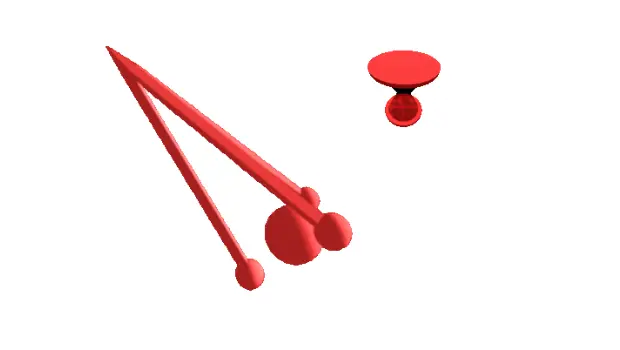
Y como siempre digo, si os gusta este conjunto de cursores Privateer podéis «pagarlo» de muchas formas en la página de KDE Store, que estoy seguro que el desarrollador lo agradecer?: puntúale positivamente, hazle un comentario en la página o realiza una donación. Ayudar al desarrollo del Software Libre también se hace simplemente dando las gracias, ayuda mucho más de lo que os podéis imaginar, recordad la campaña I love Free Software Day 2017 de la Free Software Foundation donde se nos recordaba esta forma tan sencilla de colaborar con el gran proyecto del Software Libre y que en el blog dedicamos un artículo.
Más información: KDE Store
Cómo cambiar el tema de los cursores en Plasma
Al igual que con los iconos hay varias formas de cambiar el tema de cursores en Plasma, pero la más fácil es:
- Abrir las Preferencias del Sistema
- Ir a la sección Tema de Cursor
- En esta ventana pinchar en «Obtener nuevos temas»
- Buscar Privateer.
- Seleccionar el paquete y dar a instalar.
- Seleccionar el tema y aplicar.
Rápido, sencillo y efectivo, como la mayoría de cosas en en el escritorio Plasma de la Comunidad KDE.
La entrada Cursores 3D para tu PC: Privateer se publicó primero en KDE Blog.
#openSUSE Tumbleweed revisión de la semana 6 de 2025
Tumbleweed es una distribución de GNU/Linux «Rolling Release» o de actualización contínua. Aquí puedes estar al tanto de las últimas novedades.

openSUSE Tumbleweed es la versión «rolling release» o de actualización continua de la distribución de GNU/Linux openSUSE.
Hagamos un repaso a las novedades que han llegado hasta los repositorios esta semana.
Y recuerda que puedes estar al tanto de las nuevas publicaciones de snapshots en esta web:
El anuncio original lo puedes leer en el blog de Dominique Leuenberger, publicado bajo licencia CC-by-sa, en este este enlace:
Esta semana se han publicado 3 nuevas snapshots (0130, 0204, y 0205) por un problema detectado en openQA que impedía nuevas actualizaciones, hasta que se identificó y se soluciono y vuelta a la normalidad.
Las actualizaciones más destacadas de estas semanas:
- timezone 2025a
- Meson 1.7.0
- RPM 4.20.0 – como gestor de paquetes. Más información en: https://rpm.org/wiki/Releases/4.20.0
- Qt 6.8.2
- fwupd 2.0.5
- Linux kernel 6.13.1
- Mozilla Firefox 135.0
- GStreamer 1.24.12
- El intérprete Python2 ha sido eliminado
Pero hay mucho más que se está preparando
- KDE Gear 24.12.2
- KDE Plasma 6.3
- Boost 1.87
- glibc 2.41
- Python 3.13 como intérprete predeterminado de Python
Si quieres estar a la última con software actualizado y probado utiliza openSUSE Tumbleweed la opción rolling release de la distribución de GNU/Linux openSUSE.
Mantente actualizado y ya sabes: Have a lot of fun!!
Enlaces de interés
- ¿Por qué deberías utilizar openSUSE Tumbleweed?
- zypper dup en Tumbleweed hace todo el trabajo al actualizar
- ¿Cual es el mejor comando para actualizar Tumbleweed?
- ¿Qué es el test openQA?
- http://download.opensuse.org/tumbleweed/iso/
- https://es.opensuse.org/Portal:Tumbleweed
——————————–
Tumbleweed – Review of the week 2025/06
Dear Tumbleweed users and hackers,
This week, we held back a few snapshots as we were unhappy with the openQA presented results. The main hold-up was a scripting error in gtk3-tools, which was exposed by RPM 4.20. It was bad enough to lead to crashes in multiple applications and thus definitively not something we wanted to release to the users. Once the issue was identified it was – as usual – a straightforward fix and Tumbleweed started rolling again. In total, we delivered 3 snapshots during this week (0130, 0204, and 0205)
The most relevant changes that were part of those snapshots are:
- timezone 2025a
- Meson 1.7.0
- RPM 4.20.0 – as a packager, please familiarize yourself with https://rpm.org/wiki/Releases/4.20.0
- Qt 6.8.2
- fwupd 2.0.5
- Linux kernel 6.13.1
- Mozilla Firefox 135.0
- GStreamer 1.24.12
- Python2 interpreter has been removed for good
The relevant changes coming your way as part of the next few snapshots should include:
- KDE Gear 24.12.2
- KDE Plasma 6.3
- Boost 1.87
- glibc 2.41: please help work out the errors in https://build.opensuse.org/project/show/openSUSE:Factory:Staging:O
- Python 3.13 as the default Python interpreter: Pending issues can be seen at https://build.opensuse.org/project/show/openSUSE:Factory:Staging:A
- The change of default LSM from AppArmor to SELinux is progressing, it’s expected to be switched during the next week
Segunda actualización de KDE Gear 24.12
La Comunidad KDE es una comunidad responsable y no solo se preocupa en lanzar novedades sino que también en mejorarlas. Me complace presentar la segunda actualización de KDE Gear 24.12 que apareció hace casi un mes. Más estabilidad, mejores traducciones y pequeñas mejoras para las aplicaciones de nuestro entornos de trabajo.
Segunda actualización de KDE Gear 24.12
A pesar de lo que puedan pensar muchas personas, las aplicaciones no son perfectas. Entre las líneas de código se pueden colar errores de tipografía o que el usuario realice alguna opción que en un principio no estaba prevista por los desarrollador, por poner solo un par de ejemplos de imperfecciones.
Este no es un problema del Software Libre ya que el Software actual funciona de esta manera ya que no se piensa en él como un producto final que se encierra en una caja y se olvida. En la actualidad se sabe que el Software está vivo y sería estúpido ir guardando las mejoras sin dejarlas a disposición del gran público.
Con esto se gana en rapidez y evolución pero puede aumentar el número de errores (por norma general) leves, los cuales son subsanables con pequeñas actualizaciones.
La Comunidad KDE lo tiene claro: grandes lanzamientos cada cuatro meses y actualizaciones mensuales para subsanar errores.

Por ello me congratula compartir con vosotros la primera actualización de KDE Gear 24.12 que nos ofrece más de 180 errores resueltos entre aplicaciones, librerías y widgets, algo que mejora el rendimiento del sistema.
Aquí podéis encontrar la lista completa de cambios de KDE Gear 24.12.2, pero por poner unos cuantos ejemplos de los errores que sea han resuelto tenemos:
- kalk: Se ha corregido la vista del historial. (Código modificado).
- dolphin: Se ha corregido la vista previa pixelada de las imágenes. (Código modificado, corrige el fallo #497576).
- kdevelop: Se han corregido las ubicaciones de los usos en las expansiones de macros cuando se usa clang 19 o posterior. (Código modificado, corrige el fallo #496985).
Más información: KDE Gear 24.12.02
La entrada Segunda actualización de KDE Gear 24.12 se publicó primero en KDE Blog.
Proxmox VE で、ネットデバイスを再作成するとデバイス名が変わる事象の対処
Proxmox VE を使い、openSUSE (だけじゃなくて、たぶん他のLinuxディストリビューションも)を動かし、ネットデバイスを再作成すると、OSから見たデバイス名が変わることがあります。たとえば今まで eth0 だったものが eth1 になるなどです。どうやら、MAC アドレスが変わると別デバイスと認識して、デバイス名を割り当て直すようです。これは、 /etc/udev/rules.d/70-persistent-net.rules を観て気がつきました。
対応としては、70-persistent-net.rules を観て、Proxmox VE で、ネットデバイスの MAC アドレスを eth0 として認識しているデバイスのものに変えてあげればうまくいきます。
この辺も参考になります。
https://syu-m-5151.hatenablog.com/entry/2017/11/03/162656

New Filters Added to the Request Index Page
¡Demasiadas distros! La historia y el caos de Linux explicado
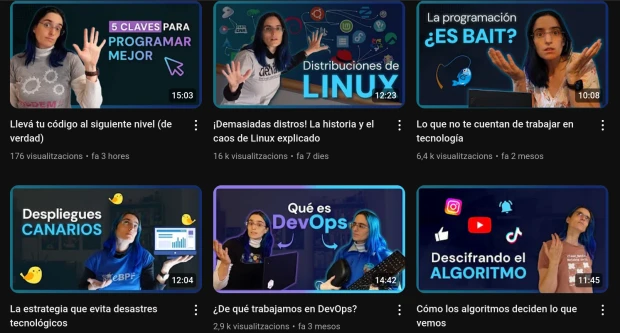
Lo comenté hace poco y sigo insistiendo: no hay demasiados canales en las plataformas de vídeo sobre el mundo del Software Libre. Así que, cuando encuentro uno, creo que hay que hacer dos cosas: promocionarlo y aprovechar su contenido para seguir difundiendo la palabra. Es el caso de «Aprendiendo con Marga«, un canal de youtube para aprender GNU/Linux de forma didáctica y entretenida, que presenté hace poco y que hoy lo sigo haciendo compartiendo con vosotros «¡Demasiadas distros! La historia y el caos de Linux explicado» donde Marga nos habla claro y cristalino sobre este tema que tanta discusión provoca entre los veteranos y que confunde a los recién llegados.
¡Demasiadas distros! La historia y el caos de Linux explicado
Un tema recurrente cuando hablamos con un linuxero es: «y tu, ¿que distribución utilizas?». Y es que la variedad de posibilidades es tan grande que es extraño que todo el mundo utilice lo mismo. A mi me gusta compararlo con los modelos de coches: son muchos y es raro que dos amigos tengan dos vehículos iguales.
Pero, ¿de dónde viene esta variedad?¿Se ha hecho a propósito?. Todo esto y mucho más lo explica Maerga, la creadora del siguiente vídeo que presenta de esta forma:
Acompañame a desentrañar el caos de las distribuciones de Linux. Te cuento la historia que nos trajo hasta acá, cómo se relacionan algunas de las distribuciones que más se usan actualmente, por qué hay tantas distribuciones, y unas cuántas cosas más.
Aprendiendo con Marga, un canal de youtube para aprender GNU/Linux
Hace tiempo que descubrí este canal, concretamente en Noviembre y gracias al III Seminario Anual GNU/Linux donde participó con «Carrera exitosa con Software Libre», pero no he podido promocionarlo como toca hasta hoy.
Se trata del canal de youtube de «Aprendiendo con Marga», cuya declaración de intenciones no puede ser más precisa «Videos sobre temas de tecnología que me resultan interesantes de compartir.» y, afortunadamente para nosotros, sus temas de interés son el Software Libre, computación en la nube y otros temas generales.
Con solo 23 vídeos (17 largos y 6 cortos) en unos tres años, este canal tiene más de 7000 subscriptores, lo cual demuestra que su gran calidad no pasa desapercibida por los usuarios.
La entrada ¡Demasiadas distros! La historia y el caos de Linux explicado se publicó primero en KDE Blog.
Glaxnimate forma parte de la comunidad #KDE
Glaxnimate el software de animación y diseño de movimiento ya forma parte de la comunidad KDE y publica la versión 0.6.0 Beta

Glaxnimate es una aplicación de escritorio potente y fácil de usar para animación vectorial y diseño de movimiento. Se centra en formatos de archivo Lottie y SVG y proporciona una interfaz intuitiva que facilita la creación de impresionantes animaciones.
Hoy (6 de febrero de 2025) acaba de publicar la versión 0.6.0 Beta y ha anunciado que este software formará parte de la gran comunidad de KDE.
Glaxnimate tiene una interfaz personalizable a tus gustos en la que puedes seleccionar un tema claro u oscuro, tipos de iconos y modos de ver la interfaz, todo desde la sección de ajustes.
Admite animaciones en formato Lottie, formato por ejemplo en el que están guardados los stickers de Telegram. Así como también imágenes vectoriales SVG, que también puedes abrir con Inkscape. Y se pueden exportar también a formatos de software como After Effects Project (.aep). También puede renderizar las animaciones en vídeo utilizando FFmpeg, WebP y GIF.
Glaxnimate es software libre y es multiplataforma, por lo que está disponible para sistemas operativos libres GNU/Linux y FreeBSD y sistemas operativos privativos. Se puede instalar desde Flatpack o snap y disponible como paquetes de software para Debian y derivadas y Arch. Y desde el instalador de paquetes de Python Pi.
Además en Python se pueden escribir complementos que añadan nuevas funcionalidades a Glaxnimate.
Un placer ver cómo más software acepta formar parte de la gran comunidad mundial que desarrolla y publica software libre, haciéndolo accesible a todo el mundo, independientemente de su idioma, y otras cuestiones sociales.
¿Quieres apoyar a KDE? No dudes en ser parte de esta gran comunidad o apoyarla mediante un donativo para seguir ofreciendo software libre para todo el mundo.
Enlaces de interés
