
openSUSE addresses supply chain attack against xz compression library
openSUSE maintainers received notification of a supply chain attack against the “xz” compression tool and “liblzma5” library.
Background
Andres Freund reported to Debian that the xz / liblzma library had been backdoored.
This backdoor was introduced in the upstream github xz project with release 5.6.0 in February 2024.
Our rolling release distribution openSUSE Tumbleweed and openSUSE MicroOS included this version between March 7 and March 28.
SUSE Linux Enterprise and openSUSE Leap are built in isolation from openSUSE Tumbleweed. Code, functionality and characteristics of Tumbleweed are not automatically introduced in SUSE Linux Enterprise and/or openSUSE Leap. It has been established that the malicious file introduced into Tumbleweed is not present in SUSE Linux Enterprise and/or openSUSE Leap.
Impact
Current research indicates that the backdoor is active in the SSH Daemon, allowing malicious actors to access systems where SSH is exposed to the internet.
As of March 29, reverse engineering of the backdoor is still ongoing.
Mitigations
openSUSE Maintainers have rolled back the version of xz on Tumbleweed on March 28 and have released a new Tumbleweed snapshot (20240328 or later) that was built from a safe backup.
The reversed version is versioned 5.6.1.revertto5.4 and can be queried with rpm -q liblzma5.
User recommendation
For our openSUSE Tumbleweed users where SSH is exposed to the internet, we recommend installing fresh, as it’s unknown if the backdoor has been exploited.
Due to the sophisticated nature of the backdoor an on-system detection of a breach is likely not possible.
Also rotation of any credentials that could have been fetched from the system is highly recommended. Otherwise, simply update to openSUSE Tumbleweed 20240328 or later and reboot the system.
openSUSE Tumbleweed Monthly Update - March
Welcome to the monthly update for openSUSE Tumbleweed for March 2024. This month provided several anticipated updates for the rolling release.
Before getting in the package updates, know that this blog aims to provide readers an overview of the key changes, improvements and issues addressed in openSUSE rolling release throughout the month. Should readers desire a more frequent amount of information about snapshot updates, readers are encouraged to subscribe to the openSUSE Factory mailing list.
Let’s get started.
New Features and Enhancements
-
Linux Kernel: Versions for the month of March progressed update version 6.8.1. These updates enhance system stability, security and hardware compatibility. Snapshot 20240319 that moved the kernel from 6.7.9 to 6.8.1 did the following:
- Patches addressed Register File Data Sampling (RFDS) microarchitectural vulnerabilities CVE-2023-28746. The patch includes mitigation measures such as exporting to guests in KVM/x86 environments and adds new documentation. There was a patch to disable KVM mitigation when the
X86_FEATURE_CLEAR_CPU_BUFis set. - A notable reversion is the removal of code for
inode_cacheandrecoverymount options from Btrfs, following an issue. Fixes related to Btrfs, such as addressing a race condition when detecting Delayed Allocation ranges during fiemap. - The updates involve significant configuration changes for arm architectures (armv6hl, armv7hl, and arm64). The updates mirror option values across different architectures and include new configurations for hardware support, such as various PINCTRL (Pin Control), GPIO (General-Purpose Input/Output), VIDEO, DRM (Direct Rendering Manager) and SND_SOC (Sound System on Chip) settings.
- Patches addressed Register File Data Sampling (RFDS) microarchitectural vulnerabilities CVE-2023-28746. The patch includes mitigation measures such as exporting to guests in KVM/x86 environments and adds new documentation. There was a patch to disable KVM mitigation when the
- Plasma 6: Find the article on news.opensuse.org
- GNOME 46: Find the article on news.opensuse.org
-
systemd: From version 254.9 to 255.4, the updated provided the following:
- Specific issues have been either rebased or removed if they’ve become part of the core version 255 updates. This indicates a significant step towards maintaining consistency with upstream developments while also ensuring the stability and reliability of systemd functionalities within penSUSE.
- A clear emphasis has been placed on enhancing the testing framework within the systemd package to ensure the reliability of bootloader installation processes during testing phases. Read more info about the systemd-bootl integration.
-
libzypp 17.32.0
- Introduction of a new resolver option ‘removeOrphaned’ for dist-upgrade processes to enhance package management
- Fixes applied to
vsftpd.confaddressing issues where SUSE and Fedora use different defaults. - Security Updates: Modification to avoid using the deprecated OPENSSL_config in the Digest section, enhancing security practices.
- Introduction of ProblemSolution::skipsPatchesOnly overload to improve patch management processes.
- Removal of HTTPS->HTTP redirection exceptions for download.opensuse.org, reinforcing security and integrity in download processes.
-
zypper 1.14.70:
- Integration of a new option
--remove-orphanedto remove all orphaned packages during a system upgrade. - Improved user interface indicating active dry-run/download-only options at the commit prompt, enhancing user experience and clarity.
- Setting of libzypp shutdown request signal upon
Ctrl+Cto improve responsiveness and control.
- Integration of a new option
-
LLVM 18:
- The patches
llvm-do-not-install-static-libraries.patchandllvm-normally-versioned-libllvm.patchhave been rebased to align with the new version, addressing specific distribution and library concerns. - Modification to prefer
ld.bfdover other linkers to achieve a Transparent Huge Pages (THP)-compatible section layout, optimizing memory management and performance.
- The patches
-
shadow: Updates to version 4.15.1
- Resolved an issue causing unwarranted error messages about unknown login.defs configuration options and implements checks for file descriptor omission to improve security and reliability
- The
shadow-4.15.0-fix-definition.patchhas been updated to address the erroneous error messages regarding configuration options, - Improved linking with libdl for better dynamic library handling.
- Revised the
shadow-login_defs-unused-by-pam.patchto ensure continued compatibility and effectiveness.
- Revised the
Bug Fixes
- Mozilla Firefox 124.0.1: Had multiple Common Vulnerabilities and Exposures fixes. These included CVE-2024-29943, which an attacker was able to perform an out-of-bounds read or write on a JavaScript object by fooling range-based bounds check elimination, and related CVE-2024-29944. There were 12 more CVEs addressed in the update from snapshot 20240326
- redis 7.2.3: The update provides a fix for CVE-2023-41056 that caused memory issues and security risks.
- python311: CVE-2024-0450 was added to the changelog due to a revert use of automated tool scripts.
- Linux Kernel 6.8.1: CVE-2023-28746 was related to microarchitectural vulnerabilities as mentioned above. Expat 2.6.2: This CVE-2024-28757 fix prevent a vulnerable attacks that overloads it with XML entities, especially when using external parsers created in a certain way.
- opensc 0.25.0: Has a fix for CVE-2023-5992 where PKCS#1 encryption padding removal was not implemented as side-channel resistant and fixes CVE-2024-1454 that requires physical access and special device related to its AuthentIC driver that happens when setting up new cards.
- libvirt 10.1.0: The update brings a fix for CVE-2024-1441 that has an off-by-one error that could allow Denial of Service via crafted data to crash daemon.
- Unbound 1.19.2: Provides a fix for CVE-2024-1931, which could lead to a Denial of Service from infinite loop in Extended DNS Error record trimming.
- graphviz: Exploitability for CVE-2023-46045 may be uncommon because this file is typically owned by root, but is related to an out-of-bounds read via a crafted config6a file. A welcoming fix was provided.
- openjpeg2 2.5.2: With CVE-2021-3575, an attacker could use this to execute arbitrary code with the permissions of the application compiled against openjpeg.
Conclusion
March 2024 brought numerous updates for openSUSE Tumbleweed systems. Besides Plasma and GNOME desktop environments, there were improvements across systemd, libzypp, LLVM and more. Other significant upgrades during the month included updates to bind, CMake, KDE Gear 24.02.1, Mesa, qemu and more. For those Tumbleweed users that want to contribute, subscribe to the openSUSE Factory mailing list. The openSUSE team encourages users to continue participating through bug reports, feature suggestions and discussions.
Contributing to openSUSE Tumbleweed
Your contributions and feedback make openSUSE Tumbleweed better with every update. Whether reporting bugs, suggesting features, or participating in community discussions, your involvement is highly valued.

 Member
 baltolkien
Recordatorio: presenta tu charla a Akademy-es 2024 de València esLibre edition #akademyes
Definitivamento todo a vuelto a presencial, como el próximo encuentro de la Comunidad española de KDE que se celebrará en València el 24 y 25 de mayo integrada con esLibre, evento coorganizado por la Asociación GNU/Linux València. Estamos todavia a unos casi dos meses y es el momento de realizar un recordatorio: presenta tu charla a Akademy-es 2024 y muestra al mundo tu proyecto.
Recordatorio: Presenta tu charla a Akademy-es 2024 de València esLibre edition #akademyes
Hace ya un tiempocompartí con vosotros que este año Akademy-es 2024 se va a realizar en València el 24 y 25 de mayo en otra edición muy especial ya que se va a celebrar integrada dentro de esLibre, evento coorganizado por la Asociación GNU/Linux València.,
Dado que esta Akademy-es vuelve a realizarse de forma paralela con otro gran evento como es esLibre, y gracias a la experiencia adquirida con la Opensouthcode del año pasado, las charlas se celebrarán el viernes y, dejando el sábado y el domingo para actividades más interactivas y sociales.
Si crees que tienes algo importante que presentar, por favor házselo saber a la organización. Y si crees que alguien debería presentar su ponencia, no dejes de animarlo para que lo haga. Todas las contribuciones son útiles.
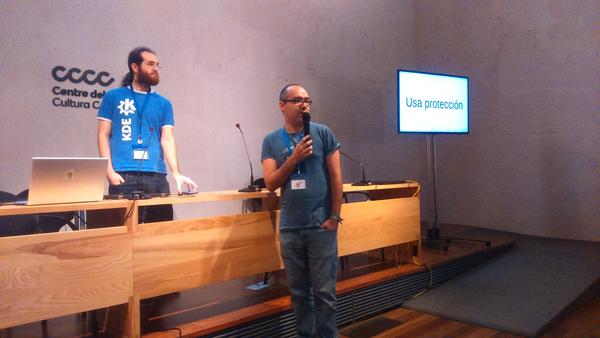
Para más detalles, mira las líneas generales del Call for Papers. Tienes de plazo para enviar tu propuesta hasta el lunes 1 de abril 23:59:59 CEST al correo akademy-es-org@kde-espana.org.
Es importante tener en cuenta las siguientes consideraciones:
- Las charlas se programarán el viernes 24. Si por algún motivo solo puedes estar el sábado coméntalo en tu propuesta.
- Se puede elegir entre dos formatos de charlas:
- Charlas de 45 minutos.
- Charlas relámpago (Lightning talk) de 10 minutos.
- Si la duración de las charlas propuestas no se ajusta a ninguno de estos dos esquemas (por ejemplo, si se necesita más tiempo), esto debe indicarse claramente en la comunicación.
- Se permitirá a KDE España la distribución bajo una licencia libre de todo el material utilizado para la realización de la actividad, así como de la grabación de la misma.
Recordar que para proponer actividades se deberá enviar un correo a akademy-es-org@kde-espana.org, indicando:
- Nombre de la persona que presenta la charla
- Título de la charla
- Preferencia de horarios
¿Qué es Akademy-es?
Akademy-es (#akademyes, que es la etiqueta para las redes sociales) es evento más importante para los desarrolladores y simpatizantes de KDE, que se ha ido celebrando desde el 2006 con éxito creciente.
En general, las Akademy-es son el lugar adecuado para conocer a los desarrolladores, diseñadores, traductores, usuarios y empresas que mueven este gran proyecto.
En ellas se realizan ponencias, se presentan programas, se hace un poco de caja para los proyectos libres (camisetas, chapas, etc) pero sobre todo se conoce a gente muy interesante y se cargan baterías para el futuro.
Podéis repasar las anteriores ediciones en estas entradas del blog:
- Camino Akademy-es 2013: Las anteriores ediciones (I): 2006 – 2008
- Camino Akademy-es 2013: Las anteriores ediciones (II): 2009-2010
- Camino Akademy-es 2013: Las anteriores ediciones (III): 2011-2012
- Anteriores ediciones de Akademy-es (IV): 2013 y 2014
La entrada Recordatorio: presenta tu charla a Akademy-es 2024 de València esLibre edition #akademyes se publicó primero en KDE Blog.
Alerting on One Identity Cloud PAM Essentials logs using syslog-ng
One Identity Cloud PAM Essentials is the latest security product by One Identity. It provides asset management as well as secure and monitored remote access for One Identity Cloud users to hosts on their local network. I had a chance to test PAM Essentials while still in development. While there, I also integrated it with syslog-ng.
From my previous blog, you could learn what PAM Essentials is, and how you can collect its logs using syslog-ng. This blog will show you how to work with the collected log messages and create alerts when somebody connects to a host on your local network using PAM Essentials.

syslog-ng logo
Tercera actualización de Plasma 6
Me alegra compartir con todos vosotros la tercera actualización de Plasma 6, iniciando así una serie de revisión de software que le dotará de más estabilidad, mejores traducción y resolución de errores. Estas actualizaciones son 100% recomendables y casi obligatorias para cualquier usuario ya que lo único que hacen es mejorar la versión sin comprometer sus funcionalidades.
Tercera actualización de Plasma 6
No existe Software creado por la humanidad que no contenga errores. Es un hecho incontestable y cuya única solución son las actualizaciones. Es por ello que en el ciclo de desarrollo del software creado por la Comunidad KDE se incluye siempre las fechas de las mismas siguiendo una especie de serie de Fibonacci.
La Comunidad KDE ha publicado se se ha lanzado la primera actualización de Plasma 6, una versión que ha supuesto una salto muy importante en cuanto a tecnología y que, francamente, ha salido bastante bien ya, por ejemplo, KDE Neon se actualizó pasadas unas horas del lanzamiento, con problemas menores y completamente funcional (de hecho, estoy trabajando desde el jueves 29 con él en todos mis equipos).
Creo es un buen momento para reflexionar: yo tardé casi un año en dar el salto a KDE 4 a Plasma 5, ya que es cuando pensé acertadamente que ya se ofrecía algo bastante estable para el trabajo diario. Para dar el salto de KDE 3 a KDE 4 fueron varios años, así que estamos ante un hito que marca un pico de calidad en el mundo del Software Libre.
Para dar el salto de Plasma 5 a Plasma 6 han bastado 5 horas. ¡Y lo mejor está por llegar! Y es que en realidad, los desarrolladores de KDE simplemente se han centrado en portar Plasma 5 a Plasma 6 y todas las novedades de la nueva tecnología está todavía en desarrollo y se irá implementando poco a poco.
Así que me congratula en presentar que ayer martes 26 de marzo de 2024, casi un mes después de liberar el código la Comunidad KDE presenta la tercera actualización de errores entre los que destacan:
- Monitor del sistema: Correción en el Colorgrid, ahora usa el mismo color de fondo que los gráficos circulares/de barras.
- Plasma SDK: Arreglado el nombre del archivo de escritorio para el explorador de iconos.
- Startplasma: Usa la configuración del tema de sonido para el sonido de inicio.
Más información: KDE
Las novedades básicas del Plasma 6
Han sido días tan frenéticos que no he podido hacer todavía la entrada detallando las novedades de Plasma 6 o de KDE Gears, pero he aquí una pincelada de las mismas .
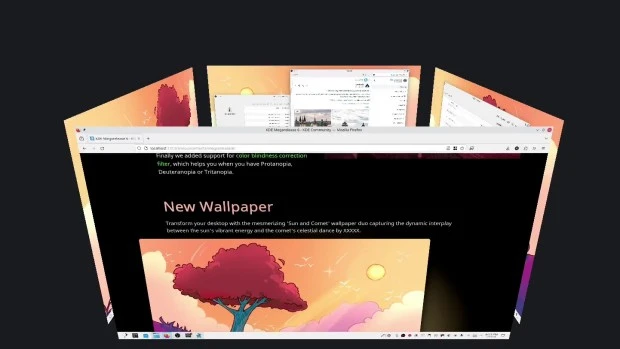
- Nuevo efecto de vista general: se han combinado los efectos de Vista general y Cuadrícula de escritorios en uno, con grandes mejoras en los gestos del panel táctil.
- Color mejorado: Plasma en Wayland ya tiene compatibilidad parcial con alto rango dinámico (HDR).
- Nuevo fondo de escritorio: Árbol escarlata, creado por axo1otl.
- Panel flotante: en Plasma 6, el panel flota de forma predeterminada. Se puede cambiar, por supuesto.
- ¡Nuevos valores predeterminados!
- Brisa refrescada: se ha rediseñado el tema Brisa para que presente un aspecto más moderno, con menos marcos y con un espaciado más consistente.
- Preferencias reorganizadas: se ha mejorado la aplicación de Preferencias para que resulte más amigable y tenga menos páginas anidadas.
- ¡El cubo ha vuelto!
- Mejoras en la búsqueda de Plasma: ahora personalizar el orden de los resultados de la búsqueda y es mucho más rápida.
- Mejoras en Plasma Mobile.
- Cambios en todas las aplicaciones de KDE Gear: Kontact, Kleopatras. Itineray, KDE Edu, KDEnlive, Dolphin, Spectacle, etc.
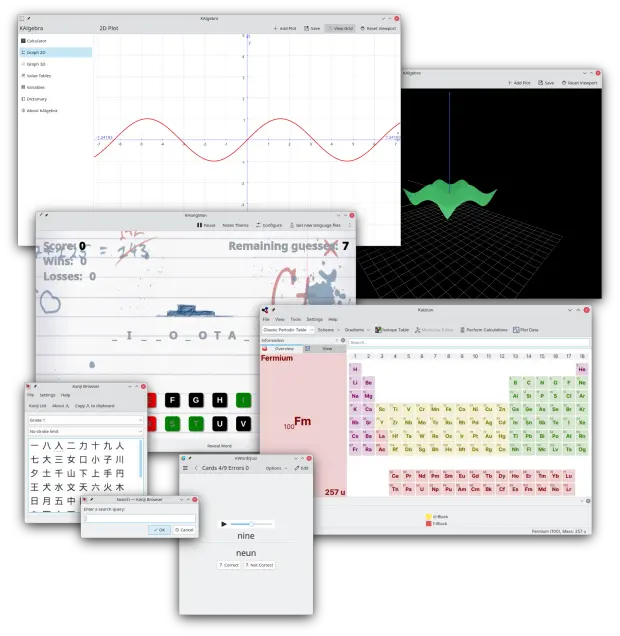
Y esto es una brevísima pincelada… Creo que ahora tengo temas de para el blog de sobra hasta 2025.
La entrada Tercera actualización de Plasma 6 se publicó primero en KDE Blog.
Mengatasi Blog yang Terkena Malware
Tulisan ini merupakan bagian dari 30 Hari Tantangan Ramadhan. Edisi Hari Ketiga Belas, 30 Days Ramadhan Challenge Day #13
Sudah lama saya tidak menulis di Blog Vavai (https://www.vavai.com). Sekian lama tidak menulis, tahu-tahu seorang kawan bertanya pada saya, “Kok websitenya kalau dibuka malah nyasar ke tempat lain?”
Setelah dicheck, ternyata benar. Ada malware direction yang akan membelokkan akses ke alamat lain yang aneh. Malware-nya melakukan injeksi kode ke banyak halaman agar tiap kali website atau halaman artikel dibuka, otomatis malware berjalan dan membelokkan pembaca ke website lain yang kerap kali “Ora geunah”, alias website gak jelas.
Malware seperti ini sangat nyebelin. Tiap kali dihapus, eh nggak lama malah balik lagi. Saya pakai plugins cache untuk percepatan akses blog, eh ternyata cache yang ada malah dijadikan sebagai pangkalan malware. Zzzzz…
Saya sampai memasang plugins Wordfence premium untuk bisa menangkal dan membersihkan malware, namun malware-nya tetap bisa kembali lagi.
Akhirnya saya memasang plugins Malcare, sebuah “WordPress Security for High Performance Websites”. Saya nekat membeli lisensi premium agar malware ini bisa menyelesaikan masalah malware ini keakar-akarnya.

Karena pembersihan malware secara otomatis gagal, namun kami mendapatkan penawaran untuk dibersihkan oleh team support dari malcare. Salah satu kemampuan malcare ini adalah deteksi malware pada database.
Setelah menunggu beberapa saat, akhirnya malware-nya bisa dibasmi secara tuntas. Senang sekali setelah sekian lama, blog saya bersih dari malware yang membandel. Saya mulai menulis kembali di blog.
Meskipun saya tidak terlalu sering menulis, namun saya senang menuangkan ide atau gagasan, sebagai bagian dari refreshing saya. Soal ada yang baca atau tidak, ya itu urusan berikutnya, hehehe…
Tercera actualización de Plasma 6 de la comunidad #KDE
La comunidad de KDE ha publicado Plasma 6.0.3 una actualización que corrige problemas encontrados y reportados de la versión 6 del escritorio Plasma

La comunidad de KDE siempre está mejorando y puliendo su software. Después del gran salto que fue el cambio a Plasma 6, no dejan de seguir solucionando los errores que se han sido reportados por personas como tu y como yo.
Así, este 26 de marzo se lanza la tercera actualización menor de Plasma 6, la que es la versión 6.0.3. Esta versión es el trabajo de dos semanas de nuevas traducciones y correcciones de las personas que contribuyen en KDE. Las correcciones de errores suelen ser pequeñas pero importantes y bastante numerosas.
La lista completa de cambios que ha traido esta versión 6.0.3, incluye mejoras y correcciones en muchas áreas del escritorio.
Quizás alguna sea de las que te afecta a tu equipo o tu sistema, quizás alguna sea la que has reportado tu, o quizás hay alguna que sigue incomodándote… paciencia, si la has reportado o si sabes que ya alguien más lo ha hecho, puede que pronto llegue la actualización que lo solucione.
Podemos encontrar actualizaciones en el tema Breeze que trae de manera predeterminada Plasma y al que he vuelto en mi equipo, para disfrutar de su belleza en el modo oscuro.
También hay actualizaciones en Discover, sistema de instalación y actualización de paquetes de nuestro sistema que personalmente no utilizo. Sigo utilizando zypper en openSUSE como medio de instalar software y actualizar mi Tumbleweed.
Muchas actualizaciones en Kwin, el gestor de ventanas de Plasma. Una herramienta muy versátil y muy configurable (como todo en KDE) con la que podemos hacer que nuestras ventanas se comporten como queremos.
Otro grueso importante de actualizaciones llega a los espacios de trabajo de Plasma (Plasma Workspace) con mejoras a la hora en la visualización de algunos elementos, correcciones de errores en ciertos casos y mucho más.
Si usas un sistema GNU/Linux o *nix «rolling release», pronto esta actualización llegará a los repositorios de tu distribución y podrás disfrutar de las correcciones y mejoras realizadas.
Tengo la intención de instalar openSUSE Tumbleweed desde 0 en mi portátil para hacer una limpieza, ya que hace ya muchos años que tengo la misma instalación y le he llenado de software de pruebas, repositorios extras que ya no uso y quiero empezar desde lo básico y cambiar el tamaño de las particiones.
Plasma 6 ha sido la excusa perfecta para hacerlo. Mi portátil seguirá disfrutando de openSUSE Tumbleweed con Plasma pero espero que esa instalación nueva le deje más fresco.

Akademy-es 2024 de València #esLibre edition busca patrocinadores #akademyes
El 24 y 25 de mayo se va a celebrar el mayor evento de la Asociación KDE España, y por ello Akademy-es 2024 de València #esLibre edition busca patrocinadores con los que cubrir esos gastos que se generan. Una forma más que adecuada para que cualquier empresa del ramo consiga visibilidad en este extenso y creciente mundo del Software Libre.
¿Por qué patrocinar la Akademy-es 2024?

Esperamos cerca de 80 asistentes a la edición presencial del evento, incluyendo desarrolladores de software libre, miembros de la prensa y representantes de empresas. Patrocinando este evento, su organización recibirá visibilidad en la comunidad hispanohablante del software libre, no solo en España sino a nivel mundial.
El evento tendrá presentaciones de primer nivel de temas relativos a las nuevas tecnologías, incluyendo aplicaciones de escritorio, aplicaciones móviles, consolas portables, multimedia, y desarrollo de software. La comunidad KDE ha presentado innovaciones en todos estos campos a lo largo de su historia. Como patrocinador, su organización tendrá la oportunidad de participar en este entorno creativo y ser conocida por los asistentes.
Además, las discusiones técnicas no son el único objetivo de Akademy-es. El evento es también una oportunidad de conocer gente y forjar redes de contactos. Los eventos sociales son también muy importantes, ya que fomentan la creación del ambiente de cordialidad dentro de la comunidad KDE que permite la aparición de nuevas ideas; así que si lo desea puede también patrocinar un evento social.
Akademy-es 2024 de València #esLibre edition busca patrocinadores #akademyes
Que este año Akademy-es se vaya a celebrar junto con esLibre el 24 y 25 de mayo no quita que necesite algún tipo de empujón económico para gastos y pequeños detalles para los asistentes, como suele ser el Coffe Break o alguna sorpresa más.
Debido a esto, este año se plantean modalidades plata, oro y platino para promocionar el evento que se resumen en la siguiente tabla:
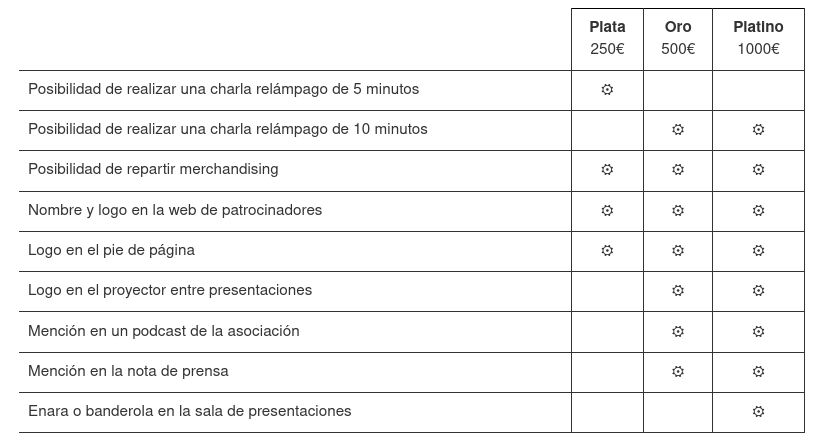
De esta forma, si quieres que tú, tu empresa, entidad o cualquier otro tipo de organización patrocine Akademy-es, como han hecho otras en pasadas ediciones simplemente se debe mandar un correo a akademy-es-org@kde-espana.org
Más información: KDE España
La entrada Akademy-es 2024 de València #esLibre edition busca patrocinadores #akademyes se publicó primero en KDE Blog.
Installation guide for warewulf4
Warewulf
Preface
In High Performance Computing (HPC), computing tasks are usually distributed among many compute threads which are spread across multiples cores, sockets and machines. These threads are tightly coupled together. Therefore, compute clusters consist of a number of largely identical machines that need to be managed to maintain a well-defined and identical setup across all nodes. Once clusters scale up, there are many scalability factors to overcome. Warewulf is there to address this ‘administrative scaling’.
Warewulf is an operating system-agnostic installation and management system
for HPC clusters.
It is quick and easy to learn and use as many settings are pre-configured
to sensible defaults. Also, it still provides the flexibility allowing fine
tuning the configuration to local needs.
It is released under the BSD license, its source code is available at
https://github.com/warewulf/warewulf. This is where the development happens
as well.
This article gives an overview on how to set up Warewulf on openSUSE Leap 15.5 or openSUSE Tumbleweed.
Installing Warewulf
Compute clusters consist of at least one management (or head) node which is usually multi-homed connected both to an external network and a cluster private network, as well as multiple compute nodes which reside solely on the private network. Other private networks dedicated to high speed tasks like RDMA and storage access may exist as well. Warewulf gets installed on one of the management nodes of a cluster to manage and oversee the installation and management of the compute nodes. To install Warewulf on a cluster which is running openSUSE Leap 15.5 or openSUSE Tumbleweed, simply run:
zypper install warewulf
This package seamlessly integrates into a SUSE system and should therefore be preferred over packages provided on Github.
During the installation, the actual network configuration is written to
/etc/warewulf/warewulf.conf. These settings should be verified, as for
multi homed hosts a sensible pre-configuration is not always possible.
Check /etc/warewulf/warewulf.conf for the following values:
ipaddr: 172.16.16.250
netmask: 255.255.255.0
network: 172.16.16.0
where ipaddr should be the IP address of this management host.
Also check the values of netmask and network - these should match
this network.
Additionally, you may want to configure the IP addresse range for dynamic/unknown hosts:
dhcp:
  range start: 172.16.26.21
  range end: 172.16.26.50
If the ISC DHCP server (dhcpd) is used (default on SUSE), make sure the
value of DHCPD_INTERFACE in the file /etc/sysconfig/dhcpd has been
set to the correct value.
You are now ready to start the warewulfd service itself which delivers the
images to the nodes:
systemctl enable --now warewulfd.service
Now wwctl can be used to configure the the remaining services needed by
Warewulf. Run:
wwctl configure --all
which will configure all Warewulf related services.
To conveniently log into compute nodes, you should now log out of and back into the Warewulf host, as this will create an ssh key on the Warewulf host which allows password-less login to the compute nodes. Note however, that this key is not yet pass-phrase protected. If you require protecting your private key by a pass phrase, it is probably a good idea to do so now:
ssh-keygen -p -f $HOME/.ssh/cluster
Adding nodes and profiles to Warewulf
Warewulf uses the concept of profiles which hold the generalized settings
of the individual nodes. It comes with a predefined profile default, to
which all new node will be assigned, if not set otherwise. You may obtain
the values of the default profile with:
wwctl profile list default
Now, a node can be added with the command assigning it an IP address:
wwctl node add node01 -I 172.16.16.101
if the MAC address is known for this node, you can specify this as well:
wwctl node add node01 -I 172.16.16.101 -H cc:aa:ff:ff:ee
For adding several nodes at once you may also use a node range, e.g.
wwctl node add node[01-10] -I 172.16.16.101
This will add the nodes with ip addresses starting at the specified address and incremented by Warewulf.
Importing a container
Warewulf uses a special 1 container as base to build OS images for the compute nodes. This is self contained and independent of the operating system installed on the Warewulf host.
To import an openSUSE Leap 15.5 container use the command
wwctl container import docker://registry.opensuse.org/science/warewulf/leap-15.5/containers/kernel:latest leap15.5 --setdefault
This will import the specified container for the default profile.
Alternative container sources
Alternative containers are available from the openSUSE registry under the science project at:
https://registry.opensuse.org/cgi-bin/cooverview?srch_term=project%3D%5Escience%3A
or from the upstream Warewulf community repository:
https://github.com/orgs/warewulf/packages?repo_name=warewulf-node-images
It is also possible to import an image from a local installation into a
directory (chroot directories) by using the path to this directory as
argument for wwctl import.
Booting nodes
As a final preparation you should rebuild the container image, now, by running:
wwctl container build leap15.5
as well as all the configuration overlays with the command:
wwctl overlay build
just in case the build of the image may have failed earlier due to an error. If you didn’t assign a hardware address to a node before, you should set the node into the discoverable state before powering it on. This is done with:
wwctl node set node01 --discoverable
Also you should run:
wwctl configure hostlist
to add the new nodes to the file /etc/hosts.
Now you should make sure that the node(s) will boot over PXE from the network
interface connected to the specified network and power on the node(s) to
boot into assigned image.
Additional configuration
The configuration files for the nodes are managed as Golang text templates. The resulting files are overlayed over the node images. There are two types of overlays depending on how they are added to the compute node:
- the system overlay which is ‘baked’ into the image during boot as part of
the
wwinitprocess. - the runtime overlay which is updated on the nodes on a regular base
(1 minute per default) via the
wwclientservice.
In the default configuration the overlay called wwinit is used as system
overlay. You may list the files in this overlays with the command:
wwctl overlay list wwinit -a
which will show a list of all the files in the overlays. Files ending with the
suffix .ww are interpreted as template by Warewulf, the suffix is removed
in the rendered file.
To inspect the content of an overlay file use the command:
wwctl overlay show wwinit /etc/issue.ww
To render the template using the values for node01 use:
wwctl overlay show wwinit /etc/issue.ww -r node01
The overlay template itself may be edited using the command:
wwctl overlay edit wwinit /etc/issue.ww
Please note that after editing templates, the overlays aren’t updated automatically and you should trigger a rebuild with the command:
wwctl overlay build
The variables available in a template can be listed with
wwctl overlay show debug /warewulf/template-variables.md.ww
Modifying the container
The node container is a self contained operating system image. You can open a shell in the image with the command:
wwctl container shell leap15.5
After you have opened a shell, you may install additional software using
zypper.
The shell command provides the option --bind which allows mounting arbitrary
host directories into the container during the shell session.
Please note that if a command exits with a non-zero status, the image won’t be rebuilt automatically. Therefore, it is advised to rebuild the container with:
wwctl conainer build leap15.5
after any change.
Network configuration
Warewulf allows configuring multiple network interfaces for the compute nodes. Therefore, you can add another network interface for example for infiniband using the command:
wwctl node set node01 --netname infininet -I 172.16.17.101 --netdev ib0 --mtu 9000 --type infiniband
This will add the infiniband interface ib0 to the node node01. You can now
list the network interfaces of the node:
wwctl node list -n
As changes in the settings are not propagated to all configuration files, the node overlays should be rebuilt after this change by running the command:
wwctl overlay build
After a reboot, these changes will be present on the nodes; in the above case the Infiniband interface will be active on the node.
A more elegant way to get the same result is to create a profile to hold those
values which are identical for all interfaces. In this case, these are mtu
and netdev.
Create a new profile for an Infiniband network using the command:
wwctl profile add infiniband-nodes --netname infininet --netdev ib0 --mtu 9000 --type infiniband
You may now add this profile to a node and remove the node specific settings which are now part of the common profile by executing:
wwctl node set node01 --netname infininet --netdev UNDEF --mtu UNDEF --type UNDEF --profiles default,infiniband-nodes
To list the data in a profile use the command:
wwctl profile list -A infiniband-nodes
Secure Boot
Switch to grub boot
By default, Warewulf boots nodes via iPXE, which isn’t signed by SUSE and
can’t be used when secure boot is enabled. In order to switch to grub as
the boot method you must add or change the following value in
/etc/warewulf/warewulf.conf
warewulf:
  grubboot: true
After this change, you will have to reconfigure dhcpd and tftp executing:
wwctl configure dhcp
wwctl configure tftp
and rebuild the overlays with the command:
wwctl overlay build
Also make sure that the packages shim and grub2-x86_64-efi (for x86-64)
or grub2-arm64-efi (for aarch64) are installed in the container. shim is
required by secure boot.
Cross product secure boot
With secure boot is enabled on the compute nodes, if you need to boot different
products, you need to make sure that the compute nodes boot with the so-called
‘http’ boot method: For secure boot the signed shim needs to match the
signature of the other pieces of the boot chain - including the kernel.
However, different products will have different sets of signatures in
their boot chain.
The ‘http’ boot method is handled by warewulfd. This will look up the image
to boot and pick the right shim from the image to deploy to a particular node.
Therefore, you need to make sure, that the node container contains the shim
package.
The default boot method will extract the initial shim for PXE boot from the
host running the warewulfd server.
Note, however, that the host system shim will also be used for nodes which
are in the discoverable state and subsequently have no hardware address
assigned, yet.
Disk management
It is possible to manage the disks of the compute nodes with Warewulf. Here,
Warewulf itself doesn’t manage the disks, but creates a configuration and
service files for ignition to do this job.
Prepare container
As ignition and its dependencies aren’t installed in most of the containers,
you should install the packages ignition and gptfdisk in the container.
wwctl container exec <container_name> zypper -n in -y ignition gptdisk
Add disk to configuration
Warewulf boots ephemeral systems, thus there is no need for local disk storage. Still, local disk storage may me useful to have, for instance as scratch storage for computational tasks. Warewulf is capable of setting up local disk storage. For this, it is necessary to configure the involved entities:
- physical storage device(s) to be used
- partition(s) on the disks
- filesystem(s) to be used
Warewulf doesn’t manage these entities itself, but creates a configuration
and service files for ignition to perform this task.
Therefore, you need to make sure to install ignition and gptfdisk on
the compute node. Open a shell in the container and run:
zypper -n in -y zypper install ignition gptfdisk
Disks
The path to the device e.g. /dev/sda must be used for diskname.
The only valid configuration option for disks is diskwipe, which
should be self-explanatory.
Partitions
The partname is the name to the partition which iginition uses as the path
for the device files, e.g. /dev/disk/by-partlabel/$PARTNAME.
Additionally, the size and number of the partition need be specified for all but the last partition (the one with the highest number) in which case this partition will be extended to the maximal size possible.
You should also set the boolean variable --partcreate so that a parition
is created if it doesn’t exist.
Filesystems
Filesystems are defined by the partition which contains them, so the
name should have the format /dev/disk/by-partlabel/$PARTNAME. A filesystem
needs to have a path if it is to be mounted, but its not mandatory.
Ignition will fail if there is no filesystem type defined.
Examples
You can add a scratch partition with
wwctl node set node01 \
  --diskname /dev/vda --diskwipe \
  --partname scratch --partcreate \
  --fsname scratch --fsformat btrfs --fspath /scratch --fswipe
This will be the only (and last) partition, therefore it does not require a size. To add another partition as a swap partition, you may run:
wwctl node set n01 \
  --diskname /dev/vda \
  --partname swap --partsize=1024 --partnumber 1 \
  --fsname swap --fsformat swap --fspath swap
This adds the partition number 1 which will be placed before
the scratch partition.
-
This container is special only in that it is bootable, i.e. it contains a kernel and an init-implementation (systemd). ↩
GNOME Arrives in openSUSE Releases
March has been an exciting month for openSUSE Tumbleweed users as GNOME 46 made its way into the rolling release like KDE’s Plasma 6 did a few weeks ago.
The GNOME users and developers not only get the upgrade in the rolling release but in the Aeon Desktop derivative. The release in the Slowroll distribution will likely see an update between April 2 and April 14.
GNOME’s version 46 codenamed “Kathmandu” pays homage to the contributions from GNOME.Asia 2023 organizers and has significant improvements and new features. A standout feature in GNOME 46 is the new global search functionality within the files app. This feature enables users to search across all configured locations directly and an addition of filters by file type and modification date further refine the tool.
The files app had a major revamp that allows for instant view switching between list and grid modes. It also had some other minor improvements such as enhanced network discovery and starred favorites in grid view, which amplified file management efficiency.
A new remote login option enhances GNOME’s remote desktop capabilities, which allows for improved configuration and user experience from the remote side.
Accessibility has seen significant advancements, especially with the Orca screen reader, which now includes a new sleep mode and system status reports. Additionally, there’s an increase in high contrast mode consistency and new settings for clearer switch toggling.
Other changes include the settings app, which has been reorganized and was updated for easier navigation. The new touchpad settings is noteworthy and includes configurations for secondary clicks that aims to enhance user interaction and convenience.
System updates include refreshed user avatars, improved notifications, and tap-to-click enabled by default. The Software app now features verified badges for Flathub apps, and both the extensions and calendar apps have been redesigned for better usability and aesthetics.
Beyond user-facing features, GNOME 46 introduces deep technical enhancements. These include performance and resource usage optimizations, security enhancements, rendering improvements and experimental support for variable refresh rates to improve video performance under certain conditions.
With its comprehensive updates and new features of GNOME 46, people should either be doing a zypper dup or transactional-update to get the latest.