
 Member
 baltolkien
Lanzado KDE Gear 24.05.0, avalacha de nuevas aplicaciones
Pasados tres meses desde el Megalanzamieto de KDE 6, las distintas ramas empiezan a seguir su ritmo de trabajo. El pasado jueves 23 de mayom fue lanzado KDE Gear 24.05.0, la segunda gran actualización de la rama de aplicaciones de la Comunidad que se ha cracterizado por el aluvión de nuevas aplicaciones.
Lanzado KDE Gear 24.05.0, avalacha de nuevas aplicaciones
Una vez más esta entrada es muy sencilla de realizar gracias al gran trabajo del Equipo de Promo, con la colaboración del resto de desarrolladores, de la Comunidad KDE ya que cada vez realizan mejores anuncios.

Parece que fue ayer cuando publicamos el Megalanzamiento con las aplicaciones incluidas en Gear 24.02. Pero, si comprueba sus calendarios (Merkuro), se dará cuenta de que los desarrolladores de KDE ya han realizado tres meses más de intenso trabajo para proporcionarle un completo nuevo conjunto de versiones mejoradas de todas sus aplicaciones favoritas de KDE.
Siga leyendo para descubrir las novedades del gestor de archivos Dolphin, del editor de vídeo Kdenlive, del asistente de viaje Itinerary, del reproductor de música Elisa, del editor de texto Kate y de muchos más programas y utilidades.
No lo dicen en la introducción pero este KDE Gear 24.05.0 nos trae nuevas aplicaciones como Skladnik, Audex, Kalm, Francis y un Inspector de accesibilidad.
Esto es todo hoy, mañana empiezo la serie para ir repasando las novedades de KDE Gear ☀️ 23.08 en el que veremos las mejoras en
múltiples aplicaciones. Si estáis impacientes y queréis ver una lista completa de todas las mejoras podéis consultar el registro de cambios completo.
Y, recuerda, todo este software es gratuito y sin publicidad en todos los sentidos: no te cuesta ni un euro y no se cobra en en forma de datos personales. No obstante, si quieres ayudar a su desarrollo siempre puedes participar en su campaña de recaudación de fondos 2023.
La entrada Lanzado KDE Gear 24.05.0, avalacha de nuevas aplicaciones se publicó primero en KDE Blog.


Brasileiro ajuda de maneira inédita democratizar a IA.

Como Intel Innovator brasileiro, liderei o avanço pioneiro em IA com OpenVINO em openSUSE Linux. Como pesquisador e Intel Innovator, introduzi o toolkit de IA OpenVINO da Intel no sistema openSUSE, marcando a primeira vez que esta tecnologia é nativamente disponibilizada em um ambiente Linux. Este avanço proporciona aos usuários acesso direto às inovadoras soluções de inteligência artificial da Intel. O processo, gerenciado por mim, envolveu extensas adaptações e colaborações para compatibilizar as políticas técnicas de ambos sistemas.
A iniciativa destaca-se por integrar comunidades de código aberto no desenvolvimento de tecnologias emergentes, visando democratizar o acesso à IA e reduzir a exclusão digital. “Adaptamos OpenVINO para operar com o openSUSE, criando um marco de inovação colaborativa que impulsiona a transformação digital e serve de inspiração para explorar novas tecnologias”, diz Faria.
Desde 2018, OpenVINO tem facilitado avanços significativos em IA, desde aplicações em edge computing até soluções empresariais, aprimorando a eficiência do uso de hardware e fomentando o desenvolvimento em áreas como visão computacional e IA generativa.
Fontes:
https://www.intel.com.br/content/www/br/pt/newsroom/news/intel-innovator-brasileiro-cria-iniciativa-pioneira-com-ia.html
https://news.opensuse.org/2024/05/14/openvino-arrives-in-os-distributions/
Lanzada la primera beta de Plasma 6.1
Los desarrolladores de la Comunidad KDE dieron un gran salto tecnológico que promete llevar a cotas superiores la excelencia de los productos KDE. Fruto de este movimiento se ha preparado fue lanzamiento colectivo de Plasma 6, KDE Frameworks 6 y KDE Gear 24.02 el pasado 28 de febrero. El tiempp pasa y ya empiezan las grandes mejoras y para ello se deben sacar de producción para llevarlas a la fase de testeo. El pasado viernes 25 de mayo fue lanzada la primera beta de plasma 6.1. Así que, para los que disfruten de probar cosas nuevas es el momento de testear esta versión y reportar los errores que se encuentren. ¡No pierdas la oportunidad de contribuir al desarrollo de Plasma!
Lanzada la primera beta de Plasma 6.1
Tras casi tres meses de vida, Plasma 6.0 empieza ver languidecer su reinado. Es el momento de probar la versión de escritorio que la va a sustituir. En otras palabras, llega Plasma 6.1 y estas son algunas de sus mejoras:
- Triple búfer en KWin para una mejor renderización y animaciones más fluidas.
- Permitir el uso del protocolo de sincronización explícita de Wayland, lo que debería mejorar la vida de los usuarios de NVIDIA en particular.
- Permitir el uso del portal de captura de entrada.
- Integración del sistema de escritorio remoto para permitir conexiones de clientes RDP con el escritorio Plasma, además de una nueva página en las «Preferencias del sistema» para configurarla.
- Nueva experiencia de usuario para el modo de edición de Plasma, para hacer que su modalidad sea más obvia y visualmente más elegante.
- Se ha añadido una barrera de borde configurable entre pantallas, para que sea más fácil alcanzar los elementos de la interfaz de usuario que tocan los bordes entre pantallas. Esto también permite que los paneles que se ocultan automáticamente en los bordes entre las pantallas funcionen correctamente.
- Restauración de falsa sesión en Wayland que, por lo menos, vuelve a abrir las aplicaciones que estaban abiertas la última vez, incluso aunque no vuelvan a estar situadas en el mismo lugar. Todavía se sigue trabajando en la restauración real de la sesión.
- Compatibilidad con la sincronización del color de la luz RGB posterior del teclado con el color de acento de Plasma.
- Permitir el uso del perfil de color integrado en la pantalla, para las pantallas que lo incluyan.
- Permitir que Discover pueda sustituir aplicaciones Flatpak que han alcanzado el final de soporte con sus reemplazos.
- Compatibilidad con las funciones del modo de conservación de batería en muchos portátiles Lenovo IdeaPad y Legion.
- Compatibilidad con el bloqueo de pantalla sin contraseña, que permite usarlo como un salvapantallas en entornos sin problemas de seguridad.
- Ahora se puede hacer un clic central en el widget de «Energía y batería» para bloquear o desbloquear el reposo automático y el bloqueo de la pantalla. También se puede usar la rueda del ratón sobre él para cambiar el perfil de ahorro de energía activo.
- Esquinas ligeramente redondeadas y más coherencia entre los radios de las esquinas en todas partes.
- Mejor algoritmo de organización de ventanas para la «Vista general».
- El efecto «Mover el cursor para encontrarlo» se ha activado de forma predeterminada.
- Nuevo efecto desactivado de forma predeterminada para ocultar el puntero del ratón tras un período de inactividad.
- La página del teclado de las «Preferencias del sistema» se ha reescrito en QML.
Más información: KDE
Pruébalo y reporta errores

Todas las tareas dentro del mundo del Software Libre son importantes: desarrollar, traducir, empaquetar, diseñar, promocionar, etc. Pero hay una que se suele pasar por alto y de la que solo nos acordamos cuando las cosas no nos funcionan como debería: buscar errores.
Desde el blog te animo a que tú seas una de las personas responsables del éxito del nuevo lanzamiento de Plasma 6.1 de la Comunidad KDE. Para ello debes participar en la tarea de buscar y reportar errores, algo básico para que los desarrolladores los solucionen para que el despegue del escritorio esté bien pulido. Debéis pensar que en muchas ocasiones los errores existen porque no le han aparecido al grupo de desarrolladores ya que no se han dado las circunstancias para que lo hagan.
Para ello debes instalarte esta beta y comunicar los errores que salgan en bugs.kde.org, tal y como expliqué en su día en esta entrada del blog.
La entrada Lanzada la primera beta de Plasma 6.1 se publicó primero en KDE Blog.
Lanzado KDE Gear 24.05.0, avalacha de nuevas aplicaciones
Pasados tres meses desde el Megalanzamieto de KDE 6, las distintas ramas empiezan a seguir su ritmo de trabajo. El pasado jueves 23 de mayom fue lanzado KDE Gear 24.05.0, la segunda gran actualización de la rama de aplicaciones de la Comunidad que se ha cracterizado por el aluvión de nuevas aplicaciones.
Lanzado KDE Gear 24.05.0, avalacha de nuevas aplicaciones
Una vez más esta entrada es muy sencilla de realizar gracias al gran trabajo del Equipo de Promo, con la colaboración del resto de desarrolladores, de la Comunidad KDE ya que cada vez realizan mejores anuncios.
Parece que fue ayer cuando publicamos el Megalanzamiento con las aplicaciones incluidas en Gear 24.02. Pero, si comprueba sus calendarios (Merkuro), se dará cuenta de que los desarrolladores de KDE ya han realizado tres meses más de intenso trabajo para proporcionarle un completo nuevo conjunto de versiones mejoradas de todas sus aplicaciones favoritas de KDE.
Siga leyendo para descubrir las novedades del gestor de archivos Dolphin, del editor de vídeo Kdenlive, del asistente de viaje Itinerary, del reproductor de música Elisa, del editor de texto Kate y de muchos más programas y utilidades.
No lo dicen en la introducción pero este KDE Gear 24.05.0 nos trae nuevas aplicaciones como Skladnik, Audex, Kalm, Francis y un Inspector de accesibilidad.
Esto es todo hoy, mañana empiezo la serie para ir repasando las novedades de KDE Gear ☀️ 23.08 en el que veremos las mejoras en
múltiples aplicaciones. Si estáis impacientes y queréis ver una lista completa de todas las mejoras podéis consultar el registro de cambios completo.
Y, recuerda, todo este software es gratuito y sin publicidad en todos los sentidos: no te cuesta ni un euro y no se cobra en en forma de datos personales. No obstante, si quieres ayudar a su desarrollo siempre puedes participar en su campaña de recaudación de fondos 2023.
La entrada Lanzado KDE Gear 24.05.0, avalacha de nuevas aplicaciones se publicó primero en KDE Blog.

XRechnung Viewer Release 1.0
Some time ago I quickly wrote a little utility to render XRechnung documents on the free desktop, called XRView. This is the initial Bogpost. It was a very fundamental Qt Widget app that shows e-invoice docs that come in the XRechnung XML format, in a human readable view.
It was never properly released, so recently I decided to wrap it up and finally cut a first release which people can find on the release page on Codeberg.
Technically it uses the XSLT stylesheets provided by Kosit and calls an external java process on the local machine to run that through a specific Saxon processor. For that, XRView requires a java runtime installed.
Since the setup of these dependencies is a bit cumbersome, the new release 1.0 does that for users. It downloads the stylesheets and also the saxon processor runtime from their upstream repositories and stores them on the local machine for future use. Of course it is strongly recommended to double check the downloaded resources for their validity and integrity and not to run software that some other code downloaded.
More new features in this first release are:
- internationalization, first available language is German
- a rudimentary application menu with about dialog and such
- the setup routine as described above
Note that this is the first release of the software. Yet, I think it is useful, and a interesting starting point for further activities in this area. As XRechnung will become a mandatory standard for all companies in Germany (at least) I think it is very important to have a free software alternative. There are already many commercial offerings.
However, I am not feeling to develop and maintain this as an “one man show” forever. Being kind of frustrated about the way how free software is often consumed nowadays, I will happily continue to contribute to it if there is more interest than “gimme for free” by other people or organizations.
Let’s see if this is heading somewhere :-)
Lanzada la primera beta de Plasma 6.1
Los desarrolladores de la Comunidad KDE dieron un gran salto tecnológico que promete llevar a cotas superiores la excelencia de los productos KDE. Fruto de este movimiento se ha preparado fue lanzamiento colectivo de Plasma 6, KDE Frameworks 6 y KDE Gear 24.02 el pasado 28 de febrero. El tiempp pasa y ya empiezan las grandes mejoras y para ello se deben sacar de producción para llevarlas a la fase de testeo. El pasado viernes 25 de mayo fue lanzada la primera beta de plasma 6.1. Así que, para los que disfruten de probar cosas nuevas es el momento de testear esta versión y reportar los errores que se encuentren. ¡No pierdas la oportunidad de contribuir al desarrollo de Plasma!
Lanzada la primera beta de Plasma 6.1
Tras casi tres meses de vida, Plasma 6.0 empieza ver languidecer su reinado. Es el momento de probar la versión de escritorio que la va a sustituir. En otras palabras, llega Plasma 6.1 y estas son algunas de sus mejoras:
- Triple búfer en KWin para una mejor renderización y animaciones más fluidas.
- Permitir el uso del protocolo de sincronización explícita de Wayland, lo que debería mejorar la vida de los usuarios de NVIDIA en particular.
- Permitir el uso del portal de captura de entrada.
- Integración del sistema de escritorio remoto para permitir conexiones de clientes RDP con el escritorio Plasma, además de una nueva página en las «Preferencias del sistema» para configurarla.
- Nueva experiencia de usuario para el modo de edición de Plasma, para hacer que su modalidad sea más obvia y visualmente más elegante.
- Se ha añadido una barrera de borde configurable entre pantallas, para que sea más fácil alcanzar los elementos de la interfaz de usuario que tocan los bordes entre pantallas. Esto también permite que los paneles que se ocultan automáticamente en los bordes entre las pantallas funcionen correctamente.
- Restauración de falsa sesión en Wayland que, por lo menos, vuelve a abrir las aplicaciones que estaban abiertas la última vez, incluso aunque no vuelvan a estar situadas en el mismo lugar. Todavía se sigue trabajando en la restauración real de la sesión.
- Compatibilidad con la sincronización del color de la luz RGB posterior del teclado con el color de acento de Plasma.
- Permitir el uso del perfil de color integrado en la pantalla, para las pantallas que lo incluyan.
- Permitir que Discover pueda sustituir aplicaciones Flatpak que han alcanzado el final de soporte con sus reemplazos.
- Compatibilidad con las funciones del modo de conservación de batería en muchos portátiles Lenovo IdeaPad y Legion.
- Compatibilidad con el bloqueo de pantalla sin contraseña, que permite usarlo como un salvapantallas en entornos sin problemas de seguridad.
- Ahora se puede hacer un clic central en el widget de «Energía y batería» para bloquear o desbloquear el reposo automático y el bloqueo de la pantalla. También se puede usar la rueda del ratón sobre él para cambiar el perfil de ahorro de energía activo.
- Esquinas ligeramente redondeadas y más coherencia entre los radios de las esquinas en todas partes.
- Mejor algoritmo de organización de ventanas para la «Vista general».
- El efecto «Mover el cursor para encontrarlo» se ha activado de forma predeterminada.
- Nuevo efecto desactivado de forma predeterminada para ocultar el puntero del ratón tras un período de inactividad.
- La página del teclado de las «Preferencias del sistema» se ha reescrito en QML.
Más información: KDE
Pruébalo y reporta errores
Todas las tareas dentro del mundo del Software Libre son importantes: desarrollar, traducir, empaquetar, diseñar, promocionar, etc. Pero hay una que se suele pasar por alto y de la que solo nos acordamos cuando las cosas no nos funcionan como debería: buscar errores.
Desde el blog te animo a que tú seas una de las personas responsables del éxito del nuevo lanzamiento de Plasma 6.1 de la Comunidad KDE. Para ello debes participar en la tarea de buscar y reportar errores, algo básico para que los desarrolladores los solucionen para que el despegue del escritorio esté bien pulido. Debéis pensar que en muchas ocasiones los errores existen porque no le han aparecido al grupo de desarrolladores ya que no se han dado las circunstancias para que lo hagan.
Para ello debes instalarte esta beta y comunicar los errores que salgan en bugs.kde.org, tal y como expliqué en su día en esta entrada del blog.
La entrada Lanzada la primera beta de Plasma 6.1 se publicó primero en KDE Blog.
#openSUSE Tumbleweed revisión de la semana 21 de 2024
Tumbleweed es una distribución de GNU/Linux «Rolling Release» o de actualización contínua. Aquí puedes estar al tanto de las últimas novedades.

openSUSE Tumbleweed es la versión «rolling release» o de actualización continua de la distribución de GNU/Linux openSUSE.
Hagamos un repaso a las novedades que han llegado hasta los repositorios esta semana.
Y recuerda que puedes estar al tanto de las nuevas publicaciones de snapshots en esta web:
El anuncio original lo puedes leer en el blog de Dominique Leuenberger, publicado bajo licencia CC-by-sa, en este este enlace:
En esta semana se han publicado 6 snapshots (0516, 0517, 0520, 0521, 0522, y 0523).
Las actualizaciones más importantes han sido:
- Mesa 24.0.7
- OpenLDAP 2.6.7
- KDE Frameworks 5.116.0
- Rust 1.78
- Linux kernel 6.9.1
- Mozilla Firefox 126.0
- GTK 3.24.42
- Snapper 0.11.0
- GCC 13.3.0
- LLVM 18.1.6
- Cambio de nombre del paquete chkstat a permctl
- ninja 1.12.0
Y se están preparando actualizaciones interesantes para próximas snapshots, como por ejemplo:
- KDE Gear 24.05.0
- KDE Plasma 6.0.5
- Python requests 2.32.2
- ICU 75.1
- QEmu 9.0.0
- AppArmor 4.0
- dbus-broker
- GCC 14
Si quieres estar a la última con software actualizado y probado utiliza openSUSE Tumbleweed la opción rolling release de la distribución de GNU/Linux openSUSE.
Mantente actualizado y ya sabes: Have a lot of fun!!
Enlaces de interés
- ¿Por qué deberías utilizar openSUSE Tumbleweed?
- zypper dup en Tumbleweed hace todo el trabajo al actualizar
- ¿Cual es el mejor comando para actualizar Tumbleweed?
- ¿Qué es el test openQA?
- http://download.opensuse.org/tumbleweed/iso/
- https://es.opensuse.org/Portal:Tumbleweed

——————————–
openSUSE Tumbleweed – Review of the week 2024/21
Dear Tumbleweed users and hackers,
Week 21 felt somewhat quiet. But then, in my region, it was only a 4-day week with Monday being a holiday, which certainly added to the calm. Yet, we published 6 snapshots (0516, 0517, 0520, 0521, 0522, and 0523) since my last weekly review. According to OBS, we have accepted 590 submit requests during the previous 7 days.
The main changes delivered in this week were:
- Mesa 24.0.7
- OpenLDAP 2.6.7
- KDE Frameworks 5.116.0
- Rust 1.78
- Linux kernel 6.9.1
- Mozilla Firefox 126.0
- GTK 3.24.42
- Snapper 0.11.0
- GCC 13.3.0
- LLVM 18.1.6
- chkstat package renamed to permctl, giving it a better name concerning its functionality
- ninja 1.12.0
The various package maintainers have submitted these things for inclusion into Tumbleweed:
- KDE Gear 24.05.0
- KDE Plasma 6.0.5
- Python requests 2.32.2
- ICU 75.1
- QEmu 9.0.0
- AppArmor 4.0
- dbus-broker: some networking issue after upgrades left to work out
- GCC 14: phase 2: use gcc14 as the default compiler – lots of help needed: https://build.opensuse.org/project/show/openSUSE:Factory:Staging:Gcc7
Foto de grupo (no oficial) de Akademy-es 2024 esLibre Edition
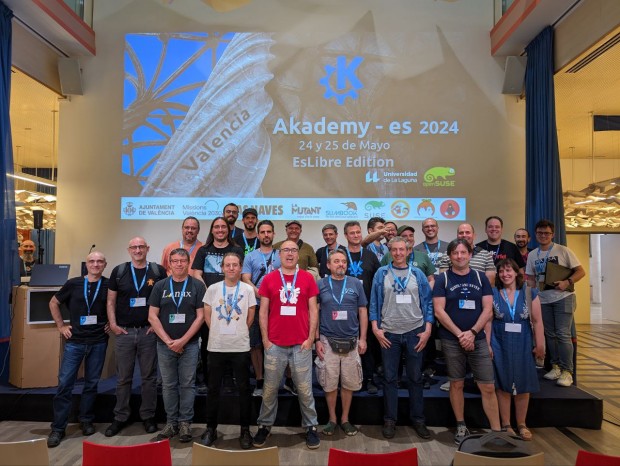
La entrada Foto de grupo (no oficial) de Akademy-es 2024 esLibre Edition se publicó primero en KDE Blog.