
 Member
 baltolkien
Promociones de ponentes de Akademy-es 2024 de València esLibre Edition #akademyes
Como ya sabréis este año se celebra Akademy-es 2024 se celebrará en de forma presencial en València, junto a esLibre del 24 al 25 de mayo, viernes y sábado. Ya hace un tiempo que fue publicado el programa oficial de charlas y que fue anunciado en el blog, pero hoy me complace compartir con todos vosotros las promociones de ponentes de Akademy-es 2024 de València esLibre Edition montados por Damian, con una intro basada en el cartel de Rosanna García y el cartel de esLibre. Si no te convencemos para que vengas yo ya no sé.
Anuncios del programa de charlas de Akademy-es 2024 de València esLibre Edition #akademyes
El 24 y 25 de mayo se va a celebrar Akademy-es 2024 de València que se celebrará organizado por KDE España y de forma paralela a otro gran evento como es esLibre, gracias al esfuerzo de la asociación sin ánimo de lucro de GNU/Linux València.
Este año volvemos a tener un gran programa de ponencias pero condensado es un solo día ya que se ha pensado que dado que estamos en un gran evento es una buena idea que los organizadores también nos mezclemos con el resto de asistentes.
En el programa de charlas, que pondré a continuación, podrás ver la diversidad de ponencias que hemos preparado, condensando a algunos de los grandes comunicadores de la Comunidad KDE y algunos artistas invitados de prestigio. Además, como novedad este año se nos ha ocurrido que algunos ponentes graben un pequeño vídeo para promocionar su charla y el evento en general.
De esta forma vais a encontrar a ponentes de la talla de Lorenzo Carbonell (Atareao), Aleix Pol, Albert Astals y Baltasar Ortega (un servidor) comentando su charla y animándoos a asistir.
Viernes 24 de mayo
Jornada matinal
12:00 – 12:05 Ceremonia de apertura de Akademy-es – Adrián Chaves, Presidente de KDE España
12:05 – 12:45 Craft: la distribución de KDE para plataformas no Linux – Albert Astals Cid, Coordinador de traduciones de KDE
12:45 – 13:30 Python y Qt – José Millán Soto, KDE España
13:30 – 14:00 Typst como alternativa a LaTeX y Markdown – Lorenzo Carbonell (Atareao), desarrollador
Jornada vespertina
15:30 – 16:00 ¿Qué es KDE España? – Junta de KDE España
16:00 – 16:45 Pintando con Krita: técnicas de ilustración – Alien
16:45 – 17:30 Cómo puedes utilizar OSS KB para desarrollar KDE – Agustín Benito, consultor
17:30 – 18:15 Charlas relámpago
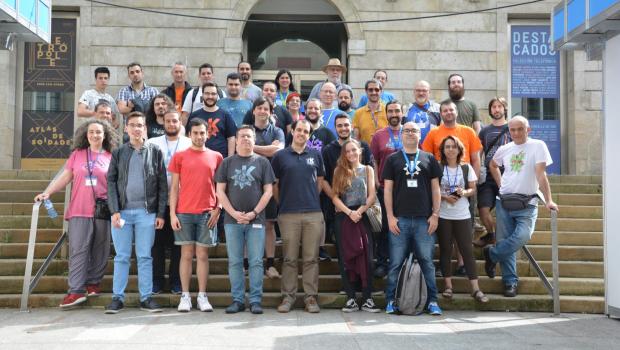
Foto de grupo
18:30 – 19:15 Mirando más allá de Plasma 6 – Aleix Pol i González, Presidente de KDE eV – En remoto
19:15 – 20:00 10 cosas que no sabías que podías hacer (o sí) en Plasma 6 – Baltasar Ortega, Editor de kdeblog
20:00 Ceremonia de clausura de Akademy-es
Nota: Las charlas y horarios pueden sufrir ligeras modificaciones dependiendo de la disponibilidad de los ponentes
La entrada Promociones de ponentes de Akademy-es 2024 de València esLibre Edition #akademyes se publicó primero en KDE Blog.
Publicado MarkNote 1.2 de #KDE
La comunidad de KDE ha publicado MarkNote 1.2 la aplicación para tomar notas en MarkDown y organizarlas en carpetas

MarkNote no es un editor de archivos en formato MarkDown, es un programa que te permite crear notas de texto enriquecido y organizarlas fácilmente en cuadernos.
Puedes personalizar tus cuadernos eligiendo un ícono o un color distinto para cada uno, lo que facilita distinguirlos facilmente.
Las notas se guardan como archivos Markdown en texto plano en tu carpeta Documentos, por tanto se pueden editar y modificar con otros editores de texto. Aunque MarkNote te facilita organizar las notas, clasificarlas, etc.
Y el pasado 17 de mayo de 2024 se ha publicado su versión 1.2, llena de mejoras, introducción de nuevas funcionalidades y correcciones de errores.
En esta versión se ha añadido la capacidad de elegir una carpeta personalizada donde almacenar tus notas. También se ha añadido la posibilidad de cambiar la clasificación de las notas de alfabéticamente a ordenar por fecha. Además en esta versión se ha ha hecho posible agregar y editar tablas.
Además, ahora el texto en MarkDown se comienza a transformar directamente en texto enriquecido a medida que se escribe. De momento no está disponible para todos los formatos disponibles, pero poco a poco se irán añadiendo. Y además ya se puede personalizar la fuente utilizada por el editor.
Además de poder editar texto, ahora también es posible crear bocetos de dibujo o imagen directamente desde MarkNote. En medios con pantalla táctil puede resultar muy útil. Ya que también se han hecho mejoras para que esté disponible para PlasmaMobile. Y para sistemas privativos.

Patrocinadores de Akademy-es 2024 de València esLibre Edition #akademyes
Todo evento supone siempre unos gasto, y una presencial también. El 24 y 25 de mayo, es decir, en meno de una semana se va a celebrar en València la esperada Akademy-es 2024, el encuentro organizado por KDE España para todos los simpatizantes del proyecto. Es hora de hablar de patrocinadores de Akademy-es 2024 de València, esLibre Edition, la desmostración de que las empresas tienen un papel importante en el desarrollo del Sofware Libre.
Patrocinadores de Akademy-es 2024 de València esLibre Edition #akademyes
Como sabrán los lector del blog en apenas cuatro días se va a celebrar Akademy-es 2024 de València como una track de esLibre de forma híbrida, el evento más importante para los desarrolladores y simpatizantes de KDE, organizado por KDE España.
Desde KDE Blog quiero animar a patrocinar este evento ya que cualquier organización que lo haga recibirá visibilidad no solo en España, sino a nivel mundial en el campo del Software Libre, ya que muchos de los integrantes de la Comunidad tienen fuertes vínculos con países de todo el mundo. Recordemos que muchos de los integrantes de KDE España son miembros de KDE e.V., la fundación internacional que auspicia el proyecto.
El evento tiene presentaciones de primer nivel de temas relativos a las nuevas tecnologías, incluyendo aplicaciones de escritorio, aplicaciones móviles, desarrollo de software y multimedia. La comunidad KDE ha presentado innovaciones en todos estos campos a lo largo de su historia. Como patrocinador, su organización tendrá la oportunidad de participar en este entorno creativo y ser conocida por los asistentes.
Además, las discusiones técnicas no son el único objetivo de Akademy-es. El evento es también una oportunidad de networking y de conocer gente. Los eventos sociales son también muy importantes, ya que fomentan la creación del ambiente de cordialidad dentro de la comunidad KDE que permite la aparición de nuevas ideas; así que si lo desea puede también patrocinar un evento social.
De momento ya tenemos algunos patrocinadores de Akademy-es 2024 confirmados, se trata de openSUSE y la Universidad de La Laguna… este año Slimbook ha patrocinado directamente esLibre, como era de esperar.
Esto, evidentemente, se merece una pequeña reseña en el blog.
Patrocinador: openSUSE

El proyecto openSUSE, de sobre conocido por los lectores habituales del blog, es una comunidad mundial que promueve el uso de Linux en todas partes. openSUSE crea una de las mejores distribuciones de Linux del mundo, en la que se trabaja de forma conjunta, abierta, transparente y amistosa como parte de la comunidad mundial de software libre y de código abierto.
El proyecto está controlado por su comunidad y depende de las contribuciones de sus miembros, que trabajan como probadores, escritores, traductores, expertos en usabilidad, artistas y embajadores o desarrolladores. El proyecto abarca una amplia variedad de tecnologías, gentes con distintos niveles de experiencia, que hablan distintos idiomas y que tienen diferentes orígenes culturales.
Patrocinador: Univesidad de La Laguna

La Universidad de La Laguna es una institución pública de educación superior e investigación ubicada en Tenerife.
Ofrece grados, másteres, doctorados, títulos propios y cursos online y semipresencial.
Destaca su amplio compromiso con el Software Libre.
La entrada Patrocinadores de Akademy-es 2024 de València esLibre Edition #akademyes se publicó primero en KDE Blog.
Menos de una semana para #Akademyes 2024 en Valencia
El próximo 24 y 25 de mayo de 2024 se celebrará Akademyes dentro del evento EsLibre en Valencia

KDE España un año más organizará el encuentro de usuarios y simpatizantes de KDE y de software libre llamado Akademyes y el epicentro será en Valencia los días 24 y 25 de mayo dentro del evento EsLibre.
Yo este año no podré asistir, pero te animo a que si tienes la oportunidad des el salto y te animes a encontrarte con otras personas eficionadas a la tecnología ética del software libre y de KDE. Valdrá la pena asistir a las charlas y talleres o simplemente conocer y encontrar a gente con mismo gustos y pasiones.
Akademyes es la reunión que organiza KDE España y ofrece un par de días de charlas con desarrolladores y usuarios de KDE, desde algo técnico a algo más accesible, pero siempre interesante aprender y conocer a las personas detrás del nick.
Puedes consultar el programa del Akademyes detallado, pero aquí te traigo un resumen:
12:00 – 12:05 Ceremonia de apertura de Akademy-es – Adrián Chavez, Presidente de KDE España
12:05 – 12:45 Craft: la distribución de KDE para plataformas no Linux – Albert Astals Cid, Coordinador de traduciones de KDE
12:45 – 13:30 Python y Qt – José Millán Soto, KDE España
13:30 – 14:00 Typst como alternativa a LaTeX y Markdown – Lorenzo Carbonell (Atareao), desarrollador
Comida
15:30 – 16:00 ¿Qué es KDE España? – Junta de KDE España
16:00 – 16:45 Pintando con Krita: técnicas de ilustración – Alien
16:45 – 17:30 Cómo puedes utilizar OSS KB para desarrollar KDE – Agustín Benito, consultor
17:30 – 18:15 Charlas relámpago
Foto de Grupo
18:30 – 19:15 Mirando más allá de Plasma 6 – Aleix Pol i González, Presidente de KDE eV – En remoto
19:15 – 20:00 10 cosas que no sabías que podías hacer (o sí) en Plasma 6 – Baltasar Ortega, Editor de kdeblog
20:00 Ceremonia de clausura de Akademy-es
Pero no todo son charlas, también hay organizadas un par de quedadas sociales, ideales para conocerse en un ambiente más relajado y cercano, compartiendo barra de bar o mesa de restaurante y hablar de la vida…
El evento es libre y gratuito, pero se requiere registro facilitar las labores de organización a la hora de gestionar el aforo, etc. Y es imprescindible para los eventos sociales de Akademyes para reserva de sitio en el restaurante.
La comunidad se organiza para poner en marcha eventos para la propia comunidad. Así que desde aquí mi enhorabuena a quienes lo han hecho posible, ya que seguro que es una tarea muy complicada.
Siempre hay personas que dan un paso al frente y deciden ponerse manos a la obra. Quizás de este evento salgan personas que sean quienes lo organicen en futuras ediciones, recogiendo el testigo de esta carrera de fondo.
Mi enhorabuena también a las personas que realizarán charlas, ponencias, talleres, etc por ser valientes y por compartir su conocimiento. Esa es la base de progresar y de expandir el conocimiento.
Lo dicho, solo animarte a que si tienes la oportunidad, este año no la dejes pasar y te acerques a Valencia los días 24 y 25 de mayo al EsLibre y Akademyes. Prueba y seguro que repites…
Enlaces de interés
- https://www.kde-espana.org/akademy-es-2024
- https://www.kde-espana.org/akademy-es-2024/programa-akademy-es-2024
- https://eslib.re/2024/
Anuncios del programa de charlas de Akademy-es 2024 de València esLibre Edition #akademyes
Como ya sabréis este año se celebra Akademy-es 2024 se celebrará en de forma presencial en València, junto a esLibre del 24 al 25 de mayo, viernes y sábado. Ya hace un tiempo que fue publicado el programa oficial de charlas y que fue anunciado en el blog, pero hoy me complace compartir con todos vosotros los anuncios del programa de charlas de Akademy-es 2024 de València esLibre Edition creador por Rosanna García (cartel original y locución) y Fernando Rosa (montaje de vídeo). Es el momento de visualizarlos y leerlos, sseguro que encuentras más de una razón para acompañarnos.
Anuncios del programa de charlas de Akademy-es 2024 de València esLibre Edition #akademyes
El 24 y 25 de mayo se va a celebrar Akademy-es 2024 de València que se celebrará organizado por KDE España y de forma paralela a otro gran evento como es esLibre, gracias al esfuerzo de la asociación sin ánimo de lucro de GNU/Linux València.
Este año volvemos a tener un gran programa de ponencias pero condensado es un solo día ya que se ha pensado que dado que estamos en un gran evento es una buena idea que los organizadores también nos mezclemos con el resto de asistentes.
En el programa de charlas, que pondré a continuación, podrás ver la diversidad de ponencias que hemos preparado, condensando a algunos de los grandes comunicadores de la Comunidad KDE y algunos artistas invitados de prestigio,
Y si no te lo crees simplemente échale un vistazo al programa.
Viernes 24 de mayo
Jornada matinal
12:00 – 12:05 Ceremonia de apertura de Akademy-es – Adrián Chavez, Presidente de KDE España
12:05 – 12:45 Craft: la distribución de KDE para plataformas no Linux – Albert Astals Cid, Coordinador de traduciones de KDE
12:45 – 13:30 Python y Qt – José Millán Soto, KDE España
13:30 – 14:00 Typst como alternativa a LaTeX y Markdown – Lorenzo Carbonell (Atareao), desarrollador
Jornada vespertina
15:30 – 16:00 ¿Qué es KDE España? – Junta de KDE España
16:00 – 16:45 Pintando con Krita: técnicas de ilustración – Alien
16:45 – 17:30 Cómo puedes utilizar OSS KB para desarrollar KDE – Agustín Benito, consultor
17:30 – 18:15 Charlas relámpago
Foto de grupo
18:30 – 19:15 Mirando más allá de Plasma 6 – Aleix Pol i González, Presidente de KDE eV – En remoto
19:15 – 20:00 10 cosas que no sabías que podías hacer (o sí) en Plasma 6 – Baltasar Ortega, Editor de kdeblog
20:00 Ceremonia de clausura de Akademy-es
Nota: Las charlas y horarios pueden sufrir ligeras modificaciones dependiendo de la disponibilidad de los ponentes
La entrada Anuncios del programa de charlas de Akademy-es 2024 de València esLibre Edition #akademyes se publicó primero en KDE Blog.
Episodio 28 de KDE Express: Spectacle, Dolphin, Plasma 6 y otras noticias al montón
Me congratula presentaros el episodio 28 de KDE Express, titulado «Spectacle, Dolphin, Plasma 6 y otras noticias al monton « donde David Marzal hace una pausa en la promoción de Akademy-es y repasa algunas de las novedades del mundo KDE.
Episodio 28 de KDE Express: Spectacle, Dolphin, Plasma 6 y otras noticias al montón
Comenté hace ya bastante tiempo que había nacido KDE Express, un audio con noticias y la actualidad de la Comunidad KDE y del Software Libre con un formato breve (menos de 30 minutos) que complementan los que ya generaba la Comunidad de KDE España, aunque ahora estamos tomándonos un tiempo de respiro por diversos motivos, con sus ya veteranos Vídeo-Podcast que todavía podéis encontrar en Archive.org, Youtube, Ivoox, Spotify y Apple Podcast.
De esta forma, a lo largo ya casi los 30 episodios, promovidos principalmente por David Marzal, nos han contado un poco de todo: noticias, proyectos, eventos, etc., convirtiéndose (al menos para mi) uno de los podcast favoritos que me suelo encontrar en mi reproductor audio.
En palabras de David el nuevo episodio de KDE Express número 27 los siguientes temas:

Spectacle es una navaja suiza, Plasma 6 llega a un montón de distros, digiKam tiene un libro, trucos de Dolphin, Spring de KDE Goals, escritorio remoto y alguna cosa más podrás encontrar en este episodio 28 de KDE Express.
Artículo original con los enlaces en https://kdeexpress.gitlab.io/28/
- Distros
- Post-mortem de los problemas de la actualización de KDE Neon a Plasma 6 : https://blog.neon.kde.org/2024/04/29/kde-neon-post-plasma-6-updates-review/
- Nueva versión de Garuda (ArchLinux) con Plasma 6
- TUXEDO OS también : https://alternativeto.net/news/2024/4/tuxedo-updates-its-linux-based-os-with-kde-plasma-6-and-enhanced-visual-features/
- Asahi Remix 40 KDE Plasma 6 por defecto : https://www.phoronix.com/news/Fedora-Asahi-Remix-40
- Spectacle recupera el retoque de desenfocar en 24.05 : https://ubunlog.com/kde-devuelve-la-funcion-factor-de-desenfoque-a-spectacle-e-introduce-un-buen-numero-de-mejoras-en-la-interfaz/
- Libro digital sobre digiKam publicado: Recipes 2024-05-13 sin DRM y en oferta : https://www.digikam.org/news/2024-04-13_digikam_recipes_2024-05-13_released/
- KDE Goals Spring de abril sobre sostenibilidad, accesibilidad y automatización
- Configurar el escritorio remoto será posible desde la configuración del sistema en Plasma 6.1
- Dolphin dejara seleccionar todos los ficheros u otras acciones en 24.08 : https://pointieststick.com/2024/05/10/this-week-in-kde-our-cup-overfloweth-with-cool-stuff-for-you/
- Atajo recomendado: Meta+e = Abrir Dolphin
- Nos entrevistan en Mancomun : https://mancomun.gal/es/podcasts/mancomun-podcast-akademy-es-2024/
Agradecimientos: Jorge Lama por su asistencia, consejo, apoyo y edición de audio en este episodio.
Y, como siempre, os dejo aquí el listado de los episodios. ¡Disfrutad!
Por cierto, también podéis encontrarlos en Telegram: https://t.me/KDEexpress
La entrada Episodio 28 de KDE Express: Spectacle, Dolphin, Plasma 6 y otras noticias al montón se publicó primero en KDE Blog.
Publicado Agama 8, el nuevo instalador de openSUSE y SUSE
Agama 8 dice adiós a Cockpit y cambia a HTTP como protocolo de comunicación entre los diferentes componente de Agama

En la versión anterior, publicada en diciembre de 2023, ya se expusieon los dos primeros pasos de la hoja de ruta del equipo de YaST para 2024 para Agama: una interfaz de usuario más potente para la configuración del almacenamiento y una nueva arquitectura sin Cockpit con una mejor API para llamadas externas. Que es lo que se empieza a vislumbrar en Agama 8.
Mucho se discutió sobre el cambio de arquitectura que era necesario en Agama para el futuro. Al inicio se había basado en Cockpit y D-Bus, pero como mejora para el futuro hacía falta repensar el código y realizar un gran cambio.
Este Agama 8 es la primera piedra de ese gran cambio al abandonar Cockpit y D-Bus en favor de HTTP como protocolo principal de comunicación entre los componentes del instalador.
Estos cambios son necesarios y útiles para integrar Agama en soluciones más grandes y obviamente son beneficiosos para instalaciones remotas o desatendidas. Pero resulta que además también mejoraron drásticamente el tiempo de inicio y la velocidad general de Agama.
Algunas partes, como las relacionadas con la configuración del almacenamiento, todavía dependen internamente de componentes de la arquitectura anterior y aún no se han beneficiado de la aceleración. Pero se pueden esperar mejoras a medio plazo.
Todavía es posible que falten algunas funciones respecto a versiones anteriores de Agama. Pero las personas que lo desarrollan pensaron que era mejor sacrificar esas funcionalidades favor del lema «liberar temprano, publicar con frecuencia». Pero todas las características importantes se reintroducirán en los próximos meses.
La eliminación de las funciones obsoletas puede no ser la noticia más interesante sobre la funcionalidad de cara al usuario de Agama, pero a cambio se ofrece una nueva interfaz para configurar el almacenamiento que, aunque todavía en un desarrollo muy incial, permite exprimir todo el jugo a la propuesta de almacenamiento tradicional de YaST (también conocida como Configuración guiada de YaST).
La nueva interfaz pretende ser comprensible para los recién llegados. Pero, los usuarios de (open)SUSE tienen grandes expectativas en términos de personalizar sus configuraciones, y ofrece muchas posibilidades para especificar dónde colocar cada nueva partición o volumen lógico LVM, incluida la posibilidad de montar sistemas de archivos anteriores o formatear los existentes. dispositivos.
La nueva interfaz también permite configurar varios aspectos relacionados con el arranque y el cifrado y seleccionar qué particiones se deben cambiar de tamaño o eliminar.
Pero además de esta novedad hay muchos otros cambios:
- Una nueva interfaz para seleccionar los patrones del software, más alineada con el resto de Agama.
- Mejor guía para configurar el cifrado de disco completo basado en TPM.
- Una pila de red en su mayor parte reescrita.
- Correcciones visuales y de usabilidad en varios widgets.
Y muchas otras mejoras realizadas por colaboradores externos, ya que al ser software libre puedes modificar el código y realizar tus aportes. Junto con los traductores (entre los que me encuentro) que permite ofrecer Agama en 10 idiomas.
Pero además de colaborar de estas formas, también puedes probar y testear las versiones publicadas y reportar errores y participar en las discusiones sobre esta herramienta en desarrollo.
La forma más sencilla de tener en tus manos Agama 8 es descargar una de las imágenes de prueba ISO de Agama Live e iniciarla en una máquina virtual.
Cabe tener en cuenta que este es uno de los prelanzamientos más experimentales de Agama.

Enlaces de interés
- https://yast.opensuse.org/blog/2024-05-17/agama-8
- https://download.opensuse.org/repositories/systemsmanagement:/Agama:/Devel/images/iso/
- https://github.com/openSUSE/agama
- https://lists.opensuse.org/archives/list/yast-devel@lists.opensuse.org/
Mi escritorio Plasma de mayo 2024 #akademyes #viernesdeescritorio
Es posible que alguien se mosquee con tanto bombo al evento pero creo que la ocasión se lo merece. Si ya estás enterado o enterada pues te saltas esta entrada y listo, aunque advierto… esto no termina aquí. Esta sexta entrega del año de la iniciativa #viernesdeescritorio no podía tener otro sabor que de la próxima Akademy-es 2024 de València esLibre Edition que se celebrará el 24 y 25 (y 26) de mayo. Con este ya serán 48 las entregas compartiendo «Mi escritorio» de forma mensual. Así que, bienvenidos a mi escritorio Plasma de mayo 2024, realizado sobre mi Kymera Slimbook.
Mi escritorio Plasma de mayo 2024 #akademyes #viernesdeescritorio
Esta va a ser la cuadragésimoocatva (48 para los que nos cuesta leer esto) vez que muestro mi escritorio Plasma 6 en público, lo cual es número nada desdeñable de entradas que sigue creciendo de forma constante. Hice un recopilatorio con los 12 escritorios del 2022 y este diciembre he hecho una con los 13 del 2023. Por fin he encontrado el momento perfecto para hacer este tipo de entradas.
Y en esta ocasión, voy a mostrar mi Slimbook Kymera el cual tiene instalado un KDE Neon con Plasma 6.0.4, sobre una versión de KDE Frameworks 6.1 y una versión de Qt 6.7. El servidor gráfico es Wayland y el Kernel es 6.5.0-35-generic (64 bits).
Respecto al tema general, no podía ser otro que el clásico Brisa oscuro al que le queda fabuloso el banner creado por mi amiga Rosanna García que he tuneado con el clásico «Yo voy a…» el evento de turno, en este caso, el más que publicitado en el blog: Akademy-es 2024 de València esLibre Edition.
Para adaptarlo mejor he cambiado el panel flotate a la parte superior y así poder visualizar los logos de lo patrocinadores del evento: openSUSE y la Universidad de La Laguna.
También he utilizado los iconos Red Nature que presenté hace poco en el blog ya que quedan muy bien con temas oscuros.
El resultado de mi escritorio Plasma de mayo de 2024 es un entorno de trabajo oscuro y, como siempre, funcional que podéis ver en la imagen inferior (pinchad sobre ella para verlo un poco más grande).

La entrada Mi escritorio Plasma de mayo 2024 #akademyes #viernesdeescritorio se publicó primero en KDE Blog.
#openSUSE Tumbleweed revisión de las semanas 19 y 20 de 2024
Tumbleweed es una distribución de GNU/Linux «Rolling Release» o de actualización contínua. Aquí puedes estar al tanto de las últimas novedades.

openSUSE Tumbleweed es la versión «rolling release» o de actualización continua de la distribución de GNU/Linux openSUSE.
Hagamos un repaso a las novedades que han llegado hasta los repositorios esta semana.
Y recuerda que puedes estar al tanto de las nuevas publicaciones de snapshots en esta web:
El anuncio original lo puedes leer en el blog de Dominique Leuenberger, publicado bajo licencia CC-by-sa, en este este enlace:
En estas dos semanas se han publicado 12 snapshots (0502…0515, las snapshots 0504 y 0513 no se compilaron por ser fin de semana)
Los cambios más relevantes que han traído estas snapshots son:
- Mozilla Firefox 125.0.3
- LibreOffice 24.2.3.2
- GNOME 46.1
- GIMP 2.10.38
- LLVM 18.1.5
- GCC 14.1
- KDE Frameworks 6.2.0
- PHP 8.3.7
- PostgreSQL 16.3
- Systemd 255.5 & 255.6
- Linux kernel 6.8.9 (con linux-glibc-devel ya preparado para la versión 6.9)
- Ruby 3.3.1
- QEmu 8.2.3
- util-linux 2.40.1
La snapshot 0515 contenía una actualización de openssh, que recomendaba erróneamente la instalación del subpaquete openssh-server-config-rootlogin. Este paquete existe desde que se cambió la configuración predeterminada de openSSH para no permitir más el inicio de sesión como root, por lo que los administradores podrían volver a activarlo fácilmente.
Debido a un error, se activó la instalación automática. Desde entonces, esto se corrigió y se publicó una versión de openssh-server en el canal de actualización, lo cual NO se recomienda.
Verifica tu instalación y elimina el paquete nuevamente, en caso de que esté instalado y no lo necesites (no podemos eliminarlo automáticamente ya que perjudicaríamos a los usuarios que lo deseaban explícitamente).
Y como siempre muchas más actualizaciones están preparándose para próximas snapshots:
- chkstat que se renombrará como permctl
- Rust 1.78
- Mesa 24.0.7
- Linux kernel 6.9.1
- Ninja 1.12
- dbus-broker
- GCC 14
Si quieres estar a la última con software actualizado y probado utiliza openSUSE Tumbleweed la opción rolling release de la distribución de GNU/Linux openSUSE.
Mantente actualizado y ya sabes: Have a lot of fun!!
Enlaces de interés
- ¿Por qué deberías utilizar openSUSE Tumbleweed?
- zypper dup en Tumbleweed hace todo el trabajo al actualizar
- ¿Cual es el mejor comando para actualizar Tumbleweed?
- ¿Qué es el test openQA?
- http://download.opensuse.org/tumbleweed/iso/
- https://es.opensuse.org/Portal:Tumbleweed

——————————–
openSUSE Tumbleweed – Review of the weeks 2024/19 & 20
Dear Tumbleweed users and hackers,
Last week, there was a public holiday on Thursday in some parts of the world (Ascension Day). Unsurprisingly, many devs, including myself and Ana, took Friday off to enjoy a longer weekend (and I can tell you: the weather was fantastic). As a result, I have to span two weeks of changes to Tumbleweed here once again. We have published 12 snapshots since my last review (0502…0515, snapshots 0504 and 0513 were not built due to weekends)
The most relevant changes delivered as part of those snapshots were:
- Mozilla Firefox 125.0.3
- LibreOffice 24.2.3.2
- GNOME 46.1
- GIMP 2.10.38
- LLVM 18.1.5
- GCC 14.1
- KDE Frameworks 6.2.0
- PHP 8.3.7
- PostgreSQL 16.3
- Systemd 255.5 & 255.6
- Linux kernel 6.8.9 (with linux-glibc-devel already prepared at 6.9)
- Ruby 3.3.1
- QEmu 8.2.3
- util-linux 2.40.1
Snapshot 0515 contained an openssh update, that mistakenly recommended installation of the subpackage openssh-server-config-rootlogin; this package has existed since the default configuration of openSSH was changed to not permit root login anymore, so admins could easily switch it back on. Due to an error, this had been triggered for automatic installation. This has since been corrected and a version of openssh-server was published to the update channel, which is NOT recommended. Please check your installation and remove the package again, should it be installed and you don’t need it (we can’t auto-remove it without breaking users that explicitly wanted it)
The following things are known to be worked on at the moment and are reaching you in some upcoming snapshot:
- chkstat package being renamed to permctl
- Rust 1.78
- Mesa 24.0.7
- Linux kernel 6.9.1
- Ninja 1.12
- dbus-broker: some networking issue after upgrades left to work out
- GCC 14: phase 2: use gcc14 as the default compiler – lots of help needed: https://build.opensuse.org/project/show/openSUSE:Factory:Staging:Gcc7