
 Member
 baltolkien
25 anys de Softcatalà: Com col·laborar en projectes lliures de llengua trobada organitzada per Barcelona Free Software
Avui me faig resó del un petit event que es celebrará a Barcelona organitzat per Barcelona Free Software. Es tracta de la trobada «25 anys de Softcatalà: Com col·laborar en projectes lliures de llengua» que tindrà lloc el dilluns 11 de març a Adventina, a la ciutat condal.
25 anys de Softcatalà o Com col·laborar en projectes lliures de llengua
Aunque suelo escribir en castellano mi idioma materno es el valenciano o catalán. A lo largo de mis años de docente he utilizado ambas lenguas para transmitir o generar conocimientos en mi alumnado, y en cientos de ocasiones he utilizado los servicios de traducción automática para adaptar mis materiales según las necesidades de mis pupilos.

Es por ello que tengo un gran aprecio al gran proyecto llamado Softcatalà ya que he utilizado su traductor, corrector, diccionarios o algunas de sus aplicaciones según mis necesidades obteniendo siempre excelentes resultados.
De esta forma me complace promocionar uno de sus enventos en los que van a conmemorar sus 25 años de existencia con la colaboración de los chicos y chicas de Barcelona Free Software, que ha sido la comunidad encargada de organizar el mismo y que describen la jornada con estas palabras:
Començarem per una introducció a l’associació Softcatalà que té com a objectiu fomentar l’ús del català a la informàtica, Internet i les noves tecnologies.
Parlarem dels projectes de la llengua que hi contribueix l’associació en l’àmbit de la traducció, tecnologies de la llengua i eines lingüístiques.
Descriurem en detall en projectes principals on cal ajuda i com persones amb perfils de traducció, disseny, comunicació i desenvolupament poden participar-hi.
Ponents: Marc Riera i Jordi Mas
Dades d’interés:
- Data: Dilluns 11 de marzç, 2024 a les 19:00
- Lloc: Adevinta Spain, C/ de la Ciutat de Granada, 150 · Barcelona, CT
Agenda:
- 19:00 h: Benvinguda
- 19:15 h: Xerrada
- 19:45 h: Moment de networking, acompanyat de menjar i beguda cortesia d’Adevinta 🙂
IMPORTANT: Per registrar-se cal fer-ho a https://www.meetup.com/adevinta-spain/events/299190289/
Més informació: Barcelona Free Software
Por cierto, si alguien no entiende el catalán y quiere saber exáctamente cuál es el planteamiento del evento lo tiene fácil: utiliza los servicios de Softcatala y los tendrás en el idioma que quieras.
La entrada 25 anys de Softcatalà: Com col·laborar en projectes lliures de llengua trobada organitzada per Barcelona Free Software se publicó primero en KDE Blog.
Disponible #openSUSE Leap 15.6 Beta ¿Te animas a probarla?
La comunidad de openSUSE ha publicado la versión Beta de desarrollo de openSUSE Leap 15.6 y te anima a que la pruebes y reportes errores

Ya está disponible la ISO y los repositorios de la distribución de GNU/Linux openSUSE Leap 15.6 en esta primera versión Beta. Esta versión sirve como prueba del sistema para instalarla en máquinas virtuales o preferentemente en equipos de prueba y reportar los errores encontrados.
Como desde hace unas cuantas versiones esta versión Beta de openSUSE Leap 15.6 toma como base la versión Beta de SUSE Linux Enterprise 15 Service Pack 6. Por lo que la versión comunitaria se beneficia del desarrollo empleado en la versión empresarial de esta distribución de GNU/Linux.
Un aspecto central de Leap 15.6 es la versión Linux Kernel 6.4, que tendrá amplias actualizaciones y se espera que la versión obtenga soporte de software y hardware más actualizado.
Además de esta actualización del kernel también incluirá otras actualizaciones como por ejemplo:
- Qt 5 recibe una actualización a 5.15.12+kde147 y tiene mejoras de seguridad de los desarrolladores de KDE más allá de la versión estándar.
- Esta actualización supone un paso a KDE Frameworks 5.114.0 y marca un salto con respecto a la versión anterior 5.90.0.
- Además de esto, Qt6 pasa a la versión 6.6.1 y garantiza que las aplicaciones más recientes puedan ejecutarse sin problemas con las nuevas bibliotecas.
- Actualizaciones en GNOME 45
- Pulseaudio 17.0 y PipeWire 1.03
- Y muchas otras actualizaciones…
La versión final de openSUSE Leap 15.6 se espera para mediados de junio de 2024, por eso la comunidad de openSUSE quiere que participes en las pruebas y en los reportes de errores.
Por eso en este caso se vuelve a retomar el día de reporte de errores o Bug Day.
Ese es un día en el que muchas personas de la comunidad ayudan a clasificar errores en Bugzilla: durante un día completo, las personas se organizan en diferentes canales de la comunidad openSUSE y se ayudan entre sí a clasificar errores.
Así que este 7 de marzo tienes una oportunidad de participar con la comunidad y aprender y aportar. Más información en la wiki de openSUSE. Todo el mundo es bienvenido.
¡Descarga la ISO, prepara tu equipo de pruebas y anímate a probar la nueva openSUSE Leap 15.6 versión Beta!

Enlaces de interés
Disponible #openSUSE Leap 15.6 Beta ¿Te animas a pobarla?
La comunidad de openSUSE ha publicado la versión Beta de desarrollo de openSUSE Leap 15.6 y te anima a que la pruebes y reportes errores
Ya está disponible la ISO y los repositorios de la distribución de GNU/Linux openSUSE Leap 15.6 en esta primera versión Beta. Esta versión sirve como prueba del sistema para instalarla en máquinas virtuales o preferentemente en equipos de prueba y reportar los errores encontrados.
Como desde hace unas cuantas versiones esta versión Beta de openSUSE Leap 15.6 toma como base la versión Beta de SUSE Linux Enterprise 15 Service Pack 6. Por lo que la versión comunitaria se beneficia del desarrollo empleado en la versión empresarial de esta distribución de GNU/Linux.
Un aspecto central de Leap 15.6 es la versión Linux Kernel 6.4, que tendrá amplias actualizaciones y se espera que la versión obtenga soporte de software y hardware más actualizado.
Además de esta actualización del kernel también incluirá otras actualizaciones como por ejemplo:
- Qt 5 recibe una actualización a 5.15.12+kde147 y tiene mejoras de seguridad de los desarrolladores de KDE más allá de la versión estándar.
- Esta actualización supone un paso a KDE Frameworks 5.114.0 y marca un salto con respecto a la versión anterior 5.90.0.
- Además de esto, Qt6 pasa a la versión 6.6.1 y garantiza que las aplicaciones más recientes puedan ejecutarse sin problemas con las nuevas bibliotecas.
- Actualizaciones en GNOME 45
- Pulseaudio 17.0 y PipeWire 1.03
- Y muchas otras actualizaciones…
La versión final de openSUSE Leap 15.6 se espera para mediados de junio de 2024, por eso la comunidad de openSUSE quiere que participes en las pruebas y en los reportes de errores.
Por eso en este caso se vuelve a retomar el día de reporte de errores o Bug Day.
Ese es un día en el que muchas personas de la comunidad ayudan a clasificar errores en Bugzilla: durante un día completo, las personas se organizan en diferentes canales de la comunidad openSUSE y se ayudan entre sí a clasificar errores.
Así que este 7 de marzo tienes una oportunidad de participar con la comunidad y aprender y aportar. Más información en la wiki de openSUSE. Todo el mundo es bienvenido.
¡Descarga la ISO, prepara tu equipo de pruebas y anímate a probar la nueva openSUSE Leap 15.6 versión Beta!
Enlaces de interés

Leap 15.6 Reaches Beta Phase
The openSUSE Project is thrilled to announce the Beta release phase of Leap 15.6.
Feel free to download Leap 15.6 Beta images from get.opensuse.org and test it out, or upgrade from your existing Leap 15.5 system by running zypper --releasever=15.6 dup. You might want to get familiar with known issues in Leap 15.6.
Show your support by dropping in today at our Thursday Weekly Meeting at 20:00 UTC and participate in the live Leap 15.6 Beta testing event aka “Bug Day”. The event will be live streamed to the openSUSE channel on youtube.
“Let’s make sure that Leap 15.6 runs well on your hardware, and that we can keep it that way for the next 18 months,” said Lubos Kocman, openSUSE Leap release manager. “We cannot address hardware issues, feature requests and other issues without knowledge of these problems. Our openQA is limited. Testing different hardware and reporting these issues are a big help.”
Built on top of SUSE Linux Enterprise 15 Service Pack 6, the Beta, which has full compatibility with the enterprise Linux release will focus on stability and offer an option for those seeking to migrate to an enterprise distribution.
One core aspect of Leap 15.6 is the Linux Kernel 6.4 version, which will have extensive backport updates and the release is expected to gain fresher software and hardware support.
Along with the updated Kernel version, glibc 2.38, systemd 254 and firmware updates with dracut 059+ version are expected to enhance processing power and faster boot times.
The container stack was refresh as podman 4.8 version provides more support. Nextcloud out of box can be easily run in an optimal way with quadlets. The newest versions of distrobox, docker, python-podman and skopeo are available for container use.
The virtualization stack also gains newer versions with Xen 4.18, KVM 8.1.3, libvirt 10.0 and virt-manager 4.1.
Updates software packages related to telecommunications received updates and Leap 15.6 is expected to have DPDK 22.1 and versions 3 and 4 of Open vSwitch will be available.
The Beta introduces substantial updates across the board, starting with the KDE environment. Qt 5 receives an uplift to 5.15.12+kde147 and has security enhancements from KDE developers beyond the standard release. This update brings a move to KDE Frameworks 5.114.0 and marks a leap from the previous 5.90.0 version. Alongside this, Qt6 moves up to version 6.6.1 and ensures that the latest applications can run smoothly with the new libraries. Python bindings for both PyQt5 and PyQt6 are updated and aligns well with the Python 3.11 stack.
GNOME users will be delighted with the GNOME 45 update, which will enhance the user experience with new features and refinements. The desktop environment continues to evolve, providing a sleeker and more intuitive interface.
Audio handling receives a dual upgrade as PulseAudio is updated to version 17.0 and features improved hardware and Bluetooth support, which includes device battery level reporting. Meanwhile, PipeWire steps up to version 1.0.3 and expands its capabilities with new features and enhances compatibile with Pulseaudio and JACK.
Packages related to security were also updated for the beta phase and OpenSSL 3.1.4 is the new default. Other related libraries that are updated are liboqs 0.8.0, python-pycurl, python-uamqp, python3-python3-saml, python-xmlsec, python3-M2Crypto. firewalld 2.0.1, gnutls 3.8.0 and openvpn 2.6.x. The update of AppArmor 3.1.6 could possibly see an upgrade to version 4.
The project’s release engineering team encourages users to download, test, and provide feedback for the Leap 15.6 Beta. This helps to identify and resolve any issues before the final release, which is slated for mid-June, according to the roadmap.
This release marks another milestone in offering a stable, feature-rich platform for workstations, servers and more. Users and developers are encouraged to join the efforts in refining this release by reporting bugs, contributing to the software and sharing experiences. Community efforts with every test, bug report or feedback provides valuable step toward a successful launch of openSUSE Leap 15.6.
Download the Beta
The Leap 15.6 Beta is available on get.opensuse.org. Pick an image fitting your purpose. Install it on a VM like virtualbox, GNOME Boxes or install it on your own hardware, which we prefer.
25 anys de Softcatalà: Com col·laborar en projectes lliures de llengua trobada organitzada per Barcelona Free Software
Avui me faig resó del un petit event que es celebrará a Barcelona organitzat per Barcelona Free Software. Es tracta de la trobada «25 anys de Softcatalà: Com col·laborar en projectes lliures de llengua» que tindrà lloc el dilluns 11 de març a Adventina, a la ciutat condal.
25 anys de Softcatalà o Com col·laborar en projectes lliures de llengua
Aunque suelo escribir en castellano mi idioma materno es el valenciano o catalán. A lo largo de mis años de docente he utilizado ambas lenguas para transmitir o generar conocimientos en mi alumnado, y en cientos de ocasiones he utilizado los servicios de traducción automática para adaptar mis materiales según las necesidades de mis pupilos.
Es por ello que tengo un gran aprecio al gran proyecto llamado Softcatalà ya que he utilizado su traductor, corrector, diccionarios o algunas de sus aplicaciones según mis necesidades obteniendo siempre excelentes resultados.
De esta forma me complace promocionar uno de sus enventos en los que van a conmemorar sus 25 años de existencia con la colaboración de los chicos y chicas de Barcelona Free Software, que ha sido la comunidad encargada de organizar el mismo y que describen la jornada con estas palabras:
Començarem per una introducció a l’associació Softcatalà que té com a objectiu fomentar l’ús del català a la informàtica, Internet i les noves tecnologies.
Parlarem dels projectes de la llengua que hi contribueix l’associació en l’àmbit de la traducció, tecnologies de la llengua i eines lingüístiques.
Descriurem en detall en projectes principals on cal ajuda i com persones amb perfils de traducció, disseny, comunicació i desenvolupament poden participar-hi.
Ponents: Marc Riera i Jordi Mas
Dades d’interés:
- Data: Dilluns 11 de marzç, 2024 a les 19:00
- Lloc: Adevinta Spain, C/ de la Ciutat de Granada, 150 · Barcelona, CT
Agenda:
- 19:00 h: Benvinguda
- 19:15 h: Xerrada
- 19:45 h: Moment de networking, acompanyat de menjar i beguda cortesia d’Adevinta 🙂
IMPORTANT: Per registrar-se cal fer-ho a https://www.meetup.com/adevinta-spain/events/299190289/
Més informació: Barcelona Free Software
Por cierto, si alguien no entiende el catalán y quiere saber exáctamente cuál es el planteamiento del evento lo tiene fácil: utiliza los servicios de Softcatala y los tendrás en el idioma que quieras.
La entrada 25 anys de Softcatalà: Com col·laborar en projectes lliures de llengua trobada organitzada per Barcelona Free Software se publicó primero en KDE Blog.
Lanzada la undécima actualización de 5.27 edición ‘KDE 💖 Free Software’
Siguiendo el calendario de lanzamiento de los desarrolladores y pleno vorágine del KDE 6, la Comunidad KDE han comunicado que ha sido lanzada la undécima actualización de Plasma 5.27, ya que esta versión es una LTS y, por tanto, tiene un peridodo de mantenimiento más alto. Además, dado que es el último hasta el lanzamiento de Plasma 6 es normal que ésta versión tenga una vida mucho más larga.
Lanzada la undécima actualización de 5.27 edición ‘KDE 💖 Free Software’
No existe Software creado por la humanidad que no contenga errores. Es un hecho incontestable y cuya única solución son las actualizaciones. Es por ello que en el ciclo de desarrollo del software creado por la Comunidad KDE se incluye siempre las fechas de las actualizaciones.
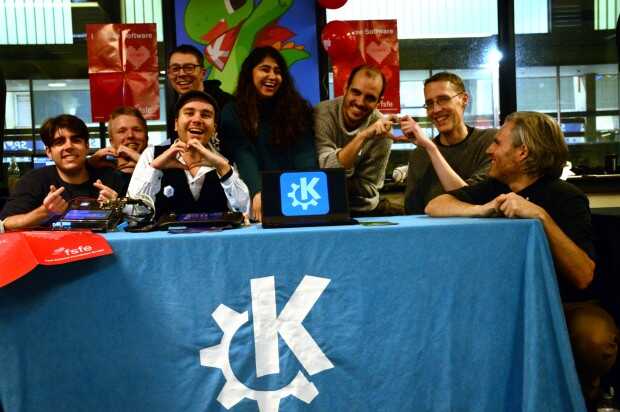
La Comunidad KDE ha publicado hoy que ha lanzado la sexta actualización de Plasma 5.27, una versión que nos ofrecen un gran conjunto de novedades y propuestas que nos acercan a lo que vendrá cuando se realice la transición a Plasma 6. No obstante, en esta versión se han dedicado a introducir la presentación en mosaico de las ventanas, las nuevas pantallas de bienvenida y mejoras notables en Discover, por nombrar solo tres de ellas.
Entre los errores solucionados nos encontramos con:
- Integración con el navegador Plasma: 🍒🍒Download Job: Truncar URLs excesivamente largas.
- KWin: el conmutador de tareas que implique Mayús+tab (tecla de retroceso) no funciona de forma continua.
- Powerdevil: Retroiluminación Kbd, arreglado el problema de la doble restauración de brillo en LidOpen-resume
Más información: KDE
Las novedades de Plasma 5.27
Ya hablé largo y tendido de las novedades de Plasma 5.27, no obstante aqui os dejo unas pinceladas de las más importantes:
- Nuevas pantallas de bienvenida.
- Mejoras en las preferencias de permisos para Flatpak.
- Mejoras en la refactorización multimonitor.
- Sistema de mosaicos de KWin.
- Añadido el Calendario Hebreo en el calendario emergente del reloj digital.
- Mejoras en Discover.
- Más funcionalidades para Krunner.
- Mejoras en los plasmoides.
La entrada Lanzada la undécima actualización de 5.27 edición ‘KDE 💖 Free Software’ se publicó primero en KDE Blog.
GNOME 46 Wallpapers
GNOME 46 is on its final stretch to be released. It's been a custom to blog a little about the wallpaper selection, which is a big part of GNOME's visual identity.

The first notable change in 46 is that we're finally delivering on the promise of bringing you a next generation image file format. Lots of performance issues had to be addressed first, apologies for the delay. While efficiency and filesize requirements might not be too high on the list outside of the geek crowd, there is one aspect of JPEG-XL that I am very excited about.

JPEG-XL allows the use of client-side synthesized grain. A method pioneered by Netflix/AV1 I believe. Compression algorithms struggle with high frequency detail, which often introduce visible artifacts. JPEG-XL allows to decouple the grain component from the actual image data. This allows for significantly more efficient compression of images that inherently require noise, such as those in gnome-backgrounds — smooth gradients that would otherwise be susceptible to color banding. To achieve similar fidelity of the grain if it were baked in, a classic format like JPEG would need an order of magnitude larger filesize. Having the grain in the format itself also allows to skip various techniques in the rendering or compositing in the 3D software.

Instead of compressing a noisy image, JPEG-XL allows to generate film-like grain as part of the decoding process. This synthesized grain combats issues like color banding while allowing a much more efficient compression on the original image data.

In essence, client-side grain in JPEG-XL isn't simply added noise, but a sophisticated strategy for achieving both efficient compression and visually pleasing image quality, especially for images that would otherwise require inherent noise.

The fresh batch of wallpapers includes evolutions of the existing assets as well as new additions. A few material/shape studies have been added as well as simple 2D shape textures. Thanks to the lovely JPEG-XL grain described earlier, it's not just Inkscape and Blender that were used.
I hope you're going to pick at least one of the wallpapers when GNOME 46 releases later next week as your favorite. Let me know on fediverse!
GNOME 46 Wallpapers
GNOME 46 is on its final stretch to be released. It’s been a custom to blog a little about the wallpaper selection, which is a big part of GNOME’s visual identity.

The first notable change in 46 is that we’re finally delivering on the promise of bringing you a next generation image file format. Lots of performance issues had to be addressed first, apologies for the delay. While efficiency and filesize requirements might not be too high on the list outside of the geek crowd, there is one aspect of JPEG-XL that I am very excited about.

JPEG-XL allows the use of client-side synthesized grain. A method pioneered by Netflix/AV1 I believe. Compression algorithms struggle with high frequency detail, which often introduce visible artifacts. JPEG-XL allows to decouple the grain component from the actual image data. This allows for significantly more efficient compression of images that inherently require noise, such as those in gnome-backgrounds — smooth gradients that would otherwise be susceptible to color banding. To achieve similar fidelity of the grain if it were baked in, a classic format like JPEG would need an order of magnitude larger filesize. Having the grain in the format itself also allows to skip various techniques in the rendering or compositing in the 3D software.

Instead of compressing a noisy image, JPEG-XL allows to generate film-like grain as part of the decoding process. This synthesized grain combats issues like color banding while allowing a much more efficient compression on the original image data.

In essence, client-side grain in JPEG-XL isn’t simply added noise, but a sophisticated strategy for achieving both efficient compression and visually pleasing image quality, especially for images that would otherwise require inherent noise.

The fresh batch of wallpapers includes evolutions of the existing assets as well as new additions. A few material/shape studies have been added as well as simple 2D shape textures. Thanks to the lovely JPEG-XL grain described earlier, it’s not just Inkscape and Blender that were used.
I hope you’re going to pick at least one of the wallpapers when GNOME 46 releases later next week as your favorite. Let me know on fediverse!
Primera actualización de Plasma 6
Me alegra compartir con todos vosotros la primera actualización de Plasma 6, iniciando así una serie de revisión de software que le dotará de más estabilidad, mejores traducción y resolución de errores. Estas actualizaciones son 100% recomendables y casi obligatorias para cualquier usuario ya que lo único que hacen es mejorar la versión sin comprometer sus funcionalidades.
Primera actualización de Plasma 6
No existe Software creado por la humanidad que no contenga errores. Es un hecho incontestable y cuya única solución son las actualizaciones. Es por ello que en el ciclo de desarrollo del software creado por la Comunidad KDE se incluye siempre las fechas de las mismas siguiendo una especie de serie de Fibonacci.
La Comunidad KDE ha publicado se se ha lanzado la primera actualización de Plasma 6, una versión que ha supuesto una salto muy importante en cuanto a tecnología y que, francamente, ha salido bastante bien ya, por ejemplo, KDE Neon se actualizó pasadas unas horas del lanzamiento, con problemas menores y completamente funcional (de hecho, estoy trabajando desde el jueves 29 con él en todos mis equipos).
Creo es un buen momento para reflexionar: yo tardé casi un año en dar el salto a KDE 4 a Plasma 5, ya que es cuando pensé acertadamente que ya se ofrecía algo bastante estable para el trabajo diario. Para dar el salto de KDE 3 a KDE 4 fueron varios años, así que estamos ante un hito que marca un pico de calidad en el mundo del Software Libre.
Para dar el salto de Plasma 5 a Plasma 6 han bastado 5 horas. ¡Y lo mejor está por llegar! Y es que en realidad, los desarrolladores de KDE simplemente se han centrado en portar Plasma 5 a Plasma 6 y todas las novedades de la nueva tecnología está todavía en desarrollo y se irá implementando poco a poco.
Así que me congratula en presentar que ayer martes 5 de marzo de 2024, una semana después de liberar el código la Comunidad KDE presenta la primera actualización de errores entre los que destacan:
- KWin: Arreglado que el puntero confinado pueda escapar de la pantalla.
- Arreglado la desaparición del puntero al alejarse (esto explica porqué no lo veía!!!!)
- La opción «Añadir widgets» del menú contextual hacía que el panel en modo «Ocultar automáticamente» se ocultara, lo que hacía imposible añadir widgets al panel sin entrar en el modo Edición de otra forma.
Más información: KDE
Las novedades básicas del Plasma 6
Han sido dias tan frenéticos que no he podido hacer todavía la entrada detallando las novedades de Plasma 6 o de KDE Gears, pero he aquí una pincelada de las mismas .
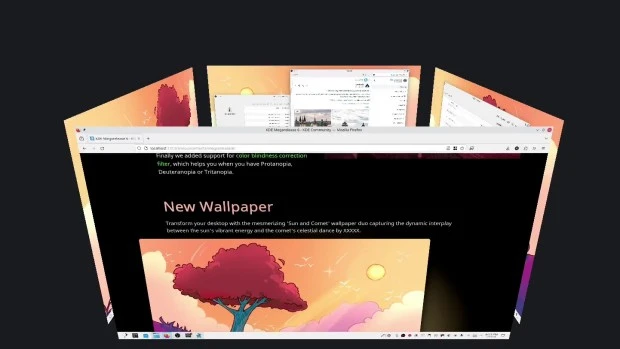
- Nuevo efecto de vista general: se han combinado los efectos de Vista general y Cuadrícula de escritorios en uno, con grandes mejoras en los gestos del panel táctil.
- Color mejorado: Plasma en Wayland ya tiene compatibilidad parcial con alto rango dinámico (HDR).
- Nuevo fondo de escritorio: Árbol escarlata, creado por axo1otl.
- Panel flotante: en Plasma 6, el panel flota de forma predeterminada. Se puede cambiar, por supuesto.
- ¡Nuevos valores predeterminados!
- Brisa refrescada: se ha rediseñado el tema Brisa para que presente un aspecto más moderno, con menos marcos y con un espaciado más consistente.
- Preferencias reorganizadas: se ha mejorado la aplicación de Preferencias para que resulte más amigable y tenga menos páginas anidadas.
- ¡El cubo ha vuelto!
- Mejoras en la búsqueda de Plasma: ahora personalizar el orden de los resultados de la búsqueda y es mucho más rápida.
- Mejoras en Plasma Mobile.
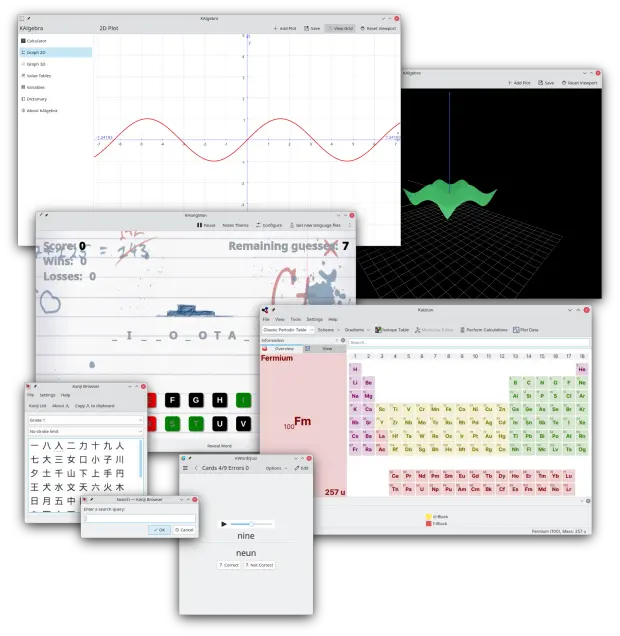
- Cambios en todas las aplicaciones de KDE Gear: Kontact, Kleopatras. Itineray, KDE Edu, KDEnlive, Dolphin, Spectacle, etc.
Y esto es una brevísima pincelada… Creo que ahora tengo temas de para el blog de sobra hasta 2025.
La entrada Primera actualización de Plasma 6 se publicó primero en KDE Blog.
