
 Member
 Futureboy
3D Printed Whiteboard Marker Clips

KDE6 release: D-Bus and Polkit Galore
Table of Contents
- Introduction
- The KDE KAuth Framework
- Legacy fontinst D-Bus service
- Problematic File System Operations in sddm-kcm6
- KWalletManager: Pseudo-Authentication to Protect the Configuration
- Improvements in DrKonqi
- Conclusion
- References
- Change History
Introduction
The SUSE security team restricts the installation of system wide D-Bus services and Polkit policies in openSUSE distributions and derived SUSE products. Any package that ships these features needs to be reviewed by us first, before it can be added to production repositories.
In November, openSUSE KDE packagers approached us with a long list of KDE components for an upcoming KDE6 major release. The packages needed adjusted D-Bus and Polkit whitelistings due to renamed interfaces or other breaking changes. Looking into this many components at once was a unique experience that also led to new insights, which will be discussed in this article.
For readers that are new to D-Bus and/or Polkit, the following sections offer a summary to get a better idea about these systems.
D-Bus Overview
The D-Bus message bus system provides a defined way to implement remote procedure calls in applications. On Linux it is usually only used locally, although the D-Bus specification also allows for operation over the network.
A D-Bus service is a program that provides one or more interfaces that can be invoked by clients to obtain information, trigger operations and so on. The D-Bus specification defines a set of data types that can be passed to and returned from D-Bus method calls.
D-Bus applications reach each other by connecting to a shared bus of which
there exist two predefined types: the system bus and the session bus. Services
that perform system wide tasks connect to the system bus. These services often
run as root or as dedicated service users. A session bus, on the other hand,
is created for each (graphical) user session, and only applications running
with the privileges of the logged-in user can connect to it. No special
privileges are involved with the session bus. Its main purpose is to provide a
defined API for session wide services, like a desktop search engine.
Polkit Overview
Polkit is an authorization framework that allows (privileged)
applications to decide whether a user in the system is allowed to perform a
specific action. These actions allow for a more fine-grained authorization
model when compared to a plain root vs. non-root decision. Examples could be
an action to enable a Bluetooth device in the system, or to mount a removable
storage device.
A Polkit policy configuration file declares actions used by a certain application domain and the authentication requirements for it. When an actor in the system asks an application that uses Polkit to perform an action, then this application in turns asks the system-wide Polkit daemon whether this actor is privileged to do so. Depending on the context this can, for example, lead to a password prompt being displayed in a user’s graphical session to authorize the operation.
Polkit is independent of D-Bus, but the combination of both is a very common
pattern. Other manners in which Polkit can be used is in setuid-root binaries
or via the sudo-like pkexec utility.
Security Relevance of D-Bus and Polkit
The typical setup of D-Bus and Polkit is as follows: a system daemon is running with full root privileges and registers a service on the D-Bus system bus. An unprivileged user that is logged into a graphical session asks the daemon via D-Bus to perform an activity. This triggers the Polkit authentication process to determine whether the caller is allowed to do this.
Security-wise, there is quite a number of things that can go wrong in this scenario. The following sections investigate typical issues that can arise.
Covering all Privileged Code Paths
The system daemon actually needs to implement the Polkit authorization check properly for every sensitive D-Bus method it offers. Polkit is not something that is magically turned on, but the privileged component needs to identify all the code paths that need to be protected by it.
Some applications deliberately offer a mix of unauthenticated and authenticated D-Bus methods. In these cases it can sometimes be hard to keep all the possible side effects and outcomes in mind, which can lead to security issues when something is overlooked.
Acting as root on Behalf of Unprivileged Users
The privileged D-Bus service component often needs to act on behalf of an
unprivileged client. An example could be mounting a file system in the
caller’s home directory, or processing a file provided by the caller. This is
a classic crossing of privilege boundaries. Developers of such services are
often not aware of the problems that can arise, especially when accessing user
controlled paths as root.
Similarly, if a privileged D-Bus service stores data from multiple users in a shared system directory, then information leaks can occur by storing files with too open permissions, or by mixing up different user contexts.
The Integration of Polkit can be Hard
Polkit has its own nomenclature and design principles that one needs to get into, to fully understand it. Apart from this, even if Polkit is correctly asked for permissions, the privileged service still needs to correctly evaluate the result. A typical mistake that can happen in this area is when a privileged service does ask Polkit correctly for authentication, but the result is simply ignored and the privileged operation continues regardless.
Everybody can Access the D-Bus System Bus
By default, all local users can access the D-Bus system bus and talk to most of the privileged services. Individual D-Bus service configuration files can limit the scope of users that are allowed to invoke a D-Bus service’s methods. This setup is the exception, however, as the majority of D-Bus services is accessible to all users.
This increases the attack surface notably, as not only an interactive user
account that is running an authorized local session can talk to these
services, but also e.g. the nobody user account. These days, many system
daemons running on the network only have limited privileges or even use
dynamically allocated users provided by systemd. If one of these network
daemons with low privileges can be exploited, then weaknesses in privileged
D-Bus system services can offer the possibility to further escalate
privileges.
This is one of the reasons why, as part of a defense-in-depth strategy, the SUSE security team looks closely also into these components that aren’t directly attached to the network.
The KDE KAuth Framework
The KDE desktop environment is a heavy user of D-Bus services both on the
system and on the session bus. It adds further abstractions on top of D-Bus
and on top of Polkit. The base component for this is the KAuth
framework. KAuth generates D-Bus configuration files and some
glue code to integrate D-Bus and Polkit into KDE applications. In KAuth, a
privileged D-Bus service running as root is called a KAuth helper.
We performed a dedicated follow-up review of it for the KDE6 release. A former member of the SUSE security team had found a major security flaw in this glue code in 2017. Since the audit at the time was comprehensive, we did not expect to find any major issues in the core authorization logic anymore, and in fact we didn’t.
Problematic use of QVariantMap Serialized Data
A peculiarity of KAuth is that, instead of the native D-Bus data types, only
binary blob objects are transferred on D-Bus level, that are based on the
QVariantMap data type offered by the Qt framework.
During the review we noticed that the implementation of this feature in KAuth is a bit shaky, since potentially attacker controlled data is processed during Qt data type deserialization, before the actual D-Bus function callbacks are even invoked. In 2019, the upstream authors had already identified this problem, that can lead to side effects like image data being deserialized, where actually only strings and integers are expected. The KAuth code currently meddles with internal Qt framework state to prevent such side effects.
Problems with generated D-Bus drop-in Configuration Snippets
Only late in our review efforts we realized that a change introduced with the KDE6 release of KAuth leads to overly open D-Bus configuration files being generated. Per-package configuration snippets for D-Bus are installed in “/usr/share/dbus-1/system.d”. These configuration files serve as a kind of firewall configuration for the D-Bus system bus. They define who is allowed to register a D-Bus service for a certain interface and also who is allowed to talk to it.
Here is a proper example taken from systemd-network’s “org.freedesktop.network1.conf”:
<busconfig>
        <policy user="systemd-network">
                <allow own="org.freedesktop.network1"/>
        </policy>

        <policy context="default">
                <allow send_destination="org.freedesktop.network1"/>
                <allow receive_sender="org.freedesktop.network1"/>
        </policy>
</busconfig>
This allows only the dedicated service user “systemd-network” to register the D-Bus interface “org.freedesktop.network1”, while any other users in the system may talk to it.
The KAuth KDE6 release candidate generated this configuration instead:
<policy context="default">
  <allow send_destination="*"/>
</policy>
The ramifications of this can easily be overlooked: this states that everybody is allowed to talk to everything on the D-Bus system bus. It also affects other D-Bus services that should not be influenced by the drop-in configuration snippet shipped for individual KDE packages. While most D-Bus services running on the system bus are “public”, i.e. everybody is allowed to talk to them, some services follow a different security model in which only dedicated users are allowed to interact with the service. We identified ratbagd as one such D-Bus service that would be negatively affected by this defect in KAuth. This shows that the security posture of unrelated packages is at stake. Luckily we identified this issue in time before the KDE6 release was finished, and the issue was fixed before it reached production systems. We also checked any non-KDE D-Bus configuration files we ship on openSUSE Tumbleweed for the same issue, but luckily found no further files containing this issue.
These side effects are also in some sense shortcomings of the D-Bus configuration scheme, since developers of a specific D-Bus service don’t expect that their configuration file has a global influence. A similar issue exists for logrotate where settings in drop-in configuration files in “/etc/logrotate.d” can influence global settings that affect the complete system. This can lead to hard to find bugs in both cases, D-Bus and logrotate, because the outcome also depends on the order in which the configuration file snippets are parsed.
Legacy fontinst D-Bus service
Most of the KDE components that we have been requested to look into for the KDE6 release had already been reviewed by us in recent years. A few of them are legacy packages though, since they were already in stock when we introduced packaging restrictions for D-Bus and Polkit. At the time we didn’t have enough resources to check all of them in one go.
One such legacy component we encountered while looking into the KDE6 release was the “org.kde.fontinst.service” which is part of the “plasma6-workspace” package. What we found there is a single D-Bus method “org.kde.fontinst.manage” that actually multiplexes a whole range of sub-methods, based on a “method” string input parameter. This is bad design since it undermines the D-Bus protocol, and thus makes the individual method calls less visible and less manageable. This is reinforced by the fact that also only a single Polkit action is used to authenticate all the sub-methods. This way there is only an all-or-nothing setting for the various code paths that are hidden behind this single D-Bus method call.
The available sub-methods in this service nearly make up a generic file system I/O layer, especially when we remember that this service is running with full root privileges:
- install: this can be used to copy arbitrary file paths to arbitrary locations, the new files end up with mode 0644.
- uninstall: this allows to remove arbitrary file paths, as long as their parent directories have a writable bit set.
- move: this allows to move arbitrary paths complete with new owner uid and group gid to arbitrary new locations.
- toggle: this takes raw XML that also seems to specify font paths that are to be enabled or disabled.
- removeFile: does what is says on the label; another way to remove files.
- configure: saves modified font directories and invokes a small bash script
fontinst_x11that prepares font directories and triggers a font refresh at the X server.
The core business logic of the fontinst service should be managing system wide fonts provided in the system. To achieve this, ideally only the necessary high level logical operations should be offered like: Install a font from provided data, remove a system font by name. Copying, removing and moving arbitrary files is way outside of the scope of what this service is supposed to do.
The single Polkit action “org.kde.fontinst.manage” requires auth_admin_keep
authorization by default i.e. anybody that wants to invoke this method needs
to provide admin credentials. Still, if an admin decides to lower these
requirements, because users should be able to e.g. install new fonts in the
system, then this interface does not only allow that, but also allows to gain
full root privileges by copying arbitrary files around (e.g. by creating a new
“/etc/shadow” file).
This service requires a larger redesign. KDE upstream was not able to come up with that in time for the KDE6 release. We hope that it will still happen though, as the API is in a rather worrying state.
Woes with “unexpected” Polkit Settings
The situation in the fontinst service regarding the auth_admin setting is a
common pattern that we see when reviewing D-Bus services and Polkit actions.
Developers believe that requiring auth_admin authentication for a Polkit
action is enough to justify overly generic APIs or unsafe file system
operations carried out as root. In some cases it might be justifiable to say
that an action should never have weaker authentication requirements than
auth_admin, since it otherwise causes uncontrollable security issues. One
should not forget that Polkit is a configurable authentication framework,
though. There are default settings shipped by applications, but system
integrators and admins are allowed to change these requirements.
The (open)SUSE Linux distributions are the only ones we know of, that offer a defined mechanism for admins to override the Polkit defaults for individual actions via profiles and overrides. This works via the polkit-default-privs package. Our experience with this shows that upstream developers mostly neither consider the security consequences of lowering the Polkit authentication requirements, nor test what happens when the authentication requirements are raised for hardening purposes. Raised authentication requirements lead to additional password prompts, and some applications implement workflows involving Polkit actions that lead to very unfortunate behaviour in such cases.
A common example of this is a package manager like Flatpak, that attempts to
acquire Polkit authentication for a repository refresh action upon login into
a graphical session. The developers only test this with the default yes
Polkit authentication requirement, which makes this authentication process
invisible to users. When raising this to auth_admin, then suddenly a password
prompt pops up during login and users are confused and annoyed. There are ways
to deal with this: for example, services using Polkit can ask it whether an
action can be authorized without user interaction. If this is not the case,
then a package manager could choose not to refresh repositories just now.
Also multiple actions can be authenticated in groups using the
“org.freedesktop.policykit.imply” annotation to avoid multiple password
prompts coming up for a single workflow.
It is understandable that the configuration management of many different Polkit configurations is hard to test for upstream developers. Increased awareness of the general problems in this area would help to avoid these issues in the first place. It seems that developers just want to “cram in” authentication into their software, though, and stop thinking about it once they’re done. Granted, Polkit and D-Bus are far from simple when you’re new to them. Still, every authentication procedure should be given careful thought. The take home lessons for developers implementing Polkit should be:
- Polkit is a configurable authentication framework and the settings intended by developers might not be what actually happens during runtime.
- When modelling Polkit actions, one should take advantage of the possibility to make them fine grained, to allow users to fine tune the requirements for individual activities.
- Each Polkit authorization that happens in an application should be given some thought in both directions: what happens if the authentication requirement is lowered and what happens if it is raised?
- Another aspect that hasn’t been discussed yet is the topic of authentication messages shown to the user. They should clearly state what exactly is being authorized in a form that non-technical users can understand. Polkit also supports placeholders in messages to fill in runtime information, like a file that is being operated on. Sadly, this feature is used very rarely in practice.
Problematic File System Operations in sddm-kcm6
This component is a KDE Configuration Module (KCM) for the SDDM display manager. It contains a D-Bus service “org.kde.kcontrol.kcmsddm.conf”. We reviewed it already in the past and did so again for the KDE6 release. The service has two major problems, discussed in the following sections.
Unsafe Operations on File System Paths Provided by the Unprivileged D-Bus Client
Multiple of the D-Bus methods provided by the sddm-kcm6 KAuth helper expect
file system paths as input parameters. Such passing of paths to privileged
D-Bus services is another problematic pattern that is often encountered. In
the openConfig() function, the provided path to a SDDM
theme configuration file will be created by the helper, if
necessary. If it already exists, then a chmod() of the path to mode 0600
is performed, which is also following symlinks. To see how this can be
problematic, consider what happens if “/etc/shadow” is passed as theme
configuration path.
Operating as root, on files that are under control of an unprivileged user, is
notoriously hard to get right, and requires careful use of lower level system
calls. Often developers aren’t even aware of this problem. KDE components have
had a number of problems in this area in the past. We believe this has
deeper roots, namely in the design of the Qt framework’s file system API, which
on the one hand doesn’t allow full control over the lower level system calls
(owed to the fact that Qt is also a platform abstraction layer), and on the
other hand does not document exactly what can be expected of its APIs
in this regard. Furthermore the Qt framework itself isn’t aware of the fact
that it runs as root, possibly operating on files owned by other users. The Qt
libraries are designed for implementing feature rich GUI applications and
don’t really consider handling untrusted input, operating with raised
privileges and crossing privilege boundaries.
An elegant way to avoid the path access issue in the first place is by not passing file paths, but already opened file descriptors over D-Bus. This is possible since D-Bus uses UNIX domain sockets internally, and they can be used to pass file descriptors. So instead of passing a string from client to service suggesting “Open this file, trust me, it’s fine”, the client passes a file descriptor, opened using its own low privileges, to the privileged service. With this, many path access issues are gone in an instant. There are cases that still require care, however, for example if recursive file system operations need to be carried out.
Unfortunately the KAuth framework used by KDE shows a limitation in
this area. Since the KAuth helper’s D-Bus API only
transfers binary blobs that result from serializing QVariantMap, there
is currently no possibility to pass an open file descriptor.
Changes in configuration files owned by the sddm service user
The other problem is not found in the D-Bus API, but in the implementation of
the sync() and reset() D-Bus methods. Once any input parameters from the
client are processed, the helper operates in the home directory belonging to
the sddm service user. Here is some condensed code taken from the reset()
and sync() functions:
// from SddmAuthHelper::reset()
QString sddmHomeDirPath = KUser("sddm").homeDir();
QDir sddmConfigLocation(sddmHomeDirPath + QStringLiteral("/.config"));
QFile::remove(sddmConfigLocation.path() + QStringLiteral("/kdeglobals"));
QFile::remove(sddmConfigLocation.path() + QStringLiteral("/plasmarc"));
QDir(sddmHomeDirPath + "/.local/share/kscreen/").removeRecursively();
// from SddmAuthHelper::sync()
QString sddmHomeDirPath = KUser("sddm").homeDir();

QDir sddmCacheLocation(sddmHomeDirPath + QStringLiteral("/.cache"));
if (sddmCacheLocation.exists()) {
    sddmCacheLocation.removeRecursively();
}

QDir sddmConfigLocation(sddmHomeDirPath + QStringLiteral("/.config"));

if (!args[QStringLiteral("kscreen-config")].isNull()) {
    const QString destinationDir = sddmHomeDirPath + "/.local/share/kscreen/";
    QSet<QString> done;
    copyDirectoryRecursively(args[QStringLiteral("kscreen-config")].toString(), destinationDir, done);
}
A compromised sddm service user can exploit these operations to its advantage:
- it can cause a denial-of-service by e.g. placing directory symlinks
to have the D-Bus service operate in completely different file system
locations. This attack is limited though, since the final path components
used in removal calls need to match, like
kscreen. - it can cause the “kscreen-config” to be copied to arbitrary locations by placing a symlink in “~/.local/share/kscreen”.
To make these operations safe, it would be best to temporarily drop privileges
to the sddm user.
Going Forward from Here
KDE upstream was not able to come up with a redesign of this D-Bus service in
time for the KDE6 release. In this instance, the unsafe operations in the sddm
user’s home directory would formally even justify assignment of a CVE. Since
all the D-Bus methods are guarded by auth_admin Polkit authentication
requirements, the issues can at least not be exploited in default installations.
KWalletManager: Pseudo-Authentication to Protect the Configuration
KWalletManager is KDE’s password manager. It features a GUI and, as one would
expect, runs in the context of the graphical user session of a logged-in user.
It ships a “savehelper” service that offers a single D-Bus method
“org.kde.kcontrol.kcmkwallet5.save”. So what does a service helper running as
root need to save here? Let’s look at the implementation:
ActionReply SaveHelper::save(const QVariantMap &args)
{
    Q_UNUSED(args);
    const qint64 uid = QCoreApplication::applicationPid();
    qDebug() << "executing uid=" << uid;
    return ActionReply::SuccessReply();
}
Turning this piece of code carefully to all sides will lead to the insight
that it does nothing. We asked upstream to remove
this unused helper, but we’ve been told that this is not a mistake, but on
purpose. They want to protect against the following attack scenario: a user
leaves their computer alone and unlocked, a random person gets by and, of all
things, wants to change KWalletManager’s settings. To prevent this from
happening, the GUI is asking the service helper to authenticate the action
requiring Polkit’s auth_self authorization, and doesn’t continue if this
fails.
This cannot stop a real attacker, though, since the KWalletManager
configuration is stored in the unprivileged user’s home directory and can
still be edited directly, or using a modified version of KWalletManager that
simply does not ask for this authentication. Not to talk about all the other
things that an attacker could do in such a situation. So where should one
draw a line to stop? We don’t even see this as a hardening, it is fake security
and confusing. If such a fake authentication is really needed then at least a
way should be found to implement it, without requiring an authentication helper
running as root that does nothing. Upstream seems to disagree, but we asked our
packagers to remove this logic from our packaging via patches.
Improvements in DrKonqi
DrKonqi is KDE’s crash handling utility. These days, it interacts with
systemd-coredump to access core dumps of applications. Our previous 2022
review of it led to a finding in
systemd-coredump itself. In the meantime DrKonqi
obtained additional D-Bus service logic to copy a private core dump (e.g. from
a process that was running as root) into the session of an unprivileged user
for analysis.
The implementation of this is unusual for a KDE component
in so far as it doesn’t rely on KAuth: it directly uses the Qt framework’s D-Bus
and Polkit facilities. The likely reason for this is the shortcoming of KAuth
with regard to passing file descriptors, as discussed above. The single
excavateFromToDirFd() D-Bus method actually accepts a file descriptor.
It is supposed to be a file descriptor referring to a directory under control
of the unprivileged caller, where the selected core dump is to be copied to.
Even though this means that DrKonqi cannot benefit from the common framework
features of KAuth, it is security-wise a good example of how to improve the
robustness of a D-Bus service running as root and operating in the file
system.
Unfortunately, even with file descriptors issues can arise, as this example
also shows. The permission handling for directories is different from regular
files. Directories generally can only be opened in read-only mode
(O_RDONLY). Write permissions are only checked at the time a write attempt
is made, like when calling renameat() in the case of the DrKonqi helper.
This is too late. The unprivileged caller can open just any directory it has
read access for and pass it to the D-Bus service. The D-Bus service running as
root will now happily create new files in the directory even if the caller
doesn’t have any write permissions for it.
There is a constructive discussion discussion going on with upstream that led to various improvements in detail in this D-Bus service that are about to be merged. The issue with the dir file descriptor was only found late in the process, but hopefully a solution for the problem will be found soon.
Conclusion
D-Bus and Polkit have their share of complexities that need to be understood and managed well. This is important as a defense in depth measure even beyond the local security of a Linux system. Putting additional layers on top, like in the KAuth framework, can cause long-term problems, as can be seen from the lack of support for passing file descriptors with the current KAuth API.
It was helpful that our KDE packagers and upstream approached us early about the KDE6 release candidate and the changes it introduces. In some areas, like the badly generated D-Bus KAuth configuration files, upstream quickly reacted and applied fixes, thus avoiding that the problematic code was ever released in a production version of KDE6. In other areas, like the legacy fontinst D-Bus service or the sddm-kcm D-Bus service, the complexity of fixing API issues has obviously been too high for upstream to come up with something better in time. We decided not to ask for CVE assignments for the findings in these services, since the attack vectors are not reachable to regular users in the default Polkit configuration.
By now most KDE6 packages should have reached openSUSE Tumbleweed and can be used in production.
References
Change History
| 2024-04-05 | Minor spelling fixes; inserted an introductory paragraph to Unsafe Operations in sddm-kcm6. |
Minetest, el juego juego libre basado en vóxeles – Juegos Linux (VIII)
Nueva entrada de la serie de grandes juegos libres enelq ue ya he tocado muchos de los géneros: estrategia por turnos (The Battle for Wesnoth, Hedgewars), velocidad (Speed Dreams, SuperTuxKart), MMORPG (Ryzom), plataformas (SuperTux) y FPS (Xonotic). Hoy toca algo diferente, se trata de Minetest, el juego juego libre basado en vóxeles que es la versión libre de Minecraft que lo supera en muchos aspectos.
Minetest, el juego juego libre basado en vóxeles – Juegos Linux (VIII)
Por alguna razón que me cuesta entender a mi hijo le encanta este juego, y eso que me he tenido que pegar con él ya que me pedía el Minecraft, una demostración del poder que tiene la publicidad de youtube. Supongo que será porque une la creatividad de Lego eliminando los límites físicos de las piezas de plástico al tiempo que le añade efectos como explosiones, sonido e interacción con otros personajes (mi hijo juega offline)
Y es que Minetest, la versión libre del juego anteriormente nombrado y protagonista de la entrada de este mes, no solo te permite construir tu mundo de voxels con cientos de posibilidades sino que además te lo permite hacer sin ningún tipo de limitación y con decenas de mods que le dan una infinita variedad de posibilidades.
En palabras de sus desarrolladores, en realidad Minestest es..
un motor de juegos voxel de código abierto. Juega a uno de nuestros muchos juegos, mod un juego a su gusto, hacer su propio juego, o jugar en un servidor multijugador.
En otras palabras, en realidad Minetest no es un «juego» propiamente dicho sino que simplemente es un motor que crea un mundo con una serie de reglas, que al ser modificadas se puede convertir en un videojuego no lineal, en un sandbox, un videojuego de aventura o videojuego de supervivencia, según el propio jugador elija.
Según la Wikipedia el juego fue desarrollado en 2010 bajo la dirección de Perttu Ahola (también conocido como «celeron55») y, desde entonces, con la ayuda de una creciente comunidad de desarrolladores ha ido creciendo en todos los sentidos.
Por defecto vienen tan solo dos juegos pero gracias a la creciente comunidad hay gran cantidad de mods y juegos que el jugador puede descargar, tales como MineClone 2 (basado en la experiencia de Minecraft), Crafter (basado en la experiencia de Minecraft Beta 1.2 – Beta 1.5) , Lord of the Test, The Legend of Minetest, rpgtest, Minetest Saturn, entre muchos otros.
El hecho de que Minestest sea libre y sea tan adictivo para los más pequeños es ideal para que sea utilizado en el mundo educativo, y prueba de ello es que en la página web podéis encontrar una sección llamada «Minestest para Educación«
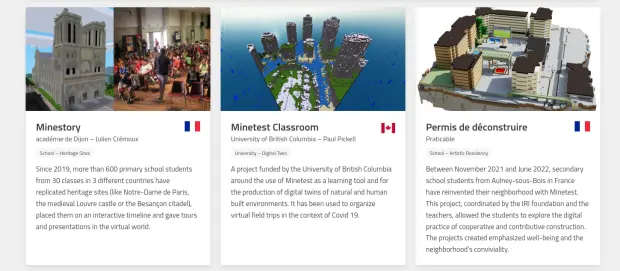
Minestest está en desarrollo continuo, siendo su última versión la Minetest 5.8.0 que fue lanzado a finales del 2023. Utiliza una licencia LGPL 2.1+.
Las características de Minestest
Minestest ofrece las siguientes características para jugadores, extraídas de la página oficial:
- Elija entre varios modos de juegos:. Podrás sobrevivir en un entorno hostil, construir de forma creativa o luchar contra otros jugadores. Sólo tienes que descargar un juego o conectarte a un servidor.
- Mapas enormes con 62.000 × 62.000 × 62.000 bloques, no te quedarás sin espacio. Puedes minar 31.000 bloques hacia abajo o construir 31.000 bloques hacia arriba.
- Modos Multijugador o Juega solo, en modo local con tus amigos o en línea con decenas de jugadores en un servidor.
- Centenares de paquetes de texturas: ¡Cámbialas!
- Elige entre muchos generadores de mapas rápidos incluidos en el motor, o instala uno como mod.
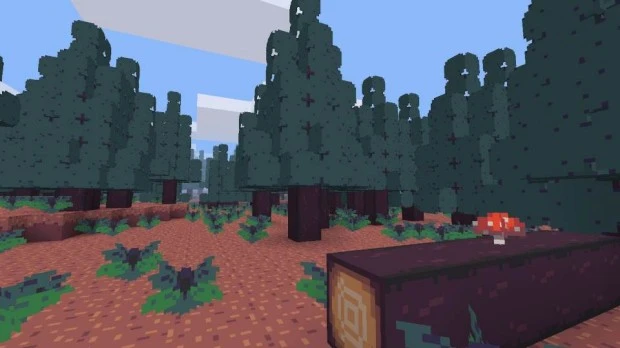
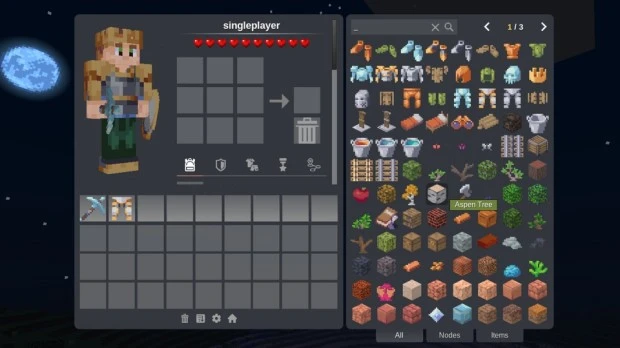
Pero este juego también ofrece interesantes características para los desarrolladores, que tienen en Minestest un fértil campo para crear casi cualquier cosa que se les ocurra:
- Creaa un juego voxel utilizando nuestra API Lua. No tendrás que preocuparte de los complicados renderizados de voxel ni de las redes; en lugar de eso, escribe scripts para añadir objetos y controlar el juego.
- Utiliza la misma API Lua para crear mods para cualquier juego basado en Minetest. Publica tus mods en ContentDB, y contribuye a los mods de otros.
- Gran colección de mods existentes con más de 1100 mods de código abierto en ContentDB, listos para ser usados, adaptados o aprendidos.
- Comunidad amigable ya que puedes encontrar ayuda con cualquier problema en nuestra comunidad.
- El motor es de código abierto y se desarrolla de forma transparente. Envía una incidencia para cualquier cosa que eches en falta, u obtén el código fuente y profundiza en él tú mismo.
Mods, juegos y texturas casi infinitas para Minetest
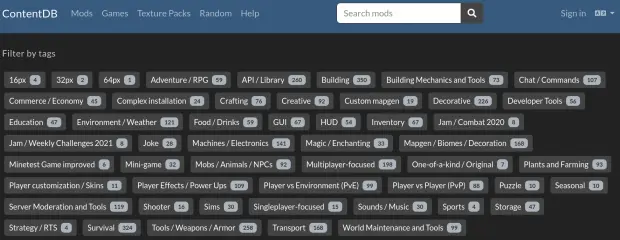
Hay que tener en cuenta que las gandes posibilidades de Minestest y la gran Comunidad que se ha generadoa su alrededor ha generados una ingente cantidad modificadores de juegos (Mods), juegos creados utilizando el motos y texturas para dar otro aspecto o poder crear otro tipo de mundos.
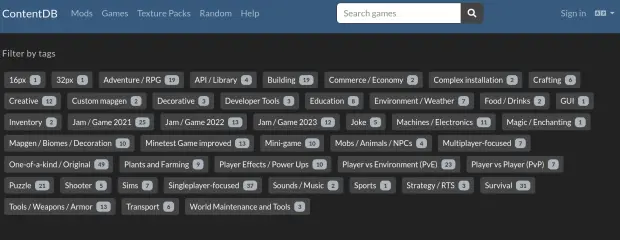
Os aconsejo visitar la sección de Mods de su página web para tener una visión de sus enormes posibilidades. Para que os hagáis una idea os dejo una captura con las etiquetas disponibles en la sección de Mods y la de Juegos.
¿Cómo conseguir Minestest?
Como está siendo habitual, estos juegos libres los podemos encontrar en casi todos los sistemas operativos disponibles. No hay más que visitar la página de descargas para ver que puedes jugar a Minestest en casi todas las distribuciones GNU/Linux, Windows, MacOS, FreeBSD, Android (está en FDroid, Google Play o bajar el apk) o conseguir el código fuente.

¿Puedo participar en su desarrollo?
Evidentemente la respuesta es que si. Cualquier proyecto libre necesita ayuda para su desarrollo bien sea programando, diseñando, organizando, etc. Además, siempre puede ayudar donando para los temas económicos como mantenimiento de servidores y, porqué no decirlo, para intentar que el juego tenga desarrolladores a tiempo completo.
En el caso de Minetest la información para colaboradores, artistas y desarrolladores se encuentra en la sección de «Get Involved» de su páagina web donde además de ver las formas de comunicación con la Comunidad te explica la forma como se desarrolla el «juego»
Además, para facilitar la participación han creado una serie de opciones clasificadas en los perfiles arquetípicos:
Para todo el mundo:
- Informe de errores y solicite funciones.
- Dar soporte en los foros y en el IRC.
- Ayuda a traducir Minetest usando nuestra interfaz web.
- Ayúdanos a revisar y combinar pull requests.
- Dona dinero para pagar la infraestructura y apoya a tus colaboradores favoritos.
Para programadores
- Trabaja en un juego o mod y publícalo en ContentDB. El Minetest Modding Book proporciona una introducción sencilla a la creación de mods y juegos.
- Informa de errores y envía parches en GitHub o IRC.
- Lee la documentación del motor.
- Para realizar buenas primeras tareas, busca la etiqueta Beginner Friendly en los repositorios del motor o del sitio web.
Para artistas
- Forma un equipo y crea un nuevo juego.
- Crea un paquete de texturas.
- Participa en los foros y ayuda con las peticiones de texturas.
La entrada Minetest, el juego juego libre basado en vóxeles – Juegos Linux (VIII) se publicó primero en KDE Blog.
Modo compacto en la barra de pestañas de Firefox
Veamos cómo podemos configurar Firefox para que las pestañas tenga una altura menor haciendo que ocupen un poco menos de espacio en nuestra pantalla

Ando en el proceso de volver a configurar muchas cosas en mi portátil después de haber formateado todo, haber rehecho las particiones de mi disco duro y haber vuelto a instalar openSUSE Tumbleweed desde 0.
El proceso completo creo que me podría dar para varios artículos, veremos cuantos escribo y publico. Me podrán ser de utilidad para mi yo del futuro y puede que también a tí.
De momento, vamos con este pequeño tutorial sobre cómo hacer más finas las pestañas de nuestro navegador o lo que es lo mismo, el modo compacto.
¡Mi portátil tiene una pantalla pequeña, por lo que cada pixel e hace imprescindible!  Así que con el modo compacto ganamos un poco de tamaño para visualizar lo importante. La verdad es que lo tengo de esta manera desde hace tiempo y no recordaba cómo lo había hecho.
De manera predeterminada Firefox ahora nos presenta unas pestañas algo más altas que antes. Supongo que para equipos con pantalla táctil puede ser más cómodo. Pero no es mi caso, por lo que quiero mi tamaño compacto. La solución está en la web de Firefox.
En esencia es seguir estos pasos:
- Escribimos en la barra de direcciones el consabido
about:configy aceptamos los riesgos - Buscamos la opción
browser.compactmode.showque estará a false y la cambiamos a true y cerramos esa pestaña. - Ahora vamos al menú de las tres rayas horizontales de Firefox y seleccionamos Más herramientas → Personalizar barra de herramientas
- En la parte inferior, en la opción Densidad, seleccionamos la opción Compacto (no mantenido) y terminamos dando a Hecho
Con esto tenemos una barra de pestañas en Firefox más compacta. Si no nos gusta volvemos a seleccionar en Densidad la opción de Normal.

Episodio 25 de KDE Express: Eventos, Plasma6 y muchas noticias #akademyes
Me congratula presentaros el episodio 25 de KDE Express, titulado «Eventos, Plasma6 y muchas noticias» donde David Marzal, con el apoyo de Jorge Lama en la post-producción hace un repaso de las novedades del mundo KDE y del Software Libre.
Episodio 25 de KDE Express: Eventos, Plasma6 y muchas noticias
Comenté hace ya bastante tiempo que había nacido KDE Express, un audio con noticias y la actualidad de la Comunidad KDE y del Software Libre con un formato breve (menos de 30 minutos) que complementan los que ya generaba la Comunidad de KDE España, aunque ahora estamos tomándonos un tiempo de respiro por diversos motivos, con sus ya veteranos Vídeo-Podcast que todavía podéis encontrar en Archive.org, Youtube, Ivoox, Spotify y Apple Podcast.
De esta forma, a lo largo ya de más de 20 episodios, promovidos principalmente por David Marzal, nos han contado un poco de todo: noticias, proyectos, eventos, etc., convirtiéndose (al emnos para mi) uno de los podcast favoritos que me suelo encontrar en mi reproductor audio.
En palabras de David el nuevo episodio de KDE Express número 25 los siguientes temas:

Hoy hablamos de esLibre y akademy-es Valencia, KDE en general, varias noticias de Plasma y os dejo bastantes enlaces para seguir la actualidad de este último mes en nuestra comunidad.
Artículo original con los enlaces en https://kdeexpress.gitlab.io/25/
- Akademy-es: El 1 de abril cierra el plazo para enviar propuestas o solicitar asistencia para alojamiento de ponentes. El de patrocinadores continua abierto.
- Estado de situación:
- KDE Gear 24.02.1 : Dolphin recupera el cambio de color de su icono según el escritorio : https://9to5linux.com/kde-gear-24-02-1-improves-dolphin-spectacle-okular-and-other-kde-apps
- KDE Plasma 6.0.3 : Esto ya es tan estable como para ponerselo a mi madre : https://kde.org/announcements/plasma/6/6.0.3/
- Plasma 6:
- https://kde.org/es/announcements/megarelease/6/
- Vídeo en Peertube con un Te lo enseño y te lo cuento: https://fediverse.tv/videos/watch/e97efa42-118a-49fe-a7d1-648953eef5d5
- User-facing changes : https://community.kde.org/Plasma/Plasma_6#User-facing_changes
- https://debugpointnews.com/kde-plasma-6-release/
- En KDE Neon : https://www.muylinux.com/2024/02/28/kde-neon-6/
- En openSUSE Tumbleweed y Kalpa : https://news.opensuse.org/2024/03/22/plasma-arrives-in-os-distributions/
- Tambien en postmarketOS : https://www.muylinux.com/2024/03/06/postmarketos-systemd-gnome-kde-plasma/
- Charla con José Picon en su nuevo podcast (Whihax) sobre privacidad, KDE y Plasma6 : http://www.ivoox.com/entrevista-a-david-marzal-kde-plasma-6-y-audios-mp3_rf_126405406_1.html
- MuyLinux nos habla de como ver el tamaño de los archivos en Dolphin : https://www.muylinux.com/2024/02/19/tamano-archivos-en-dolphin-kde-plasma/
- La nlnet financia la mejora de la accesibiliad en KDE Plasma con Wayland : https://nlnet.nl/project/KDEPlasma-Wayland/
- Nuevo KDE Slimbook : https://www.muylinux.com/2024/02/22/slimbook-excalibur-kde-amd/
- 8 Nuevas actividades en Gcompris (Android, Flatpak…): https://www.muylinux.com/2024/02/22/gcompris-4/
- digiKam 8.3 incorporta un descodificador RAW interno : https://www.kdeblog.com/tercera-actualizacion-de-digikam-8-ahora-con-descodificador-raw-interno.html
- Fedora 40 vendrá pronto con Plasma6 pero sin opción de X11 : https://www.muylinux.com/2024/03/27/fedora-40-beta/
- XRay OS, una especie de ArchLinux «Vanilla» enfocado en juegos con Plasma por defecto : https://ubunlog.com/xray-os/
- Agradecimientos:
- Jorge Lama por su asistencia, consejo, apoyo y edición de audio en este episodio.
Y, como siempre, os dejo aquí el listado de los episodios. ¡Disfrutad!
Por cierto, también podéis encontrarlos en Telegram: https://t.me/KDEexpress
La entrada Episodio 25 de KDE Express: Eventos, Plasma6 y muchas noticias #akademyes se publicó primero en KDE Blog.

NVidia Labs: Assistente de localização temporal em vídeo.

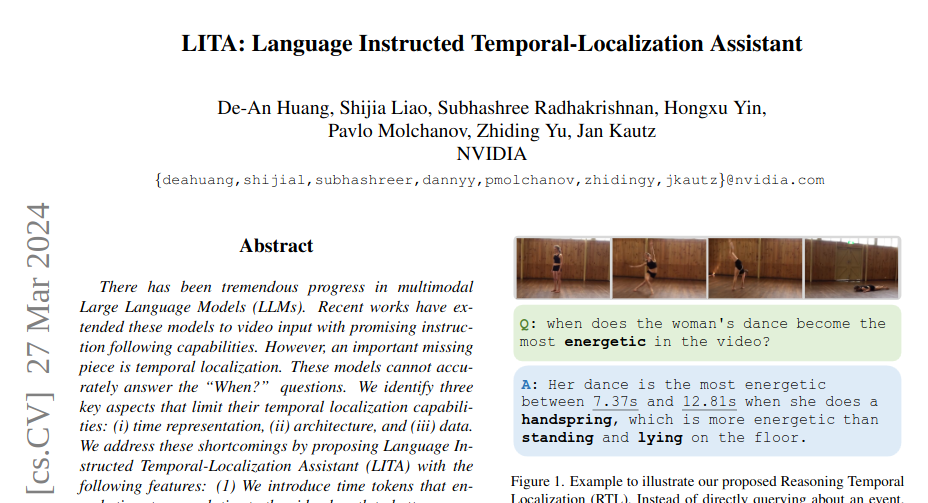
Este post refere-se ao paper publicado dia 17 de Março, um avanço significativo nos Modelos de Linguagem de Grande Escala (LLMs) multimodais, especialmente no que diz respeito ao processamento e interpretação de vídeos. Até recentemente, apesar dos avanços, esses modelos enfrentavam limitações significativas para responder perguntas sobre “Quando?” ocorrem determinados eventos nos vídeos, um problema conhecido como localização temporal. O paper identifica três aspectos principais que limitam a capacidade de localização temporal dos modelos atuais: (i) representação do tempo, (ii) arquitetura do modelo e (iii) dados utilizados.


Para superar esses desafios, é proposto um novo sistema chamado LITA (Language Instructed Temporal-Localization Assistant), que introduz melhorias significativas em cada um desses aspectos:
- Representação do Tempo: O LITA introduz “tokens de tempo” que codificam carimbos de tempo relativos ao comprimento do vídeo. Isso significa que o modelo é capaz de compreender melhor o tempo em vídeos, permitindo uma localização temporal mais precisa.
- Arquitetura: Para capturar informações temporais com uma resolução temporal fina, o LITA utiliza “tokens SlowFast” na sua arquitetura. Isso permite que o modelo processe informações em diferentes velocidades, captando detalhes temporais mais sutis que seriam perdidos em modelos tradicionais.
- Dados para Localização Temporal: O projeto LITA dá ênfase a dados específicos para treinamento e avaliação de localização temporal. Além de utilizar conjuntos de dados de vídeo existentes que incluem carimbos de tempo, o LITA propõe uma nova tarefa chamada Localização Temporal de Raciocínio (RTL, do inglês Reasoning Temporal Localization) e um novo conjunto de dados chamado ActivityNet-RTL. Essa abordagem visa aprimorar a capacidade do modelo de não apenas localizar eventos temporais em vídeos, mas também de raciocinar sobre eles.
O LITA demonstrou um desempenho impressionante nessa tarefa desafiadora, além disso, mostrou-se que a ênfase na localização temporal melhora substancialmente a geração de texto baseada em vídeos em comparação com os LLMs de vídeo existentes, incluindo uma melhoria relativa de 36% na Compreensão Temporal.
Em resumo, o LITA representa um avanço significativo na tecnologia de processamento de vídeo por modelos de linguagem, trazendo melhorias importantes na forma como esses modelos podem entender e interagir com o conteúdo temporal dos vídeos. Essas inovações abrem caminho para aplicações mais precisas e eficientes em áreas como análise de vídeo automatizada, assistência por vídeo e diversas outras aplicações onde a compreensão precisa do tempo é crucial.
Projeto : https://github.com/NVlabs/LITA
Nintendo DS Lite Upper LCD Replacement
#openSUSE Tumbleweed revisión de las semanas 12 y 13 de 2024
Tumbleweed es una distribución de GNU/Linux «Rolling Release» o de actualización contínua. Aquí puedes estar al tanto de las últimas novedades.

openSUSE Tumbleweed es la versión «rolling release» o de actualización continua de la distribución de GNU/Linux openSUSE.
Hagamos un repaso a las novedades que han llegado hasta los repositorios esta semana.
Y recuerda que puedes estar al tanto de las nuevas publicaciones de snapshots en esta web:
El anuncio original lo puedes leer en el blog de Dominique Leuenberger, publicado bajo licencia CC-by-sa, en este este enlace:
- https://dominique.leuenberger.net/blog/2024/03/opensuse-tumbleweed-review-of-the-week-2024-12/
- https://dominique.leuenberger.net/blog/2024/03/opensuse-tumbleweed-review-of-the-week-2024-13/
Semana 12
En openSUSE marzo ha sido el «mes de los escritorios». Los dos principales entornos de escritorio (KDE/Plasma y GNOME) acaban de publicar sus nuevos lanzamientos en las últimas semanas y los usuarios de Tumbleweed tuvimos el placer de recibir ambas actualizaciones durante los últimos días.
Pero pasaron muchas más cosas durante la semana 12. Se publicaron 7 instantáneas completas (0314, 0315, 0317, 0318, 0319, 0320 y 0321)
Que trajeron las siguientes actualizaciones:
- KDE Plasma 6.0.2
- Systemd 255.3 & 255.4
- Linux kernel 6.8.1 & Kernel firmware 20240312
- linux-glibc-devel 6.8 (kernel 6.8 headers)
- strace * iputils2 6.8
- QEmu 8.2.2
- LLVM 18
- SQLite 3.45.2
- GNOME 46.0
- PHP 8.2.17
- Qt 5.15.13
Semana 13
¡Que semana! Todos esperábamos con ansias una semana corta justo antes de las vacaciones de semana santa y su merecido descanso, pero…. Las cosas nunca son como se espera que sean, ¿verdad?
«Sólo» se han publicado 4 instantáneas esta semana (0325, 0326, 0327 y 0328) que han traido actualizaciones muy interesantes:
- Mesa 24.0.3
- KDE Gear 24.02.1
- emacs 20.3
- Shadow 4.15.1
- Mozilla Firefox 124.0.1
- KDE Plasma 6.0.3
- LibreOffice 24.2.2
- TeXLive 2024 Qt 6.6.3 cURL 8.7.1
Y ya preparándose para próximas actualizaciones, podemos encontrar:
- Python 3.9 eliminación de módulos de esta versión.
- Linux kernel 6.8.2
- Linux LTS Kernel 6.6.23
- dbus-broker
- libxml 2.12.x
- GCC 14
Si quieres estar a la última con software actualizado y probado utiliza openSUSE Tumbleweed la opción rolling release de la distribución de GNU/Linux openSUSE.
Mantente actualizado y ya sabes: Have a lot of fun!!
Enlaces de interés
- ¿Por qué deberías utilizar openSUSE Tumbleweed?
- zypper dup en Tumbleweed hace todo el trabajo al actualizar
- ¿Cual es el mejor comando para actualizar Tumbleweed?
- ¿Qué es el test openQA?
- http://download.opensuse.org/tumbleweed/iso/
- https://es.opensuse.org/Portal:Tumbleweed

——————————–
Búsquedas más rápidas y eficientes en Plasma 6
Seguimos con el repaso a las novedades de Plasma 6, que ya está instalado en todos mis equipos y no puedo estar más que satisfecho. Además, de los allegados que les he puesto KDE Neon solo uno con tarjeta Nvidia me ha reportado problemas, y os puedo asegurar que son usuarios nivel básico. Hoy toca hablar de una mejora sustancias, y es que este nueva versión del escritorio nos proporciona búsquedas más rápidas y eficientes, uno de esos cambios que se han realizado en el motor de Plasma 6, dificil de explicar por su alto contenido técnico pero que se materializa en mejoras palpables para el usuario. .
Búsquedas más rápidas y eficientes en Plasma 6
Una de las cosas que me encanta hacer con mi escritorio es demostrar lo flexible en cuanto al manejo de todo tipo de archivos (documentos, imágenes, sonido, etc). Gracias a los filtros de Dolphin, sus opciones de vista (aunque todavía estoy esperando poder dividir más las pestañas), las posibilidades de ordenación, etc. consigo una eficiencia que dudo que se pueda conseguir en otro sistema operativo.
Pero es que además, no solo Dolphin es donde se pueden encontrar archivos, sino que todo el entorno de trabajo se pone a tu disposición para que sea sencillo encontrar lo que buscas… y no solo hablo de ficheros.
Gracias a la barra de Krunner, un pequeña barra de búqueda que aparece pulsando «Alt» + «Barra espaciadora» o «Alt» + «F2», puedes buscar en un segundo TODO lo que hay en tu equipo.
Con la llegada de Plasma 6 este aspecto del escritorio ha mejorado en los siguientes aspectos:
- ahora es posible personalizar el orden de los resultados de la búsqueda.
- también permite ahora convertir entre zonas horarias. Esto es útil si viaja con frecuencia o necesita mantenerse en contacto con sus colegas, amigos y familia de otras partes del mundo. Consulta otras formas en las que KDE puede ayudarte durante sus viajes.
- debido a algunas refactorizaciones y al análisis de rendimiento, la Búsqueda de Plasma es generalmente más rápida y, en particular, buscar aplicaciones y páginas de preferencias es mucho más rápido, a la vez que consume menos recursos de la CPU.
- más de un 200 % más rápida al buscar en los documentos recientes.
- hasta un 60 % más rápida al buscar aplicaciones.
- hasta un 30 % menos de ciclos de CPU
- posibilidad de activar el «Reposo híbrido» desde KRunner.
- búsqueda en codeberg y en PyPi desde KRunner.
- La búsqueda encuentra ahora resultados en el idioma actual del sistema y en inglés.
Más información: KDE
Las novedades básicas del Plasma 6
A l largo de muchos días voy a ir desgranando las novedades de Plasma 6 pero es bueno tener una pequeña lista donde se reúnana las principales:
- Nuevo efecto de vista general: se han combinado los efectos de Vista general y Cuadrícula de escritorios en uno, con grandes mejoras en los gestos del panel táctil.
- Color mejorado: Plasma en Wayland ya tiene compatibilidad parcial con alto rango dinámico (HDR).
- Nuevo fondo de escritorio: Árbol escarlata, creado por axo1otl.
- Panel flotante: en Plasma 6, el panel flota de forma predeterminada. Se puede cambiar, por supuesto.
- ¡Nuevos valores predeterminados!
- Brisa refrescada: se ha rediseñado el tema Brisa para que presente un aspecto más moderno, con menos marcos y con un espaciado más consistente.
- Preferencias reorganizadas: se ha mejorado la aplicación de Preferencias para que resulte más amigable y tenga menos páginas anidadas.
- ¡El cubo ha vuelto!
- Mejoras en la búsqueda de Plasma: ahora personalizar el orden de los resultados de la búsqueda y es mucho más rápida.
- Mejoras en Plasma Mobile.
- Cambios en todas las aplicaciones de KDE Gear: Kontact, Kleopatras. Itineray, KDE Edu, KDEnlive, Dolphin, Spectacle, etc.
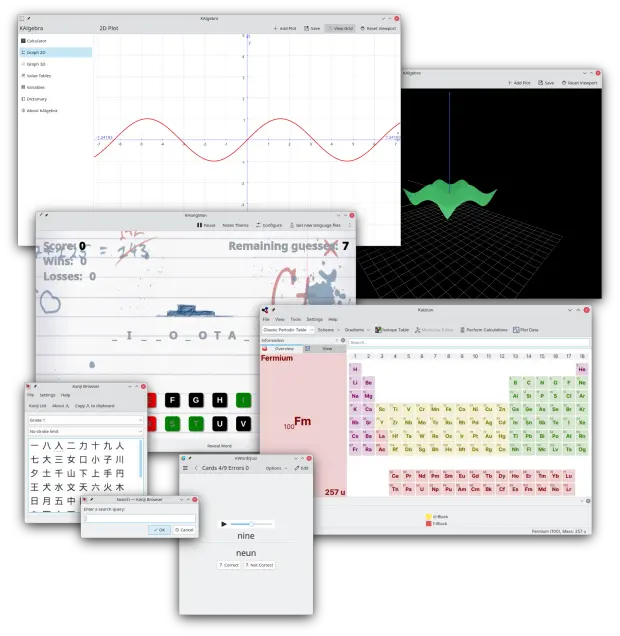
Y esto es una brevísima pincelada… Creo que ahora tengo temas de para el blog de sobra hasta 2025.
La entrada Búsquedas más rápidas y eficientes en Plasma 6 se publicó primero en KDE Blog.
openSUSE Tumbleweed – Review of the week 2024/13
Dear Tumbleweed users and hackers,
What a week! We all were looking forward to a short week just before the Easter weekend and a long break. Things just never are, as they are expected to be, right? You have “only” received 4 snapshots this week (0325, 0326, 0327, and 0328) – and, as happens very rarely, some updates in the update channel (this should indicate to you it is important enough for us to side-track the already fast release process).
The most relevant changes this week were:
- Mesa 24.0.3
- KDE Gear 24.02.1
- emacs 29.3
- Shadow 4.15.1
- Mozilla Firefox 124.0.1
- KDE Plasma 6.0.3
- LibreOffice 24.2.2
- TeXLive 2024
- Qt 6.6.3
- cURL 8.7.1
- xz 5.6.1.revertto5.4 (version 5.4, but with a version tag > 5.6.1 for users that wrongly would not use zypper dup – we wanted to be sure). Please see https://news.opensuse.org/2024/03/29/xz-backdoor/ and upgrade SOON (at least liblzma5, then reboot)
For some regions, there is a long weekend ahead – so expect no / few snapshots until early next week. For snapshot 0328, Ring0 has been completely bootstrapped (as the attack vectors for xz were not fully known, we went the safest route) and for 0329 all of Tumbleweed rebuilt against that new base; Ezpect that snapshot to appear ‘large’ (even though many packages will not be different). The relevant changes to come to you during the next days/week include:
- Python 3.9 module removal (the bootstrap rebuild was a good excuse, as that removal would have required OBS internal rebuild strategy anyway – so instead of doing it twice, we pulled that change forward into 0329 – I mentioned that removed for a few weeks already)
- Linux kernel 6.8.2
- Linux LTS Kernel 6.6.23
- dbus-broker: no progress this week
- libxml 2.12.x: slow/no progress
- GCC 14: phase 2: use gcc14 as the default compiler