

Updating GNOME shell extensions to GNOME 45

The new version of the GNOME desktop was released more than one month ago. It takes some time to arrive to the final user, because distributions should integrate, tests and release the new desktop, and that's not something simple, and it should integrate in the distribution release planning.
So right now, it's possible that there's just a few people with the latest version of the desktop right now, just people with rolling release distros or people using testing versions of mayor distributions.
This is one of the reasons because a lot of gnome-shell extensions aren't updated to work with the latest version of GNOME, even after a few months, because even developers doesn't have the latest version of the desktop and it's not something "easy" to install, without a virtual machine or something like that. Even if the update is just a change in the metadata.json, there should be someone to test the extension, and even someone to request this update, and that will happen once the mayor distributions release a new version.
I'm using Tumbleweed, that's a rolling release and GNOME 45 is here just after the official release, but of course, a lot of extensions are not working, and in the infamous list of non working extensions there where the three that I'm maintaining right now:
- mute-spotify-ads, extension to mute the spotify app when it's playing ads.
- calc, a simple calculator in the alt+F2 input.
- hide-minimized, hide minimized windows from alt+tab and overview.
The correct way
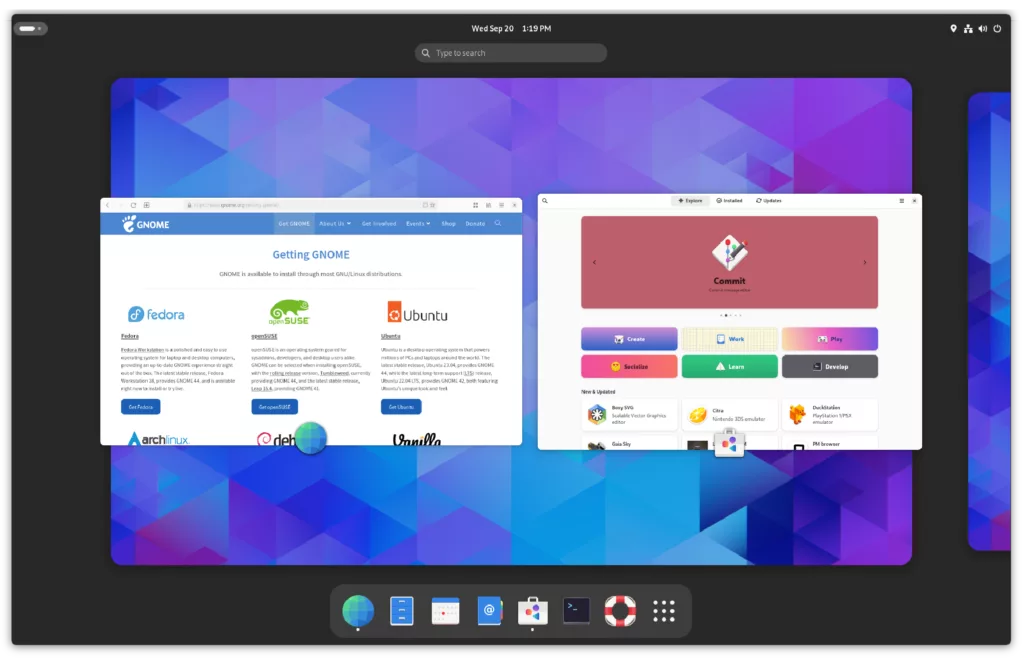
The correct way to maintain and update a gnome-shell extension should be to test and update "before" the official release of GNOME. It should be something easy for me, using Tumbleweed I can just add the GNOME Next repository, install the new desktop when it's in beta stage, and update the extension there.
But that's something that require an active maintainership... And right now what I do is to update the extensions when they are broken for me, so just when I need them, and that's after I get the new desktop and I find some time to update.
I know that's not the correct way and this produces a bad experience for other people using the extensions, but this is the easier thing to do for me. Maybe in the future I can do it correctly, and provide a tested update before the official release, maybe using snapper to be able to go back to stable, without the need of using virtual machines.
Update your extension to GNOME 45
The update to GNOME 45 was a bit more complex than previous ones. This version of the shell and gjs change a lot of things, so the migration it's not just to add a new number to the metadata.json, but requires incompatible changes, so extensions that works for GNOME 45 won't work for previous versions and vice versa.
But the people working in gnome-shell does a great work documenting and there's a really nice guide about how to upgrade your extension.
The most important part is the import section, that now it has a different syntax.
// Before GNOME 45
const Main = imports.ui.main;

// GNOME 45
import * as Main from 'resource:///org/gnome/shell/ui/main.js';
And some changes in the extension class, that now can inherit from existing ones to provide common usage, like preferences window:
import Adw from 'gi://Adw';

import {ExtensionPreferences, gettext as _} from 'resource:///org/gnome/Shell/Extensions/js/extensions/prefs.js';

export default class MyExtensionPreferences extends ExtensionPreferences {
    fillPreferencesWindow(window) {
        window._settings = this.getSettings();

        const page = new Adw.PreferencesPage();

        const group = new Adw.PreferencesGroup({
            title: _('Group Title'),
        });
        page.add(group);

        window.add(page);
    }
}

 Member
 Victorhck
Recopilación del boletín de noticias de la Free Software Foundation – noviembre de 2023
Recopilación y traducción del boletín mensual de noticias relacionadas con el software libre publicado por la Free Software Foundation.

La Free Software Foundation (FSF) es una organización creada en Octubre de 1985 por Richard Stallman y otros entusiastas del software libre con el propósito de difundir esta filosofía.
La Fundación para el software libre (FSF) se dedica a eliminar las restricciones sobre la copia, redistribución, entendimiento, y modificación de programas de computadoras. Con este objeto, promociona el desarrollo y uso del software libre en todas las áreas de la computación, pero muy particularmente, ayudando a desarrollar el sistema operativo GNU.
Además de tratar de difundir la filosofía del software libre, y de crear licencias que permitan la difusión de obras y conservando los derechos de autorías, también llevan a cabo diversas campañas de concienciación y para proteger derechos de los usuarios frentes a aquellos que quieren poner restricciones abusivas en cuestiones tecnológicas.
Mensualmente publican un boletín (supporter) con noticias relacionadas con el software libre, sus campañas, o eventos. Una forma de difundir los proyectos, para que la gente conozca los hechos, se haga su propia opinión, y tomen partido si creen que la reivindicación es justa!!
- En este enlace podéis leer el original en inglés: https://www.fsf.org/free-software-supporter/2023/november
- Y traducido en español (cuando el equipo de traducción lo tenga disponible) en este enlace: https://www.fsf.org/free-software-supporter/2023/noviembre

Puedes ver todos los números publicados en este enlace: http://www.fsf.org/free-software-supporter/free-software-supporter
Después de muchos años colaborando en la traducción al español del boletín, desde inicios del año 2020 decidí tomarme un descanso en esta tarea.
Pero hay detrás un pequeño grupo de personas que siguen haciendo posible la difusión en español del boletín de noticias de la FSF.
¿Te gustaría aportar tu ayuda en la traducción? Lee el siguiente enlace:
Por aquí te traigo un extracto de algunas de las noticias que ha destacado la FSF este mes de noviembre de 2023.
GNU40 USA: Encuentro con viejos y nuevos amigos, y algunos primeros pasos en la escalera de la libertad
Del 11 de octubre
El domingo 1 de octubre, la FSF organizó un hackday para celebrar el cuadragésimo aniversario del Proyecto GNU. Los participantes disfrutaron de un pastel con temática GNU, jugaron juegos de software libre, vieron una demostración de GNU Boot y más.
En general, el evento logró nuestro objetivo de dar la bienvenida a miembros veteranos y presentar a gente nueva el software libre y nuestra causa. Y para aquellos que se preguntan ¿Qué sigue para GNU? Bueno, como dijo el presidente de la FSF, Geoff Knauth, «la vida comienza a los cuarenta».
El controvertido proyecto de ley de seguridad en línea del Reino Unido finalmente se convierte en ley
Del 26 de octubre por Jon Porter
Nos decepciona saber que el Reino Unido ha aprobado el llamado Online Safety Bill (proyecto de ley de seguridad en línea). Si bien el proyecto de ley promete muchas cosas, como proteger a los niños en línea, lo hace imponiendo una vigilancia invasiva a los ciudadanos comunes del Reino Unido.
Muchos servicios de comunicación de extremo a extremo ya han dicho que se verán obligados a abandonar el Reino Unido debido a las nuevas reglas. También le animamos a leer nuestro artículo, publicado en junio, sobre las razones por las que el cifrado es importante y por qué nos oponemos a este y otros proyectos de ley similares: https://u.fsf.org/41a
Derecho de reparación de California convertido en ley
Del 10 de octubre por Elisabeth Chamberlain
Este octubre se lograron avances en el movimiento por el derecho a reparar. Vimos la Ley de Derecho a Reparar de California, SB 244 promulgada, que promete brindar a los consumidores opciones importantes para reparar sus dispositivos.
Por supuesto, cuando se trata de dispositivos que ejecutan software, la libertad del software también es fundamental para el derecho de los consumidores a reparar. Lea más sobre esta ley, así como sobre cómo el software libre juega un papel en el movimiento para el derecho a reparar.
- https://www.ifixit.com/News/84491/california-right-to-repair-signed-into-law
- https://www.fsf.org/campaigns/fight-to-repair

Estas son solo algunas de las noticias recogidas este mes, ¡¡pero hay muchas más muy interesantes!! si quieres leerlas todas (cuando estén traducidas) visita este enlace:
Y todos los números del «supporter» o boletín de noticias de 2023 aquí:
—————————————————————
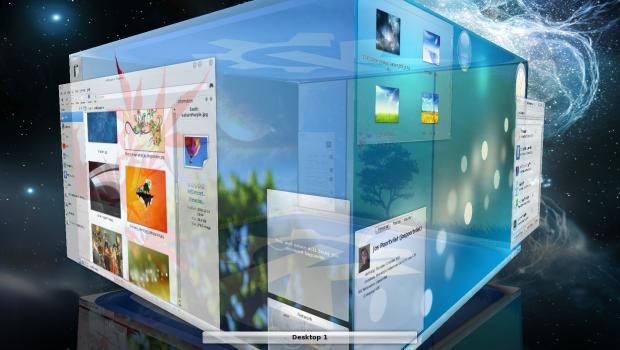
Vuelve el efecto cubo a Plasma
Desapareció por problemas de estabilidad y algunos usuarios protestaron. Los desarrolladores dijeron que no estaba muerto y han cumplido su palabra. Vuelve el efecto cubo a Plasma. Será para la nueva versión que será lanzada el 28 de febrero de 2024, es decir, será para Plasma 6 y demuestra que esta Comunidad, que recordemos que se nutre de voluntarios, escucha a sus usuarios.
Vuelve el efecto cubo a Plasma
Fue uno de los efectos que me volvía loco cuando me inicié en el mundo de GNU/Linux: el efecto cubo. Que mi escritorio fuera capaz de generar ese efecto gráfico tan moderno me encantaba, utilizándolo en muchas de las demostraciones que realizaba para mostrar lo potente que era mi entorno de escritorio KDE.
Poco a poco lo fui dejando pero cada poco lo volvía a utilizar para llamar la atención de mis alumnos. Cuando desapareció debí centrarme en otros aspectos como las opciones de Dolphin, los plasmoides o los service menus.
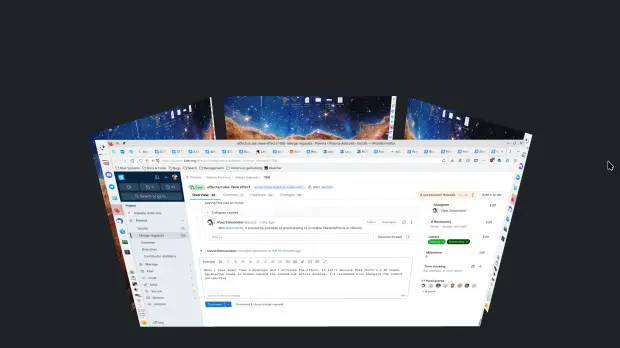
Así que celebro que los desarrolladores de KDE hayan dedicado tiempo a hacer que regrese el maravilloso efecto cubo, tal y como cuenta Nate en su entrada de repaso a las novedades en el desarrollo de Plasma. Ahora se encuentra en el repositorio kdeplasma-addons y puede activarse con el método abreviado Meta+C.
Los detalles técnicos es que ahora utiliza QtQuick 3D, siendo esta una versión mucho más simple del antiguo efecto de cubo de escritorio. Se puede rotar el cubo y hacer clic en LMB para cambiar al escritorio virtual que se ve en ese momento.
Más infomación: Invent KDE
Calendario para el lanzamiento de Plasma 6
Aprovecho la entrada para rececordar el calendario de lanzamientos previsto para el desarrollo de Plasma 6. Según el calendario oficial, estos son las fechas para anotar en el calendario:
- 8 de noviembre de 2023: Alfa – KDE Gear 24.01.75 / KDE Plasma 5.80.0 / KDE Frameworks 5.245.0.
- 29 de noviembre de 2023: Beta 1 – KDE Gear 24.01.80 / KDE Plasma 5.90.0 / KDE Frameworks 5.246.0.
- 20 de diciembre de 2023: Beta 2 – KDE Gear 24.01.85 / KDE Plasma 5.91.0 / KDE Frameworks 5.247.0.
- 10 de enero de 2024: Release Candidate 1 – KDE Gear 24.01.90 / KDE Plasma 5.92.0 / KDE Frameworks 5.248.0.
- 31 de enero de 2024: Release Candidate 2 – KDE Gear 24.01.95 / KDE Plasma 5.93.0 / KDE Frameworks 5.249.0.
- 21 de febrero de 2024: Publicación Tarball privada – KDE Gear 24.02.0 / KDE Plasma 6.0 / KDE Frameworks 6.0.
- 28 de febrero de 2024: Publicación pública – KDE Gear 24.02.0 / KDE Plasma 6.0 / KDE Frameworks 6.0.
Personalmente os anuncio que yo iré al ritmo que me marque KDE Neon, mi distribución de cabecera y que cuando se pase a Plasma 6 yo iré detrás.
Mientras tanto, os recuerdo que sigue en marcha el concurso para buscar el nuevo fondo de pantalla por defecto del escritorio… que hay ya muchas aportaciones y que todavía estás a tiempo de participar.

La entrada Vuelve el efecto cubo a Plasma se publicó primero en KDE Blog.

Extracting postfix journal logs for fun, profit and unbanning
From journal to .json
In order to convert from your journal log to json, so it is easily parseable, jq offers an option that allows you to run a filter, only until the end of the file:
    Instead of running the filter for each JSON object in the input, read the entire input stream into a large array and
    run the filter just once.
This allows you to save the file directly, ready to be processed by your favorite tools, here’s what I used:
journalctl -u postfix.service --since yesterday -g "denied" --output json | jq -s "." > data/log.json
Enter Perl
Now, because I’ve been using Perl for ${deity} knows how long (I wrote my first Perl script at the end of the 90’s),
naturally, is my language of choice for quick things where my knowledge of bash isn’t going to cut it:
First I want to load my file, I’m going to rely on Mojo, specifically
Mojo::Collection and Mojo::JSON for this as I’m familiar with both, also, if I wan’t to dig a bit into what’s inside
my collections, I can always do:
use Mojo::Util qw(dumper);

say dumper $collection->to_array;
But I digress, back to business
The real stuff
This piece of code filters for me, what it reads from a file (I’m doing $_= path(shift); for convenience)
my $file = Mojo::Collection->new(decode_json($_->slurp))->flatten;

// Filter using Mojo::Collection::grep to have a new collection with the data I'm interested in
my $filtered = $file->grep(sub{
        $_->{MESSAGE} =~ /denied/
    });
Now that I have the elements on a single array (of course, if I’m looking at a file over a gigabyte, likely I’d look into putting this inside some sort of database, PostgreSQL for instance, has excellent Json support), it’s time to do something with it:
// get anything that looks like a hostname before, and get the ip address
// example: NOQUEUE: reject: RCPT from ns2.pads.ufrj.br[146.164.48.5]: 554 5.7.1 <relaytest@antispam-ufrj.pads.ufrj.br>:
// I want to have ethe IP in a named group so I can later reference it with `$+{'IP'}`
my $regexp = qr{(.*[a-zA-Z0-9-._]+)\[(?<IP>.*)\]>?:.*};
Ideally (and for the future) I might want to filter in a different way, and capture different things, but you get the idea however today, we only want to know which ip addresses were rejected while testing our changes in our postfix’s configuration
$filtered->each(sub{
        if ($_->{'MESSAGE'} =~ /$regexp/ ){
            say "bash ./unban ".$+{'IP'};
        } else {
            warn "CANNOT GET IP: ".$_->{"MESSAGE"};
        }
    });
I have another script that does the unban, but for now I’m ok with copy&pasting :)
The full script is at foursixnine/stunning-octo-chainsaw pull requests are welcome, and maybe in the future I move this to its own thing, but for now, that’s all folks.

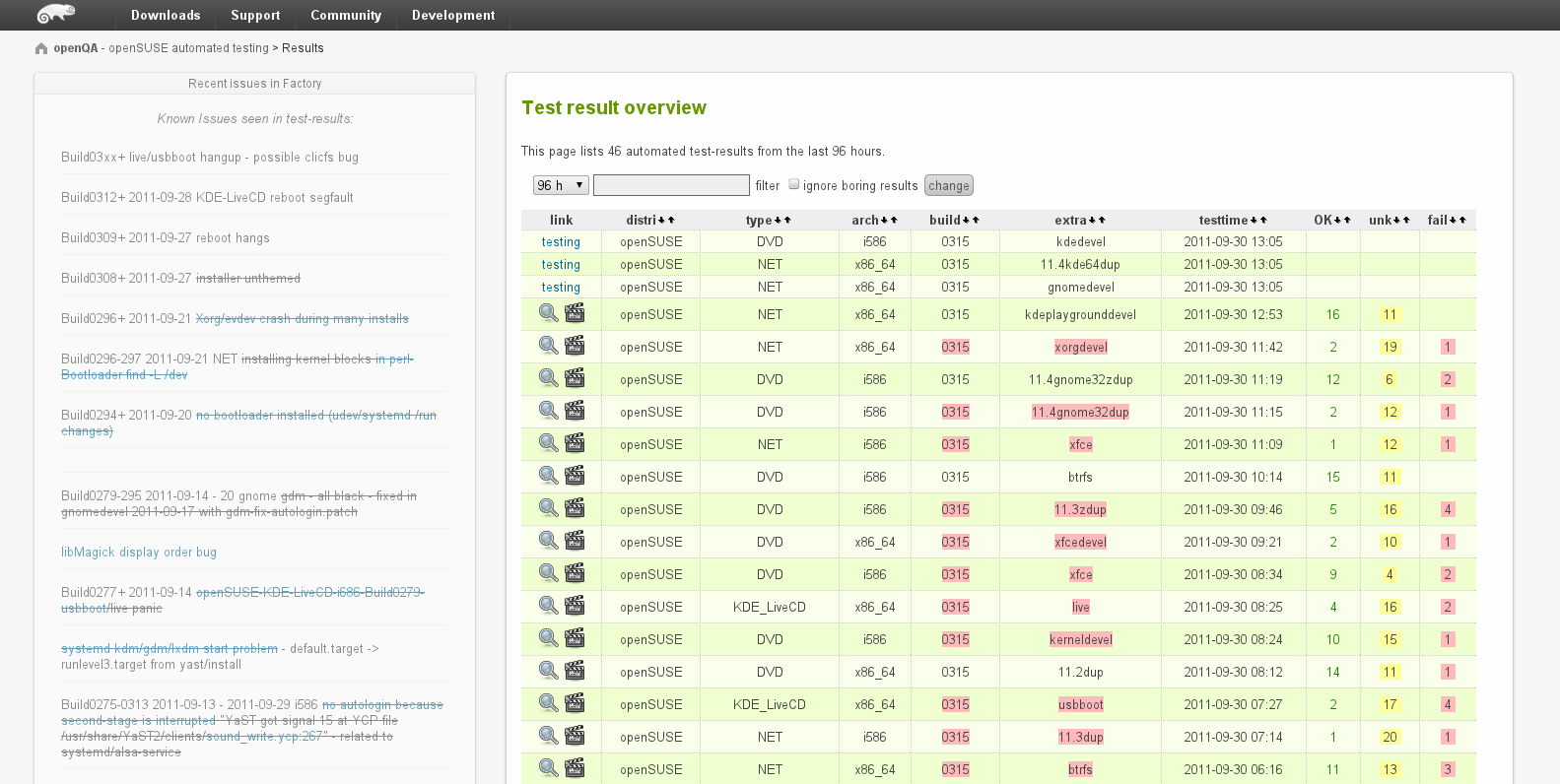
OpenQA - Το εργαλείο ελέγχου ποιότητας λογισμικού που αυξάνει την αξιοπιστία και την αποτελεσματικότητα

Υπάρχουν αρκετοί λόγοι για τους οποίους κάποιος θα μπορούσε να χρησιμοποιήσει το openQA για τον έλεγχο της ποιότητας του λογισμικού του. Καταρχήν, η αυτοματοποίηση των διαδικασιών ελέγχου επιτρέπει την εκτέλεση γρήγορων και αξιόπιστων δοκιμών, εξοικονομώντας χρόνο και πόρους στη διάρκεια της διαδικασίας ανάπτυξης του λογισμικού. Επιπλέον, η αυτοματοποίηση μπορεί να εξασφαλίσει υψηλότερη ακρίβεια και συνέπεια στις δοκιμές, αποτρέποντας την ανθρώπινη παραμέληση και λανθασμένες εκτελέσεις.
Το openQA χρησιμοποιείται από μια ποικιλία οργανισμών και κοινοτήτων που αναπτύσσουν λογισμικό. Παραδείγματα οργανισμών που χρησιμοποιούν το openQA περιλαμβάνουν την openSUSE, τόσο για την διανομή όσο και άλλως προγραμμάτων και εργαλείων, και το Fedora QA. Και οι δύο οργανισμοί χρησιμοποιούν το openQA για να ελέγξουν την ποιότητα των νέων εκδόσεων του λογισμικού τους πριν από την κυκλοφορία τους, εντοπίζοντας πιθανά σφάλματα και διασφαλίζοντας την ομαλή λειτουργία του συστήματος.
Η χρήση του openQA συνίσταται σε μια σειρά βημάτων. Καταρχήν, πρέπει να δημιουργηθούν σενάρια δοκιμών που θα εκτελεστούν αυτοματοποιημένα. Αυτά τα σενάρια μπορούν να περιλαμβάνουν ενέργειες όπως πλοήγηση στην εφαρμογή, εισαγωγή δεδομένων και επαλήθευση αποτελεσμάτων. Έπειτα, τα σενάρια δοκιμών εκτελούνται αυτοματοποιημένα σε ένα περιβάλλον ελέγχου, όπου το openQA παρακολουθεί την εκτέλεσή τους και ελέγχει τα αποτελέσματα. Οποιαδήποτε ασυμφωνία ή σφάλμα που εντοπίζεται από το openQA αναφέρεται και αναλύεται για περαιτέρω έρευνα και διόρθωση.
Ένα παράδειγμα χρήσης του openQA είναι η διαδικασία έλεγχου της νέας έκδοσης μιας διανομής Linux, όπως η openSUSE. Το openQA εκτελεί αυτοματοποιημένα δοκιμαστικά σενάρια σε διάφορα συστήματα, μοντέλα και περιβάλλοντα για να δοκιμάσει τη λειτουργικότητα και τη σταθερότητα της διανομής. Εάν το openQA ανιχνεύσει οποιαδήποτε σφάλματα, αποτυχίες ή ασυνέπειες, θα δημιουργήσει αναφορές για να επισημάνει τα προβλήματα προς τους προγραμματιστές, οι οποίοι θα αναλάβουν τη διόρθωση και την επανεξέταση του κώδικα. Αυτός είναι ο λόγος που η openSUSE Tubleweed καταφέρνει να εισάγει πρώτη (αν όχι πρώτη, τότε από τις πρώτες διανομές), τις τελευταίες εκδόσεις των προγραμμάτων, των GUI κλπ.
Configurar la firma de los correos en NeoMutt
Veamos cómo configurar NeoMutt para que añada una firma en los correos nuevos

Ya hemos visto cómo configurar NeoMutt con diferentes archivos para darle el aspecto que queremos y que nos gusta.
Un aspecto quizás menos importante en los correos puede ser la firma que se incluye, aunque siempre es aconsejable configurar una firma. Puede ser simplemente nuestro nombre, o podemos incluir unas cuantas líneas con información personal extra, o algo más «friki».
Veamos cómo configurar en NeoMutt la firma que aparecerá en nuestros correos.
Para configurar la firma, podemos hacerlo en el propio archivo muttrc o neomuttrc en los archivos de ajustes que tengamos configurados y a los que llamen los archivos anteriores con un source como ya hemos aprendido.
Una firma simple
Si solo queremos que se incluya una firma simple tipo: «Saludos. Victorhck». En nuestro archivo de configuración deberemos escribir lo siguiente:
set signature = "Saludos. Victorhck"
Una firma guardada en un archivo de texto
Si queremos incluir una firma un poco más elaborada, con diversas líneas y que incluya más texto. Podemos guardar el texto de esa firma en un archivo de texto y desde el archivo de configuración llamar a la ruta de dicho archivo. En mi caso sería así:
set signature = "~/.config/mutt/firma"
Y dentro del archivo firma en la ruta especificada tengo lo siguiente:
GPG Key: 0xcc742e8dc9b7e22a
Fingerprint = 6FE2 3B1F AAC8 E5B7 63EA 88A9 CC74 2E8D C9B7 E22A

Aprende a proteger la privacidad de tu correo:
https://emailselfdefense.fsf.org/es/

Mi blog sobre openSUSE, GNU/Linux y software libre:
https://victorhckinthefreeworld.com/

Herramientas para proteger tu privacidad
https://victorhck.gitlab.io/privacytools-es/
Por ejemplo, tu la adaptarás a lo que se quiera mostrar.
Una firma que ejecuta un comando
Podremos querer que en la firma se incluya la salida de un comando. El ejemplo más típico es el de fortune un programa que muestra una frase o cita célebre cada vez de manera aleatoria.
Podemos utilizar ese, podemos utilizar uno que hayamos programado nosotros, podemos utilizar lo que queramos. Aunque no tiene mucho sentido, en el ejemplo voy a utilizar la salida del comando uname -a (ya sabes, en GNU/Linux muestra información de nuestro sistema)
Para añadir un comando, deberemos poner la ruta al script, si se trata de un script propio. O simplemente el nombre del comando y terminando la línea con el símbolo | Esto indica que no es un texto, si no un comando.
set signature = "uname -a |"
Eliminar los guiones antes de la firma
En muchos clientes de correo, NeoMutt entre ellos, se añade un par de guiones (–) encima del bloque de la firma, como para diferenciar el cuerpo del correo con la firma.
Para eliminar esos guiones si no los quieres incluir, deberás añadir esta línea a tu archivo de configuración:
unset sig_dashes
Y eso es todo, espero que te haya resultado útil.


Cómo instalar el navegador Chrome en #openSUSE Tumbleweed
Veamos cómo instalar el navegador Chrome de Google en nuestro openSUSE Tumbleweed

En mi sistema openSUSE Tumbleweed solo utilizo el navegador Firefox, pero en ocasiones otras personas por diferentes motivos que no vienen al caso necesitan utilizar Chrome de Google (y no no vale Chromium o basados en Chrome).
Veamos cómo instalar el navegador Chrome desde el repositorio propio de Google en el que ofrece versiones de su navegador para sistemas GNU/Linux.
Lo primero que tenemos que hacer es añadir el repositorio propio de Google en el que ofrece la versión de su navegador Chrome para GNU/Linux y para nuestro sistema openSUSE Tumbleweed.
Podemos añadir el repositorio de manera gráfica mediante la herramienta YaST o desde la línea de comandos. Veamos los dos métodos. Si realizamos uno, no tendremos que realizar el otro.
Mediante YaST
Abrimos un navegador y seleccionamos esta URL:
https://dl.google.com/linux/linux_signing_key.pub
Se nos descargará un archivo de firma .pub que necesitaremos más adelante.
Abrimos YaST desde el menú de aplicaciones y una vez introducida la contraseña de root
En YaST → Repositorio de software, pulsamos sobre el botón Claves GPG… y en la pantalla siguiente pulsamos sobre Añadir y examinamos en nuestro equipo hasta la ruta donde se nos ha descargado el archivo .pub del inicio (probablemente en la carpeta de Descargas). Seleccionamos el archivo y aceptamos.
Sin salir de YaST, vamos a la sección de software → Repositorios de software. Seleccionamos Añadir y a continuación la opción especificar URL
Nos pedirá un nombre, podemos poner el que queramos, por ejemplo Google Chrome. Y nos pedirá una url, pegamos la siguiente URL:
https://dl.google.com/linux/chrome/rpm/stable/x86_64
Aceptamos y actualizará la base de datos con los datos del repositorio.
Mediante la línea de comandos
Como en el método anterior, primero descargaremos y añadiremos las firmas GPG del repositorio. Para ello ejecutamos los siguiente comandos:
wget https://dl.google.com/linux/linux_signing_key.pub
sudo rpm --import linux_signing_key.pub
Añadida la clave, podremos borrar el archivo descargado mediante: rm linux_signing_key.pub
Ahora añadiremos el propio repositorio. Para ello utilizaremos zypper mediante la terminal. Abrimos una terminal desde el menú de aplicaciones y añadimos el repositorio mediante el comando:
sudo zypper ar http://dl.google.com/linux/chrome/rpm/stable/x86_64 Google-Chrome
zypper ar es el comando para añadir un repositorio (add repo), la URL específica para el repo y el nombre identificativo que queremos ponerle.
Actualizamos los repositorios mediante el comando: zypper ref
Instalar el navegador Chrome
Una vez añadido el repositorio de Google, ya podremos instalar el navegador Chrome. De nuevo podemos hacerlo desde la interfaz gráfica con YaST o desde la línea de comandos.
Instalar desde YaST
Abrimos YaST y en vamos a la sección Software → Instalar/desinstalar software
En la caja de búsqueda escribimos chrome y damos a buscar. De todas las opciones escogemos la que deseemos, en mi caso google-chrome-stable. Están disponibles las opciones beta e inestable.
Aceptamos y esperamos a que termine. Finalizado el proceso, estará disponible desde en el menú de aplicaciones para usar el navegador.
Instalar desde zypper
Abrimos una terminal y escribimos:
sudo zypper in google-chrome-stable
Aceptamos el paquete que nos muestra y terminado el proceso tendremos instalado el navegador Chrome.
Espero que te haya resultado interesante y útil.

Encriptar correo electrónico móvil por Emancipació Comunitaria – Taller Express
Me congratula promocionar otro taller express » Encriptar correo electrónico móvil« organizado por Emancipació Comunitaria. Se trata de una nueva inicicitaiva que tiene como principal objetivo tener más seguridad a la hora de realizar comunicaciones mediante este vía en nuestro móvil. Más información, sigue leyendo.
Encriptar correo electrónico móvil por Emancipació Comunitaria – Taller Express

Me complace compartir con vosotros una nueva iniciativa del grupo de personas que en València está impulsado el Software Libre y temas relacionados con el empoderamiento de la sociedad que lleva por nombre Emanciació Comunitaria, que podéis encontrar en su Grupo y Canal de Telegram.
A lo largo de ya varios años han relizado numerosas charlas promocionando el Software Libre, casi todas orientadas a la concienciación y a la iniciación de nuevos usuarios, casi todas ellas con un Taller de Instalación asociado con el que facilitar la entrada a todo el mundo.
En esta ocasión se trata de una propuesta completamente online y mucho más específica que explícitamente nos propone lo siguiente:
TALLER EXPRÉS: ENCRIPTAR CORREU ELECTRÒNIC (VERSIÓ MÒBIL)
Proper dimarts 31 d’octubre i dijous 2 de novembre 17:00, sessió remota de configuració i ús de correu electrònic encriptat.
Passarem enllaç de connexió a les 16:30 per:
https://t.me/emancipacio_comunitaria_canal
Respongau els que esteu interessats
Recomanem encaridament instal·lar K-9-Mail i openkeychain.
https://k9mail.app/
https://www.openkeychain.org/
TALLER EXPRÉS: ENCRIPTAR CORREO ELECTRÓNICO (VERSIÓN MÓVI)
Próximo martes 31 de octubre y jueves 2 de noviembre 17:00, sesión remota de configuración y uso de correo electrónico encriptado.
Pasaremos enlace de conexión a las 16:30 por:
https://t.me/emancipacio_comunitaria_canal
Responded los que estáis interesados
Recomendamos encarecidamente instalar K-9-Mail y openkeychain. https://k9mail.app/
https://www.openkeychain.org/
En esta ocasión, si he llegado para la edición del martes…
Os dejo el cartel, realizado únicamente con Software Libre, como debe ser:

Más información: Grupo y Canal de Telegram de Emancipació Comunitaria
La entrada Encriptar correo electrónico móvil por Emancipació Comunitaria – Taller Express se publicó primero en KDE Blog.
Encriptar correo electrónico móvil por Asociació Emancipació Comunitaria – Taller Express
Me congratula promocionar otro taller express » Encriptar correo electrónico móvil« organizado por la Asociació Emancipació Comunitaria. Se trata de una nueva inicicitaiva que tiene como principal objetivo tener más seguridad a la hora de realizar comunicaciones mediante este vía en nuestro móvil. Más información, sigue leyendo.
Encriptar correo electrónico móvil por Asociació Emancipació Comunitaria – Taller Express
Me complace compartir con vosotros una nueva iniciativa del grupo de personas que en València está impulsado el Software Libre y temas relacionados con el empoderamiento de la sociedad que lleva por nombre Asociació Emanciació Comunitaria, que podéis encontrar en su Grupo y Canal de Telegram.
A lo largo de ya varios años han relizado numerosas charlas promocionando el Software Libre, casi todas orientadas a la concienciación y a la iniciación de nuevos usuarios, casi todas ellas con un Taller de Instalación asociado con el que facilitar la entrada a todo el mundo.
En esta ocasión se trata de una propuesta completamente online y mucho más específica que explícitamente nos propone lo siguiente:
TALLER EXPRÉS: ENCRIPTAR CORREU ELECTRÒNIC (VERSIÓ MÒBIL)
Proper dimarts 31 d’octubre i dijous 2 de novembre 17:00, sessió remota de configuració i ús de correu electrònic encriptat.
Passarem enllaç de connexió a les 16:30 per:
https://t.me/emancipacio_comunitaria_canal
Respongau els que esteu interessats
Recomanem encaridament instal·lar K-9-Mail i openkeychain.
https://k9mail.app/
https://www.openkeychain.org/
TALLER EXPRÉS: ENCRIPTAR CORREO ELECTRÓNICO (VERSIÓN MÓVI)
Próximo martes 31 de octubre y jueves 2 de noviembre 17:00, sesión remota de configuración y uso de correo electrónico encriptado.
Pasaremos enlace de conexión a las 16:30 por:
https://t.me/emancipacio_comunitaria_canal
Responded los que estáis interesados
Recomendamos encarecidamente instalar K-9-Mail y openkeychain. https://k9mail.app/
https://www.openkeychain.org/
En esta ocasión, si he llegado para la edición del martes…
Os dejo el cartel, realizado únicamente con Software Libre, como debe ser:
Más información: Grupo y Canal de Telegram de Emancipació Comunitaria
La entrada Encriptar correo electrónico móvil por Asociació Emancipació Comunitaria – Taller Express se publicó primero en KDE Blog.