
 Member
 baltolkien
Avances de Merkuro fruto de la colaboración con el programa Google Summer of Code 2023
Hoy quiero comenzar una serie de artículos para comentar el estado final de la participación de KDE en Google Summer of Code 2023 (GSoC). Este año han sido varias las aplicaciones o procesos que han sido foco del trabajo por parte de los mentores y estudiantes. De esta forma, empiezo este repaso con los avances de Merkuro fruto de la colaboración con el programa Google Summer of Code 2023, una aplicacion que una gran potencial.
Avances de Merkuro fruto de la colaboración con el programa Google Summer of Code 2023
El equipo de KDE es uno de las Comunidades que siempre intentan colaborador con los proyectos centrados en el Software Libre que suele organizar cualquier compañía, y Google no es ninguna excepción

Como podemos leer en el anuncio del dot donde se comenta el final de este curso del 2023:
Este año, KDE ha tutelado con éxito siete proyectos en el Google Summer of Code (GSoC). GSoC es un programa en el que colaboradores nuevos en software libre y de código abierto dedican entre 175 y 350 horas durante 10 a 22 semanas a trabajar en un proyecto de código abierto. Este artículo presenta los proyectos y colaboradores de 2023 y sus logros.
Fruto de esta colaboración se han mejorado aplicaciones del ecosistema KDE al tiempo que proporcioba experiencia, conocimiento y maestría a nuevos desarrolladores. Es el momento de reconocer este trabajo y promocionar este trabajo para ser consciente así de que el Software Libre va de personas que trabajan por un bien común.
Así que empiezo el repaso con los avances de Merkuro (antes conocido como Kalendar) , el gestor de calendarios independiente de Kontact que es una buena alternativa del mítico Kalendar.
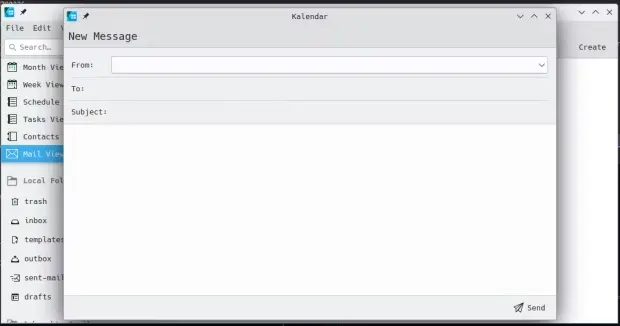
- Mejorada la Integración de Correo en Kalendar – Aakarsh MJ ha trabajado en la integración de correo en Kalendar con lo que ahora es posible el uso de esta aplicación como un cliente de correo completo integrado con el calendario ya existente.
- Implementado la disponibilidad de calendario – Anant Verma ha trabajado en la disponibilidad del calendario en Kalendar, permitiendo especificar tus horas de trabajo en las que estás disponible y puedes ser invitado a reuniones y eventos. Esta funcionalidad todavía está en desarrollo pero la primera piedra ya está puesta.
Más información: KDE News
¿Qué es GSoC?

Vía Somos Libres he encontrado esta magnífica descripción del programa GSoC:
Google Summer of Code (GSoC) es un evento organizado por Google, cuyo objetivo es hacer participar a varios estudiantes en el desarrollo de determinados proyectos Open Source elegidos por Google. Cada grupo debe cumplir con una lista de tareas específicas que deben realizar y elegidas por el representante del proyecto, también conocido como mentor.
Los objetivos del GSoC son:
- Crear y liberar código Open Source para el beneficio de todos.
- Inspirar a los jóvenes desarrolladores a participar en el desarrollo de aplicaciones Open Source.
- Ayudar a los proyectos Open Source a identificar a nuevos y posibles desarrolladores.
- Dar a los estudiantes la oportunidad de trabajar en algo relacionado a sus estudios. Dar a los estudiantes una mayor exposición a situaciones del mundo real de desarrollo de software.
En definitiva, una excelente iniciativa que beneficia a todo el mundo.
La entrada Avances de Merkuro fruto de la colaboración con el programa Google Summer of Code 2023 se publicó primero en KDE Blog.
More info with -ll in sudo 1.9.15
Version 1.9.15 of sudo gives more detailed information when using the -ll option. For commands, it adds the rule that allows it. Without a command parameter, it lists rules affecting a given user. It also prints which file contains the given rule, making debugging easier.
You can read more about it at https://www.sudo.ws/posts/2023/11/more-info-with-ll-in-sudo-1.9.15/

Sudo logo
The syslog-ng Insider 2023-11: Splunk; configuration; journald;
The November syslog-ng newsletter is now on-line:
- Sending logs to Splunk using syslog-ng
- Developing a syslog-ng configuration
- Systemd-journald vs. syslog-ng
It is available at https://www.syslog-ng.com/community/b/blog/posts/the-syslog-ng-insider-2023-11-splunk-configuration-journald

syslog-ng logo
Clock Asitoki Color, reloj para Plasma – Plasmoides de KDE (234)
Sigo con estas pequeñas aplicaciones que se conocen como applets, widgets o plasmoides y que dotan de funcionalidades de todo tipo a nuestro entorno de trabajo KDE y que parece que van a sufrir un lavado de cara considerable en Plasma 6. Hoy toca un plasmoide sencillo, muy visual y que es la evolución de Circle Clock, se trata de Clock Asitoki Color, otro reloj para tu fondo de pantallas con una estética muy original y elegante. Con este ya serán 234 los elementos de esta serie presentados en el blog.
Clock Asitoki Color, reloj para Plasma – Plasmoides de KDE (234)
Como he comentado en otras ocasiones, de plasmoides tenemos de todo tipo funcionales, de configuración, de comportamiento, de decoración o, como no podía ser de otra forma, de información sobre nuestro sistema como puede ser el uso de disco duro, o de memoria RAM, la temperatura o la carga de uso de nuestras CPUs.
En esta caso vuelvo uno de los clásicos, los relojes, que ya fue protagonista de la seccilón hace unos días. Hoy os presento , una creación del prolífico Zayronxyo (que se está convirtiendo en un clásico ya que hace unas semanas ya presenté otra creación suya , hace menos Nemmayan Clock and Date y hace un par de días Circle Clock) que nos muestra la fecha y la hora con acento de color que sigue el acento del sistema, es posible modificarlo y establecer un valor personalizado si lo deseas. Otra maravilla visual que creo que aparecerá en mi próximo Viernes de Escritorio.

Lo cierto es que solo no me gusta una cosa: el nombre del mes aparece siempre en castellano, aunque el sistema lo tengas en otro idioma. Se lo comentaré al desarrollador.
Y como siempre digo, si os gusta el plasmoide podéis «pagarlo» de muchas formas en la nueva página de KDE Store, que estoy seguro que el desarrollador lo agradecer?: puntúale positivamente, hazle un comentario en la página o realiza una donación. Ayudar al desarrollo del Software Libre también se hace simplemente dando las gracias, ayuda mucho más de lo que os podéis imaginar, recordad la campaña I love Free Software Day de la Free Software Foundation donde se nos recordaba esta forma tan sencilla de colaborar con el gran proyecto del Software Libre y que en el blog dedicamos un artículo.
Más información: KDE Store
¿Qué son los plasmoides?
Para los no iniciados en el blog, quizás la palabra plasmoide le suene un poco rara pero no es mas que el nombre que reciben los widgets para el escritorio Plasma de KDE.
En otras palabras, los plasmoides no son más que pequeñas aplicaciones que puestas sobre el escritorio o sobre una de las barras de tareas del mismo aumentan las funcionalidades del mismo o simplemente lo decoran.
La entrada Clock Asitoki Color, reloj para Plasma – Plasmoides de KDE (234) se publicó primero en KDE Blog.
openSUSE Asia Summit 2023 Report
Tahun ini adalah tahun ke 7 openSUSE digelar. Dan kali kedua openSUSE Asia Summit kembali digelar di China.
Ini juga adalah Summit pertama luring paska COVID19. Summit tahun ini diadakan di Chongqing University of Posts and Telecommunications, Chongqing, China 21-23 Oktober 2023. Kali ini kontingen Indonesia hanya mengirimkan tiga personil, Pak Edwin Zakaria, Pak Yan Arief dan saya. Masing masing hadir sebagai pembicara dengan materi yang berbeda.
Setelah selesai mengurus visa China dengan segala kerepotannya, akhirnya visa keluar tanggal 10 Oktober, 10 hari sebelum keberangkatan. Kita lanjut memesan tiket pesawat ke Chongqing. Pak Yan Arif dan saya akan memulai perjalanan dari Jogja.
19 Oktober: Berangkat

Kita memulai perjalanan dengan Pelita Air pukul 19.15 dari NYIA menuju CGK.


Pukul 20.45 kita mendarat di Terminal 3 CGK. Kemudian menunggu Pak Edwin yang bergerak dari Fatmawati. Jam 21.30 sudah lengkap dan menuju konter checkin. Kita menggunakan maskapai China Southern Airlines karena alasan jadwal terbang dan budget yang paling sesuai.

Setelah selesai checkin bagasi, kita bergeser ke imigrasi dan ke ruang tunggu.
20 Oktober: Masih di Udara

Pukul 23.30 WIB kita boarding ke pesawat Airbus A321neo dan lepas landas dijadwalkan pukul 00.20 WIB. Pesawat ini berbadan kecil dan panjang, kursi 3-3. Rute kita adalah CGK-SZX-CKG.

Kita nanti akan transit di Shenzen selama 6 jam. Lanjut sarapan (dini hari).

Saya kebetulan duduk di jendela, dan sempat mengabadikan matahari terbit di ufuk timur.

Pukul 06.35 CST pagi pesawat mendarat di Shenzen. Kita lanjut imigrasi. Mengisi borang kesehatan, kemudian ambil bagasi. Toilet dan mengisi air putih. Kemudian checkin tiket dan bagasi kembali.

Untuk internet (whatapps, email, telegram), kita berbekal kartu DIGITravel dari Indonesia yang hanya memiliki akses data 500MB/hari dan dibeli dari toko online Rp 80rbu/5hari. Sudah lebih dari cukup.

Memasuki ruang tunggu, saya sempatkan sarapan mie gelas. Oh iya. dispenser minum tersedia dimana-mana, termasuk air panas. Jadi tidak susah untuk menyeduh minuman sashet atau mi instan.

Pukul 11.40 CST kita boarding. Kali ini pesawat berbadan lebar. Kursi 3-4-3. Airbus A330 twin jet.

Kemudian makan siang sekitar pukul 13.00.

Pesawat mendarat pukul 14.45 CST. Kita lanjut ambil bagasi dan rehat sebentar. Sembari mencari lokasi stasiun metro (MRT/LRT).

Ya panitia menyarankan menggunakan metro (LRT/MRT) untuk sampai hotel. Tiket metro 5Yuan, atau sekitar Rp 11ribu.

Stasiun ditemukan, dilanjutkan membeli tiket. Bertanya jalur berapa ke mbak-mbak yang jaga. Dan kemudian dilanjut berjibaku bagaimana caranya bisa bayar tiket. Mesin tiket menerima tunai, kartu kredit unionpay dan lainnya. Pembayaran yang disarankan menggunakan Wechat/AliPay.


Akhirnya setelah beberapa percobaan berganti akun Alipay, tiket terbeli. Lanjut MRT jalur 10, kemudian ganti ke jalur 2. Saya sempat mengambil foto senja di Sungai Jialing, sebelumnya dikenal dengan banyak nama lain, adalah anak sungai utama Sungai Yangtze di Cekungan Sichuan.

Turun di Stasiun Linjiangmen. Jalan kaki kemudian mencari hotel yang ternyata di gedung besar depan pintu keluar Stasiun. Butuh akses lift ke lantai 5. Kita menginap di Vienna Hotel (Chongqing Jiefangbei Hongyadong)

Proses checkin cukup lama, karena keterbatasan bahasa dan juga belum pernah mengurus tamu dari Indonesia. Checkin selesai dan masuk kamar. Finally kasur setelah 24 jam perjalanan. Saya sekamar berdua dengan Pak Yan Arief.
Setelah berberes, kita lanjut mencari resto halal di sekitar hotel dengan berjalan kaki.


Resto yang kita tuju berada tidak jauh dari lokasi Masjid Besar Chongqing lama. Menu yang kita pesan daging, salad dan tofu.


Pulang dari resto kita singgah di gerai sate kambing muslim dan membeli 9 tusuk beserta 3 roti untuk sarapan besok.


Balik ke hotel sebagai penutup hari ini, eh belum. Slide saya belum jadi, maka saya utik-utik dulu hingga dini hari.
21 Oktober: Summit Day
Selain kontingen Indonesia, ada Sakana dari Taiwan, Takeyama dan Syuta dari Jepang yang menginap di hotel ini. Jadi kita barengan saja ke kampus menaiki 2 buah taksi. Harga taksi di sini cukup murah, perjalanan 20KM ke kampus hanya dikisaran 60-70rbu. Untuk urusan memesan taksi, ada Sakana yang fasih berbahasa china.
Sesampai di gerbang kampus, kita bertemu dengan Patrick Fitzgerald, salah satu board openSUSE. Kemudian kita lanjut mencari gedung acara kesana kemari.

Akhirnya setelah berapa kali bertanya sampai juga di lokasi summit. Melakukan swafoto kemudian berkeliling mencari kelas tempat saya mengisi. Sesi saya ada di sore hari di ruang A108/A107.


Acara dibuka oleh perwakilan kampus, kemudian Sakana. Dilanjut keynote speaker dari Board: Patrick Fitzgerald tentang Geeko Foudation.

Setelah rehat kopi, Pak edwin membawakan materi di ruang utama dengan materi Managing Indonesia openSUSE community Mirror Infrastructure.


Kemudian saya bergabung di kelas lain untuk melihat sesi dari Houge Langley openSUSE running on RISC-V. Seorang dokter beneran dan kontributor Arch/Gentoo. Riset yang ia kerjakan dapat dilihat pada laman https://github.com/HougeLangley/riscv.

Kemudian saya bergeser untuk ikut sesi dari Sakana Max tentang Using openSUSE in the Public Cloud.

Lanjut makan siang, kita diajak jalan kaki keluar kampus menuju restoran. Ciri khas makan besar di sini, selalu menggunakan meja putar.


Saya mulai mengisi kelas setelah sesi dari Simon Lees, tentang OBS: Packaging Workshop. Pak Yan Arief dan saya memiliki jadwal yang serentak namun beda ruang. Berikut sesi saya. openSUSE inside WSL.


Diujung sesi, saya menyempatkan diskusi dengan peserta terkait beberapa isu DevOps dalam keseharian mereka.

Sesi pak Yan Arief membawakan materi Securing Docker Containers: Preventing Privilege Escalation and Enhancing Vulnerability Detection.

Saya bertemu Joey Lee yang sudah lama tidak bersua.

Setelah sesi selesai, kita kembali ke ruang utama. Saya menonton sesi dari Sunny yang membawakan judul Open Source is an option of life.
Kemudian sesi ditutup dengan penyerahan album ke panitia lokal dan foto bersama.


Akhirnya ketemu Colie Li yang selalu rajin menjadi sponsor individu untuk openSUSE Asia Summit tiap tahunnya.

Acara dilanjut makan malam. Kita menuju resto dengan Bis tidak jauh dari area kampus. Restonya masih dengan meja putar.

Setelah selesai makan, kita lanjut balik dengan naik taksi ke hotel, hari kedua selesai. Mandi dan tidur.
22 Oktober: 1 day tour
Pagi hari kita berkumpul tidak jauh dari hotel menunggu bis jemputan. Hari ini kita akan menuju Dazu Rock Carvings, sekitar 150KM dari pusat kota chongqing. Pukul 10.00 CST bis bergerak.

Setelah 3 jam perjalanan, sampai juga di lokasi. Kemudian membeli tiket masuk. Karena sampai di lokasi sudah jam makan siang, kita kemudian lanjut makan siang dulu di sekitar lokasi.


Kembali ke Dazu Rock Carvings. Dari gate tiket kita akan diantar bus menuju pintu objek wisata. Kemudian ada pemandu dengan alat seperti handytalky untuk mendengarkan orasi pemandu. Kali ini dengan translasi bahasa inggris. Jalan-jalan dimulai. Rutenya lumayan jauh, hampir 5km.


Kita selesai jalan-jalan pukul 15.00 CST. Jam 16.00 kita bergerak kembali ke kota. Pukul 18.30 kita sampai di kota, dan menujur resto untuk makan malam. It is HotPot time.

Sampainya di resto, setelah jalan berliku-liku, kita memesan hotpot varian vegant.


Setelah makan selesai, saya melanjutkan diskusi dengan panitia lokal terkait liku-liku menjadi mahasiswa dan pekerja IT di sana.

Pukul 10 kita bersiap pulang sekaligus sebagai penutup rangkaian openSUSE Asia Summit 2023.

23 Oktober: Pulang
Kita pulang dengan pesawat pukul 10 malam. Paginya kita isi dengan istirahat dan kemudian mengunjungi Masjid Raya Chongkinq dan menikmati makan siang sate kambing.


Pukul 16.00 kita bergeser ke Bandara. Menyempatkan diri memotret tepian sungai saat kita transit jalur metro.

Tiba di Bandara, checkin bagasi dan bersiap masuk ruang tunggu. Rute kali ini akan transit di Guangzhou, dengan bagasi yang langsung diambil di Jakarta. CKG-CAN-CGK. Boarding pukul 22.50 CST. Pukul 02.00 kita mendarat di Guangzhou. Penerbangan selanjutnya pukul 08.25 pagi. Mencari sofa tidur, popmie dan tidur.


24 Oktober: Pulang
Pukul 07.00 CST kita boarding menuju Jakarta. Sarapan di pesawat. Pukul 12.20 WIB kita mendarat di CGK. Welcome home. Lanjut antrian Imigrasi kemudian ambil bagasi.

Untuk makan siang kita mencari nasi goreng di Solaria Terminal 3. Ah makanan cita rasa Indonesia memang yang terbaik.

Kita bertiga berpisah setelah makan di sini. Pak Edwin memesan taksi dan kembali ke Jakarta. Pak Yan Arief menunggu pesawat selanjutnya ke Yogyakarta dari Terminal 3 Pukul 4 sore. Saya sendiri masih akan ke Malaysia via Johor, penerbangan pukul 20.00 dari terminal 2. Long journey.

Terimakasih untuk panitia lokal atas terselenggaranya Summit tahun ini. Terimakasih openSUSE yang mensponsori perjalanan kami. Sampai jumpa tahun depan.
Estu~
Episodio 20 de KDE Express: En 110d vuelve el cubo
Tras un parón obligado por razones de peso, me congratula presentaros que tenemos a nuestra disposición el episodio 20 de KDE Express, titulado «En 110d vuelve el cubo» donde David y un servidor, con el apoyo de Jorge Lama en los controles técnicos, damos un vistazo a las novedades candentes del próximo Plasma 6 y a las novedades podcasteras de este audio.
Episodio 20 de KDE Express: En 110d vuelve el cubo
Comenté hace tiempo que había nacido KDE Express, un audio con noticias y la actualidad de la Comunidad KDE y del Software Libre con un formato breve (menos de 30 minutos) que complementan los que ya generaba la Comunidad de KDE España, aunque ahora estamos tomándonos un tiempo de respiro por diversos motivos, con sus ya veteranos Vídeo-Podcast que todavía podéis encontrar en Archive.org, Youtube, Ivoox, Spotify y Apple Podcast.

De esta forma se llega al número 20, el octavo de su segunda temporada y que cuenta con el incombustible e hiperactivo David Marzal y un servidor, Baltasar Ortega con la producción de Jorge Lama, donde damos un breve resumen al aluvión de novedades que nos esperan en febrero de la mano de la Comunidad KDE y a las nuevas funcionalidades que ofrece este audio al subirse al carro de Podcasting 2.0.
En palabras de David, que es quien hace la entradilla:
Empezado el curso escolar y acabada la temporada opositora respectivamente, Baltasar y David comentán en este episodio la fecha de la MEGA publicación de KDE6 en Febrero, la recuperación del efecto cubo, la campaña de donaciones y membresía de KDE Internacional y algunas cosas más que tendréis que escuchar para estar al día de que se mueve en la comunidad KDE.
Enlaces de interés:
- https://kde.org/announcements/kdes-6th-megarelease-alpha/
- https://kde.org/es/fundraisers/plasma6member/
- https://www.kdeblog.com/vuelve-el-efecto-cubo-a-plasma.html
- https://www.kdeblog.com/concurso-fondo-de-pantalla-para-plasma-6.html
- Podcasting 2.0 desde la web sin necesidad de cambiar de aplicación:
- Subtitulos: https://podverse.fm/es/podcast/kkDmfJUu-r
- Podroll: https://www.podfriend.com/podcast/kde-express/ y https://podnews.net/podcast/iaqqu
- Participantes: https://www.podfriend.com/podcast/kde-express/ o https://www.steno.fm/show/a9a56b87-575a-5f6f-9636-cdf7b73e6230 (entrando en un cápitulo y dandole a PEOPLE)
Subtitulos disponibles en podverse.fm o en podcastindex.org si vuestra aplicación no implementa las transcripciones.
- Agradecimientos:
- Jorge Lama por su asistencia, consejo, apoyo y edición de audio en este episodio.
- Erotic by Frank Schroeter – (CC BY 4.0)
Y, como siempre, os dejo aquí el listado de los episodios. ¡Disfrutad!
Por cierto, también podéis encontrarlos en Telegram: https://t.me/KDEexpress
La entrada Episodio 20 de KDE Express: En 110d vuelve el cubo se publicó primero en KDE Blog.

Is developing word processing software hard?
Hello LibreOffice Planet!
This is my first blog post on the topic of LibreOffice. Let me quickly explain my link to LibreOffice. I work for a data protection authority in the EU and help navigate the digital transformation of our office with about 100 staff members. While many of our partner organisations adopt Microsoft 365, our office decided to pilot Nextcloud with Collabora Office Online.
In the future, I want to blog (in my personal capacity) about my thoughts related to the use of alternative word processing software in the public sector in general and in our specific case.
As there are no dedicated resources for training, preparation of templates etc., during the pilot of LibreOffice, the experience so far covers a large spectrum of user satisfaction. Generally, our staff has been spent years of their life using Microsoft Office and has the expectation that any other software works the same way. If it does not, they send an email to me (best case) or switch back to Microsoft Office.
During the week, I discussed again some smaller LibreOffice bugs. Then, I showed this weekend some FOSS Blender animated short videos to family members. It seems that Blender is more successful in its domain than LibreOffice. Is that possible? Or are animated short videos just more capturing due to their special effects? 😅
You can watch the 1min Blender animated short movie “CREST” on Youtube or the making-off. The latter you find here below.
I find it very inspiring to see what talented artists can do with Blender. For my part, I have once installed Blender and deinstalled it. Back then it was not easy to use for people not familiar with video animation software. Blender competes with proprietary software such as Maya or Cinema 4D. The latter is about 60 USD per month in the annual subscription plan. Not exactly cheap.
Then, I read in the fediverse about people working with LibreOffice:
I just tried to use #LibreOffice #Draw to draw some arrows and boxes onto JPEG images for emphasizing stuff.
The UX is really bad for somebody not working with Draw all the time.
Whatever I do, instead of drawing onto the image, the image gets selected instead.
Could not find any layer-sidebar.
Could not scale text without starting the “Character …” menu, modifying font size blindly + confirming > just to see its effect and then start all over.
Dear #FOSS, we really should do better.
— Author Karl Voit (12 November 2023 at 14:51)
In my past, I have worked on online voting systems. They are not very good yet despite years of efforts. xkcd dedicated a comic to voting software
Elections seem simple—aren’t they just counting? But they have a unique, challenging combination of security and privacy requirements. The stakes are high; the context is adversarial; the electorate needs to be convinced that the results are correct; and the secrecy of the ballot must be ensured. And they have practical constraints: time is of the essence, and voting systems need to be affordable and maintainable, and usable by voters, election officials, and pollworkers.
— Author Matthew Bernhard et al. in their paper Public Evidence from Secret Ballots from 2017
What is the unique challenge of developing word processing software? Happy to hear back from you in the blog comments or on the companion fediverse post!
Actualización de noviembre del 2023 de KDE Frameworks
Los meses pasan volando. Me complace anunciar la actualización de noviembre del 2023 de KDE Frameworks. Con esta se llega a la versión 5.111 que evidencia el compromiso y constancia que no tiene un final cercano, a no ser que consideremos el salto al número 6 dado que ya se está haciendo la migración a Qt 6.
Actualización de noviembre del 2023 de KDE Frameworks
A pesar de que para los usuarios corrientes esta noticia sea algo confusa ya que no se trata de realzar una nueva aplicación ni de una nueva gran funcionalidad del escritorio, el desarrollo de KDE Frameworks tiene repercusiones directas en él a medio y largo plazo.
La razón de esta afirmación es que KDE Frameworks es básicamente la base de trabajo de los desarrolladores para realizar sus aplicaciones, es como el papel y las herramientas de dibujo para un artista: cuanto mejor sea el papel y mejores pinceles tenga, la creación de una artista será mejor.

De esta forma, las mejoras en KDE Frameworks facilitan el desarrollo del Software de la Comunidad KDE, haciendo que su funcionamiento, su estabilidad y su integración sea la mejor posible.
Este domingo 12 de noviembre de 2023 ha sido lanzado KDE Frameworks 5.1112la nueva revisión del entorno de programación sobre el que se asienta Plasma 5, el escritorio GNU/Linux de la Comunidad KDE, y las aplicaciones que se crean con para él.
Más información: KDE
La constancia del equipo de desarrollo de la Comunidad KDE
Hay que recordar que los desarrolladores de KDE decidieron lanzar actualizaciones mensuales de este proyecto y lo están cumpliendo con puntualmente. La idea es ofrecer pocas pero consolidadas novedades, a la vez que se mantiene el proyecto evolucionando y siempre adaptándose al vertiginoso mundo del Software Libre.
Una gran noticia para la Comunidad KDE que demuestra la evolución continua del proyecto que continua ganando prestigio en el mundo de los entornos de trabajo Libres.
¿Qué es KDE Frameworks?
Para los que no lo sepan, KDE Frameworks añade más de 70 librerías a Qt que proporcionan una gran variedad de funcionalidades necesarias y comunes, precisadas por los desarrolladores, testeadas por aplicaciones específicas y publicadas bajo licencias flexibles. Como he comentado, este entorno de programación es la base para el desarrollo tanto de las nuevas aplicaciones KDE y del escritorio Plasma 5.

Aquí podéis encontrar un listado con todos estos frameworks y la serie de artículos que dedico a KDE Frameworks en el blog,
Recuerda que puedes ver una introducción a Frameworks 5.0 en su anuncio de lanzamiento.
La entrada Actualización de noviembre del 2023 de KDE Frameworks se publicó primero en KDE Blog.
Tragedy of Return to Hostile Offices
Spoilers: it’s not about whether remote or office work is better.
The prevalence of return to office mandates has provoked much discourse and strong opinions. For good reasons. Return to office mandates can tear teams apart by pushing out people who cannot relocate, at huge cost.
Working physically together, in the same space, as a whole team, can be extremely enabling. Supporting a joyful environment. Sadly, too many offices were (and remain) environments hostile to collaboration. Return to those hostile environments has been imposed on many.
It makes me sad to see people…
…forced to return to offices that are noisy, cramped, illness-spreading, collaboration-killing environments.
…conversing over video chat from across the same open-plan office, because while they’re in the same space it’s not set up to help them collaborate.
…excluded from teamwork because the rest of the team is in another location.
…stuck waiting on pull request reviews from people they are sat right next to.
Most of all I get sad when I see ineffective teams with no ability or motivation to improve—whether remote or co-located.
For many teams there can be huge advantages to co-located working, but these aren’t it. Different approaches better support different people, different teams, different contexts.
Return to office mandates can destroy the effectiveness of teams who have uncovered better ways of working by going remote.
Tearing your teams apart and undermining their ways of working are tremendously damaging. Fabled watercooler serendipity will not make up for this.
You’ll cause harm by forcing RTO on teams with cultures that benefit from remote. Please, instead, help your teams craft their best environment.
Remote isn’t always Best
Many people are very passionate about remote work. Remote can bring inclusion benefits. Offices can bring communication bandwidth benefits.
This claim crossed my feed this week:
“Every successful company needs to have the most talented people. The most talented people no longer live in, or want to live in the same place.”
This suggests that “acquiring” talented people is a zero-sum game. It’s not.
Rather, successful companies maximise what their people can achieve. One factor is indeed how talented the people who join are. Another is their pre-existing skills. Even more significant than these is the extent to which the organisation amplifies & accelerates, or impedes their abilities.
Different organisations, and different ways of working, are more or less suited to make different individuals the most effective.
Don’t Compromise
Mediocre teams compromise on their ways of working to avoid conflict; sacrificing their team’s potential on the altar of individual autonomy.
Effective teams find ways of working that give themselves an advantage. They shape their environment to maximise their effectiveness.
Mediocre teams compromise on their ways of working to avoid conflict; sacrificing their team’s potential on the altar of individual autonomy.
Hybrid work policies can easily result in the downsides of being anchored to an office location, with none of the benefits that could come from having everyone together.
It doesn’t just happen with location. Individual preferences for working exclusively in certain parts of the codebase can result in nobody working together towards the same mission. People who feel they get more done if left to their own devices for days or weeks are often right, and it can also be true that the team as a whole is less successful.
It’s easy to avoid conflict and get stuck in mediocrity. Optimising for individual happiness can result in less of the joy that people find in teams that achieve great things together.
Optimising for individual happiness can result in less of the joy that people find in teams that achieve great things together.
If only effective collaboration had such an easy answer as asking everyone to come to an office.
If you want to build up your teams rather than undermine them, start with curiosity about how they work. Invite and support them to uncover better ways of working for them. What helps them. Their preferences. Their lives. Their mission. Their constraints.
I’m privileged to have experienced working with many effective & ineffective teams & communities. Both in office environments and remotely, with a variety of collaboration styles.
I’ve experienced some of my most joyful work in teams working together in the same space. I’ve benefited from flexibility and inclusion with remote work. I’ve also been able to contribute as part of larger open source communities where I couldn’t even know everyone by name. There are plenty of reasons to be passionate about each approach.
What I am most passionate about is teams finding the most effective ways to work together. Joy for the individuals involved. Successful team missions. Turning the constraints they’re working with to their advantage.
Beyond a Binary Debate
There are more options than just Office vs Remote. Distributed vs Co-located working is often conflated with Async vs Synchronous working styles. It’s not one or the other.
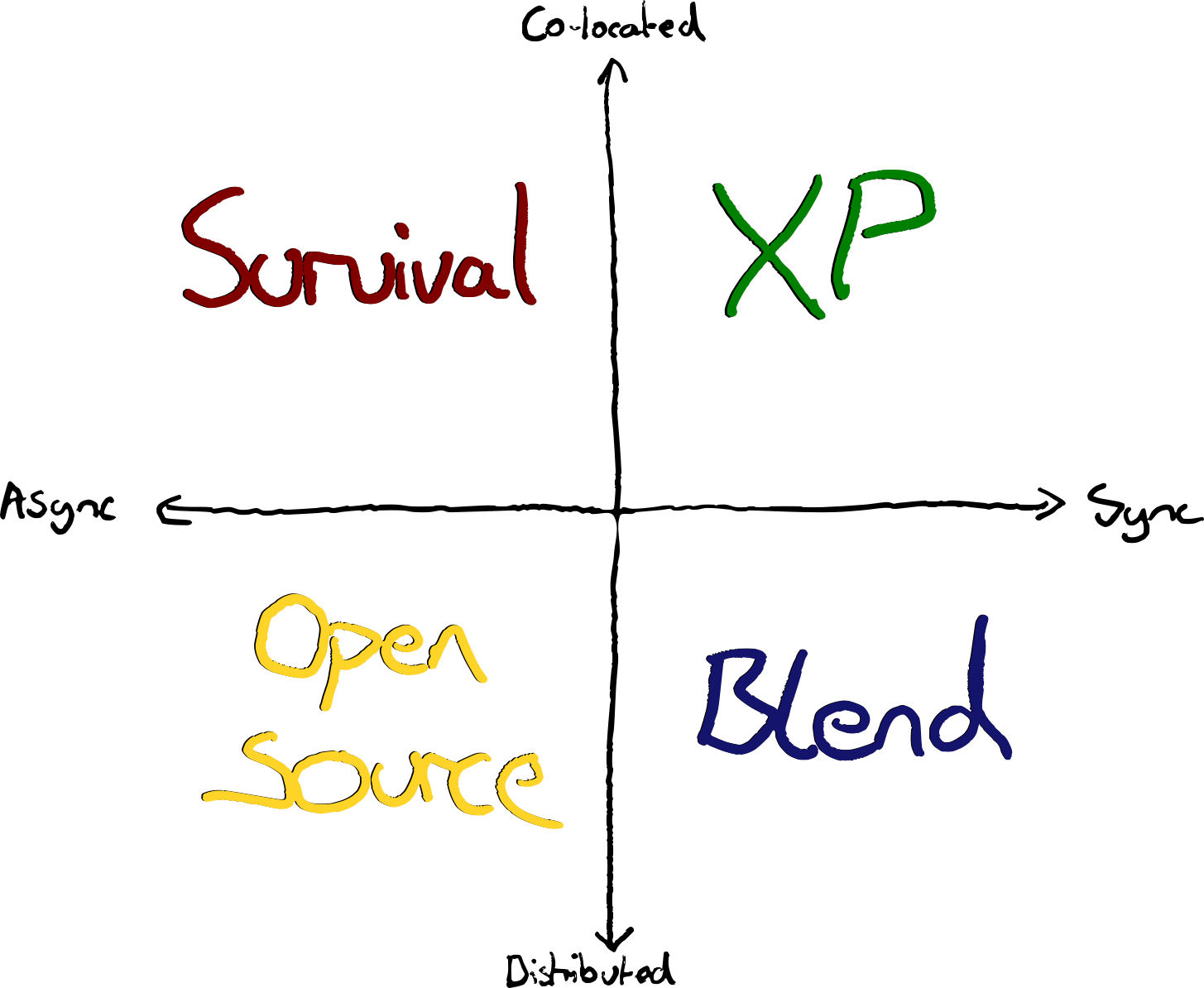
By Async I mean working independently. Coordinating via tickets, pull requests, mailing lists etc.
By Sync I mean working together, on the same thing, at the same time—and not necessarily at the same place.
Those who’ve experienced greatness at one extreme on this chart are often enthusiastic. Top-right and bottom-left have many proponents. However, bottom right can be glorious as well, and this seems to be less discussed. Fans of Async-Remote sometimes characterise Sync-Remote as being “unable to let go of the office”. However, I’ve seen it work tremendously well—often far better than the typical office space allows.
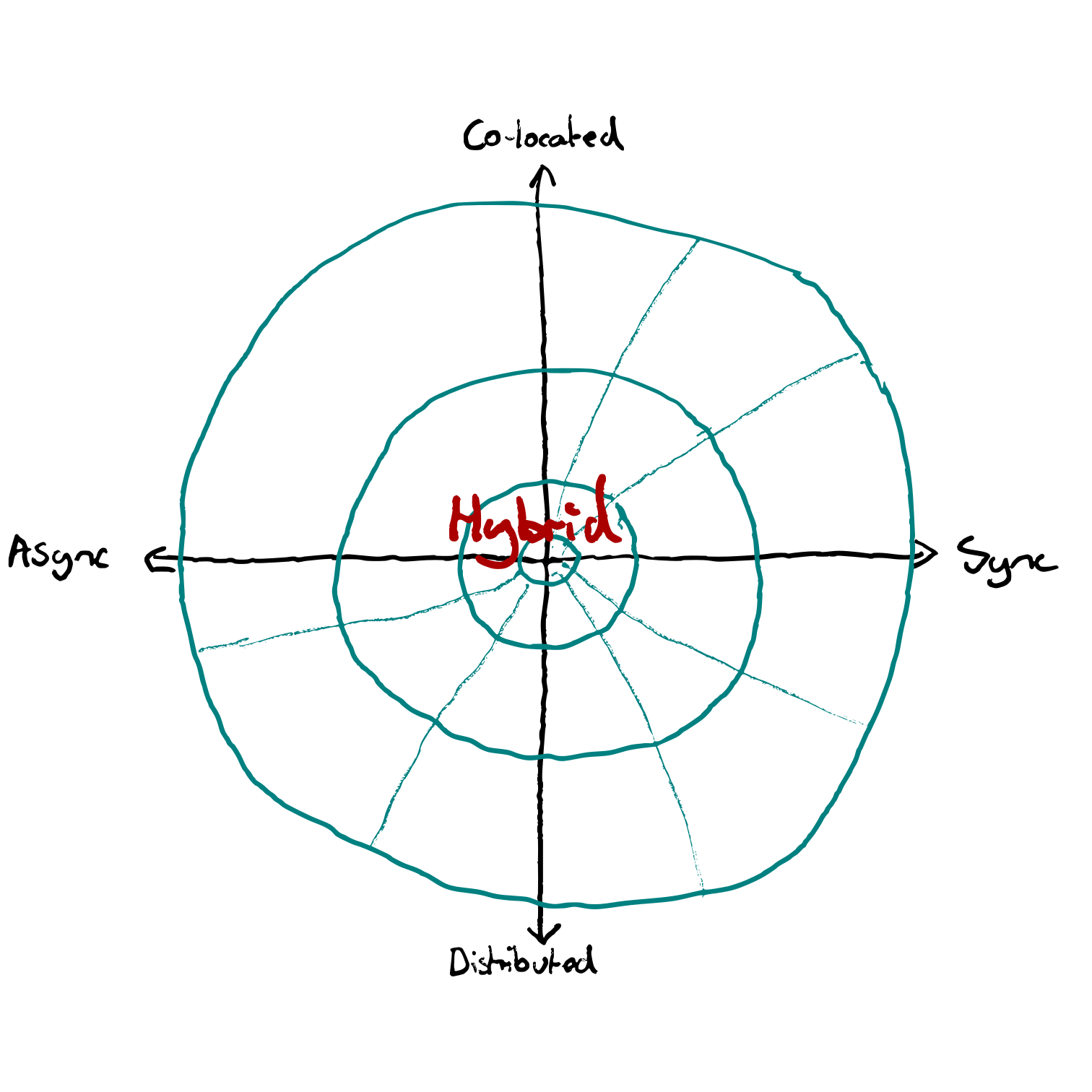
Teams often compromise somewhere near the middle. A hybrid of workplaces and work-ways. Accommodating a variety of preferences and needs.
The best teams I’ve seen move towards an edge and find a sweet spot. You can imagine a third dimension of effectiveness. With a pit in the centre.
Office and Async — Escape the Tragedy
I’ve not found a scenario where this quadrant is better than an alternative, despite it being, in my experience, the most common for most “teams”. Where teams are acting more like a mere convenient grouping of individuals than a collective with a common mission.
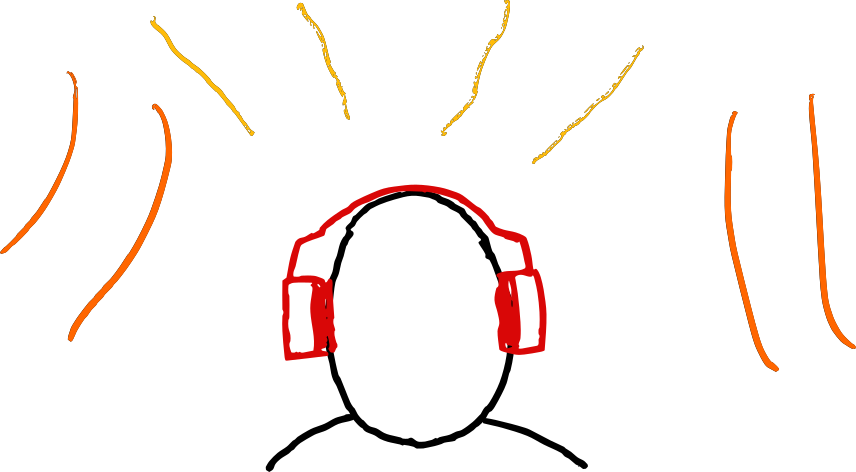
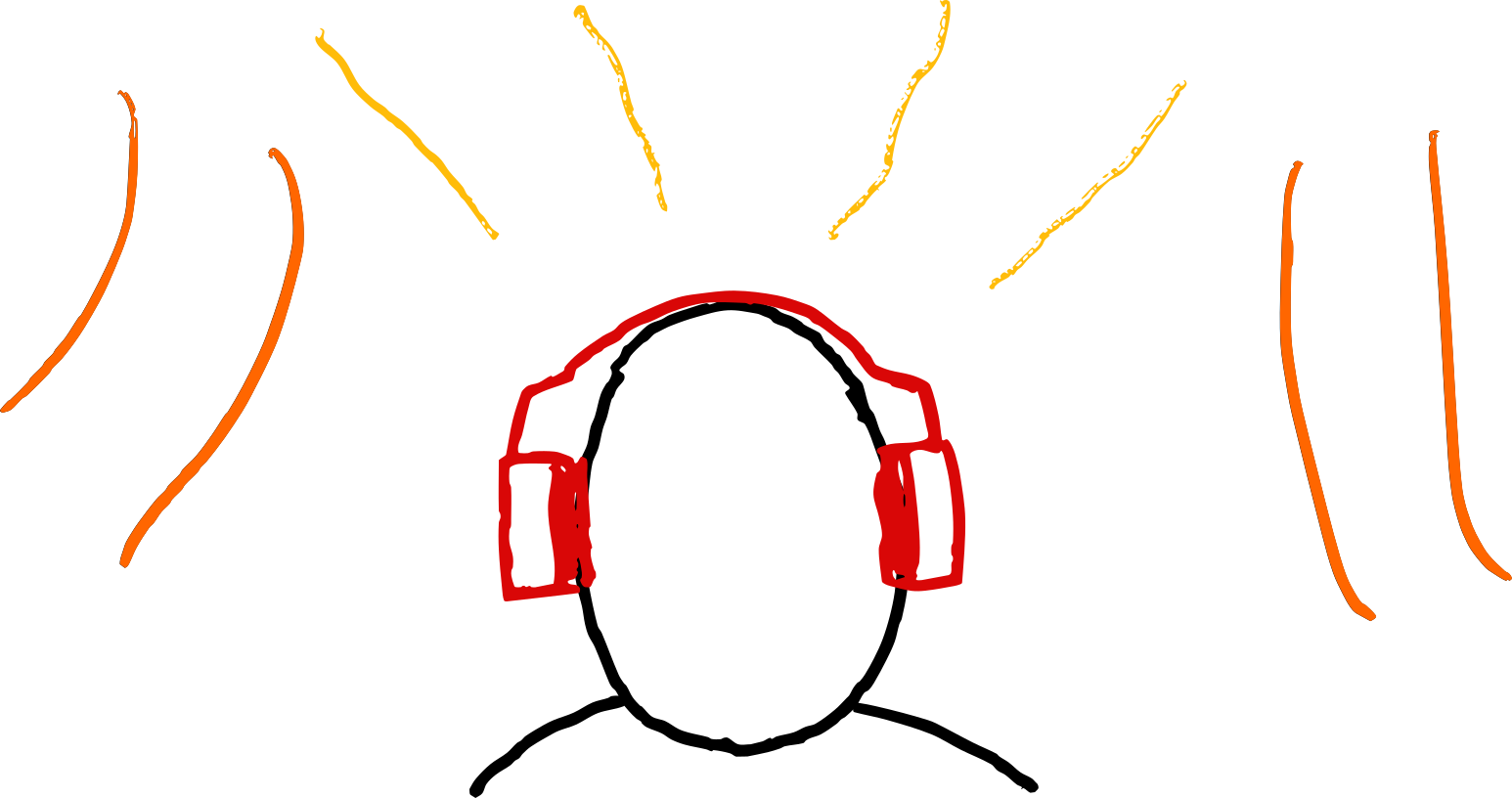
Don’t suffer and merely survive, aided by your noise cancelling headphones.
This scenario often arises through compromise on ways of working that are the least objectionable to everyone in the team. In contrast, better ways of working tend to arise from finding what works and turning it up to the extreme.
I’m interested to hear from you if you have seen a team better off in the Office & Async quadrant than they would be in another.
If you’re stuck in this quadrant, and you’re not finding it joyful, consider a move to another. Don’t suffer and merely survive, aided by your noise cancelling headphones.
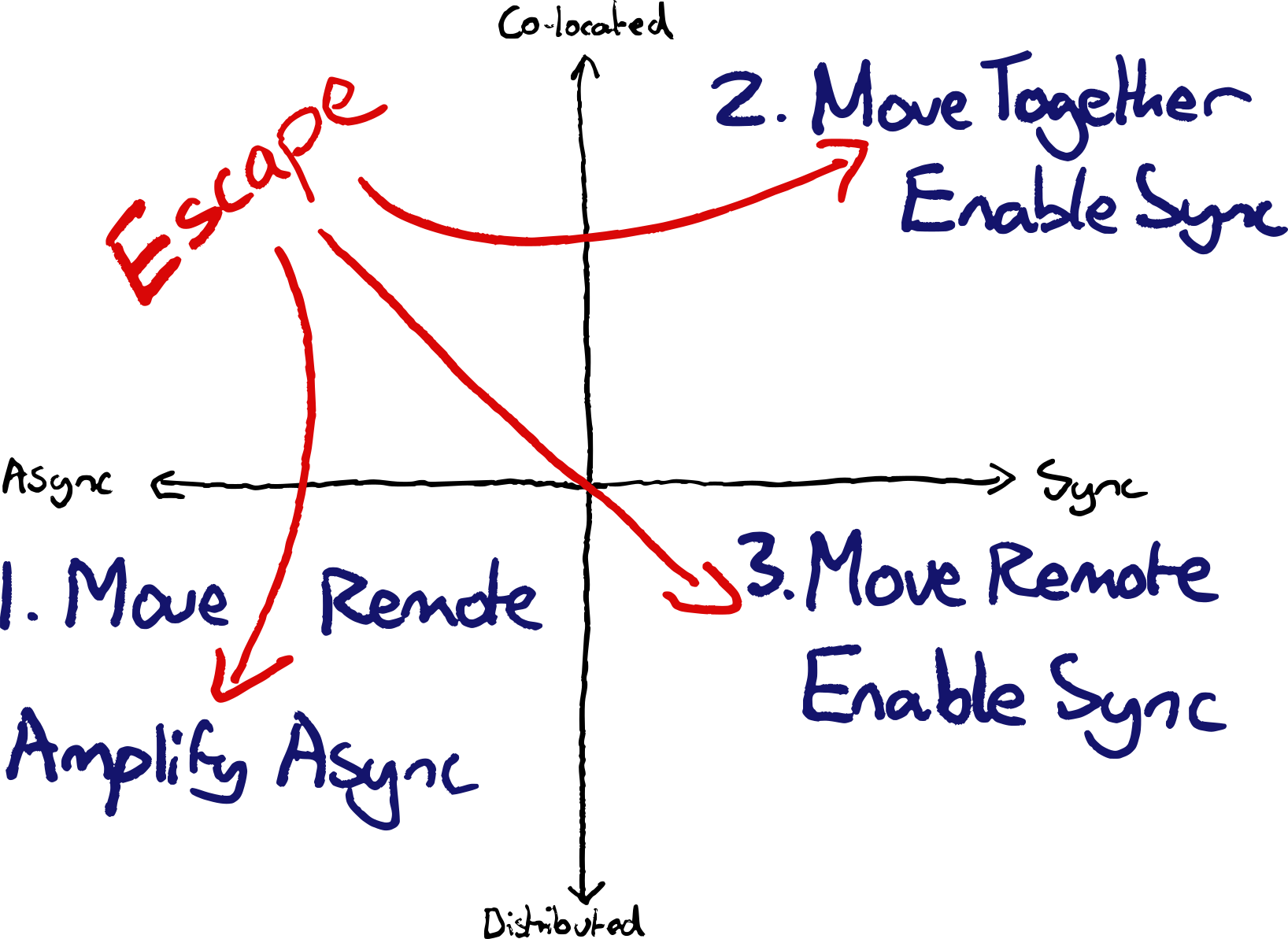
Option 1: Move remote, to get the true benefits of Async
If you have the luxury of working remotely, and you prefer working asynchronously, then remote will open up lots of benefits.
You’ll avoid commutes. You’ll enable hiring from anywhere, including a wide geographical spread, making it easier to hire great people. You’ll increase timezone coverage for progress that never stops and improve operational coverage.
Option 2: Move together, to enable Sync
If your team are all spread out within the same office, bring your desks together. Control your space as much as possible. Use the wall space. Separate your area with whiteboards / soundproofing.
If this isn’t possible, consider booking meeting rooms out where you could go to work together. It’s amazing how infrequently large meetings get questioned. Whereas making small changes to enhance the space you’re working in sometimes alarms bureaucracies.
Working in the same space will enable ad-hoc discussions. It facilitates pair programming with regular rotations. You can make the things most important to you visible in the workspace. You’ll also overhear opportunities to help each other.
Option 3: Move remote, to enable Sync
If you can’t move your desks but have the luxury of working remotely, you could move to the bottom right to make collaboration easier. Then try some of the ways of working mentioned below.
Remote and Async — Open Source Style
Many of the best ways of working in this quadrant have emerged from the ways that distributed open source communities work. Pull requests. Mailing lists. Decision frameworks based on written proposals.
This style enables large groups of people to collaborate effectively to achieve large things. Often larger than a traditional team could achieve. Sometimes at the cost of speed of decisions.
Office and Sync — XP Style
Extreme Programming Practices are a great starting point for office & sync. Then experiment and iterate towards what works best for you.
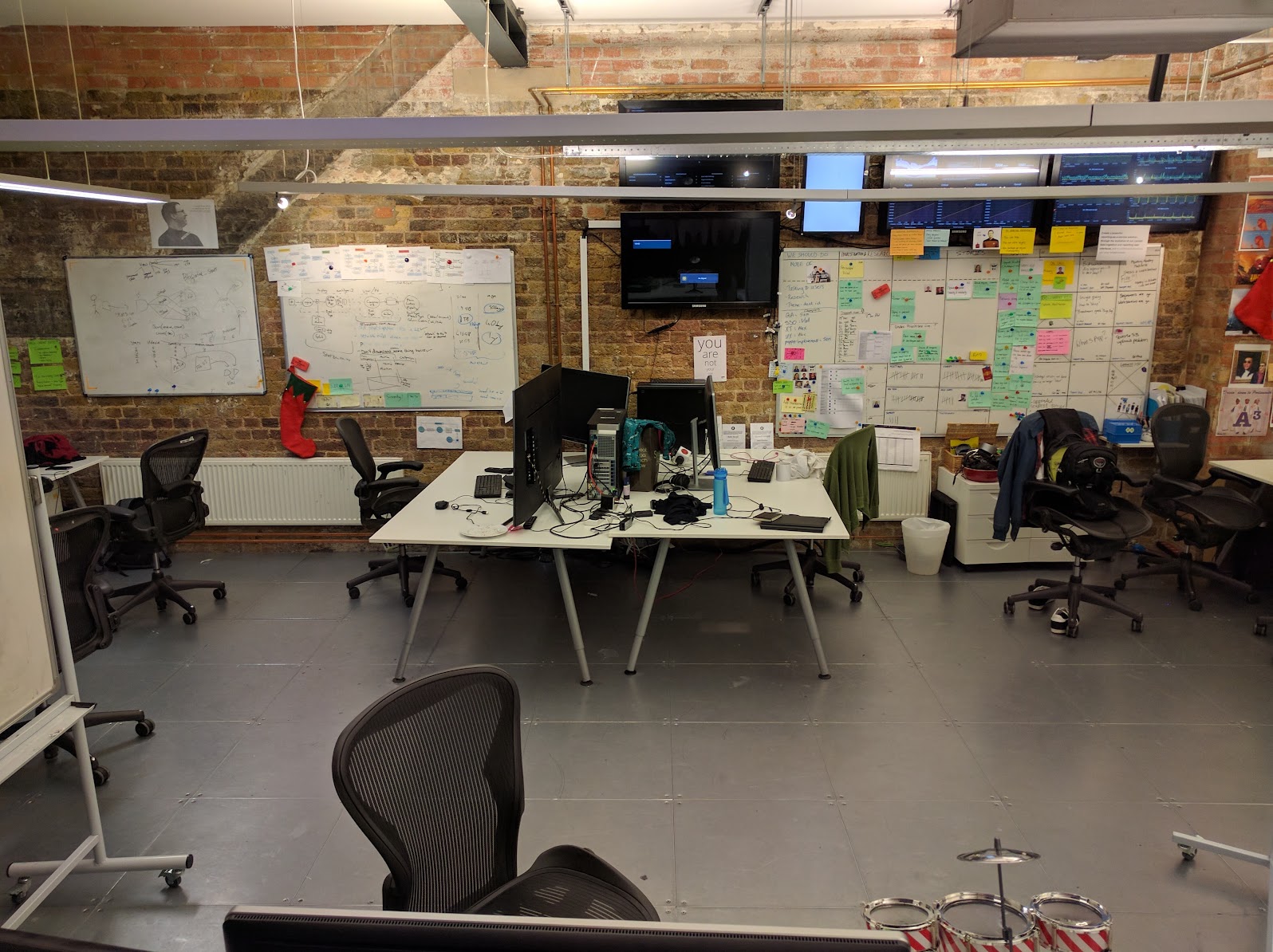
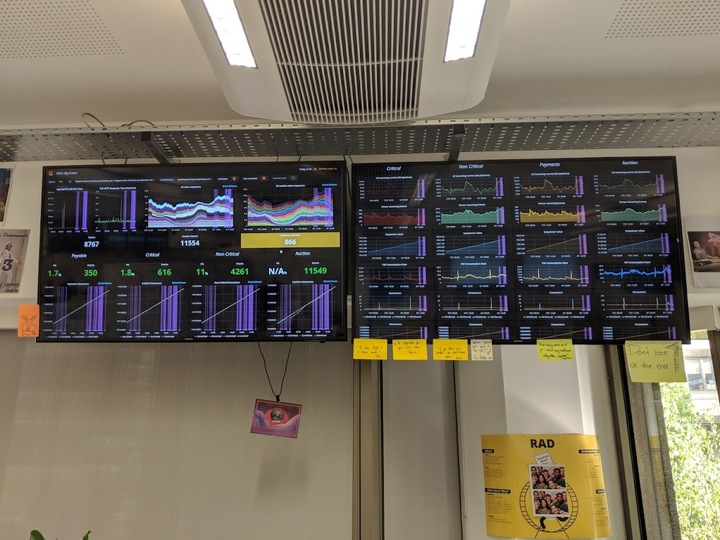
If you have the luxury of being in the same space—be in the same space. i.e. get your desks together. Get big desks so you can sit and work together. Customise your space to be informative & facilitate collaboration. Track things on the walls. Keep living diagrams on whiteboards. Put up big displays with production metrics.
One of the nice things about using a physical whiteboard as the information radiator in a team was
— Benji Weber :: @benjiweber@mastodon.social (@benjiweber) February 13, 2022
a) the ease of modifying the process visualisation and
b) the reinforcement of the constant reminder
Subtle effect from opinionated tools like Jira/Trello is stifling this. pic.twitter.com/HJeqeZR7t0
Remote and Sync — Learn what works
Less has been written about this quadrant. Kent Beck wrote this article recently which partly inspired this post.
During the pandemic I saw several teams stuck in the Async-Colocated quadrant discover the benefits of collaborative practices.
re-discovery of XP practices unimpeded by hostile offices
Teams stuck working as isolated individuals within the same office were freed. Absent the noisy office environments where they were artificially separated, they could start working together, in a remote-first way.
Teams discovered new ways. These included re-discovery of XP practices unimpeded by hostile offices.
Eliminate wasteful Meetings
I saw teams inverting what they used synchronous time for. Things they did together through mere habit, like status updates for stakeholders, became async. Boring meetings of status updates that could be slack messages became slack messages.
Instead, sync time was protected for actual collaboration. The higher cost of sync time when remote due to lower bandwidth incentivised using it more wisely.
Always-on Zoom
An always-on video call for teams allowed people to drop in and out to work with each other and catch up on work others were doing in parallel. Analogous to a dedicated team war-room in an office. Without the bureaucratic hurdles to setting one up. Nor the challenge of competing with nearby teams for noise.
Dashboard Nudges
Automated daily screenshots of dashboards with team KPIs. Regular snapshots sent to teams’ Slack channels replaced the physical TVs from the physical office. These nudges provoked conversation, increasing awareness of both the success of features, and production risks.
Team Games
Opportunities to relax and have fun together needed to be intentional. Web based multi-player remote games were a go-to for several teams.
Virtual Whiteboarding
Discussions and brainstorms sometimes worked even better than their in-person alternatives. Unlike physical whiteboards, in virtual space there’s no problems with everyone crowding around. Nobody can hog the view. Everyone can participate at once. Not to mention saving a fortune in post-it notes.
Pair Programming
Pair programming works well when remote. For many teams it works better remotely; their office environments being so hostile to in-person collaboration. No longer having to compete with the din, pairs could focus.
Communication bandwidth isn’t as high as in-person, but the tooling to work together remotely has come a long way. Tools like VSCode Live-share, and Tuple make working together a breeze. Tooling like mob enables fast handover.
Continuous Integration
True continuous integration (integrating to main multiple times per day) is even more valuable when you don’t have the opportunity to overhear what others are working on.
Serendipity is not a Strategy
All quadrants benefit from intentionally defining and writing down ways of working, rather than relying on accidental interactions and happenstance in an office.
Don’t rely on watercooler moments.
If you want folks to have unstructured conversations from which new ideas might emerge, create those opportunities intentionally. There are lots of mechanisms to increase luck and the chances of useful conversations occurring. e.g. No-pre-planned meeting days. Blocked lunch breaks. Group volunteering. Team meals. Quarterly Offsites. Retrospectives.
Look for what’s working for your team and turn it up. Try changing things and uncovering better ways of working!
The post Tragedy of Return to Hostile Offices appeared first on Benji's Blog.
Circle Clock, más relojes para plasma – Plasmoides de KDE (233)
Sigo con estas pequeñas aplicaciones que se conocen como applets, widgets o plasmoides y que dotan de funcionalidades de todo tipo a nuestro entorno de trabajo KDE y que parece que van a sufrir un lavado de cara considerable en Plasma 6. Hoy toca un plasmoide sencillo pero muy visual: Circle Clock, otro reloj para tu fondo de pantallas con una estética muy original, de nuevo ideal para los viernes de escritorio. Con este ya serán 233 los elementos de esta serie presentados en el blog.
Circle Clock, más relojes para plasma – Plasmoides de KDE (233)
Como he comentado en otras ocasiones, de plasmoides tenemos de todo tipo funcionales, de configuración, de comportamiento, de decoración o, como no podía ser de otra forma, de información sobre nuestro sistema como puede ser el uso de disco duro, o de memoria RAM, la temperatura o la carga de uso de nuestras CPUs.
En esta caso vuelvo uno de los clásicos, los relojes con Circle Clock, una creación del prolífico Zayronxyo (que se está convirtiendo en un clásico ya que hace unas semanas ya presenté otra creación suya y hace menos Nemmayan Clock and Date) que nos muestra un simple reloj, envuelto en un círculo con la frase «It is» y la hora transparente. Una maravilla visual que creo que aparecerá en mi próximo Viernes de Escritorio.

Y como siempre digo, si os gusta el plasmoide podéis «pagarlo» de muchas formas en la nueva página de KDE Store, que estoy seguro que el desarrollador lo agradecer?: puntúale positivamente, hazle un comentario en la página o realiza una donación. Ayudar al desarrollo del Software Libre también se hace simplemente dando las gracias, ayuda mucho más de lo que os podéis imaginar, recordad la campaña I love Free Software Day de la Free Software Foundation donde se nos recordaba esta forma tan sencilla de colaborar con el gran proyecto del Software Libre y que en el blog dedicamos un artículo.
Más información: KDE Store
¿Qué son los plasmoides?
Para los no iniciados en el blog, quizás la palabra plasmoide le suene un poco rara pero no es mas que el nombre que reciben los widgets para el escritorio Plasma de KDE.
En otras palabras, los plasmoides no son más que pequeñas aplicaciones que puestas sobre el escritorio o sobre una de las barras de tareas del mismo aumentan las funcionalidades del mismo o simplemente lo decoran.
La entrada Circle Clock, más relojes para plasma – Plasmoides de KDE (233) se publicó primero en KDE Blog.