
Salt, Vim, nodejs update in Tumbleweed
This week’s openSUSE Tumbleweed snapshots had a steady amount of software packages in each of the daily releases.
While vim, Node.js and Salt updates made the headlines, AppStream, KDE Frameworks and the Linux Kernel provided several important updates.
In the most recent 20230118 snapshot, manpages-l10n moves to version 4.17.0, which now actively has Swedish maintained. The package also adds a new language. A week’s worth of fixes came in the ncurses 6.4.20230114 update. The package improves configure-script macros vs compiler warnings and it has a fix to avoid a conflict with pre-existing usage in vim. Two openSUSE packages updated in the snapshot. A change to allow both swap and none as paths for swap in fstab were made with the libstorage-ng 4.5.64 update. An update to identify Dell storage devices with the extension of regular expressions was made in yast2-storage-ng 4.5.16. The diffutils utility program used for creating patch files updated to version 3.9, but did not list any fixes for the platform, according to the changelog. Other packages to update were python-httpx 0.23.3 and python310-packaging 23.0.
Both the Node.js and the Linux Kernel updated in snapshot 20230117. The 6.1.6 kernel-source update enabled headset microphones with more Dell laptops through Advanced Linux Sound Architecture changes, and netfilter nftables consolidated set descriptions and added a function to create set stateful expressions. The nodejs19 package update to 19.4.0 improved timeout defaults handling. The package also had a change with an impact of less RAM for AArch64 and 32-bit arm. Fixes to handle btrfs subvolumes were made with GNOME’s tracker-miners 3.4.3 version. Georgian and Macedonian language changes were made with a yast2-trans update and a few other libraries were updated in the snapshot.
With the exception of three other packages in snapshot 20230116, KDE Frameworks updates took the majority of data packets for users who did a zypper dup. Frameworks 5.102.0 fixes a crash with KTextEditor and adds a missing KWindowSystem dependency. The Plasma Framework update centers a panel popup only if it would cover two-thirds of its panel widget and it adds a function to open a context menu. Another Frameworks update was made to the barcode namespace generator; Prison adds the 2.0 version of decoder ZXing. KDE hex editor okteta cleaned the spec file in version 0.26.10 and improved translations. An update of perl-Image-ExifTool 12.54, which is a command-line interface for reading and writing meta information, adds support for a number of new XMP tags, which included the decoding of Nikon, Fujifilm and Canon tags. An update of mpg123 1.31.2 fixed a build error that was network related.
Two packages were released in the 20230115 snapshot. An easier initial setup was made with the perl-Bootloader 0.941 update. The other package, python-Pygments, updated to version 2.14.0. This syntax highlighting package had a number of changes and improves parentheses handling for function definitions. The new version also fixes number and operator recognition.
Vim was among the several updates in snapshot 20230114. The text editor updated to version 9.0.1188 and fixes a memory leak when using class functions, yet the new release may provide an unexpected output when autoloading a script for an interactive operation. A newer 0.15.6 version of AppStream’s cross-distribution efforts added a patch to support meson 0.59, which is meant for the next minor version of Leap. The software component for metadata standardizing also added an Application Programming Interface for content rating descriptions and ratingIds. There were a few fixes with the NetworkManager 1.40.10 update. One of those fixes an evaluation of the autoconnect function and another ensures that dnsmasq is stopped after changing the dns backend and restarting the service. There were various other fixes in the package. An update of pipewire 0.3.64 had a mass amount of info about the update. It cleared some old buffer memory on ports to fix some bus errors, and now makes it possible to assign custom port names to the ports from an adapter. The audio and video package fixed an error in the quantum and rate calculations that could cause nodes to run with these wrong computations when multiple rates were allowed. Several patches were removed with the package update. The utility library for ndctl had a major version update. Version 75 had many improvements and added master-passphrase removal support. Other packages to update in the snapshot were gtksourceview5 5.6.2, libstorage-ng 4.5.63 and more.
Salt 3005.1 added a missing patch after a rebase to fix collections mapping issues, which arrived in snapshot 20230113. The release was full of patches and one of the fixes ensures the default values for interprocess communication buffers are the correct type. The new version also fixes an architecture parsing issue in apt source files. Mesa 22.3.3 fixes a broken graphics in a game, a hang with Plasma and a crash when creating graphics pipeline libraries with a module identifier. Some updates for Xfce packages also became available in the snapshot. The file manager thunar 4.18.2 prevents a crash for copy+overwrite via DBus and also prevents a rare crash when closing thunar. Another update was made to xfce4-panel 4.18.1, which fixes a sync timeout issue. A few more packages were updated in the snapshot.
The snapshot that began the week, 20230112, had file updated to version 5.44.

 Member
 Futureboy
Raspberry Pi OctoPrint Powered by Ender3 3D Printer

Lanzada la beta de Plasma 5.27
Los desarrolladores de la Comunidad KDE ya están preparando el lanzamiento de la siguiente versión de su escritorio. Es por lo que ya se empiezan a conocerlas novedades de la beta del escritorio de Plasma 5.27, las cuales ya podemos ir desgranando. Además, para los que disfruten de probar cosas nuevas es el momento de probar esta versión y que reporten los errores que se encuentren. ¡No pierdas la oportunidad de contribuir al desarrollo de Plasma!
Lanzada la beta de Plasma 5.27
Hoy 19 de enero ha sido lanzada la beta de Plasma 5.27. En esta primera versión liberada del 2023, no apta todavía para el usuario que busquen estabilidad, sigue centrado en que el escritorio de la Comunidad KDE siga mejorando en aspecto, funcionalidades y usabilidad, poniendo el foco en los nuevos usuarios con pantalla de bienvenida, con mejoras en Flatpak o refactorización multimonitor para pantallas grandes.
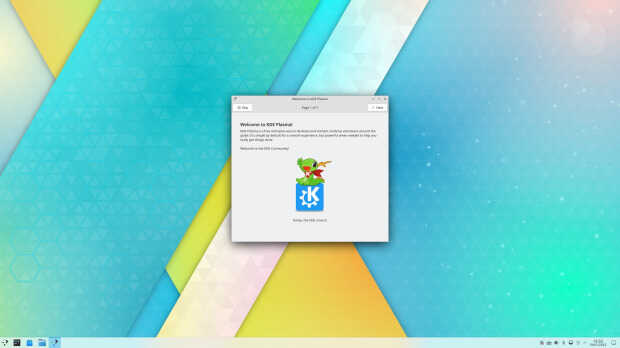
En palabras de sus desarrolladores:
Hoy os traemos la versión preliminar de la versión Plasma 5.27 de KDE. Plasma 5.27 Beta está dirigida a probadores, desarrolladores y cazadores de errores. Además de nuestro ligero y rico escritorio Linux, esta versión añade una versión Bigscreen de Plasma para su uso en televisores.
Para ayudar a los desarrolladores de KDE a corregir errores y resolver problemas, instala Plasma 5.27 Beta y prueba las características que se enumeran a continuación. Por favor, informe de errores en nuestro bug tracker.
La versión final de Plasma 5.27 estará disponible para el público en general el 14 de febrero.
Más información: KDE
Pruébalo y reporta errores

Todas las tareas dentro del mundo del Software Libre son importantes: desarrollar, traducir, empaquetar, diseñar, promocionar, etc. Pero hay una que se suele pasar por alto y de la que solo nos acordamos cuando las cosas no nos funcionan como debería: buscar errores.
Desde el blog te animo a que tú seas una de las personas responsables del éxito del nuevo lanzamiento de Plasma 5.27 de la Comunidad KDE. Para ello debes participar en la tarea de buscar y reportar errores, algo básico para que los desarrolladores los solucionen para que el despegue del escritorio esté bien pulido. Debéis pensar que en muchas ocasiones los errores existen porque no le han aparecido al grupo de desarrolladores ya que no se han dado las circunstancias para que lo hagan.
Para ello debes instalarte esta beta y comunicar los errores que salgan en bugs.kde.org, tal y como expliqué en su día en esta entrada del blog.
La entrada Lanzada la beta de Plasma 5.27 se publicó primero en KDE Blog.

2022 picks: software projects to keep an eye on
These software projects and technologies caught my attention and excitement during 2022, though they may not have necessarily appeared that year. My selection and focus have a clear bias as I have spent most of my life developing open-source, data center, and e-commerce infrastructure software on UNIX-like systems. I only included projects I have tried myself.
I admire software that solves complex problems in a simple, elegant, and lean manner and those that are easily adopted and standardized as the “default”.
Tree-sitter
Description from its website:
Tree-sitter is a parser generator tool and an incremental parsing library. It can build a concrete syntax tree for a source file and efficiently update the syntax tree as the source file is edited.
Why is this important? This comment summarizes it well:
Incremental parsing of incorrect code is one of those things that is literally impossible in the general case, but tree-sitter has found a lot of good ways to do it that are not just possible for a large fraction of reality, but also performant. It’s hard to understate how impressive a piece of engineering this is.
I see this technology having an impact on IDEs, editors, linters and other tools similar to what the LLVM project did years ago for the compiler and interpreter ecosystem, and what Language Server Protocol did for IDEs during the last years.
For example, the Emacs editor adopted LSP by including eglot by default.
Originally, you could replace the limited regexp-based syntax highlighting in Emacs with the emacs-tree-sitter modes. This is no longer necessary, as from version 29+, Tree-sitter support is part of Emacs by default.
Wireguard
Description from its website:
WireGuard® is an extremely simple yet fast and modern VPN that utilizes state-of-the-art cryptography.
Wireguard’s simplicity:
- implemented in ~5000 lines of code, when most VPN solutions range from tens of thousands to hundreds of thousands
- works at the interface level, which means you can treat it like any other interface
- the state is hidden from the user, so things like roaming just work
- It is incorporated in most open-source operating systems. There is a Windows native version and a multi-platform userspace version written in Go.
- NetworkManager, which most people use to manage networks in desktop Linux, has native support for it, and GNOME even displays the toggle for Wireguard connections.
- Android/iOS app
- Most commercial VPN providers support it, including the only one that is worth your time.
Some higher-level solutions have been built on top of WireGuard. The most impressive is Tailscale, which brings magical usability to access private networks spread across the world.
And last but not least, Fritzboxes, one of the most popular consumer routers in Germany, supports Wireguard natively, since December 2022, which means I now can access my home LAN very easily and from almost any device.
Litestream and liteFS
I believe many of the complicated app architectures today are either too early or just unnecessary.
SQLite is a local database engine that operates on a single file per database. It is the most deployed database in the world, and it is likely running in your pocket inside your phone on many different apps.
Many businesses could start in a single machine using a SQLite database.
Litestream is a project from Ben Johnson that replicates sqlite3 databases to make sqlite globally distributed. The replication part was extracted into LiteFS, while Litestream kept the disaster recovery replication.
With this model, LiteFS uses FUSE (Filesystem in userspace) as a pass-through filesystem to intercept writes to the database to detect transaction boundaries and replicate those in the replica nodes.
Litestream allows replicating databases by continuously copying write-ahead log pages to cloud storage.
An alternative implementation of transaction replication using SQLite built-in VFS is also planned.
The project was since then acquired by Fly.io, which specializes in deploying apps close to the users.
Both projects give SQLite superpowers and allow for resilient and performant applications while keeping the setup and architecture lean and simple.
During the Twitter exodus to Mastodon, I saw people dealing with the complexity and resource requirements of operating Mastodon for a single user. My Fediverse instance is not Mastodon, but gotosocial. Uses 128M ram, a 140M SQLite database, and runs on a 5€ micro VM. The database is replicated to an sftp share with Litestream.
Nix
Nix is a tool for producing reproducible builds and deployments. It takes a different approach to package management using a declarative and functional build description.
When you build something with Nix, it ends in its own directory in the Nix store e.g. /nix/store/hxxrbmr2zh6ph90qi8b4n2m53yvan3fr-curl-7.85.0/ and as long as the inputs do not change, the location, which is content-addressed, will not change either. They will also depend on the exact versions they were built against.
This allows you the installation of multiple versions in parallel, and the current system profile itself is a collection of symbolic links to the right binaries, which means you can roll back very easily.
While Nix can be used on Linux and macOS, there is a full Linux distribution built on this model.
While it can also be used for CI, building container images, etc., I use Nix in two ways:
-
Declare project dependencies
If I have e.g. a folder with some Ansible roles I use to configure my home gadgets, I can make that project independent from where I am running it by just having a top
shell.nixdeclaring dependencies. Then a simple.envrcfile with the lineuse_nixand direnv setup in my shell.As soon as I
cdinto the directory, Ansible is installed and appears in the path. Icdout and it disappears. The nix store is cached, so the second time is very fast (until younix store gc).You can use this to have reproducible developer environments.
Nix Flakes is a new format to package Nix-based projects in a more discoverable, composable, consistent and reproducible way.
With Flakes, you could even pin your environment to a specific revision of the package descriptions.
-
Manage packages, including my own
Some packages I need all the time: Emacs, Chromium, tarsnap, etc. I use Nix for that, and keep my distribution just for the base system.
nix profile install nixpkgs#tarsnapand the package is now always available. I also have packages that are not free to distribute, so I can keep the recipe to build it in git, or just override a few compile options from another package. It is just flexible.
The language is a functional DSL that takes some curve to learn, just like the built-in functions. I am not sure if this will be someday the future of deployments, but for me as been agreat addition to those two use cases..
Stable Diffusion
StableDiffusion is an AI model which allows to:
- transform text prompt into images
- transform images plus a text prompt into new images
- edit images by selecting an area and a prompt
Also impressive are the creations where StableDiffusion is used to change a single video frame, and another model is used to extrapolate the change to the rest of the frames, resulting in full video editing.
The Dreambooth model allows to finetune StableDiffusion for specific subjects. This is what the Lensa app does when generating many avatars from your selfies.
I believe this will have a huge impact on creative industries (design, gaming), and will make their software understand the semantics of the image, just like IDEs have been doing for years offering syntax-aware refactorings.
ChatGPT
I’d like to mention ChatGPT together with Copilot, but I haven’t tried Copilot yet.
These technologies are already proving to be very useful in the context of programming.
Leaving out the controversial topic of training proprietary models on GPL code for another occasion, I am impressed how good ChatGPT is to port code from one dimension to another, eg. rewriting using a different language, library, etc. I think it will become very useful for porting, refactoring and updating software.
For example, I was very pleased with ChatGPT being able to take some Linux commands, and generating me a set of Ansible tasks to replicate the configuration

Phoenix LiveView, hotwire and the return of the server-side HTML
Single-page applications (SPA) are with us for longer than I can remember, but the feeling something is not right in that model continues to live with me.
The architecture duplication on the server and client-side (controllers, views, stores), dividing teams through json messages in two worlds speaking different languages seems broken. The instability of the Javascript eco-system just makes things worse.
I can’t however, picture how to solve the challenges SPAs aim to solve when it comes to highlyy interactive applications.
Phoenix is a web framework for Elixir, a language running on the Erlang VM. His creator has a Rails background, so he took off from where Rails left and brought innovation to the space in the form of Phoenix LiveView, a technique that allows for highly interactive applications without abandoning the server side paradigm.
Other toolkits have appeared which allow to start server side and add interactivity in a structured way without abandoning the server side paradigm. One is HotWire from Basecamp, which includes Turbo and other libraries, and htmx, which works by just annotating HTML.
virtio-fs and krunvm
Something I always disliked about virtualization was the use of images. It added a whole layer of complexity.
virtio-fs is a filesystem that allows sharing the host filesystem with the guest. Unlike virtio-9p (the one used by Windows Subsystem for Linux), it has local semantics.
qemu has support for it, so you can boot a root filesystem.
One tool that takes advantage of virtio-fs is krunvm. It allows to run container images as micro virtual machines. The machines implement a few simple virtio devices enough to run an embedded kernel in libkrun.
krunvm takes virtio-fs to the next level, basically making it invisible, allowing you to mount any host folder into the virtual machine the same way that you do it with container images.
Follow the work Sergio Lopez is doing in this space.
These are my picks. What are yours?
Docker en Linux Center de València
Los eventos parece que empiezan a ser más numerosos a medida que la comunidad linuxera vuelve a la normalidad post-pandémica. Hoy me complace compartir una nueva charla-taller, en concreto se trata de Docker en Linux Center, el punto de encuentro y formación de los usuarios GNU/Linux auspiciada de Slimbook. Y como maestro de cermonias tenemos al gran Lorenzo Carbonell, más conocido como el atareao, uno de ls grandes divulgadores de las bondades del Software Lbre.
Docker en Linux Center de València
Hemos hablado mucho este verano de la compañía valenciana de ensamblaje de dispositivos compatibles 100% con el Software Libre conocida como Slimbook, pero hemos hablado de sus ultrabooks y no tanto de sus actividades, y es hora compaginar ambas cosas ya que hace poco han dedicido volver al mundo de los eventos con la reapertura de su Linux Center.

De esta forma, para seguir estas el próximo sábado 21 de enero vamos a poder disfrutar de una nueva charla-taller a cargo de Lorenzo Carbonell, (aka @atareao) el cual ya ha participado en Linux Center con el taller «Bots para Telegram, como automatizar hasta el infinito y más allá» o el «Ciclo de Raspberry Pi», entre otros.
En palabras de él mismo:
Lorenzo Carbonell, soy un desarrollador independiente de aplicaciones, principalmente, para GNU/Linux y Android. Divulgador y evangelizador del software libre. Orientado a Ubuntu y distribuciones derivadas de Debian. Firme creyente en la filosofía de la cultura libre y accesible para todos.
La información adicional que necesitas es esta:
Plazas Total: 20
¿Curso Gratuito o de Pago?: GRATUÍTO gracias a SLIMBOOK.
¿Podemos retransmitirlo via streaming?: No
Localización: Linux Center (Grupo Odín). Ronda de la Química s/n Edificio ABM L’Andana, 7ª planta Frente a Parque Técnológico 46980 Paterna, Valencia
Más información: Linux Center
La entrada Docker en Linux Center de València se publicó primero en KDE Blog.
Mentorship Community Plans Project Finalization, Submission
People interested in mentorship for this year’s Google Summer of Code as part of openSUSE’s application will conclude a finalization meetup on Feb. 7 at 15:30 UTC on the project’s Jitsi instance channel.
After the project meeting, the project will submit an application for the openSUSE Project being a mentorship organization for 2023.
A large group of people involved in the project participated in a workshop on Jan. 10 with a focus on increasing mentorship for the organization and listing project mentoring ideas. Participants brainstormed project ideas during the workshop on the event’s etherpad and created listings for the project’s mentorship repository.
Still, there is plenty of time for people who are interested in mentoring to create an issue on the mentorship repository; the submitter of the issue will be listed as the main mentor. Those who do submit a project idea should list all the details from the template and label it with a tag as either a large-size project (350 hrs) or medium-size project (175 hrs).
Those who did not attend the workshop are still encouraged to participate as a mentor if they have the time or interest. The mentorship efforts have proven over the years to introduce people into open-source development, the many projects openSUSE has and the interactions it has with many other open-source projects. The openSUSE Project lists it’s GSoC mentorship projects on 101.opensuse.org.
The openSUSE Project has a long tradition of participating in GSoC and has done it several times since 2006. If you have any questions about the GSoC application or want to help mentor a project on 101.opensuse.org, email ddemaio@opensuse.org. The application period is open between Jan. 23 and Feb 7, but mentors can add their project on 101.opensuse.org now.
Learn More About openSUSE, ALP at FOSDEM
The openSUSE Project is planning activities for this year’s FOSDEM, which will take place Feb. 4 and 5 in Brussels.
The project will be in with operating systems space in Hall H and at its exhibit will have contributors available to discuss all openSUSE related projects to include ALP, MicroOS, Tumbleweed, Leap, Open Build Service, openQA and more.
SUSE released its second prototype late last month of its Adaptable Linux Platform (ALP). There will be experts from the on hand to discuss ALP.
Two ALP prototypes have been released so far; Les Droites was the first one released in October and Punta Baretti is the current available prototype for testing. More prototypes are expected for spring and summer.
Make sure not to miss talks from the community. Dan Čermák will talk about Modularity and ALP; Richard Brown will give a keynote for the distribution track. And Sarah Julia Kriesch will give a talk about collaboration and The Open Mainframe Project.
The booth will have swag, a quiz and beer. Enlighting yourself. Come see us and Have a lot of fun!
Actualización de enero del 2023 de KDE Frameworks
Se me ha pasado anunciarlo el día que tocaba, supongo que será la resaca de las festas. No obstante me complace anunciar la actualización de enero del 2023 2024 de KDE Frameworks. Con esta se llega a la versión 5.102 que evidencia el compromiso y constancia que no tiene un final cercano.
Actualización de enero del 2023 de KDE Frameworks
A pesar de que para los usuarios corrientes esta noticia sea algo confusa ya que no se trata de realzar una nueva aplicación ni de una nueva gran funcionalidad del escritorio, el desarrollo de KDE Frameworks tiene repercusiones directas en él a medio y largo plazo.
La razón de esta afirmación es que KDE Frameworks es básicamente la base de trabajo de los desarrolladores para realizar sus aplicaciones, es como el papel y las herramientas de dibujo para un artista: cuanto mejor sea el papel y mejores pinceles tenga, la creación de una artista será mejor.

De esta forma, las mejoras en KDE Frameworks facilitan el desarrollo del Software de la Comunidad KDE, haciendo que su funcionamiento, su estabilidad y su integración sea la mejor posible.
El 14 de enero de 2023 ha sido lanzado KDE Frameworks 5.102 la nueva revisión del entorno de programación sobre el que se asienta Plasma 5, el escritorio GNU/Linux de la Comunidad KDE, y las aplicaciones que se crean con para él.
Más información: KDE
La constancia del equipo de desarrollo de la Comunidad KDE
Hay que recordar que los desarrolladores de KDE decidieron lanzar actualizaciones mensuales de este proyecto y lo están cumpliendo con puntualmente. La idea es ofrecer pocas pero consolidadas novedades, a la vez que se mantiene el proyecto evolucionando y siempre adaptándose al vertiginoso mundo del Software Libre.
Una gran noticia para la Comunidad KDE que demuestra la evolución continua del proyecto que continua ganando prestigio en el mundo de los entornos de trabajo Libres.
¿Qué es KDE Frameworks?
Para los que no lo sepan, KDE Frameworks añade más de 70 librerías a Qt que proporcionan una gran variedad de funcionalidades necesarias y comunes, precisadas por los desarrolladores, testeadas por aplicaciones específicas y publicadas bajo licencias flexibles. Como he comentado, este entorno de programación es la base para el desarrollo tanto de las nuevas aplicaciones KDE y del escritorio Plasma 5.

Aquí podéis encontrar un listado con todos estos frameworks y la serie de artículos que dedico a KDE Frameworks en el blog,
Recuerda que puedes ver una introducción a Frameworks 5.0 en su anuncio de lanzamiento.
La entrada Actualización de enero del 2023 de KDE Frameworks se publicó primero en KDE Blog.
Linux Saloon | Linux New Year
Plasma Drawer, otro lanzador de aplicaciones a pantalla completa – Plasmoides de KDE (216)
Seguimos con los lanzadores de aplicaciones para KDE, de los cuales tenemos indexeados en la KDE Store ya 36 de ellos. En esta ocasión os presento Plasma Drawer, otro lanzador de aplicaciones a pantalla completa para KDE, con el que llegamos a las 216 de plasmoides de esta serie de miniaplicaciones que se une a la ingente cantidad de widgets de este tipo presentados en el blog.
Plasma Drawer, otro lanzador de aplicaciones a pantalla completa – Plasmoides de KDE (216)
Seguimos con las posibilidades de personalización de Plasma 5 en cuanto a lanzadores de aplicaciones. Al nuevo lanzador que nos vino con Plasma 5.21, a su versión clásica que podéis encontrar en la KDE Store, y a la infinidad de alternativas que tenemos (UMenu, Minimal Menu, Simple Menu , Ditto Menu ,Popup Launcher, Stupid Simple Launcher o OSXLaunchpad) se unen inspiraciones de otros sistemas operativos como el que os presento hoy.
Así que espero que le deis la bienvenida a un plasmoide de llamado Plasma Drawer, creado por colloquiem , y que se trata de un lanzador personalizable a pantalla completa con directorios de aplicaciones y búsqueda tipo krunner para KDE Plasma.
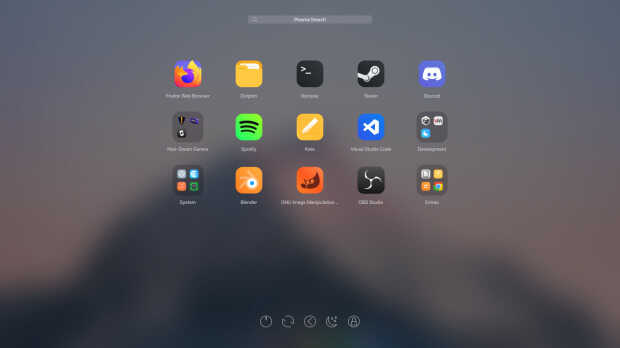
Y como siempre digo, si os gusta el plasmoide podéis «pagarlo» de muchas formas en la nueva página de KDE Store, que estoy seguro que el desarrollador lo agradecer?: puntúale positivamente, hazle un comentario en la página o realiza una donación. Ayudar al desarrollo del Software Libre también se hace simplemente dando las gracias, ayuda mucho más de lo que os podéis imaginar, recordad la campaña I love Free Software Day de la Free Software Foundation donde se nos recordaba esta forma tan sencilla de colaborar con el gran proyecto del Software Libre y que en el blog dedicamos un artículo.
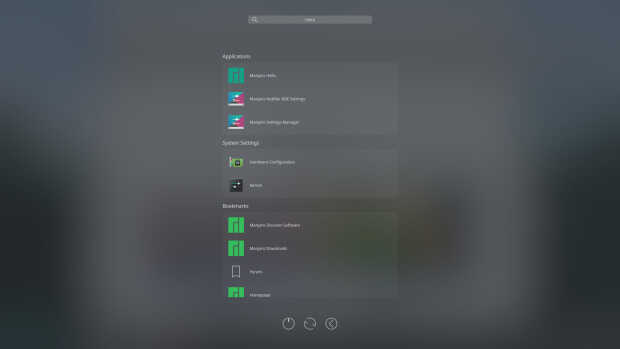
Más información: KDE Store
¿Qué son los plasmoides?
Para los no iniciados en el blog, quizás la palabra plasmoide le suene un poco rara pero no es mas que el nombre que reciben los widgets para el escritorio Plasma de KDE.
En otras palabras, los plasmoides no son más que pequeñas aplicaciones que puestas sobre el escritorio o sobre una de las barras de tareas del mismo aumentan las funcionalidades del mismo o simplemente lo decoran.
La entrada Plasma Drawer, otro lanzador de aplicaciones a pantalla completa – Plasmoides de KDE (216) se publicó primero en KDE Blog.