
 Member
 baltolkien
Andromeda Launcher, otro lanzador de aplicaciones estilo ventana – Plasmoides de KDE (221)
Seguimos con los lanzadores de aplicaciones para KDE, de los cuales tenemos indexeados en la KDE Store ya 38 de ellos. En esta ocasión os presento Andromeda Launcher, otro lanzador de aplicaciones estilo ventana, con el que llegamos a las 221 de plasmoides de esta serie de miniaplicaciones que se une a la ingente cantidad de widgets de este tipo presentados en el blog.
Andromeda Launcher, otro lanzador de aplicaciones estilo ventana – Plasmoides de KDE (221)
Seguimos con las posibilidades de personalización de Plasma 5 en cuanto a lanzadores de aplicaciones. Al nuevo lanzador que nos vino con Plasma 5.21, a su versión clásica que podéis encontrar en la KDE Store, y a la infinidad de alternativas que tenemos (UMenu, Minimal Menu, Simple Menu , Ditto Menu ,Popup Launcher, Stupid Simple Launcher o OSXLaunchpad) se unen inspiraciones de otros sistemas operativos como el que os presento hoy.
Así que espero que le deis la bienvenida a un plasmoide de llamado Adromeda Launcher, creado por ELIVERLARA, y que se trata de un lanzador estilo ventana, es decir, de los que aparecen pero no ocupan la pantalla completa que se caracteriza por poner el avatar del usuario centrado, lo cual viene de fábula para las posibles personalizaciones que ofrece el entorno de trabajo Plasma a sus usuarios.

Y como siempre digo, si os gusta el plasmoide podéis «pagarlo» de muchas formas en la página de KDE Store, que estoy seguro que el desarrollador lo agradecer: puntúale positivamente, hazle un comentario en la página o realiza una donación. Ayudar al desarrollo del Software Libre también se hace simplemente dando las gracias, ayuda mucho más de lo que os podéis imaginar, recordad la campaña I love Free Software Day de la Free Software Foundation donde se nos recordaba esta forma tan sencilla de colaborar con el gran proyecto del Software Libre y que en el blog dedicamos un artículo.
Más información: KDE Store
¿Qué son los plasmoides?
Para los no iniciados en el blog, quizás la palabra plasmoide le suene un poco rara pero no es mas que el nombre que reciben los widgets para el escritorio Plasma de KDE.
En otras palabras, los plasmoides no son más que pequeñas aplicaciones que puestas sobre el escritorio o sobre una de las barras de tareas del mismo aumentan las funcionalidades del mismo o simplemente lo decoran.
La entrada Andromeda Launcher, otro lanzador de aplicaciones estilo ventana – Plasmoides de KDE (221) se publicó primero en KDE Blog.
Cambio de fecha – Introducción al WebScraping con Python en Linux Center de València
Parace ser que hay un cambio de fechas y la charla-taller sobre Introducción al WebScraping con Python que se celebrará en las instalaciones de Linux Center de Slimbook se realizará el próximo 24 de junio. Todavía hay plazas así que si te interesa no dejes de asisitir..
Introducción al WebScraping con Python en Linux Center de València
Hablamos mucho el verano pasado de la compañía valenciana de ensamblaje de dispositivos compatibles 100% con el Software Libre conocida como Slimbook. A lo largo de este otoño, invierno y primavera hemos dejado un poco sus ultrabooks y no nos hemos centrado en sus actividades comunitarias que suelen realiza en su Linux Center.

De esta forma el próximo sábado 10 de junio (contraprogramando Akademy-es de Málaga Opensouthcode Edition) sábado 24 de junio vamos a poder disfrutar de una nueva charla-taller titulada «Introducción al WebScraping con Python » a cargo de Manuel S. Lemos, organizador de la comunidad WordPress Valencia (WP-Valencia), titulado como Técnico Superior en Desarrollo de Software, cuenta con dilatada experiencia en desarrollo y programación.
Para quienes no lo sepan, WebScraping es el proceso de recolectar y analizar datos de la web. Esta técnica permite extraer información de sitios web de forma manual o automática. La palabra «Scraping» significa raspar, reunir o arañar, lo que nos da una idea de lo que implica esta técnica.

En otras palabras, Con WebScraping se extrae el contenido HTML de páginas web para filtrar la información requerida y almacenarla. Esta técnica es muy útil para recolectar grandes cantidades de datos de manera rápida y eficiente. Esta charla promete ser muy interesante ya que Python es uno de los lenguajes de programación más utilizados para realizar estas tareasdebido a su velocidad y facilidad de uso. Además, existen diversas bibliotecas y herramientas en Python que facilitan el proceso de Web Scraping, como Beautiful Soup, Requests y Scrapy.
La información adicional que necesitas es esta:
Plazas Total: 20 (corre que solo quedan 7 libres)
¿Curso Gratuito o de Pago?: GRATUITO gracias a SLIMBOOK y a Samuel.
Requisitos: Portatil con Linux en una máquina virtual (como hay que acceder a una VPN pública, mejor que este virtualizado) y ganas de aprender 
¿Podemos retransmitirlo via streaming?: No
Localización: Linux Center (Grupo Odín). Ronda de la Química s/n Edificio ABM L’Andana, 7ª planta Frente a Parque Técnológico 46980 Paterna, Valencia
Más información: Linux Center
La entrada Cambio de fecha – Introducción al WebScraping con Python en Linux Center de València se publicó primero en KDE Blog.
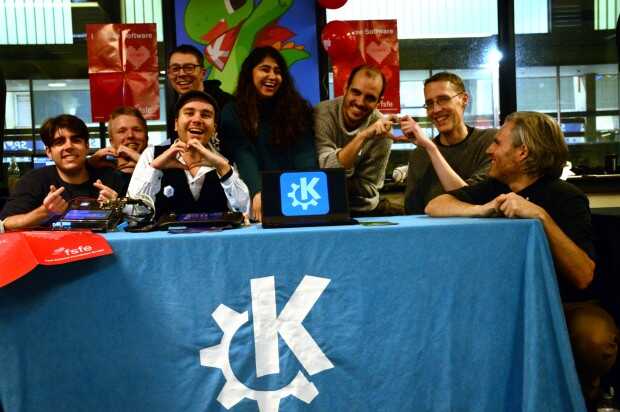
Lanzada la sexta actualización de 5.27 edición ‘KDE 💖 Free Software’
Siguiendo el calendario de lanzamiento de los desarrolladores, la Comunidad KDE han comunicado que ha sido lanzada la sexta actualización de Plasma 5.27, ya que esta versión es una LTS y, por tanto, tiene un peridodo de mantenimiento más alto. Además, dado que es el último hasta el lanzamiento de Plasma 6 es normal que ésta versión tenga una vida mucho más larga.
Lanzada la sexta actualización de 5.27 edición ‘KDE  Free Software’
 Free Software’
No existe Software creado por la humanidad que no contenga errores. Es un hecho incontestable y cuya única solución son las actualizaciones. Es por ello que en el ciclo de desarrollo del software creado por la Comunidad KDE se incluye siempre las fechas de las actualizaciones.
La Comunidad KDE ha publicado hoy que ha lanzado la sexta actualización de Plasma 5.27, una versión que nos ofrecen un gran conjunto de novedades y propuestas que nos acercan a lo que vendrá cuando se realice la transición a Plasma 6. No obstante, en esta versión se han dedicado a introducir la presentación en mosaico de las ventanas, las nuevas pantallas de bienvenida y mejoras notables en Discover, por nombrar solo tres de ellas.
Entre los errores solucionados nos encontramos con:
- Dpms: no se bloquea si intenta interactuar con la pantalla falsa.
- Panel: mitigado el alto uso de CPU de plasmashell al mover ventanas.
- Runners/calculadora: soluciondo el problema de seguridad de hilos en QalculateEngine::evaluate.
- Arreglado ddcutil para usuarios de portátiles.
- Corregida la interfaz de usuario con ventanas de gran tamaño.
Más información: KDE
Las novedades de Plasma 5.27
Ya hablé largo y tendido de las novedades de Plasma 5.27, no obstante aqui os dejo unas pinceladas de las más importatantes:
- Nuevas pantallas de bienvenida.
- Mejoras en las preferencias de permisos para Flatpak.
- Mejoras en la refactorización multimonitor.
- Sistema de mosaicos de KWin.
- Añadido el Calendario Hebreo en el calendario emergente del reloj digital.
- Mejoras en Discover.
- Más funcionalidades para Krunner.
- Mejoras en los plasmoides.
La entrada Lanzada la sexta actualización de 5.27 edición ‘KDE 💖 Free Software’ se publicó primero en KDE Blog.
Tarde del viernes 9 de junio Akademy-es 2023 de Málaga Opensouthcode Edition #akademyes
Tras el parón de ayer sigo la serie de entradas que me sirven como resumen de Akademy-es 2023 que se celebró en de forma presencial en Málaga el 9 y 10 de junio. Tras la odisea para llegar a málaga del jueves y la crónica matinal del viernes hoy toca hablar de la tarde del viernes 9 de junio de Akademy-es 2023, una jornada .
Tarde del viernes 9 de junio Akademy-es 2023 de Málaga Opensouthcode Edition #akademyes
Contra lo que suele ser habitual en las Akademy-es, la sede de este año estaba sorprendentemente cerca de decenas de locales para comer, así que no nos costó casi nada encontrar una simple pero bueno hamburguesería donde comer algo «rápidamente» para seguir con la jornada vespertina. Y sí, el entrecomillado es irónico ya que parece que no se esperaban la afluencia de la gente de Opensouthcode que acudieron a este restaurante para reponer fuerzas.
Como podéis aventurar, llegamos bastante justos a las 4 de la tarde, hora donde empezaba la charla de Antonio Larrosa, desarrollador KDE y de Opensuse, que nos deleitó con su charla «Audiofilia en Linux» donde aprendimos bastante sobre temas sonoros tanto de software como de hardware… con demostración en vivo de la cualidades sonoras por parte del grupo musical que iba a actuar un poco más tarde.
Iniciamos la sesión vespertina on @antlarr y su "Audiofilia en Linux" #akademyes @Opensouthcode #FelizViernes pic.twitter.com/2sntjcRlqX
— KDE_España (@KDE_Espana) June 9, 2023
A continuación, tuvimos la oportunidad de escuchar a Carlos Chan, un usuario de KDE de Mexico, que gracias a las bondades de BBB pudo realizar su ponencia desde su país de origen y hablarnos de Software libre y educación: El papel de KDE en los centros educativos de bajos recursos, una buena introducción para aquellos que todavía no entienden que estos dos mundos (Software y Educación) tienen mucho más en común de lo que parece.
Las aplicaciones de KDE Edu en #akademyes pic.twitter.com/xtvlXWzGtf
— KDE_España (@KDE_Espana) June 9, 2023
Llegó el turno de las charlas relámpago, la primera a cargo Victor que nos hizo reflexionar sobre los verdaderos problemas de accesibilidad que tiene el software KDE y que debe corregirse en breve, y la segunda de Antonio Larrosa que nos presentó OpenSUSE MicroOS.
Charlas relámpago… la primera a cargo de Víctor sobre accesibilidad que es una gran reflexón. #akademyes pic.twitter.com/cXEoBNHqtx
— KDE_España (@KDE_Espana) June 9, 2023
El momento de KDE España había llegado, y Adrián Chaves y Rubén Gómez subieron al estrado para explicar qué es KDE España y porqué necesitamos que te asocies…. o como mínimo que colabores con nosotros.
Charla sore nosotros "KDE España" por Adrián Chaves, nuestro presidente y Rubén Gómez #akademyes pic.twitter.com/k7Ho2tjaX6
— KDE_España (@KDE_Espana) June 9, 2023
Finaliza la jornada vespetina conla charla de un servidor, Baltasar Ortega, que como es habitual me dediqué a destripar los secretos encondidos de Plasma y KDE, un tema que aunque ya lleve años haciendo nunca llego a agotar. Evidentemente, dado que no podía twettear y hacer la charla al mismo tiempo, esta ponencia tiene un hilo bastante corto, así que le añado una foto mía en acción.
TIempo para @baltolkien Más secretos de Plasma y KDE #akademyes pic.twitter.com/gMTuW6NccP
— KDE_España (@KDE_Espana) June 9, 2023

Hasta aquí la parte de charlas de Akademy-es de Málaga de la tarde, una parte fundamental pero que debo confesar que congregó a poco público, algo que me parece que fue denominador común de la mayoría de las salas. Y es que el verdadero evento se estaba jugando en stand, en el pasillo, donde los miembros de KDE España no pararon de atender a decenas de visitantes y a entablar interesantes conversaciones con la gente que se interesó en KDE o que simplemente curioseaba. Además, nos falta la parte social pura del evento, el mini festival musical y tardeo, pero eso lo dejo para otra entrada.
¿Qué es Akademy-es?
Akademy-es (#akademyes, que es la etiqueta para las redes sociales) es evento más importante para los desarrolladores y simpatizantes de KDE, que se ha ido celebrando desde el 2006 con éxito creciente.
En general, las Akademy-es son el lugar adecuado para conocer a los desarrolladores, diseñadores, traductores, usuarios y empresas que mueven este gran proyecto.
En ellas se realizan ponencias, se presentan programas, se hace un poco de caja para los proyectos libres (camisetas, chapas, etc) pero sobre todo se conoce a gente muy interesante y se cargan baterías para el futuro.
Podéis repasar las anteriores ediciones en estas entradas del blog:
- Camino Akademy-es 2013: Las anteriores ediciones (I): 2006 – 2008
- Camino Akademy-es 2013: Las anteriores ediciones (II): 2009-2010
- Camino Akademy-es 2013: Las anteriores ediciones (III): 2011-2012
- Anteriores ediciones de Akademy-es (IV): 2013 y 2014
La entrada Tarde del viernes 9 de junio Akademy-es 2023 de Málaga Opensouthcode Edition #akademyes se publicó primero en KDE Blog.
LibreOffice y Thunderbird colaborarán para integrar su software
La suite ofimática LibreOffice y el cliente de correo Thunderbird, ambos proyectos de software libre colaborarán para mejorar la integración de ambos programas

En el mundo del software privativo, la suite ofimática de Microsoft integra todos los programas clásicos de ofimática (editor de texto, hoja de cálculo, presentación, etc) junto con el cliente de correo del propio Microsoft.
Dentro del mundo del software libre, tenemos grandes proyectos que crean software que está a la altura del de Microsoft, como LibreOffice, pero no existe una integración con un cliente de correo.
Para ello las comunidades de LibreOffice y Thunderbird han decidido colaborar para mejorar la integración entre ambas herramientas.
Para ello, ambos proyectos preguntaron por las redes sociales de qué manera podrían colaborar ambos proyectos para mejorar la experiencia de uso entre ellos y ver qué es lo que las personas que los usan requieren:
- https://mastodon.online/@thunderbird/110151140625679579
- https://fosstodon.org/@libreoffice/110150592222353571
Estas son algunas de las respuestas que han destacado de todo el feedback recibido por redes sociales:
- “Una interfaz de usuario consistente podría ayudar a los recién llegados a familiarizarse con ambas herramientas más rápidamente… posiblemente un área de Configuración unificada si tuviera que combinar la funcionalidad de ambas aplicaciones. Incluya un iniciador de aplicaciones Thunderbird en el panel de control de LibreOffice”. ~Jay Robbie
- “Vincular documentos a eventos o tareas del calendario, lo que permite un acceso rápido a archivos relevantes durante las reuniones o al trabajar en proyectos y crear eventos o tareas del calendario directamente desde LibreOffice”. ~Briani Davide
- “¿Qué tal una mejor integración de las capacidades de visualización, edición y exportación de LibreOffice en Thunderbird para enviar archivos por correo? Por ejemplo, un archivo ODT puede verse y editarse directamente en Thunderbird (sin salir de la ventana) y exportarse como archivo PDF”. ~ this.ven
- “Para mí, sería útil si ambos tuvieran los mismos atajos para formatear el texto. Por ejemplo, Ctrl+1 para el encabezado 1, etc.” ~Johannes
- “Poder insertar contactos de Thunderbird en LibreOffice mientras escribes, como cuando escribes “@” en Twitter”. ~ Fabián Valverde
Estos son solo un pequeño ejemplo de lo que la comunidad les pide a los desarrolladores de LibreOffice y thunderbird, a la hora de poder integrar mejor sus herramientas.
¿Qué te parecería a ti cual sería lo que mejoraría la integración de la suite ofimática de LibreOffice y el cliente de correo electrónico Thunderbird?
Más información en sendos artículos de su blog:
- https://blog.thunderbird.net/2023/06/community-voice-5-ways-to-make-thunderbird-and-libreoffice-better-together/
- https://es.blog.documentfoundation.org/cinco-maneras-de-hacer-que-libreoffice-y-thunderbird-funcionen-mejor-juntos/

What I learned about syslog-ng performance using sngbench
A few weeks ago, I posted about sngbench, a shell script to measure syslog-ng performance. The performance of syslog-ng is influenced by many factors, including the hardware and OS it runs on, and syslog-ng itself. This blog summarizes some of my findings using the script.

syslog-ng logo

Post-mortem: Staging Workflow Unavailable

openSUSE.Asia Summit 2023 Call For Papers
openSUSE.Asia Summit 2023
Call For Papers
It is a pleasure to announce the call for papers for openSUSE.Asia summit 2023 starting today, the openSUSE.Asia Committee is looking for speakers from different avenues of life, representing and advocating Free and Open Source Software. openSUSE.Asia Summits are organized every year to promote the use of free and open source software and have been appreciated events for the openSUSE community (i.e. both contributors and users) in Asia. Following the last Asia Summit, the nineth openSUSE.Asia Summit 2023 will be held by openSUSE Chongqing team on Late October. The speakers are eligible to receive sponsorship from openSUSE Travel Support Program (TSP). Even if you live away from China, please consider applying for the event.
The past Asia Summits received major participation from Indonesia, China mainland, China Taiwan, Japan, South Korea, and India.
Topics
openSUSE.Asia Summit 2023 will invite talks relevant to openSUSE and other topics like Cloud, Virtualization, Container, Container Orchestration, Linux desktop environments and applications since openSUSE is a collection of various FLOSS products. The examples of the topics (not limited to) are as the following:
- openSUSE (including Leap, Tumbleweed, Open Build Services, openQA, YaST)
- openSUSE Kubic & MicroOS, Cloud, Virtualization, Container, and Container Orchestration
- Embedded and IoT
- Security (Access/Integrity control, Cryptography, Vulnerability management)
- Desktop environments and applications (e.g. GNOME, KDE, XFCE)
- Office suite, graphic art, multimedia (e.g. LibreOffice, Calligra, GIMP, Inkscape)
- Multilingualization support (e.g. input methods, translation)
- Other software running on openSUSE
Please note that non-technical talks are also welcome. For example:
- Explanations of FLOSS technologies
- Development, Quality Assurance, Translation
- Tips & Tricks, Experience stories (success or fail), Best practice
- Marketing and community management
- Computer Science
- Education
Types of sessions
We are inviting proposals for these 4 types of sessions.
- Workshop (120 min + Q&A)
- Long talks with presentation (60 min + Q&A)
- Short talks with/without presentation (30 min + Q&A)
- Lightning talk (15 min and less)
Schedule
- The deadline of the call for proposals: August 20, 2023
- Notification to speakers: Week of August 28, 2023
- openSUSE.Asia Summit 2023: October 21 until October 23, 2023.
How to submit your proposal
Please submit your proposal to the event
- Your proposal must be written in English and 150–500 words long with an appropriate title.
- You need to use English or Chinese in speech and English only on slides.
- Please run spell and grammar checks for your proposal before submission. LibreOffice Language tools and Grammarly
- Your biography on your profile page is also a reviewed document. Please do not forget to write your background.
- You must obey openSUSE Conference code of Conduct. You will receive a forms link after successful submission of proposal for further information requirements.
Guide to write your proposal
Please ensure that your proposal is about and around a topic
For example, if your talk is on security or desktop application, a wholesome proposal will always start with steps to install the application first.
Please include the reasons as to why your proposal should be the one.
It may contain the following as a reason:
- Need of the application/ technology/ solution
- Future prospects of the proposed solution
- Learnings for the target audience (beginners, contributors)
Do not hesitate to contact the local team on social media or write to the committee if you are not sure about writing your proposal or preparing your presentation.
Contact Organising committee
For any enquiries regarding the programme, please contact:
opensuseasia-summit@googlegroups.com
We look forward to see you at openSUSE.Asia Summit 2023.
Proyecto de robot destructor – Charla Hablemos de GNU/Linux València
Organizada por la asociación sin ánimo de lucro GNU/Linux València siguen las charlas Hablemos en pleno verano y que tanto éxito tuvieron en el pasado. Y lo hace con una charla a cargo de José Gil y su «Proyecto de robot destructor» que se celebrará el próximo el próximo 30 de junio a las 19:00 horas GTM+2.
Proyecto de robot destructor – Charla Hablemos de GNU/Linux València
Me complace presentaros un nuevo evento de la Asociación sin Ánimo de Lucro GNU/Linux València. que versará sobre un tema muy ligado al mundo maker: los robots caseros que utilizan hardware libre (o al menos todo lo libre que puede llegar a ser), Software Libre y, sobre todo, mucho conocimiento compartido sin el cual la construcción de estos maravillas tecnológicas de baja presupuesto no podrían hacerse realidad:
José Gil nos comentará el desarrollo del escalofriante robot destructor. Dotado de lanzallamas, mortíferas descargas eléctricas, y otros adminículos que causarán el terror en todos los rivales a los que se enfrente.
Un proyecto que sigue progresando y que incorporará novedades que conocerás en directo.
¡¡¡No te lo puedes perder!!!
Es este caso será el 30 de junio a las 19:00 a 20:30 GTM+2 (huso horario de la España peninsular) en Las Naves (Carrer de Joan Verdeguer, 16, 46024, València: Localización en OpenStreetMap)
Más información: GNU/Linux València

¡Únete a GNU/Linux València!
Aprovecho para recordar que desde hace unos meses, los chicos de GNU/Linux Valencia ya tienen su menú propio en el blog, con lo que seguir sus eventos en esta humilde bitácora será más fácil que nunca, y así podréis comprobar su alto nivel de actividades que realizan que destacan por su variedad.
Y que además, GNU/Linux València creció y se ha convertió en asociación. Así que si buscas una forma de colaborar con el Software Libre, esta asociación puede ser tu sitio. ¡Te esperamos!
La entrada Proyecto de robot destructor – Charla Hablemos de GNU/Linux València se publicó primero en KDE Blog.
¿YouTube/Google no quiere Invidious? ¡Pues toma 3 tazas!
Google propietaria de YouTube no quiere que exista Invidious. Así que voy a promocionar qué es eso de Invidious

Google la propietaria de la plataforma de vídeos YouTube, ha enviado un correo electrónico al desarrollador principal de Invidious, donde le pide que deje de crear Invidious ya que según Google infringe varias normas.
Recibir un mensaje de este tipo del equipo legal del gigante tecnológico Google tiene que intimidar, pero leyendo su contenido el desarrollador informa que incurre en falsedades y equívocos. Pero ¿qué es eso de Invidious?
Invidios es un «front-end» para ver vídeos de YouTube. Más explicado: Invidious, digamos que es una página web o un portal web, que recoge los vídeos que se alojan en YouTube, las miniaturas, sus comentarios, listas, etc y te la presenta de una manera diferente.
Invidious no almacena los vídeos, únicamente hace «de intermediario» entre el usuario y la web de YouTube donde sí están almacenados los vídeos. Así que puedes ver los mismos vídeos que verías en YouTube, pero mediante Invidious.
¿Por qué entonces Google/YouTube está en contra de Invidious? Por varias razones.
Rastreo y privacidad
Viendo vídeos de esta manera, no generas visitas, ni tráfico en la web de YouTube, por lo que tampoco pueden rastrearte. Invidious te protege del seguimiento y rastreo de Youtube.
No te hace anónimo en la red, pero sí que anonimiza tu consumo de vídeos en su plataforma y además Invidious no te rastrea.
Invidious te permite suscribirte a canales y crear listas de reproducción, sin necesidad de una cuenta de YouTube.
Invidious te permite ver videos sin que te molesten los anuncios. ¿No es esa una buena excusa para usar Invidious? Entiendo que tiene que haber una financiación, pero hay veces que el acoso publicitario es desmesurado.
Yo tengo bloqueador de publicidad en mi navegador, pero cuando tengo que navegar sin él o desde otro navegador o equipo, me doy cuenta de la basura con la que bombardean a quien tiene que sufrir ese acoso en YouTube o en muchas otras webs.
Comunitario
Invidious es software libre disponible en un repositorio en GitHub, publicado bajo licencia AGPL 3.0, comunitario en el que cualquiera puede inspeccionar el código fuente, colaborar, o crear una versión mejorada.
También eres libre de instalarlo en tu servidor y ofrecer una instancia pública de Invidious, para que quien quiera se conectar a ese servidor y empiece a ver vídeos de YouTube con los beneficios que he enumerado más arriba, que aporta Invidious. Incluso desde la red Tor.
Por cierto, aunque uses Invidious, apoya el contenido que realiza o crea ese canal de YouTube que tanto te gusta y agradece el tiempo que ese creador ha invertido en crearlo. Dona, si tiene un sistema de financiación, envía un correo o mensaje de gratitud, etc.
Que elijas una opción más privada y ética que la de la plataforma donde se aloja, no impide que seas agradecido con el creador que te guste.
