
 Member
 federico1
Reducing code size in librsvg by removing an unnecessary generic struct
Someone mentioned cargo-bloat the other day and it reminded me that I have been wanting to measure the code size for generic functions in librsvg, and see if there are improvements to be made.
Cargo-bloat can give you a rough estimate of the code size for each
Rust crate in a compiled binary, and also a more detailed view of the
amount of code generated for individual functions. It needs a [bin]
target to work on; if you have just a [lib], it will not do
anything. So, for librsvg's purposes, I ran cargo-bloat on the
rsvg-convert binary.
$ cargo bloat --release --crates
    Finished release [optimized] target(s) in 0.23s
    Analyzing target/release/rsvg-bench

 File  .text     Size Crate
10.0%  38.7%   1.0MiB librsvg
 4.8%  18.8% 505.5KiB std
 2.5%   9.8% 262.8KiB clap
 1.8%   7.1% 191.3KiB regex
 ... lines omitted ...
25.8% 100.0%   2.6MiB .text section size, the file size is 10.2MiB

Note: numbers above are a result of guesswork. They are not 100% correct and never will be.
The output above is for cargo bloat --release --crates. The
--release option is to generate an optimized binary, and --crates
tells cargo-bloat to just print a summary of crate sizes. The numbers
are not completely accurate since, for example, inlined functions may
affect callers of a particular crate. Still, this is good enough to
start getting an idea of the sizes of things.
In this case, the librsvg crate's code is about 1.0 MB.
Now, let's find what generic functions we may be able to condense.
When cargo-bloat is run without --crates, it prints the size of
individual functions. After some experimentation, I ended up with
cargo bloat --release -n 0 --filter librsvg. The -n 0 option
tells cargo-bloat to print all functions, not just the top N biggest
ones, and --filter librsvg is to make it print functions only in
that crate, not for example in std or regex.
$ cargo bloat --release -n 0 --filter librsvg

File .text    Size   Crate Name
0.0%  0.0%  1.2KiB librsvg librsvg::element::ElementInner<T>::new
0.0%  0.0%  1.2KiB librsvg librsvg::element::ElementInner<T>::new
0.0%  0.0%  1.2KiB librsvg librsvg::element::ElementInner<T>::new
... output omitted ...
0.0%  0.0%    825B librsvg librsvg::element::ElementInner<T>::set_style_attribute
0.0%  0.0%    825B librsvg librsvg::element::ElementInner<T>::set_style_attribute
0.0%  0.0%    825B librsvg librsvg::element::ElementInner<T>::set_style_attribute
... output omitted ...
0.0%  0.0%    358B librsvg librsvg::element::ElementInner<T>::get_cond
0.0%  0.0%    358B librsvg librsvg::element::ElementInner<T>::get_cond
0.0%  0.0%    358B librsvg librsvg::element::ElementInner<T>::get_cond
... etc ...
After looking a bit at the output, I found the "duplicated" functions
I wanted to find. What is happening here is that ElementInner<T> is
a type with generics, and rustc is generating one copy of each of its
methods for every type instance. So, there is one copy of each method
for ElementInner<Circle>, one for ElementInner<Rect>, and so on
for all the SVG element types.
The code around that is a bit convoluted; it's in a part of the library that hasn't gotten much cleanup after the C to Rust port and initial refactoring. Let's see what it is like.
The initial code
Librsvg parses the XML in an SVG document and builds something that
resembles a DOM tree. The tree itself uses the rctree
crate; it has reference-counted nodes and functions like
first_child or next_sibling. Nodes can represent XML elements, or
character content inside XML tags. Here we are interested in elements
only.
Consider an element like this:
<path d="M0,0 L10,10 L0,10 Z" fill="black"/>
Let's look at how librsvg represents that. Inside each
reference-counted node in an rctree, librsvg keeps a NodeData enum
that can differentiate between elements and character content:
enum NodeData {
    Element(Element),
    Text(Chars),
}
Then, Element is an enum that can distinguish between all the
elements in the svg namespace that librsvg supports:
enum Element {
    Circle(Box<ElementInner<Circle>>),
    Ellipse(Box<ElementInner<Ellipse>>),
    Path(Box<ElementInner<Path>>),
    // ... about 50 others omitted ...
}
Inside each of those enum's variants there is an ElementInner<T>, a
struct with a generic type parameter. ElementInner holds the data
for the DOM-like element:
struct ElementInner<T: ElementTrait> {
    element_name: QualName,
    attributes: Attributes,
    // ... other fields omitted
    element_impl: T,
}
For the <path> element above, this struct would contain the following:
-
element_name: a qualified namepathwith ansvgnamespace. -
attributes: an array of(name, value)pairs, in this case(d, "M0,0 L10,10 L0,10 Z"),(fill, "black"). -
element_impl: A concrete type,Pathin this case.
The specifics of the Path type are not terribly interesting here;
it's just the internal representation for Bézier paths.
struct Path {
    path: Rc<SvgPath>,
}
Let's look at the details of the memory layout for all of this.
Initial memory layout
Here is how the enums and structs above are laid out in memory, in
terms of allocations, without taking into account the rctree:Node
that wraps a NodeData.

There is one allocated block for the NodeData enum, and that block
holds the enum's discriminant and the embedded Element enum. In
turn, the Element enum has its own discriminant and space for a
Box (i.e. a pointer), since each of its variants just holds a single
box.
That box points to an allocation for an ElementInner<T>, which itself
contains a Path struct.
It is awkward that the fields to hold XML-isms like an element's name
and its attributes are in ElementInner<T>, not in Element. But
more importantly, ElementInner<T> has a little bunch of methods:
impl<T: ElementTrait> ElementInner<T> {
    fn new(...) -> ElementInner<T> {
        // lots of construction
    }

    fn element_name(&self) -> &QualName {
        ...
    }

    fn get_attributes(&self) -> &Attributes {
        ...
    }

    // A bunch of other methods
}
However, none but one of these methods actually use the element_impl: T
field! That is, all of them do things that are common to all
element types. The only method that really deals with the
element_impl field is the ::draw() method, and the only thing it
does is to delegate down to the concrete type's implementation of
::draw().
Removing that generic type
So, let's shuffle things around. I did this:
-
Turn
enum Elementinto astruct Element, with the fields common to all element types. -
Have an
Element.element_datafield... -
... that is of type
ElementData, an enum that actually knows about all supported element types.
There are no types with generics in here:
struct Element {
    element_name: QualName,
    attributes: Attributes,
    // ... other fields omitted
    element_data: ElementData,
}

enum ElementData {
    Circle(Box<Circle>),
    Ellipse(Box<Ellipse>),
    Path(Box<Path>),
    // ...
}
Now the memory layout looks like this:

One extra allocation, but let's see if this changes the code size.
Code size
We want to know the size of the .text section in the ELF file.
# old
$ objdump --section-headers ./target/release/rsvg-bench
Idx Name          Size      VMA               LMA               File off  Algn
 15 .text         0029fa17  000000000008a060  000000000008a060  0008a060  2**4
(2750999 bytes)

# new
Idx Name          Size      VMA               LMA               File off  Algn
 15 .text         00271ff7  000000000008b060  000000000008b060  0008b060  2**4
(2564087 bytes)
The new code is is 186912 bytes smaller. Not earth-shattering, but cargo-bloat no longer shows duplicated functions which have no reason to be monomorphized, since they don't touch the varying data.
old:
$ cargo bloat --release --crates
 File  .text     Size Crate
10.0%  38.7%   1.0MiB librsvg
# lines omitted
25.8% 100.0%   2.6MiB .text section size, the file size is 10.2MiB
new:
$ cargo bloat --release --crates
 File  .text     Size Crate
 9.2%  37.5% 939.5KiB librsvg
24.6% 100.0%   2.4MiB .text section size, the file size is 10.0MiB
Less code should help a bit with cache locality, but the functions involved are not in hot loops. Practically all of librsvg's time is spent in Cairo for rasterization, and Pixman for compositing.
Dynamic dispatch
All the concrete types (Circle, ClipPath, etc.) implement
ElementTrait, which has things like a draw() method, although that
is not visible in the types above. This is what is most convenient
for librsvg; using Box<ElementTrait> for type erasure would be a little
awkward there — we used it a long time ago, but not anymore.
Eventually the code needs to find the ElementTrait vtable that
corresponds to each of ElementData's variants:
let data: &dyn ElementTrait = match self {
    ElementData::Circle(d) =>   &**d,
    ElementData::ClipPath(d) => &**d,
    ElementData::Ellipse(d) =>  &**d,
    // ...
};

data.some_method_in_the_trait(...);
The ugly &**d is to arrive at the &dyn ElementTrait that each
variant implements. It will get less ugly when pattern matching for
boxes
gets stabilized in the Rust compiler.
This is not the only way of doing things. For librsvg it is
convenient to actually know the type of an element, that is, to keep
an enum of the known element types. Other kinds of code may be
perfectly happy with the type erasure that happens when you have a
Box<SomeTrait>. If that code needs to go back to the concrete type,
an alternative is to use something like the
downcast-rs crate, which lets
you recover the concrete type inside the box.
Heap usage actually changed
You may notice in the diagrams below that the original NodeData
didn't box its variants, but now it does.
Old:
enum NodeData {
    Element(Element),
    Text(Chars),
}
New:
enum NodeData {
    Element(Box<Element>),
    Text(Box<Chars>),
}
One thing I didn't notice during the first round of memory
reduction is that the NodeData::Text(Chars) variant is not
boxed. That is, the size of NodeData enum is the size of the
biggest of Element and Chars, plus space for the enum's
discriminant. I wanted to make both variants the same size, and by
boxing them they occupy only a pointer each.
I measured heap usage for a reasonably large SVG:


I used Valgrind's Massif to measure peak memory consumption during loading:
valgrind --tool=massif --massif-out-file=massif.out ./target/release/rsvg-bench --num-load 1 --num-render 0 India_roadway_map.svg
ms_print massif.out
The first thing that ms_print shows is an overview of the program's
memory usage over time, and the list of snapshots it created. The following is an extract of its output for the new version of the code, where snapshot 36 is the one with peak memory usage:
MB
14.22^                                                                      :
     |                                                @#:::::::::::::::::::::
     |                                              @@@#:      :::: :: ::: ::
     |                                            @@@@@#:      :::: :: ::: ::
     |                                          @@@ @@@#:      :::: :: ::: ::
     |                                        @@@ @ @@@#:      :::: :: ::: ::
     |                                       @@@@ @ @@@#:      :::: :: ::: ::
     |                                    @@@@@@@ @ @@@#:      :::: :: ::: ::
     |                                  @@@@ @@@@ @ @@@#:      :::: :: ::: ::
     |                                 @@ @@ @@@@ @ @@@#:      :::: :: ::: :::
     |                               @@@@ @@ @@@@ @ @@@#:      :::: :: ::: :::
     |                              @@ @@ @@ @@@@ @ @@@#:      :::: :: ::: :::
     |                             @@@ @@ @@ @@@@ @ @@@#:      :::: :: ::: :::
     |                          @@@@@@ @@ @@ @@@@ @ @@@#:      :::: :: ::: :::
     |                        :@@@ @@@ @@ @@ @@@@ @ @@@#:      :::: :: ::: ::@
     |                     @@@:@@@ @@@ @@ @@ @@@@ @ @@@#:      :::: :: ::: ::@
     |                 @@@@@ @:@@@ @@@ @@ @@ @@@@ @ @@@#:      :::: :: ::: ::@
     |              :::@ @ @ @:@@@ @@@ @@ @@ @@@@ @ @@@#:      :::: :: ::: ::@
     |            :@:: @ @ @ @:@@@ @@@ @@ @@ @@@@ @ @@@#:      :::: :: ::: ::@
     |     @@@@::::@:: @ @ @ @:@@@ @@@ @@ @@ @@@@ @ @@@#:      :::: :: ::: ::@
   0 +----------------------------------------------------------------------->Mi
     0                                                                   380.9

Number of snapshots: 51
 Detailed snapshots: [3, 4, 5, 9, 12, 13, 14, 15, 16, 18, 19, 20, 21, 22, 23, 24, 25, 26, 27, 28, 29, 30, 31, 32, 33, 34, 35, 36 (peak), 50]
Since we are just measuring memory consumption during loading, the chart shows that memory usage climbs steadily until it peaks when the complete SVG is loaded, and then it stays more or less constant while librsvg does the initial CSS cascade.
The version of librsvg without changes shows this (note how the massif snapshot with peak usage is number 39 in this one):
--------------------------------------------------------------------------------
  n        time(i)         total(B)   useful-heap(B) extra-heap(B)    stacks(B)
--------------------------------------------------------------------------------
 39    277,635,004       15,090,640       14,174,848       915,792            0
That is, 15,090,640 bytes.
And after making the changes in memory layout, we get this:
--------------------------------------------------------------------------------
  n        time(i)         total(B)   useful-heap(B) extra-heap(B)    stacks(B)
--------------------------------------------------------------------------------
 36    276,041,810       14,845,456       13,935,702       909,754            0
I.e. after the changes, the peak usage of heap memory when the whole file is loaded is 14,845,456 bytes. So the changes above not only reduced the code size, but also slightly lowered memory consumption at runtime. Nice!
Wall-clock performance
This file is not huge — say, 15 MB when loaded — so whatever we gained in memory consumption is a negligible win. It's nice to know that code size can be reduced, but it is not a problem for librsvg either way.
I did several measurements of the time used by the old and new
versions to render the same file, and there was no significant
difference. This is because although we may get better cache locality
and everything, the time spent executing the element-related code is
much smaller than the rendering code. That is, Cairo takes up most
of the runtime of rsvg-convert, and librsvg itself takes relatively
little of it.
Conclusion
At least for this case, it was feasible to reduce the amount of code
emitted for generics, since this is a case where we definitely didn't
need generics! The code size in the ELF file's .text section shrank
by 186912 bytes, out of 2.6 MB.
For code that does need generics, one can take different approaches.
For example, a function that take arguments of type AsRef<Path> can
first actually obtain the &Path, and then pass that to a function
that does the real work. For example, from the standard library:
impl PathBuf {
    pub fn push<P: AsRef<Path>>(&mut self, path: P) {
        self._push(path.as_ref())
    }

    fn _push(&mut self, path: &Path) {
        // lots of code here
    }
}
The push function will be monomorphized into very tiny functions
that call _push after converting what you passed to a &Path
reference, but the big _push function is only emitted once.
There is also the momo crate, which helps doing similar things automatically. I have not used it yet, so I can't comment further on it.
You can see the patches for librsvg in the merge request.

#openSUSE Tumbleweed revisión de la semana 8 de 2023
Tumbleweed es una distribución de GNU/Linux «Rolling Release» o de actualización contínua. Aquí puedes estar al tanto de las últimas novedades.

openSUSE Tumbleweed es la versión «rolling release» o de actualización continua de la distribución de GNU/Linux openSUSE.
Hagamos un repaso a las novedades que han llegado hasta los repositorios esta semana.
El anuncio original lo puedes leer en el blog de Dominique Leuenberger, publicado bajo licencia CC-by-sa, en este este enlace:
De nuevo esta semana se han publicado 7 nuevas snapshots (0216…0222) lo que ha hecho que lleguen a los repositorios de openSUSE Tumbleweed un buen número de actualizaciones.
Entre muchas, se pueden destacar las siguientes:
- dav1d 1.1.0
- git 2.39.2
- mozjs 102.8.0
- PHP 8.1.16
- poppler 23.02.0
- samba 4.17.5
- Ruby 3.2 ya está como predeterminado
- Python 3.11 los módulos se están enviando (el intérprete predeterminado de python3 sigue siendo la versión 3.10)
- openssl 3.0.8
- binutils 2.40
- mutter 3.43+2
Para los próximos días/semanas/meses podremos esperar estas actualizaciones que ya se están preparando:
- SQLite 3.41.0
- KDE Plasma 5.27.1
- Podman 4.4.2
- Linux kernel 6.2 & linux-glibc-devel 6.2
- cURL 7.88.1
- zstd 1.5.4
- Mesa 23.0.0
- Gcc 13
Si quieres estar a la última con software actualizado y probado utiliza openSUSE Tumbleweed la opción rolling release de la distribución de GNU/Linux openSUSE.
Mantente actualizado y ya sabes: Have a lot of fun!!
Enlaces de interés
- ¿Por qué deberías utilizar openSUSE Tumbleweed?
- zypper dup en Tumbleweed hace todo el trabajo al actualizar
- ¿Cual es el mejor comando para actualizar Tumbleweed?
- ¿Qué es el test openQA?
- http://download.opensuse.org/tumbleweed/iso/
- https://es.opensuse.org/Portal:Tumbleweed

——————————–

Project Killswitch Travel Case Review | SteamDeck

Ruby Default Switches in Tumbleweed
This week’s openSUSE Tumbleweed roundup will look at five snapshots that have been released since last Friday.
Snapshots include switching the default Ruby for the rolling release along with software updates for packages like pidgin, parole, OpenSSL, php, sudo, tigervnc and more.
Snapshot, 20230222 updated just four packages. The major release of gnu-unifont-fonts 15.0.01 arrived in the snapshot and it introduced a couple new subpackages and cleaned up the spec file. The curses emulation library ncurses 6.4.20230218 added a patch and provided some configuration script improvements. The ibus-m17n 1.4.19 update added a parrot icon emoji and made some Weblate translations for the Sinhala language, which is spoken in Sri Lanka. There was also an update for Ark Logic video cards with the xf86-video-ark 0.7.6 update, which brings a decade worth of accumulated changes that has the ability to build against xorg-server 1.14 and newer out of the box.
Chat program pidgin updated to version 2.14.12 in snapshot 20230221; it fixed a crash when closing a group chat and updated the about box pointing people to another form of communication besides the mailing. The Wayland display server and X11 window manager and compositor library for GNOME was updated. The 43.3+2 mutter package provided a fix that broke the windows focus where people with a full screen encountered a problem with layers transitioning between Wayland and X11. Binary tools package binutils 2.40 had a rebase and removed a package. A fix for the package that tracks the route taken by packets over an IP network; the traceroute 2.1.2 update fixed an unprivileged Internet Control Message Protocol tracerouting with the Linux Kernel. A couple other packages were updated in the snapshot including yast2-packager 4.5.16.
An update of openssl 3.0.8 arrived in snapshot 20230220. The updated fixed three Common Vulnerabilities and Exposures; a NULL pointer vulnerability was fixed CVE-2023-0401. A denial of service attack could be avoided with the CVE-2023-0217 fix to prevent a crash and CVE-2023-0286 prevents an attacker from reading member contents or enacting a DoS. Xfce’s media player parole 4.18.0 fixed a compilation warning, a memory lead when loading a cover image and updated translations and the copyright year. Tests to handle zstd 1.5.4 were made with the zchunk 1.2.4 update.
The default was changed in snapshot 20230218 from Ruby 3.1 to 3.2. The newer version adds many features and performance improvements. The release provides WASI based WebAssembly support that enables a CRuby binary to be available on a Web browser, a Serverless Edge environment, or other kinds of WebAssembly/WASI embedders. The release improved the regular expression matching algorithm and has a new feature of syntax_suggest, which was formerly dead_end integrated into Ruby.
The snapshot from last Friday, 20230217, had a lengthy amount of package updates. The sudo 1.9.13 update fixed a signal handling bug when running sudo commands in a shell script and fixed potential memory leaks in error paths. The lock key synchronization has been re-enabled in the native tigervnc viewer after being accidentally disabled in 1.11.0 thanks to the 1.13.0 update. An update of php8 8.1.16 was a security release that addresses CVE-2023-0567, CVE-2023-0568, and CVE-2023-0662, which an excessive number of parts in HTTP form uploads can cause high resource consumption and an excessive number of log entries. Rendering of color type 3 fonts were fixed with PDF render poppler 23.02.0 and inkscape 1.2.2 had four fixes for crash, five fixes for extension bugs and 13 improved user interface translations. Other packages to update in the snapshot were bind 9.18.12, webkit2gtk3 2.38.5 and more.
openSUSE Tumbleweed – Review of the week 2023/08
Dear Tumbleweed users and hackers,
The week having 7 days is defined. Tumbleweed reaching a daily snapshot is almost as defined. It’s pretty rare to do anything else. No surprise on this front this week when we delivered the 7 snapshots (0216…0222) to the users.
The most relevant changes delivered include:
- dav1d 1.1.0
- git 2.39.2
- mozjs 102.8.0 (used to power gnome-shell)
- PHP 8.1.16
- poppler 23.02.0
- samba 4.17.5
- Ruby 3.2 is now the default
- Python 3.11 modules are being shipped (the default python3 interpreter is still version 3.10)
- openssl 3.0.8
- binutils 2.40
- mutter 3.43+2: fix regression of 3.43 regarding window focus being ‘weird’
Staging projects are mostly cleared – except the long-running ones expected to be with us a bit longer. The main changes coming to Tumbleweed in the next few days/weeks are:
- SQLite 3.41.0: Take note of https://sqlite.org/quirks.html#dblquote which is enforced by this version when using the CLI
- KDE Plasma 5.27.1
- Podman 4.4.2
- Linux kernel 6.2 & linux-glibc-devel 6.2
- cURL 7.88.1
- zstd 1.5.4
- Mesa 23.0.0
- Gcc 13 as distro compiler (progress tested in Staging:Gcc7)
Mi escritorio Plasma oscuro de febrero 2023 #viernesdeescritorio
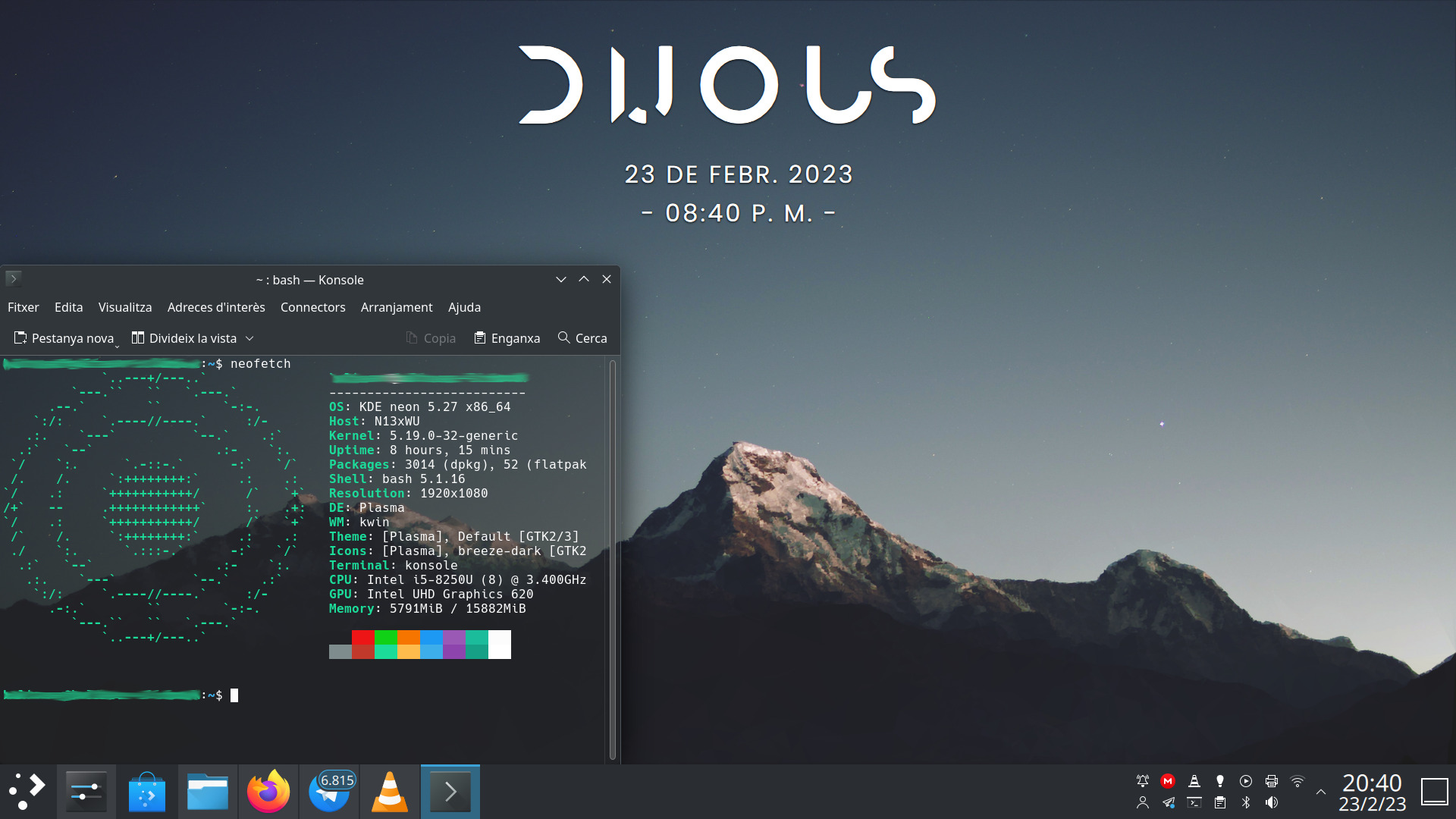
Este mes voy a hacer dobletes con la serie de la iniciativa #viernesdeescritorio con una nueva captura, con la que llegaré a más de un año y medio compartiendo «Mi escritorio» de forma mensual, una mirada a la intimidad de mi entorno de trabajo. De esta forma, bienvenidos a mi escritorio oscuro Plasma de febrero 2023, el tercero del año, que está dedicado al recientemente lanzado Plasma 5.27, último de la serie, y con el que utilizaré su tema básico oscuro.
Mi escritorio Plasma oscuro de febrero 2023 #viernesdeescritorio
Esta va a ser la trigésimatercera vez que muestro mi escritorio Plasma 5 en público, lo cual es número nada desdeñable de entradas que sigue creciendo de forma constante. Hice un recopilatorio con los 12 escritorios del 2022 y tengo pendiente seguir con otros, para finalizar con una entrada que los recopile todos… pero eso será en un futuro.
Respecto al mes pasado, y como he dicho en la introducción, está basado en el tema Brisa Oscuro del VDG de la Comunidad KDE: tema global, ventanas, colores, iconos, etc.
Respecto a plasmoides, he despejado el escritorio de ellos ya que me ha gustado tanto el fondo de pantalla que me apetecía verlo sin distracciones. No obstante al utilizar el tema oscuro, el mismo fondo cambia para que quede más harmonioso con el tema global. Sigo dejando solamente el plasmoide Modern Clock, que encaja a la perfección. El resto de cosas que necesito (calendario, conexiones, volumen, etc,) lo tengo en la barra de tareas a un solo click.
Sigo, tras unos meses mostrando mi Slimbook Kymera AMD de sobremesa, a realizar la captura sobre mi portátil Slimbook Pro de 13 pulgadas, el cual tiene instalado un KDE Neon con Plasma 5.27.1, siendo mi sistema gráfico Wayland que ya ha se ha establecido definitivamente.
El resultado de mi escritorio oscuro de febrero de 2023 es un entorno de trabajo claro y, como siempre, funcional que podéis ver en la imagen inferior (pinchad sobre ella para verlo un poco más grande). Por cierto, he añadido un poco de transparencia a Konsole.
La entrada Mi escritorio Plasma oscuro de febrero 2023 #viernesdeescritorio se publicó primero en KDE Blog.

Projeto transforma YouTube em armazenamento infinito.
Impressionante a criatividade dos nerds. Um amigo meu e do meu filho chamado Homero Caom, enviou o link de um projeto chamado ISG (Infinite-Storage-Glitch). Este projeto permite aos usuários a capacidade de usar o YouTube como um serviço de armazenamento em nuvem, permitindo que eles façam upload de qualquer tipo de arquivo, seja ele um documento, uma imagem ou mesmo um vídeo.
Uma vez carregado, os arquivos injetados podem então ser baixados e recuperados a qualquer momento. Com isso, o YouTube se transforma em um serviço de armazenamento em nuvem praticamente ilimitado. O YouTube não limita a quantidade de vídeo para upload, assim criando a brecha para este projeto.
Conceito:
Todos os arquivos são feitos de bytes que podem ser interpretados como números de 0 a 255. Esse número pode ser representado com pixels usando um dos dois modos: RGB ou binário. RGB: No modo RGB cada byte se encaixa perfeitamente dentro de uma das cores de um pixel RGB. Um pixel RGB pode conter 3 bytes por vez. Você apenas continua adicionando pixels assim até que acabe os dados. É muito mais eficiente e rápido que o binário.

Post-mortem: Downtime on February 23, 2023

Νους υγιής εν κώδικα υγιεί

Ένα υγιές μυαλό οδηγεί σε υγιή κώδικα. Το ένα είναι απαραίτητο για να έχουμε το άλλο. Το θέμα το λάτρεψα διότι συνέβη και σε εμένα κατά τη διάρκεια του έτους. Πέρασε χρόνος που δεν αισθανόμουν ιδιαίτερα καλά λόγω προσωπικών θεμάτων.
Νομίζω ότι είναι απαραίτητο να υπενθυμίσουμε στους εαυτούς μας ότι δεν είμαστε ρομπότ. Χρειαζόμαστε ελεύθερο χρόνο κάθε τόσο και πρέπει να ισορροπήσουμε σωστά τη ζωή μας. Θα πρέπει να ζείτε τη ζωή σας. Δεν πρέπει να ξοδεύετε κάθε στιγμή που ξυπνάτε στο project που δουλεύετε, διότι δεν είναι υγιές. Μπορείτε να ξοδέψετε ένα μεγάλο μέρος του χρόνου σας σε projects που σας ευχαριστούν.
Το πιο σημαντικό πράγμα είναι να λέτε συχνά ΟΧΙ. Αυτό είναι και δικό μου λάθος. Μπορείτε να πειτε ΟΧΙ δεν μπορώ όταν κάποιος σας ρωτά "Μπορείς να κάνεις αυτό;". Βέβαια μπορείτε να πείτε και ΝΑΙ μερικές φορές. Μην τα ισοπεδώνουμε.
Υπάρχουν άλλα σημαντικά πράγματα.
- Ένα από τα πιο σημαντικά πράγματα είναι ο ύπνος. Να κοιμάστε πολλές ώρες. Να ξεκουραστείτε.
- Επίσης σημαντικές είναι οι φιλίες. Μπορείτε να έχετε φιλίες. Φιλίες εντός του project είτε εκτός. Θα σας κάνουν να αισθανθείτε περίφημα.
- Υιοθετήστε έναν έναν υγιεινό τρόπο ζωής και ίσως μερικές φορές σκεφτείτε τη δική σας κατάσταση του μυαλού. Πώς αισθάνεστε και πώς σας κάνει να νιώθετε το project που συνεισφέρετε. Ίσως επειδή ίσως σας αγχώνουν, είναι καλό να καταλάβετε γιατί αγχώνεστε και έτσι κάνετε σωστά την ερώτηση στον εαυτό σας.
Να έχετε υπόψη σας ότι τα projects ανοικτού λογισμικού αποτελούν μια εθελοντική προσπάθεια. Δεν βγάζετε κάτι από αυτό, σωστά; Οπότε θα πρέπει να έχετε στο νού σας να πάρετε κάτι από αυτό. Ίσως είναι απόλαυση, ίσως είναι απλώς η αίσθηση της κοινότητας, η αίσθηση της φιλίας που βιώνουμε. Αυτό που σίγουρα δεν θέλετε να έχετε είναι να χάσετε τον ύπνο σας. Γι' αυτό αν υπάρχει ένα ιδιαίτερα δύσκολο πρόβλημα που αντιμετωπίζετε στην καθημερινή σας δουλειά στο project σας, απλώς ρωτήστε κάποιον άλλο. Πάρτε τη γνώμη κάποιου άλλου. Μην χάσετε τον ύπνο σας. Ο ύπνος είναι πολύ σημαντικός. Φυσικά μερικές φορές μπορεί απλώς να χρειαστεί να αποστασιοποιηθείτε από τα πράγματα.
Ορίστε μερικές συμβουλές, μερικές πολύ γενικές συμβουλές:
- Να ξέρετε τα όριά σας. Μην αγχώνεστε πολύ αν δεν μπορείτε να διορθώσετε όλα τα σφάλματα στον κόσμο. Τα μισά από αυτά μπορεί να ειναι ΟΚ. Μην απλώσετε το εύρος ζώνης σας, ακόμα και αν πιστεύετε ότι αυτό που θα κάνετε θα σας αποφέρει ευχαρίστηση.
- Μερικές φορές είναι εντάξει να κάνετε διακοπές για μερικά χρόνια. Εννοώ ότι μπορείτε να απέχετε από το project ανοικτού λογισμικού που συνεισφέρετε. Όλη η κοινότητα θα σας αγαπά ακόμα όταν επιστρέψετε. Και ελπίζω ότι θα επιστρέψετε.
- Δεν χρειάζεται να σχεδιάζετε υπερβολικά τη ζωή σας. Να είστε ελεύθεροι να δεσμευτείτε στο project που σας άρεσε και συνεισφέρατε τόσο χρόνο, μόνο και μόνο επειδή συντηρείτε ένα κομμάτι λογισμικού δεν σημαίνει ότι έχετε το παντρευτήκατε και πρέπει να το συντηρείτε για πάντα. Μπορεί να κάνετε ένα βήμα πίσω και να μπείτε σε ένα άλλο έργο πχ έρευνας και ανάπτυξης.
- Αν διαπιστώσετε ότι κάτι δεν σας προσφέρει ικανοποίηση, δεν σας προσφέρει απόλαυση, μειώστε τον χρόνο που διαθέτετε σε αυτό. Καλύτερα είναι να το αφήσετε τελείως, ιδιαίτερα αν είναι μια λίστα αλληλογραφίας ή κάτι άλλο που δεν οδηγεί σε τίποτα παραγωγικό ούτως ή άλλως

Νους υγιής εν κώδικα υγιεί
Ένα υγιές μυαλό οδηγεί σε υγιή κώδικα. Το ένα είναι απαραίτητο για να έχουμε το άλλο. Το θέμα το λάτρεψα διότι συνέβη και σε εμένα κατά τη διάρκεια του έτους. Πέρασε χρόνος που δεν αισθανόμουν ιδιαίτερα καλά λόγω προσωπικών θεμάτων.
Νομίζω ότι είναι απαραίτητο να υπενθυμίσουμε στους εαυτούς μας ότι δεν είμαστε ρομπότ. Χρειαζόμαστε ελεύθερο χρόνο κάθε τόσο και πρέπει να ισορροπήσουμε σωστά τη ζωή μας. Θα πρέπει να ζείτε τη ζωή σας. Δεν πρέπει να ξοδεύετε κάθε στιγμή που ξυπνάτε στο project που δουλεύετε, διότι δεν είναι υγιές. Μπορείτε να ξοδέψετε ένα μεγάλο μέρος του χρόνου σας σε projects που σας ευχαριστούν.
Το πιο σημαντικό πράγμα είναι να λέτε συχνά ΟΧΙ. Αυτό είναι και δικό μου λάθος. Μπορείτε να πειτε ΟΧΙ δεν μπορώ όταν κάποιος σας ρωτά "Μπορείς να κάνεις αυτό;". Βέβαια μπορείτε να πείτε και ΝΑΙ μερικές φορές. Μην τα ισοπεδώνουμε.
Υπάρχουν άλλα σημαντικά πράγματα.
- Ένα από τα πιο σημαντικά πράγματα είναι ο ύπνος. Να κοιμάστε πολλές ώρες. Να ξεκουραστείτε.
- Επίσης σημαντικές είναι οι φιλίες. Μπορείτε να έχετε φιλίες. Φιλίες εντός του project είτε εκτός. Θα σας κάνουν να αισθανθείτε περίφημα.
- Υιοθετήστε έναν έναν υγιεινό τρόπο ζωής και ίσως μερικές φορές σκεφτείτε τη δική σας κατάσταση του μυαλού. Πώς αισθάνεστε και πώς σας κάνει να νιώθετε το project που συνεισφέρετε. Ίσως επειδή ίσως σας αγχώνουν, είναι καλό να καταλάβετε γιατί αγχώνεστε και έτσι κάνετε σωστά την ερώτηση στον εαυτό σας.
Να έχετε υπόψη σας ότι τα projects ανοικτού λογισμικού αποτελούν μια εθελοντική προσπάθεια. Δεν βγάζετε κάτι από αυτό, σωστά; Οπότε θα πρέπει να έχετε στο νού σας να πάρετε κάτι από αυτό. Ίσως είναι απόλαυση, ίσως είναι απλώς η αίσθηση της κοινότητας, η αίσθηση της φιλίας που βιώνουμε. Αυτό που σίγουρα δεν θέλετε να έχετε είναι να χάσετε τον ύπνο σας. Γι' αυτό αν υπάρχει ένα ιδιαίτερα δύσκολο πρόβλημα που αντιμετωπίζετε στην καθημερινή σας δουλειά στο project σας, απλώς ρωτήστε κάποιον άλλο. Πάρτε τη γνώμη κάποιου άλλου. Μην χάσετε τον ύπνο σας. Ο ύπνος είναι πολύ σημαντικός. Φυσικά μερικές φορές μπορεί απλώς να χρειαστεί να αποστασιοποιηθείτε από τα πράγματα.
Ορίστε μερικές συμβουλές, μερικές πολύ γενικές συμβουλές:
- Να ξέρετε τα όριά σας. Μην αγχώνεστε πολύ αν δεν μπορείτε να διορθώσετε όλα τα σφάλματα στον κόσμο. Τα μισά από αυτά μπορεί να ειναι ΟΚ. Μην απλώσετε το εύρος ζώνης σας, ακόμα και αν πιστεύετε ότι αυτό που θα κάνετε θα σας αποφέρει ευχαρίστηση.
- Μερικές φορές είναι εντάξει να κάνετε διακοπές για μερικά χρόνια. Εννοώ ότι μπορείτε να απέχετε από το project ανοικτού λογισμικού που συνεισφέρετε. Όλη η κοινότητα θα σας αγαπά ακόμα όταν επιστρέψετε. Και ελπίζω ότι θα επιστρέψετε.
- Δεν χρειάζεται να σχεδιάζετε υπερβολικά τη ζωή σας. Να είστε ελεύθεροι να δεσμευτείτε στο project που σας άρεσε και συνεισφέρατε τόσο χρόνο, μόνο και μόνο επειδή συντηρείτε ένα κομμάτι λογισμικού δεν σημαίνει ότι έχετε το παντρευτήκατε και πρέπει να το συντηρείτε για πάντα. Μπορεί να κάνετε ένα βήμα πίσω και να μπείτε σε ένα άλλο έργο πχ έρευνας και ανάπτυξης.
- Αν διαπιστώσετε ότι κάτι δεν σας προσφέρει ικανοποίηση, δεν σας προσφέρει απόλαυση, μειώστε τον χρόνο που διαθέτετε σε αυτό. Καλύτερα είναι να το αφήσετε τελείως, ιδιαίτερα αν είναι μια λίστα αλληλογραφίας ή κάτι άλλο που δεν οδηγεί σε τίποτα παραγωγικό ούτως ή άλλως