
 Member
 CzP
CzPSyslog-ng 101, part 9: Filters
This is the ninth part of my syslog-ng tutorial. Last time, we learned about macros and templates. Today, we learn about syslog-ng filters. At the end of the session, we will see a more complex filter and a template function.
You can watch the video on YouTube:
and the complete playlist at https://www.youtube.com/playlist?list=PLoBNbOHNb0i5Pags2JY6-6wH2noLaSiTb
Or you can read the rest the tutorial as a blog at: https://www.syslog-ng.com/community/b/blog/posts/syslog-ng-101-part-9-filters

syslog-ng logo
Lanzada la segunda actualización de 5.27 edición ‘KDE 💖 Free Software’
Siguiendo el calendario de lanzamiento de los desarrolladores, la Comunidad KDE han comunicado que ha sido lanzada la segunda actualización de Plasma 5.27. Una noticia que aunque es esperada y previsible es la demostración palpable del alto grado de implicación de la Comunidad en la mejora continua de este gran entorno de escritorio de Software Libre.
Lanzada la segunda actualización de 5.27 edición ‘KDE  Free Software’
 Free Software’
No existe Software creado por la humanidad que no contenga errores. Es un hecho incontestable y cuya única solución son las actualizaciones. Es por ello que en el ciclo de desarrollo del software creado por la Comunidad KDE se incluye siempre las fechas de las actualizaciones.
La Comunidad KDE ha publicado hoy que ha lanzado la primera actualización de Plasma 5.27, una versión que nos ofrecen un gran conjunto de novedades y propuestas que nos acercan a lo que vendrá cuando se realice la transición a Plasma 6. No obstante, en esta versión se han dedicado a introducir la presentación en mosaico de las ventanas, las nuevas pantallas de bienvenida y mejoras notables en Discover, por nombrar solo tres de ellas.
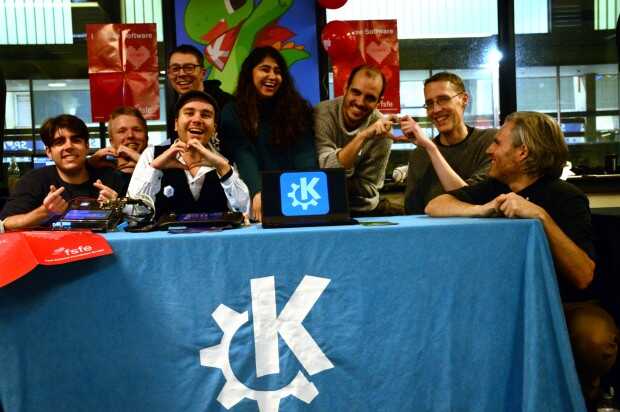
Entre los errores solucionados nos encontramos con:
- Discover: Confirma que los repos de terceros son parte del SO en los derivados de Debian.
- Dr Konqi: añadido Plasma Welcome al archivo mappings.
- Sddm: Enfoca a algo útil cuando se cambia entre pantallas de inicio de sesión alternativas.
Más información: KDE
Las novedades de Plasma 5.27
Tengo pendiente aún hablar de las novedades de Plasma 5.27 así que simplemente hablo de las pinceladas que nos han comentado los desarrolladores:
- Nuevas pantallas de bienvenida.
- Mejoras en las preferencias de permisos para Flatpak.
- Mejoras en la refactorización multimonitor.
- Sistema de mosaicos de KWin.
- Añadido el Calendario Hebreo en el calendario emergente del reloj digital.
- Mejoras en Discover.
- Más funcionalidades para Krunner.
- Mejoras en los plasmoides.
En los próximas entradas más detalles.
La entrada Lanzada la segunda actualización de 5.27 edición ‘KDE 💖 Free Software’ se publicó primero en KDE Blog.
Todo lo que siempre quisiste saber sobre GNU Guix y no sabías donde encontrarlo
En esta entrevista aprenderás más sobre el gestor de paquetería Guix y la distribución GNU Guix de mano de un colaborador del proyecto llamado Ekaitz Zárraga

El mundo del software libre está lleno de pequeños proyectos que nacen y se desarrollan convirtiéndose después en un gran proyecto detrás del cual participan un gran número de personas que le dan soporte técnico, lo mejoran y lo mantienen en el tiempo.
Entre esos proyectos, hace tiempo que vengo leyendo cosas de Guix, un gestor de paquetes de software libre para sistemas GNU, y también con el tiempo se ha desarrollado una distribución «rolling release» de GNU/Linux que incluye Guix como sistema de paquetería (como no podía ser de otra manera) y el kernel libre linux-libre sin blobs privativos.
Pero a pesar de que por la red puedes encontrar información al respecto, no me termina de queda claro en qué consiste eso de Guix, así que lo mejor es buscar información de primera mano, y preguntar a alguien que sabe y que tiene la amabilidad de emplear un poco de su tiempo en contestarte.
Y para estos menesteres, no he encontrado a nadie mejor que a Ekaitz Zárraga un desarrollador que participa de alguna manera en el proyecto. Sus respuestas sin duda serán muy esclarecedoras y me (nos) ayudará a entender mejor qué es eso de Guix.
A Ekaitz lo podréis en el fediverso y también contactar con el, en la página web de su empresa ElenQ de i+D ética y comprometida con el software libre.
ElenQ Technology es una empresa de Investigación y Desarrollo. Lo que
significa que aprendemos para ti y te damos el conocimiento de vuelta de modo
que puedas usarlo de forma libre.
Empezamos con la entrevista, espero que os resulte tan interesante y aprendáis tanto como he aprendido yo con las respuestas de Ekaitz.
Victorhck: Hola Ekaitz, lo primero agradecerte tu tiempo por ofrecerte a responder a estas preguntas. La primera pregunta que hago, sirve para poner en contexto, así que, háblanos un poco sobre ti y cual es tu relación con el proyecto Guix.
Ekaitz: ¡Hola! Hace unos años un amigo mío me habló de Nix y NixOS, proyectos en los que Guix se basa, y me generó interés. Poco después lo probé como sistema de paquetería y desde hace unos años lo utilizo como distribución. Desde entonces participo activamente enviando paquetes y parches de vez en cuando, todo lo que puedo.
Por otro lado, trabajo en el sistema de Bootstrap (más adelante cuento qué es esto) de Guix para RISC-V. El último año (2022) recibí fondos de la organización NlNet para dedicarme profesionalmente a ello.
También soy un miembro activo de la comunidad, aunque no soy un experto en su funcionamiento, intento estar al día en la medida de lo posible.
Vhck: Como persona conocedora del proyecto, la primera pregunta sería ¿Cómo explicarías con tus palabras qué es eso de Guix a una persona como yo que ha leído varias cosas pero no tiene un concepto claro?
Ekaitz: Guix System es una distribución de GNU/Linux bastante especial, cuyo funcionamiento gravita entorno el sistema de paquetes Guix.
Las ideas detrás de Guix vienen de Nix (gestor de paquetes) y NixOS (la distribución en basada en el gestor de paquetes). Estas ideas son bastante innovadoras, una maravilla de la ingeniería de software.
Nix se define a sí mismo como un gestor de paquetes «funcional», en el sentido de la «programación funcional». Pero no sé cómo de agradable es esa definición para un ser humano normal.
Podemos decir que los paquetes instalados mediante estas herramientas se instalan de modo que puede volverse atrás (rollback) sin romper el sistema. Además, los paquetes de estas herramientas se describen de tal forma que son «replicables».
En las distribuciones clásicas como Debian o RedHat, los paquetes almacenan un conjunto de archivos ya compilados y unos metadatos que indican dónde deben instalarse. En Nix y en Guix los paquetes son una descripción de qué se debe hacer a partir del código fuente y las dependencias de un paquete para construir el programa final. Esta descripción está hecha de modo que en dos máquinas diferentes se produce exactamente el mismo resultado: el proceso se puede replicar independientemente del entorno.
La distribución además aporta una forma declarativa de describir las máquinas. Toda la configuración de la máquina se puede añadir en un archivo (los paquetes instalados, los usuarios, la configuración de red, etc.) que permite llevar la configuración a otras máquinas fácilmente pudiendo reproducir la configuración de una máquina en otras de forma sencilla. También, igual que con los paquetes, si actualizamos la máquina y falla, podemos volver atrás sin ningún problema.
Este concepto de la «replicabilidad» es fundamental para evitar casos como el clásico «it works in my machine» (funciona en mi máquina), y sobre todo primordial en entornos como la ciencia, donde poder replicar estudios científicos para comprobar sus resultados es cada vez más difícil.
Para poder aplicar estos conceptos (y algún otro) Nix y NixOS utilizan un lenguaje de programación propio (llamado Nix) que está basado en Haskell y es bastante complejo. Para simplificar esto, hace unos años (unos 10) Ludovic Courtès tuvo la brillante idea de sustituir el lenguaje Nix por Guile y crear así Guix. Una distribución y un gestor de paquetes que mantienen la misma esencia pero usan un lenguaje más cómodo para nosotros.
Vhck: Si Guix es un gestor de paquetes de software ¿Podría utilizarse este gestor en cualquier distribución de GNU/Linux, sustituyendo o conviviendo con el gestor propio de la distribución? Si es así ¿Cual serían los beneficios de usar Guix frente al gestor nativo?
Ekaitz: Sí, es posible instalar sólo el gestor de paquetes sobre tu distribución de GNU/Linux habitual.
Desde hace poco además, ¡es posible hacer apt install guix en Debian!
Este gestor de paquetes aportaría las ventajas que he mencionado antes, poder volver atrás si algo se rompe y que los paquetes sean replicables, pero aporta también otras muy interesantes.
En Debian, por ejemplo, es difícil tener instaladas dos versiones de la misma librería, porque se pisan entre ellas. En Guix esto es pan comido.
Guix permite definir perfiles, que cada uno describe un set de paquetes disponibles. Al pasar de un perfil a otro, los paquetes disponibles cambian sin que ocurran colisiones.
Del mismo modo, es posible crear perfiles bajo demanda con el comando guix shell, capaz de levantar una shell con el set de paquetes que le pidas. Esto es especialmente útil en proyectos de desarrollo de software, ya que te permite usar las dependencias de cada proyecto en éste, sin mezclarlas con tu sistema. Al salir de la shell, los paquetes usados como dependencias desaparecen, y no se mezclan con tu sistema.
Muchos gestores de paquetes de lenguajes de programación como npm en JavaScript o pipenv (o virtualenv) en Python te aportan un sistema similar para gestionar entornos de desarrollo, pero Guix es mucho más potente, ya que no se limita a un lenguaje. Además, el hecho de que Guix sea replicable lo hace más potente que los lockfiles que estos sistemas utilizan.
Yo, como me dedico a la investigación y el desarrollo, trabajo en muchos proyectos al mismo tiempo y necesito poder levantar entornos de desarrollo rápidamente sin manchar mi sistema. Guix me lo regala.
La «replicabilidad» se puede combinar con la habilidad de Guix para viajar en el tiempo. Es posible «sacar una foto» del entorno de trabajo y compartirla en tu proyecto de software de modo que aunque pasen años cualquiera con Guix pueda volver a ese punto en el pasado y preparar un entorno de trabajo como si estuviera en tu ordenador. Los paquetes que usará serán idénticos a los que tú en su día instalaste: idénticos bit por bit.

Vhck: Además de un gestor de paquetes, el proyecto Guix también ha desarrollado una distribución de GNU/Linux que ofrece únicamente software libre y que está recomendada por la FSF dentro de su lista de distribuciones libres. Entiendo que usas Guix como distro en tu día a día ¿qué ventajas encuentras en Guix frente a otras distribuciones más conocidas? ¿La recomendarías a otras personas que estén familiarizadas con GNU/Linux y quieran probar algo nuevo?
Ekaitz: Guix es una distribución muy gratificante pero a veces difícil de usar. Para poder aplicar toda su magia tiene algunas limitaciones. Yo la recomendaría, pero hay que aprender algunos conceptos antes. La documentación está muy bien para esto.
Las ventajas que aporta son para mí geniales: nunca te va a pasar eso que pasa con Arch que actualizas y rompes cosas y ya no puedes volver atrás. Siempre vas a poder revertir los cambios. Es tan fácil como seleccionar tu configuración anterior en GRUB en el momento del arranque.
El hecho de poder configurar tu máquina en un archivo de texto es muy poderoso. La puedes gestionar con Git y así ves cómo vas avanzando y añadiendo cosas. Mi configuración está online por si queréis verla.
La replicabilidad de los paquetes también es una manera de asegurarte de que lo que instalas no está corrupto. Los repositorios de paquetes de Guix te entregan los paquetes ya compilados (lo que se conoce como substitutes) pero la distribución está basada en código fuente (como Gentoo). El gestor de paquetes siempre te da la opción de retar a los paquetes que te descargas ya compilados: los compilas tú mismo y compruebas si lo que descargarías es igual que cuando lo compilas tú. Así no te la juegan.
El tema de que Guix sea 100% software libre es muy guay pero a veces da problemas con el hardware, como puede pasar con Trisquel u otras distros. Hay gente (se llaman NonGuix) que ha creado un channel (un repositorio independiente) con drivers privativos por si queréis probarlo y tenéis miedo de
que no funcione en vuestra máquina.
Vhck: ¿Cual sería la característica (o grupo de características) particular de Guix que la diferencia de alguna manera del resto?
Ekaitz: Además de lo que he mencionado, en Guix se toma especialmente en serio el no
tener que confiar en nadie. Que todo sea transparente.
Aquí entra el concepto del bootstrapping, que es un tema en el que yo he estado trabajando.
Cuando instalamos una distribución de GNU/Linux como Debian, en el pincho USB se instalan un montón de binarios grandes: Bash, GCC, Python… ¿Pero esos binarios de dónde vienen?¿Podemos confiar en que hagan lo que dicen?
En Guix se ha reducido el número de binarios en los que se confía. Partimos desde código fuente y vamos compilando las cosas una a una, incluso los propios compiladores, para no tener que confiar en ellos. Es un proceso apasionante, y nos permite poder auditar todo desde el principio, sin tener que confiar en nadie.
Esto no tendría sentido sin todas las otras cosas bonitas que nos da Guix, siendo la fundamental la «reproducibilidad».
Sé que es un poco loco todo esto. Si queréis saber más tanto Jan Nieuwenhuizen (janneke) como yo mismo hemos hablado sobre esto en FOSDEM y tenéis la página del proyecto bootstrappable.org para saber más sobre el tema.
Vhck: ¿Guix la podríamos comparar a distros como Arch en lo relacionado a la hora de construir la distro en la que nos da libertad para construirla a nuestro gusto o a distros en las que ya vienen muchas cosas predeterminadas?
Ekaitz: Guix viene con prácticamente cero cosas.
Hay varias configuraciones por defecto que se pueden elegir y extender: desde entornos de escritorio como gnome (estamos trabajando en añadir KDE) a cosas mínimas para el lado de servidor.
Guix define un set de componentes en lo que se conoce como servicios (services) y cada uno te aporta una cosa. En función de los que añadas puedes tener un sistema más complejo o más simple: tú eliges.
Vhck: ¿Cual es la configuración de tu Guix? ¿Qué entorno de escritorio utilizas y a grandes rasgos cómo usas tu sistema?
Ekaitz: Yo tengo GNOME instalado en mi sistema porque KDE aún no está disponible del todo (pronto, ¡pronto!). Pero casi nunca entro en el GNOME, sino que lo utilizo para que me aporte un set de programas mínimamente útil.
Yo uso i3 y una terminal para casi todo. Soy bastante minimalista con el software que utilizo.
Mi configuración está online pero también os adelanto que no soy un ejemplo a seguir. Yo odio configurar cosas y se me da fatal (lo uno es la consecuencia de lo otro  ).
).
Usar Guix me ayuda a no tener que hacerlo a menudo y una vez funciona me aseguro que nada se
rompe.
Vhck: Personalmente ¿qué te enganchó de Guix? ¿Cómo empezaste a participar en el proyecto y en qué colaboras?
Ekaitz: Para mí lo más potente de Guix es poder usar entornos de trabajo aislados de mis sistema, incluso pudiendo usar contenedores para ello. Como te comentaba antes, necesito colaborar en muchos proyectos de software y poder evitar que sus dependencias colisionen con mi sistema es fundamental en mi trabajo.
Empecé porque me hablaron de Nix y a mí me gustaba Scheme, y siendo Guile el Scheme de GNU no podía evitar tirar por esta versión más amigable de Nix. Los Lisperos somos así.
El proyecto también me enganchó por su comunidad, que es muy agradable, y porque es fácil contribuir con paquetes o incluso mantener los tuyos propios.
Hoy en día colaboro mandando paquetes o actualizándolos, aunque también he colaborado creando un build system entero para Zig (que nos permitirá paquetizar software de Zig en el futuro) y he trabajado también, como te comentaba, en el proceso de Bootstrapping para RISC-V.
Vhck: De nuevo agradecerte tu tiempo por responder estas preguntas, la última palabra es tuya
Ekaitz: Es un placer. Yo estoy encantado de compartir cosas interesantes con los demás.
Si alguien tiene dudas o quiere empezar, que me busque en el fediverso, me escriba un email o me mencione en IRC en #guix (libera.chat). No estoy demasiado activo en el IRC pero intentaré ayudar en lo que pueda.
¿Te ha gustado? ¿Has aprendido algo más o descubierto qué es eso de Guix? Quizás ahora sientas la necesidad de probar todas esas cualidades de Guix de las que nos habla Ekaitz en tu propia máquina y ¡quizás sea tu nueva distribución!
Agradecer de nuevo a Ekaitz el tiempo que ha empleado y sus conocimientos para una comunidad.


Nheko | Matrix Client written in Qt on openSUSE
¿Cuanto sabes de GNU/Linux? Ponte a prueba (febrero)
Pon a prueba tus conocimientos sobre GNU/Linux con estas sencillas preguntas

En este blog que lees escribo desde hace ya muchos años sobre GNU/Linux. Encontrarás tutoriales, consejos, y formas de realizar ciertas tareas en este sistema operativo potente, estable y de software libre.
Pero ¿Te atreverías a poner a prueba tus conocimientos sobre este sistema operativo? La idea es publicar un artículo cada mes, en el que formularé algunas preguntas relacionadas con GNU/Linux, para ver si eres capaz de resolverlas sin mirar la ayuda o necesitas seguir el manido consejo de RTFM.
No sufras, las preguntas serán sencillas, pero por supuesto puedes leer la ayuda de los comandos, buscar ayuda en la red, etc. También yo te proporcionará la solución (eso sí, codificada en ROT13), para que no te quedes con la duda, la idea es aprender.
Seguro que sea cual sea tu nivel aprenderás algo con alguno de los retos propuestos. Mi idea inicial, es que sean retos mensuales (veremos si después la realidad me permite realizarlo durante todo el año).
Tengo en mente que cada mes sean 5 preguntas o retos, te pediría que no publicases las soluciones en los comentarios, para no hacer «spoilers», pero por supuesto puedes comentar lo que sea con cualquiera de los retos, errores, mejoras, si te resultaron interesantes, etc.
Espero que la idea os resulte atractiva, y ya veremos, igual la propuesta tiene aceptación y tengo que publicar más de un reto por mes! Bueno, el tiempo mandará…
Como digo, la idea es compartir y aprender, la idea es que practiquéis, busquéis información, probéis opciones, leáis ayuda, etc y así ir descubriendo nuevas funcionalidades. Además, no dudéis del valor de la serendipia, que os llevará por caminos de conocimiento paralelos.
Reto 1
PREGUNTA
En una terminal, usando la shell Bash, crea una variable local llamada nr_lineas que contenga únicamente el número de líneas del archivo /etc/passwd. Y a continuación muestra el valor de la variable
RESPUESTA
jp -y < /rgp/cnffjq
rpub $ae_yvarnf
Reto 2
PREGUNTA
En una terminal con la shell Bash, estamos en la carpeta ~/Musica/rock y estando en esa carpeta y sin salir de ella queremos mover todos los archivos en formato mp3 que hay dentro de la carpeta ~/Musica/ a la carpeta actual ~/Musica/rock
RESPUESTA
zi ../*.zc3 .
Reto 3
PREGUNTA
Usando el comando systemctl, ¿cómo podría un usuario verificar si el servicio de systemd sshd.service está activo?
RESPUESTA
Pba ry pbznaqb flfgrzpgy fgnghf ffuq.freivpr b flfgrzpgy vf-npgvir ffuq.freivpr.
Reto 4
PREGUNTA
Y continuando con systemd ¿qué comando debe ejecutarse para permitir la activación del servicio sshd.service durante la inicialización del sistema?
RESPUESTA
Pbznaqb flfgrzpgy ranoyr ffuq.freivpr, rwrphgnqb cbe ebbg.
Reto 5
PREGUNTA
¿Cómo podría ver todas las variables de entorno configuradas en mi sistema GNU/Linux? y de qué dos formas podría ver el valor de la variable de entorno PATH
RESPUESTA
cevagrai
rpub $CNGU
cevagrai CNGU
Al final entre unas cosas y otras, hacer un post como este me ha llevado más tiempo de lo esperado, pero creo que es interesante. Os animo a participar y medir vuestros conocimientos con GNU/Linux.

Episodios de diciembre de 2022 los podcast de GNU/Linux València
Hoy me complace compartir con todos vosotros los episodios de diciembre de 2022 de los podcast de GNU/Linux València, tres nuevos capítulos que he decidido reunir porque se me están acumulando y creo que están realizando un gran trabajo de difusión y merecen toda la repercusión posible.
Episodios de diciembre de 2022 los podcast de GNU/Linux València
Tras bastante tiempo en silencio, básicamente porque no tenían forma de cuadrar agendas, han vuelto con mucha fuerza los podcast de GNU/Linux València. Unos podcast que suelen ser de tipo tertulia muy amena y destinada a todo el mundo.
Este es el podcast de la Asociación GNU/Linux Valencia. Un punto de encuentro en torno al que nos reunimos para hablar sosegadamente sobre el software libre y acontecimientos relacionados. ¿Y por qué? Pues porque sin software libre no hay democracia.
Aquest és el podcast de l’Associació GNU/Linux València. Un punt de trobada entorn del qual ens reunim per a parlar assossegadament sobre el programari lliure i esdeveniments relacionats. I per què? Doncs perquè sense programari lliure no hi ha democràcia.
De esta forma en estos podcast que habitualmente cuenta con con Voro, Alejandro Forner, Alejandro, Alex y Taraak se habla de todo tipo de cosas, desde distribuciones, juegos, privacidad, etc., y que en diciembre se marcaron 3 episodios:
Pòdcast 6 de decembre [valencià]
El primer podcast del mes se realizó íntegramente en valenciano y tocó temas como el teclado virtual, Tails, OpenAI per a programar, filtración de datos comisaría Shanghai, Tuxedo Computers desactiva el infame Intel Management Engine y Install party 17 de diciembre.

Más información: Podcast 6 de diciembre de GNU/Linux València
Pódcast 14 de diciembre
El segundo del mes trató temas diversos que se pueden agrupar en unas serie de secciones que se parece que Taraak esta estableciendo: Pepito Distro, Otra Mierda Pal Cajón, La Fin Del Mundo, Maleus Maleficorum Y Patio De Juegos. Y de la mano de Alejandro B tuvimos: Proyecto Solid, del bloqueador de imágenes Easy Image Blocker, LibreJS para solamente cargar el JavaScript que no sea privativo.
Más información: Podcast 14 de diciembre de GNU/Linux València
Pódcast 21 de diciembre
El tercer podcast del mes siguió tratando diversos agrupados en las secciones del podcast anterior de Taraak, mientras que Alejandro B trajo temas como: El niño que hizo prótesis, Expulsada por una IA y Estudiantes usando la IA para hacer deberes.
Más información: Podcast 21 de diciembre de GNU/Linux València
Muchas gracias por tu atenta escucha. Si quieres participar en la tertulia o hacernos llegar algún aporte puedes ponerte en contacto con la asociación. En gnulinuxvalencia.org/contactar tienes todas las formas de hacerlo Te esperamos en el próximo episodio. ¡Hasta entonces!
Moltes gràcies per la teva atenta escolta. Si vols participar en la tertúlia o fer-nos arribar alguna aportació pots posar-te en contacte amb l’associació. En gnulinuxvalencia.org/contactar tens totes les maneres de fer-ho T’esperem en el pròxim episodi. Fins llavors!
¡Únete a GNU/Linux València!
Aprovecho para recordar que desde hace unos meses, los chicos de GNU/Linux Valencia ya tienen su menú propio en el blog, con lo que seguir sus eventos en esta humilde bitácora será más fácil que nunca, y así podréis comprobar su alto nivel de actividades que realizan que destacan por su variedad.
Y que además, GNU/Linux València creció y se ha convertió en asociación. Así que si buscas una forma de colaborar con el Software Libre, esta asociación puede ser tu sitio. ¡Te esperamos!
La entrada Episodios de diciembre de 2022 los podcast de GNU/Linux València se publicó primero en KDE Blog.
Linux Saloon | 25 Feb 2023 | CentOS Stream 9
El nuevo mosaico para ventanas de Plasma 5.27 edición ‘KDE 💖 Free Software’
Una vez actualizado en todos los equipos y llegada su primera revisión de errores es hora de iniciar la revisión de sus novedades. La inicié con la presentación con el nuevo asistente de bienvenida y sigo con el nuevo mosaico para ventanas de Plasma 5.27 que nos permite personalizar la posiciones de las aplicaciones .
El nuevo mosaico para ventanas de Plasma 5.27 edición ‘KDE Free Software’
La Comunidad KDE anunció y publicó el 14 de febrero la última versión la rama 5.x de su escritorio. Se trata de de Plasma 5.27, una versión que nos ofrecen un gran conjunto de novedades y propuestas que nos acercan a lo que vendrá cuando se realice la transición a Plasma 6.
Muchas son las nuevas funcionalidades que voy desgranando poco a poco y sigo con una que viene a personalizar las posiciones fijas de las ventanas, lo que se llama función mosaico. En palabras de desarrolladores:
Hablando de funciones, eche un vistazo al nuevo sistema de organización de ventanas en mosaico: le permitirá configurar diseños de mosaico personalizados y cambiar el tamaño de las ventanas adyacentes de forma simultánea. Actívelo en Preferencias del sistema > Comportamiento del espacio de trabajo > Efectos del escritorio. De este modo podrá colocar una ventana en mosaico arrastrándola mientras mantiene pulsada la tecla Mayúsculas. Para crear diseños de mosaico personalizados, mantenga pulsada la tecla Meta («Windows») y pulse T.
Y para verlo mejor, nada mejor que un vídeo para verlo en funcionamiento:
Más información: KDE
Las novedades de Plasma 5.27
No quiero dejar de hablar de las novedades en general que nos han facilitaron inicialmente los desarrolladores para que tengamos una visión general.
- Nuevas pantallas de bienvenida.
- Mejoras en las preferencias de permisos para Flatpak.
- Mejoras en la refactorización multimonitor.
- Sistema de mosaicos de KWin.
- Añadido el Calendario Hebreo en el calendario emergente del reloj digital.
- Mejoras en Discover.
- Más funcionalidades para Krunner.
- Mejoras en los plasmoides.
En los próximas entradas más detalles.
La entrada El nuevo mosaico para ventanas de Plasma 5.27 edición ‘KDE 💖 Free Software’ se publicó primero en KDE Blog.
El nuevo asistente de bienvenida de Plasma 5.27 edición ‘KDE 💖 Free Software’
Una vez actualizado en todos los equipos y llegada su primera revisión de errores es hora de iniciar la revisión de sus novedades. Y se inicia con la presentación de una de sus principales nuevas características: el nuevo asistente de bienvenida de Plasma 5.27 que viene a cumplir dos funciones principales: explicar algunos detalles del escritorio y explicar que es realmente la Comunidad KDE.
El nuevo asistente de bienvenida de Plasma 5.27 edición ‘KDE Free Software’
La Comunidad KDE anunció y publicó el 14 de febrero la última versión la rama 5.x de su escritorio. Se trata de de Plasma 5.27, una versión que nos ofrecen un gran conjunto de novedades y propuestas que nos acercan a lo que vendrá cuando se realice la transición a Plasma 6.
Muchas son las nuevas funcionalidades y las iré desgranando poco a poco, y quiero empezar con la gran novedad: el nuevo asistente de bienvenida de Plasma 5.27. En palabras de los desarrolladores:
Lo primero que notará después de instalar Plasma es un sencillo asistente de bienvenida. Le puede ayudar a conectarse a Internet, a conocer las características de Plasma y a ajustar la configuración, así como a instalar software nuevo, entre otras cosas.
Y para verlo mejor, nada mejor que un vídeo para verlo en funcionamiento:
Para aquellos que no quieran o puedan ver el vídeo he desgranado las ocho pantallas básicas que nos aparecen pero que podemos omitir en cualquier momento.
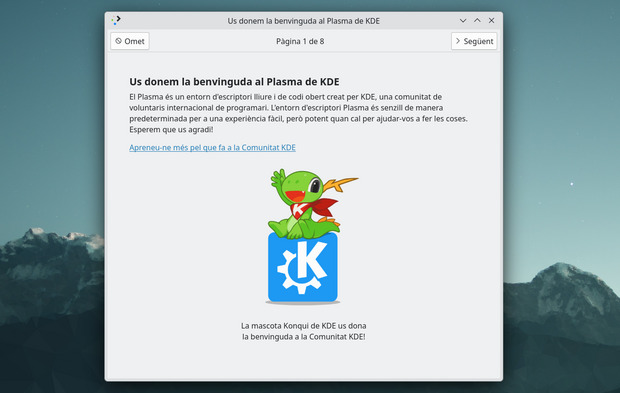
La primera pantalla es una simple bienvenida donde Konqi nos dedica unas palabras y nos emplaza a visitar la pantalla de bienvenida extendidada de la Comunidad KDE.
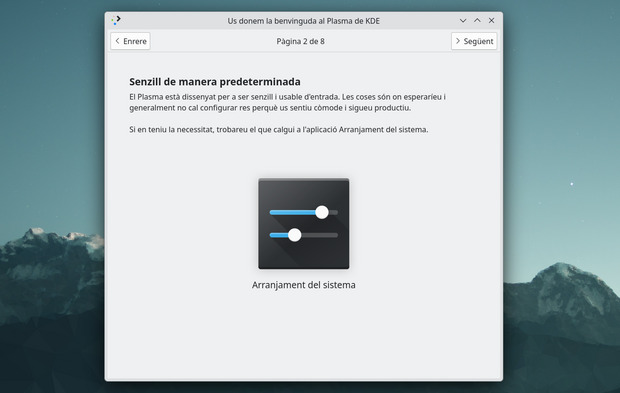
La segunda nos explica que Plasma es «sencillo por defecto …» y para ello nos presenta la aplicación «Preferencias del Sistema» permitiéndonos acceder directamente en ella.
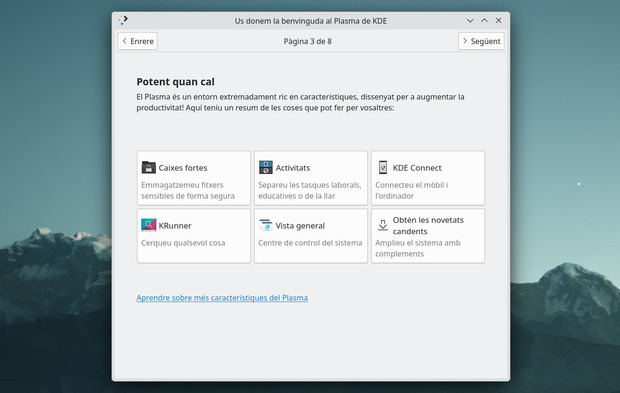
La tercera pantalla es una extensión de la anterior ya que nos dice la segunda característica de Plasma «… potente cuando es necesario» y nos presenta 6 de sus funciones más potentes: Cajas fueres, actividades, KDE Connect, Krunner, Vista general y Obtener nuevas funcionalidades. Todas ellas
La cuarta pantalla nos muestra una de las aplicaciones más importantes para los nuevos usuarios: el gestor de aplicaciones Discover. Con él se busca centralizar todo lo referente a la instalación de programas, la actualización del sistema, etc.
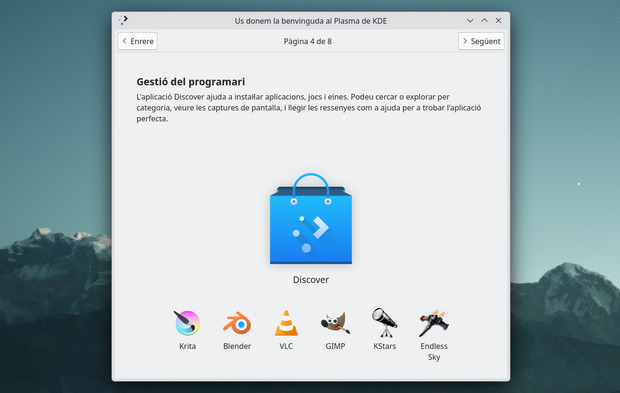
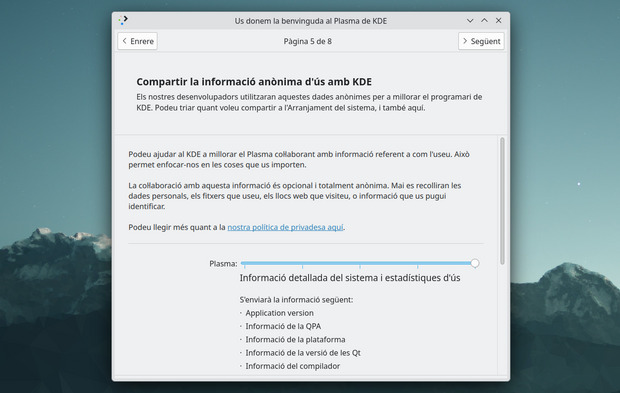
La quinta pantalla está referida a un tema importante: la calidad del Software. Así que en ella nos piden que Plasma tiene una aplicación voluntaria integrada en que pide de forma abierta datos a sus usuarios para poder afinar su funcionamiento. De esta forma aquí se puede configurar si no queremos ninguna información a los desarolladores o toda la posible, eso si, en ningún caso se trata de información personal, de los archivos que se utilizan, de páginas web o información que permita nuestra identificación.
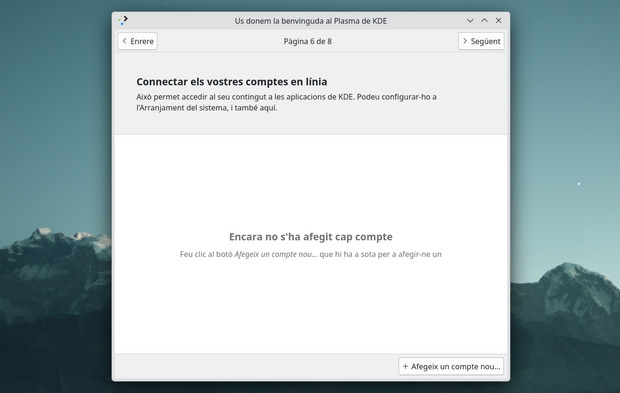
La sexta pantalla nos permite conectar nuestro Plasma con cuentas en línea que utilicen protocolos más o menos libre: OpenDekstop.org, NextCloud, OwnCloud o Google.
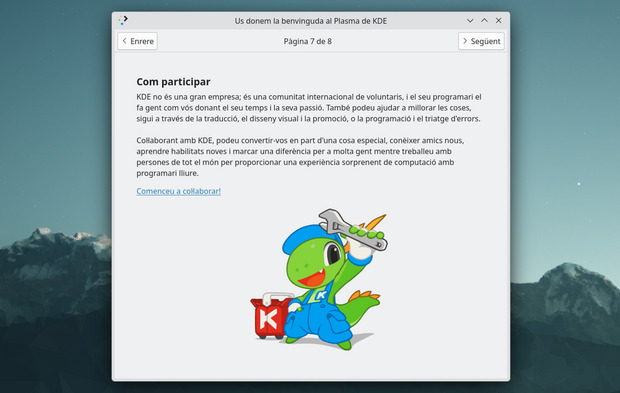
Con la penúltima pantalla nos explica algo que muchos nuevos usuarios pueden desconocer: KDE no es una empresa sino una Comunidad Internacional de voluntarios que ofrece el mejor Software para todo el mundo y, por consiguiente, necesita de colaboración contante en todos los ámbitos: programacion, promoción, traducciones, resolución de errores, diseño, etc. De esta forma Konqi nos anima a participar de forma activa en el desarrollo de KDE. Estoy seguro que aportando con su tiempo en cosas pequeñas o grandes por mucha gente se consigue grandes cosas.
Y en la última pantalla nos anima a participar en la Comunidad KDE en la forma que menos tiempo nos cuesta, con donaciones. Como siempre, toda contribución es válida, por pequeña que sea.
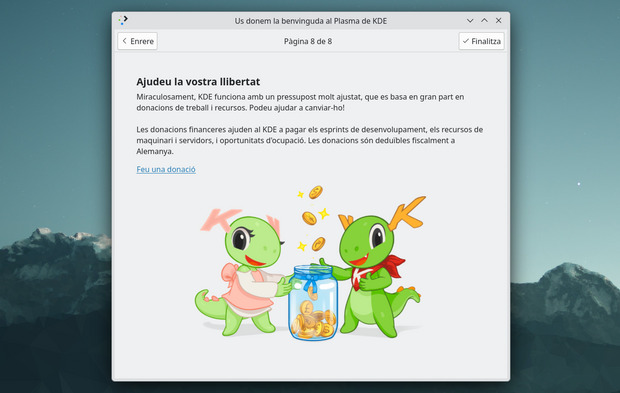
¿Qué os parece? A mi, debo reconocer, que en un principio no le veía utilidad pero después de analizarla creo que es un gran resumen de lo que significa la Comunidad KDE.
Más información: KDE
Las novedades de Plasma 5.27
No quiero dejar de hablar de las novedades en general que nos han facilitaron inicialmente los desarrolladores para que tengamos una visión general.
- Nuevas pantallas de bienvenida.
- Mejoras en las preferencias de permisos para Flatpak.
- Mejoras en la refactorización multimonitor.
- Sistema de mosaicos de KWin.
- Añadido el Calendario Hebreo en el calendario emergente del reloj digital.
- Mejoras en Discover.
- Más funcionalidades para Krunner.
- Mejoras en los plasmoides.
En los próximas entradas más detalles.
La entrada El nuevo asistente de bienvenida de Plasma 5.27 edición ‘KDE 💖 Free Software’ se publicó primero en KDE Blog.
Enabled Wakeup Dengan Keyboard dan Mouse dari kondisi Sleep
Bismillah,
Permasalahan ini saya jumpai pada salah satu komputer di tempat kerja saya, sedangkan komputer yang lain yang terinstal dengan sistem operasi yang sama (openSUSE) bahkan dengan dekstop yang sama (KDE Plasma), jika komputer dalam kondisi sleep kemudian untuk menggunakankannya kembali bisa dengan menekan salah satu tombol keyboard atau dengan mengklik mouse.
Jika Anda mempunyai masalah yang sama dengan saya, mudah-mudahan ini solusinya. Sebagai tambahan, antara openSUSE dan distro yang lainnya mungkin sedikit berbeda dengan lokasi file startup config nya. Misal dalam konteks ini adalah file rc.local, di sistem operasi Ubuntu bisa ditemukan di path /etc/rc.local sedangkan di openSUSE di path /etc/init.d/after.local .
Untuk bisa menggunakan keyboard atau mouse untuk menyalakan komputer setelah kondisi sleep, berikut langkah-langkahnya.
- Buka terminal kemudian ketik
grep . /sys/bus/usb/devices/*/power/wakeup, hasilnya seperti ini./sys/bus/usb/devices/2-1/power/wakeup:disabled
/sys/bus/usb/devices/usb1/power/wakeup:disabled
/sys/bus/usb/devices/usb2/power/wakeup:disabled
/sys/bus/usb/devices/usb3/power/wakeup:disabled
/sys/bus/usb/devices/usb4/power/wakeup:disabled
/sys/bus/usb/devices/usb5/power/wakeup:disabled - Untuk mengetahui dari masing-masing devices, ketik
cat /sys/bus/usb/devices/number_usb/product. Misalkan saya ingin mengetahui device pada baris pertama, maka ketikcat /usb/bus/usb/devices/2-1/product, maka hasilnya seperti berikut.USB Optical Mouse - Misalkan saya ingin mengaktifkan mouse saya untuk menyalakan komputer setelah sleep, maka tambahkan baris berikut pada file after.local. Jika file tersebut tidak ada, maka bisa membuatnya secara manual dan tambahkan baris berikut,
! /bin/sh -e

echo enabled > /sys/bus/usb/devices/2-1/power/wakeup

exit 0
- Kemudian buat file tersebut menjadi file executable dengan mengetik
chmod +x after.local - Setelah itu, restart komputer.
- Untuk memastikan langkah-langkah tersebut berhasil, buat komputer dalam kondisi sleep kemudian klik mouse atau keyboard.
Semoga bermanfaat.