
 Member
 DimStar
openSUSE Tumbleweed – Review of the week 2022/37
Dear Tumbleweed users and hackers,
This week was the week of the Linux desktop – as it is every week anyway. Specifically, we have seen all components from KDE (Plasma, Frameworks, Gear) being refreshed during the last week. Of course, this is not everything the 7 snapshots (0908…0914) brought you.
The main changes delivered this week were:
- KDE Plasma 5.25.5
- KDE Frameworks 5.98.0
- KDE Gear 20.08.1
- Squid 5.7
- pipewire 0.3.57
- Mozilla Firefox 104.0.2
- GTK 4.8.0
- Linux kernel 5.19.8
- LibreOffice 7.4.1
In the staging projects we are currently testing the integration of these updates:
- Meson 0.63.2
- GNOME 43: currently Release Candidate in staging, Final release is scheduled for Sept 21
- grep 3.8: declares egrep and fgrep as deprecated. Switch to grep -E resp grep -F
- LLVM 15: breaks all versions of PostgreSQL
- util-linux 2.38.1: this also brings a massive package layout change, which will probably take some time to settle. It’s part of the distro bootstrap and we have to be careful not to blow it out of proportion
- fmt 9.0: Breaks ceph and zxing-cpp
- gpgme 1.18: breaks LibreOffice
- libxslt 1.1.36: breaks daps
Even Mo’ Pixels
To keep the habbit alive, I continue to do a daily pixel routine, now covering almost all of the GNOME Circle apps.


I’ve been practicing the art of animation a little too in an effort to promote GNOME Circle on Twitter and Mastodon. Presenting all these GIFs would probably not be kind to Planet GNOME readers though. Perhaps I could compose a video in the future (no GIF support in Blender, strangely!). Keep grinding your (pointless) skills, kids!
Comparar diferencias de archivos con vimdiff
Veamos cómo usar vimdiff para comparar las diferencias entre dos archivos de texto

Con la herramienta vimdiff podremos comparar las diferencias entre dos archivos de texto y aplicar cambios en uno u otro fichero con toda la potencia del editor Vim.
En estos días (por un proyecto en el que ando metido y del que pronto espero dar más noticias en el blog) tengo la necesidad de comparar las diferencias que existen entre dos archivos.
Para esas tareas siempre había usado Kompare, pero esta vez he querido probar vimdiff y la verdad es que me está gustando mucho. Veamos cómo usarlo.
Este artículo es una nueva entrega del curso “improVIMsado” que desde hace meses vengo publicando en mi blog sobre el editor Vim y que puedes seguir en estos enlaces:
- https://victorhckinthefreeworld.com/tag/vim/
- https://victorhck.gitlab.io/comandos_vim/articulos.html
Y para aprender Vim (de la manera más inteligente) aquí tienes esta útil guía:
Con vimdiff puedes comparar dos, tres o cuatro archivos. En mi caso y en el ejemplo vamos a comparar únicamente las diferencias entre dos archivos. En el ejemplo compararemos un archivo llamado capítulo1.md que me han enviado por correo con otro con el mismo nombre que tengo en un repositorio git en una carpeta.
Para ello ejecutamos: vimdiff <ruta/del/archivo1> <ruta/del/archivo2> de esta manera:
vimdiff capítulo1.md Git/libro/capítulo1.md
Se nos abrirá una instancia del editor Vim, con una división vertical de la pantalla. En la parte izquierda tendremos el primer archivo y en la parte derecha el segundo archivo.
Si en vez de una división vertical, que es la opción predeterminada, queremos una división horizontal de la pantalla de comparación de archivos, deberemos añadir la opción o de esta forma:
vimdiff -o capítulo1.md Git/libro/capítulo1.md
De manera predeterminada, en vimdiff no se cortan las líneas de texto al final de la pantalla, por lo que si es una línea de texto larga, se mostrará toda seguida, cosa que a mí no me gusta.
Para que vimdiff nos ajuste la longitud de las líneas de texto al ancho de la pantalla y la continúe en la línea siguiente, yo he añadido en mi archivo de configuración .vimrc lo siguiente:
" ajusta la longitud de las líneas a la pantalla en vimdiff
au VimEnter * if &diff | execute 'windo set wrap' | endif
Bueno, abiertos ambos archivos en Vim, con el cursor en una parte de la pantalla podemos ir navegando por el texto hasta encontrar una zona donde vimdiff nos mostrará las diferencias que ha encontrado entre ambos archivos.
Podemos desplazarnos con las teclas y comandos de movimiento de Vim y ambos textos se desplazarán de manera sincronizada o podemos navegar entre las diferencias con los comandos ]c para ir a la siguiente diferencia o [c para ir a la diferencia anterior.
El cursor lo podemos situar en cualquiera de las dos divisiones, para ello igual que en Vim, podemos «saltar» de una a otra división con Ctrl+W W
Una vez situado el cursor sobre una de las diferencias en la ventana que queramos, podemos revisar el texto resaltado que nos muestra las diferencias y editar el archivo en cuestión (cualquiera de los dos) tal como haríamos en vim.
Pero si lo que queremos es una vez revisadas las diferencias, incorporar las modificaciones de uno u otro archivo en el archivo contrario, tenemos los comandos diffput y diffget Veamos cómo usarlos.
Imaginemos que tenemos el cursor en la división de la izquierda en una diferencia entre ambos archivos y después de revisarlos vemos que queremos hacer que el archivo en el que está el cursor incorpore las diferencias del otro archivo, para eso ejecutaremos diffget
Ahora imaginemos que queremos que la diferencia del archivo en el que tenemos el cursor se aplique en el otro archivo, para eso ejecutaremos diffput
Cuando hayamos de revisar todas las diferencias, ya podremos salir de vimdiff pero antes deberemos guardar los cambios que hemos realizado en los archivo, para eso como en Vim, podremos hacerlo mediante :wqa O el método que prefieras (ZZ, :x, o !qa si queremos salir sin guardar los cambios)
Al igual que en Vim, si hemos hecho un cambio ya sea con diffget o diffput siempre podremos revertirlo mediante el comando u y volverlo a rehacer con Ctrl+R
Si no conocías la herramienta, te recomiendo darle una oportunidad a la hora de comparar archivos con los comandos vistos en el tutorial y comprobar lo sencillo y potente que es vimdiff

Lanzada la beta de Plasma 5.26, con mejoras en Plasma Bigscreen
Esta semana estamos muy centrados en Akademy-es 2022, que se celebrará en de forma presencial y en línea el 29 y 30 de septiembre y cuyo registro está abierto, y en la posterior Akademy que tendrá lugar los días siguientes hasta el 7 de octubre. No obstante, la Comunidad KDE no deja de seguir evolucionando y una vez finalizado el periodo de mantenimiento de Plasma 5.25 es hora de ir preparando el lanzamiento de la siguiente versión. Es por ello que me complace compartir con vosotros que ha sido lanzada la beta de Plasma 5.26 la próxima versión del escritorio de la Comunidad KDE que nos llega con mejoras para los dispositivos de pantalla grande con muchas mejoras en Plasma Bigscreen y en las posibilidades sonoras con Kpipewire. Es el momento de que esta beta sea probada y que se reporten los errores que se encuentren. ¡No pierdas la oportunidad de contribuir al desarrollo de Plasma!
Lanzada la beta de Plasma 5.26, con mejoras en Plasma Bigscreen
Hoy 15 de septiembre ha sido lanzada la beta de Plasma 5.26. En esta segunda versión liberada del 2022, no apta todavía para el usuario que busquen estabilidad, sigue centrado en que el escritorio de la Comunidad KDE siga mejorando en aspecto, funcionalidades y usabilidad, poniendo el foco en los dispositivos táctiles.
En palabras de sus desarrolladores:
Hoy os traemos la versión preliminar de la versión Plasma 5.26 de KDE. Plasma 5.26 Beta está dirigida a probadores, desarrolladores y cazadores de errores. Además de nuestro ligero y rico escritorio Linux, esta versión añade una versión Bigscreen de Plasma para su uso en televisores.
Para ayudar a los desarrolladores de KDE a eliminar los errores y resolver los problemas, instale Plasma 5.26 Beta y pruebe las características que se enumeran a continuación. Por favor, informa de los errores en nuestro rastreador de errores.
La versión final de Plasma 5.26 estará disponible para el público en general el 6 de octubre.
Más información: KDE
Pruébalo y reporta errores

Todas las tareas dentro del mundo del Software Libre son importantes: desarrollar, traducir, empaquetar, diseñar, promocionar, etc. Pero hay una que se suele pasar por alto y de la que solo nos acordamos cuando las cosas no nos funcionan como debería: buscar errores.
Desde el blog te animo a que tú seas una de las personas responsables del éxito del nuevo lanzamiento de Plasma 5.25 de la Comunidad KDE. Para ello debes participar en la tarea de buscar y reportar errores, algo básico para que los desarrolladores los solucionen para que el despegue del escritorio esté bien pulido. Debéis pensar que en muchas ocasiones los errores existen porque no le han aparecido al grupo de desarrolladores ya que no se han dado las circunstancias para que lo hagan.
Para ello debes instalarte esta beta y comunicar los errores que salgan en bugs.kde.org, tal y como expliqué en su día en esta entrada del blog.
La entrada Lanzada la beta de Plasma 5.26, con mejoras en Plasma Bigscreen se publicó primero en KDE Blog.
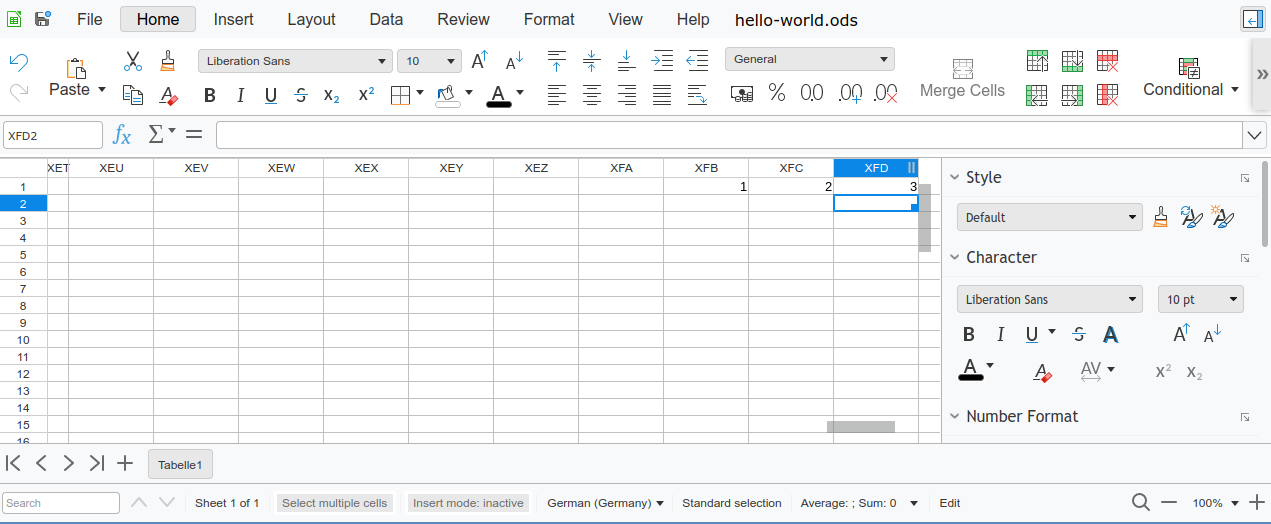
16384 columns in Collabora Online
After the work to support 16384 columns in LibreOffice Calc I have also made sure that the feature works also in Collabora Online, thanks to the funding of NGI.
This project has received funding from the European Union’s Horizon 2020 research and innovation programme under grant agreement No 871498.

Since the Calc core is the same, the underlying functionality works just like in LibreOffice. But the online functionality presented some additional challenges that needed handling, as having more cells in a spreadsheet may mean more data sent over the network, slowing things down. There definitely used to be problems with large spreadsheets, as the tiled rendering used by Online in fact was already limited to 500000 rows compared to 1048576 rows of the desktop version (in fact, git history shows that this started at only 1000 rows initially and then was continually raised over the time as things improved). So together with raising column count to 16384 I have raised this to the normal 1048576 rows as well.
While working on this, one of the problems I needed to handle was a rather unusual one - some automated tests were failing because of timing out. Only with debug builds, because they of course do more checks compared to optimized release builds. And the problem turned out to be how some tests checked resulting spreadsheets after some operations. Since testing Calc running in a browser is more complicated than testing the desktop version, what the tests did was to select a large number of cells (e.g. one entire row), paste that to the clipboard and then the clipboard data was present in browsers HTML data, so the testing framework could test it and verify it is as expected. And this failed with unoptimized debug builds because even though the spreadsheet was almost empty, the unoptimized code checked every cell involved and together it added up enough to exceed the test timeout. Ironically enough, a significant portion was spent in code that was trying to optimize the size of the clipboard data. So I needed to improve the tests and optimize handling of unoptimized code, as strange as it may sound.
Now with hopefully all performance problems solved, Collabora Online 22.05 should support these spreadsheet sizes just as fine as the desktop version.

Plasma, Gear, Frameworks update in Tumbleweed
This week’s openSUSE Tumbleweed snapshots had several KDE packages updated and an update affecting scripts related to grep.
In addition to some changes with YaST affecting grep, the rolling release had snapshots updating Plasma, Gear and Frameworks in that order.
Snapshot 20220914 is finishing testing and the snapshot could be released before this article is published, which would make this week another full week of snapshots if the testing passes openQA.
Frameworks 5.98.0 arrived in snapshot 20220913. The update deduplicated color loading codes with KConfigWidgets and Kirigami had a fix for a potential crash in imagecolors. Frameworks also delivered a lot of additions and fixes to KTextEditor. There were some fixes of inconsistencies in the completion config tab and KTextEditor enabled the clipboard history with non read-only. An update of fetchmail 6.4.33 removed an upstream patch and a wrapper script for HTMLDOC was added for use with Flatpak because the snapd version was broken. Audio format flac 1.4.0 added a FMA instruction set extension to speed up audio for x86_64 CPUs. There is also now a set of files available to test whether a FLAC decoder implements the format correctly. The update of libstorage-ng 4.5.44 fixed the resizing of Linux Unified Key Setup and did some Czech translations. Also updated in the snapshot was the 4.5.4 versions of yast2-bootloader and yast2-kdump.
Just a few packages were updated in snapshot 20220912. Caching proxy package squid 5.7 fixed a regression and a handful of bugs. The package now supports OpenSSL 3.0. An update of the smartcard middleware library pcsc-lite 1.9.9 made some minor improvements and improved the log from the smartcard daemon to log the return code in text instead of hex. A fix to a missing comma in the JSON output of tree 2.0.4 was made and yast2-trans had multiple translations updates for German and Czech.
Device mapper package multipath-tools had its second update of the week in snapshot 20220911. The other package to update in the snapshot was the font drawing library libXft 2.3.6, which fixes a regression in 2.3.5 for dimension-length checks.
The 20220910 snapshot focused on a VERY IMPORTANT update to autoyast2 4.5.4, which replaced egrep with grep -E. This is important to Tumbleweed users to pay attention to as the package replaces obsolete egrep with grep -E. Both egrep and fgrep are deprecated in favor of grep -E and grep -F and a deprecation warning output can break output-parsing scripts. This grep -E change also were listed in yast2 4.5.13, yast2-printer 4.5.2 and yast2-scanner 4.5.1 version updates. The kernel-source updated to 5.19.8. The Linux Kernel had a fix for a memory leak for virtual multilayer switch Open vSwitch. The kernel added a Rosewill USB adapter dongle to the device tables and most of there fixes were related to Bluetooth in this kernel update. Other packages to update in the snapshot were a Plymouth 22.02.122 version, gnome-browser-connector 42.1, ibus-table 1.16.12 and more.
KDE applications were updated in snapshot 20220909 with the update of Gear 22.08.1. Updates to video editor Kdenlive fixed a broken paste clip if trying to paste an invalid clip. The package also made sure that tasks are properly terminated upon closing and had a fix for an incorrect lock that could cause corruption. Some logic and internationalization fixes were made in KMail. News on the starting page was disable with KDevelop as the section is currently unmaintained. Network Time Protocol (NTP) package chrony improved stability with hardware timestamping in its 4.3 version update; it also improved the filter option to better handle missing NTP samples. Some changes with the yast2-core 4.5.4 and yast2-hardware-detection 4.5.1 updates are important for Tumbleweed users becasuse these packages replaced obsolete fgrep with grep -F; egrep and fgrep are both deprecated in favor of grep -E and grep -F. There is a deprecation warning output that can break output-parsing scripts, so be careful Tumbleweed users. Another package to update in the snapshot was multipath-tools.
KDE users received the update of Plasma 5.25.5 in snapshot 20220908, which seems to address a few touchy topics. This bugfix version disabled the Plasma Desktop drag and drop for touch; it conflicted with drag/flick scrolling. The drag and drop was deemed less important than scrolling or opening the context menu for touch. Some brightness actions were changed with PowerDevil and configuration modules for Plasma Workspace now considers the GTK theme setting when computing the default state. A problem with scrolling animations was also fixed in the gtk4 4.8.0 package update. The snapshot also improved the handling of OpenType-font features with the toolkit. Another package to update in the snapshot was Mozilla Firefox 104.0.2. The package fixed a bug making it impossible to use touch or use a stylus to drag the scrollbar on pages. Other packages to update in the snapshot were ipmitool 1.8.19.0, libssh 0.10.4, yast2-network 4.5.6 and more.
Working Hybrid
I worked from home all my life, or at least that’s what I thought. Recently I learned that what do is actually called “hybrid” work. I do most of my work from home, however I also regularly visit the office. I can work a lot more efficiently at home, so, I work from there. Once a week I’m at the office where I do not progress that well with my tasks. Still, I find these visits very important.
This is a follow-up post to my working from home blog from last week.
Meetings
When I started working at my current workplace more than a decade ago, I had a saying that “I only work four days a week for Balabit”. When someone asked me what I do on the fifth work day, I said that “I go to the office for a full day of meetings.”. At that time I considered any meetings a waste of time, taking time from doing actual work.
As a first step I learned that meetings can actually be useful. What I work on between meetings, the main targets of the next software release for example are all decided in meetings. I need to participate to take part in the decisions. Of course I still consider that many meetings could easily be replaced by a few e-mails. However, I quickly remove those from my calendar. There are topics however, that are not easily discussed in e-mail threads. Talking with interested participants in real-time can speed up the discussions and lead to a decision quicker.
In person
The pandemic also taught me that meeting people in person regularly is important as well. Yes, virtual meetings are just as efficient as IRL meetings. In some ways even better, as during less interesting topics you can catch up with your e-mails without disturbing others. But normally meetings have a few fixed topics, and when the discussion is finished or the meeting time is over, people leave and do so with a lot less wasted time. Or is it really wasted time?
Virtual meetings can completely fulfill their jobs. However, many of the best discussions and ideas are born after meetings, in the kitchen or around the water cooler. These are informal discussions where there is no formal agenda, no fixed participants list, just a few random people meeting without any planning. Rushing back to your desk or avoiding the office completely makes these random encounters impossible.
Going hybrid
Many people – including me – are (a lot) more efficient when working from home. That is where work can be done. In the office it is a lot less efficient. Meetings, people talking around you, lots of interruptions. Why do I still say that visiting the office regularly is very important? Because you can meet random people in person. Why is meeting random people is important?
-
In regular meetings people talk to close colleagues. You do not see outside your silo. In the kitchen you might run into members of other teams, join discussions with higher management, or the other way around. This can help to break down silos, listen to different views of the same problems.
-
In an informal discussion people are more open to share why a problem frustrates them. If the other side better understands a problem and why is it frustrating, there is a better chance to resolve it quicker.
-
Even when starting to talk about the weather with someone you just met at the coffee machine, the discussion can easily lead to something useful from the work point of view.
-
Learning about a common hobby with your colleague can bring you closer together, and gain you more attention from the colleague even when discussing work.
These random in person encounters in the office can create tremendous value. Working from home is more efficient in most cases, that is how most people in IT can work through their task lists systematically with minimal interruptions. However, random discussions in the office can break down silos, facilitate quicker problem solutions and even lead to groundbreaking new ideas. This is why in most cases hybrid is better than both in office or full remote.
Happy Hours
If you really cannot get to the office regularly, for example because you moved far and away while remote work was mandatory during the pandemic, you should still visit the office every once in a while. A good occasion is the Happy Hours in the office, when people stay in the office after work and have some great discussions next to a hamburger or other fine food. You can even meet some of the otherwise full-remote colleagues on these special evenings. These events also help team bonding which is especially important when team members rarely see each-other in real life. And, of course, the informal discussions have all the benefits I listed earlier.
What do you think?
Of course, in a more strict interpretation, hybrid means that everyone works where it is the most efficient. From this point of view, the kind of office day I describe is just socializing. In my view going to the office with an open mind and talking to random people you meet there is beneficial, even if you cross out less tasks from your to-do list on office days. These discussions open new perspectives and can be huge productivity boosts, even if somewhat unpredictable. So, it even fits the stricter definition of hybrid: you spend part of your work hours in the office to be more efficient: probably not always on the day you are in the office, but in the long run.
What do you think? You can reach me on Twitter and LinkedIn.
Camiseta para Akademy-es 2022 de Barcelona #akademyes
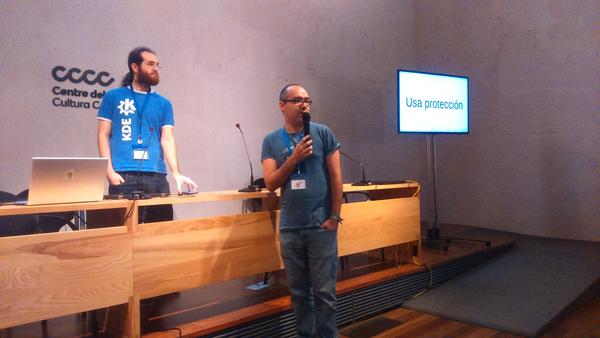
Como ya sabrán los seguidores del blog, a diferencia del año anterior, Akademy-es 2022 se celebrará en de forma presencial y en línea, es decir, híbrida el 29 y 30 de septiembre. Estamos cerca ya de su celebración y prueba de ello es que ha sido abierto el registro, se ha publicado el programa y, como novedad, este año se ha diseñado una camiseta para Akademy-es 2022 de Barcelona que seguro os gustará.
Hace unos meses compartí con vosotros que este año Akademy-es 2022 se va a realizar de forma híbrida en Barcelona el 29 y 30 de septiembre, en una edición muy especial ya que volveremos a encontrarnos de forma física pero que seguirá siendo accesible para todo el mundo utilizando tecnologías de telecomunicación libres.
Siguiendo el esquema habitual cuando coincide con una Akademy, las charlas se celebrarán el jueves y el viernes, para dejar libre el fin de semana para las ponencias el evento Internacional.
Y esta semana, y las que vienen, el blog va a ser casi un monográfico dedicado a la promoción tanto de este evento como el de su hermano mayor, Akademy que se celebrará los días posteriores.
De esta forma, el lunes hablamos de que se había abierto el registro para Akademy-es 2022 de Barcelona y ayer martes comentamos que había sido publicado el programa, con un total de trece charlas normales más las charlas relámpago. Será una oportunidad de aprender con gente destacada tanto de la comunidad KDE como del resto de comunidades del Software Libre, y en que se tratan temas como usos destacados del software KDE, personalización de Plasma, el futuro del Software Libre, el licenciamiento del software y la sostenibilidad.
Camiseta para Akademy-es 2022 de Barcelona #akademyes
Este año, como novedad tenemos la posibilidad de adquirir una camiseta del evento, una oportunidad única hasta la fecha y que tiene varios objetivos: poder llevarte un recuerdo de la primera Aakdemy-es presencial tras la pandemia y para mostrar con orgullo que participas en la difusión del Software Libre y de sus Comunidades.

Los detalles de la camiseta creada por Rosie «Mose» Matthews son los siguientes:
- Precio:
- Para asistentes presenciales a Akademy-es 2022: 22,5€
- Para asistentes en remoto que vivan en España peninsular o Baleares: 27,5€, incluyendo gastos de envío.
- Reserva al realizar la inscripción en Akademy-es 2022.
- Si vas a asistir presencialmente, podrás pagar y recoger tu camiseta en Akademy-es 2022 en Barcelona.
- Si vas a asistir en remoto y vives en España peninsular o Baleares, recibirás un email tras inscribirte para coordinar el pago y el envío.
- Desgraciadamente, no podemos asegurar que nos sea posible hacer el envío a Canarias o a otros países fuera de España.
- Si quieres pedir más de una camiseta, por favor, envía un email a akademy-es-org (en) kde-espana.org
Más información y tallas en Akademy-es 2022.
¿Qué es Akademy-es?
Akademy-es (#akademyes, que es la etiqueta para las redes sociales) es evento más importante para los desarrolladores y simpatizantes de KDE, que se ha ido celebrando desde el 2006 con éxito creciente.
En general, las Akademy-es son el lugar adecuado para conocer a los desarrolladores, diseñadores, traductores, usuarios y empresas que mueven este gran proyecto.
En ellas se realizan ponencias, se presentan programas, se hace un poco de caja para los proyectos libres (camisetas, chapas, etc) pero sobre todo se conoce a gente muy interesante y se cargan baterías para el futuro.
Podéis repasar las anteriores ediciones en estas entradas del blog:
- Camino Akademy-es 2013: Las anteriores ediciones (I): 2006 – 2008
- Camino Akademy-es 2013: Las anteriores ediciones (II): 2009-2010
- Camino Akademy-es 2013: Las anteriores ediciones (III): 2011-2012
- Anteriores ediciones de Akademy-es (IV): 2013 y 2014
La entrada Camiseta para Akademy-es 2022 de Barcelona #akademyes se publicó primero en KDE Blog.

PETSCII Robots on TheC64 Maxi or Mini with a SNES Controller
