
 Member
 baltolkien
Programa de charlas de Akademy-es 2022 híbrida de Barcelona #akademyes
Como ya sabréis este año se celebra Akademy-es 2022 se celebrará en de forma presencial y en línea. Hoy se ha publicado el programa de charlas de Akademy-es 2022. Léelo y seguro que encuentras más de una razón para acompañarnos.
Programa de charlas de Akademy-es 2021 en línea #akademyes
El 29 y 30 de septiembre se va a celebrar Akademy-es 2022 de Barcelona que se celebrará en modalidad híbrida organizado por KDE España y que será la antesala de Akademy, el evento internacional de la Comunidad KDE.
Este año se volvemos a tener un gran programa de ponencias, que van desde lo último en Plasma y en proyectos KDE pasando por temas de hardware, programación, ciberseguridad y privacidad.
Y si no te lo crees simplemente échale un vistazo al programa.
Jueves 29 de septiembre
- 16:00 – 16:10 Ceremonia de apertura
- 16:15 – 17:00 Linux hoy y mañana – Aleix Pol, Presidente de KDE e.V.
- 17:05 – 17:30 Como hacer temas para KDE – Fabián Inostroza, Diseñador gráfico de temas para KDE – En remoto
- 17:35 – 18:15 Charlas relámpago
- Descanso
- 18:35 – 19:05 Albert Vaca, desarrollador KDE Connect
- 19:10 – 19:55 KDE y el SL, ante el horizonte de cambio – Rubén Gómez Antolí, KDE España
Viernes 30 de septiembre

10:00 – 10:25 KDE España – José Millán Soto, KDE España
10:30 – 11:15 ¿Dónde están las mujeres en la Wikipedia? – Ester Bonet, Wikimedia España y Wikimujeres Grupo de Usuarias
11:20 – 12:05 Software Libre en la Astronomía Amateur. Caso: Kstars – Juan Antonio González Herrera, Estrellas Compartidas – En remoto
Descanso
12:25 – 13:10 Los Services Menu: cómo aumentar tu eficiencia con Dolphin – Baltasar Ortega, editor de KDEBlog – En remoto
13:15 – 14:00 Licencias libres y derecho – Marelisa Blanco, nolegaltech
Pausa para la comida
15:30 – 16:15 REUSE: Indicar derechos de autor y licencias sin morir en el intento – Lina Ceballos, FSFE
16:20 – 17:05 Subtítulos y KDE – Juan Febles, editor de Linux Podcast – En remoto
17:10 – 17:55 LliureX: personalizando KDE a nuestras necesidades – Enrique Medina Gremaldos, equipo LliureX
18:00 – 18:45 Sostenibilidad en SL y permacomputing – Paula de la Hoz – En remoto
18:45 Ceremonia de clausura
Nota: Las charlas y horarios pueden sufrir ligeras modificaciones dependiendo de la disponibilidad de los ponentes
Vía: KDE España
La entrada Programa de charlas de Akademy-es 2022 híbrida de Barcelona #akademyes se publicó primero en KDE Blog.
Nightly syslog-ng container images
The syslog-ng team started publishing container images many years ago. For quite a while, it was a manual process, however, a few releases ago, publishing a container image became part of the release process. Recently, nightly container images have also become available, so you can test the latest features and bug fixes easily.
The syslog-ng images are still available under the Balabit namespace on the Docker hub. Balabit was bought by One Identity almost five years ago, and we stopped using the old company name years ago. However, there are many scripts, blogs and even books that feature this location, so changing the location would cause problems for many people. Not to mention, that moving to a new location would reset the download counter :-) Close to 50 million pulls over the years!
From this blog you can learn about the various container images the syslog-ng team provides. You can find basic information about how to use the syslog-ng container image at https://hub.docker.com/r/balabit/syslog-ng, where you can learn how to use your own syslog-ng configuration or open ports for syslog-ng.

syslog-ng logo
You can read the blog at https://www.syslog-ng.com/community/b/blog/posts/nightly-syslog-ng-container-images
Abierto el registro para Akademy-es 2022 de Barcelona #akademyes
Como ya sabrán los seguidores del blog, a diferencia del año anterior, Akademy-es 2022 se celebrará en línea el 29 y 30 de septiembre. Estamos cerca ya de su celebración y prueba de ello es que ha sido Abierto el registro para Akademy-es 2022 de Barcelona #akademyes, y en breve muchas más noticias sobre este evento.
Abierto el registro para Akademy-es 2022 de Barcelona #akademyes
Hace unos meses compartí con vosotros que este año Akademy-es 2022 se va a realizar de forma híbrida en Barcelona el 29 y 30 de septiembre, en una edición muy especial ya que volveremos a encontrarnos de forma física pero que seguirá siendo accesible para todo el mundo utilizando tecnologías de telecomunicación libres.
Siguiendo el esquema habitual cuando coincide con una Akademy, las charlas se celebrarán el jueves y el viernes, para dejar libre el fin de semana para las ponencias el evento Internacional.
Ya se tiene el programa preparado, con más de una docena de charlas tanto presenciales y en línea con todo tipo de temas: divulgativos, técnicos, éticos, etc.
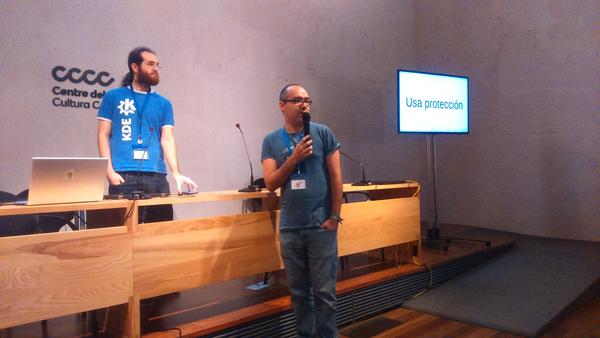
En otras palabras, el evento se acerca y es por ello que ya se ha abierto el registro para Akademy-es 2022 de Barcelona, un registro que se realiza para tener un poco de control sobre el número de asistente y así poder tener una previsión de aforo y de otros detalles como refrescos, café o algo de comidad para las pausas para el café.
Y este año, como novedad, posibilidad de adquirir una camiseta del evento que sirve para poderte llevar un recuerdo y para mostrar con orgullo que participas en la difusión del Software Libre y de sus Comunidades. En breve más noticias.
¿Qué es Akademy-es?
Akademy-es (#akademyes, que es la etiqueta para las redes sociales) es evento más importante para los desarrolladores y simpatizantes de KDE, que se ha ido celebrando desde el 2006 con éxito creciente.
En general, las Akademy-es son el lugar adecuado para conocer a los desarrolladores, diseñadores, traductores, usuarios y empresas que mueven este gran proyecto.
En ellas se realizan ponencias, se presentan programas, se hace un poco de caja para los proyectos libres (camisetas, chapas, etc) pero sobre todo se conoce a gente muy interesante y se cargan baterías para el futuro.
Podéis repasar las anteriores ediciones en estas entradas del blog:
- Camino Akademy-es 2013: Las anteriores ediciones (I): 2006 – 2008
- Camino Akademy-es 2013: Las anteriores ediciones (II): 2009-2010
- Camino Akademy-es 2013: Las anteriores ediciones (III): 2011-2012
- Anteriores ediciones de Akademy-es (IV): 2013 y 2014
La entrada Abierto el registro para Akademy-es 2022 de Barcelona #akademyes se publicó primero en KDE Blog.

AlexaTM 20B : Amazon diz superar o GPT-3

Baseado nas informações da Amazon, o seu novo modelo superou o GPT-3 do OpenAI e também o PaLM da Google em diversos testes de NLP. Batizado como Alexa Teacher Models, o modelo de linguagem de seq2seq com 20 bilhões de parâmetros ainda não está disponível publicamente. Entretanto, mais dados disponíveis no paper e no blog da Amazon.
O modelo seq2seq é utilizado para resolução de linguagem natural como tradução, interação em chatbots, respostas e resenha. Diferente dos seus concorrentes, o Alexa Teacher (AlexaTM 20B) é um modelo que apresenta codificador e decodificador. Com isto teoricamente permite um maior desempenho em traduções automáticas. Mesmo apresentando menos parâmetros, o modelo da Amazon superou o fantástica GPT-3 alcançando excelente desempenho.
Actualización de septiembre del 2022 de KDE Frameworks
Estando en el mes previo a Akademy-es y Akademy híbridas de Barcelona siguen las entradas recurrentes de las actualizaciones mensuales de rigor que demuestra que los desarrolladores de KDE no dejan de trabajar en sus librerías. Así que se congratulan en anunciar la actualización de septiembre del 2022 de KDE Frameworks. Con esta se llega a la versión 5.98, un suma y sigue de compromiso y constancia que no parece que tenga un final cercano, y que ofrece una novedad, como mínimo, controvertida.
Actualización de septiembre del 2022 de KDE Frameworks
La razón de esta afirmación es que KDE Frameworks es básicamente la base de trabajo de los desarrolladores para realizar sus aplicaciones, es como el papel y las herramientas de dibujo para un artista: cuanto mejor sea el papel y mejores pinceles tenga, la creación de una artista será mejor.

De esta forma, las mejoras en KDE Frameworks facilitan el desarrollo del Software de la Comunidad KDE, haciendo que su funcionamiento, su estabilidad y su integración sea la mejor posible.
El xxxxxx xxx de septiembre de 2022 ha sido lanzado KDE Frameworks 5.98, la nueva revisión del entorno de programación sobre el que se asienta Plasma 5, el escritorio GNU/Linux de la Comunidad KDE, y las aplicaciones que se crean con para él.
Más información: KDE
La constancia del equipo de desarrollo de la Comunidad KDE
Hay que recordar que los desarrolladores de KDE decidieron lanzar actualizaciones mensuales de este proyecto y lo están cumpliendo con puntualmente. La idea es ofrecer pocas pero consolidadas novedades, a la vez que se mantiene el proyecto evolucionando y siempre adaptándose al vertiginoso mundo del Software Libre.
Una gran noticia para la Comunidad KDE que demuestra la evolución continua del proyecto que continua ganando prestigio en el mundo de los entornos de trabajo Libres.
¿Qué es KDE Frameworks?
Para los que no lo sepan, KDE Frameworks añade más de 70 librerías a Qt que proporcionan una gran variedad de funcionalidades necesarias y comunes, precisadas por los desarrolladores, testeadas por aplicaciones específicas y publicadas bajo licencias flexibles. Como he comentado, este entorno de programación es la base para el desarrollo tanto de las nuevas aplicaciones KDE y del escritorio Plasma 5.

Aquí podéis encontrar un listado con todos estos frameworks y la serie de artículos que dedico a KDE Frameworks en el blog,
Recuerda que puedes ver una introducción a Frameworks 5.0 en su anuncio de lanzamiento.
La entrada Actualización de septiembre del 2022 de KDE Frameworks se publicó primero en KDE Blog.
Speed Dreams – Juegos Linux (II)
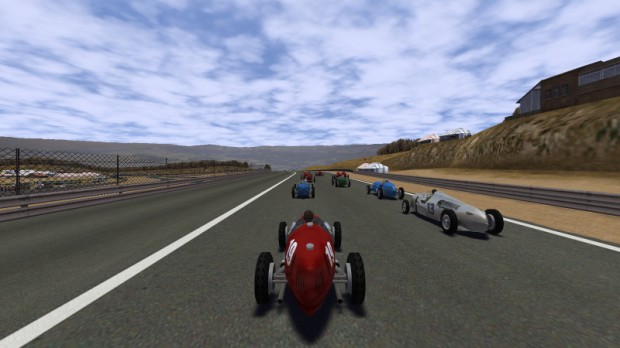
Sigo la serie que me apetecía mucho hacer ahora que tengo un poco de tiempo para escribir de temas más lúdicos. Empecé con The Battle for Wesnoth y sigo con Speed Dreams, un juego de simulación de conducción que también destaca por su alta calidad en cuanto a gráficos, jugabilidad y con una IA que mejora versión a versión.
Speed Dreams – Juegos Linux (II)
Como decía en la primera entrada, un buen número de jugadores se están uniendo al carro de los sistemas GNU/Linux gracias a la irrupción de la Steam Deck, y aunque eso significa la llegada de juegos privativos es un buen momento para recordar a juegos los nativos y libres que tenemos a nuestra disposición y que constituyen una buena puerta de entrada al mundo de la programación de este tipo de aplicaciones para aquellos que quieran empezar: aprendiendo al mismo tiempo que aportan algo al bien común.
Speed Dreams es una bifurcación del simulador de coches de carreras abierto Torcs, con el objetivo de implementar nuevas y emocionantes características, coches, pistas y oponentes de IA para hacer un juego más agradable para el jugador, así como mejorar constantemente el realismo visual y de la física.
Equipo de desarrollo de Speed Dreams
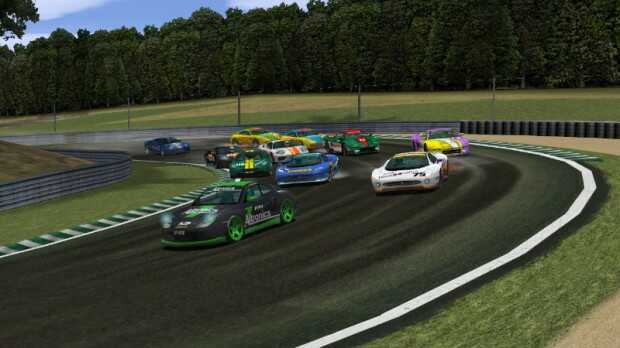
De esta forma nos encontramos con un juego escrito principalmente en C++ y publicado bajo GPL v2+ y Free Art License, siendo la versión más reciente la 2.2.3 de agosto de 2021. Estas características de juegos libre le confieren propiedades únicas que no encuentras en otros juegos de corte similar.
Speed Dream es un juego donde los desarrolladores pueden probar sus ideas y tener todas las posibilidades de hacerlas llegar a los usuarios finales (la democracia es el principio fundamental que rige a este equipo de desarrollo). Al mismo tiempo es un juegos donde donde los usuarios finales pueden disfrutar de la realización de estas ideas y dar su opinión al respecto, y/o hacer nuevas sugerencias.
Las características de Speed Dreams
La lista de características Speed Dreams son las siguientes:
- Simulador 3D de deportes de motor en tiempo real para jugadores y desarrolladores
- Física precisa que apunta al máximo realismo posible
- Gráficos de alta calidad
- 21 pistas HQ para correr
- 82 coches HQ ajustados en 16 conjuntos equilibrados y consistentes
- Muchos más coches y circuitos disponibles en la Comunidad
- 4 oponentes IA de primera clase para carreras emocionantes
- Totalmente abierto a cualquier trabajo de investigación, estudio o enseñanza (física, IA, gráficos, …)
- Soporte para muchos dispositivos de entrada (teclado, joypad, joystick, volante/pedal …)
- Funciona en Windows, Linux y Mac OS X
¿Cómo conseguir Speed Dreams?
Como se ha dicho anteriormente el juego está disponible para en Linux, Windows y Mac, por tanto os aconsejo ir a la página de descargas para ver todas las opciones.
No obstante, para KDE Neon la he instalada sin problemas mediante Flatpak aunque tiene un problema a reportar: no funciona en Wayland.
Contribuye al desarrollo
Las opciones para ayudar al desarroolo de Speed Dreams se focalizan en dos opciones:
-
Como usuario final puedes
- ayudar al equipo de desarrollo a probar las versiones preliminares
- sugerir mejoras, expresar tu apoyo o disgusto por los cambios
- hacer preguntas sobre problemas de compilación/instalación desde el código fuente
y todo eso a través de:
- la lista de correo de usuarios: speed-dreams-users@lists.sourceforge.net
- su rastreador de errores/características
- su sala de chat de usuarios en JabberFr
- en su chat IRC Freenode #speed-dreams
-
Como desarrollador tienes dos modalidades:
-
como colaborador invitado
- puedes proponer sus adiciones/mejoras como parches contra el último árbol de fuentes, y enviarlocomo archivos adjuntos a través de su lista de correo devel speed-dreams-devel@lists.sourceforge.net o nuestro rastreador de errores/características;
- puedes unirte a las discusiones diarias del equipo dev.
- puedes unirte a las discusiones diarias del equipo de desarrollo y a las reuniones mensuales en nuestra sala de desarrolladores en JabberFr;
-
como desarrollador registrado
- Todo lo anterior pero ahora tienes acceso de escritura al repositorio SVN y puedes simplemente confirmar tus adiciones/mejoras
-
como colaborador invitado
Más información en Speed Dreams Get Involved.
La entrada Speed Dreams – Juegos Linux (II) se publicó primero en KDE Blog.
#openSUSE Tumbleweed revisión de la semana 36 de 2022
Tumbleweed es una distribución «Rolling Release» de actualización contínua. Aquí puedes estar al tanto de las últimas novedades.

openSUSE Tumbleweed es la versión «rolling release» o de actualización continua de la distribución de GNU/Linux openSUSE.
Hagamos un repaso a las novedades que han llegado hasta los repositorios esta semana.
El anuncio original lo puedes leer en el blog de Dominique Leuenberger, publicado bajo licencia CC-by-sa, en este este enlace:
Esta semana de nuevo se han publicado 7 snapshots, aunque solo 6 llegaron a los repositorios y una séptima fue descartada.
Aunque la siguiente snapshot sí que pasó muy rápidamente los test, así que sí habrá una nueva snapshot disponible.
Las 6 snapshots publicadas fueron 0901, 0903, 0904, 0905, 0906, y 0907 que entre otros han traído estos cambios:
- Linux kernel 5.19.7
- libssh 0.10.3
- SQLite 3.39.3
- NMap 7.93
- Mozilla Thunderbird 102.2.1
- librsvg 2.55.1
- NetworkManager 1.40.0
- Flatpak 1.14.0
- GCC 12.2.1
- Libvirt 8.7.0
Y para próximas snapshots, ya se están preparando actualizaciones como:
- Mozilla Firefox 104.0.2
- KDE Plasma 5.25.5
- GTK 4.8.0
- Mozilla Thunderbird 102.2.2
- LibreOffice 7.4.1
- libxml 2.10.2
- Linux kernel 5.19.8
- KDE Gear 22.08.1
- grep 3.8
- util-linux 2.38.1
- fmt 9.0
- gpgme 1.18
- libxslt 1.1.36
Si quieres estar a la última con software actualizado y probado utiliza openSUSE Tumbleweed la opción rolling release de la distribución de GNU/Linux openSUSE.
Mantente actualizado y ya sabes: Have a lot of fun!!
Enlaces de interés
- ¿Por qué deberías utilizar openSUSE Tumbleweed?
- zypper dup en Tumbleweed hace todo el trabajo al actualizar
- ¿Cual es el mejor comando para actualizar Tumbleweed?
- ¿Qué es el test openQA?
- http://download.opensuse.org/tumbleweed/iso/
- https://es.opensuse.org/Portal:Tumbleweed

——————————–
Create folder from selected files – Service menu para KDE (23)
Hoy os presento el Service menu para KDE número 23 de esta serie y que puede ser más que útil si estamos continuamente trabajando con archivos. Hoy toca hablar de Create folder from selected files, un atajo que nos permitirá crear una carpeta y mover los archivos que deseemos en ella con un simple click.
Create folder from selected files – Service menu para KDE (23)
Seguimos con uno de esos servicios complementarios para Dolphin, el explorador de archivos del escritorio Plasma de la Comunidad KDE, que seguro que vendrá bien para algunos usuarios, como es mi caso ya que en muchas ocasiones reordeno archivos en carpetas.
Se trata de Create folder from selected files, de Samvo, que nos permite utilizar el botón derecho sobre una serie de archivos para crear una carpeta que los contenga a todos. Y todo ello con un simple click.
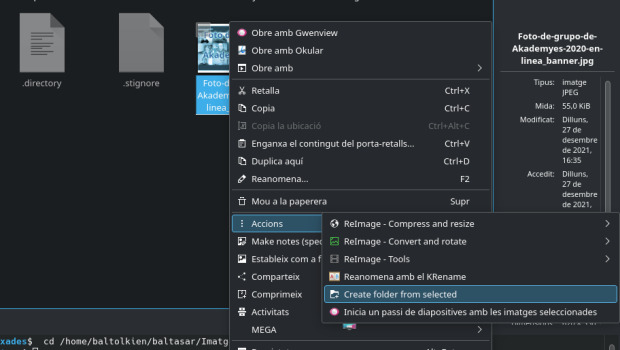
Este Service Menu puede ser instalado directamente desde Dolphin.
Y como siempre digo, si os gusta el pack de iconos podéis “pagarlo” de muchas formas en la página de KDE Store, que estoy seguro que el desarrollador lo agradecerá: puntúale positivamente, hazle un comentario en la página o realiza una donación. Ayudar al desarrollo del Software Libre también se hace simplemente dando las gracias, ayuda mucho más de lo que os podéis imaginar, recordad la campaña I love Free Software Day 2017 de la Free Software Foundation donde se nos recordaba esta forma tan sencilla de colaborar con el gran proyecto del Software Libre y que en el blog dedicamos un artículo.
Más información: KDE Store
¿Qué son los Dolphin Service Menu?
La personalización de KDE y Plasma está más que demostrada y prueba de ello son los Dolphin Service Menu, que no son más que la posibilidad de disponer un menú auxiliar en el gestor de archivos Dophin o en Konqueror que se activa con el botón derecho del ratón.
Con ellos tendremos nuevas acciones como:
- Accesos directos a los servicios de Dropbox.
- Accesos directos a las acciones de 7zG.
- Realizar acciones como root automáticamente.
- Enviar un adjunto con el Thunderbird
- Convierte de LibreOffice a pdf
- Comic book kservicemenu Original
Y muchos más como hemos explicado en varias ocasiones en el blog. Puedes encontrar estos servicios se pueden encontrar en la sección Dolphin Service Menu en la Store de KDE y en esta categoría de este humilde blog, que poco a poco va creciendo para mostrar lo mucho que se puede personalizar el entorno de trabajo Plasma de KDE.
La entrada Create folder from selected files – Service menu para KDE (23) se publicó primero en KDE Blog.
openSUSE Tumbleweed – Review of the week 2022/36
Dear Tumbleweed users and hackers,
As we are used to by now, Tumbleweed is kicking and rolling. 7 snapshots in a week would be nothing surprising. Unfortunately, this week we ‘only’ reached 6 snapshots. Number 7 was discarded – not for having issues, but the next snapshot passed so quickly through OBS that it was ‘ready for testing; before openQA could even finish the previous run. Not something we see very often. In any case, no harm done: you just needed an extra day of patience to get some of the updates.
The 6 snapshots published were called 0901, 0903, 0904, 0905, 0906, and 0907 and delivered these changes:
- Linux kernel 5.19.7
- libssh 0.10.3
- SQLite 3.39.3
- NMap 7.93
- Mozilla Thunderbird 102.2.1
- librsvg 2.55.1
- SETools: no longer recommend python3-networkx, which pulled in way too much, incl. pandoc
- NetworkManager 1.40.0
- Flatpak 1.14.0
- GCC 12.2.1
- Libvirt 8.7.0
In the future, near or far, I predict these changes to reach Tumbleweed:
- Mozilla Firefox 104.0.2
- KDE Plasma 5.25.5
- GTK 4.8.0
- Mozilla Thunderbird 102.2.2
- LibreOffice 7.4.1
- libxml 2.10.2
- Linux kernel 5.19.8
- KDE Gear 22.08.1
- grep 3.8: declares egrep and fgrep as deprecated. Switch to grep -E resp grep -F
- util-linux 2.38.1: this also brings a massive package layout change, which will probably take some time to settle. It’s part of the distro bootstrap and we have to be careful to not blow it out of proportion
- fmt 9.0: Breaks ceph and zxing-cpp
- gpgme 1.18: breaks libreoffice
- libxslt 1.1.36: breaks daps
openSUSE-ID Meet Up
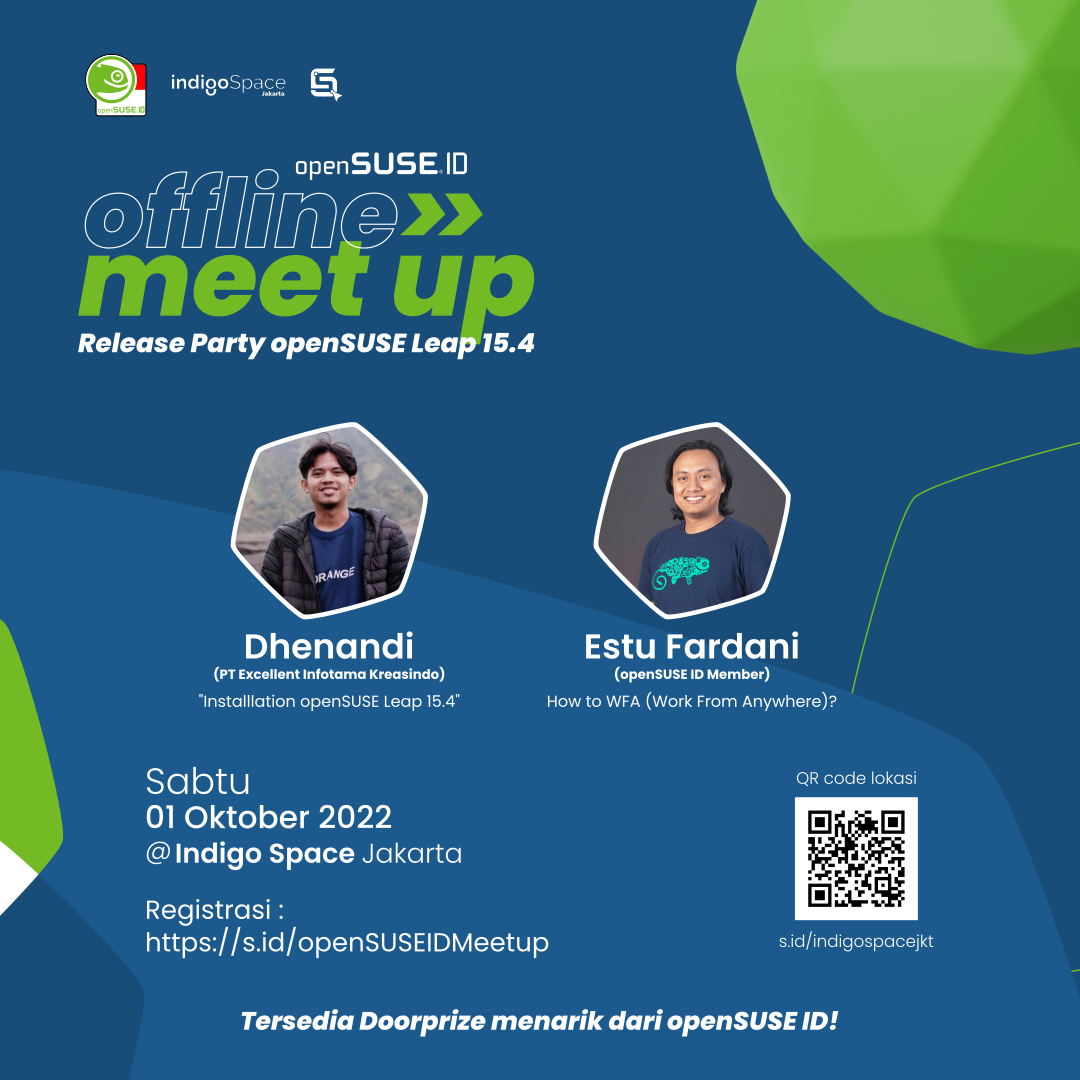
Halo teman-teman.
openSUSE Indonesia ingin mengadakan meetup offline nih di awal bulan Oktober.
Segera daftar yuk! ada beberapa hadiah menarik
daftar di http://s.id/openSUSEIDMeetup
Kuota terbatas ya!