
 Member
 Victorhck
#openSUSE Tumbleweed revisión de la semana 35 de 2022
Tumbleweed es una distribución «Rolling Release» de actualización contínua. Aquí puedes estar al tanto de las últimas novedades.

openSUSE Tumbleweed es la versión «rolling release» o de actualización continua de la distribución de GNU/Linux openSUSE.
Hagamos un repaso a las novedades que han llegado hasta los repositorios esta semana.
El anuncio original lo puedes leer en el blog de Dominique Leuenberger, publicado bajo licencia CC-by-sa, en este este enlace:
El día tenía que llegar. Después de 26 snapshots publicadas de manera diaria, la snapshots 0830 rompió ese ritmo, debido a una incompatibilidad de libxml 2.10.x con la anterior versión 2.9.x.
En total esta semana se hna publicado 5 snapshots (0826, 0827, 0828, 0829 y 0831).
Los cambios más relevantes que han traido a los repositorios son:
- Meson 0.63.1
- Shadow 4.12.3
- Grub2
- Mozilla Firefox 104.0
- Mozilla Thunderbird 102.2
- glibc 2.36
- Make
Y en próximas snapshots podremos encontar, entre otros:
- Linux kernel 5.19.6
- util-linux 2.38.1: esto también trae un cambio masivo en el diseño del paquete, que probablemente llevará algún tiempo resolver. Es parte del arranque de la distribución y debemos tener cuidado de no desproporcionarlo.
- Mozilla Thunderbird 102.2.1
- GCC 12.2
- fmt 9.0
- libxml 2.10.2
- gpgme 1.18
- libxslt 1.1.36
Si quieres estar a la última con software actualizado y probado utiliza openSUSE Tumbleweed la opción rolling release de la distribución de GNU/Linux openSUSE.
Mantente actualizado y ya sabes: Have a lot of fun!!
Enlaces de interés
- ¿Por qué deberías utilizar openSUSE Tumbleweed?
- zypper dup en Tumbleweed hace todo el trabajo al actualizar
- ¿Cual es el mejor comando para actualizar Tumbleweed?
- ¿Qué es el test openQA?
- http://download.opensuse.org/tumbleweed/iso/
- https://es.opensuse.org/Portal:Tumbleweed

——————————–
openSUSE Tumbleweed – Review of the week 2022/35
Dear Tumbleweed users and hackers,
We all knew the day would come – and after 26 daily snapshots were released, 0830 wanted to break that. It turned out that libxml 2.10.x is not entirely ABI compatible with the previous 2.9.x we had in the tree (depending on configure parameters given; IMHO such symbols should have a specific version for those options, allowing to require feature sets). Snapshot 0831 is a very large one: as we checked in glibc during this week, coupled with this ABI break, we decided to let OBS decide what all needs a rebuild (with glibc which usually is everything). In total, we released 5 snapshots this week (0826, 0827, 0828, 0829, and 0831).
The most relevant changes in these snapshots were:
- Meson 0.63.1
- Shadow 4.12.3
- Grub2: revert to a version from 2 months ago without the various TPM patches: they turned out to cause a lot of trouble (and are being further reworked in the devel project)
- Mozilla Firefox 104.0
- Mozilla Thunderbird 102.2
- glibc 2.36
- Make: Add support for job server using named pipes
The staging projects are testing these upgrades and changes:
- Linux kernel 5.19.6
- util-linux 2.38.1: this also brings a massive package layout change, which will probably take some time to settle. It’s part of the distro bootstrap and we have to be careful to not blow it out of proportion
- Mozilla Thunderbird 102.2.1
- GCC 12.2
- fmt 9.0: Breaks ceph and zxing-cpp
- libxml 2.10.2: breaks xmlsec1
- gpgme 1.18: breaks libreoffice
- libxslt 1.1.36: breaks daps
7 nuevos efectos gráficos para Plasma
Lo descubrí en el grupo de Telegram de KDE – Cañas y Bravas donde Jorge Dangelo (jomada74) nos compartió un vídeo con 7 nuevos efectos gráficos para Plasma que ha creado el desarrollador Schneegans. Además, el mismo Jorge ha promocionado en su blog estos efectos y que me ha gustado tanto que creo que debo seguir promocionando.
7 nuevos efectos gráficos para Plasma
Las opciones de personalización de Plasma, el entorno de trabajo de la Comunidad KDE, son asombrosas y sus efectos o animaciones son ideales para llamar la atención a los más jóvenes.
Son un clásico cuando muestro mi escritorio a mis alumnos las ventanas gelatinosas, las transparencias, la lámpara mágica y, lo reconozco, las ventanas explosivas. Estos efectos visuales son como la luz para las polillas y más de un alumno me ha pedido consejo para instalar una distribución GNU/Linux en su ordenador gracias a ellos.
Además, porqué no decirlo, los efectos empleados en pequeñas dosis hacen que el trabajo continuo con un PC sea un poco más agradable… al menos para mi.
Así que la aparición de 7 nuevos efectos gráficos para Plasma , es decir, para Kwin, son una gran noticia.y como dice Jomad74 le dan «un nuevo aire al escritorio plasma.»
Como he dicho en la introducción los siete nuevos efectos son una creación de Schneegans y reciben los nombres de Wisps, Tv Effect, Energize A, Energize B, Hexagon, Fire e Incinerate.

Además, pueden instalarse directamente desde las preferencias del sistema de forma sencilla simplemente abriendo la Preferencias del Sistema, ir a Comportamiento del espacio de trabajo. A continuación en la sección de efectos del escritorio tenemos la opción de obtener nuevos efectos de escritorio, buscamos los nuevos efectos, instalamos e inmediatamente aparecerán en Animaciones.
De hecho, Jomada74 nos ha hecho un vídeo demostrativo… no os lo perdáis.
La entrada 7 nuevos efectos gráficos para Plasma se publicó primero en KDE Blog.

Tumbleweed Continues Release Streak
Tumbleweed’s continuous daily release streak has reached an astounding 26 snapshots.
The streak of openSUSE’s rolling release continued this week and packages like glibc, ibus, Mozilla Firefox and sudo all received updates.
Will the streak continue beyond snapshot 20220829? Users should know soon.
Snapshot 20220829 provided package updates for AppArmor and libapparmor3.0.7. The new versions fixed the setuptools-version detection in buildpath.py. The Man pages for Japanese made some improvements with the man-pages-ja 20220815 update. The tree 2.0.3 update provided multiple fixes for .gitignore functionality and fixed a couple segfaults.
The 20220828 snapshot had ten packages updated. Among the updated packages were ibus 1.5.27, which enabled an ibus restart in GNOME desktop and disabled XKB engines in Plasma Wayland. The update of webkit2gtk3 2.36.7 fixed several crashes and rendering issues as well as addressed a Common Vulnerabilities and Exposure related to Apple’s use of the package. The Python web framework and asynchronous networking library python-tornado6 6.2 enabled SSL certificate verification and hostname checks by default and its Continuous Integration has moved from Travis and Appveyor to Github Actions. Another package to update in the snapshot was font handler libXfont2 2.0.6. The new version fixed some spelling and wording issues. It also fix comments to reflect the removal of legacy Operating System/2 support.
A new major version of the Mozilla Firefox browser arrived in snapshot 20220827. Firefox 104.0 addressed multiple CVEs to include an address bar spoofing to disguise a URL; another fixed an exploit that showed evidence of memory corruption and the possibility to running arbitrary code. The update of the GNU C Library added major new features; glibc 2.36 added process_madvise and process_mrelease functions. Support for the DT_RELR relocation format was added and socket connection fsopen and many other sorting features were added. VMware’s open-vm-tools 12.1.0 package, which enables several features to better manage seamless user interactions with guests, fixed a vulnerability that allowed for local privilege escalation; it also had a fix for the build of the ContainerInfo plugin for a 32-bit Linux release. A few RubyGems like rubygem-faraday-net_http 3.0.0, rubygem-parser 3.1.2.1 and rubygem-rubocop 1.35.1 were also updated in the snapshot.
A total of three packages were updated in snapshot 20220826. The simple PIN- or passphrase-secure reader pinentry updated to 1.2.1; the package improved accessibility and fixed the handling of an error during initialization. The package update also made sure an entered PIN is always cleared from memory. Its graphical user interface pinentry-gui was also updated to the 1.2.1 version. The shadow package, which converts UNIX password files to the shadow password format, updated to version 4.12.3. It fixed a 9-year-old CVE. CVE-2013-4235 fixed the time-of-check time-of-use race condition when copying and removing directory trees. The package also updated and fixed some Spanish and French translations.
A minor update to sudo 1.9.11p3 arrived in snapshot 20220825. The update fixed a crash in the Python module with Python 3.9.10 on some systems and AppArmor integration was made available for Linux, so a sudoers rule can now specify an APPARMOR_PROFILE option to run a command confined by the named AppArmor profile. The sudo package also fixed a regression introduced in 1.9.11p1 that caused a warning when logging to sudo_logsrvd if the command returned no output. That regression was never released in a Tumbleweed snapshot. An update of the open-source disk encryption package cryptsetup updated to 2.5.0. This new version removed cryptsetup-reencrypt tool from the project and move reencryption to an already existing cryptsetup reencrypt command. Other packages to update in the snapshot were gnome-bluetooth 42.3, device memory enabler ndctl 74, yast2-tune 4.5.1 and more.
Participa en el concurso Wiki loves monuments con tus fotografías
Del 1 al 30 de septiembre de 2022 podrás participar en el concurso organizado por Wikimedia con tus fotografías de monumentos de España o de cualquier parte del mundo

Durante este mes de septiembre de 2022 se vuelve a celebrar una nueva edición del concurso «Wiki Loves Monuments» que lleva ya 12 años celebrándose a nivel mundial.
De esta manera se trata de incentivar el que la fundación Wikimedia pueda mantener, ampliar completar un registro fotográfico de los monumentos de todo el mundo. Y poner a disposición de todo el mundo esas fotografías recopiladas y publicadas bajo licencias libres.
Cualquier persona puede participar y colaborar así en el patrimonio fotográfico de Wikimedia, las bases son las siguientes:
- Fotografiar monumentos (tengan o no foto previa) con una resolución mínima de 1920×1080.
- Subir las fotografías a Wikimedia Commons (necesitas registrarte) con una licencia libre entre el 1 y el 30 de septiembre de 2022.
- Las fotos deben ser realizadas y subidas por las personas participantes.
- Incluir el identificador del monumento en el formulario de subida de las fotografías (puedes encontrarlos en las listas de monumentos.
- No hay límite al número de imágenes que puedes subir y puedes participar con cualquier cámara. ¿A qué esperas para salir y hacer algunas fotos? (Lee las bases completas)
Como ves, las bases son muy sencillas de cumplir. Así que anímate a compartir tu mejor fotografía del monumento de tu pueblo o ciudad o del sitio donde has estado el mes pasado.
Hay dos fases, en la primera un jurado nacional seleccionará las mejores fotografías de entre todas las enviadas, que en la edición anterior fueron casi 150.000 fotografías. Y las seleccionadas tendrán unos premios.
Después las 10 mejores seleccionadas de cada país competirán a nivel internacional, donde también se otorgarán premios para las ganadoras.
Lo que más se valorará a la hora de judgar las fotografías:
- Calidad técnica:
- exposición correcta
- nitidez
- ausencia de problemas como pueden ser distorsiones de lente, ruido, manchas de polvo, artefactos JPEG o viñeteo, entre otros
- composición (el sujeto principal de la fotografía ha de ser el monumento en cuestión, sin elementos que distraigan o que marginen el protagonismo del mismo)
- calidad estética
- valor enciclopédico
Espero que te este artículo te anime a participar, quizás yo también envíe alguna mía… si es así, ¡suerte!
Enlaces de interés
- https://www.wikilm.es/
- https://wikilm.es/es/Wiki_Loves_Monuments/Reglamento_2022
- https://commons.wikimedia.org/wiki/Wiki_Loves_Monuments_2021_winners
Software Libre en el Segundo encuentro Ibérico de Moneda Libre G1
Me complace promocionar el taller de Software Libre en el Segundo Encuentro Ibérico de Moneda Libre G1 que ha organizado la Asociació Emancipació Comunitaria. Una intensa jornada justo en medio del encuentro que se celebrará el próximo 10 de septiembre en Alfafara y Agullent.
Software Libre en el Segundo encuentro Ibérico de Moneda Libre G1
Si algo es necesario en la Comunidad de Software Libre es difusión y por ello es detacable la labor que está realizando la Asociació Emancipació Comunitaria ya que se dedica justamente a eso.
Y como muestra un botón. Dentro del Segundo encuentro Ibérico de Moneda Libre que se celebrará del 9 al 11 de septiembre en Alfara/Agullent (podéis encontrar más información en el grupo deTelegram abierto para la ocasión) los chicos y chicas de la Asociación se ha comprometido a realizar dos breves charlas («Filosofía del Software Libre» y «Por qué y cómo nos rastrean») en las que entenderás por qué es fundamental proteger tus datos y te enseñaremos cómo hacerlo.
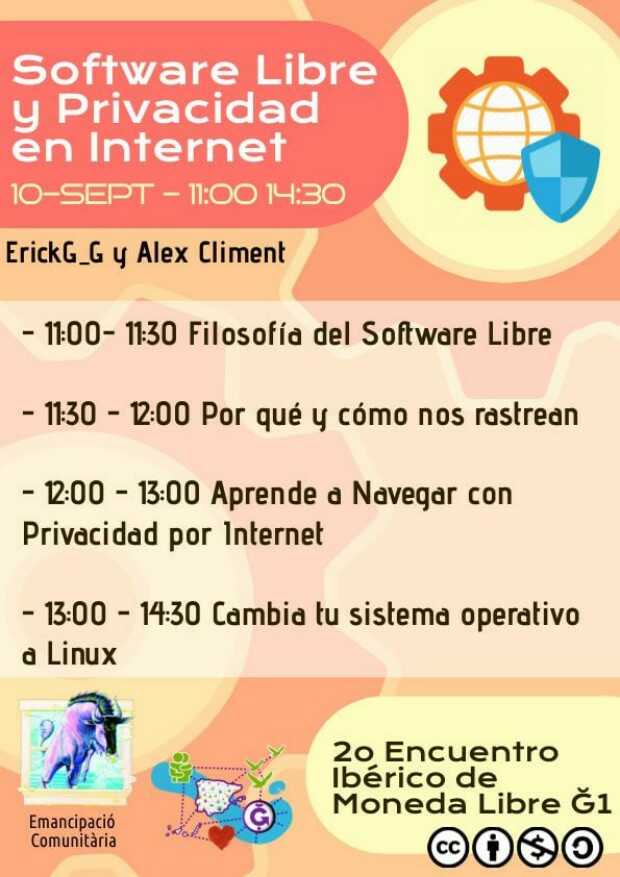
Por otra parte en el taller «APRENDE A NAVEGAR CON PRIVACIDAD EN INTERNET», impartido por ErickG_G, aprenderás y aplicarás estrategias básicas de seguridad y privacidad para navegar por Internet desde nuestros teléfonos y ordenadores. Además, aprenderás una poderosa técnica de envenenamiento de datos para ocultar a plena vista tu actividad en Internet desde tu ordenador.
Finalmente, si estás listo para dar el gran paso a la soberanía tecnológica (o estás hasta el moño de Windows y Apple) te ayudaremos a instalar un sistema operativo basado en GNU/Linux de la mano de ErickG_G y Alex Climent.
Notas importantes:
 PARA PODER PARTICIPAR EL EN TALLER «APRENDE A NAVEGAR CON PRIVACIDAD EN INTERNET» NECESITAS:
1) Ordenador con el navegador LibreWolf instalado.
2) Tener acceso a tu cuenta de Telegram desde el Ordenador.
3) Móvil con el Navegador DuckDuckGo instalado.
PARA PODER PARTICIPAR EL EN TALLER «CAMBIA TU SISTEMA OPERATIVO A GNU/LINUX» NECESITAS:
1) Tener un respaldo de TODOS tus archivos en un PenDrive o disco duro externo (ten en cuenta que el disco duro se borrará y se perderán todos los datos que no tengas respaldados).
2) Tener un respaldo de TODAS las contraseñas que utilices para tener acceso a tus cuentas de servicios en Internet.
Si tienes dudas y necesitas preparación de cara al evento no dudes en contactar con ellos ya que estarán encantados de ayudarte en el grupo de Telegram.
Como podemos ver, una propuesta más que interesante.
La entrada Software Libre en el Segundo encuentro Ibérico de Moneda Libre G1 se publicó primero en KDE Blog.

RMNUDES v2 Combate a pornografia infantil.
Além de evitar gestos obscenos com visão computacional, podemos também evitar conteúdos impróprios para menores na internet. Também podemos limpar a web e combater a pornografia infantil, detectando nudes onde alguma face na cena apresenta estimativa de idade de crianças. Assim enviando automaticamente o conteúdo para polícia do país em questão.
Cómo abrir división de pantalla en Vim con un archivo en blanco o con un archivo específico
Cómo dividir la pantalla de nuestro Vim (ya sea de manera horizontal o vertical) y que se abra o bien sin nada o con un archivo que especifiquemos

Imaginemos que estamos editando un archivo, y queremos dividir la pantalla ya sea en horizontal o vertical, con un espacio en Vim vacío, nuevo en el que iremos anotando cosas que después guardaremos en un archivo… o no.
O queremos abrir una división de la pantalla directamente con otro archivo del mismo directorio o de otra ruta. Veamos cómo hacerlo.
¿Me creéis si os digo que casi con 90 artículos relacionados con Vim en el blog, ya no sé si sobre alguno he escrito o no?
Este artículo es una nueva entrega del curso “improVIMsado” que desde hace meses vengo publicando en mi blog sobre el editor Vim y que puedes seguir en estos enlaces:
- https://victorhckinthefreeworld.com/tag/vim/
- https://victorhck.gitlab.io/comandos_vim/articulos.html
Y para aprender Vim (de la manera más inteligente) aquí tienes esta útil guía:
Con nuestro editor Vim abierto con un documento que llene toda la pantalla, si pulsamos los comandos :sp o :vsp nos abrirá una división horizontal o vertical respectivamente con el mismo documento que estamos editando, después ya podremos seleccionar otro si lo deseamos en esa división nueva.
Pero ¿cómo abrimos una división de pantalla en la que no se abra ningún archivo, simplemente un nuevo Vim vacío? Para ello tenemos que ejecutar los comandos :new o :vnew para que la división de pantalla sea horizontal o vertical respectivamente.
En ese espacio vacío podemos escribir lo que queramos y al acabar cerrarlo sin guardar y se perderá lo que hayamos escrito o podemos guardarlo con un nombre y se convertirá en un archivo. Es un buen método para escribirnos recordatorios o notas, sobre el documento principal que estemos editando.
Pero quizás queremos abrir en esa división vertical u horizontal un archivo distinto ya existente para compararlos o lo que sea, para eso podemos pasarles a los comandos anteriores el nombre de un archivo del mismo directorio o una ruta y archivo de otro lugar.
Por ejemplo :new /home/victorhck/Documentos/Blog/artículo.txt abrirá el archivo de la ruta especificada en una división horizontal.
O :vnew otro_archivo.txt abrirá el archivo especificado que se encuentra en el mismo directorio que el archivo que tenemos abierto en una división vertical.
División nueva abajo o a la derecha
Quizás tenemos la manía de que las divisiones nuevas que creamos se abran a la derecha cuando es una división vertical o abajo cuando es una división horizontal, bueno, al menos yo sí tengo esa manía…
Para ello, hay que indicárselo a Vim en nuestro archivo de configuración .vimrc añadiendo estas líneas en él:
set splitright
set splitbelow
Movernos entre las divisiones
Y para movernos entre las diferentes divisiones de pantalla que hayamos creado lo haremos con la combinación de teclas Ctrl + W y una tecla de movimiento hjkl para ir a la izquierda, abajo, arriba o derecha respectivamente.
Desde luego es algo muy sencillo pero que nos puede ser de utilidad mientras estamos editando con Vim. ¿Ya conocías este método? ¿Es lo que estabas buscando? Comparte en los comentarios…
Mix de novedades de KDE Gear 22.08
La Comunidad KDE anunció hace unos días que había sido lanzado KDE Gear 22.08, la gran actualización de sus aplicaciones que tiene una periodicidad cuatrimestral. De esta forma, se nos presentan decenas de cambios importantes, una ingente cantidad de bugs solucionados y mejoras en las traducciones. Es hora de ir descubriendo poco a poco cuáles han sido. Hace unos días empezamos con Spectacle, el capturador de pantalla del escritorio Plasma, seguimos con Kalendar, KDE Itinerary, continuamos con los editores Kate y KWrite, los gestores de disco Filelight y el gestores de particiones, Dolphin y, el último de momento, Elisa. Hoy con el mix de novedades de KDE Gear 22.08 cerramos esta serie que empezamos hace bastante tiempo.
Mix de novedades de KDE Gear 22.08
Dentro del lanzamiento de KDE Gear 22.08 muchas aplicaciones han recibido mucho cariño, como hemos visto en las últimas entradas del blog donde vamos repasando una a una las pequeñas novedades de ellas.
Y es que, con tantas aplicaciones, hacer un resumen de todas y cada una sería interminable, así que aquellas que no han recbido más que una mejora destacable, sin contar la resolución de errores, se agrupan en esta macedonia.

En resumen, estas son el mix de novedades de KDE Gear 22.08:
- Ark comprueba ahora el espacio disponible para asegurarse de que existe suficiente en el lugar de destino antes de empezar a descomprimir un archivo.
- Al pulsar sobre una notificación de Konsole sobre una determinada sesión se activa ahora dicha sesión de Konsole.
- Skanpage permite ahora la exportación de PDF en los que se puede buscar usando el reconocimiento óptico de caracteres.
- Gwenview, el popular visor de imágenes de KDE, permite añadir anotaciones en sus funciones de edición de imágenes. La funcionalidad de anotaciones es la misma que usa Spectacle, por lo que probablemente ya estará familiarizado con ella.
La entrada Mix de novedades de KDE Gear 22.08 se publicó primero en KDE Blog.
La comunidad de KDE España y KDE Internacional se reunirán en Barcelona este 2022
El 29 y 30 de septiembre y del 1 al 7 de octubre de este 2022 se celebrarán Akademy-es y Akademy Internacional respectivamente con opción de seguirlas de manera remota

La comunidad de KDE retoma las citas y encuentros presenciales después de un par de año de impedimentos. Y lo hace en Barcelona donde se celebrarán la Akademy-es y la Akademy Internacional.
Si usas software de KDE, si colaboras de alguna manera, si desarrollas software en KDE o si simplemente el software libre fluye por tus meninges, tienes una cita en Barcelona, ve reservando las fechas.
Akademy-es
Akademy-es se celebrará los días 29 y 30 de septiembre de 2022 en Barcelona. Es la cita anual donde personas con una pasión afín por KDE o el software libre se dan cita para asistir a charlas, conocer a otras personas de gustos similares y aprender.
Durante esos dos días se darán diversas charlas con temáticas centradas en KDE pero abiertas a otros temas relacionados con el software libre. Es una gran oportunidad para desvirtualizar a ese desarrollador que mantiene esa aplicación de KDE que te gusta, o poder informarte de otros temas.
Por cierto, los periodos para enviar tus charlas si quieres participar está abierto hasta el próximo 5 de septiembre. Ponte en contacto con KDE España si quieres dar una charla en el Akademy-es.
La asociación KDE España, organiza estos eventos de manera anual en diferentes ciudades para difundir el proyecto KDE y acercarlo a las personas que ya lo siguen o a aquellas que nunca han oido hablar de otro entorno de escritorio o sistema operativo que no sean privativos.
Por cierto, también si lo deseas puedes unirte a KDE España y ser parte de la asociación, o colaborar de manera externa con diversas propuestas que creas interesantes.
Akademy Internacional
Sin solución de continuidad, después de Akademy-es se celebrará del 1 al 7 de octubre el Akademy Internacional también en Barcelona.
De nuevo la organización del evento internacional se hará en el estado español, y aquí se reunirán colaboradores, simpatizantes y desarrolladores de la comunidad de KDE de todas partes del mundo.
Sí, la comunidad de KDE es global y tendrá su punto de encuentro en Barcelona. Habrá un par de días de charlas de diferentes personas que desarrollan KDE y después un montón de talleres donde aprender sobre eso que te interesa o aquella tecnología por la que tienes curiosidad.
¡No te lo pierdas!
Si tienes la oportunidad de asistir, te recomendaría que lo hicieras. Que te dejes inundar por la experiencia y disfrutes. Cuando asistí por primera vez A Coruña, donde también coincidieron ambos eventos, fue muy interesante conocer a esas personas que te sonaban por haber seguido hilos en listas de correo, o conocer sus nombres por ser desarrolladores de partes importantes de KDE.
Aunque todo el mundo cuenta, no hace falta ser desarrollador (yo no lo soy) para asistir, para encontrar a otras personas interesantes o temas que te interesen.
De momento el plazo de recepción de charlas y talleres está abierto, por lo que todavía no se sabe sobre qué se tratará, pero pronto estará disponible un cartel definitivo para consultarlo.
Eventos híbridos
Ambos eventos serán compartidos y retransmitidos por la red para aquellas personas que deseen asistir pero por diversas causas no puedan hacerlo. Una manera de acercar KDE a muchas personas para que se animen a participar en la próxima cita, ya de manera presencial.
Enlaces de interés
