
Novo forum em portugues de openSUSE
Olá Geekos.
Estamos animados com o nosso novo fórum em português. Esperamos ter a sua ajuda para construir uma comunidade envolvente no nosso idioma e para a nossa querida distribuição Linux, o openSUSE.
O fórum em português está disponível em: https://forums.opensuse.org/c/portugues-portuguese/130
Com este novo canal, queremos unir a comunidade portuguesa de usuários do openSUSE e melhorar o apoio aos nossos usuários. Crie uma conta e comece fazer perguntas ou ajudar a responder dúvidas de outras pessoas.
Esse novo meio de comunicação é um complemento aos canais do Telegram e Matrix, e ainda continuaremos com o suporte nos diversos meios. O fórum oferece algumas vantagens em relação às mensagens instantâneas, como, por exemplo, uma melhor ferramenta de busca e armazenamento a longo termo.
Esperamos que o fórum cresça e melhore gradativamente com a sua ajuda.
Divirta-se!
#English
Hello Geekos.
We are excited to bring you our new Portuguese forum. We look forward to build, with your help, an engaging community in our language for our beloved Linux distribution, openSUSE.
The Portuguese forum is available at: https://forums.opensuse.org/c/portugues-portuguese/130
With this new place, we want to unite the Portuguese openSUSE community and continue to provide mutual support to our users. Do not hesitate to create an account, ask questions and help other users.
This new communication channel complements our Telegram and Matrix channels, and we will continue to provide support on each platform. The forum offers a few advantages compared to instant messaging, such as a better search mechanism and better long-term data retention.
We hope that the Portuguese forum will gradually grow and improve with your help.
Have a lot of fun!
Novo fórum de openSUSE em portugues
Olá Geekos.
Estamos animados com o nosso novo fórum em português. Esperamos ter a sua ajuda para construir uma comunidade envolvente no nosso idioma e para a nossa querida distribuição Linux, o openSUSE.
O fórum em português está disponível em: https://forums.opensuse.org/c/portugues-portuguese/130
Com este novo canal, queremos unir a comunidade portuguesa de usuários do openSUSE e melhorar o apoio aos nossos usuários. Crie uma conta e comece fazer perguntas ou ajudar a responder dúvidas de outras pessoas.
Esse novo meio de comunicação é um complemento aos canais do Telegram e Matrix, e ainda continuaremos com o suporte nos diversos meios. O fórum oferece algumas vantagens em relação às mensagens instantâneas, como, por exemplo, uma melhor ferramenta de busca e armazenamento a longo prazo.
Esperamos que o fórum cresça e melhore gradativamente com a sua ajuda.
Divirta-se!
#English
Hello Geekos.
We are excited to bring you our new Portuguese forum. We look forward to build, with your help, an engaging community in our language for our beloved Linux distribution, openSUSE.
The Portuguese forum is available at: https://forums.opensuse.org/c/portugues-portuguese/130
With this new place, we want to unite the Portuguese openSUSE community and continue to provide mutual support to our users. Do not hesitate to create an account, ask questions and help other users.
This new communication channel complements our Telegram and Matrix channels, and we will continue to provide support on each platform. The forum offers a few advantages compared to instant messaging, such as a better search mechanism and better long-term data retention.
We hope that the Portuguese forum will gradually grow and improve with your help.
Have a lot of fun!

 Member
 Futureboy
Linux Saloon | News Flight Night 10

Avance de Plasma 5.27, mejoras para multimonitores
Como dje hace unas semanas, los desarrolladores de la Comunidad KDE ya están preparando el lanzamiento de la siguiente versión de su escritorio. Eso ya lo anuncié en el blog y es el momento de hacer el avance de Plasma 5.27 donde destacamos las novedades para los sistemas con múltiples pantallas, las ventanas de ayuda para los nuevos usuarios y las mejoras para la distribución de ventanas en nuestros monitores.
Avance de Plasma 5.27, mejoras para multimonitores
El pasado 19 de enero fue sido lanzada la beta de Plasma 5.27, la primera versión liberada del 2023, no apta todavía para el usuario que busquen estabilidad, sigue centrado en que el escritorio de la Comunidad KDE mejore en todos los aspectos: funcionalidades y usabilidad.
Las primeras novedades que nos han faciltados los desarrolladores son las siguientes:
Bienvenida a Plasma: nueva pantalla de bienvenda que presenta a los nuevos usuarios la belleza y la potencia de nuestro escritorio. Además, les permite realizar tareas de configuración inicial, como conectar todas sus cuentas en línea y sugiere cómo ponerse en contacto con la Comunidad KDE.
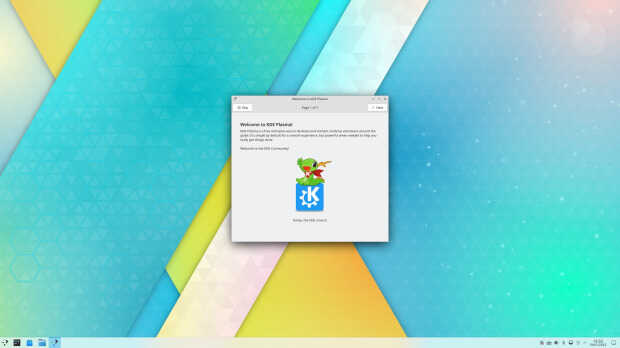
Preferencias de permisos para Flatpak: cada vez un número mayor de nuestros usuarios instala software a través de paquetes en contenedores, como Flatpak. Estos paquetes no ofrecen acceso al resto del sistema de forma predeterminada y solicitarán permisos según sea necesario, lo que significa que es menos probable que un código malicioso pueda estropear su equipo. Se ha añadido un nuevo módulo a las «Preferencias del sistema» para controlar con facilidad estas preferencias para Flatpak.
El gran refactor multimonitor: El widget de la configuración de la pantalla aparece ahora en la bandeja del sistema de forma predeterminada, inactivo cuando solo tiene una pantalla o una configuración multimonitor, y activo cuando tiene un portátil con una o más pantallas externas conectadas. Esto hacer que sea más fácil cambiar rápidamente los ajustes de estas pantallas, si es necesario. Además, se ha realizado una gran renovación multimonitor para que sea más fiable trabajar con varias pantallas. También hay nuevas herramientas de control detallado cuando el usuario tiene tres o más pantallas conectadas.
Sistema de mosaicos de KWin: Para quienes posean un gran monitor, hace mucho tiempo que KWin podía colocar una ventana a la izquierda y otra a la derecha. Ahora, con Meta+T se lanza el mosaico rápido, que permite un control completo de dónde se colocan las ventanas. Puede arrastrar ventanas mientras pulsa Mayúsculas para que se adhieran al diseño en mosaico.
Y, para fnalizar, comentar que se ha añadido el Calendario Hebreo en el calendario emergente del reloj digital.
Más información: Plasma 5.27 Beta

Pruébalo y reporta errores
Todas las tareas dentro del mundo del Software Libre son importantes: desarrollar, traducir, empaquetar, diseñar, promocionar, etc. Pero hay una que se suele pasar por alto y de la que solo nos acordamos cuando las cosas no nos funcionan como debería: buscar errores.
Desde el blog te animo a que tú seas una de las personas responsables del éxito del nuevo lanzamiento de Plasma 5.27 de la Comunidad KDE. Para ello debes participar en la tarea de buscar y reportar errores, algo básico para que los desarrolladores los solucionen para que el despegue del escritorio esté bien pulido. Debéis pensar que en muchas ocasiones los errores existen porque no le han aparecido al grupo de desarrolladores ya que no se han dado las circunstancias para que lo hagan.
Para ello debes instalarte esta beta y comunicar los errores que salgan en bugs.kde.org, tal y como expliqué en su día en esta entrada del blog.
La entrada Avance de Plasma 5.27, mejoras para multimonitores se publicó primero en KDE Blog.
Presenta tu charla para Linux App Summit 2023
Lo anuncié hace un tiempo y, como dije en un reciente podcast, la colaboración entre escritorios es benefciosa para el desarrollo del Software Libre. De esta forma si tienes algo que explcar de tu proyecto presenta tu charla para Linux App Summit 2023 que se celebrará de forma híbrida en Brno, República Checa, que se celebrará del 21 al 23 de abril.
Presenta tu charla para Linux App Summit 2023
Como he dicho enla introducción este año Linux App Summit se realizará en Brno, República Checa del 21 al 23 de abril, siguiendo una modalidad híbrida que ha venido para quedarse, combinando sesiones presenciales y a distancia, incluyendo charlas, paneles y preguntas.
Hace unas semanas se abrió el plazo para presentar las charlas que finaliza el próximo 18 de febrero, con lo que tienes tiempo pero no te duermas.

Las charlas normales tienen una duración aproximada de 40 minutos, mientras que las relámpago se reducen a 10 minutos y las keynote 60 minutos.
Por cierto, el registro todavía no está abierto, así que estad atentos para cuando lo esté y estar totalmente informados de este más que interesante interesante encuentro.
Más información: Linux App summit 2023
¿Qué es Linux App Summit (LAS)?
Para los que no lo conozcan os comento que el evento Linux App Summit lleva celebrándose hace unos años y que poco a poco va cogiendo impulso que se merece, convirtiéndose en un clásico en el blog.
LAS (acrónimo con el que se conoce Linux App Summit) reúne bajo un mismo techo, aunque sea virtual, a los desarrolladores de los entornos de trabajo KDE y Gnome para que compartan ideas, código y conocimiento.
En otras palabras, LAS está diseñado para acelerar el crecimiento del ecosistema de aplicaciones de Linux reuniendo a todos los que participan en la creación de una gran experiencia de usuario de aplicaciones de Linux.
La entrada Presenta tu charla para Linux App Summit 2023 se publicó primero en KDE Blog.
#openSUSE Tumbleweed revisión de la semana 5 de 2023
Tumbleweed es una distribución de GNU/Linux «Rolling Release» o de actualización contínua. Aquí puedes estar al tanto de las últimas novedades.

openSUSE Tumbleweed es la versión «rolling release» o de actualización continua de la distribución de GNU/Linux openSUSE.
Hagamos un repaso a las novedades que han llegado hasta los repositorios esta semana.
El anuncio original lo puedes leer en el blog de Dominique Leuenberger, publicado bajo licencia CC-by-sa, en este este enlace:
De nuevo otra semana en la que se vuelven a publicar 7 nuevas snapshots llenas de actualizaciones (0126…0201)
Los cambios más importantes que han llegado a los repositorios son:
- Node.JS 19.5.0
- Mesa 22.3.4
- pipewire 0.3.65
- btrfsprogs 6.1.3
- Systemd 252.5
- XTerm 378
- libnvme 1.3 y nvme-cli 2.3
- Boost 1.81.0
Sin embargo, las próximas instantáneas pueden ser realmente interesantes: la instantánea 0202, que se está construyendo actualmente, será la primera en haber cambiado la implementación predeterminada de openssl 1.1 a openssl 3.0. Este fue un proyecto importante que abarcó un período bastante largo, pero finalmente terminó.
Algunas de las actualizaciones que llegarán próximamente a los repositorios son:
- Cambio a openssl 3.0
- Mozilla Thunderbird 102.7.1
- GStreamer 1.22.0
- KDE Gear 22.12.2
- Rust 1.67
- KDE Plasma 5.27 beta (5.26.90)
- Binutils 2.40
Si quieres estar a la última con software actualizado y probado utiliza openSUSE Tumbleweed la opción rolling release de la distribución de GNU/Linux openSUSE.
Mantente actualizado y ya sabes: Have a lot of fun!!
Enlaces de interés
- ¿Por qué deberías utilizar openSUSE Tumbleweed?
- zypper dup en Tumbleweed hace todo el trabajo al actualizar
- ¿Cual es el mejor comando para actualizar Tumbleweed?
- ¿Qué es el test openQA?
- http://download.opensuse.org/tumbleweed/iso/
- https://es.opensuse.org/Portal:Tumbleweed

——————————–
openSUSE Tumbleweed – Review of the week 2023/05
Dear Tumbleweed users and hackers,
During this week, many developers took part in HackWeek, resulting in resources being deviated from regular distro maintenance to other areas of interest. I’m certain to see some great outcomes of this hackweek over the next weeks/months (see for example the thread on Creating a Leap replacement based on ALP). Of course, Tumbleweed has been keeping up with all the changes and supports everybody in getting their results delivered to users. And it did so by delivering the usual 7 snapshots in a week (0126…0201)
The main changes found in those 7 snapshots were:
- Node.JS 19.5.0
- Mesa 22.3.4
- pipewire 0.3.65
- btrfsprogs 6.1.3
- Systemd 252.5
- XTerm 378
- libnvme 1.3 and nvme-cli 2.3
- Boost 1.81.0
The next few snapshots might be really interesting though: Snapshot 0202, which is currently building, will be the first to have switched the default openssl implementation from openssl 1.1 to 3.0. This was a major project spanning quite a long period, but it finally ended.
Here is an overview of what the next week’s snapshot promise to deliver:
- Switched openssl by default to the 3.0 branch (currently 3.0.7)
- Mozilla Thunderbird 102.7.1
- GStreamer 1.22.0
- KDE Gear 22.12.2
- Rust 1.67
- KDE Plasma 5.27 beta (5.26.90)
- Binutils 2.40
- Enabling of python311 modules (keeping python 3.10 as the default interpreter in a first step)
- Staging:H still tests ruby 3.2 as the new default (yast2-packager is the only failing package left)
- Staging:L holds some packages breaking others stuff taking more time, like gpg2, and ant
- Staging:Gcc7 tests the impact of using GCC 13 as the default compiler
Las novedades base de Plasma Mobile Gear 23.01
Hace unos días, concretamenté el 30 de enero Plasma Mobile Gear lanzó la nueva versión de su apuesta para los dispositivos móviles. Es hora de empezar a hablar de ella y nada mejor que con las novedades base de Plasma Mobile Gear 23.01, es decir, la shell de esta interfaz gráfica que muchos esperamos que se convierta en la próxima en nuestro terminal.
Las novedades base de Plasma Mobile Gear 23.01
El pasado 30 de enero ls desarrolladores lanzaron Plasma Mobile Gear 23.01, la cual llegó con muchas novedades en tanto en su base como en sus aplicaciones, así como un cambio de desribir sus lanzamientos.

Esto ya lo anuncié en este artículo, así que os remito a él y entro de lleno en el objetivo de éste, que no es más que hablar de las novedades base de Plasma Mobile Gear 22.11, las cuales enumero a continuación:
Plasma 5.27: el próximo 14 de febrero de 2023 se lanzará la nueva versión de Plasma, así que a partir de entonces, el trabajo se centrará en Plasma 6, y la rama Plasma 5.27 sólo recibirá correcciones de errores.
Pantalla de bloqueo: ha sido mejorada y se han soluconado muchos bloqueos que se originaban cuando se recibían varias solicitudes de pantalla de bloqueo en un corto espacio de tiempo.
Navegación por gestos: Se ha solucionado un un problema por el que sólo se podía utilizar parte del borde inferior de la pantalla para el gesto con orientación horizontal en teléfonos y tabletas.
Más información: Plasma Mobile
¿Qué es Plasma Mobile?
Para los que no lo conozcan Plasma Mobile es la alternativa libre a interfaz gráfica para smartphones de la Comunidad KDE, hablé de él hace un tiempo y, poco a poco, se está convirtiendo en un clásico del blog.
Su idea es muy simple, tras conquistar tu escritorio KDE la Comunidad también quiere conquistar tu teléfono móvil… aunque todavía lo tenga complicado por todas las limitaciones de hardware que todavía tiene este campo de la tecnología.
No obstante, confiemos que de igual forma se han ido conquistando los ordenadores de sobremesa, portátiles y servidores, lleguemos un día que podamos tener libertad total en nuestros smartphones.
Y para cuando eso ocurra la Comunidad KDE estará preparada para ello y por eso está confeccionando un catálogo más que decente de aplicaciones con tecnología adaptativa.
La entrada Las novedades base de Plasma Mobile Gear 23.01 se publicó primero en KDE Blog.
Recopilación del boletín de noticias de la Free Software Foundation – febrero de 2023
Recopilación y traducción del boletín mensual de noticias relacionadas con el software libre publicado por la Free Software Foundation.

La Free Software Foundation (FSF) es una organización creada en Octubre de 1985 por Richard Stallman y otros entusiastas del software libre con el propósito de difundir esta filosofía.
La Fundación para el software libre (FSF) se dedica a eliminar las restricciones sobre la copia, redistribución, entendimiento, y modificación de programas de computadoras. Con este objeto, promociona el desarrollo y uso del software libre en todas las áreas de la computación, pero muy particularmente, ayudando a desarrollar el sistema operativo GNU.
Además de tratar de difundir la filosofía del software libre, y de crear licencias que permitan la difusión de obras y conservando los derechos de autorías, también llevan a cabo diversas campañas de concienciación y para proteger derechos de los usuarios frentes a aquellos que quieren poner restricciones abusivas en cuestiones tecnológicas.
Mensualmente publican un boletín (supporter) con noticias relacionadas con el software libre, sus campañas, o eventos. Una forma de difundir los proyectos, para que la gente conozca los hechos, se haga su propia opinión, y tomen partido si creen que la reivindicación es justa!!
- En este enlace podéis leer el original en inglés: https://www.fsf.org/free-software-supporter/2023/february
- Y traducido en español (cuando el equipo de traducción lo tenga disponible) en este enlace: https://www.fsf.org/free-software-supporter/2023/febrero

Puedes ver todos los números publicados en este enlace: http://www.fsf.org/free-software-supporter/free-software-supporter
Después de muchos años colaborando en la traducción al español del boletín, desde inicios del año 2020 decidí tomarme un descanso en esta tarea.
Pero hay detrás un pequeño grupo de personas que siguen haciendo posible la difusión en español del boletín de noticias de la FSF.
¿Te gustaría aportar tu ayuda en la traducción? Lee el siguiente enlace:
Por aquí te traigo un extracto de algunas de las noticias que ha destacado la FSF este mes de febrero de 2023
Erin Rose Glass, defensora de la libertad del software en la educación, pronunciará el discurso inaugural de LibrePlanet de la FSF
Del 12 de enero
¡Nos enorgullece anunciar que Erin Rose Glass será nuestra primera presentación de LibrePlanet 2023! Glass es una investigadora y educadora que fomenta el uso de tecnología ética que pone la libertad del usuario y los valores de la comunidad al frente y al centro.
Ella cree que los estudiantes deberían tener la oportunidad de aprender con software libre. De lo contrario, en sus palabras, «salen del aula habiendo perdido la oportunidad de conocer y experimentar formas éticas de práctica del software, dejándolos mal preparados para enfrentar nuestros desafíos políticos tecnológicos actuales».
Esperamos que los visitantes de LibrePlanet estén genuinamente interesados en escuchar sus experiencias, y esperamos tener el discurso de apertura de Glass, ya que su trabajo encaja perfectamente con el tema de este año: «Trazando el rumbo».
La marca CE propuesta por la Unión Europea para el software podría tener un impacto terrible en el software libre
Del 24 de enero por Tim anderson
La Ley de Resiliencia Cibernética (CRA) propuesta por la Unión Europea (UE), si se aprueba, podría tener graves consecuencias no deseadas para el software libre. Si bien la CRA tiene como objetivo garantizar la seguridad y la calidad de una variedad de «productos» disponibles en el mercado europeo, requeriría que el software se someta a evaluaciones y auditorías rigurosas.
Tales evaluaciones, dicen los expertos, supondrían una carga indebida para los desarrolladores de software libre, que a menudo trabajan en software fuera de organizaciones que pueden realizar o financiar dichas auditorías. Además, hay mucho software libre que juega un papel, que aparentemente bajo el CRA propuesto, se describiría como «crítico».
Dicho software, que podría incluir cualquier cosa, desde criptografía hasta el sistema operativo que se ejecuta en una computadora de escritorio, teléfono o enrutador, puede volverse altamente regulado, lo que agrega cargas adicionales a los desarrolladores de software libre que, si bien son expertos en seguridad digital, es posible que no tengan acceso. a los recursos necesarios para cumplir con la regulación.
- https://devclass.com/2023/01/24/eus-proposed-ce-mark-for-software-could-have-dire-impact-on-open-source/
- https://www.theregister.com/2023/01/30/opinion_eu_foss_security/
- https://blog.nlnetlabs.nl/open-source-software-vs-the-cyber-resilience-act/
- https://www.internetsociety.org/blog/2022/10/the-eus-proposed-cyber-resilience-act-will-damage-the-open-source-ecosystem/
Las luces han estado encendidas en una escuela de Massachusetts durante más de un año porque nadie puede apagarlas
Del 19 de enero por Corky Siemaszko
Durante casi un año y medio, una escuela secundaria de Massachusetts ha estado iluminada las 24 horas porque el distrito no puede apagar las aproximadamente 7,000 luces en el edificio en expansión.
Resulta que el software que hace funcionar las luces falló hace más de un año, el 24 de agosto de 2021. El artículo de NBC y un artículo anterior del sitio de noticias de la escuela detallan cómo intentaron arreglarlo y descubrieron que no podían.
Esto se debe a que la empresa que contrataron para instalar el sistema había cambiado de manos, y ahora la empresa, según supieron, «ya no tiene esa información. No tienen el software. La información anterior es propietaria» y, ahora, «no está disponible».
Desafortunadamente, el artículo de NBC está escrito de una manera que centra gran parte de la culpa en la interrupción de la cadena de suministro, y termina con «hicimos un trato con el diablo al trasladar las fábricas a China».
Sin embargo, si hubieran comenzado con software libre, la escuela habría tenido las libertades necesarias para resolver el problema sin ningún hardware nuevo. Por lo tanto, el «trato con el diablo» de los involucrados en la construcción de la escuela es el trato que hicieron al entrar en el acuerdo de licencia de propiedad, que ha sido verificado por el personal de la FSF como una combinación de licencias privativas y libres.
- https://www.nbcnews.com/news/us-news/lights-massachusetts-school-year-no-one-can-turn-rcna65611
- https://minnechaugsmokesignal.com/1894/news/whats-wrong-with-the-lights-draft/

Estas son solo algunas de las noticias recogidas este mes, pero hay muchas más muy interesantes!! si quieres leerlas todas (cuando estén traducidas) visita este enlace:
Y todos los números del «supporter» o boletín de noticias de 2023 aquí:

—————————————————————
Segunda actualización de KDE Gear 22.12
La Comunidad KDE es una comunidad responsable y no solo se preocupa en lanzar novedades sino que también en mejorarlas. Me complace presentar la segunda actualización de KDE Gear 22.12 que apareció hace casi dos meses. Más estabilidad, mejores traducciones y pequeñas mejoras para las aplicaciones de nuestro entornos de trabajo.
Segunda actualización de KDE Gear 22.12
A pesar de lo que puedan pensar muchas personas, las aplicaciones no son perfectas. Entre las líneas de código se pueden colar errores de tipografía o que el usuario realice alguna opción que en un principio no estaba prevista por los desarrollador, por poner solo un par de ejemplos de imperfecciones.
Este no es un problema del Software Libre ya que el Software actual funciona de esta manera ya que no se piensa en él como un producto final que se encierra en una caja y se olvida. En la actualidad se sabe que el Software está vivo y sería estúpido ir guardando las mejoras sin dejarlas a disposición del gran público.
Con esto se gana en rapidez y evolución pero puede aumentar el número de errores (por norma general) leves, los cuales son subsanables con pequeñas actualizaciones.
La Comunidad KDE lo tiene claro: grandes lanzamientos cada cuatro meses y actualizaciones mensuales para subsanar errores.

Por ello me congratula compartir con vosotros la primera actualización de KDE Gear 22.12 que nos ofrece más de 120 errores resueltos entre aplicaciones, librerías y widgets, algo que mejora el rendimiento del sistema.
Aquí podéis encontrar la lista completa de cambios de KDE Gear 22.12.2, pero por poner unos cuantos ejemplos de los errores que sea han resuelto tenemos:
- Dolphin: No hace recursión el los enlaces simbólicos al contar el contenido de los directorios.
- kdeconnect: Corregida la autenticación ssh usando pubkey en versiones recientes de openssh.
- libkdegames: Corregida la búsqueda de temas knewstuff .
Más información: KDE Gear 22.12.2
La entrada Segunda actualización de KDE Gear 22.12 se publicó primero en KDE Blog.