
 Member
 baltolkien
Skanlite, una aplicación de escaneo de imágenes
Parece mentira. A pesar de todos los años que estoy publicando en el blog todavía no he comentado todas las aplicaciones que ofrecen los desarrolladores de la Comunidad KDE. Y eso que esta la he utilizado en innumerables ocasiones. Os presento, Skanlite, una aplicación de escaneo de imágenes con decenas de opciones que se adapta a cualquier tipo de necesidades.
Skanlite, una aplicación de escaneo de imágenes
Hoy os traigo una aplicación que te vendrá muy bien si tienes un escáner o una impresora multfunción en tu casa u oficina y necesitas pasar a formato digital tus fotografías.
Se trata de Skanlite, una sencilla aplicación para escanear y guardar imágenes en multitud de formatos. Está optimizada para escáneres de superficie plana.
Además de fotos y documentos, Skanlite puede escanear diapositivas y filminas con los escáneres admitidos.
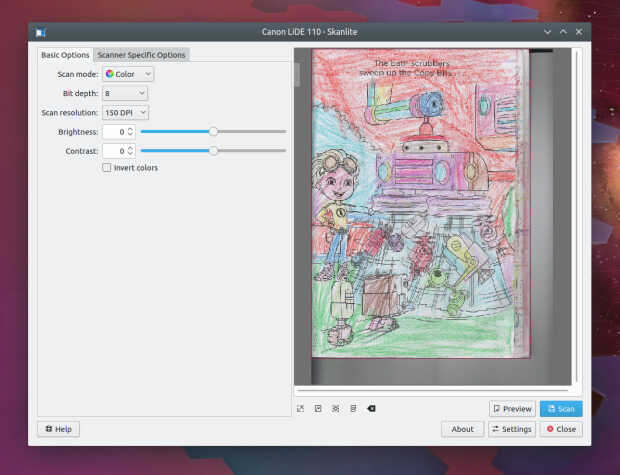
Otras características destacables son:
- Diálogo para guardar las imágenes escaneadas o para guardarlas inmediatamente en la carpeta indicada con nombres generados automáticamente y en el formato indicado.
- Permite el uso de escáneres en red.
- Vista previa con función de selección para el escaneo final.
- Escanear múltiples selecciones de una imagen.
- Además de los habituales escáneres USB, también funciona con escáneres en red.
Skanlite tiene licencia GPL-2.0+ y GFDL-1.3 , y agradece vuestra colaboración en el reporte de errores en este enlace de bugs.kde, así como mejoras en su traducción.
Skanlite se basa en libksane, una interfaz proporcionada por KDE para librerías SANE para controlar escáneres. También funciona con escáneres en red.
Por cierto, la Comunidad KDE también tiene otra aplicación similar llamada SkanPage que está orientada más a documentos escritos al estilo Simple-Scan de Gnome, información que tengo gracias a un usuario del grupo de Telegram de la Comunidad KDE – Cañas y Bravas, al cual os invito a participar.
Más información: Skanlite – Aplicaciones de KDE
La entrada Skanlite, una aplicación de escaneo de imágenes se publicó primero en KDE Blog.
GNOME 43 Wallpapers
GNOME 43 Wallpapers
Evolution and design can co-exist happily in the world of desktop wallpapers. It’s desirable to evolve within a set of constraints to create a theme in time, set up a visual brand that doesn’t rely on putting a logo on everything. At the same time it’s healthy to stop once in a while, do a small reflection on what’s perhaps a little dated and do a fresh redesign.
I took extra time this release to focus on refreshing the whole wallpaper set for 43. While the default wallpaper isn’t a big departure from 3.38 hexagon theme, most of the supplemental wallpapers have been refreshed from the ground up. The video above shows a few glimpses of all the one way streets it took for the default to land back in the hexagons.
GNOME 42 was the first release to ship a bunch of SVG based wallpapers that embraced the flat colors and gradients and benefited from being just a few kilobytes in file size. It was also the first release to ship dark preference variants. All of that continues into 43.

Major change comes from addressing a wide range of display aspect ratios with one wallpaper. 43 wallpapers should work fine on your ultrawides just as well as portrait displays. We also rely on WebP as the file format getting a much better quality with a nice compression ratio (albeit lossy).
What’s still missing are photographic wallpapers captured under different lighting. Hopefully next release.
Blender’s geometry nodes is an amazing tool to do generative art, yet I feel like I’ve already forgotten the small fraction of what can be done that I’ve learned during this cycle. Luckily there’s always the next release to do some repetition. Thanks to everyone following my struggles on the twitch streams.
The release is dedicated to Thomas Wood, a long time maintainer of all things visual in GNOME.

Announcing the availability of two openSUSE mirrors in Mauritius
Yesterday, I attended an open source event organised by OSCA Mauritius and OceanDBA.

I was invited to speak at the event and I chose to explain a little about openSUSE, its different distributions and how we have managed to set up two mirrors to improve the performance of openSUSE updates in Mauritius.
Girish is a representative for OSCA Mauritius and he works at OceanDBA. He put all the effort into organising this event. At about 09h30, the conference room at Flying Dodo was almost full. Girish welcomed everyone and introduced the presentation themes for the day.

First presentation – Linux Kernel history by Chittesh Sham
Chittesh is a DevOps Engineer at Corel Corporation. He did a presentation on the Linux Kernel. He tried to summarise three decades of Linux history in one presentation. It was a very informative and fun prez.

Second presentation – Bash Scripting by Shravan Dwarka
Shravan is a Linux System Engineer at OceanDBA. He did a presentation on the Bourne Again SHell (Bash).

After explaining about Shells, Shravan gave a scenario where a database administrator had to automate backups and perform backup retention.

He then explained line by line how he wrote a Bash script to execute the backup.
Final presentation – openSUSE Mirrors in Mauritius
My presentation was last. It's been a while since I set up two openSUSE mirrors in Mauritius. Any openSUSE user on the island will now benefit from fast updates without having to configure anything on their openSUSE machine.
This event was an opportunity to make a public announcement about the mirrors and explain the process behind. That is, how I contacted sponsors for server/bandwidth in Mauritius and got in touch with the openSUSE Heroes to build the repo mirrors.
However, first I did a history lesson about S.u.S.E, SUSE and openSUSE. I clarified that openSUSE is a project and the various distributions have names like Leap, Leap Micro, Tumbleweed and MicroOS.

Then, I showed the tickets that I opened at openSUSE to get the ball rolling. Within a few days we had the mirrors set up.
I mentioned that the domain opensuse.mu is sponsored by the openSUSE project itself. Then, the Heroes created the records to point the domain & sub-domains to servers in Mauritius, sponsored by cloud.mu and Rogers Capital Technology Services.

While speaking about the mirrors, I explained how MirrorBrain works. It is an open source framework to run a content delivery network for mirror servers. The two openSUSE mirrors in Mauritius are mirror.opensuse.mu and mirror.rcts.opensuse.mu. To show how MirrorBrain works with these two servers, I opened get.opensuse.org to download the latest release of openSUSE Leap 15.4.
I selected the offline installation image and we checked the URL from which the image was downloading. It was the Rogers Capital Technology Services (RCTS) mirror server.
I SSH'ed on the cloud.mu mirror server to show how the rsync is done from the restricted rsync server of openSUSE.org. I did not SSH on the RCTS server because it requires a VPN (RCTS engineers take security very seriously 🤓). My VPN setup was on a different machine than the one I was doing my presentation on.
I explained the difference between rsync.opensuse.org and stage.opensuse.org, the former being a public rsync server. It can be used by anyone wishing to run a private openSUSE mirror for home or office use.
The conference room was packed with attendees which is a promising thing for an open source event.


At the end of the event, Joffrey Michaïe, the founder and CEO of OceanDBA addressed the attendees. He thanked the wonderful audience for showing up to the event. Joffrey explained that OceanDBA's business is built on open source technologies and that they have the open source philosophy at the heart of the company.

He was glad to see a lot of young folks attending the event and said that his company would be keen to sponsor such events again in the future. He mentioned that at the moment there are about fifteen open positions at OceanDBA and anyone wishing to apply could reach out to him directly or talk to any other personnel of the company.
The Managing Director of Rogers Capital Technology Services, Dev Hurkoo, and the Roshan Patroo, Manager at RCTS, attended the event. We met after my presentation. They both told me that they were impressed by the attendee turn-out for an open source event. Dev expressed his interest to support open source activities in the future too.
Geeko Magazine 2022 夏
今年の夏も Geeko Magazine を発行します。最初の頒布はコミックマーケット C100 1日目 8月13日(土)西2ホール す19b です。事前に入場券の購入が必要になりますので、ご注意ください。
Asociación Open EdTech
Hoy quiero presentar Open EdTech, una asociación que quiere dotar al mundo educativo de herramientas libres, tanto a nivel de hardware como software para garantizar una educación basada en una tecnología sostenible, duradera y de código abierto que apoye todas las formas de educación en línea.
Asociación Open EdTech
Lo descubrí gracias a un mensaje de Tàfol Nebot en el que hablaba de un congreso llamado Open Education Technology donde se decía «que en Francia las escuelas solo se utiliza Software Libre: Nextcloud, Moodle, BigBlueButton, Matrix, LibreOfficeOnline…» lo cual me llenó de alegría.
#OpenEdtechBCN RT: «A França, les escoles només utilitzen programari lliure. Nextcloud, Moodle, BigBlueButton, Matrix, LibreOfficeOnline.. Cada regió allotja la seva instància. El govern dona fons al programari que utilitzen i contribueix amb codi. Ponent @framaka. Vinga Suècia!» https://t.co/1FITZMRFk3
— Tàfol Nebot(@tafol) July 13, 2022
 (@tafol)
 De esta forma, decubro el congreso y, de paso, la asociación que nos define la «tecnología educativa» y su rama «Abierta»:
La tecnología educativa es el software y el hardware que apoya los procesos de enseñanza y aprendizaje. La Tecnología Educativa Abierta va más allá al ponerse a disposición de todos los educadores de una manera que promueve la disponibilidad, la estandarización, la seguridad, la longevidad y la colaboración en torno a mejoras y servicios en torno a esa tecnología. Es la diferencia entre una red social propietaria y algo como el correo electrónico (que nadie posee y todo el mundo utiliza).

Así, esta asociación tiene la visión de creer en una educación de calidad que requiere de una adaptación y colaboración constantes. Y, por tanto, se concreta en sutene como misión:
- Ser la voz de la tecnología educativa abierta como solución preferida para la educación.
- Ayudar a financiar el desarrollo y la promoción de la tecnología educativa abierta
No obstante, creo que se entiende mucho mejor la explicación que el mismísimo Tàfol me hizo ya que, de momento, esta asocación:
Está intentando hacer conciencia de la problemática de usar servicios de BigTech, de que lo datifiquen absolutamente todo y de las consecuencias que puede comportar si no se tiene soberanía digital.
Y, de momento, ofrecen un ecosistema educativo libre para instalar en un servidor propio (o contratado) las siguientes herramientas lbres: Moodle, Nextcloud, WordPress, Etherpad, correo electrònico,
Otras de sus iniciativas ha sido el congreso Open EdTech Gobal que se ha celebrado en Barcelona y que os recomiendo seguir, mientras investigo como ver sus vídeos, mediante la etiqueta #OpenEdtechBCN de Twitter.
Un poco de historia
Creo que esta iniciativa tiene un gran recorrido por delante, sobretodo si tenemos en cuenta algunas de las informaciones sobre la prohibición del uso de productos de la gran G en países como Dinamarca (Genbeta y Diario.es), lo cual puede hacer mirar a nuestros políticos por la senda correcta.
No obstante no nos desviemos del epígrafe y digamos que Open EdTech tiene su origne en unas denuncias de padres y madres que se veían obligados a usar GSuite en la educación de sus hijos e hijas. De esta forma contactaron con XNet, una asociación de defensa de los derechos digitales, e hicieron una propuesta al departamento de educación y en el ayuntamiento de Barcelona.
El consistorio de la ciudad aceptó hacer un pilotaje e hicieron una licitación. De esta forma unos pocos técnicos que se pusieron a trabajar y finalmente han puesto en marcha el pilotaje en unos pocos colegios de Barcelona en los que implementan un ‘ecosistema de aplicaciones llamada DD (Digitalització Democràtica) que consta de una interfaz que integra un conjunto de herramientas libres para asegurar una educación respetuosa.
La entrada Asociación Open EdTech se publicó primero en KDE Blog.

10 Outils pour l’admin occupé
Avant qu’il ne soit trop tard, veuillez télécharger votre cadeau de Linux Magazine et leur partenaire TuxCare pour la fête des admins : https://linux-magazine.us2.list-manage.com/ Le contenu du la trousse à outils : Faire des recherches en ligne de commande Voir le trafic réseau Contrôler les tentatives de SSH Eliminer les metadata des URLs Et beaucoup …
10 Outils pour l’admin occupéRead More »
The post 10 Outils pour l’admin occupé appeared first on Cybersécurité, Linux et Open Source à leur plus haut niveau | Network Users Institute | Rouen - Normandie.
Cómo colaborar con KDE
A raíz de una conversación por Telegram me he decidido hacer un entrada para recordar cómo colaborar con KDE según la documentación oficial de la misma Comunidad. Una excelente forma de recordar que para participar de forma activa con el Proyecto KDE solo hace falta querer hacerlo ya que las posibilidades son casi infinitas.
Cómo colaborar con KDE
¿Tienes interes por el Software Libre? ¿Te sientes en deuda con la Comunidad? ¿Quieres ofrecer tu tiempo libre y conocimientos para mejorar la vida de los demás y no sabes como? ¿Quieres aprender al tiempo que mejoras el Software Libre?
Si has respndido que sí a algunas de las las preguntas anteriores es posible que te interese participar de forma activa en la Comunidad del Conocimiento Libre… y si estás por este blog lo normal es que la Comunidad seleccionada sea la de KDE.
En el blog hemos hablado muchas veces de esto con entradas como «20 formas de colaboras con KDE (Y el Software Libre en general)» o «No puedes colaborar con tu tiempo con KDE… haz donaciones» . Pero como ésta Comunidad es muy organizada tiene una página específica que nos informa de las formas más habituales de colaborar con KDE.
El mensaje de bienvenida nos dice:
¡Bienvenido a la Comunidad KDE! Al unirte a nuestro equipo, formarás parte de un esfuerzo internacional de miles de personas que trabajan para ofrecer una increíble experiencia informática de Software Libre.
Conozca nuevos amigos, aprenda nuevas habilidades y marque la diferencia para millones de usuarios mientras trabaja con gente de todo el mundo. Esta página le dará una breve introducción y le ayudará a empezar a contribuir.
Queremos asegurarnos de que la Comunidad KDE siga siendo un lugar acogedor y amigable donde la gente pueda sentirse cómoda. Te pedimos que aprendas y cumplas el Código de Conducta de la Comunidad KDE cuando interactúes con el resto de la Comunidad KDE.
De esta forma, si vamos a la entrada nos hace un listado de algunas de las posibilidades, ya que éstas no son las únicas. Leámoslas y si quieres más información no dudes ir a la página de Get Involved:
- Informe de incidencias
- Clasificación de errores
- Desarrollo
- Calidad
- Accesibilidad
- Traducción
- Diseño de la interfaz visual y humana
- Documentación
- Asistencia al usuario
- Promoción
- Diseño de la web
- Gestión
- Donaciones
- Añadir tu proyecto a KDE
Y para finalizar nos explican que todavía se puede participar de otras formas más institucionalizadas:
En definitiva, si quieres colaborar aquí tienes unas cuantas formas de hacerlo y, si no encuentras la tuya, habla con los que ya están colaborando que seguro que encuentran tu hueco o coméntalo en el grupo de Telegram KDE – Cañas y Bravas.
La entrada Cómo colaborar con KDE se publicó primero en KDE Blog.
#openSUSE Tumbleweed revisión de las semanas 29, 30 y 31 de 2022
Tumbleweed es una distribución «Rolling Release» de actualización contínua. Aquí puedes estar al tanto de las últimas novedades.

openSUSE Tumbleweed es la versión «rolling release» o de actualización continua de la distribución de GNU/Linux openSUSE.
Hagamos un repaso a las novedades que han llegado hasta los repositorios estas semanas.
El anuncio original lo puedes leer en el blog de Dominique Leuenberger, publicado bajo licencia CC-by-sa, en este este enlace:
En estas tres semanas de paréntesis en cuanto a revisiones, las actualizaciones han seguido llegando a openSUSE Tumbleweed, aunque el periodo veraniego y de vacaciones lo ha ralentizado un poco.
En estas 3 semanas se han publicado un total de 8 snapshots (0718, 0719, 0725, 0728, 0729, 0731, 0801, 0802).
Estas han traido entre otras actualizaciones las de estos paquetes:
- Linux kernel 5.18.11
- Pipewire 0.3.55 & 0.3.56
- nvme-cli 2.1~rc0
- XOrg X11 SFFmpeg21.1.4
- ffmpeg 5.1
- qemu 7.0
- AppArmor 3.0.5
- Poppler 22.07.0
- polkit: que divide pkexec en varios paquetes para mejorar el rendimiento del sistema
La siguiente snapshot que se está probando es la 0804, (que en el momento de escribir este artículo ya se ha publicado).
Y esta y próximas snapshots traerán las siguientes actualizaciones:
- Mesa 22.1.4
- Mozilla Firefox 103.0.1
- AppArmor 3.0.6
- gdb 12.1
- Linux kernel 5.18.15, seguido por 5.19
- libvirt 8.6.0
- nvme-cli 2.1.1
- KDE Plasma 5.25.4
- Samba 4.16.4
- Postfix 3.7.2
- RPM 4.17.1
- python-setuptools 63.2.0
- Python 3.10.6
- CMake 3.24.0
Si quieres estar a la última con software actualizado y probado utiliza openSUSE Tumbleweed la opción rolling release de la distribución de GNU/Linux openSUSE.
Mantente actualizado y ya sabes: Have a lot of fun!!
Enlaces de interés
- ¿Por qué deberías utilizar openSUSE Tumbleweed?
- zypper dup en Tumbleweed hace todo el trabajo al actualizar
- ¿Cual es el mejor comando para actualizar Tumbleweed?
- ¿Qué es el test openQA?
- http://download.opensuse.org/tumbleweed/iso/
- https://es.opensuse.org/Portal:Tumbleweed

——————————–
openSUSE Tumbleweed – Review of the weeks 2022/29-31
Dear Tumbleweed users and hackers,
I was in the fortunate situation of enjoying two weeks of offline time. Took a little bit of effort, but I did manage to not start my computer a single time (ok, I cheated, checked emails, and staging progress on the phone browser). During this time, Richard has been taking good care of Tumbleweed – with the limitations that were put upon him, like reduced OBS worker powers and the like. In any case, I still do want to give you an overview of what changed in Tumbleweed during those three weeks. There was a total of 8 snapshots released (0718, 0719, 0725, 0728, 0729, 0731, 0801, 0802). A few of those snapshots have only been published, but no announcement emails were sent out, as there were also some mailman issues on the factory mailing list.
Those snapshot accumulated the following changes:
- Linux kernel 5.18.11
- Pipewire 0.3.55 & 0.3.56
- nvme-cli 2.1~rc0
- XOrg X11 SFFmpeg21.1.4
- ffmpeg 5.1
- qemu 7.0
- AppArmor 3.0.5
- Poppler 22.07.0
- polkit: split out pkexec into seperate package to make system hardening easier (to avoid installing it jsc#PED-132 jsc#PED-148).
The next snapshot being tested is currently 0804, which mostly looks good with some ‘weird’ things around transactional servers. This snapshot and the current state of staging projects promise to deliver these items soon (for any random value of time to fit into ‘soon’):
- Mesa 22.1.4
- Mozilla Firefox 103.0.1
- AppArmor 3.0.6
- gdb 12.1
- Linux kernel 5.18.15, followed by 5.19
- libvirt 8.6.0
- nvme-cli 2.1.1 (out of RC phase)
- KDE Plasma 5.25.4
- Samba 4.16.4
- Postfix 3.7.2
- RPM 4.17.1, with some major rework on the spec, i.e previously bundled things like debugedit and python-rpm-packaging are split out)
- python-setuptools 63.2.0
- Python 3.10.6
- CMake 3.24.0
An Update
There have been a lot of changes going on for me in the past few months. Without going onto a lot of details that I would rather not share, I’ve changed a lot in my personal and online life and I’ve taken on some new interests and possible changes in my future.
This blog has been running in one form or another for many years and I don’t want to get rid of it but it will be mainly focused on things that interest in me in the Usenet world.
My new blog is https://blog.syntopicon.info and it will be my new general-interest blog but also focused on my other upcoming interests that I’m not going to share here as much.
This blog is being moved to https://blog.theuse.net
By the way, why did I start hosting my own wordpress server again when I have an account on wordpress.com? Because worspress.com sucks. You can no longer create new blogs without a paid account. For the same cost of a paid account, I was able to buy a VPS server and have total control of everything and have plenty of resources left over to restart my usenet server, gemini server, and other services.