
 Member
 vavai
vavaiBibit Ubi Merah Zeze Zahra
Ini adalah foto bibit ubi merah. Daunnya seperti gambar love 😁
Bibit ubi merah ini berasal dari ubi merah yang saya beli di toko. Saat itu saya membeli ubi merah sekitar 5 kg dengan harga 9 ribu rupiah per kg (tapi biaya kirimnya hampir sama, hehehe)
Saya paling senang jenis ubi berwarna merah ini. Selain daunnya yang eksotis, rasanya juga pulen dan enak, meski ukurannya tidak sebesar ubi ungu atau ubi yang lain.
Dari 5kg ubi merah, hanya 1 kg yang saya konsumsi. 4 kg saya kirim ke lokasi markas Excellent Danita, ke toko Zeze Zahra dan ke rumah kabin Zeze Zahra untuk digunakan sebagai pembibitan.


Saya membuat bibit ubi itu dengan menggunakan media air, seperti yang saya videokan disini :
Setelah tumbuh tunas dan berakar, saya pindahkan ke planter bag. Ada yang saya pisahkan per satu bibit ada juga yang saya tanam langsung keseluruhan. Tujuannya supaya nanti bisa diperbanyak untuk pembibitan di rumah kabin Zeze Zahra.
Jika musim hujan sudah agak reda, saya berencana untuk menanam ubi ini di area kebun pisang Zeze Zahra, yang saat ini sedang ditanami jagung. Sambil menunggu itu, saya menanamnya di planter bag dan menempatkannya di area kandang bebek Zeze Zahra.
Lanzada la quinta actualización de Plasma 5.26
Tal y como estaba previsto en el calendario de lanzamiento de los desarrolladores, hoy martes 3 de enero la Comunidad KDE ha comunicado que ha sido lanzada la quinta actualización de Plasma 5.26. Una noticia que aunque es esperada y previsible es la demostración palpable del alto grado de implicación de la Comunidad en la mejora continua de este gran entorno de escritorio de Software Libre.
Lanzada la quinta actualización de Plasma 5.26
No existe Software creado por la humanidad que no contenga errores. Es un hecho incontestable y cuya única solución son las actualizaciones. Es por ello que en el ciclo de desarrollo del software creado por la Comunidad KDE se incluye siempre las fechas de las actualizaciones.
De esta forma, el martes 3 de enero de 2023 ha sido lanzada la cuarta actualización de Plasma 5.26, la cual solo trae (que no es poco) soluciones a los bugs encontrados en esta semana de vida del escritorio y mejoras en las traducciones. Es por tanto, una actualización 100% recomendable.
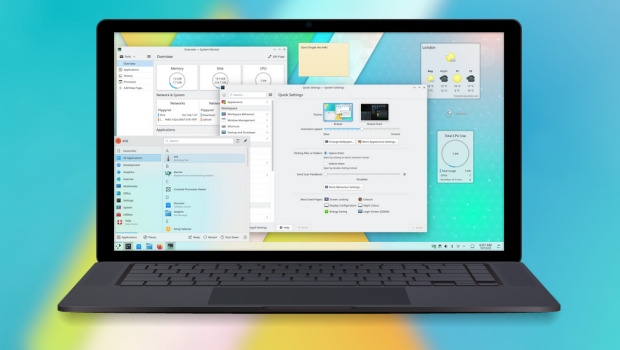
Más información: KDE
Las novedades de Plasma 5.26
La Comunidad KDE publicó el 11 de octubre Plasma 5.26, una versión que nos ofrecen un gran conjunto de novedades y propuestas que nos acercan a lo que vendrá cuando se realice la transición a Plasma 6 y que se ha centrado en los plasmoides y ha supuesto un gran paso en el desarrollo de Plasma Bigscreen.
Ya ha pasado el día de descarga y actualizaciones, y ya los estoy disfrutando en mi KDE Neon, así que os comento algunas de sus novedades:
- Posibilidad de redimensionar los plasmoides emergentes incrustados en una barra de tareas.
- Timer: nuevo plasmoide que nos sirve para tener un simple temporizador para las tareas que lo requieran o, inlcuso, asignarle acciones como ejecutar un comando.
- Añadido el navegador Aura especialmente diseñado para la pantalla grande del modo Plasma Bigscreen que destaca por tener mosaicos grandes y claramente etiquetados te permiten navegar por la red mundial con tu mando a distancia desde el sofá.
- También se une a Bigscreen Plank Player, un reproductor multimedia sencillo y fácil de usar que te permitirá reproducir vídeos desde un dispositivo de almacenamiento que conectes a tu televisor.
- Mejoras en el entorno Plasma que utiliza el servidor gráfico Wayland, el cual sigue mejroando y hace que las aplicaciones XWayland escaladas ahora se ven más hermosas, nítidas y claras.
Más información: KDE
La entrada Lanzada la quinta actualización de Plasma 5.26 se publicó primero en KDE Blog.

HP EliteBook RAM Failure
Bear, la plataforma de blogs súper rápida, sensata y que prioriza la privacidad
Bear es una plataforma basada en software libre en la que te puedes registrar para crear tu blog y compartir tus ideas

A la hora de compartir tus ideas y pensamientos en la web, es mejor hacerlo mediante un blog, que en una red social, que por definición es más efímera y volátil.
Para poner en marcha tu blog de una manera rápida y sin complicaciones, lo mejor es abrir una cuenta en alguna plataforma que te permita alojar tu contenido de manera sencilla y rápida para que te centres en lo que quieres contar.
Plataformas para blogs basadas en software libre hay muchas, en este caso quiero darte a conocer el servicio de blogs llamado Bear ʕ •ᴥ•ʔ que es software libre y en el que podrás compartir tu blog sin rastreadores, sin javascript, sin hojas de estilo. Solo tus palabras.
Bear está creado y mantenido por un desarrollador llamado Herman que ha publicado su código en GitHub bajo una licencia MIT.
El software no está pensado para que tu lo puedas alojar en tu servidor, si no como una plataforma en la que registrarte y tener así tu espacio para tu blog. Al registrarte obtendrás una dirección https nombre_del_blog.bearblog.dev
Los artículos se escriben en formato Markdown, por lo que es muy sencillo empezar a escribir lo que deseamos compartir y sin más complicaciones después compartirlo en la red.
Como dicen en su web, Bear es una plataforma de blogs donde las palabras son lo más importante.
Las personas que vengan a leer los blogs están protegidas mientras el contenido se entrega a la velocidad de la luz.
Es una plataforma de blogs súper rápida, sensata y que prioriza la privacidad. Sin rastreadores, sin javascript, sin hojas de estilo. Solo tus palabras.
Lo que hace que sea un sistema sencillo y ligero, no ahonda en las webs o blogs que consumen recursos (como muchas personas achacan a WordPress) además:
- Se ve muy bien en cualquier dispositivo
- Páginas diminutas (~2.7kb), optimizadas y sorprendentes
- Sin rastreadores, anuncios o scripts
- Es muy sencillo y rápido registrarse
- Construido para durar para siempre
- Conecta tu dominio personalizado
- Temas gratis
- Fuentes RSS y Atom
No hay disponible la opción de poder comentar en los artículos por parte de los visitantes, pero sí hay un botón llamado «toast» que sería para marcar como «me gusta».
Si este nuevo año 2023 te estás planteando empezar a bloguear, quizás esta plataforma tan simple y sencilla sea un incentivo para no posponer esa intención. Comparte tus pensamientos, trucos, recetas, poesías, etc por la red.
Enlaces de interés

Puasa, Treadmill dan Abs Workout
Mumpung saat ini baru awal tahun 2023 dan saya sudah sempat menjalankan pendahuluannya di bulan Desember, saya membuat beberapa resolusi kesehatan untuk 2023. Misalnya berat badan dibawah 75 kg di akhir Januari 2023 dan dibawah 70 kg diakhir tahun 2023.
Untuk mencapai hal itu, saya menjalankan beberapa proses secara paralel, antara lain :
- Melanjutkan puasa Daud
- Menambah intermittent fasting dengan membuat “jendela makan” saat tidak berpuasa, misalnya jam makan antara jam 12 siang sampai dengan jam 8 malam, sisanya puasa makanan kecuali air minum
- Olahraga rutin setiap hari. Saat berpuasa, saya biasanya olah raga sebelum sahur atau menjelang buka puasa. Saat tidak berpuasa, saya bisa memilih waktu olah raga secara bebas, namun biasanya di pagi hari selepas shalat Shubuh
Olah raga yang saya jalani masih sederhana, yaitu berupa treadmill selama 30 menit (28 menit jalan kaki, 2 menit lari), kemudian ditambah dengan sit up dan ditutup dengan abs workout mengikuti panduan di aplikasi.


Sejauh ini prosesnya berjalan dengan lancar dan manfaatnya sangat terasa baik di jam kerja maupun jam istirahat. Saya biasanya tidur di jam 10 malam dan bangun jam 03.30 menjelang Shubuh. Tidurnya pulas dan saat aktivitas juga tidak mengantuk.
Dari sisi badan, sepertinya lingkar pinggang mulai menyusut. Saya belum ukur lagi, namun dari sisi berat badan mulai stabil di kisaran 76 kg. Meski masih perlu perjuangan untuk mendapatkan kondisi optimal, namun prosesnya saya anggap sudah sesuai jalur yang saya inginkan.


Hackweek 2023

Hack Week is the time SUSE employees experiment, innovate & learn interruption-free for a whole week! Across teams or alone, but always without limits.
This year the Hack Week was this week, the last week of January and for my first SUSE hack week I decided to work in something funny, LILS.
Linux Immersive Learning System (LILS)
I don't think that this is a good name, but don't focus on it. The main idea of this project is to create some basic machinery to be able to write "interactive" tutorials or games using the INK language.
This is not an original idea, indeed all I've done is something that's currently working on EndlessOS, and was the main idea behind the dead project Hack Computer, you can even take a look to the Hack app in flathub. But I wanted to work around this, and create something simpler, from scratch.
I wanted to build something simple, with just Python, and make it simple enough to be able to build other tools on top. The design is simple, an INK parser, with a simple game runner. In the INK script you can define commands, to do something special, and wait for events with listeners, to wait for an event in the OS to continue.
With this basic functionality it's possible to build different user interfaces for different environments. And the original idea was to make the commands and listeners something extensible with a simple API, but that's something that I have not done yet, it's all Python functions without extension point.
The code can be found in github.
The INK parser
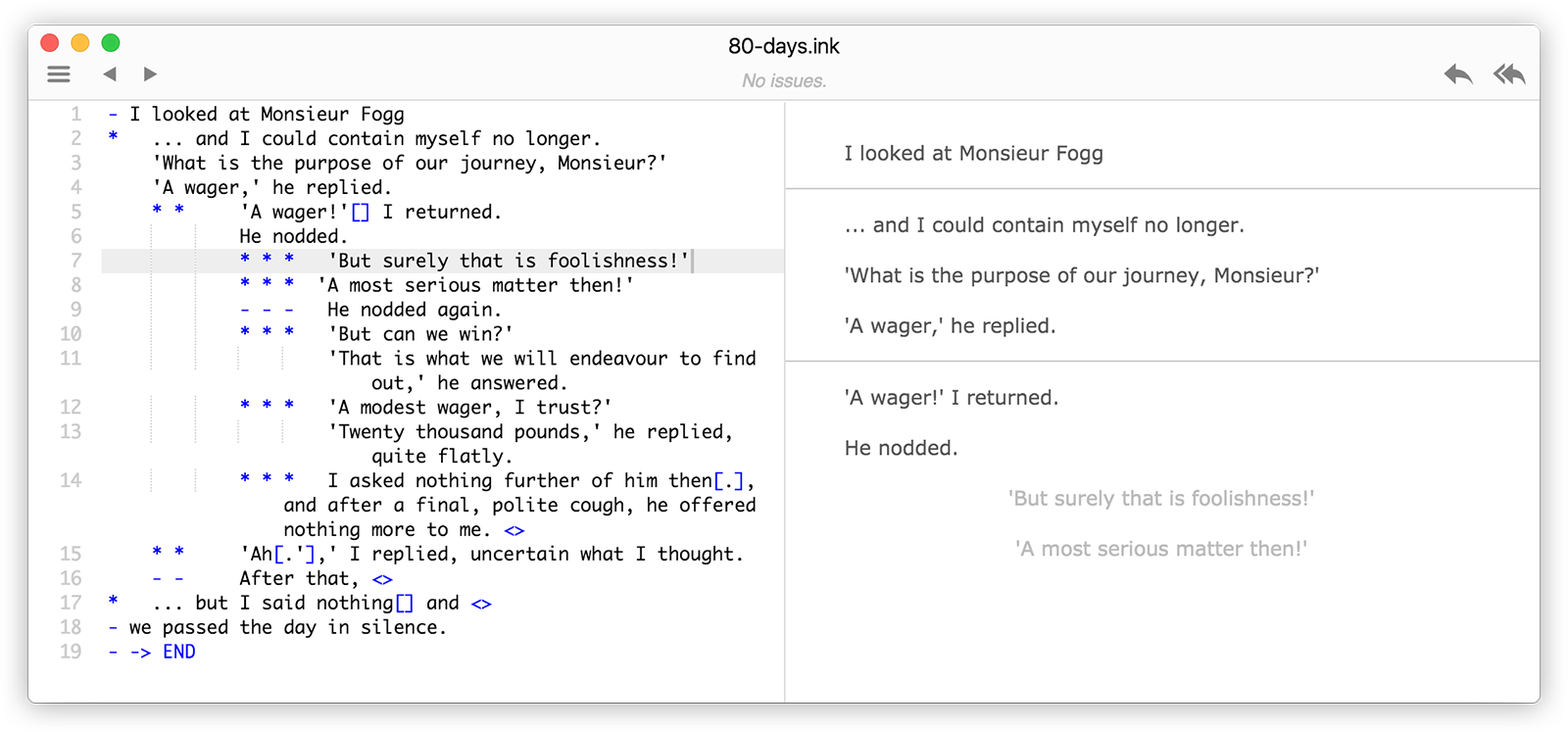
The most complex part of this project is the INK language parser. The Ink parser is free software and there's a Linux version that you can use to parse and compile to json, but I wanted to create my own parser with Python.
I've spent most of the Hack Week time fighting with the parser and indeed was the most challenging and fun part, because I've not worked a lot with parsers and it's not something easy as pie 😛️.
I remember creating a java compiler long time ago, when I was in the Seville University, for the Language Processors course. We did that with ANTLR, so starting from that, and looking for a Python lib, I found the Lark project. So if you like regular expressions, writing a grammar is a lot more FUN.
At the end I was able to support some basic INK language with support for:
- Text
- Tag support
- Options, with suppress text support
- Knots, Stitches and Diverts
- Include other .ink files
- Variable definition and basic operations
- Knots and Stitches automatic visiting count variables
- Conditional options using variables
It still fails in some cases, the comments and TODO placed in between text is not detected correctly and there's a lot of complex stuff that's not supported yet, but with what's supported right now it's possible to create complex scripts with loops and complex game graphs, so it's good enough to build games just with it.
GNOME shell extension
To integrate with the system I've done a simple GNOME shell extension. The extension just shows the text as bubbles and options as buttons, it's really simple and I've no time to make it something ready to be used, but I was able to make something usable.
To be able to run the LILS python library from gjs I've created a simple dbus service that exposes the basic InkScript class functionality as a dbus API.
I was thinking about being able to change the desktop background, depending of the value of a background variable in the script and do something similar to play music and sounds, so it could be a cool game engine with some additions.
SUSE Hack Week
So this Hack week was really fun and I learned a lot. It's really great that SUSE does things like this, letting us work in different projects for a week, to learn, to grow or to just explore different paths.
Las novedades en el editor Kate de KDE
Repasemos las novedades que ha incorporado la comunidad KDE a su editor de texto avanzado llamado Kate

El editor de texto avanzado de KDE o Kate, es el editor con interfaz gráfica que utilizo en mi sistema openSUSE con Plasma cuando no uso Vim en la terminal.
Es sencillo de utilizar, pero dispone de muchas funcionalidades, y tiene detrás una gran comunidad que lo mantiene al día y va incorporando nuevas herramientas que cada vez lo hacen más imprescindible. Si no lo has utilizado, te animo a que lo pruebes.
En este artículo voy a repasar las nuevas herramientas que han incorporado en la actualización de diciembre de 2022 (versión 22.12).
Página de bienvenida en las nuevas ventanas
Ahora al abrir una nueva ventana del editor Kate, se nos mostrará una página de bienvenida donde se nos mostrará una lista con los documentos y proyectos recientes que hemos abierto en Kate. También nos mostrará las sesiones que tengamos guardadas.
De esta forma es más rápido y sencillo abrir un archivo en el que ya hayamos estado trabajando otro día, sin necesidad de buscarlo.
Desde esa página de bienvenida podemos inhabilitarla para que no se muestre. Si lo hacemos y queremos volver a habilitarla podemos hacerlo activando la opción en el menú: Preferencias → Configurar Kate → Sesión → Mostrar la vista de bienvenida en las ventanas nuevas
Visor de las diferencias de git
Si tenemos un proyecto git y queremos comprobar las diferencias en un archivo, ahora Kate puede mostrárnola de manera nativa, y muestra las diferencias marcando el detalle de lo cambiado.
El nuevo visor de diferencias también te permite saltar entre diferencias, cambiar entre diferentes estilos de visualización (unificado, en paralelo y sin procesar) y puedes usarlo para validar o volver atrás los cambios en stage.
Pestaña de configuración con opción de búsqueda
Ahora podemos configurar Kate y todas sus opciones fácilmente en Preferencias → Configurar Kate (o con el atajo de teclado Ctrl+Shift+,).
Y en ese menú, ahora disponemos de un cuadro de búsqueda de opciones. Ya no es necesario ir recorriendo los menús para buscar esta u otra opción. Podemos escribir una palabra relacionada con esa configuración y Kate nos mostrará las opciones disponibles.
Nuevo diálogo del portapapeles
Ahora Kate dispone de un portapapeles en el que se pueden guardar múltiples extractos que hayamos copiado previamente y después podremos pegar de ellos el que prefiramos. Podemos invocar este nuevo portapapeles mediante el atajo Ctrl+Sift+Alt+V (reconozco que no es muy práctico…)
Podemos copiar por ejemplo tres extractos de un texto y después pulsando la combinación de teclas mencionada (o en el menú Editar → Pegar historial del portapapeles) se abrirá una ventana flotante con todos los extractos de texto que hayamos copiado. En esa ventana incluso podemos buscar alguna cadena de texto. Una vez seleccionado el texto del portapapeles, lo pegaremos en nuestro documento.
La verdad que esta opción no la uso, ya que estoy más habituado al uso de Klipper en la bandeja del sistema que tiene una funcionalidad similar pero en todo el sistema. Pero sin duda es una funcionalidad interesante.
Más mejoras
Estas son solo algunas de las funcionalidades más notables que trae Kate 22.12, pero hay algunas otras que también merecen una mención:
- Varias mejoras en el complemento de compilación.
- Más acciones que se usan comúnmente ahora tienen asignado un atajo predeterminado
- Los botones de la barra lateral ahora se pueden mover a una sección propia haciendo clic derecho sobre ellos. Esto permite abrir múltiples vistas de herramientas en una barra lateral simultáneamente
- Los documentos ahora se pueden separar en una nueva ventana desde el menú contextual de la pestaña
- La barra de estado ocupa menos espacio y ahora es configurable
Como ves, todas estas opciones es «marca de la casa» de KDE, que hace que su software sea tan configurable como tu quieras o necesites.
Consigue Kate
Instala y prueba Kate en tu sistema GNU/Linux instalándolo desde los repositorios de tu sistema. También puedes utilizar Kate en sistemas privativos como Windows o MacOS.
Enlaces de interés


雲平台工具容器升級小記 - gcloud 412.0 / AWS Cli 2.9.12 / ansible 2.11.12
雲平台工具容器升級小記 - gcloud 412.0 / AWS Cli 2.9.12 / ansible 2.11.12
OS: container with openSUSE Leap 15.4
上次升級是 2022/10 , 這次會來升級的原因是
因應 GKE, 安裝 gke-gcloud-auth-plugin 與 kubectl
Azure 再官方文件上面宣告 2.39.0 之後就不支援 openSUSE / SUSE, 請使用者用其他的 OS 版本 - 故移除 azure cli 與 azure ansible module
更新 gcloud 以及 AWS Cli 版本
同步紀錄一下目前 Azure CloudShell 上面的 Ansible 資訊
Ansible: 2.13.3 / python 3.9.14

先整理結果
升級前
OS: openSUSE Leap 15.4
awscli: aws-cli/2.8.5 Python/3.9.11
gcloud: Google Cloud SDK 406.0.0
azure-cli: 2.35.0 (目前有 bug)
ansible: 2.11.12
升級後
OS: openSUSE Leap 15.4
awscli: aws-cli/2.9.12 Python/3.9.11
gcloud: Google Cloud SDK 412.0.0
ansible: 2.11.12
GCP Cloud SDK 版本
AWS CLI v2 安裝文件
另外執行 ansible --version 也會收到之後 ansible 需要 python 3.8 以上的告警, 訊息如下
[DEPRECATION WARNING]: Ansible will require Python 3.8 or newer on the controller starting with Ansible 2.12. Current version: 3.6.15 (default, Sep 23
2021, 15:41:43) [GCC]. This feature will be removed from ansible-core in
version 2.12. Deprecation warnings can be disabled by setting
deprecation_warnings=False in ansible.cfg.
這個部份應該是因為 openSUSE Leap 15.x 還是基於 SLES 15, 所以 python 的策略是還在 3.6, 只能先這樣
這次的做法還是會透過 docker build 指令來進行
我有比較過 docker build 以及使用現有的 docker image 修改後再使用 docker commit 建立的 image 大小還是很有差異的
Dockerfile 的部分我是拿之前的 Dockerfile 來修改目前是 openSUSE Leap 15.4
修改細節
Update time
移除 Azure CLI 安裝以及 Ansible Azure module
Google SDK 版本還有下載的檔案路徑以及檔案名稱
安裝 kubectl 以及需要的 components
列出 diff 的結果給大家參考
> diff opensuseLeap153_ansible_20221022_Dockerfile opensuseLeap154_ansible_20230102_Dockerfile
< # update time: 20221022
---
> # update time: 20230102
45,48c45,50
< RUN zypper install -y curl && \
< rpm --import https://packages.microsoft.com/keys/microsoft.asc && \
< zypper addrepo --name 'Azure CLI' --check https://packages.microsoft.com/yumrepos/azure-cli azure-cli && \
< zypper install --from azure-cli -y azure-cli
---
> # 2023/1/2 Azure 宣告不支援openSUSE/SUSE, 所以不進行安裝 - https://learn.microsoft.com/en-us/cli/azure/install-azure-cli-linux?pivots=zypper
> #
> #RUN zypper install -y curl && \
> # rpm --import https://packages.microsoft.com/keys/microsoft.asc && \
> # zypper addrepo --name 'Azure CLI' --check https://packages.microsoft.com/yumrepos/azure-cli azure-cli && \
> # zypper install --from azure-cli -y azure-cli
52,56c54,58
< RUN zypper install -y curl && \
< curl -O https://raw.githubusercontent.com/ansible-collections/azure/dev/requirements-azure.txt && \
< pip3 install -r requirements-azure.txt && \
< rm -f requirements-azure.txt && \
< ansible-galaxy collection install azure.azcollection
---
> #RUN zypper install -y curl && \
> # curl -O https://raw.githubusercontent.com/ansible-collections/azure/dev/requirements-azure.txt && \
> # pip3 install -r requirements-azure.txt && \
> # rm -f requirements-azure.txt && \
> # ansible-galaxy collection install azure.azcollection
76c78
< # Install google cloud SDK 381.0.0
---
> # Install google cloud SDK 412.0.0
78,79c80,81
< RUN wget https://dl.google.com/dl/cloudsdk/channels/rapid/downloads/google-cloud-sdk-406.0.0-linux-x86_64.tar.gz && \
< tar zxvf google-cloud-sdk-406.0.0-linux-x86_64.tar.gz && \
---
> RUN wget https://dl.google.com/dl/cloudsdk/channels/rapid/downloads/google-cloud-sdk-412.0.0-linux-x86_64.tar.gz && \
> tar zxvf google-cloud-sdk-412.0.0-linux-x86_64.tar.gz && \
82a85,89
>
> # Install kubect and gke-gcloud-auth-plugin
> # https://cloud.google.com/kubernetes-engine/docs/how-to/cluster-access-for-kubectl
> RUN /google-cloud-sdk/bin/gcloud components install gke-gcloud-auth-plugin
> RUN /google-cloud-sdk/bin/gcloud components install kubectl
Dockerfile 內容如下
我檔案的名稱取名爲 opensuseLeap154_ansible_20230102_Dockerfile
# openSUSE Leap 15.4 with ansible, azure-cli, aws cli, gcloud
FROM opensuse/leap:15.4
# Author
# MAINTAINER 已經棄用, 之後要使用 LABEL 方式
# update time: 20230102
LABEL maintainer="sakana@cycu.org.tw"
# Set LANG for UTF-8 - for Chinese
ENV LANG C.UTF-8
# Install python3-pip, upgrade pip, ansible, boto, boto3
RUN zypper refresh && \
zypper install -y python3-pip && \
pip3 install --upgrade pip && \
pip3 install ansible && \
pip3 install boto boto3
# Install openssh, set ls alias
RUN zypper install -y openssh
RUN echo "alias ls='ls --color=tty'" >> /root/.bashrc
# Install wget, download azure_rm.py, set permission
RUN zypper install -y wget
# azure_rm.py no need to download
# Starting with Ansible 2.8, Ansible provides an Azure dynamic-inventory plug-in
# https://docs.ansible.com/ansible/latest/plugins/inventory/azure_rm.html
# old azure_rm.py URL https://raw.githubusercontent.com/ansible/ansible/devel/contrib/inventory/azure_rm.py
#
# Create working directory in /root
RUN mkdir /root/.azure && \
mkdir /root/.aws && \
mkdir /root/playbook && \
mkdir -p /root/.config/gcloud && \
wget https://raw.githubusercontent.com/sakanamax/LearnAnsible/master/template/ansible.cfg && \
mv /ansible.cfg /root && \
wget https://raw.githubusercontent.com/sakanamax/LearnAnsible/master/template/hosts && \
mv /hosts /root
#### Azure ####
# Install azure-cli
# 2020/11/29 Still have az login issue in Github https://github.com/Azure/azure-cli/issues/13209
# 2023/1/2 Azure 宣告不支援openSUSE/SUSE, 所以不進行安裝 - https://learn.microsoft.com/en-us/cli/azure/install-azure-cli-linux?pivots=zypper
#
#RUN zypper install -y curl && \
# rpm --import https://packages.microsoft.com/keys/microsoft.asc && \
# zypper addrepo --name 'Azure CLI' --check https://packages.microsoft.com/yumrepos/azure-cli azure-cli && \
# zypper install --from azure-cli -y azure-cli
# Install Ansible azure module
# After ansible 2.10, some module move to ansible collect, change install method
#RUN zypper install -y curl && \
# curl -O https://raw.githubusercontent.com/ansible-collections/azure/dev/requirements-azure.txt && \
# pip3 install -r requirements-azure.txt && \
# rm -f requirements-azure.txt && \
# ansible-galaxy collection install azure.azcollection
#install vim tar gzip jq unzip less bind-utils iputils groff
RUN zypper install -y vim tar gzip jq unzip less bind-utils iputils groff
RUN echo "set encoding=utf8" > /root/.vimrc
#### AWS ####
# Install awscli v1
#RUN pip3 install awscli
#RUN echo "source /usr/bin/aws_bash_completer" >> /root/.bashrc
# Install awscli v2
RUN curl "https://awscli.amazonaws.com/awscli-exe-linux-x86_64.zip" -o "awscliv2.zip" && \
unzip awscliv2.zip && \
/aws/install
RUN echo "complete -C '/usr/local/bin/aws_completer' aws" >> /root/.bashrc
#### GCP ####
# Install google cloud SDK 412.0.0
ENV CLOUDSDK_CORE_DISABLE_PROMPTS 1
RUN wget https://dl.google.com/dl/cloudsdk/channels/rapid/downloads/google-cloud-sdk-412.0.0-linux-x86_64.tar.gz && \
tar zxvf google-cloud-sdk-412.0.0-linux-x86_64.tar.gz && \
/google-cloud-sdk/install.sh && \
echo "if [ -f '/google-cloud-sdk/path.bash.inc' ]; then . '/google-cloud-sdk/path.bash.inc'; fi" >> /root/.bashrc && \
echo "if [ -f '/google-cloud-sdk/completion.bash.inc' ]; then . '/google-cloud-sdk/completion.bash.inc'; fi" >> /root/.bashrc
# Install kubect and gke-gcloud-auth-plugin
# https://cloud.google.com/kubernetes-engine/docs/how-to/cluster-access-for-kubectl
RUN /google-cloud-sdk/bin/gcloud components install gke-gcloud-auth-plugin
RUN /google-cloud-sdk/bin/gcloud components install kubectl
使用 docker build 指令建立 image
> docker build -t sakana/ansible_opensuse154:20230102 -f ./opensuseLeap154_ansible_20230102_Dockerfile .
使用 -f 指定 Dockerfile 名稱
最後是 ” . “ 目前的目錄
這邊有個網路問題自己小記一下, 不知為何, 在執行 docker build 之前要先 ping 一下外部網路 IP 或是 FQDN, 再進行 docker build 就沒有相關問題, 日後再研究
測試 container image
> docker run -v ~/.aws:/root/.aws -v ~/.azure:/root/.azure -v ~/.config/gcloud:/root/.config/gcloud -it sakana/ansible_opensuse154:20230102 /bin/bash
測試結果 OK, 建立 tag
觀察資訊
> docker images
REPOSITORY TAG IMAGE ID CREATED SIZE
sakana/ansible_opensuse154 20230102 1d643691def7 14 minutes ago 3.73GB
opensuse/leap 15.4 d6a4298be45c 2 weeks ago 113MB
建立 tag
> docker tag 1d643691def7 sakana/ansible_opensuse154:latest
登入 docker
> docker login
上傳 image
> docker push sakana/ansible_opensuse154:20230102
> docker push sakana/ansible_opensuse154:latest
完工, 以後使用就用
> docker run -v ~/.aws:/root/.aws -v ~/.azure:/root/.azure -v ~/.config/gcloud:/root/.config/gcloud -it sakana/ansible_opensuse154 /bin/bash
額外小記: 更新 blog 就會順道檢查 Azure 的認證資訊有沒有超過一年, 參考之前自己的筆記
http://sakananote2.blogspot.com/2020/05/azure-dynamic-inventory-with-ansible.html
在 Azure Cloud Shell 使用 az ad sp list --all --output table | grep azure-cli 找出舊的認證,
刪除他 ex: # az ad sp delete --id d06f8905-ad21-425b-9da5-3e0bcf22a853
然後建立新的認證 ex: # az ad sp create-for-rbac --query '{"client_id": appId, "secret": password, "tenant": tenant}'
查詢 subscription_id, ex: # az account show --query "{ subscription_id: id }"
更新 ~/.azure/credentials 內的 client_id 以及 secret
~ enjoy it
Reference:
https://sakananote2.blogspot.com/2022/10/gcloud-4060-aws-cli-285-ansible-21112.html
https://sakananote2.blogspot.com/2022/04/ansible-21110-aws-cli-256-gcloud-3810.html
https://sakananote2.blogspot.com/2021/12/ansible-2116-aws-cli-245-gcloud-3650.html
http://sakananote2.blogspot.com/2021/05/ansible-2109-aws-cli-224-gcloud-3400.html
http://sakananote2.blogspot.com/2020/11/ansible-2103-azure-module.html
https://sakananote2.blogspot.com/2020/11/opensuse-leap-152-container.html
https://stackoverflow.com/questions/64921336/warning-ansible-2-10-3-does-not-provide-the-extra-azure
http://sakananote2.blogspot.com/2020/08/opensuse-leap-152-container.html
https://sakananote2.blogspot.com/2020/05/aws-cli-v2-with-opensuse-leap-151.html
http://sakananote2.blogspot.com/2020/01/python-3-with-opensuse-leap-151.html
http://sakananote2.blogspot.com/2019/07/with-opensuse-leap-15-container.html
http://sakananote2.blogspot.com/2019/05/ansible-azure-cli-awscli-gcloud-with.html
http://sakananote2.blogspot.com/2019/11/with-opensuse-leap-151-container.html
Nuevo Black Kymera AMD de Slimbook
Cada cierto tiempo me gusta hablar de Slimbook, la marca de dispositivos 100% compatibles con GNU/Linux por varias razones, entre las que destacan que soy usuario habitual de la marca y que tengo la convicción de que debemos promocionar las empresas que confían en el Sotware Libre. Es por ello que me complace compartir con vosotros que ha sido lanzado el nuevo Black Kymera AMD de Slimbook, dentro de su serie de ordenadores de sobremesa. ¿Tienes curiosidad? Sigue leyendo.
Nuevo Black Kymera AMD de Slimbook
Aunque en el mundo de las ordenadores de sobremesa o de escritorio la posibilidad de disfrutar de un sistema operativo libre es algo relativamente sencillo. De hecho, su conquista apenas tiene el problema del arranque y las tarjetas gráficas, el resto se soluciona rápido y bien (aunque las impresoras pueden ser un dolor de muelas).
No obstante siempre es de agradecer que algunas compañías como Slimbook se preocupen no solo de ofrecerte una alternativa que asegura su compatibilidad absoluta con los sistemas del GNU y el pingüino sino que te los afinen como solo los profesionales saben hacer (y si no me creéis os remito a este artículo donde un producto puesto a punto por los chicos y chicas de Slimbook barría en las pruebas de rendimiento a ordenadores en principio más potentes).
De esta forma me congratula compartir con todos vosotros que la gama Kymera (Ventus o Aqua) de Slimbook, ha ganado un nuevo miembro. Se trata de nuevo Black Kymera AMD de Slimbook que destaca por su elegante caja de color negro con el cristal templado en sus laterales, y con una edición limitada que tendrá serigrafiado con un súper TUX de gran tamaño en su frontal, con numeración exclusiva y, según la gente de Slimbook «alguna sorpresilla más que nos reservamos para los afortunados.»
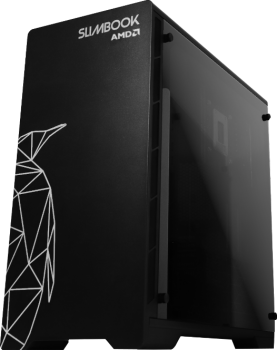
Las características básicas de esta máquina son las siguientes:
- Nuevos procesadores AMD 7000 con hasta 16 núcleos y velocidad máximas de 5,7 GHz
- Nuevos procesadores Intel 13ª de hasta 24 núcleos y 5,8GH
- Gráficas NVIDIA o AMD con cualquier CPU. Concretamente AMD serie 7900 con hasta 24GB de memoria GDDR6, la familia RTX Nvidia serie 4000 con hasta 24GB de memoria GDDR6 o serie ARC de Intel con hasta 16GB de memoria GDDR6.
- Nuevas memorias RAM más rápidas, hasta 5200 MHz
Por cierto, y como suelo comentar en estos casos, esto tampoco es una entrada patrocinada. Mi relación con Slimbook es de cliente habitual, amistad e intereses mutuos (el dominio del mundo por parte de la filosofía GNU/Linux).
Más información: Slimbook
La entrada Nuevo Black Kymera AMD de Slimbook se publicó primero en KDE Blog.

Kraft on Windows
Kraft, which was released as version 1.0 after long time of active development, is targetted to the Linux desktop. My firm conviction is that the Linux desktop is very suitable for the target group of Kraft: In the small office of craftsmen for example, a Linux desktop is a great work horse which is stable, very well adoptable and has a great amount of applications that are stable and maintained.
These are only the most obvious points why Kraft is so far only available for Linux.
But often enough switching to Linux is another hurdle that users have to go, coming from a more mainstream world. So it is great to learn that Kraft, as many UI applications, can be run unter the Windows Subsystem for Linux (WSL) on Windows systems quite flawlessly.
 It was tried with Windows 11 Home and the Kraft AppImage of 1.0.
The steps to run Kraft in WSL:
- Make WSL running on the Windows installation
- Install a X-server on the Windows machine
- Create a Debian or Ubuntu Linux subsystem
- Install a few extra packages into the Linux installation
- Download and run the Kraft AppImage 1.0
A more detailed howto and discussion can be found in the easy cash & tax forum. Thanks Thomas for bringing up the topic and providing the Howto!