
 cabelo
OWASP SP : Terceiro Meetup Virtual de 2022
Nesta quarta-feira, dia 14 de dezembro (quarta feira), a OWASP SP proporcionará o terceiro Meetup com mais uma palestra de extrema relevância, sendo uma vez que o mundo vive uma crise no contexto de segurança da informação e uma grande transformação tecnológica. Todo dia nos deparamos com um novos vazamentos de dados. Sendo assim, a propagação de conhecimento, proporcionará softwares e sistemas seguros minimizando esta crise.
19h30 : Tema: I.A evitando ciladas das situações reais de regulação
Palestrante : Alessandra Martins

Nesta talk vamos abordar exemplos mais práticos sobre as Leis de Proteção de Dados e Privacidade, a necessidade de Regular o uso de I.A e o dia a dia que temos enfrentado, partindo do exemplo de um edital público e desdobrando nas relações com a LGPD, Marco regulatório de I.A, recomendações da UE e outras entidades Mundiais , relacionando esses pontos conceituais, e muitas vezes apenas teóricos com quem usa e desenvolve a tecnologia na prática, procurando prover uma perspectiva de uso mais útil e funcional da teoria com a prática.
Bio: Encarregada de Proteção de Dados as a Service: Gestão de Privacidade e Ciclo de Vida de Dados; Assessment LGPD e GDPR; Usable Security and Privacy; Gerenciamento de Projetos – PMO; Gestão de Produtos; Gestão de Demandas; Scrum Master – Facilitadora Agile; DevOps Master – Assessment & Best Practices para criação e manutenção de pipelines; Desenvolvimento Seguro de Software – DevSecOps e Code Review, Engenharia de Software; Big Data e Data Minining; Documentação de Qualidade de Software baseada no Modelo MPS.BR e ISO 9000; Gestão de Documentação e Automatização de Testes de Software; Análise e Gerenciamento de Riscos baseadas em ativos ; Forense de Dados; Governança de TI; Compliance e Governança de Segurança da Informação; Acompanhamento de auditorias internas; Gerenciamento de Serviços e Infraestrutura de TI; Gestão Ágil de projetos com Scrum e Kanban; Governança de Dados; LMS, OA, AVA; Cloud Computing; API Manager; Arquitetura Corporativa; Análise de Negócios.

Ou aqui: https://www.meetup.com/owasp-sao-paulo-chapter/events/290042977/

Post-mortem: Downtime on December 5, 2022

 Member
Las novedades de aplicaciones de Plasma Mobile Gear 22.11: Weather y Recorder
Hace unos días, concretamenté que desde el 30 de noviembre está disponible la nueva versión de Plasma Mobile Gear. Es hora de empezar a hablar de ella como ya hice con las novedades base, tocando hoy hablar de las novedades de aplicaciones de Plasma Mobile Gear 22.11, es decir, las herramientas que vienen por defecto en nuestro terminal, y empiezo la serie con Weather y Recorder.
Las novedades de aplicaciones de Plasma Mobile Gear 22.11: Weather y Recorder
El pasado 30 de noviembre ls desarrolladores lanzaron Plasma Mobile Gear 22.11, la cual llegó con una gran novedade: un cambio en la forma de realizar sus lanzamientos.
Esto ya lo hablé en este artículo, así que os remito a él y entro de lleno en el objetivo de este, que no es más que hablar de las novedades de aplcacones de Plasma Mobile Gear 22.11, las cuales se estan preparando para ser integradas al ciclo de lanzamiento de KDE Gear.
Weather, la aplicación que nos muestra la previsión meteorlógica nos ofrece:

- Cambiado el diálogo de configuración para utilizar una ventana en modo de escritorio
- Añadidas vistas a las barras de desplazamiento.
- Reimplementación de la reordenación de la lista de ubicaciones para que sea mucho más fácil de usar.
- Muchas correcciones de errores
Recorder, la aplicación de grabación de sonidos.
- La página del grabador utiliza ahora un diseño a pantalla completa.
- Se ha modificado el diseño del reproductor de grabación para facilitar su uso.
- El cuadro de diálogo de configuración es ahora una ventana en modo de escritorio.
- Las grabaciones se inician inmediatamente después de pulsar el botón de grabación.
- Ahora se pueden exportar las grabaciones a otra ubicación.
- Corregido un error que añadía sufijos a los nombres de los archivos grabados sin motivo alguno.
¿Qué es Plasma Mobile?
Para los que no lo conozcan Plasma Mobile es la alternativa libre a interfaz gráfica para smartphones de la Comunidad KDE, hablé de él hace un tiempo y, poco a poco, se está convirtiendo en un clásico del blog.
Su idea es muy simple, tras conquistar tu escritorio KDE la Comunidad también quiere conquistar tu teléfono móvil… aunque todavía lo tenga complicado por todas las limitaciones de hardware que todavía tiene este campo de la tecnología.
No obstante, confiemos que de igual forma se han ido conquistando los ordenadores de sobremesa, portátiles y servidores, lleguemos un día que podamos tener libertad total en nuestros smartphones.
Y para cuando eso ocurra la Comunidad KDE estará preparada para ello y por eso está confeccionando un catálogo más que decente de aplicaciones con tecnología adaptativa.
La entrada Las novedades de aplicaciones de Plasma Mobile Gear 22.11: Weather y Recorder se publicó primero en KDE Blog.
Main dengan Ikan Besar Healing di Kampung Sampireun Garut
Beberapa waktu yang lalu, Zeze Zahra menyempatkan diri berlibur ke kampung Sampireun Garut. Kampung Sampireun adalah resort atau villa yang dibangun ditepian danau atau telaga. Pemandangannya bagus, tempatnya sejuk. Cocok untuk dijadikan sebagai tempat untuk rehat sejenak dari kesibukan.
Yang menarik dari Kampung Sampireun adalah villa atau resort atau cottage (atau apalah namanya hehehe…) ditepi telaga. Telaganya berisi ikan besar-besar warna warni yang jinak dan suka hilir mudik, apalagi saat diberi makan. Paling senang liburan seperti ini, dengan ikan banyak dan jinak, suasana sejuk dan kadang turun hujan yang membuat hati tenteram.
/usr/bin/*ctl なプログラムが何をするのかを試してみました(localectl)
この記事は openSUSE Advent Calendar 2022 の6日目です。
systemd が使われるようになると、daemon の制御とかのやり方は大きく変わりました。/etc/init.d にあるスクリプトから、systemd パッケージに含まれるコマンドを使うようになってきました。それらのコマンドは、xxxxxctl という、末尾に ctl が含まれるものが多いように感じました。そこで、/usr/bin/ の中にある、末尾が ctl なプログラムがどんなものかを簡単に調べて見ることにしました。
今回は、localectl を紹介します。
コマンド名: localectl
パッケージ: systemd-249.12-150400.8.13.1.x86_64
動作: ○
詳細:
localectl は、システムのロケールを表示したり、変更を行うコマンドです。そのほかに、キーボードマッピングの変更も行えます。locale コマンドと loadkeys や kbdconfig の後継とも考えることができます。ただし、機能は強化されています。
ロケールの表示については、 locale コマンドと localectl コマンドでは内容が違い、locale コマンドの方が環境変数に設定されている値を表示するのに対し、localectl コマンドでは、最低限の物のみを表示します。
%locale
LANG=ja_JP.UTF-8
LC_CTYPE="ja_JP.UTF-8"
LC_NUMERIC="ja_JP.UTF-8"
LC_TIME="ja_JP.UTF-8"
LC_COLLATE="ja_JP.UTF-8"
LC_MONETARY="ja_JP.UTF-8"
LC_MESSAGES="ja_JP.UTF-8"
LC_PAPER="ja_JP.UTF-8"
LC_NAME="ja_JP.UTF-8"
LC_ADDRESS="ja_JP.UTF-8"
LC_TELEPHONE="ja_JP.UTF-8"
LC_MEASUREMENT="ja_JP.UTF-8"
LC_IDENTIFICATION="ja_JP.UTF-8"
LC_ALL=

%localectl
   System Locale: LANG=ja_JP.UTF-8
       VC Keymap: jp
      X11 Layout: jp
       X11 Model: microsoftpro
     X11 Options: terminate:ctrl_alt_bksp
また、localectl list-locales でロケールの一覧を表示することができますが、その結果は locale コマンドの結果とは異なっていました。locale コマンドで表示できる、UTF-8系以外のロケールが、localectl では表示されません。
% locale -a | grep ja
ja_JP.eucjp
ja_JP.shiftjisx0213
ja_JP.sjis
ja_JP.utf8

%localectl list-locales | grep ja
ja_JP.UTF-8
但し、localectl でロケールの一覧に表示されていない、たとえば ja_JP.sjis を指定しても、変更することはできました。ちなみに、ロケールの変更は、localectl のサブコマンド set-locale で指定します。
キーボードマップの変更はサブコマンド set-keymap で指定します。これも、loadkeys で指定できるキーマップと異なります。loadkeys の場合ですと、IA アーキテクチャを使用する場合には /usr/share/kbd/keymaps/i386/ 配下にあるキーマップを使いますが、そこにあるマップ一覧と同じものになっています。ただ、標準 jp106 以外の使い道は少ないと思いますが….
%localectl list-keymaps | grep jp
jp
jp-OADG109A
jp-dvorak
jp-kana86
jp106
mac-jp106
%find /usr/share/kbd/keymaps -name "jp*" -print
/usr/share/kbd/keymaps/i386/qwerty/jp106.map.gz
/usr/share/kbd/keymaps/xkb/jp-dvorak.map.gz
/usr/share/kbd/keymaps/xkb/jp-OADG109A.map.gz
/usr/share/kbd/keymaps/xkb/jp-kana86.map.gz
/usr/share/kbd/keymaps/xkb/jp.map.gz
localectl でのロケール変更は、システム全体の変更となるので、一時的な変更には使えません。一時的な変更は、環境変数を設定し直すことになります。キーボードの変更についても、loadkeys と同等のことはできますが、locale と言う名前でキーボードの操作、と言うことになるので、ちょっと分かりにくいかもしれません。使い道は限定されそうです。

The openSUSE forums move from vBulletin to Discourse
Maybe you have read this announcement in openSUSE forums and asked yourself what this will mean for the way you use the forums. Even more when you may not understand, or only vaguely understand, what the words vBulletin and Discourse mean.
You will understand that the website forums.opensuse.org runs software that handles not only the interface with you, but also stores and manages the threads with the posts, and the user administration of the forum members. The software package used is named vBulletin. It is a commercial package and as such brings considerable costs.
Because all software that stays alive will move to new versions, this is also the case with vBulletin. That will mean that all of the adaptions that were made in the openSUSE instance had to be converted to the new version. At such a moment, it is time to look if a different solution might be better. We will not burden you with all the details, but the result is that vBulletin will be replaced by a different and open-source (which fits into the openSUSE philosophy) product: Discourse.
This will not be an easy move for many, including the forums’ staff. Many things will have to be addressed after we switched over, but we can mention a few things that will come up first in most members thoughts (we think).
Accounts: As the login facility is not bound to vBulletin but to the general SUSE login feature, there will be no change there, and all members will be able to login as earlier.
Old threads: Threads will be moved to the new environment and be available. Their layout maybe disfigured here and there, but we expect that solutions to problems will still be understandable. As said, it will look very different, please try to cope with that.
We expect a lot of questions and problems to arise. There is of course an “About the forums’ section where you can start threads. Be prepared that the staff has to deal with all of them in their spare time and will, like you, not feel at home in the beginning.
Planned Forum outage will be from Dec. 11 to 13 for the migration. That includes export and import of users and threads, testing and managing the headache.
Thank you for bearing with us in advance.
D-Installer needs your help
Now that the headline got your attention, let's start with the good news - D-Installer development is progressing just fine. What's the matter then? To answer that question is important to make a difference between D-Installer itself and the live ISO image we provide for everyone to test it.
So let's break this post into sections.
New prototype of D-Installer available for testing
As you all know, D-Installer is a new application being developed by the YaST Team that will allow to install any (open)SUSE operating system into any virtual or physical machine. It can be controlled via a D-Bus API, a command-line interface or a modern web front-end. It can run directly on top of any Linux system and can also be executed as a container. So you can run D-Installer using the live ISO we provide for testing or you could use it from your currently installed Tumbleweed (eg. to install Leap Micro in another disk) or even as a container on top of Iguana.

Today we published a new prototype of D-Installer fixing several bugs reported by early testers and improving the usage experience in some areas like the configuration of passwords and users. But beyond those improvements, there are a couple of new features that deserve some attention.
The most visible change is the new screen to configure the storage setup. It's the first step towards the vision we documented a couple of months ago. Functionality-wise it brings the ability to install the system using LVM (Logical Volume Manager) and/or full-disk encryption. The exact type of encryption depends on the operating system being installed. For the prototype of ALP ContainerHost, D-Installer will use LUKS2 adjusting some settings to ensure everything works with the provided version of GRUB. The usage of LUKS2 opens the door for future possibilities, like unlocking the encrypted devices on boot using the system's TPM (Trusted Platform Module) instead of entering a passphrase.

Beware the new screen comes also with some other changes. When making space for the new operating system into the selected disk, previous versions of D-Installer mimicked some default behaviors of YaST like trying to keep alive as many partitions as possible or reusing existing LVM structures. That's not the case anymore. We plan to implement a user interface to decide exactly what to delete, keep or resize. But in the meantime D-Installer will go full throttle and delete all previous content in the chosen disk. You have been warned. 😉
Another relevant improvement is the ability to properly configure the boot loader on AArch64
systems. Previous prototypes messed up the selection of GRUB-related packages on non-x86 systems,
but now D-Installer is more capable of handling different hardware architectures. At the YaST Team
we don't have that many different Aarch64 systems at hand, so we would really appreciate any help
testing whether this works consistently. You can do it by grabbing the aarch64 version of the
testing live ISO... which leads us to our next topic.
The D-Installer testing ISO image
As you already know, the most convenient way of testing the prototypes of D-Installer is using the already mentioned live ISO images we constantly build with the latest development version of D-Installer. But, to be honest, we don't have that much time (or knowledge) to invest on those images and there is a lot of room for improvement.
First of all, almost 1 GiB is clearly too much for an image that doesn't even include the packages of the operating systems to be installed (everything is fetched from online repositories). Beyond the size of the ISO, running X11 and Firefox may not be the most memory-efficient way to connect to a local web interface. There is already an open issue suggesting alternative components and approaches, but it's something that can hardly be addressed by the YaST Team in the short term.
Talking about the graphical environment and the web browser. There is actually no need to run them unconditionally when the system boots, like our current live image does. Adding some modularity to the boot process of the image could result in a much smaller memory footprint in scenarios in which the installation process is driven from another device or from the command-line interface.
Moreover, since our live ISO is just an slightly customized version of openSUSE Tumbleweed we are suffering the consequences of some performance problems present in the latest versions. We reported the problem as bug#1205938 and we really need some way to fix it or to work around it. The slowdown described at that bug report can completely ruin the overall experience of using the D-Installer live ISO image.
Join the fun
The future looks pretty bright for D-Installer now that the general infrastructure is set and we can keep adding all the currently missing features reusing the power of YaST. So please join us in the adventure.
Of course, the easiest way to contribute is by testing the new release and giving us your valuable constructive feedback, so we can keep evolving the current prototype. Additionally, it would be great if you could help to improve the current testing live ISO image or to fix the mentioned performance issue at Tumbleweed. We would also welcome any kind of support in the area of containerization and Iguana.
In all cases, and for any other matter, you know where to find us!
Los foros oficiales de openSUSE migrarán de vBulletin a Discourse
El foro oficial de la comunidad de openSUSE migrará el software que usa la plataforma del privativo vBulletin al software libre de Discourse entre el 11 y 13 de diciembre de 2022

Desde hace un tiempo, la comunidad y el foro oficial de openSUSE en español, se integró dentro de los foros oficiales de openSUSE.
Tanto el desaparecido foro en español, como el actual foro comunitario en varios idiomas, utilizaban un software privativo llamado vBulletin que es el software que hace funcionar el foro y toda su estructura.
Ahora los administradores del foro han decidido migrar ese software «parcheado» de pago a un software de código libre llamado Discourse.
A continuación comparto traducido el anuncio oficial de esta migración de los foros de openSUSE de vBulletin a Discourse:
Quizás hayas leído el anuncio de la migración en los foros de openSUSE y te hayas preguntado qué significará esto. Más cuando quizás ni siquiera entiendes, o solo tienes una idea remota de lo que significan las palabras vBulletin y Discourse.
Hay que entender que el sitio web forums.opensuse.org está usando un software que maneja no solo la interfaz con la que puedes interactuar en los foros, sino que también almacena y administra los hilos de los temas con sus publicaciones y la administración de usuarios de los miembros del foro. El paquete de software utilizado se llama vBulletin. Es un paquete comercial y como tal conlleva costos considerables.
Todo el software que permanece activo, en un momento u otro pasará a nuevas versiones, ese también es el caso con vBulletin. Eso significa que todas las adaptaciones y mejoras que los administradores del foro hicieron en la instancia de openSUSE tuvieron que convertirse a la nueva versión.
En ese momento, es hora de mirar si una solución diferente podría ser mejor. No te agobiaremos con todos los detalles, pero el resultado es que vBulletin será reemplazado por un producto diferente y de código abierto (que se ajusta a la filosofía openSUSE): Discourse.
Este no será un cambio sencillo para muchas personas, incluido el personal que administra y modera los foros. Habrá que abordar muchas cosas después de que se migre el contenido.
Pero podemos dar respuesta a algunas primeras cuestiones que (pensamos) surgirán en estos primeros momentos:
Cuentas: Dado que la función de inicio de sesión no está vinculada a vBulletin, sino a la función general de inicio de sesión de SUSE, no habrá cambios en este aspecto y todos los miembros podrán iniciar sesión como antes. No habrá que crear un nuevo usuario ni cambiar la contraseña.
Hilos viejos: Las subcategorías de los foros se moverán al nuevo entorno y estarán disponibles. El diseño puede estar un poco descolocado aquí y allá, pero esperamos que las soluciones a los problemas sigan siendo comprensibles. También habrá un poco de limpieza en la estructura del foro. Algunos subforos serán eliminados por no ser útiles y otros serán fusionados por ser redundantes.
El aspecto y la forma de interactuar de la nueva plataforma se verá muy diferente, por favor trata de ir acostumbrándote a la nueva interfaz, que terminará siendo tan familiar y quizás más sencilla de utilizar e intuitiva que la que hasta ahora estábamos utilizando.
Esperamos muchas preguntas y problemas. Por supuesto, hay una sección «Acerca de los foros» donde se pueden plantear. Pero ten en cuenta que los moderadores hacen esto en su tiempo libre, poniendo ganas, pero que es un recurso limitado, pedimos paciencia.
La interrupción planificada del foro será del 11 al 13 de diciembre de 2022 para realizar la migración. Eso incluye la exportación e importación de usuarios e hilos, pruebas y dolores de cabeza.
Gracias de antemano por las molestias que pueda causar, pero pensamos que es un cambio a mejor que beneficiará a la comunidad.
Lo dicho, esperamos que este cambio sea beneficioso, y aunque al principio pueda chocar por el cambio de interfaz al que estabas acostumbrado, con el tiempo también te acostumbrarás a la nueva interfaz y terminarás usándola sin problemas.
Los administradores tratarán de migrar el contenido, pero quizás algo se pierda… cosas de la vida, nada es eterno.
Las categorías se han reformado, eliminando algunas y otras uniéndolas, todo para que sea más sencillo preguntar y responder.
Nos seguiremos leyendo en el foro en esta nueva versión y si no te habías registrado, no dudes en abrirte una cuenta y pasar por allí a compartir y aprender.

Wisuda Bersama
Waktu berlalu bagai angin,
Meninggalkan jejak di tanah berdebu,
Bukan sesuatu yang tak mungkin,
Kembali wisuda bersamamu 🤭😊
Cinta pada ibu jadi abadi,
Cinta pada anak tak mau berbagi,
Cinta kepadamu, mengapa menyergap berkali-kali… Ehm ☺️😆
I Love you, My Dear Rey.


Iconos de alto contraste para tu PC: Bolder Folders
Hoy toca hablar de diseño. Concretamente de unos iconos de alto constraste oara tu PC que pueden ir estupendos para los que les guste destacar estos avatares de aplicaciones, documentos y acciones en su equipo. Se trata de Bolder Folders. Espero que os gusten.
Iconos de alto contraste para tu PC: Bolder Folders
Me fascina la variedad que tenemos a nuestra disposición tanto de forma, estilo o colores. Tenemos iconos clásicos, minimalistas, lineales, 3D, que simulan otros sistemas operativos, imaginativos, que recuerdan a objetos cotidianeos, etc.
Hoy os presento Bolder Foldrs, un pack de iconos creados por fredbird67 que no es ni más ni menos que es un remake del tema de iconos de Papirus, pero con colores más brillantes, más audaces y más llamativos para las carpetas.
Además, algunos iconos de acciones también han sido recoloreados para indicar más claramente si añaden o eliminan cosas, añadiendo algo de verde o rojo, respectivamente, o sustituyendo el negro o el blanco originales por el verde o el rojo.
Para completar la adpatación, lLos iconos de las carpetas están disponibles en arena (el predeterminado, que es necesario para que funcionen los demás colores), aguamarina, azul, marrón, dorado, gris, verde, índigo, jade, granate, azul marino, naranja, rosa, morado, rojo, pizarra y verde azulado.
Como vemos en las imágenes inferiores quedan bien tanto en temas claros como oscuros:
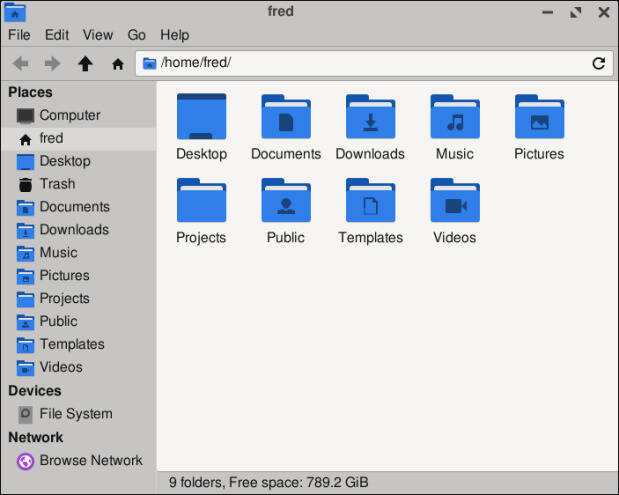

Y como siempre digo, si os gusta el pack de iconos podéis pagarlo de muchas formas en la página en continua evolución (mirad su nuevo aspecto) de KDE Store, que estoy seguro que el desarrollador lo agradecer: puntúale positivamente, hazle un comentario en la página o realiza una donación. Ayudar al desarrollo del Software Libre también se hace simplemente dando las gracias, ayuda mucho más de lo que os podéis imaginar, recordad la campaña I love Free Software Day 2017 de la Free Software Foundation donde se nos recordaba esta forma tan sencilla de colaborar con el gran proyecto del Software Libre y que en el blog dedicamos un artículo.
Más información: KDE Store
La entrada Iconos de alto contraste para tu PC: Bolder Folders se publicó primero en KDE Blog.