
Nano, VirtualBox update in Tumbleweed
A steady pace of openSUSE Tumbleweed snapshots arrived to users this week and there were tons of conversation on the openSUSE Factory mailing list regarding plans to advance the rolling release’s microarchitecture and discussions about the mitigation plan/call for help.
The changes to x86-64-v2 are expected to take place in the first quarter of the 2023 new year and forthcoming changes will be communicated on both the mailing list and blog.
A single package arrived in snapshot 20221128. The Skype plugin for chat client Pidgin, skype4pidgin, updated to version 1.7. The plugin fixed the loss of admin rights when joining a room, problems with file transfers through the client and issues where people were not appearing as being online.
An update of gawk 5.2.1 arrived in snapshot 20221127. The utility fixed issues with the debugger, dropped a few patches and addressed some subtle issues with untyped array elements being passed to functions. The general purpose cryptographic library package libgcrypt, which is based on code from GnuPG, updated to version 1.10.1 and fixed minor memory leaks. The package was updated to improve support for PowerPC architectures and it added the hardware optimizations configuration file hwf.deny to the /etc/gcrypt/ directory. There was also a git+ update of kdump, an update of heaptrack 1.4.0, iputils 20221126 and libeconf 0.4.9, which added new Application Programming Interface calls and fixed some compiling issues.
Snapshot 20221126 updated five packages. A memory leak and buffer overflow were fixed in the libpng16 1.6.39 update. Some code cleanup was made with the libstorage-ng 4.5.53 update and libzypp 17.31.6 avoids calling getsockopt when info is already known and the patch is expected to fix logging on Windows Subsystem for Linux. An upgrade of macros were made for both the coming Leap 15.5 and Fedora 37 in manpages-l10n 4.16.0. An update of python-setuptools 65.6.3 fixed logging errors and improved the reproducibility of clib builds by sorting the sources.
A major version update of text editor nano updated in snapshot 20221125. Nano 7.0 allows for unicode codes to be entered (via M-V) without leading zeroes and by finishing short codes. The new major version now allows string binds containing bindable function names between braces. The braced function names may be mixed with literal text. Nano was not the only text editor to update in the snapshot. An update of vim 9.0.0924 freed memory when executing mapclear, unmenu and delfunc at the more prompt. The package also fixed Amazon Web Services configuration files that were not recognized. An update of video media player VLC 3.0.18 fixed color regression and some rendering and performance issues with older GPUs. Several more packages were update in the snapshot including apparmor 3.1.2, image processing framework gegl 0.4.40, openvpn 2.5.8 and more.
The email announcement for snapshot 20221124 was not sent due to an error with the preparation of the changelog, but the snapshot did go out.
The 7.0.4 version update of virtualbox arrived in snapshot 20221123. The new major version had multiple Graphical User Interface changes to include fixing a regression in the new virtual machine wizard. Oracles’ VM package also added support for the Secure Boot feature. An update of sudo 1.9.12p1 fixed a Common Vulnerability and Exposure that had the potential out-of-bounds write for passwords smaller than eight characters when the password authentication is enabled. CVE-2022-43995 does not affect configurations that use other authentication methods like PAM, AIX authentication or BSD authentication. An update of mariadb 10.10.2 had InnoDB storage crash recovery fixes and improved optimization of joins with many tables, including eq_ref tables.

/usr/bin/*ctl なプログラムが何をするのかを試してみました(1)
この記事は openSUSE Advent Calendar 2022 の1日目です。
systemd が使われるようになると、daemon の制御とかのやり方は大きく変わりました。/etc/init.d にあるスクリプトから、systemd パッケージに含まれるコマンドを使うようになってきました。それらのコマンドは、xxxxxctl という、末尾に ctl が含まれるものが多いように感じました。そこで、/usr/bin/ の中にある、末尾が ctl なプログラムがどんなものかを簡単に調べて見ることにしました。
今回は、bluetoothctl を紹介します。
コマンド名: bluetoothctl
パッケージ: bluez-5.55-150300.3.11.1.x86_64
動作: ○
詳細:
bluetooth の制御をするためのコマンドです。初っ端からですが、systemd とは無関係です。動作には、bluethoothd が必要です。
手持ちの、openSUSE が動く物理マシンでは、bluetooth 機能が標準で入っていなかったので、USB 接続の、バッファローの USB アダプタを使って検証してみました。
まずは、systemd で bluetoothd を起動しておきます。
続いて、USB アダプタを差し込み、bluetoothctl を起動します。
起動すると、プロンプトが表示されるので、デバイスのスキャンをするため、スキャンコマンドを入力すると、エラーになってしまいます。
# bluetoothctl
Agent registered
[CHG] Controller 00:1B:DC:F3:8B:51 Pairable: yes
[bluetooth]# scan on
Failed to start discovery: org.bluez.Error.NotReady
[bluetooth]#
これは、USB Bluetooth アダプタを差し込んだだけでは、まだ機能が動いていないためです。まずは、Bluetooth アダプタの機能を有効にするため、power on と入力します。すると、今度は見えるようになりました。
# power on
[CHG] Controller 00:1B:DC:F3:8B:51 Class: 0x00000104
Changing power on succeeded
[CHG] Controller 00:1B:DC:F3:8B:51 Powered: yes
[bluetooth]# scan on
Discovery started
[CHG] Controller 00:1B:DC:F3:8B:51 Discovering: yes
[NEW] Device 77:6C:E6:94:2A:38 77-6C-E6-94-2A-38
[NEW] Device 7E:4D:FE:CB:CC:D9 7E-4D-FE-CB-CC-D9
[CHG] Device 77:6C:E6:94:2A:38 RSSI: -73
[NEW] Device 4C:FD:32:93:41:95 4C-FD-32-93-41-95
[CHG] Device 77:6C:E6:94:2A:38 RSSI: -65
[NEW] Device 46:D9:DC:39:CC:E8 46-D9-DC-39-CC-E8
[NEW] Device 8C:DE:52:B8:AB:EA SRS-X33
[CHG] Device 77:6C:E6:94:2A:38 RSSI: -73
[CHG] Device 77:6C:E6:94:2A:38 RSSI: -65
[bluetooth]#
ここで、pair コマンドを入力すると
# pair 8C:DE:52:B8:AB:EA
Attempting to pair with 8C:DE:52:B8:AB:EA
[CHG] Device 8C:DE:52:B8:AB:EA Connected: yes
[CHG] Device 8C:DE:52:B8:AB:EA Modalias: bluetooth:v0039p1582d2110
[CHG] Device 8C:DE:52:B8:AB:EA UUIDs: 00001108-0000-1000-8000-00805f9b34fb
[CHG] Device 8C:DE:52:B8:AB:EA UUIDs: 0000110b-0000-1000-8000-00805f9b34fb
[CHG] Device 8C:DE:52:B8:AB:EA UUIDs: 0000110c-0000-1000-8000-00805f9b34fb
[CHG] Device 8C:DE:52:B8:AB:EA UUIDs: 0000110e-0000-1000-8000-00805f9b34fb
[CHG] Device 8C:DE:52:B8:AB:EA UUIDs: 0000111e-0000-1000-8000-00805f9b34fb
[CHG] Device 8C:DE:52:B8:AB:EA UUIDs: 00001200-0000-1000-8000-00805f9b34fb
[CHG] Device 8C:DE:52:B8:AB:EA ServicesResolved: yes
[CHG] Device 8C:DE:52:B8:AB:EA Paired: yes
Pairing successful
[bluetooth]#
となり、ペアリングが出来るようになりました。
この先は試してみていませんが、デバイスの削除とか情報の取得とか色々できるようです。
GUI な環境が無い状況での bluetooth 利用には使えると思います。

Post-mortem: Downtime on November 30, 2022
 Member
 vavai
vavaiIseng-Iseng Berhadiah : Menanam Pepaya untuk Masa Depan
Saya pernah menanam pepaya California dan Mexican Sweet di pekarangan rumah kabin Zeze Zahra. Niat awal sekedar iseng menanam, ternyata hasil buahnya banyak sekali.
Karena hal tersebut, saya menambah jumlah bibit yang ditanam dengan jarak tanaman yang lebih rapat. Harapannya, tanaman tersebut bisa menghasilkan buah yang lebat dalam beberapa bulan kedepan.
Trabaja en KDE
La comunidad de KDE a través de la organización KDE e.v. que representa a KDE en cuestiones legales y financieras, ofrece unas plazas de empleo para trabajar en la comunidad

KDE es una gran comunidad global que crea software libre para ser utilizado por cualquier persona en sistemas GNU/Linux e incluso por otros sistemas privativos.
La comunidad de KDE está formada por diferentes personas que desarrollan software, corrigen errores, escriben, traducen de manera altruista, compartiendo sus conocimientos, tiempo y esfuerzo en este gran proyecto de software libre.
Pero además de ese trabajo voluntario, hay también una serie de personas que trabajan contratados por KDE, mediante KDE e.v. para realizar diferentes tareas dentro de la comunidad, en las que se requiere un toque más profesional.
Esas personas contratadas por KDE trabajan y coordinan sus esfuerzos y trabajos para hacerlo junto a la gran comunidad de KDE.
Si quieres encontrar un trabajo relacionado con el software libre, en un gran proyecto como es KDE, echa un vistazo a estas ofertas de empleo que ofrece KDE.
Documentación
KDE e.V. está buscando una persona con experiencia en redacción técnica para actualizar la documentación de KDE en sus diversos proyectos. La documentación del software y comunidad está en constante evolución y requiere una cuidadosa planificación y mantenimiento, así como una comunicación regular y una estrecha colaboración con nuestros equipos de colaboradores.
Se basará en el resultado del trabajo de documentación anterior. Consulta la convocatoria de la propuesta para obtener más detalles sobre esta oportunidad de contratación.
Hardware
Tu tarea abarcará desde discutir con los fabricantes y evaluar el tipo de hardware que planean enviar, hasta asegurarte de que sea viable que KDE lo admita, ya sea implementando las características o coordinando con los diferentes equipos para asegurarse de que esto pueda suceder en de manera oportuna.
Eventualmente, esto requerirá la colaboración con las comunidades de integración de sistemas para garantizar que nuestros usuarios obtengan una experiencia óptima. Consulta la convocatoria de la propuesta para obtener más detalles sobre esta oportunidad de contratación.
Software
KDE e.V. está buscando un ingeniero de software para desarrollar la plataforma de software de KDE. Trabajará en KDE Frameworks, Plasma, Qt y otras bibliotecas de middleware para impulsar el estado del arte en la tecnología de KDE.
Las responsabilidades incluyen el desarrollo de nuevas funciones, la corrección de errores, la realización del trabajo de portabilidad necesario, la mejora de la cobertura y la confiabilidad de las pruebas y el mantenimiento del código existente. Consulta la convocatoria de la propuesta para obtener más detalles sobre esta oportunidad de contratación.
En los diversos enlaces se especifican los conocimientos necesarios que se requieren y también las condiciones del trabajo. Todos ellos para realizar en remoto. Y un correo de contacto al que enviar tu propuesta o pedir más información al respecto.
Quizás alguna de esta se adapta a tu perfil técnico y consigas el puesto y sea una puerta que se abra a trabajar en el gran proyecto que es KDE dentro de la comunidad de software libre. ¡Anímate!

Taller de navidad: diseño & impresión 3D en Linux Center
Los eventos parece que empiezan a ser más numerosos a medida que la comunidad linuxera vuelve a la normalidad post-pandémica. Hoy me complace compartir la tercera charl0-tallera tras la reapertura de Linux Center, el punto de encuentro y formación de los usuarios GNU/Linux auspiciada de Slimbook que lleva por título «Taller de navidad: diseño & impresión 3D», que será realizado por Adriana en las Linux Center.
Taller de navidad: diseño & impresión 3D en Linux Center
Hemos hablado mucho este verano de la compañía valenciana de ensamblaje de dispositivos compatibles 100% con el Software Libre conocida como Slimbook, pero hemos hablado de sus ultrabooks y no tanto de sus actividades, y es hora compaginar ambas cosas ya que hace poco han dedicido volver al mundo de los eventos con la reapertura de su Linux Center.

De esta forma, el próximo 3 de diciembre de este 2022 vamos a poder disfrutar la tercera charla formal desde su reapertura oficial.
En palabras de los organizadores:
Adriana Fuentes, profesional de las TIC con más de 15 años de experiencia en el sector de tecnologías web, diseño y multimedia. He trabajado como responsable de marketing y diseño, UX/UI y desarrollo de aplicaciones corporativas.
Algunos de sus trabajos han sido:
* Video-animación 3D reproducido en Noticias cuatro (TV)
* Trabajos audiovisuales para empresas utilizando animación 2D o edición de vídeo
* Diseño/guión/maquetación de libros infantiles
* Ganadora del diseño español del concurso europeo de diseño de tarjetas de World of Warcraft organizado por Blizzard.
Y como índice del curso Taller de navidad: diseño & impresión 3D tenemos:
- Repaso rápido INKSCAPE
1.1. Operaciones booleanas
1.2. trazado avanzado
1.3. Convertir trazado a objeto.
1.4. Trabajando con trayectos
1.5. Simplificar
- Ejercicio de diseño vectorial en INKSCAPE
- Modelar el diseño vectorial en 3D con FREECAD
- IMPRIMIR CON IMPRESORA 3D
NOTAS:
- Se necesitan unos conocimientos mínimos de INKSCAPE.
- Venir al curso con INKSCAPE y FREECAD ya instalados.
La información adicional que necesitas es esta:
Plazas Total: 20 (alerta, ¡son limitadas y quedan pocas!)
¿Curso Gratuito o de Pago?: GRATUÍTO gracias a SLIMBOOK.
¿Podemos retransmitirlo via streaming?: No
Localización: Linux Center (Grupo Odín). Ronda de la Química s/n Edificio ABM L’Andana, 7ª planta Frente a Parque Técnológico 46980 Paterna, Valencia
Más información: Linux Center
La entrada Taller de navidad: diseño & impresión 3D en Linux Center se publicó primero en KDE Blog.
Syslog-ng 101, part 1: Introduction
Welcome to the first part of my syslog-ng tutorial series. In this part, I give you a quick introduction what to expect from this series and try to define what syslog-ng is.
I plan to release parts of my tutorial around every week. Of course, the Christmas holidays and the upcoming conference season may cause some delays. Each part will be released as a blog accompanied by a video. It is up to you, which version you follow. However, even if you go with the video, it is worth visiting the blog: you will be able to copy and paste configuration samples from there.
You can watch the video on YouTube:
Or you can read the rest of my blog at: https://www.syslog-ng.com/community/b/blog/posts/syslog-ng-101-part-1-introduction

syslog-ng logo
Lanzada la cuarta actualización de Plasma 5.26
Tal y como estaba previsto en el calendario de lanzamiento de los desarrolladores, hoy martes 29 de novembre la Comunidad KDE ha comunicado que ha sido lanzada la cuarta actualización de Plasma 5.26. Una noticia que aunque es esperada y previsible es la demostración palpable del alto grado de implicación de la Comunidad en la mejora continua de este gran entorno de escritorio de Software Libre.
Lanzada la cuarta actualización de Plasma 5.26
No existe Software creado por la humanidad que no contenga errores. Es un hecho incontestable y cuya única solución son las actualizaciones. Es por ello que en el ciclo de desarrollo del software creado por la Comunidad KDE se incluye siempre las fechas de las actualizaciones.
De esta forma, el martes 29 de noviembre ha sido lanzada la cuarta actualización de Plasma 5.26, la cual solo trae (que no es poco) soluciones a los bugs encontrados en esta semana de vida del escritorio y mejoras en las traducciones. Es por tanto, una actualización 100% recomendable.
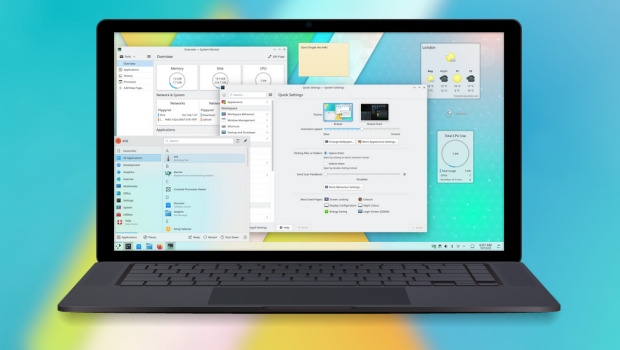
Las novedades de Plasma 5.26
La Comunidad KDE publicó el 11 de octubre Plasma 5.26, una versión que nos ofrecen un gran conjunto de novedades y propuestas que nos acercan a lo que vendrá cuando se realice la transición a Plasma 6 y que se ha centrado en los plasmoides y ha supuesto un gran paso en el desarrollo de Plasma Bigscreen.
Ya ha pasado el día de descarga y actualizaciones, y ya los estoy disfrutando en mi KDE Neon, así que os comento algunas de sus novedades:
- Posibilidad de redimensionar los plasmoides emergentes incrustados en una barra de tareas.
- Timer: nuevo plasmoide que nos sirve para tener un simple temporizador para las tareas que lo requieran o, inlcuso, asignarle acciones como ejecutar un comando.
- Añadido el navegador Aura especialmente diseñado para la pantalla grande del modo Plasma Bigscreen que destaca por tener mosaicos grandes y claramente etiquetados te permiten navegar por la red mundial con tu mando a distancia desde el sofá.
- También se une a Bigscreen Plank Player, un reproductor multimedia sencillo y fácil de usar que te permitirá reproducir vídeos desde un dispositivo de almacenamiento que conectes a tu televisor.
- Mejoras en el entorno Plasma que utiliza el servidor gráfico Wayland, el cual sigue mejroando y hace que las aplicaciones XWayland escaladas ahora se ven más hermosas, nítidas y claras.
Más información: KDE
La entrada Lanzada la cuarta actualización de Plasma 5.26 se publicó primero en KDE Blog.
Lanzada la cuarta actualización de Plasma 5.25
Tal y como estaba previsto en el calendario de lanzamiento de los desarrolladores, hoy martes 29 de novembre la Comunidad KDE ha comunicado que ha sido lanzada la cuarta actualización de Plasma 5.26. Una noticia que aunque es esperada y previsible es la demostración palpable del alto grado de implicación de la Comunidad en la mejora continua de este gran entorno de escritorio de Software Libre.
Lanzada la cuarta actualización de Plasma 5.26
No existe Software creado por la humanidad que no contenga errores. Es un hecho incontestable y cuya única solución son las actualizaciones. Es por ello que en el ciclo de desarrollo del software creado por la Comunidad KDE se incluye siempre las fechas de las actualizaciones.
De esta forma, el martes 29 de noviembre ha sido lanzada la cuarta actualización de Plasma 5.26, la cual solo trae (que no es poco) soluciones a los bugs encontrados en esta semana de vida del escritorio y mejoras en las traducciones. Es por tanto, una actualización 100% recomendable.
Las novedades de Plasma 5.26
La Comunidad KDE publicó el 11 de octubre Plasma 5.26, una versión que nos ofrecen un gran conjunto de novedades y propuestas que nos acercan a lo que vendrá cuando se realice la transición a Plasma 6 y que se ha centrado en los plasmoides y ha supuesto un gran paso en el desarrollo de Plasma Bigscreen.
Ya ha pasado el día de descarga y actualizaciones, y ya los estoy disfrutando en mi KDE Neon, así que os comento algunas de sus novedades:
- Posibilidad de redimensionar los plasmoides emergentes incrustados en una barra de tareas.
- Timer: nuevo plasmoide que nos sirve para tener un simple temporizador para las tareas que lo requieran o, inlcuso, asignarle acciones como ejecutar un comando.
- Añadido el navegador Aura especialmente diseñado para la pantalla grande del modo Plasma Bigscreen que destaca por tener mosaicos grandes y claramente etiquetados te permiten navegar por la red mundial con tu mando a distancia desde el sofá.
- También se une a Bigscreen Plank Player, un reproductor multimedia sencillo y fácil de usar que te permitirá reproducir vídeos desde un dispositivo de almacenamiento que conectes a tu televisor.
- Mejoras en el entorno Plasma que utiliza el servidor gráfico Wayland, el cual sigue mejroando y hace que las aplicaciones XWayland escaladas ahora se ven más hermosas, nítidas y claras.
Más información: KDE
La entrada Lanzada la cuarta actualización de Plasma 5.25 se publicó primero en KDE Blog.
Perjuangan Mencapai Cita-Cita
Kemarin sore saya buru-buru pulang setelah menjemput Vivian dari sekolah. Cuaca mendung gelap dan kelihatannya akan hujan lebat. Daripada terjebak kemacetan, lebih baik sampai di rumah lebih awal dan bisa mempersiapkan diri untuk kuliah Business Intelligence.
Sambil ngabuburit dan mempersiapkan diri untuk kuliah, saya mengecek email dan group chat kuliah. Banyak yang terjebak kemacetan karena hujan dan banjir. Salah satu teman kuliah yang bekerja di salah satu lembaga pemerintah malah info, motornya mogok karena mencoba menerobos banjir setinggi dengkul.
“Menyesal malah pulang, tau gitu kuliah di kantor tadi🥲”, gitu katanya. Saya bilang bahwa ya kita nggak pernah tahu keputusan mana yang paling baik. Sewaktu memutuskan pulang menerobos hujan, itu kan sebenarnya diniatkan untuk hal yang baik, agar bisa kuliah online dari rumah dengan suasana nyaman dan tenteram. Kalau kuliah online di kantor, selesai jam 9 malam dan harus pulang ke rumah. Besok pagi sudah kembali lagi ke kantor. Rasa lelahnya belum hilang.
Karena motornya mogok, akhirnya teman-teman satu group kuliah menyarankan ia bersantai dulu. Minum teh panas dulu karena kebetulan ia berhenti dan menunggu di warung makan. Daripada menyesali keputusan dan sewot karena ada hal-hal yang tidak berjalan sesuai keinginan.
Akhirnya ada ibu-ibu baik hati yang membantunya menyalakan motor dan ia bisa sampai ke rumah tepat sebelum kuliah Business Intelligence dimulai.
Kadang kita kerap menyesali keputusan yang kita ambil karena kita terbebani dengan keputusan tersebut. Misalnya keputusan untuk mengambil kuliah, otomatis ada beban tugas kuliah, beban presentasi, beban mengatur waktu antara pekerjaan, keluarga dan kuliah.

Ada juga yang kuliah sambil kerja. Di pekerjaan kadang mendapatkan situasi yang tidak enak, ditambah dengan beban kuliah pula. Belum lagi yang kuliah sambil kerja dan sudah berkeluarga. Jadi tambah tanggung jawab dan kegiatannya.
Tapi justru disitu perbedaannya. Disitu letak perjuangannya. Apakah kita bisa melakukan manajemen pribadi agar bisa mengatasi masalah tersebut. Apakah kita mau belajar untuk membagi waktu agar ada keseimbangan diantara kegiatan yang kita lakukan.
Kalau kita sudah memutuskan untuk kuliah, dicamkan didalam hati agar kuliahnya bisa diselesaikan. Mungkin kita jadi kurang tidur, karena harus mengerjakan tugas malam-malam. Mungkin kita jadi tidak bisa liburan, karena waktunya sempit dan banyak kegiatan yang harus dilakukan. Mungkin kita tidak punya waktu untuk melakukan hal-hal yang kita senangi.
Itu hal wajar. Mau tidak mau kita memang harus berkorban. Bisa berkorban waktu, tenaga maupun biaya. Justru karena berkorban itu, makanya jangan sampai gagal.
Di Excellent dan Aktiva, saya meminta staff untuk membuat laporan harian secara rutin. Setiap sore. Mungkin ini jadi tambahan pekerjaan meski harusnya tidak sulit-sulit amat. Laporan harian itu semacam resume apa saja yang dilakukan sehari itu.
Sebagai staff, saya bisa saja punya banyak alasan untuk tidak melakukan tugas tersebut. Namun saya juga tidak bisa berargumentasi jika dari sekian banyak staff, hanya saya yang tidak bisa mengirimkan laporan secara periodik sesuai yang diminta.
Analoginya sama seperti tugas kuliah. Mata kuliah Business Intelligence meminta semua mahasiswa untuk menyiapkan final assignment berupa analisa data, implementasi (application) dan improvementnya. Silakan buat sebaik mungkin, minggu depan harus siap dipresentasikan.
Kalau ada tugas seperti itu, apa saya harus berdebat dengan dosen bahwa saya tidak punya basic pengetahuan untuk materinya? Apa saya harus berdebat dengan dosen bahwa saya belum siap? Bahwa saya banyak tugas lain dari mata kuliah Ubiquitous Computing, Research Methodology dan IT Forensics? Kan nggak.
Dosen sudah memberikan tugas, ya tugas saya untuk menyelesaikannya. Kalau untuk menyelesaikan tugas itu saya harus membagi waktu dengan cermat antara pekerjaan di kantor, urusan keluarga dan urusan bisnis, ya saya harus bisa membaginya. Kalau untuk menyelesaikannya saya harus mengerjakan malam-malam sehingga waktu tidur berkurang ya saya harus melakukannya. Jika karena tugas saya terpaksa tidak liburan, tidak ke rumah kabin, tidak ke kebun Zeze Zahra, tidak bisa nonton Netflix, tidak bisa melihat Curiosity Stream, ya itu harga yang harus dibayar. Itu pengorbanan bentuk kecil yang harus saya lakukan.
Banyak para dosen dan mahasiswa yang kuliah terpisah jauh dari tempat tinggal. Banyak dari mereka yang menempuh pendidikan di luar negeri, jauh dari keluarga dan sanak saudara. Dengan budget terbatas, mungkin adakalanya timbul perasaan lonely dan nelangsa, apalagi jika lingkungan juga bukan seperti lingkungan di Indonesia yang sudah familiar. Justru hal-hal seperti itu yang bisa mendewasakan kita dan membuat kita belajar menghargai apa-apa yang selama ini kita anggap sepele. Saya selalu kagum pada para mahasiswa yang harus berjuang seperti itu untuk bisa mencapai yang dicita-citakan. Hal-hal yang tidak enak cukup ditelan, untuk nantinya diceritakan pada anak bahwa kita pernah harus berjuang sedemikian rupa agar bisa sampai di tujuan yang diharapkan.
Kalau kita yang kuliah bisa ulang-alik setiap hari, kuliah bisa online sambil ngemil dan bersantai, kuliah dengan budget yang lebih dari cukup dan kemudian mengeluhkan pengorbanan yang harus dilakukan, gimana kalau kita sampai ditest pada situasi yang lebih berat seperti mereka? Apa kita harus jejeritan di tengah malam karena stress pada beban yang kita anggap sangat berat?
Hal-hal seperti itu yang membuat saya bersemangat untuk bisa belajar mengatur waktu dan menyelesaikan tugas sebagaimana mestinya. Karena itu tugas dan saya harus menyelesaikannya sebaik mungkin.
Pada akhirnya, hidup kita milik kita, susah maupun senang, kita juga yang menjalaninya.