
 Member
 baltolkien
Lanzada la cuarta actualización de Plasma 5.26
Tal y como estaba previsto en el calendario de lanzamiento de los desarrolladores, hoy martes 29 de novembre la Comunidad KDE ha comunicado que ha sido lanzada la cuarta actualización de Plasma 5.26. Una noticia que aunque es esperada y previsible es la demostración palpable del alto grado de implicación de la Comunidad en la mejora continua de este gran entorno de escritorio de Software Libre.
Lanzada la cuarta actualización de Plasma 5.26
No existe Software creado por la humanidad que no contenga errores. Es un hecho incontestable y cuya única solución son las actualizaciones. Es por ello que en el ciclo de desarrollo del software creado por la Comunidad KDE se incluye siempre las fechas de las actualizaciones.
De esta forma, el martes 29 de noviembre ha sido lanzada la cuarta actualización de Plasma 5.26, la cual solo trae (que no es poco) soluciones a los bugs encontrados en esta semana de vida del escritorio y mejoras en las traducciones. Es por tanto, una actualización 100% recomendable.
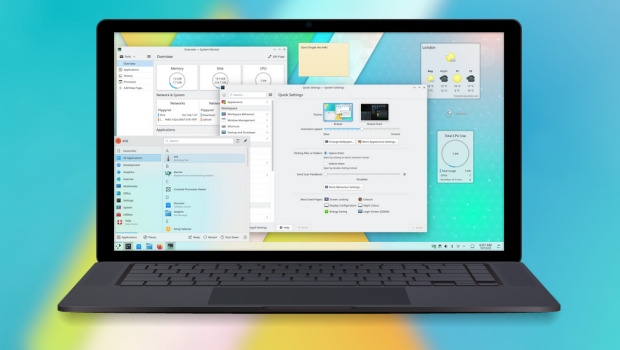
Las novedades de Plasma 5.26
La Comunidad KDE publicó el 11 de octubre Plasma 5.26, una versión que nos ofrecen un gran conjunto de novedades y propuestas que nos acercan a lo que vendrá cuando se realice la transición a Plasma 6 y que se ha centrado en los plasmoides y ha supuesto un gran paso en el desarrollo de Plasma Bigscreen.
Ya ha pasado el día de descarga y actualizaciones, y ya los estoy disfrutando en mi KDE Neon, así que os comento algunas de sus novedades:
- Posibilidad de redimensionar los plasmoides emergentes incrustados en una barra de tareas.
- Timer: nuevo plasmoide que nos sirve para tener un simple temporizador para las tareas que lo requieran o, inlcuso, asignarle acciones como ejecutar un comando.
- Añadido el navegador Aura especialmente diseñado para la pantalla grande del modo Plasma Bigscreen que destaca por tener mosaicos grandes y claramente etiquetados te permiten navegar por la red mundial con tu mando a distancia desde el sofá.
- También se une a Bigscreen Plank Player, un reproductor multimedia sencillo y fácil de usar que te permitirá reproducir vídeos desde un dispositivo de almacenamiento que conectes a tu televisor.
- Mejoras en el entorno Plasma que utiliza el servidor gráfico Wayland, el cual sigue mejroando y hace que las aplicaciones XWayland escaladas ahora se ven más hermosas, nítidas y claras.
Más información: KDE
La entrada Lanzada la cuarta actualización de Plasma 5.26 se publicó primero en KDE Blog.
Pemanis Buatan, Kadar Garam dan Pengajian
Di lingkungan rumah tinggal orang tua saya di Tambun maupun di lingkungan sekitar rumah kabin Zeze Zahra di Batujaya Karawang, saya menemukaan kenyataan hidup yang hampir mirip. Banyak warga yang mengalami sakit diabetes, darah tinggi dan stroke.
Kehidupan yang tidak mudah membuat hal tersebut lebih menyesakkan. Uang pendapatan sehari-hari yang seharusnya bisa digunakan untuk keperluan kebutuhan pokok dan pendidikan jadi tersedot untuk biaya pengobatan.
Pola hidup sehat mungkin jarang menjadi pertimbangan. Kita saja yang mungkin bekerja rutin setiap hari kerap mengabaikan pola hidup sehat, apalagi bagi keluarga yang memiliki sedikit pilihan, hanya bisa makan apa yang tersedia.
Itu sebabnya jadi banyak yang mengulang siklus yang sama dari waktu ke waktu. Jadi turun temurun. Sekolah sampai tingkat SLTA saja atau bahkan lebih rendah, kemudian bekerja sebagai buruh atau bekerja serabutan, berkeluarga dan mengulang siklus yang sama. Hanya sedikit yang bisa keluar dari lingkaran tersebut.

Saat menghadiri pemakaman salah satu warga yang berpulang karena sakit, saya bicara ke adik saya Mardalih yang mengurus Yayasan Ultima Insani Madania. Saya sampaikan padanya bahwa ada baiknya yayasan menjalankan program tambahan, misalnya membantu keluarga yang terkena musibah. Memfasilitasi pembelian kain kafan, membantu proses penggalian kubur hingga membantu hal lain terkait pemakaman.
Karena pernah mengalami sendiri kehilangan anggota keluarga, saya merasakan bahwa jika terkena musibah kadang kita sulit berpikir dengan jernih. Bantuan dari orang lain untuk mengurus hal tersebut tentu akan sangat meringankan beban keluarga yang terkena musibah.
Di perkotaan dan di perumahan, biasanya sudah ada lembaga keagamaan atau yayasan yang mengurus hal tersebut, namun di perkampungan seperti di tempat tinggal keluarga di Tambun Bekasi dan di Batujaya Karawang, proses itu masih mengandalkan gotong royong keluarga dan warga sekitar.
Yayasan Ultima Insani Madania merupakan yayasan yang bergerak dibidang pendidikan, kesehatan dan pemberdayaan masyarakat. Dibiayai dari CSR (Corporate Social Responsibility) PT Excellent Infotama Kreasindo dan PT Aktiva Kreasi Investama dan dari donasi individu warga masyarakat.
Sesuai misinya, saya berharap yayasan Ultima bisa menjadi pihak yang memberdayakan masyarakat baik terkait pengurusan bagi yang berduka cita maupun dalam bentuk edukasi.
Setiap malam biasanya ada pengajian anak-anak dan setiap minggu ada pengajian ibu-ibu. Saya mengusulkan pada pengurus agar 1x dalam sebulan, ada sisipan di pengajian ibu-ibu, berupa edukasi dari tenaga kesehatan (dokter atau bidan) mengenai pola hidup sehat. Misalnya mengenai saran menghindari minuman dengan pemanis buatan, mengurangi konsumsi gula maupun garam.
Ada beberapa rekan saya yang berprofesi sebagai tenaga kesehatan dan saya bisa minta bantuannya untuk memberikan edukasi dalam bahasa sederhana dan mudah dimengerti.
Selain edukasi ke ibu-ibu, hal yang mirip nantinya dilakukan juga terhadap anak-anak. Agar ada kesinambungan pemahaman dan ada inisiatif untuk mulai hal yang benar. Meski mungkin hasilnya belum signifikan, saya berharap apa yang dilakukan bisa membekas dan bisa membawa dampak berkelanjutan.
Sama seperti saat membangun Excellent maupun rumah kabin Zeze Zahra, saya tidak tahu apakah inisiatif ini bisa berkembang ke arah yang lebih luas atau tidak, namun bagi saya sepanjang hal itu baik untuk dilakukan, ya dilakukan saja. Nanti sambil belajar dari pihak lain yang sudah berpengalaman dan sekaligus mereview apa yang sudah dilakukan.
Sumber gambar : Tien Vu (Pixabay)
Battery Bar – Plasmoides de KDE (212)
Hoy os presento Battery Bar, el plasmoide de KDE número 212 de la gran serie de los mismos mostrados en el blog y que nos ofrece un widget informativo sobre el estado de la barería de nuestro dispostivo
Battery Bar – Plasmoides de KDE (212)
De plasmoides tenemos de todo tipo funcionales, de configuración, de comportamiento, de decoración o, como no podía ser de otra forma, de información sobre nuestro sistema como puede ser el uso de disco duro, o de memoria RAM, la temperatura o la carga de uso de nuestras CPUs.
A todos ellos se les une otro plasmoide creado por lonelytrainsistor que añade una barra de batería a un panel orientado horizontalmente en KDE Plasma.
En realidad, el applet añade dos barras de batería a un panel:
- barra principal (verde por defecto) – llena la pantalla en función del porcentaje de energía que queda en la batería,
- barra auxiliar (roja por defecto) – su longitud representa el porcentaje de batería que se utilizará durante la próxima hora (por defecto) con el consumo de energía actual.

Además, este plasmoide tiene otras características visuales como:
- cuando la batería se está cargando la barra principal respira lentamente de vez en cuando,
- cuando el cargador está desconectado se mostrarán varias burbujas que escapan de la barra principal hacia la derecha,
- cuando el cargador está conectado, un rápido destello brillante recorrerá la barra principal de izquierda a derecha.
Y como siempre digo, si os gusta el plasmoide podéis “pagarlo” de muchas formas en la nueva página de KDE Store, que estoy seguro que el desarrollador lo agradecerá: puntúale positivamente, hazle un comentario en la página o realiza una donación. Ayudar al desarrollo del Software Libre también se hace simplemente dando las gracias, ayuda mucho más de lo que os podéis imaginar, recordad la campaña I love Free Software Day 2017 de la Free Software Foundation donde se nos recordaba esta forma tan sencilla de colaborar con el gran proyecto del Software Libre y que en el blog dedicamos un artículo.
Más información: KDE Store
¿Qué son los plasmoides?
Para los no iniciados en el blog, quizás la palabra plasmoide le suene un poco rara pero no es mas que el nombre que reciben los widgets para el escritorio Plasma de KDE.
En otras palabras, los plasmoides no son más que pequeñas aplicaciones que puestas sobre el escritorio o sobre una de las barras de tareas del mismo aumentan las funcionalidades del mismo o simplemente lo decoran.
La entrada Battery Bar – Plasmoides de KDE (212) se publicó primero en KDE Blog.
Webminars de la asociación Dédalo sobre la Semana del software libre
La Fundación Dédalo lleva desde el año 2006 dando a conocer el Software Libre y las diferentes alternativas disponibles en el mercado. Este es el objetivo con el que se ha programado la Semana del Software Libre.

La fundación Dédalo desde Navarra en España, pone en marcha unos seminarios a los que se puede asistir previa reserva en su web, donde nos enseñarán el uso de diversas herramientas de software libre.
En concreto serán los días 29 y 30 de noviembre y 1 de diciembre de 2022.
Los objetivos que se pretenden conseguir con esta nueva edición (la que hace ya la número XVII) son:
- Divulgar y dar a conocer los programas de Software Libre de uso más común.
- Fomentar el uso del Software Libre, tanto en el ámbito doméstico como en el profesional, mostrando las ventajas e inconvenientes de este tipo de soluciones.
- Mostrar las similitudes en las formas de trabajar entre diferentes sistemas libres y privativos, demostrando su eficacia como alternativas completas, prácticas y útiles.
- Acercar a las empresas TIC de la Ribera tecnologías libres de desarrollo de primer nivel.
29 de noviembre de 2022
Correo electrónico libre con Thunderbird.
Aprende a manejar tus cuentas de correo electrónico personales y profesionales con Thunderbird, el cliente de correo electrónico libre más usado.
Asistencia gratuita, previa inscripción en nuestro teléfono 948 088 044, desde su web haciendo clic aquí.
Inscripción online: pincha aquí
30 de noviembre de 2022
Reutiliza tu viejo PC con GNU/Linux
Aprende a instalar un sistema operativo Linux en tu PC y vuelve a darle utilidad como cuando lo compraste. Conoce los mejores sistemas operativos para equipos antiguos.
Asistencia gratuita, previa inscripción en nuestro teléfono 948 088 044, desde su web haciendo clic aquí
Inscripción online: pincha aquí
1 de diciembre de 2022
OBS: Streaming con software libre
En este Webinar veremos y conoceremos una de las herramientas Software Libre más utilizadas para realización de streamings y grabación de vídeos, OBS Studio. Un software que está siendo más usado cada día (incluso por profesionales del sector audiovisual) y tiene multitud de funcionalidades como: streaming (en multitud de plataformas), grabación, escenas, múltiples fuentes de audio y vídeo, mejora de sonido, plugins… etc. Resuelve tus dudas.
Asistencia gratuita, previa inscripción en nuestro teléfono 948 088 044 o desde su web haciendo clic aquí
Inscripción online: pincha aquí

Si te interesan los temas y tienes disponibilidad, no dudes en inscribirte y asistir.

Tumbleweed to Roll Out Mitigation Plan, Advance Microarchitecture
A mitigation plan for a microarchitecture level change and information about advancing openSUSE’s rolling release Tumbleweed to an x86-64-v2 microarchitecture kicked off a significant move forward for the project this week.
Tumbleweed and openSUSE other distributions are built for old x86-64-v1 hardware and transitioning to x86-64-v2 will require community efforts to support users with hardware that can’t make the transition to the microarchitecture.
The “openSUSE Factory repository is repurposed to move forward with x86-64-v2,” wrote Tumbleweed release manager Dominique Leuenberger in an email to the openSUSE Factory mailing list. A new repository “will be set up as openSUSE Factory currently exists today. This change is necessary to align with the SUSE factory first policy to keep aligned with the project’s sponsor’s development efforts.
That new repository looks like it will be named openSUSE:Factory:LegacyX86 and volunteers would be needed to maintain aspects of the repository designed for x86-64-v1 users.
“I’ll help with the initial setup (incl openQA) but, once running, expect not to touch this anymore (unless the people opting to take care ask for specific help),” Leuenberger wrote in a reply. “I expect installer ISO files, but I’d not expect live” images.
People attending openSUSE’s open release engineering meeting discussed the topic and came up with an action plan.
The discussed and agreed upon solution forward is repurposing Tumbleweed’s main repository to x86-64-v2 like ALP will be upon its release. The i586 support will be dropped from the repository and only -32bit parts that are necessary for specific packages will exist, but no complete repository will exist for -32bit. Users will not need to do anything other than to zypper dup when the repository transitions to x86-64-v2, but a notification for this change is expected to be sent to users.
As for the users of the legacy systems who remain on x86-64-v1, action will be necessary. The repository list will need to be updated from download.opensuse.org/tumbleweed/repo/oss to something like download.opensuse.org/ports/legacyx86/tumblewed/repo/oss.
“With this solution, we provide benefits to users of more recent machines than that of V1 by using the newer CPU instructions,” he wrote. “Yet this provides a path for users to still run Tumbleweed on machines that might not have the needed hardware.”
To check the hardware for those running Tumbleweed, users can use the following command in a terminal.
/lib64/ld-linux-x86-64.so.2 --help
Results should likely result in the following:
x86-64-v4
x86-64-v3 (supported, searched)
x86-64-v2 (supported, searched)
“Once the new intel port repository is ready, I’ll let you know the exact location of it,” Leuenberger emphasized in the email “We can expect for these changes to take place in the first quarter of the new year of 2023.”
A recent poll on openSUSE’s Twitter found that 51 percent of poll respondents had an understanding of microarchitecture levels and the benefits it brings to developers and infrastructure optimization.
For more information, follow the discussion on the openSUSE Factory mailing list.

Request Page Redesign - Build Results with a Pinch of Salt
Cara Termudah Panen Ubi Ungu Dalam Pot
Menanam ubi dalam pot ternyata bukan hanya memudahkan proses penanaman dan pemeliharaan, melainkan juga saat proses panen. Saat panen sebelumnya, saya menggali ubi (ndukur kalau istilah Betawinya), namun ternyata ada cara yang lebih mudah. Ternyata itu salah satu aspek penting prinsip “Kaizen”, yaitu perbaikan terus menerus.
Ada kalanya kita menjalani sesuatu karena kita melihat contohnya dari dulu seperti itu. Bisa juga karena alam bawah sadar kita mendorong kita untuk melakukan hal tersebut dan tidak berupaya mencari cara lain yang sebenarnya lebih efisien dan efektif.
Bagaimana caranya? Pak Amoy dan bang Matan akan mencontohkannya dalam video ini.
Linux Connexion con Eduardo Morenoen Podcast Linux #166
Bienvenidos a un nuevo audio de Podcast Linux, concretamente el episodio 166 titulado «Linux Connexion con Eduardo Moreno» Linux donde Juan Febles comparte una de sus aficiones, el retrogaming, que se combina con su otra afición, GNU/Linux, mundos que combinan de maravilla por varias razones, entre las que destacan el compromiso comunitario y de lucha contra la obsolescencia programada que ambas comunidades comparten.
Linux Connexion con Eduardo Moreno en Podcast Linux #166
Cada cierto tiempo me gusta promocionar los audios de Podcast Linux, un programa de Juan Febles que hace con mucho cariño y que siempre tienen cosas interesantes que descubrir.
De esta forma, hace poco promocioné su especial 6º aniversario, su Linux Connexión con Jorge Lama o la Academia Automatización del Hogar con Luis del Valle y Germán Martín.
Hoy toca volver hablar y compartir de nuevo su podcast con una entrada en la que presenta al creador de Adam Image, una Custom Firmware para consolas portátiles chinas de emulació con la que se pueden hacer muchas cosas y sobre la Comunidad Linuxera tiene mucho que decir.
En palabras de Juan:
¡¡¡Muy buenas amante del Software Libre!!!
Bienvenido a otra entrega, la número 166, de Podcast Linux. Un saludo muy fuerte de quien te habla, Juan Febles. Hoy viene al programa Eduardo Moreno, Ingeniero Industrial, autodidacta en formación informática y apasionado del software libre y cada vez más del hardware libre. Creador de Adam Image, una Custom Firmware para consolas portátiles de emulación.
Recordar a los oyentes que estamos en una sala Jitsi para esta charla, un servicio libre para videoconferencias, y que este podcast se aloja su web en Gitlab, un servicio libre de repositorios git y su contenido en Archive.org, la biblioteca digital libre con licencias Creative Commons.
Recuerda el proyecto PC Reciclado de la Audiencia. Anímate a participar
Enlaces:
Así que os invito a escuchar este monólogo deJuan cuya voz, tranquilidad y simpatía hace que me encan . ¡Dentro audio!
Más información: Podcast Linux
Sigue a Podcast Linux
Aprovecho para animaros a seguir Podcast Linux en algunos de los canales de comunicación que tiene:
- Twitter: https://twitter.com/podcastlinux
- Mastodon: https://mastodon.social/@podcastlinux/
- Correo: podcastlinux@disroot.org
- Web: https://podcastlinux.com/
- Telegram: https://t.me/podcastlinux
- Telegram Juan Febles: https://t.me/juanfebles
- Youtube: https://www.youtube.com/PodcastLinux
- Feed Podcast Linux: https://podcastlinux.com/feed
- Feed Linux Express (Audios Telegram): https://podcastlinux.com/Linux-Express/feed
La entrada Linux Connexion con Eduardo Morenoen Podcast Linux #166 se publicó primero en KDE Blog.
Cukup 2 Bulan! Panen Ubi Jalar Ungu di Dalam Pot
Dua bulan yang lalu, saya mulai menanam ubi ungu di dalam pot. Penanaman itu dilakukan setelah saya melakukan ujicoba penanaman ubi dalam pot dan berhasil mendapatkan ubi yang cukup besar. Ada belasan pot yang saya gunakan untuk menanam ubi ungu. Selang 2 bulan dari waktu penanaman, ubi tersebut dipanen.


Apakah hasilnya bagus dan memuaskan? Yuk simak dalam video ini :
KTechlab: Aplicaciones KDE Edu (I)
Hace más de diez años realicé para el blog una sección que llevaba por título KDE Education en la que repasaba tosas las aplicaciones de la rama educativa de la Comunidad KDE. Creo que ha pasado un tiempo más que prudencial para volver a repsar este más que interesante colección de aplicaciones y voy a empezar justo con una que no apareció en la primera serie: KTechlab una aplicación que nos pemite experimentar con microcontroladores y circutios electrónicos.
KTechlab: Aplicaciones KDE Edu (I)
Como decía en la introducción, hace unos 11 años finalicé el repaso a las aplicaciones educativas de KDE , y lo hice con una que he utilizado hace poco para mejorar los resultados académicos de mi alumnado.Hoy me complace reiniciar esta serie en la que repasaré de nuevo las aplicaciones haciendo énfasis en sus actualizaciones, mejoras y propuestas educativas.
Para este reboot he seleccionado KTechlab, un entorno de desarrollo integrado para microcontroladores y electrónica diseñado para que sea fácil de usar y lo menos intrusivo posible.
Con KTechlab podemos recrear desde sencillos circuitos eléctricos hasta complicados circuitos electrónicos como un contador de 0 a 99 con un display de 7 segementos, como podemos ver en el vídeo inferior de Valmir Massaro.
Entre sus funciones destacadas podemos encontrarnos con:
- Amplio abanico de componentes con características editables
- Editor de circuitos visual
- Ayuda de contexto para los componentes
- Dos modos de rutas de conectores: automático y manual
- Diversos modos de definir la lógica del PIC: código ensamblador, código Microbe (lenguaje de programación propio de alto nivel), código C y FlowCode visual
- Conversión interna del código de programación entre los lenguajes permitidos
- Depurador integrado
- Simulación con osciloscopio y sondas
- Envío del código ensamblador al PIC usando el programador hardware.
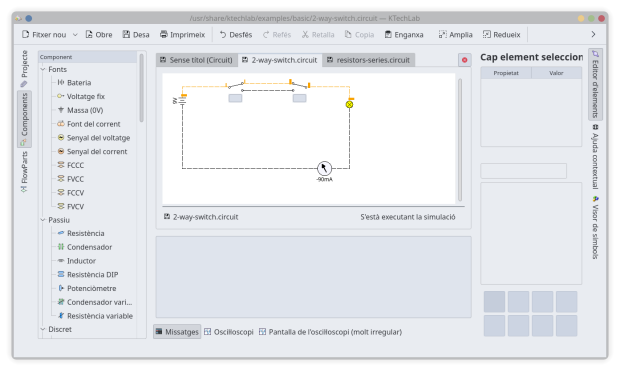
Como vemos, esta aplicación nos puede servir tanto para diseñar circuitos, como para no quemar componentes electrónicos, algo bastante habitual en los talleres de tecnología.
Más información: Apps KDE
La entrada KTechlab: Aplicaciones KDE Edu (I) se publicó primero en KDE Blog.