GNOME, curl, Fetchmail update in Tumbleweed, WSL Image Published
Snapshots of openSUSE Tumbleweed flowed out this week and the rolling release also gave Microsoft Windows users a newer Windows Subsystem for Linux image.
A newly published WSL image of Tumbleweed in the Windows Store arrived on April 25. Users of the WSL image are encouraged to leave a review on the website for the developer tool.
The latest snapshot, 20220504, included the second LLVM update this week. The updated 14.0.3 version includes Application Programming Interface and Application Binary Interface changes for the new major LLVM 14 version. An update of libpipeline 1.5.6 fixed the handling of leading whitespaces for the C library used for manipulating pipelines of subprocesses in a flexible and convenient way. An update of sqlite3 3.38.3 pushed a fix that had effected missing rows in the output due to overly aggressive optimizing the automatic-index and Bloom-filter construction that used an inappropriate ON clause term. An update of yast2-trans had multiple Japanese, Polish, Slovak, Catalan and Brazilian Portuguese translations. The GPS daemon and library that supports USB and serial GPS devices, gpsd, updated to version 3.24. The new version now works with the open-source implementation of Networked Transport of RTCM via Internet Protocol 2.0. Other packages to update in the snapshot were swtpm 0.7.3 and unixODBC 2.3.10.
The 20220502 snapshot featured changes to the English dictionary package words; it updated from version 2015.02.15 to 2020.12.07 and had various new words added from previous version updates included in the five year jump. Several RubyGems packages were updated in the snapshot. One of those was the update of rubygem-gyoku 1.4.0, which translates Ruby Hashes to XML; the update removed Rubinius support and added options to allow for prettified XML outputs. The dpdk update in the snapshot had a Peripheral Component Interconnect change that assigns a driver pointer before mapping. Other packages to update in the snapshot were fribidi 1.0.12, power-profiles-daemon 0.11 and libX11 1.8, which is supposed to resolve a number of long-standing bugs with the libxcb integration.
The 20220501 snapshot updated the rolling release with GNOME 42.1; the minor version provided translation updates, API changes and a fix for a build GTK4 option. Daniel Stenberg discussed several Common Vulnerability and Exposure fixes in the version video coveraging curl 7.83.0, which landed in the snapshot. One of those was CVE-2022-22576, which could allow for the reusing OAUTH2-authenticated connections without properly ensuring the connection was authenticated with the same credentials set for transfer. There was an update of pipewire 0.3.51 that provided improvements for codec switches when a device is disconnected and Advanced Linux Sound Architecture should now work again on 32-bits in the pipewire package; improving the handling of audio and video under Linux! GNOME’s virtual filesystem gvfs updated to version 1.50.1; it had some API changes that fixed a couple hangs and crashes. The gvfs package wasn’t the only filesystem update in the snapshot. An update of btrfsprogs 5.17 arrived in the snapshot and it had some cleanup and refactoring; the update also included improved build documentation for the rollback filesystem. A massive amount of RubyGems packages were updated in the snapshot and there were several libraries updated as well. Other notable packages to update in the snapshot were LLVM 14.0.1, nano 6.3, aws-cli 1.23.1, redis 6.2.7 and more.
People using fetchmail will have noted an update in snapshot 20220428. The update to version 6.4.30 provided security fixes, added a wolfSSL compatibility workaround and updated Serbian, Romanian, Vietnamese and Spanish translations. Package manager yarn 1.22.18 fixed some breakage in url.resolve that was introduced by Node.js 17.7.0, which caused network errors. The regressions were fixed on the 17.7.1 version of Node.js as well. Translations were made in the yast2-firstboot 4.5.2 update. The PDF rendering package poppler 22.04.0 fixed some content that, while written correctly, wasn’t displaying correctly with Adobe Reader. The package also had code improvements and fixed a few small memory leaks. OpenSSL3 gateway support was made in the update of freerdp 2.7.0. Other packages to update in the snapshot were SDL2 2.0.22, ell 0.50 and more.

 Member
 baltolkien
Novedades de Dolphin de KDE Gear 22.04
La Comunidad KDE anunció hace unos días que había sido lanzado KDE Gear 22.04, es hora de empezar a revisar que nos trae de nuevo. Por tanto empiezo con las novedades de Dolphin de KDE Gear 22.04, el cual viene con mejoras en las vistas previas.
Novedades de Dolphin de KDE Gear 22.04


Una de las aplicaciones imprescindibles del ecosistema KDE es Dolphin, el potente gestor de archivos que conquista a quien lo utiliza.
Y es que lo he dicho muchas veces pero lo repetiré mil más. ¡Qué suerte tiene la gente que no ha probado Dolphin que no se sienten inútiles al utilizar otro explorador de ficheros!.
Dolphin es un explorador que por configuración, funcionalidades, flexibilidad y eficiencia que no tiene rival como gestor de ficheros Y encima los desarrolladores no dejan de mejorarlo y afinarlo en cada versión. Veamos sus novedades para esta nueva versión de KDE Gear 22.04.
- Vistas previas para más tipos de archivos del tipo epub, un formato de libro electrónico muy extendido entre los usuarios.
- Ampliada la información sobre cada elemento del sistema de archivos de un modo más legible. Siendo más específico ahora las dimensiones de las imágenes se muestran debajo de sus vistas previas.
- Al comprimir uno o más archivos, o directorios completos, Dolphin proporciona ahora un nombre más significativo.
- Mejoras para los idiomas que se escriben de derecha a izquierda.
- La conectividad con los dispositivos MTP, como algunas cámaras, funciona ahora mucho mejor en general. En realidad, es un tema que debe seguir mejorando.
- Mejoras en lo alias de Dolphin, que ahora puede ser encontrado al buscar aplicaciones usando los términos «Explorador», «Buscador», «archivos», «gestor de archivos» o «recursos compartidos de red».
Como vemos, muchas mejoras interesantes que siguen manteniendo a Dolphin como el mejor explorador de archivos que puedes tener un tu dispositivo.
Más información: KDE
La entrada Novedades de Dolphin de KDE Gear 22.04 se publicó primero en KDE Blog.

Switching from wicked to NetworkManager
Intro
NetworkManager was used already a long time for the majority of openSUSE Tumbleweed installations, except for server, MicroOS and Kubic. But more and more users requested NetworkManager also for this flavours, since wicked is missing some functionality (like 5G modem support) or there are k8s network plugins, which only support NetworkManager. And since MicroOS Desktop was already using Networking, it was a logical choice to switch completly. So openSUSE MicroOS and openSUSE Kubic are now using NetworkManager as default instead of wicked since quite some time.
Configuration files
As of today there are no plans to automatically switch a system from wicked to NetworkManager. The reason is: depending on the configuration, it may be as easy as just replacing wicked with NetworkManager and everything will continue to work, or, in worst case, everything needs to be re-created from scratch for NetworkManager. There is no feature parity between this tools, so an automatic conversation may not work in all cases.
The /etc/sysconfig/network/ifcfg-* files should be compatible, but it’s not
clear if there are no corner cases where they are incompatible. A migratoin
should be pretty easy in this case. But if a native wicked xml configuration
is in use, a manual migration of the configuration has to be done.
Migration
If the network configuration got created during installation or if only
ifcfg-* files are used, the switch to NetworkManager should be very
simple. Just replace wicked with NetworkManager:
# transactional-update shell
-> zypper in --no-recommends NetworkManager
-> rpm -e wicked wicked-service
-> systemctl enable --now NetworkManager
-> exit
# reboot
Recopilación del boletín de noticias de la Free Software Foundation – mayo de 2022
Recopilación y traducción del boletín mensual de noticias relacionadas con el software libre publicado por la Free Software Foundation.

La Free Software Foundation (FSF) es una organización creada en Octubre de 1985 por Richard Stallman y otros entusiastas del software libre con el propósito de difundir esta filosofía.
La Fundación para el software libre (FSF) se dedica a eliminar las restricciones sobre la copia, redistribución, entendimiento, y modificación de programas de computadoras. Con este objeto, promociona el desarrollo y uso del software libre en todas las áreas de la computación, pero muy particularmente, ayudando a desarrollar el sistema operativo GNU.
Además de tratar de difundir la filosofía del software libre, y de crear licencias que permitan la difusión de obras y conservando los derechos de autorías, también llevan a cabo diversas campañas de concienciación y para proteger derechos de los usuarios frentes a aquellos que quieren poner restricciones abusivas en cuestiones tecnológicas.
Mensualmente publican un boletín (supporter) con noticias relacionadas con el software libre, sus campañas, o eventos. Una forma de difundir los proyectos, para que la gente conozca los hechos, se haga su propia opinión, y tomen partido si creen que la reivindicación es justa!!
- En este enlace podéis leer el original en inglés: https://www.fsf.org/free-software-supporter/2022/may
- Y traducido en español (cuando el equipo de traducción lo tenga disponible) en este enlace: https://www.fsf.org/free-software-supporter/2022/mayo

Puedes ver todos los números publicados en este enlace: http://www.fsf.org/free-software-supporter/free-software-supporter
Después de muchos años colaborando en la traducción al español del boletín, desde inicios del año 2020 he decidido tomarme un descanso en esta tarea.
Pero hay detrás un pequeño grupo de personas que siguen haciendo posible la difusión en español del boletín de noticias de la FSF.
¿Te gustaría aportar tu ayuda en la traducción? Lee el siguiente enlace:
Por aquí te traigo un extracto de algunas de las noticias que ha destacado la FSF este mes de mayo de 2022
Richard Stallman: El estado del movimiento del software libre
Del 13 de abril
El 13 de abril, Richard Stallman dio una charla sobre «El estado del movimiento del software libre». Habló sobre dónde está ganando terreno el movimiento del software libre, como GNU Health, y sobre los lugares en los que enfrentamos nuevos desafíos, como la escasez de máquinas compatibles con Libreboot.
También compartió consejos sobre cómo podemos decirles a otros que no nos gustaría usar software que no sea libre, indicándoles que este es un problema que nos preocupa profundamente, diciendo que «incluso si solo lo haces una vez que estás ayudando al movimiento , porque es una oportunidad para explicarle a la gente por qué es malo».
La comunidad de software libre lamenta la perdida de Pedro Francisco (MasGNULinux)
Del 19 de abril por Luis Falcon
Pedro creó y administró MasGNULinux, un blog español con noticias acerca del software libre y GNU/Linux. MasGNULinux
Ecodiseño de la UE: Treinta y ocho organizaciones exigen el derecho a acceder y reutilizar el hardware
Del 27 de abril por la Free Software Foundation Europe
La Free Software Foundation Europe (FSFE) anunció la publicación de una carta abierta, firmada por un total de treinta y ocho organizaciones y empresas, para solicitar a los legisladores de la Unión Europea (UE) el derecho a instalar cualquier software en cualquier dispositivo.
Las solicitudes son:
- Derecho universal a instalar cualquier software en cualquier dispositivo.
- Libre elección de proveedores de servicios en línea.
- Dispositivos interoperables y compatibles.
- Publicación del código fuente de controladores, herramientas e interfaces.
Lea el artículo para obtener más información sobre este avance estratégico hacia la libertad, así como sobre cómo las empresas y organizaciones pueden firmar la carta.
La compra de Twitter pone a Mastodon en el centro de atención
Del 26 de abril por Eugen Rochko
La noticia de que una sola persona puede estar a unos meses de cerrar un trato para comprar acciones mayoritarias en Twitter, Inc., ha llevado a la gente a acudir en masa a Mastodon (juego de palabras intencionado).
El fundador de Mastodon, Eugen Rochko, comparte sus pensamientos sobre el crecimiento repentino que han experimentado recientemente en la plataforma de redes sociales federadas, que es una gran solución para usted si está buscando pasarse a una plataforma de redes sociales que cree que «su capacidad para comunicarse en línea no debe ser a los caprichos de una sola empresa comercial». Lea sobre este crecimiento y todo lo que necesita saber para unirse a Mastodon.
Facebook no sabe qué hace con tus datos, ni adónde van: Documento filtrado
Del 26 de marzo por Lorenzo Franceschi-Bicchierai
A Facebook, que la FSF ha calificado durante mucho tiempo como poco ético, le resulta imposible reconciliar sus prácticas actuales de datos con las leyes y regulaciones destinadas a proteger la privacidad de las personas, según documentos internos filtrados.
Los documentos sugieren que la empresa, debido a su estructura, no puede realizar los ajustes necesarios en sus algoritmos que garantizarían la privacidad y, por lo tanto, no puede seguir las regulaciones establecidas para hacer precisamente eso.

Estas son solo algunas de las noticias recogidas este mes, pero hay muchas más muy interesantes!! si quieres leerlas todas (cuando estén traducidas) visita este enlace:
Y todos los números del «supporter» o boletín de noticias de 2022 aquí:

—————————————————————
Call for Volunteers to 2022 openSUSE Asia Summit
Call For Volunteers
The openSUSE.Asia Summit is an annual openSUSE Asian conference, attended by contributors and enthusiasts from all over Asia. The event focuses primarily on the openSUSE distribution and community, its applications for personal and enterprise use, and open source culture. Since 2014, openSUSE.Asia Summit events had been held offline and thus, a great opportunity for the community to meet.
However, due to COVID-19, the summit was canceled in 2020.In 2021,the online summit was organized by the team India.
What Will openSUSE.Asia Summit 2022 Be?
- openSUSE.Asia Summit 2022 is going to be a hybrid event.
- We will have centralized online summit.
- Each country/city could make different offline part.
Asian-wide part (online + offine satellite):
- Will be held around 4:00-6:00 UTC, easy to join from any Asian cities.
- keynote, invited talks etc.
Local part (online and/or offine):
- Each country/city could organize local offine event based on COVID-19 restrictions.
- Content is up to local; talks, workshops, meet up, etc.
Expectations From The Volunteers
We are looking forward to volunteers to make this event happen. Volunteers can be from anywhere this year.
The volunteers are expected to:
- Attend regular online meeting to prepare Asian-wide part. (currently Friday 13:00 UTC, with Slack chat)
- Organize local event, adjust schedule with Asian-wide part.
- Help on online conference, and coordinate the meeting schedule with other volunteers. host offine event by talking to Asian committee if you need any support.
If you are interested in volunteering, please send an email to opensuseasia-summit@googlegroups.com with your short introduction by Monday, May 30th, 2022.

A local mirror for openSUSE users in Mauritius 🥳
When I attended the openSUSE Asia Summit in 2019, I asked my friends in Indonesia about their experience in setting up the mirror for the Indonesian users.
Earlier this year, when Luboš Kocman visited Mauritius, we spoke about it again.
Then, a few weeks ago, I heard from cloud.mu, who were willing to sponsor a server for mirror purposes. That was just perfect timing. I had started discussions with an ISP but then cloud.mu was not just willing to provide the server & bandwidth resources but their speed to deploy and assist was even more commendable.
Once the server was ready, the next step was to contact openSUSE admins to update the DNS records for opensuse.mu. I sent my request to the openSUSE Board for the purchase of the domain a long time ago. Until now I used to run a small blog for openSUSE tips & tutorials on opensuse.mu. The domain is owned by SUSE and mananged by the openSUSE admins, i.e the Heroes team.
After a few trials to sync from rsync.opensuse.org and other mirrors closer to Mauritius, I contacted the Heroes to get access to stage.opensuse.org, the restricted rsync server of openSUSE. Then, it was a matter of a few days to sync all that content.
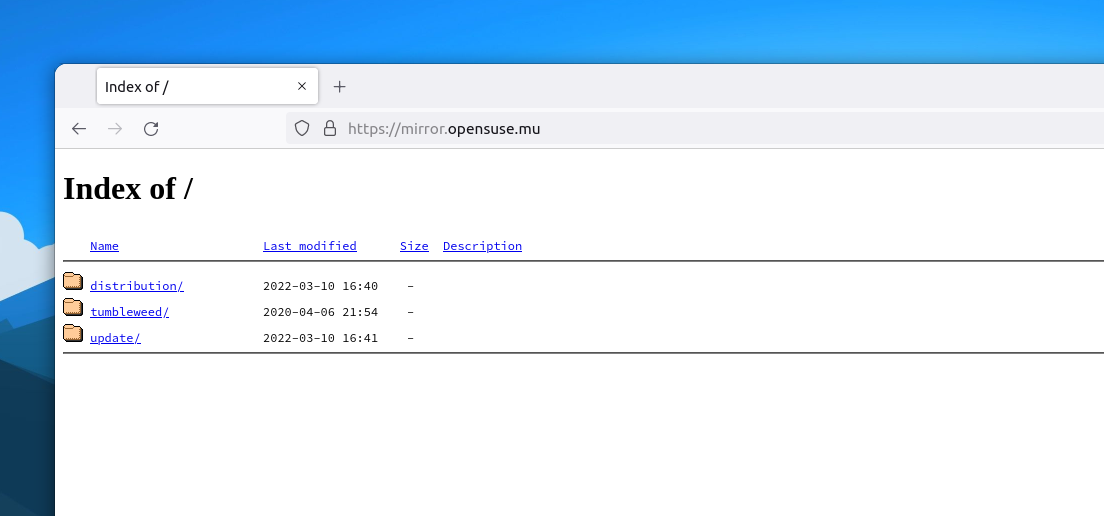
Finally, the openSUSE mirror for Mauritius was ready.
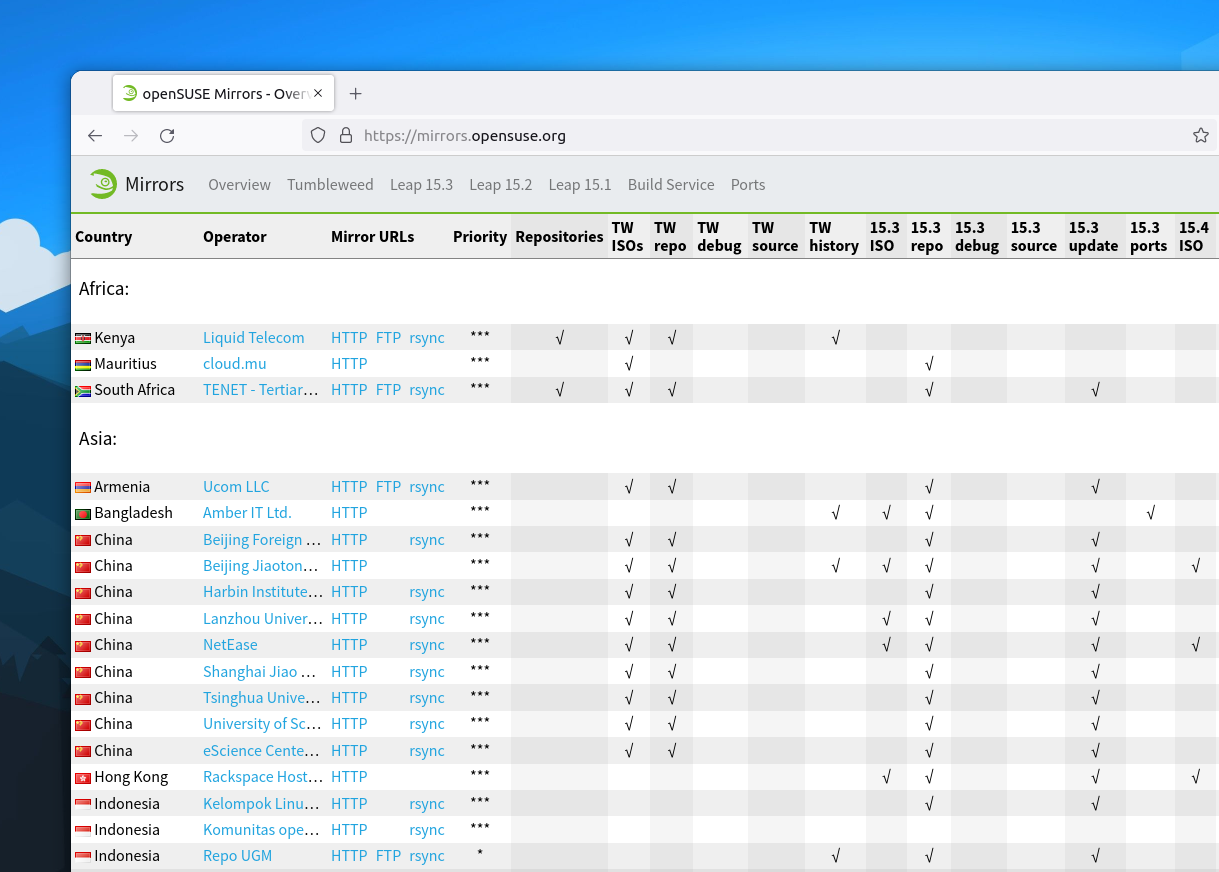
Compared to other regions, where there are several mirrors in the same country, the whole African continent had only two openSUSE mirrors until now. One managed by TENET (Tertiary Education and Research Network) in South Africa and the other one by Liquid Telecom in Kenya. Mauritius joins that list as the third mirror in the African region, thanks to cloud.mu.
How to switch to the openSUSE Mauritius mirror?
Switching to the Mauritian mirror is easy. First, remove the current repos that you have by either running zypper lr to identify them and zypper rr repo-name to remove the repos, or go to /etc/zypp/repos.d and remove the .repo files of the openSUSE repositories. If you have repos for other applications, e.g Google Chrome, VS Code etc, leave them.
Then, if you're using Leap, you can set up the Leap 15.3 OSS, Non-OSS and Update repositories.
sudo zypper ar https://mirror.opensuse.mu/distribution/leap/15.3/repo/oss openSUSE-Leap-OSS

sudo zypper ar https://mirror.opensuse.mu/distribution/leap/15.3/repo/non-oss openSUSE-Leap-Non-OSS

sudo zypper ar https://mirror.opensuse.mu/update/leap/15.3/oss openSUSE-Leap-Update-OSS

sudo zypper ar https://mirror.opensuse.mu/update/leap/15.3/non-oss openSUSE-Leap-Update-Non-OSS
If you're using Tumbleweed, add the following repositories.
sudo zypper ar https://mirror.opensuse.mu/tumbleweed/repo/oss openSUSE-Tumbleweed-OSS

sudo zypper ar https://mirror.opensuse.mu/tumbleweed/repo/non-oss openSUSE-Tumbleweed-Non-OSS

sudo zypper ar https://mirror.opensuse.mu/update/tumbleweed openSUSE-Tumbleweed-Update-OSS
The mirror contains files for the x86_64 architecture only. If there is a need for other architectures, I'll do the necessary. Ping me on social media or send a mail to ishwon@opensuse.org.
Analyzing Apache HTTPD logs in syslog-ng
Recently, I started my own blog, and as Google Analytics seems to miss a good part of visitors, I wanted to analyze my web server logs myself. I use syslog-ng to read Apache logs, process them, and store them to Elasticsearch. Along the way, I resolve the IP address using a Python parser, analyze the Agent field of the logs, and also use GeoIP to locate the user on the map.
From this blog, you can learn how I built my configuration. Note that once I was ready, I realized that my configuration is not GDPR compliant, so I also show you which parts to remove from the final configuration :-).
Read the rest of my blog at https://www.syslog-ng.com/community/b/blog/posts/analyzing-apache-httpd-logs-in-syslog-ng
Bazsi, founder of the syslog-ng project is looking for your feedback. He writes:
“In the past few weeks I performed a round of discussions/interviews with syslog-ng users. I also spent time looking at other products and analyst reports on the market. Based on all this information I’ve come up with a list of potential strategic directions for syslog-ng to tackle. Focusing on these and prioritizing features that fall into one of these directions ensures that syslog-ng indeed moves ahead.”
- The Edge
- Cloud Native
- Observability
- Application awareness
- User friendliness
You can read the rest if his blog and provide him (and the syslog-ng team) with feedback at https://syslog-ng-future.blog/syslog-ng-on-the-long-term-a-draft-on-strategic-directions/

syslog-ng logo
Curso de Vim: Actualizado vimtutor a la versión 1.7
Vimtutor es un recurso para empezar a aprender lo básico de Vim que viene incluido de manera predeterminada y donde aprenderemos a dar nuestros primeros pasos en el editor Vim

Para empezar a usar el editor Vim hay muchos recursos en los que aprender los primeros pasos y las primera nociones de uso de este gran editor.
Uno puede ser este blog y la serie de artículos que he realizado, la guía que he traducido, etc…
Pero Vim trae incorporado de manera predeterminada un tutor que hace un repaso somero de lo básico, para empezar a adentrarnos en este editor. Se llama vimtutor. Y está disponible en español.
Este artículo es una nueva entrega del curso “improVIMsado” que desde hace meses vengo publicando en mi blog sobre el editor Vim y que puedes seguir en estos enlaces:
- https://victorhckinthefreeworld.com/tag/vim/
- https://victorhck.gitlab.io/comandos_vim/articulos.html
Y para aprender Vim (de la manera más inteligente) aquí tienes esta útil guía:
Abre una terminal en tu distribución de GNU/Linux y escribe:
vimtutor
Esto nos abrirá un documento en el que se irá repasando lo básico del editor Vim. Veremos cómo movernos usando las teclas hjkl, salir de Vim, los comandos básicos y poco a poco nos adentraremos en otros conceptos simples.
Es una forma ideal para sin salir de Vim ir leyendo y practicando. Por que esta guía quiere ser eminentemente práctica. Así mientras vas aprendiendo lo básico podrás practicar.
De hecho, tal como se comenta en el propio vimtutor, la idea no es que simplemente vayas memorizando comandos, si no que los pruebes y los practiques. Así será más sencillo ver lo fácil que es utilizar este potente editor de texto.
Pero este vimtutor en español estaba un poco desfasado. La versión en español hacía más de 2 años que no se actualizaba.
Mientras que la versión en inglés se había corregido y ampliado a la versión 1.7, la versión en español seguía en la versión 1.4 con algunos errores tipográficos y sin incluir las últimas modificaciones.
Así que eché mano de git, y del editor Vim y lo he actualizado a la versión 1.7. en un commit en GitHub:
En donde el propio Bram Moolenar desarrollador de Vim dijo que se iba a aceptar la actualización y pronto estará disponible junto con otras muchas mejoras y correcciones que incorporen las nuevas versiones de Vim.
Un placer colaborar con este pequeño aporte a Vim. No soy desarrollador, así que aporto en lo que puedo, y en este caso como en otros muchos la traducción es una buena forma de hacerlo.

Lanzada la quinta actualización de Plasma 5.24
Tal y como estaba previsto en el calendario de lanzamiento de los desarrolladores, ayer martes 3 de mayo la Comunidad KDE comunicó que había sido lanzada la quinta actualización de Plasma 5.24, que no será la última porque esta es una versión de soporte extendido. Una noticia que aunque es esperada y previsible es la demostración palpable del alto grado de implicación de la Comunidad en la mejora continua de este gran entorno de escritorio de Software Libre.
Lanzada la quinta actualización de Plasma 5.24
No existe Software creado por la humanidad que no contenga errores. Es un hecho incontestable y cuya única solución son las actualizaciones. Es por ello que en el ciclo de desarrollo del software creado por la Comunidad KDE se incluye siempre las fechas de las actualizaciones.

De esta forma, el martes 3 de mayo ha sido lanzada la quinta actualización de Plasma 5.24, la cual solo trae (que no es poco) soluciones a los bugs encontrados en esta semana de vida del escritorio y mejoras en las traducciones. Es por tanto, una actualización 100% recomendable.
Más información: KDE
Las novedades de Plasma 5.24 LTS
Aún tengo pendiente el resumen de las novedades pero he aquí la lista preliminar de ellas.
- Mejoras en las funciones de KRunner con el asistente de ayuda.
- Desbloqueo de la pantalla y autentificación de las aplicaciones con tus huellas dactilares.
- Nuevo y espectacular fondo de pantalla de Ken Vermette para Plasma 5.24 «Honeywave»
- Breeze amplía la función que permite elegir los colores de acento (introducida en Plasma 5.23) y ahora permite elegir cualquier color que desee, en caso de que los colores preseleccionados no sean de vuestro agrado.
- El tema por defecto Plasma Breeze ha recibido un refresco visual para que se ajuste más al estilo de Breeze de las aplicaciones, mejorando la coherencia visual entre ellas.

- Para que las notificaciones críticas de Plasma destaquen, ahora vienen con una franja naranja en el lateral para distinguirlas visualmente de los mensajes menos urgentes.
- Muchos widgets han recibido nuevas funciones y mejoras sutiles que mejoran su aspecto, la relevancia de su información y la facilidad para navegar por ellos.
- Los menús contextuales del Administrador de tareas se han aclarado y simplificado.
- Retorno de la la vista general para gestionar todos los escritorios y aplicaciones

- Se han añadido mejoras al Color Nocturno, a la hoja de pruebas de los altavoces en la página de Audio de los Ajustes del Sistema y a la función de límite de carga de la batería.
- Discover da la opción de reiniciar automáticamente después de que se haya completado una actualización., haciendo click en la casilla de verificación situada en la parte inferior de la página de Actualizaciones.
- Wayland continúa a buen ritmo con un gran número de mejoras, como la compatibilidad con colores de más de 8 bits, auriculares de RV con un rendimiento óptimo y tabletas de dibujo.
Más información: KDE
La entrada Lanzada la quinta actualización de Plasma 5.24 se publicó primero en KDE Blog.
Sudo for blue teams: how to control and log better
Sudo had many features to help blue teams in their daily job even before 1.9 was released. Session recordings, plugins and others made sure that most administrative access could be controlled and problems easily detected. Version 1.9 introduced Python support, new APIs, centralized session recordings, however some blind spots still remained. Learn how some of the latest sudo features can help you to better control and log administrative access to your hosts. You will learn about JSON logging in sudo, chroot support, logging sub-commands, and how to work with these logs in syslog-ng.
You can read the rest of my blog at https://www.sudo.ws/posts/2022/05/sudo-for-blue-teams-how-to-control-and-log-better/