
 Member
 baltolkien
La sede de Akademy 2022 de Barcelona
Ya se ha publicado la ciudad donde se celebra, el programa de charlas, la camiseta e incluso la principal excursión del macroevento de la la Comunidad KDE. No obstante quedan todavía algunas cosas por comentar como es el la localización exacta, es decir, la sede Akademy 2022 de Barcelona.
La sede de Akademy 2022 de Barcelona
Este año, como sabréis los que sois asiduos al blog, este año se celebra en Barcelona en modalidad híbrida del 1 al 7 de octubre, quedando los días previos, el 29 y 30 para Akademy-es que, este año tiene una gran novedad ya que ofrece la posibilidad de obtener una camiseta especial del evento (corre que tienes hasta mañana para reservarla)
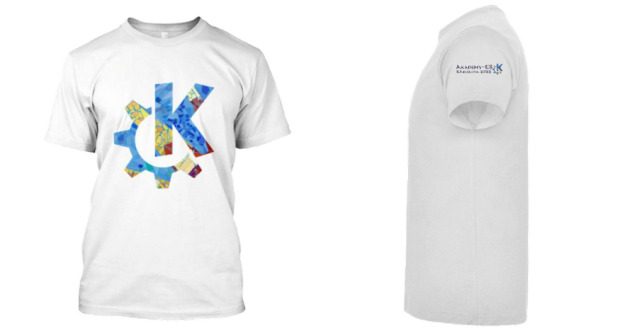
No obstante el protagonista de hoy no es la camiseta sino la sede física donde se celebrar Akademy 2022 de Barcelona, que no es otra que el edificio Vertex (41.39048, 2.11435) en la Universitat Politècnica de Catalunya (UPC), en la Plaça Eusebi Güell, 6, 08034 Barcelona
Veure el mapa més gran
Para llegar utilizando los servicios públicos tenemos:
Metro: L3 - Palau Reial station
Tram: T1, T2, T3 - Palau Reial stop
Bus: H6, 7, 33, 67, 113, 175 - Palau Reial stop
Bus: V5, 63, 78 - Av Pedralbes - Pg Manuel Girona stop
Más información: Akademy 2022 Venue
¿Qué es Akademy?
Para los que no lo sepan, Akademy es el evento de la Comunidad KDE que aúna en una gran conferencia todo tipo de simpatizantes de KDE como desarrolladores, diseñadores, usuarios, traductores, promotores, ideólogos, etc. Allí se reunirán a lo largo de una semana para compartir charlas, cenas, ponencias, talleres y, en definitiva, para trabajar juntos.
Es una gran semana que sirve para unir más fuerte los lazos que unen nuestra Comunidad, así como para crear nuevos que se mantendrán gracias a las listas de correo, canales irc o Sprints.
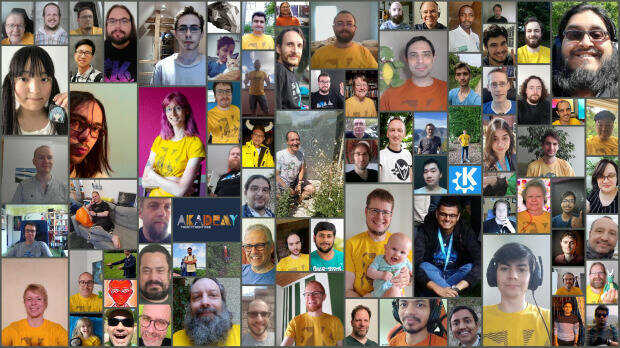
Este año se vuelve a un modelo presencial pero con todo su contenido retrasmitido en línea, cumpliéndose los pronósticos que auguraban que tras el impacto de pandemia este tipo de encuentros se adaptarán a esta nueva realidad.
La entrada La sede de Akademy 2022 de Barcelona se publicó primero en KDE Blog.
#openSUSE Tumbleweed revisión de la semana 37 de 2022
Tumbleweed es una distribución «Rolling Release» de actualización contínua. Aquí puedes estar al tanto de las últimas novedades.

openSUSE Tumbleweed es la versión «rolling release» o de actualización continua de la distribución de GNU/Linux openSUSE.
Hagamos un repaso a las novedades que han llegado hasta los repositorios esta semana.
El anuncio original lo puedes leer en el blog de Dominique Leuenberger, publicado bajo licencia CC-by-sa, en este este enlace:
Esta semana hemos visto en openSUSE Tumbleweed cómo todos los componentes de KDE (Plasma, Frameworks y Gear) han sido actualizados. Pero esto no es lo único que las 7 snapshots publicadas (0908…0914) nos han traido a los repositorios.
Los cambios más notables son:
- KDE Plasma 5.25.5
- KDE Frameworks 5.98.0
- KDE Gear 20.08.1
- Squid 5.7
- pipewire 0.3.57
- Mozilla Firefox 104.0.2
- GTK 4.8.0
- Linux kernel 5.19.8
- LibreOffice 7.4.1
Y entre las actualizaciones que se están preparando y pronto llegarán a los repositorios encontramos:
- Meson 0.63.2
- GNOME 43
- grep 3.8
- LLVM 15
- util-linux 2.38.1
- fmt 9.0
- gpgme 1.18
- libxslt 1.1.36
Si quieres estar a la última con software actualizado y probado utiliza openSUSE Tumbleweed la opción rolling release de la distribución de GNU/Linux openSUSE.
Mantente actualizado y ya sabes: Have a lot of fun!!
Enlaces de interés
- ¿Por qué deberías utilizar openSUSE Tumbleweed?
- zypper dup en Tumbleweed hace todo el trabajo al actualizar
- ¿Cual es el mejor comando para actualizar Tumbleweed?
- ¿Qué es el test openQA?
- http://download.opensuse.org/tumbleweed/iso/
- https://es.opensuse.org/Portal:Tumbleweed

——————————–
Mi escritorio Plasma de septiembre 2022 #viernesdeescritorio Akademy Edition
Sigo la serie de la iniciativa #viernesdeescritorio con una nueva captura. Con este ya llevo más de un año compartiendo «Mi escritorio», una mirada a la intimidad de mi entorno de trabajo. De esta forma, bienvenidos a mi escritorio Plasma de septiembre 2022 que sigue con un tema claro y dedicado al gran evento de la Comunidad KDE de este octubre: Akademy 2022 de Barcelona.
Mi escritorio Plasma de septiembre 2022 #viernesdeescritorio #akademy edition
Esta va a ser la vigesimoséptima vez que muestro mi escritorio Plasma 5 en público, lo cual es número nada desdeñable de entradas que sigue creciendo de forma constante. Tengo pendiente hacer una entrega recopilatorio para este mes con los 25 primeros escritorios para ver la evolución… a ver si lo consigo.
Respecto al mes pasado, sigo con un tema claro y he eliminado el fantástico reloj Aesthetic clock v2 ya que no quedaba bien con un fondo tan particular de este mes: el anuncio de Akademy 2022 de Barcelona. Y he desplazado la barra de tareas a un lateral por la misma razón, una posición que no me desagrada por la relación de aspecto de la pantalla y que ya he utilizado anteriormente.
Y sigo, tras unos meses enseñando mi Slimbook Kymera AMD de sobremesa, sigo realizando a captura está realizada sobre mi portátil Slimbook Pro de 13 pulgadas, el cual tiene instalado un KDE Neon con Plasma 5.25.5, siendo mi sistema gráfico Wayland.
El resultado de mi escritorio de septiembre de 2022 es un entorno de trabajo claro y, como siempre, funcional que podéis ver en la imagen inferior (pinchad sobre ella para verlo un poco más grande).

La entrada Mi escritorio Plasma de septiembre 2022 #viernesdeescritorio Akademy Edition se publicó primero en KDE Blog.
openSUSE Tumbleweed – Review of the week 2022/37
Dear Tumbleweed users and hackers,
This week was the week of the Linux desktop – as it is every week anyway. Specifically, we have seen all components from KDE (Plasma, Frameworks, Gear) being refreshed during the last week. Of course, this is not everything the 7 snapshots (0908…0914) brought you.
The main changes delivered this week were:
- KDE Plasma 5.25.5
- KDE Frameworks 5.98.0
- KDE Gear 20.08.1
- Squid 5.7
- pipewire 0.3.57
- Mozilla Firefox 104.0.2
- GTK 4.8.0
- Linux kernel 5.19.8
- LibreOffice 7.4.1
In the staging projects we are currently testing the integration of these updates:
- Meson 0.63.2
- GNOME 43: currently Release Candidate in staging, Final release is scheduled for Sept 21
- grep 3.8: declares egrep and fgrep as deprecated. Switch to grep -E resp grep -F
- LLVM 15: breaks all versions of PostgreSQL
- util-linux 2.38.1: this also brings a massive package layout change, which will probably take some time to settle. It’s part of the distro bootstrap and we have to be careful not to blow it out of proportion
- fmt 9.0: Breaks ceph and zxing-cpp
- gpgme 1.18: breaks LibreOffice
- libxslt 1.1.36: breaks daps
Even Mo' Pixels
To keep the habbit alive, I continue to do a daily pixel routine, now covering almost all of the GNOME Circle apps.
Good call. Empty alt attributes (alt="") are actually better for decorative images or icons since they tell screen readers to skip over them, rather than announcing "x" over and over again.
Here is the updated block:


I've been practicing the art of animation a little too in an effort to promote GNOME Circle on Twitter and Mastodon. Presenting all these GIFs would probably not be kind to Planet GNOME readers though. Perhaps I could compose a video in the future (no GIF support in Blender, strangely!). Keep grinding your (pointless) skills, kids!
Even Mo’ Pixels
To keep the habbit alive, I continue to do a daily pixel routine, now covering almost all of the GNOME Circle apps.


I’ve been practicing the art of animation a little too in an effort to promote GNOME Circle on Twitter and Mastodon. Presenting all these GIFs would probably not be kind to Planet GNOME readers though. Perhaps I could compose a video in the future (no GIF support in Blender, strangely!). Keep grinding your (pointless) skills, kids!
Comparar diferencias de archivos con vimdiff
Veamos cómo usar vimdiff para comparar las diferencias entre dos archivos de texto

Con la herramienta vimdiff podremos comparar las diferencias entre dos archivos de texto y aplicar cambios en uno u otro fichero con toda la potencia del editor Vim.
En estos días (por un proyecto en el que ando metido y del que pronto espero dar más noticias en el blog) tengo la necesidad de comparar las diferencias que existen entre dos archivos.
Para esas tareas siempre había usado Kompare, pero esta vez he querido probar vimdiff y la verdad es que me está gustando mucho. Veamos cómo usarlo.
Este artículo es una nueva entrega del curso “improVIMsado” que desde hace meses vengo publicando en mi blog sobre el editor Vim y que puedes seguir en estos enlaces:
- https://victorhckinthefreeworld.com/tag/vim/
- https://victorhck.gitlab.io/comandos_vim/articulos.html
Y para aprender Vim (de la manera más inteligente) aquí tienes esta útil guía:
Con vimdiff puedes comparar dos, tres o cuatro archivos. En mi caso y en el ejemplo vamos a comparar únicamente las diferencias entre dos archivos. En el ejemplo compararemos un archivo llamado capítulo1.md que me han enviado por correo con otro con el mismo nombre que tengo en un repositorio git en una carpeta.
Para ello ejecutamos: vimdiff <ruta/del/archivo1> <ruta/del/archivo2> de esta manera:
vimdiff capítulo1.md Git/libro/capítulo1.md
Se nos abrirá una instancia del editor Vim, con una división vertical de la pantalla. En la parte izquierda tendremos el primer archivo y en la parte derecha el segundo archivo.
Si en vez de una división vertical, que es la opción predeterminada, queremos una división horizontal de la pantalla de comparación de archivos, deberemos añadir la opción o de esta forma:
vimdiff -o capítulo1.md Git/libro/capítulo1.md
De manera predeterminada, en vimdiff no se cortan las líneas de texto al final de la pantalla, por lo que si es una línea de texto larga, se mostrará toda seguida, cosa que a mí no me gusta.
Para que vimdiff nos ajuste la longitud de las líneas de texto al ancho de la pantalla y la continúe en la línea siguiente, yo he añadido en mi archivo de configuración .vimrc lo siguiente:
" ajusta la longitud de las líneas a la pantalla en vimdiff
au VimEnter * if &diff | execute 'windo set wrap' | endif
Bueno, abiertos ambos archivos en Vim, con el cursor en una parte de la pantalla podemos ir navegando por el texto hasta encontrar una zona donde vimdiff nos mostrará las diferencias que ha encontrado entre ambos archivos.
Podemos desplazarnos con las teclas y comandos de movimiento de Vim y ambos textos se desplazarán de manera sincronizada o podemos navegar entre las diferencias con los comandos ]c para ir a la siguiente diferencia o [c para ir a la diferencia anterior.
El cursor lo podemos situar en cualquiera de las dos divisiones, para ello igual que en Vim, podemos «saltar» de una a otra división con Ctrl+W W
Una vez situado el cursor sobre una de las diferencias en la ventana que queramos, podemos revisar el texto resaltado que nos muestra las diferencias y editar el archivo en cuestión (cualquiera de los dos) tal como haríamos en vim.
Pero si lo que queremos es una vez revisadas las diferencias, incorporar las modificaciones de uno u otro archivo en el archivo contrario, tenemos los comandos diffput y diffget Veamos cómo usarlos.
Imaginemos que tenemos el cursor en la división de la izquierda en una diferencia entre ambos archivos y después de revisarlos vemos que queremos hacer que el archivo en el que está el cursor incorpore las diferencias del otro archivo, para eso ejecutaremos diffget
Ahora imaginemos que queremos que la diferencia del archivo en el que tenemos el cursor se aplique en el otro archivo, para eso ejecutaremos diffput
Cuando hayamos de revisar todas las diferencias, ya podremos salir de vimdiff pero antes deberemos guardar los cambios que hemos realizado en los archivo, para eso como en Vim, podremos hacerlo mediante :wqa O el método que prefieras (ZZ, :x, o !qa si queremos salir sin guardar los cambios)
Al igual que en Vim, si hemos hecho un cambio ya sea con diffget o diffput siempre podremos revertirlo mediante el comando u y volverlo a rehacer con Ctrl+R
Si no conocías la herramienta, te recomiendo darle una oportunidad a la hora de comparar archivos con los comandos vistos en el tutorial y comprobar lo sencillo y potente que es vimdiff

Lanzada la beta de Plasma 5.26, con mejoras en Plasma Bigscreen
Esta semana estamos muy centrados en Akademy-es 2022, que se celebrará en de forma presencial y en línea el 29 y 30 de septiembre y cuyo registro está abierto, y en la posterior Akademy que tendrá lugar los días siguientes hasta el 7 de octubre. No obstante, la Comunidad KDE no deja de seguir evolucionando y una vez finalizado el periodo de mantenimiento de Plasma 5.25 es hora de ir preparando el lanzamiento de la siguiente versión. Es por ello que me complace compartir con vosotros que ha sido lanzada la beta de Plasma 5.26 la próxima versión del escritorio de la Comunidad KDE que nos llega con mejoras para los dispositivos de pantalla grande con muchas mejoras en Plasma Bigscreen y en las posibilidades sonoras con Kpipewire. Es el momento de que esta beta sea probada y que se reporten los errores que se encuentren. ¡No pierdas la oportunidad de contribuir al desarrollo de Plasma!
Lanzada la beta de Plasma 5.26, con mejoras en Plasma Bigscreen
Hoy 15 de septiembre ha sido lanzada la beta de Plasma 5.26. En esta segunda versión liberada del 2022, no apta todavía para el usuario que busquen estabilidad, sigue centrado en que el escritorio de la Comunidad KDE siga mejorando en aspecto, funcionalidades y usabilidad, poniendo el foco en los dispositivos táctiles.
En palabras de sus desarrolladores:
Hoy os traemos la versión preliminar de la versión Plasma 5.26 de KDE. Plasma 5.26 Beta está dirigida a probadores, desarrolladores y cazadores de errores. Además de nuestro ligero y rico escritorio Linux, esta versión añade una versión Bigscreen de Plasma para su uso en televisores.
Para ayudar a los desarrolladores de KDE a eliminar los errores y resolver los problemas, instale Plasma 5.26 Beta y pruebe las características que se enumeran a continuación. Por favor, informa de los errores en nuestro rastreador de errores.
La versión final de Plasma 5.26 estará disponible para el público en general el 6 de octubre.
Más información: KDE
Pruébalo y reporta errores

Todas las tareas dentro del mundo del Software Libre son importantes: desarrollar, traducir, empaquetar, diseñar, promocionar, etc. Pero hay una que se suele pasar por alto y de la que solo nos acordamos cuando las cosas no nos funcionan como debería: buscar errores.
Desde el blog te animo a que tú seas una de las personas responsables del éxito del nuevo lanzamiento de Plasma 5.25 de la Comunidad KDE. Para ello debes participar en la tarea de buscar y reportar errores, algo básico para que los desarrolladores los solucionen para que el despegue del escritorio esté bien pulido. Debéis pensar que en muchas ocasiones los errores existen porque no le han aparecido al grupo de desarrolladores ya que no se han dado las circunstancias para que lo hagan.
Para ello debes instalarte esta beta y comunicar los errores que salgan en bugs.kde.org, tal y como expliqué en su día en esta entrada del blog.
La entrada Lanzada la beta de Plasma 5.26, con mejoras en Plasma Bigscreen se publicó primero en KDE Blog.
16384 columns in Collabora Online
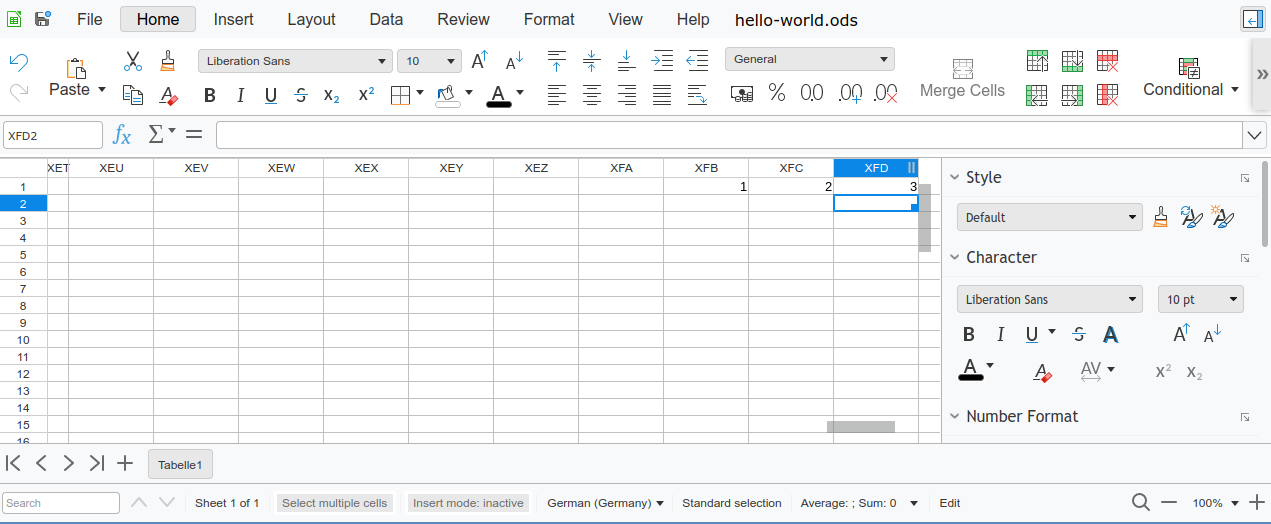
After the work to support 16384 columns in LibreOffice Calc I have also made sure that the feature works also in Collabora Online, thanks to the funding of NGI.
This project has received funding from the European Union’s Horizon 2020 research and innovation programme under grant agreement No 871498.

Since the Calc core is the same, the underlying functionality works just like in LibreOffice. But the online functionality presented some additional challenges that needed handling, as having more cells in a spreadsheet may mean more data sent over the network, slowing things down. There definitely used to be problems with large spreadsheets, as the tiled rendering used by Online in fact was already limited to 500000 rows compared to 1048576 rows of the desktop version (in fact, git history shows that this started at only 1000 rows initially and then was continually raised over the time as things improved). So together with raising column count to 16384 I have raised this to the normal 1048576 rows as well.
While working on this, one of the problems I needed to handle was a rather unusual one - some automated tests were failing because of timing out. Only with debug builds, because they of course do more checks compared to optimized release builds. And the problem turned out to be how some tests checked resulting spreadsheets after some operations. Since testing Calc running in a browser is more complicated than testing the desktop version, what the tests did was to select a large number of cells (e.g. one entire row), paste that to the clipboard and then the clipboard data was present in browsers HTML data, so the testing framework could test it and verify it is as expected. And this failed with unoptimized debug builds because even though the spreadsheet was almost empty, the unoptimized code checked every cell involved and together it added up enough to exceed the test timeout. Ironically enough, a significant portion was spent in code that was trying to optimize the size of the clipboard data. So I needed to improve the tests and optimize handling of unoptimized code, as strange as it may sound.
Now with hopefully all performance problems solved, Collabora Online 22.05 should support these spreadsheet sizes just as fine as the desktop version.

Plasma, Gear, Frameworks update in Tumbleweed
This week’s openSUSE Tumbleweed snapshots had several KDE packages updated and an update affecting scripts related to grep.
In addition to some changes with YaST affecting grep, the rolling release had snapshots updating Plasma, Gear and Frameworks in that order.
Snapshot 20220914 is finishing testing and the snapshot could be released before this article is published, which would make this week another full week of snapshots if the testing passes openQA.
Frameworks 5.98.0 arrived in snapshot 20220913. The update deduplicated color loading codes with KConfigWidgets and Kirigami had a fix for a potential crash in imagecolors. Frameworks also delivered a lot of additions and fixes to KTextEditor. There were some fixes of inconsistencies in the completion config tab and KTextEditor enabled the clipboard history with non read-only. An update of fetchmail 6.4.33 removed an upstream patch and a wrapper script for HTMLDOC was added for use with Flatpak because the snapd version was broken. Audio format flac 1.4.0 added a FMA instruction set extension to speed up audio for x86_64 CPUs. There is also now a set of files available to test whether a FLAC decoder implements the format correctly. The update of libstorage-ng 4.5.44 fixed the resizing of Linux Unified Key Setup and did some Czech translations. Also updated in the snapshot was the 4.5.4 versions of yast2-bootloader and yast2-kdump.
Just a few packages were updated in snapshot 20220912. Caching proxy package squid 5.7 fixed a regression and a handful of bugs. The package now supports OpenSSL 3.0. An update of the smartcard middleware library pcsc-lite 1.9.9 made some minor improvements and improved the log from the smartcard daemon to log the return code in text instead of hex. A fix to a missing comma in the JSON output of tree 2.0.4 was made and yast2-trans had multiple translations updates for German and Czech.
Device mapper package multipath-tools had its second update of the week in snapshot 20220911. The other package to update in the snapshot was the font drawing library libXft 2.3.6, which fixes a regression in 2.3.5 for dimension-length checks.
The 20220910 snapshot focused on a VERY IMPORTANT update to autoyast2 4.5.4, which replaced egrep with grep -E. This is important to Tumbleweed users to pay attention to as the package replaces obsolete egrep with grep -E. Both egrep and fgrep are deprecated in favor of grep -E and grep -F and a deprecation warning output can break output-parsing scripts. This grep -E change also were listed in yast2 4.5.13, yast2-printer 4.5.2 and yast2-scanner 4.5.1 version updates. The kernel-source updated to 5.19.8. The Linux Kernel had a fix for a memory leak for virtual multilayer switch Open vSwitch. The kernel added a Rosewill USB adapter dongle to the device tables and most of there fixes were related to Bluetooth in this kernel update. Other packages to update in the snapshot were a Plymouth 22.02.122 version, gnome-browser-connector 42.1, ibus-table 1.16.12 and more.
KDE applications were updated in snapshot 20220909 with the update of Gear 22.08.1. Updates to video editor Kdenlive fixed a broken paste clip if trying to paste an invalid clip. The package also made sure that tasks are properly terminated upon closing and had a fix for an incorrect lock that could cause corruption. Some logic and internationalization fixes were made in KMail. News on the starting page was disable with KDevelop as the section is currently unmaintained. Network Time Protocol (NTP) package chrony improved stability with hardware timestamping in its 4.3 version update; it also improved the filter option to better handle missing NTP samples. Some changes with the yast2-core 4.5.4 and yast2-hardware-detection 4.5.1 updates are important for Tumbleweed users becasuse these packages replaced obsolete fgrep with grep -F; egrep and fgrep are both deprecated in favor of grep -E and grep -F. There is a deprecation warning output that can break output-parsing scripts, so be careful Tumbleweed users. Another package to update in the snapshot was multipath-tools.
KDE users received the update of Plasma 5.25.5 in snapshot 20220908, which seems to address a few touchy topics. This bugfix version disabled the Plasma Desktop drag and drop for touch; it conflicted with drag/flick scrolling. The drag and drop was deemed less important than scrolling or opening the context menu for touch. Some brightness actions were changed with PowerDevil and configuration modules for Plasma Workspace now considers the GTK theme setting when computing the default state. A problem with scrolling animations was also fixed in the gtk4 4.8.0 package update. The snapshot also improved the handling of OpenType-font features with the toolkit. Another package to update in the snapshot was Mozilla Firefox 104.0.2. The package fixed a bug making it impossible to use touch or use a stylus to drag the scrollbar on pages. Other packages to update in the snapshot were ipmitool 1.8.19.0, libssh 0.10.4, yast2-network 4.5.6 and more.