
 Member
 Victorhck
#openSUSE Tumbleweed revisión de la semana 44 de 2022
Tumbleweed es una distribución de GNU/Linux «Rolling Release» o de actualización contínua. Aquí puedes estar al tanto de las últimas novedades.

openSUSE Tumbleweed es la versión «rolling release» o de actualización continua de la distribución de GNU/Linux openSUSE.
Hagamos un repaso a las novedades que han llegado hasta los repositorios esta semana.
El anuncio original lo puedes leer en el blog de Dominique Leuenberger, publicado bajo licencia CC-by-sa, en este este enlace:
Durante esta semana también se han publicado 7 nuevas snapshots (1028…1103). ¡Y eso que esta semana ha sido una hora más corta! 
Entre las snapshots publicadas, podemos destacar las siguientes actualizaciones
- Mozilla Firefox 106.0.2 & 106.0.3 & Thunderbird 102.4.1
- gpgme 1.18.0
- Linux kernel 6.0.5 & 6.0.6
- Python 3.10.8
- Sudo 1.9.12
- KDE Plasma 5.26.2
- strace 6.0
- btrfsprogs 6.0
- GNOME 43.1 (gnome-shell, mutter y gnome-desktop no se actualizaron en este caso, por eso es que gnome-control-center todavía muestra gnome 43.0)
- openssl 1.1.1s & openssl 3.0.7
Pero como siempre, openSUSE Tumbleweed no para de rodar y ys se están preparando más actualizaciones que pronto llegarán a los repositorios. Las más relevantes son:
- KDE Applications 22.08.3
- CMake 3.24.2
- Qt 5.15.7
- Libvirt 8.9.0
- SQLite 3.39.4
- Linux kernel 6.0.7
- GNU Make 4.4
- git 2.38.1
- icu 72.1
- suse-module-tools 16.0.24
Si quieres estar a la última con software actualizado y probado utiliza openSUSE Tumbleweed la opción rolling release de la distribución de GNU/Linux openSUSE.
Mantente actualizado y ya sabes: Have a lot of fun!!
Enlaces de interés
- ¿Por qué deberías utilizar openSUSE Tumbleweed?
- zypper dup en Tumbleweed hace todo el trabajo al actualizar
- ¿Cual es el mejor comando para actualizar Tumbleweed?
- ¿Qué es el test openQA?
- http://download.opensuse.org/tumbleweed/iso/
- https://es.opensuse.org/Portal:Tumbleweed

——————————–
openSUSE Tumbleweed – Review of the week 2022/44
Dear Tumbleweed users and hackers,
Despite the week being one hour shorter (as a reminder: Europe switched from summer time to winter time on Oct 30), the maintainers and contributors went beyond and still delivered 7 snapshots (1028…1103). The staging projects have been nicely balanced and performance seems good. Unless the requests cause breakages, they are still going through the process rather quickly.
The 7 snapshots brought you updates in these area:
- Mozilla Firefox 106.0.2 & 106.0.3 & Thunderbird 102.4.1
- gpgme 1.18.0
- Linux kernel 6.0.5 & 6.0.6
- Python 3.10.8
- Sudo 1.9.12
- KDE Plasma 5.26.2
- strace 6.0
- btrfsprogs 6.0
- GNOME 43.1 (gnome-shell, mutter and gnome-desktop did not get an update in this release, which is why gnome-control-center still reports 43.0)
- openssl 1.1.1s & openssl 3.0.7
A lot of requests have been submitted in the last days and the staging projects are busy building and testing those changes. The most relevant are:
- KDE Applications 22.08.3
- CMake 3.24.2
- Qt 5.15.7
- Libvirt 8.9.0
- SQLite 3.39.4
- Linux kernel 6.0.7
- GNU Make 4.4
- git 2.38.1: breaks python-GitPython
- icu 72.1: breaks nodejs18/nodejs19 (and a chain behind this)
- suse-module-tools 16.0.24: breaks virtualbox and vmdk (and potentially more kmp builds)
Menyiasati Kesibukan dan Rutinitas
Pekerjaan di Excellent dan Aktiva umumnya terkait dengan IT. Pekerjaannya cenderung duduk, jarang bergerak dan mata menatap laptop. Setiap hari begitu. Ulang alik dari rumah ke markas kemudian kembali ke rumah lagi.
Beberapa ada yang menyiasati dengan menginap di markas Danita, lokasi pangkalan team PT Aktiva Kreasi Investama. Sebagian lagi menyiasatinya dengan mengambil kuliah. Pulang dari markas Excellent dan Aktiva tidak langsung pulang ke rumah melainkan ke kampus.
Saya menambahkan satu pilihan lagi untuk menyiasati rasa monoton itu, yaitu dengan sesekali makan siang diluar atau bekerja di luar markas. Kami selalu menyebut kantor Excellent maupun Aktiva sebagai markas, sebagai bagian dari pembahasaan suasana yang lebih kalem dan informal.
2 hari yang lalu saya berkumpul bersama team-team support atau engineer di Excellent. Mereka adalah team yg dilead oleh Ahmad Imanudin, salah satu senior di Excellent. Team support adalah team yang menangani implementasi sistem, maintenance dan support sistem. Mereka adalah team IT di perusahaan IT 🤭😁


Saya dan Ackoy berkumpul bersama dengan mereka, makan siang dan ngobrol santuy di pujasera (food court) Summarecon Mall Bekasi lantai 4. Pujasera dipilih karena pilihan makanannya beragam dan team bisa memilih makanan yang disukai. Selain itu, dengan asumsi kumpul sampai sore, saya bisa langsung “nyeberang” menjemput Vivian di sekolahnya di SMPIA 31 Al Azhar Summarecon.
Saya sampaikan bahwa fokus utama pertemuan itu bukan pekerjaan. Itu adalah bagian dari kembali ke spirit awal saat Excellent pertama dibangun. Saat kami lebih leluasa jalan kesana kemari tanpa harus mempertimbangkan banyak hal.
Di Excellent kita masih bisa memilih untuk sesekali bekerja diluar kantor atau sesekali santai diluaran. Ini bukan hal istimewa bagi sebagian rekan yang baca tulisan ini tapi hal itu istimewa buat saya yang dulu bekerja sebagai operator produksi di pabrik.
Di pabrik, kecil kemungkinan kita kelayapan diluaran dan santai-santai kecuali jabatan kita cukup tinggi atau memang pekerjaannya harus kelayapan keluar.
Dengan sesekali bersantai diluar atau bekerja diluar pakem yang baku, sedikit banyak kita jadi healing 🤭😁. Kita jadi punya kesempatan me time. Jadi tahu, oh kalau Pujasera atau food court mall itu nggak rame-rame amat di hari biasa. Oh, kalau kita belanja si hari biasa, rasanya lebih santai dan kalem.
Saya berharap team tidak kehilangan perasaan itu. Perasaan bahwa pekerjaan masih bisa menunggu. Perasaan bahwa kita bisa dan berhak mengatur ritme pekerjaan kita. Perasaan bahwa, “hidup kita milik kita, susah maupun senang kita juga yang menjalaninya…”
AppCounter – Plasmoides de KDE (209)
Seguimos con los plasmoides para Plasma. LLegamos al 209 de la serie con APPCounterm un pequeño widget que nos permite tener nformación sobre las ventanas que tenemos en cada pantalla.
AppCounter – Plasmoides de KDE (209)
Llevo diciéndolo varios artículos, por norma general los plasmoides sirven para decorar, ampliar funcionalidades o proporcionar información que nuestro sistema tiene de su funcionamiento.
Hoy tenemos el ejemplo de uno que nos da información sobre el número de ventanas que tenemos abiertas en alguno de nuestros escritorios virtuales. Se trata de AppCounter, una creación de A2-n, que está aconsejada para aquellos usuarios para los usuarios de plasma que utilizan un gestor de ventanas pero no un gestor de tarea

Sus opciones de visualzación son variadas:
| Estilo | Descripción | Resultado |
|---|---|---|
| displayFormat | Si quieres sólo el total de la aplicación abierta o el total por escritorio virtual |
Y o X
|
| showTotal | Sólo si displayFormat está configurado como desktop count – añade el total de la aplicación abierta después del total de la aplicación abierta para el escritorio actual |
X/A o X/A~B
|
| showDesktop | Sólo si displayFormat está configurado como desktop count – añade el id del escritorio virtual actual después del total de aplicaciones abiertas para el escritorio actual |
X~B or X/A~B
|
| filterByActivity | Si quieres filtrar todo por actividad | |
| groupingApp | Si desea agrupar o no la aplicación por la aplicación que los respalda |

Y como siempre digo, si os gusta el plasmoide podéis “pagarlo” de muchas formas en la cambiante página de KDE Store, que estoy seguro que el desarrollador lo agradecerá: puntúale positivamente, hazle un comentario en la página o realiza una donación. Ayudar al desarrollo del Software Libre también se hace simplemente dando las gracias, ayuda mucho más de lo que os podéis imaginar, recordad la campaña I love Free Software Day 2017 de la Free Software Foundation donde se nos recordaba esta forma tan sencilla de colaborar con el gran proyecto del Software Libre y que en el blog dedicamos un artículo.
Más información: KDE Store
¿Qué son los plasmoides?
Para los no iniciados en el blog, quizás la palabra plasmoide le suene un poco rara pero no es mas que el nombre que reciben los widgets para el escritorio Plasma de KDE.
En otras palabras, los plasmoides no son más que pequeñas aplicaciones que puestas sobre el escritorio o sobre una de las barras de tareas del mismo aumentan las funcionalidades del mismo o simplemente lo decoran.
La entrada AppCounter – Plasmoides de KDE (209) se publicó primero en KDE Blog.
El gestor de ventanas iceWM publica la versión 3.2.0
El gestor de ventanas iceWM para sistemas GNU/Linux tiene como objetivo su velocidad, su simplicidad, la ligereza y acaba de publicar su versión 3.2.0

A pesar de no ser un gestor de ventanas muy conocido y quizás tampoco extensamente utilizado, iceWM tiene un ciclo de desarrollo muy continuado.
Hoy mismo (3-11-2022) se ha publicado la versión 3.2.0, pero la anterior 3.1.0 fue de apenas 11 días antes y la 3.0.1 de hace 29 días… lo que da una cuenta de que el proyecto, lejos de estar aparcado tiene muy buena salud.
En el artículo donde repasaba 38 gestores de ventanas para sistemas GNU/Linux, por supuesto aparecía iceWM y además por el blog ya he publicado algún que otro vídeo o tutorial sobre iceWM. Pero ¿qué es iceWM?
Es un gestor de ventanas (el software que «dibuja» los marcos de las ventanas, botones, barras, etc en tu sistema operativo) disponible para sistemas GNU/Linux como openSUSE, Debian y derivadas, Arch y también para la mayoría de sistemas *BSD.
Ofrece una barra de tareas inferior, un paginador de escritorios virtuales y atajos de teclado. Las ventanas pueden manejarse tanto con el ratón como con el teclado, haciendo así más productivo y cómodo su uso. Ofrece un gestor de fondos de escritorio un gestor de sesión y una bandeja de sistema que se añade a la barra de tareas.
Ofrece la posibilidad de trabajar con varios monitores y es muy flexible, ya que se puede adaptar a tus gustos, dispone de varios temas diferentes y tiene una muy buena documentación para ayudarte en el uso y en su customización.
Los usuarios de openSUSE lo conocemos muy bien, ya que este entorno de escritorio se instala de manera predeterminada, independientemente de tu opción. Algo que está muy bien, si quieres un entorno gráfico disponible y el tuyo, por lo que sea, ha sufrido un «crash» que no te deja acceder.
Fue creado desde 0 por el desarrollador Marko Maček en 1997 en lenguaje C++ y su desarrollo actualmente es comunitario en su repositorio GitHub.
Está disponible a muchos idiomas, entre ellos el español y tiene una buena documentación de todas sus partes, para resolver dudas y expandir sus posibilidades. Aquí tienes unos cuantos enlaces útiles:
De entrada puede parecer algo «rudo», antiguo y poco agradecido si lo comparamos con entornos como Plasma o Gnome, pero iceWM tiene una buena comunidad detrás que crea temas para todos loc gustos, que se pueden instalar fácilmente y le dan otro aspecto. Por ejemplo así:
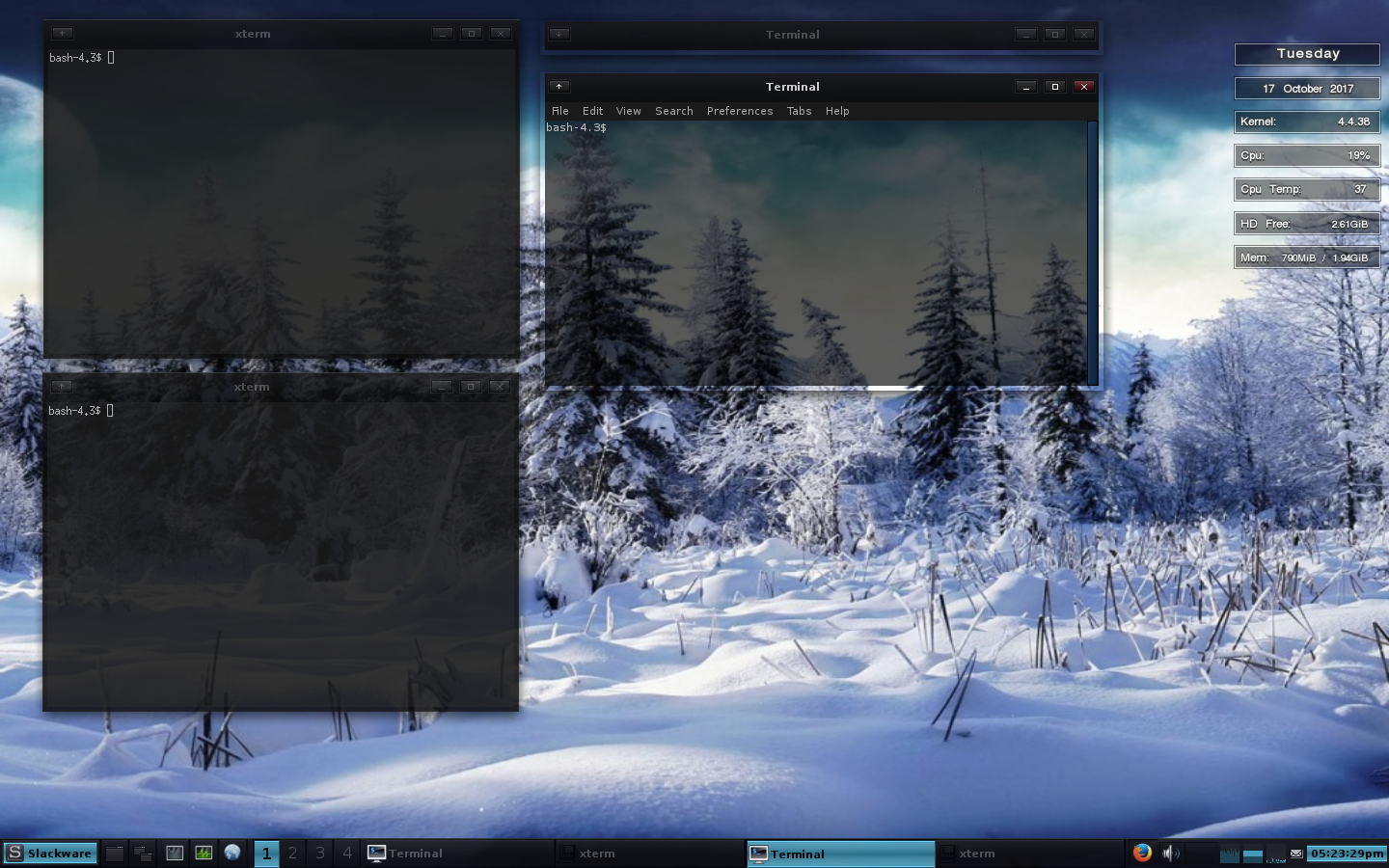
Con este gestor de ventanas, puedes seguir utilizando las herramientas de tu escritorio favorito. Es decir, puedes usar firefox, dolphin, thunderbird, el editor Kate, o lo que prefieras. No tienes límites.
Yo he instalado la versión 3.2.0 en mi openSUSE Leap de pruebas. ¿Quieres probarlo también en tu equipo? Si no está disponible desde los repositorios de tu sistema, puedes hacerlo desde la fuente y compilando.
Primero deberemos instalamos las dependencias necesarias para compilar he instalar iceWM:
$ wget https://ice-wm.org/scripts/os-depends.sh
$ sudo bash -x ./os-depends.sh
Después descargamos la versión que queremos, compilamos e instalamos. En el ejemplo siguiente es la versión 3.2.0, pero si quieres otra, simplemente es cambiar a la versión más reciente disponible:
$ wget https://github.com/ice-wm/icewm/releases/download/3.2.0/icewm-3.2.0.tar.lz
$ tar -x --lzip -vpf icewm-3.2.0.tar.lz
$ cd icewm-3.2.0
$ ./configure --prefix=/usr
$ make
$ sudo make install
Cerramos la sesión y la abrimos seleccionando iceWM para probar la versión más reciente. IceWM es:
- Fácil de usar, simple y rápido
- Se puede manejar por completo con el teclado
- Permite cambiar entre ventanas mediante Alt+Tab
- Uso eficiente de los recursos de tu equipo
- Barra de tareas(optional)
- Múltiples escritorios
- Muchos temas diferentes disponibles
- Se puede usar con entornos GNOME o Plasma
- Atajos de teclado configurables
¿Te animas a probarlo?
Enlaces de interés


LLVM, sudo, Plasma update in Tumbleweed
This week’s openSUSE Tumbleweed snapshots continued to roll forward and update more than 150 software packages.
Besides updates for LLVM, sudo and KDE’s Plasma, packages like systemd, curl, strace and tracker also gained software updates.
An update of gnome-terminal 3.46.3 arrived in snapshot 20221101. The package updated translations, put to use a new icon and removed XML namespaces. Other GNOME packages updated in the snapshot like document viewer evince 43.1. The document viewer fixes a crash and avoids a rendering issue. An update of glib2 2.74.1 had a patch that reverts the handling of collisions between standard input/output file descriptors and newly created ones, which solves the password and secrets storer gnome-keyring-daemon from eating 100 percent CPU. The building blocks package for libraries and applications written in C also fixes regression with int64, which is used to represent 64-bit signed integers; the package also fixes various build failures in different situations. Terminal Emulators vte 0.70.1 implemented the clipboard for GTK4, added a define for Apple’s darwin and fixed a filter for unwanted environment variables. Macedonian translations were added with an update to yast2-trans. A few other packages were updated in the snapshot.
The new major version of the diagnostic, debugging and instructional userspace package strace was made available in the 20221031 snapshot. The 6.0 version updates the decoding of setns system call, which allows for the calling thread to move into different namespaces, and updates the lists of ioctl commands related to Linux Kernel 6.0. The package update of timezone 2022f will let people reading this Tumbleweed blog know that Mexico no longer observes daylight savings except near the US border. Chihuahua moves to year-round time, but it’s unclear if that is for the state or the city. The timezone update changes the time for Fiji as it also no longer observes daylight savings. The few Python Package Index and RubyGems packages were updated in the snapshot as well.
Snapshot 20221030 was more of a RubyGems snapshot that anything else although it had two PyPI updates; python-zope.interface 5.5.0 and python-colorama 0.4.6. Some RubyGems like rubygem-openid_connect added two-way authentication mTLS access token capabilities in the 2.2.0 update. An update of rubygem-pg 1.4.4 reverted a change to let libpq do the host iteration while ensuring the parameter [connect_timeout](https://github.com/ged/ruby-pg/pull/485) is still respected. RubyGems application dependencies package rubygem-bundler fixes a User Interface issue when bundler duplicated gems; this was done by deduplicating the list. One of the few non-RubyGems packages to update in the snapshot was to the application and emulator filter luit 0221028, which updated a configuration script to work around regressions in grep 3.8.
Plasma 5.26.2 was updated in snapshot 20221029. KDE’s software center Discover makes sure to look up the correct resource for Flatpak and now shows the beta information for apps on the backend. Window manager and Wayland compositor KWin replaced some manual pointer conversions with calls and fixed a potential race condition when the text input state changes and when focus changes happen at the same time. Fixes to dragging desktop components were made with the plasma-desktop update and the package fixed font size changes when migrating from Plasma 5.25. A minor update of llvm15 15.0.3 adds a patch to fix the lowering of non-canonical vector comparisons on ARMv7. An updated of decoder mpg123 1.31.0 fixed an interaction of pause (looping) with buffer, adding a --pauseloop to set the loop interval. The package also added interruption handling to fix a bug for certain Advanced Linux Sound Architecture setups. Several other packages were updated in the snapshot.
Browser Mozilla Firefox 106.0.2 fixed a handful of bugs in snapshot 20221028. One of those fixes notifications in the sub-panel settings and another fixes the browser from freezing on some sites. The update of sudo 1.9.12 was extensive. It fixed a bug when logging the commands exit status in intercept mode. It also fixed a bug that prevented event log data from being sent to the log server when I/O logging is not enabled. Tracker and tracker-miners both updated to version 3.4.1. The searching and indexing functionality packages both had fixes for memory leaks. The latter improved performance lookups and provided new handling of syscalls. An update of the mobile remote terminal application mosh 1.4.0 added true color support and syslog logging of connections. The libstorage-ng 4.5.48 update set used feature flags and an update of Plymouth fixed some plugins and dropped a few patches. Linux kernel-source 6.0.5 update provides support GNU Compiler Collection 12.1 and newer compilers, and it had a firmware change that doesn’t free memory if an Advanced Configuration and Power Interface table is loaded successfully. Python updated in the snapshot; a fix for multiplying a list by an integer to detect an integer overflow when a new allocated length is close to the maximum size was made with the python310 3.10.8 update. Many other packages were updated in the snapshot including yast2-firstboot 4.5.5 and yast2-packager 4.5.6.
The 20221027 snapshot that came shortly after publishing last week’s blog had an enormous amount of updated packages. Three Common Vulnerabilities and Exposures were fixed with the curl 7.86.0 update; Daniel Stenberg provided a video from Oct. 26 providing feature changes and discussing pending removals that will be coming in the future. ImageMagick 7.1.0.51 added a private Application Programming Interface to go through a linked list without using semaphores. Advanced Linux Sound Architecture 1.2.8 added a keyring and added support for pause/resume and for an ID3v2 tag skip. An update of systemd 251.7 added support for QR code encoding library libqrencode 3.0, and it reverted a system time set back that introduced regressions that affected many users. LibreOffice 7.4.2.3 fixed a bug where queries don’t show any content when executed directly through the Graphical User Interface. The yast2 4.5.18 update improved logging in the product control module and uses the new log.group call to group logs for each workflow step. Other packages to update in the snapshot were GTK4, dbus-1 1.14.4, mtools 4.0.42, webkit2gtk3 2.38.1 and several more.
The continuous streak of Tumbleweed snapshots stands at 21.
Photography is not just about the camera
Once upon a time I started taking photos with a Lubitel, which is an old, very basic, and completely manual camera. In 2000 I switched from film to digital and everything could be automated. This was the time when I finally realized that having a good camera is not everything. A perfect exposure with a good camera can still result in an ugly and boring photo.

Lubitel 2
When I had a fully manual film camera, I quickly learned how to do perfectly exposed photos without any tools to measure light or distance. My later film cameras had exposure metering, but still, my own estimates were much better than the measurements of my cameras. I had some really nice photos, but most of them were pretty boring, despite being perfectly exposed. Knowing that I had some cheap, Soviet and DDR made cameras, I blamed it on the tech, of course. Yes, I blamed boring photos on the cheap cameras even though my exposures were 100% perfect, sometimes even better (with a bit of luck, one could take 37 photos on a 36 photos film).
My first digital camera was a Nikon Coolpix 950. This was state-of-the-art camera in 2000, way ahead of the competition. I did not have to guess exposure and distance anymore, as everything was properly measured and set by the camera. Still, the majority of my photos were ugly and boring. This was an eye-opening moment for me: I realized that technology is not everything.
For almost two decades, my primary focus was on mastering the perfect exposure and distance without any tools. This camera could set those on its own. This was the moment when I realized that composition is also key. Making sure that I focus on the main subject, do not chop off the head or legs of people, select a proper background, that I am aware of the depth of field and the rule of thirds, and so on.
To me, mastering the proper exposure was an instinct. Learning how to compose nice photos was a long learning process. I have some really nice photos. Most of them are now well composed, but there is nothing really special about them. No matter how many photos I take or how many books I read about photography, it is not really possible to learn creativity…
For many years I considered mobile photography a joke. Compared to a full frame or APS-C camera, the lens and sensor in a mobile are ridiculous. However, the camera is not everything. Of course, the camera can limit some of the advanced possibilities, but not the composition and creativity.
Learning how to use a camera can be overwhelming. A good camera is also expensive, but using “just” a mobile does not mean that someone is not good at photography. I met quite a few people who were bullied by people with expensive cameras that they suck at photography. And yet, when you look at their photos taken using their mobile, you see that they do wonderful compositions without ever hearing about the rule of thirds, or knowing about timing or aperture. With a bit of encouragement, they understood that they are taking nice photos and some even started to learn photography.
Long story short: a good camera can give a lot more flexibility and extra quality, but it is just one ingredient of good photos. Do not discourage anyone from pursuing photography just because they are using a mobile or a point and shoot camera.
You can find some of my photos on Gurushots.
Bibit Pepaya dan Petik Pepaya
Setelah menanam 4 bibit pepaya dan mendapat hasil yang menyenangkan dengan buah berlimpah, saya mulai melakukan penyemaian bibit pepaya dari benih F1 (benih pabrikan dari IPB) di toko pertanian Zeze Zahra.
Pertimbangannya sederhana. Pepaya yang saya tanam di rumah kabin Zeze Zahra hanya butuh waktu beberapa bulan sudah mulai berbuah. Sekali berbuah lebat sekali. Rasanya juga manis, karena saya menunggu pepaya tersebut tua atau matang di pohon.


Karena hal tersebut, saya memilih untuk menjual benih dan bibit pepaya di toko pertanian Zeze Zahra (https://tokopedia.com/zezezahra). Sebagian bibit yang sudah besar ada yang saya bawa ke rumah kabin Zeze Zahra untuk ditanam sebagai bibit pengganti.
Harapannya dalam beberapa bulan ke depan, saya memiliki lebih banyak pohon pepaya dan bisa mendapatkan hasil yang lebih banyak lagi.
Tertarik menanam pepaya di pekarangan seperti di Zeze Zahra? Bisa beli benih maupun bibitnya di toko pertanian Zeze Zahra (https://tokopedia.com/zezezahra) 😊😁
Haruna, otro reproductor multimedia de KDE
Sigo presentando aplicaciones de la Comunidad KDE que nunca han sido protagonistas del blog. En esta ocasión le ha tocado a Haruna, otro reproductor multimedia que se une a las alternativas KDE como Dragon Player o Kaffeine.
Haruna, otro reproductor multimedia de KDE
Siempre es de agradecer tener varias opciones para cualquier funcionalidad básica de nuestro sistema, y en eso el Software Libre es sobresaliente, y es que en ocasiones podemos tener problemas con uno de ellos o que simplemente nos guste uno más que otro.
Tenemos a nuestra dsposición decenas de reproductores multimedia como VLC o SMPlayer, y la Comunidad KDE te ofrece incluso un par dentro de su ecosistema, los ya nombrados Dragon Player o Kaffeine.
A este elenco se le ha unido Haruna, un reproductor de vídeo de código abierto construido con libmpv que destaca por su integración con Youtube y que, debo reconocer, desconocía hasta hace muy poco.
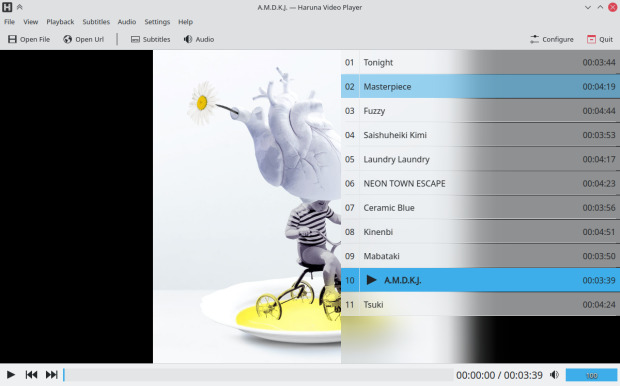
Las principales caracteristicas de Haruna son las siguientes:
- Posibilidad de poner una lista de reproducción automática.
- Atajos de teclado configurables.
- Reproducción de vídeos en línea a través de youtube-dl/yt-dlp
- Saltar automáticamente los capítulos que contengan determinadas palabras
- Asignación de acciones a los botones del ratón: clics simples y dobles a la izquierda, al centro y a la derecha, así como desplazamiento hacia arriba y hacia abajo
- Salto rápido al siguiente capítulo haciendo clic en el centro de la barra de progreso.
- Posibilidad de cambiar los esquemas de color así como los estilos de los widgets/controles.
En la actualidad haruna se encuentra en su versión 2.9 que fue lanzada el pasado 25 de junio y que nos ofrece las siguientes novedades:
- Soporte para menús globales
- Posbilidad de configurar pausae la reproducción cuando se minimiza y guardar la posición de tiempo cuando se apaga.
- Opción de menú de «archivos recientes».
Más información; Haruna
La entrada Haruna, otro reproductor multimedia de KDE se publicó primero en KDE Blog.
Mostrar el recuento de carpetas y archivos en la terminal
Veamos cómo hacer que se muestre un resumen con el número de carpetas y archivos al listar el contenido de una carpeta en la terminal de nuestro sistema GNU/Linux

Estando en una terminal, es una tarea muy común el listar el contenido de una carpeta para que nos muestre el listado de archivos y carpetas que contiene. Eso lo podemos realizar con el comando ls o con herramientas más modernas como exa
Hace unos días, al escribir un artículo para el blog sobre el comando tree me gustó el detalle de que al terminar, hace un resumen en el que muestra el número de directorios y archivos que el comando ha mostrado.
Pensé que me gustaría que exa, que es el comando (con el alias de ll) que uso para mostrar el contenido de las carpetas también tuviera esa funcionalidad. Y dándole alguna vuelta, así logré tenerlo.
Para mostrar ese resumen del comando tree en exa, había además que usar tail para que seleccionara la última línea del comando tree.
Al final el comando quedaría así:
ll && tree -L 1 | tail -n 1
Como he dicho antes, ll es un alias que tengo establecido para que ejecute exa con los siguientes parámetros: exa --icons --long --header --git --group-directories-first
El resultado, es lo que ves en la captura que abre el artículo. Se muestra el contenido de la carpeta y se añade el resumen final del comando tree, del que el comando tail ha recortado la última línea para mostrarla.
El comando tiene algún pequeño contratiempo, ya que si quieres que exa muestre todos los archivos, incluidos ocultos, también a tree deberás pedírselo, para que concuerde lo mostrado con el resumen final. Para ello deberemos hacerlo así:
ll -a && tree -aL 1 | tail -n 1
También podemos usar alguna otra de las funcionalidades de las opciones del comando tree, para que nos muestre lo que ocupan dichos archivos y directorios mediante la opción --du y añadiendo también -h para que muestre el valor de una manera adecuada. Quedando así:
ll && tree --du -hL 1 | tail -n 1
¿Te ha resultado interesante la opción que te he traido? Ya queda en tu mano añadir ese comando a tus alias y adaptarlo a tus gustos personales.
Enlaces de interés
- https://victorhckinthefreeworld.com/2022/10/31/el-comando-tree-en-gnu-linux/
- https://victorhckinthefreeworld.com/2021/09/09/el-comando-tail-de-gnu/
- https://victorhckinthefreeworld.com/2020/04/29/exa-un-reemplazo-mas-colorido-y-moderno-para-el-comando-ls/
