
 cabelo
RMNUDES v2 Combate a pornografia infantil.
Além de evitar gestos obscenos com visão computacional, podemos também evitar conteúdos impróprios para menores na internet. Também podemos limpar a web e combater a pornografia infantil, detectando nudes onde alguma face na cena apresenta estimativa de idade de crianças. Assim enviando automaticamente o conteúdo para polícia do país em questão.

 Member
Cómo abrir división de pantalla en Vim con un archivo en blanco o con un archivo específico
Cómo dividir la pantalla de nuestro Vim (ya sea de manera horizontal o vertical) y que se abra o bien sin nada o con un archivo que especifiquemos

Imaginemos que estamos editando un archivo, y queremos dividir la pantalla ya sea en horizontal o vertical, con un espacio en Vim vacío, nuevo en el que iremos anotando cosas que después guardaremos en un archivo… o no.
O queremos abrir una división de la pantalla directamente con otro archivo del mismo directorio o de otra ruta. Veamos cómo hacerlo.
¿Me creéis si os digo que casi con 90 artículos relacionados con Vim en el blog, ya no sé si sobre alguno he escrito o no?
Este artículo es una nueva entrega del curso “improVIMsado” que desde hace meses vengo publicando en mi blog sobre el editor Vim y que puedes seguir en estos enlaces:
- https://victorhckinthefreeworld.com/tag/vim/
- https://victorhck.gitlab.io/comandos_vim/articulos.html
Y para aprender Vim (de la manera más inteligente) aquí tienes esta útil guía:
Con nuestro editor Vim abierto con un documento que llene toda la pantalla, si pulsamos los comandos :sp o :vsp nos abrirá una división horizontal o vertical respectivamente con el mismo documento que estamos editando, después ya podremos seleccionar otro si lo deseamos en esa división nueva.
Pero ¿cómo abrimos una división de pantalla en la que no se abra ningún archivo, simplemente un nuevo Vim vacío? Para ello tenemos que ejecutar los comandos :new o :vnew para que la división de pantalla sea horizontal o vertical respectivamente.
En ese espacio vacío podemos escribir lo que queramos y al acabar cerrarlo sin guardar y se perderá lo que hayamos escrito o podemos guardarlo con un nombre y se convertirá en un archivo. Es un buen método para escribirnos recordatorios o notas, sobre el documento principal que estemos editando.
Pero quizás queremos abrir en esa división vertical u horizontal un archivo distinto ya existente para compararlos o lo que sea, para eso podemos pasarles a los comandos anteriores el nombre de un archivo del mismo directorio o una ruta y archivo de otro lugar.
Por ejemplo :new /home/victorhck/Documentos/Blog/artículo.txt abrirá el archivo de la ruta especificada en una división horizontal.
O :vnew otro_archivo.txt abrirá el archivo especificado que se encuentra en el mismo directorio que el archivo que tenemos abierto en una división vertical.
División nueva abajo o a la derecha
Quizás tenemos la manía de que las divisiones nuevas que creamos se abran a la derecha cuando es una división vertical o abajo cuando es una división horizontal, bueno, al menos yo sí tengo esa manía…
Para ello, hay que indicárselo a Vim en nuestro archivo de configuración .vimrc añadiendo estas líneas en él:
set splitright
set splitbelow
Movernos entre las divisiones
Y para movernos entre las diferentes divisiones de pantalla que hayamos creado lo haremos con la combinación de teclas Ctrl + W y una tecla de movimiento hjkl para ir a la izquierda, abajo, arriba o derecha respectivamente.
Desde luego es algo muy sencillo pero que nos puede ser de utilidad mientras estamos editando con Vim. ¿Ya conocías este método? ¿Es lo que estabas buscando? Comparte en los comentarios…
Mix de novedades de KDE Gear 22.08
La Comunidad KDE anunció hace unos días que había sido lanzado KDE Gear 22.08, la gran actualización de sus aplicaciones que tiene una periodicidad cuatrimestral. De esta forma, se nos presentan decenas de cambios importantes, una ingente cantidad de bugs solucionados y mejoras en las traducciones. Es hora de ir descubriendo poco a poco cuáles han sido. Hace unos días empezamos con Spectacle, el capturador de pantalla del escritorio Plasma, seguimos con Kalendar, KDE Itinerary, continuamos con los editores Kate y KWrite, los gestores de disco Filelight y el gestores de particiones, Dolphin y, el último de momento, Elisa. Hoy con el mix de novedades de KDE Gear 22.08 cerramos esta serie que empezamos hace bastante tiempo.
Mix de novedades de KDE Gear 22.08
Dentro del lanzamiento de KDE Gear 22.08 muchas aplicaciones han recibido mucho cariño, como hemos visto en las últimas entradas del blog donde vamos repasando una a una las pequeñas novedades de ellas.
Y es que, con tantas aplicaciones, hacer un resumen de todas y cada una sería interminable, así que aquellas que no han recbido más que una mejora destacable, sin contar la resolución de errores, se agrupan en esta macedonia.

En resumen, estas son el mix de novedades de KDE Gear 22.08:
- Ark comprueba ahora el espacio disponible para asegurarse de que existe suficiente en el lugar de destino antes de empezar a descomprimir un archivo.
- Al pulsar sobre una notificación de Konsole sobre una determinada sesión se activa ahora dicha sesión de Konsole.
- Skanpage permite ahora la exportación de PDF en los que se puede buscar usando el reconocimiento óptico de caracteres.
- Gwenview, el popular visor de imágenes de KDE, permite añadir anotaciones en sus funciones de edición de imágenes. La funcionalidad de anotaciones es la misma que usa Spectacle, por lo que probablemente ya estará familiarizado con ella.
La entrada Mix de novedades de KDE Gear 22.08 se publicó primero en KDE Blog.
La comunidad de KDE España y KDE Internacional se reunirán en Barcelona este 2022
El 29 y 30 de septiembre y del 1 al 7 de octubre de este 2022 se celebrarán Akademy-es y Akademy Internacional respectivamente con opción de seguirlas de manera remota

La comunidad de KDE retoma las citas y encuentros presenciales después de un par de año de impedimentos. Y lo hace en Barcelona donde se celebrarán la Akademy-es y la Akademy Internacional.
Si usas software de KDE, si colaboras de alguna manera, si desarrollas software en KDE o si simplemente el software libre fluye por tus meninges, tienes una cita en Barcelona, ve reservando las fechas.
Akademy-es
Akademy-es se celebrará los días 29 y 30 de septiembre de 2022 en Barcelona. Es la cita anual donde personas con una pasión afín por KDE o el software libre se dan cita para asistir a charlas, conocer a otras personas de gustos similares y aprender.
Durante esos dos días se darán diversas charlas con temáticas centradas en KDE pero abiertas a otros temas relacionados con el software libre. Es una gran oportunidad para desvirtualizar a ese desarrollador que mantiene esa aplicación de KDE que te gusta, o poder informarte de otros temas.
Por cierto, los periodos para enviar tus charlas si quieres participar está abierto hasta el próximo 5 de septiembre. Ponte en contacto con KDE España si quieres dar una charla en el Akademy-es.
La asociación KDE España, organiza estos eventos de manera anual en diferentes ciudades para difundir el proyecto KDE y acercarlo a las personas que ya lo siguen o a aquellas que nunca han oido hablar de otro entorno de escritorio o sistema operativo que no sean privativos.
Por cierto, también si lo deseas puedes unirte a KDE España y ser parte de la asociación, o colaborar de manera externa con diversas propuestas que creas interesantes.
Akademy Internacional
Sin solución de continuidad, después de Akademy-es se celebrará del 1 al 7 de octubre el Akademy Internacional también en Barcelona.
De nuevo la organización del evento internacional se hará en el estado español, y aquí se reunirán colaboradores, simpatizantes y desarrolladores de la comunidad de KDE de todas partes del mundo.
Sí, la comunidad de KDE es global y tendrá su punto de encuentro en Barcelona. Habrá un par de días de charlas de diferentes personas que desarrollan KDE y después un montón de talleres donde aprender sobre eso que te interesa o aquella tecnología por la que tienes curiosidad.
¡No te lo pierdas!
Si tienes la oportunidad de asistir, te recomendaría que lo hicieras. Que te dejes inundar por la experiencia y disfrutes. Cuando asistí por primera vez A Coruña, donde también coincidieron ambos eventos, fue muy interesante conocer a esas personas que te sonaban por haber seguido hilos en listas de correo, o conocer sus nombres por ser desarrolladores de partes importantes de KDE.
Aunque todo el mundo cuenta, no hace falta ser desarrollador (yo no lo soy) para asistir, para encontrar a otras personas interesantes o temas que te interesen.
De momento el plazo de recepción de charlas y talleres está abierto, por lo que todavía no se sabe sobre qué se tratará, pero pronto estará disponible un cartel definitivo para consultarlo.
Eventos híbridos
Ambos eventos serán compartidos y retransmitidos por la red para aquellas personas que deseen asistir pero por diversas causas no puedan hacerlo. Una manera de acercar KDE a muchas personas para que se animen a participar en la próxima cita, ya de manera presencial.
Enlaces de interés

Ampliado el plazo para presentar charlas para Akademy-es 2022 de Barcelona #akademyes
Como ya sabrán los seguidores del blg, a diferencia del año anterior, Akademy-es 2022 se celebrará en línea el 29 y 30 de septiembre. Estamos ya solo a un mes de su celebración y ha sido ampliado el plazo para presentar charlas para Akademy-es 2022 de Barcelona, una manera de rescatar a los despistadillos.
Ampliado el plazo para presentar charlas para Akademy-es 2022 de Barcelona
Hace unos meses compartí con vosotros que este año Akademy-es 2022 se va a realizar de forma híbrida en Barcelona el 29 y 30 de septiembre, en una edición muy especial ya que volveremos a encontrarnos de forma física pero que seguirá siendo accesible para todo el mundo utilizando tecnologías de telecomunicación libres.
Siguiendo el esquema habitual cuando coincide con una Akademy, las charlas se celebrarán el jueves y el viernes, para dejar libre el fin de semana para las ponencias el evento Internacional.
Si crees que tienes algo importante que presentar, por favor házselo saber a la organización. Y si crees que alguien debería presentar su ponencia, no dejes de animarlo para que lo haga. Todas las contribuciones son útiles.
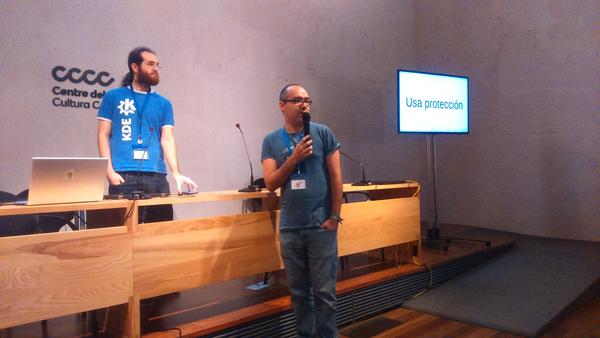
Para más detalles, mira las líneas generales del Call for Papers, donde se comenta que ha sido ampliado el plazo para enviar tu propuesta hasta el domingo 29 de agosto 5 de septiembre 23:59:59 CEST al correo akademy-es-org@kde-espana.org.
Es importante tener en cuenta las siguientes consideraciones:
- Se puede elegir entre dos formatos de charlas:
- Charlas de 45 minutos.
- Charlas relámpago (Lightning talk) de 10 minutos.
- Si la duración de las charlas propuestas no se ajusta a ninguno de estos dos esquemas (por ejemplo, si se necesita más tiempo), esto debe indicarse claramente en la comunicación.
- Se permitirá a KDE España la distribución bajo una licencia libre de todo el material utilizado para la realización de la actividad, así como de la grabación de la misma.
- La charla puede ser tanto a nivel de usuario como de nivel técnico.
¿Qué es Akademy-es?
Akademy-es (#akademyes, que es la etiqueta para las redes sociales) es evento más importante para los desarrolladores y simpatizantes de KDE, que se ha ido celebrando desde el 2006 con éxito creciente.
En general, las Akademy-es son el lugar adecuado para conocer a los desarrolladores, diseñadores, traductores, usuarios y empresas que mueven este gran proyecto.
En ellas se realizan ponencias, se presentan programas, se hace un poco de caja para los proyectos libres (camisetas, chapas, etc) pero sobre todo se conoce a gente muy interesante y se cargan baterías para el futuro.
Podéis repasar las anteriores ediciones en estas entradas del blog:
- Camino Akademy-es 2013: Las anteriores ediciones (I): 2006 – 2008
- Camino Akademy-es 2013: Las anteriores ediciones (II): 2009-2010
- Camino Akademy-es 2013: Las anteriores ediciones (III): 2011-2012
- Anteriores ediciones de Akademy-es (IV): 2013 y 2014
La entrada Ampliado el plazo para presentar charlas para Akademy-es 2022 de Barcelona #akademyes se publicó primero en KDE Blog.
El proyecto GNOME publica una herramienta de telemetría para mejorar su escritorio
El proyecto GNOME ha publicado una herramienta que recopila datos de los usuarios que quieran instalarla y envía datos anónimos al proyecto para que puedan mejorar su proyecto

El proyecto GNOME ha anunciado la disponibilidad de una herramienta que el usuario que lo desee puede instalar en su distribución de GNU/Linux para enviar datos recolectados del sistema del usuario de manera anónima al proyecto para ayudarlo a tomar decisiones futuras basadas en el uso del escritorio que hacen sus usuarios.
La herramienta se llama gnome-info-collect y está disponible desde su repositorio de GitLab propio y también disponible en los repositorios de diferentes distribuciones de GNU/Linux como Fedora, openSUSE, Arch o Ubuntu.
La herramienta recopila los siguientes datos:
| Distribución, variante, versión | ¿Quién está proporcionando datos? ¿La información está influenciada por la distribución utilizada? |
| Hardware (fabricante/vendedor, modelo) | ¿Para qué hardware debería GNOME priorizar su compatibilidad? |
| ¿Flatpak instalado? | ¿Hasta qué punto se debe diseñar el software GNOME en torno a la disponibilidad de Flatpak? |
| Estado de Flathub (habilitado/filtrado/deshabilitado) | ¿En qué medida debe diseñarse el software GNOME en torno a la disponibilidad de Flathub? |
| aplicaciones instaladas | ¿Qué aplicaciones debería priorizar GNOME en el desarrollo? ¿Hay alguna aplicación de terceros que se pueda mover al núcleo? |
| Aplicaciones favoritas (las que están en dash) | ¿Es el dash personalizable una característica útil? ¿Qué aplicaciones deben ser favoritas por defecto? |
| Tipos de configuración de cuentas en línea de GNOME | ¿Qué cuentas necesita GNOME para continuar admitiendo? ¿En qué medida se utiliza GOA? |
| Configuración de uso compartido habilitada (uso compartido de archivos (DAV), escritorio remoto (VNC y RDP), uso compartido de multimedia, inicio de sesión remoto (SSH)) | ¿Qué ajustes de uso compartido deben seguir formando parte de la aplicación Ajustes? ¿Cuál podría trasladarse a otro lugar? |
| Espacios de trabajo solo en el principal/espacios de trabajo en todas las pantallas | ¿Qué nivel de recursos se debe invertir en espacios de trabajo en todas las pantallas? |
| Espacios de trabajo dinámicos/estáticos | ¿Qué nivel de recursos se debe invertir en espacios de trabajo estáticos? |
| Número de usuarios en el sistema. | ¿La experiencia multiusuario merece más atención? |
| Navegador predeterminado | ¿Dónde debería centrarse el trabajo de integración del navegador? |
| Extensiones de GNOME habilitadas | ¿Algún cambio de las extensiones que deba considerarse para la experiencia de shell predeterminada? |
| Salted hash de máquina ID+nombre de usuario | Se utiliza para desduplicar respuestas |
Aunque la telemetría es un tema peliagudo entre las personas que valoran su privacidad, cabe recordar que los datos enviados son totalmente anónimos y como hacen otros proyectos se utilizarán para tener una serie de datos de cómo los usuarios usan GNOME.
Algunos de los pasos para garantizar el anonimato incluyen no recopilar ninguna información personal, como el nombre de usuario o la dirección de correo electrónico, solo la configuración del sistema y algunas propiedades del hardware. Además, algunos datos innecesarios se descartan deliberadamente, como la dirección IP del remitente y la hora exacta de recepción de los datos.
Esto permite priorizar recursos en torno a las medidas más demandadas frente a las menos usadas. Algo que también es algo peligroso, porque se pueden olvidar esas minorías… pero los recursos de desarrolladores, diseñadores, etc es limitado…
Si te apetece colaborar con el proyecto enviando de manera anónima tus datos, echa un vistazo al código e instala la herramienta.

Las novedades de Elisa de KDE Gear 22.08
La Comunidad KDE anunció hace unos días que había sido lanzado KDE Gear 22.08, la gran actualización de sus aplicaciones que tiene una periodicidad cuatrimestral. De esta forma, se nos presentan decenas de cambios importantes, una ingente cantidad de bugs solucionados y mejoras en las traducciones. Es hora de ir descubriendo poco a poco cuáles han sido. Hace unos días empezamos con Spectacle, el capturador de pantalla del escritorio Plasma, seguimos con Kalendar, KDE Itinerary, de los editores Kate y KWrite y de los gestores de disco Filelight y el gestores de particiones y, el último de la serie de momento, Dolphin. Hoy toca hablar de las novedades de Elisa de KDE Gear 22.08, uno de los reproductores de audio de KDE.
Las novedades de Elisa de KDE Gear 22.08
Dentro del lanzamiento de KDE Gear 22.08 muchas aplicaciones han recibido mucho cariño, como estamos viendo en las últimas entradas del blog donde vamos repasando una a una las pequeñas novedades de ellas.
Con la desaparición de Amarok, una pena, la Comunidad KDE está buscando una aplicación que la sustituya, y una de las que más números tiene es Elisa.
Para los que no lo conozcan, Elisa es un elegante y compacto reproductor de música de KDE que ha tenido algunas entradas en el blog y que, aunque a mi todavía no me tiene convencido, cada cierto tiempo le doy una oportunidad.
Si vamos al grano, las novedades de Elisa de KDE Gear 22.08 son las siguientes:
- Mejoradas sus funciones de accesibilidad: la barra lateral de la lista de reproducción vuelve a ser navegable mediante el uso del teclado.
- En una pantalla táctil, al tocar una canción de la lista de reproducción de Elisa se reproducirá de forma inmediata en lugar de quedar seleccionada.
- Los elementos de la lista de reproducción son más altos y más fáciles de usar con los dedos.
- Ahora se puede elegir desactivar el escaneo automático al inicio y ejecutarlo sólo manualmente
- También ahora se puede ordenar la vista de las pistas por «Fecha de modificación» – útil si quieres reproducir cosas que has añadido o cambiado recientemente.
- La vista de «Archivos» de Elisa comienza en la raíz por lo que puedes acceder fácilmente a la música que no está en tu carpeta de inicio.
En los próximo días seguiré comentando las novedades de este gran lanzamiento.
La entrada Las novedades de Elisa de KDE Gear 22.08 se publicó primero en KDE Blog.
Detectando gestos obscenos em tempo real
Desde 2018 a tecnologia Certiface da OITI permitia detectar gestos obscenos em FOTOS cadastrais. Agora com a evolução da performance e precisão de inferência tecnológica em visão computacional, podemos detectar e garantir a não presença de gestos obscenos em tempo real utilizando o processamento em computadores de borda. Embora a biometria facial utilize apenas a região da face, alguns sistemas armazenam a foto original para exibição da foto cadastral. Para evitar diversos desconfortos podemos utilizar algoritmos de Visão Computacional para este propósito.

Search API Endpoints, Fully Documented
Las novedades de Filelight y el gestor de particiones de KDE Gear 22.08
La Comunidad KDE anunció hace unos días que había sido lanzado KDE Gear 22.08, la gran actualización de sus aplicaciones que tiene una periodicidad cuatrimestral. De esta forma, se nos presentan decenas de cambios importantes, una ingente cantidad de bugs solucionados y mejoras en las traducciones. Es hora de ir descubriendo poco a poco cuáles han sido. Hace unos días empezamos con Spectacle, el capturador de pantalla del escritorio Plasma, seguimos con Kalendar, KDE Itinerary y de los editores Kate y KWrite. Es el momento de hablar de las novedades de Filelight y el gestor de particiones de KDE Gear 22.08, las herramientas para la gestión de discos duros.
Las novedades de Filelight y el gestor de particiones de KDE Gear 22.08
Dentro del lanzamiento de KDE Gear 22.08 muchas aplicaciones han recibido mucho cariño, como estamos viendo en las últimas entradas del blog.
Hay que reconocer que la Comunidad KDE se preocupa de todos los aspectos de nuestro entorno de trabajo, siendo la gestión de discos duros un aspecto más que fundamental.
Y para ello se nos ofrecen dos herramientas como Filelight, que nos permite ver con claridad el espacio de almacenamiento disponible y encuentra lo que está ocupando mucho espacio, o el Gestor de particiones, la herramienta de KDE para crear, mover y cambiar el tamaño de las particiones de los discos,
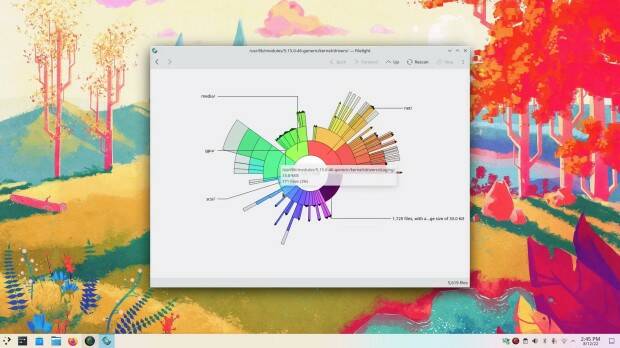
De esta forma, las novedades de Filelight y el gestor de particiones de KDE Gear 22.08 son las siguientes:
- Remodelado el aspecto de Filelight para modernizarlo y, durante el proceso, han hecho que el código sea más fácil de mantener portándolo a QtQuick.
- También Filelight ha mejorado el texto de las ayudas emergentes de Filelight ya no se recortan hacia el final. «Selección» que contiene acciones que solo se aplicarán a lo que esté seleccionado.
- El gestor de particiones ha corregido algunos defectos que afectaban al texto del panel de información.
- Además, ahora el gestor muestra un texto legible para los humanos sobre la cantidad de tiempo que un disco ha estado encendido.
En los próximo días seguiré comentando las novedades de este gran lanzamiento.
La entrada Las novedades de Filelight y el gestor de particiones de KDE Gear 22.08 se publicó primero en KDE Blog.