
 Member
 Victorhck
Algunos trucos útiles de uso del paginador less
Vamos a descubrir algunos atajos de teclado útiles y sencillos para sacarle más partido al paginador less en GNU/Linux

¿Qué es less? Y tú me lo preguntas… pues te respondo, less es un paginador de texto.
Bien, ¿y qué se supone que es un paginador? Un paginador de texto es un programa que muestra archivos de texto en la terminal de nuestro sistema, por páginas o partes del mismo y con el que puedes avanzar o retroceder por el texto y con less además muchas otras cosas más.
Less no es un editor. No puedes cambiar el contenido del archivo que estás viendo. Less no tiene barras de desplazamiento sofisticadas u otros elementos GUI (interfaz gráfica de usuario). Fue diseñado para funcionar en terminales simples de solo texto.
Miles de personas en todo el mundo han utilizado Less desde su lanzamiento en 1985. Y está disponible como parte del sistema GNU bajo una licencia de software libre GPL.
Si has consultado alguna vez una página «man» en la terminal de tu sistema GNU/Linux, seguro que lo has hecho gracias a less. Y también puedes consultar y leer el contenido de archivos de texto, logs, scripts, etc con less.
En este artículo voy a compartir contigo algunos trucos útiles y sencillos sobre less, con los que podrás sacarle más partido y hacerlo una herramienta de uso, porque seguro que tiene alguna de las cosas que te voy a contar no las sabías…
Podemos abrir un archivo de texto con less ejecutando en nuestra terminal:
less <nombre_archivo>
También puedes abrir una página «man» de algún comando, lo que seguramente hará que se muestre la ayuda usando less, vamos a probar esto:
man less
Verás que se nos mostrará el texto del archivo, de una manera muy sencilla, sin florituras, sin elementos que despisten… y también hacen que te puedas encontrar un poco perdido o perdida al principio. ¡Que no cunda el pánico!
Podemos desplazarnos por el texto bajando o subiendo una línea:
- usando las teclas de las flechas de nuestro teclado
- usando j o k para bajar o subir
- usando e o y para bajar o subir
Podemos desplazarnos en bloques de pantalla:
- usando f (forward) o b (backward) una página entera
- usando z para avanzar o w para retroceder una página entera
- usando d (down) para avanzar media página
- usando u (up) para retroceder media página
Podemos hacer saltos más grandes:
- usando g o < irá a la primera línea del archivo
- usando G o > irá a la última línea del archivo
Pero less también puede buscar un texto en el archivo:
- usando /término → buscará la palabra término hacia adelante en el texto, parándose en la primera que encuentre
- usando ?término → buscará la palabra término hacia atrás en el texto, parándose en la primera que encuentre
- usando n realizará la última búsqueda
- usando N realizará la última búsqueda pero en sentido contrario
- usando &término → mostrará únicamente las líneas que contengan la cadena término
Comandos generales:
- Para salir que less, podemos hacerlo pulsando q, Q o ZZ
- Podemos hacer que nos muestre los números de línea mediante -N y Enter
- Podemos ocultar los números de línea mediante -n
- Y podemos consultar en cualquier momento la ayuda de less pulsando tanto h como H
Por supuesto que less tiene muchas otras funcionalidades interesantes, estas que enumero aquí son las más básicas y sencillas, pero sin dudo muy útiles. Te dejo a tí, descubrir el resto.
Como verás muchos de los comandos de less son similares a los que usa el editor Vim, así que si estás acostumbrado a estos, te será más sencillo de acordarte.
¿Conocías todo lo que puede hacer less? ¿Algún comando que has aprendido, alguno que conoces y quieres compartir? Usa los comentarios para compartir tus aportes que complementen el artículo.

Mi escritorio Plasma de junio 2022 #viernesdeescritorio
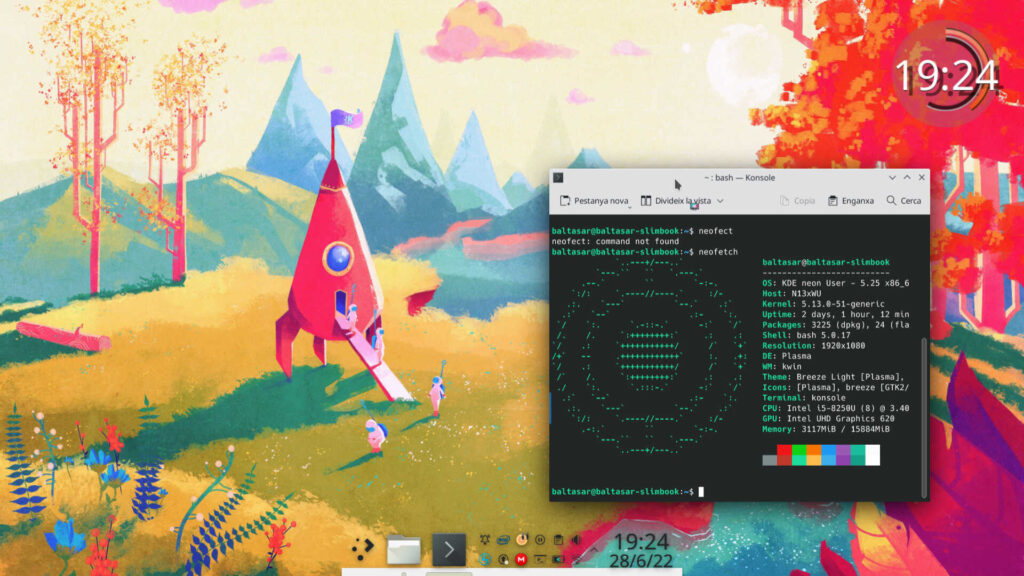
Sigo la serie de la iniciativa #viernesdeescritorio con una nueva captura. Con este ya llevo más de un año compartiendo «Mi escritorio», una mirada a la intimidad de mi entorno de trabajo. De esta forma, bienvenidos a mi escritorio Plasma de junio 2022 que cambia radicalmente respecto al tema oscuro (y algo triste) del mes pasado para conmemorar el lanzamiento de Plasma 5.25
Mi escritorio Plasma de junio 2022 #viernesdeescritorio
Esta va a ser la vigesimocuarta vez que muestro mi escritorio Plasma 5 en público, lo cual es número nada desdeñable de entradas que sigue creciendo de forma constante.
En esta ocasión he hecho algo de trampa ya que el mes ha sido muy intenso y he publicado esta entrada del viernes de escritorio un jueves, el del último días del mes de junio. Espero que me permitáis este pequeño truco para no perder la cadencia.
Además, he vuelto a los temas claros, para variar un poco, y utilizar el fondo de pantalla con el que se presenta Plasma 5.25, que fue lanzado el 14 de junio.
Para mostrar la información sigo utilizando neofetch, y he cambiado del fantástico reloj Aesthetic clock v2 a Digital Clock BE Style, del cual también hablé hace un tiempo en el blog.
Sigo con la barra Latte Dock (me gusta que tengan tantas opciones de personalización) ligeramente modificado, añadiendo el lanzador de aplicaciones, la bandeja de sistema y un reloj digital.
Y sigo, tras unos meses enseñando mi Slimbook Kymera AMD de sobremesa, realizando a captura está realizada sobre mi portátil Slimbook Pro de 13 pulgadas, el cual tiene instalado un KDE Neon con Plasma 5.25.0 (el primero de la rama 25 aunque ya tengo un par de actualizaciones pendientes)
El resultado de mi escritorio de junio de 2022 es un entorno de trabajo claro y, como siempre, funcional que podéis ver en la imagen inferior (pinchad sobre ella para verlo un poco más grande).
La entrada Mi escritorio Plasma de junio 2022 #viernesdeescritorio se publicó primero en KDE Blog.

OpenSSL, Squid, Dracut Update in Tumbleweed
Five openSUSE Tumbleweed snapshots have been released since last Friday.
The snapshots had a small amount of packages in each release.
The 20220629 snapshot updated OpenSSL to version 1.1.1p. This newer version fixed CVE-2022-2068 affecting the c_rehash script, which was not properly sanitizing the shell metacharacters to prevent command injection. The script, which is distributed by some operating systems in a manner where it is automatically executed, could give an attacker execute arbitrary commands with the privileges of the script. Another package updated in the snapshot was perl-JSON 4.07, which provided some backport updates from 4.10 version. New memory device types, processor upgrades, slot types, processor characteristics and more came in the update of dmidecode 3.4. There were also several table engine updates in the snapshot like ibus-table 1.16.9, ibus-table-chinese 1.8.8 and more.
A single package was updated in snapshot 20220628. The update of mpg123 1.30.0 has a new network backend using external tools/libraries to support HTTPS and the terminal control keys are now case-sensitive.
Two Python Package Index updates were released in 20220626. Missing constructors for UUID for each Bluetooth service were added in the python-qt5 5.15.7 update. The package is a comprehensive set of Python bindings for Qt v5. The other PyPI package update was python-rsa 4.8, which switched to Poetry for dependency and release management and made decryption 2-4x faster by using the Chinese Remainder Theorem when decrypting with a private key.
Text editor vim fixed an invalid memory access when using an expression on the command line in the 8.2.5154 update and some fixes related valgrind became available in the 20220625 snapshot. Caching proxy squid fixed some parser regressions and improved the handling of Gopher responses in version 5.6. The updated open-source printing package cups-filters 1.28.15 had improvements to identify old LaserJets more precisely and switch to Poppler when appropriate. The 5.18.6 Linux Kernel came in the snapshot as well and had several ALSA System on Chip enhancements and fixes. The kernel also had a couple KVM for arm64 changes and handled some GNU Compiler Collection 12 warnings.
Snapshot 20220624 brought an updated dracut version, which stopped leaking shell options and put in a temporary workaround for openSUSE appliance builder kiwi. The gstreamer 1.20.3 made some WebRTC and performance improvements; it also fixed scrambled video playback with hardware-accelerated VA-API decoders on certain Intel hardware. The D-Bus interface for user account query and manipulation, accountsservice, updated from version 0.6.55 to 22.08.8. Other packages to update in the snapshot were Imath 3.1.5, KDE’s amarok and more.
Pisa a fondo el pedal con el editor #Vim
Un proyecto de un usuario para construir un pedal hardware para manejar el editor Vim

VIM Clutch o lo que se podría traducir como un pedal de embrague para Vim, es un pedal de hardware creado por el usuario Aleksandr Levchuk para mejorar la velocidad de edición de texto para los usuarios del gran editor Vim.
Cuando se presiona el pedal, el pedal escribe «i», lo que hace que VIM entre en modo de insertar. Cuando se suelta, escribe «Esc» y vuelve al modo normal.
Este artículo es una nueva entrega del curso “improVIMsado” que desde hace meses vengo publicando en mi blog sobre el editor Vim y que puedes seguir en estos enlaces:
- https://victorhckinthefreeworld.com/tag/vim/
- https://victorhck.gitlab.io/comandos_vim/articulos.html
Y para aprender Vim (de la manera más inteligente) aquí tienes esta útil guía:
En GitHub me encuentro un repositorio del usuario Aleksandr Levchuk, donde comparte el proceso que utilizó para crear un circuito electrónico incorporado a un pedal que conectado por USB a nuestro equipo nos ayude a editar de manera más rápida en Vim.
Compró un pedal y lo modificó y cableó de tal manera que interactúa en nuestro equipo con el editor Vim. Además lo modificó al más puro estilo «hacker» McGyver con un palillo de dientes para hacer algo más de lo que podría hacer uno solo.
Colocó ambas placas de sensores en una carcasa de pedal de modo que, cuando se presione el pedal, primero los palillos de dientes cruzarán el sensor de Esc y luego la hoja de plástico entrará en el sensor «i». Cuando suelte el pedal, los palillos volverán a cruzar el sensor Esc.
Y este es el resultado final del invento:

En un repositorio de GitHub, comparte más fotografías del proceso y enlaces a los componentes utilizados, por si te animas a crear tu propio embrague para Vim.
Pero la cosa no acaba aquí, está pensando en un pedal con triple función:
- El pedal de la izquierda pulsaría un «I» para insertar texto al inicio de la línea
- El pedal del centro pulsaría «i» para entrar en el modo insertar normal
- El pedal de la derecha pulsaría una «A» para añadir texto al final de la línea
Tanto si te gusta Vim como si no, deberás reconocer que este es un proyecto realmente curioso ¿verdad?
Vim 1 – Emacs 0 

Disponible Plasma Mobile Gear 22.06
Este mes de junio está siendo un mes con muchos lanzamientos: el 14 de junio se lanzó Plasma 5.25, también tuvimos una nueva versión de DigiKam y tengo en el tintero algo de Kdenlive. Pero hoy toca hablar de que también está disponible, desde ayer, Plasma Mobile Gear 22.06, la colección de aplicaciones especialmente diseñadas para dispositivos móviles. Hagamos una breve reseña del lanzamiento.

Para los que no lo conozcan Plasma Mobile es la alternativa libre a interfaz gráfica para smartphones de la Comunidad KDE, hablé de él hace un tiempo y, poco a poco, se está convirtiendo en un clásico del blog.
Su idea es muy simple, tras conquistar tu escritorio KDE la Comunidad también quiere conquistar tu teléfono móvil… aunque todavía lo tenga complicado por todas las limitaciones de hardware que todavía tiene este campo de la tecnología.
No obstante, confiemos que de igual forma se han ido conquistando los ordenadores de sobremesa, portátiles y servidores, lleguemos un día que podamos tener libertad total en nuestros smartphones.
Y para cuando eso ocurra la Comunidad KDE estará preparada para ello y por eso está confeccionando un catálogo más que decente de aplicaciones con tecnología adaptativa.
Disponible Plasma Mobile Gear 22.06
En este mes de diciembre, y siguiendo la estela de los KDE Gear, Plasma Mobile Gear ha lanzado su versión 22.06, la cual llega con muchas novedades. Veamos algunas de ellas a la espera de poder realizar un articulo más completo.
- El conmutador de tareas ahora se ordena por la última aplicación abierta, en lugar de hacerlo por orden alfabético.
- Portadas las vistas previas de las tareas al nuevo componente KPipewire.
- Mejorado el cajón de acciones, el componente que se ve en la parte superior de la pantalla y que te permite configurar cosas como el WiFi, la batería, el modo avión, etc.
- Añadido una función que permite que el cajón de acciones muestre páginas.
- Añadido vibraciones cuando se tocan los botones de la barra de navegación. Las vibraciones se pueden personalizar en los ajustes.
La entrada Disponible Plasma Mobile Gear 22.06 se publicó primero en KDE Blog.
Lanzada la segunda actualización de Plasma 5.25
Tal y como estaba previsto en el calendario de lanzamiento de los desarrolladores, hoy martes 28 de junio la Comunidad KDE ha comunicado que ha sido lanzada la segunda actualización de Plasma 5.25. Una noticia que aunque es esperada y previsible es la demostración palpable del alto grado de implicación de la Comunidad en la mejora continua de este gran entorno de escritorio de Software Libre.
Lanzada la segunda actualización de Plasma 5.25
No existe Software creado por la humanidad que no contenga errores. Es un hecho incontestable y cuya única solución son las actualizaciones. Es por ello que en el ciclo de desarrollo del software creado por la Comunidad KDE se incluye siempre las fechas de las actualizaciones.
De esta forma, el martes 28 de junio ha sido lanzada la segunda actualización de Plasma 5.25, la cual solo trae (que no es poco) soluciones a los bugs encontrados en esta semana de vida del escritorio y mejoras en las traducciones. Es por tanto, una actualización 100% recomendable.
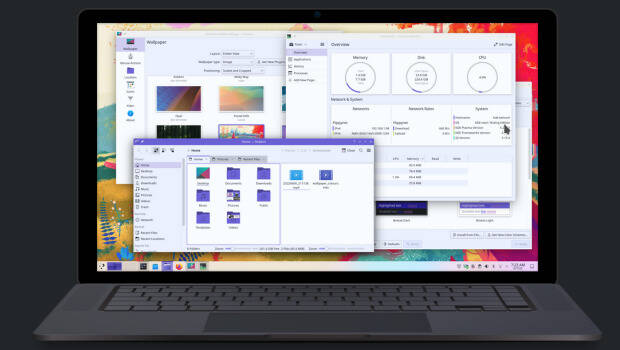
Algunos de los errores solucionados han sido:
- Cambiado el requisito de versión de Qt 5 a 5.15.2 y el requisito de KF5 a 5.94.
- Corregido el tintado de la barra de título de la ventana en colorsapplicator.
- Ahora los los tooltips de la barra lateral respetan la configuración globall.
Más información: KDE
Las novedades de Plasma 5.25
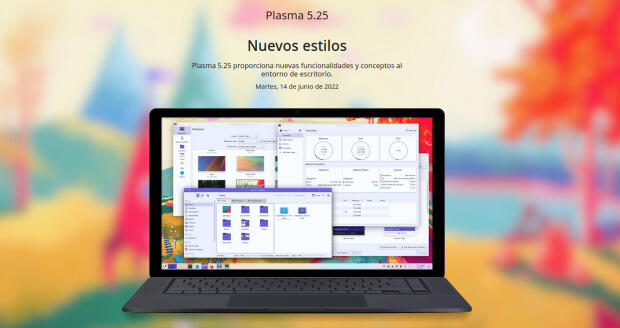
La Comunidad KDE publicó el 14 de junio Plasma 5.25, una versión que nos ofrecen un gran conjunto de novedades y propuestas que nos acercan a lo que vendrá cuando se realice la transición a Plasma 6.
En otras palabras, esta nueva versión de Plasma nos presenta una gran cantidad de nuevas funciones y geniales conceptos de Plasma 5.25 le traen un anticipo del futuro del escritorio de KDE.
Ya ha pasado el día de descarga y actualizaciones, y ya los estoy disfrutando en mi KDE Neon, así que os comento algunas de sus novedades:
- Rediseñado y mejorado la forma de navegar entre las ventanas y los espacios de trabajo.
- Gran actualización en la gestión del control de nuestro dispositivo mediante gestos.
- Sincronización del color de acentuación con el fondo de pantalla, de esta forma se puede aplicar el color dominante del fondo a todos los componentes que usan el color de acentuación.
- Activación del modo táctil desprendiendo la pantalla, rotándola 360° o seleccionándolo de forma manual.
- Añadidos los paneles flotantes que añaden un margen a su alrededor para hacer que floten, mostrando una animación cuando se vuelven normales al maximizar una ventana.
- Los efectos de mezcla entre esquemas se animan con elegancia, por ejemplo en la transición al cambiar el esquema de color actual.
- Posibilidad de mover todo el escritorio, con carpetas, widgets y paneles, de un monitor a otro con la ventana de gestión del contenedor.
Más información: KDE
La entrada Lanzada la segunda actualización de Plasma 5.25 se publicó primero en KDE Blog.

Fixing test coverage reports in at-spi2-core
Over the past weeks I have been fixing the test coverage report for at-spi2-core. It has been a bit of an adventure where I had to do these:
- Replace a code coverage tool for another one...
- ... which was easier to modify to produce more accessible HTML reports.
- Figuring out why some of at-spi2-core's modules got 0% coverage.
- Learning to mock DBus services.
What is a code coverage report?
In short — you run your program, or its test suite. You generate a coverage report, and it tells you which lines of code were executed in your program, and which lines weren't.
A coverage report is very useful! It lets one answer some large-scale questions:
-
Which code in my project does not get exercised by the tests?
-
If there is code that is conditionally-compiled depending on build-time options, am I forgetting to test a particular build configuration?
And small-scale questions:
-
Did the test I just added actually cause the code I am interested in to be run?
-
Are there tests for all the error paths?
You can also use a coverage report as an exploration tool:
- Run the program by hand and do some things with it. Which code was run through your actions?
I want to be able to do all those things for the accessibility infrastructure: use the report as an exploration tool while I learn how the code works, and use it as a tool to ensure that the tests I add actually test what I want to test.
A snippet of a coverage report
This is a screenshot of the report for at-spi2-core/atspi/atspi-accessible.c:

The leftmost column is the line number in the source file. The second column has the execution count and color-coding for each line: green lines were executed one or more times; red lines were not executed; white lines are not executable.
By looking at that bit of the report, we can start asking questions:
-
There is a
return -1for an error condition, which is not executed. Would the calling code actually handle this correctly, since we have no tests for it? -
The last few lines in the function are not executed, since the check before them works as a cache. How can we test those lines, and cause them to be executed? Are they necessary, or is everything handled by the cache above them? How can we test different cache behavior?
First pass: lcov
When I initially added continuous integration infrastructure to at-spi2-core, I copied most of it from libgweather, as Emmanuele Bassi had put in some nice things in it like static code analysis, address-sanitizer, and a code coverage report via lcov.
The initial runs of lcov painted a rather grim picture: test coverage was only at about 30% of the code. However, some modules which are definitely run by the test suite showed up with 0% coverage. This is wrong; those modules definitely have code that gets executed; why isn't it showing up?
Zero coverage
At-spi2-core has some peculiar modules. It does not provide a single program or library that one can just run by hand. Instead, it provides a couple of libraries and a couple of daemons that get used through those libraries, or through raw DBus calls.
In particular, at-spi2-registryd is the registry daemon for
accessibility, which multiplexes requests from assitive technologies
(ATs) like screen readers into applications. It doesn't even use the
session DBus; it registers itself in a separate DBus daemon specific
to accessibility, to avoid too much traffic in the main session bus.
at-spi2-registryd gets started up as soon as something requires the
accessibility APIs, and remains running until the user's session ends.
However, in the test runner, there is no session. The daemon
runs, and gets a SIGTERM from its parent dbus-daemon when it
terminates. So, while at-spi2-registryd has no persistent state
that it may care about saving, it doesn't exit "cleanly".
And it turns out that gcc's coverage data gets written out only if
the program exits cleanly. When you compile with the --coverage
option, gcc emits code that turns on the flag in libgcc to write out
coverage information when the program ends (libgcc is the
compiler-specific runtime helper that gets linked into normal programs
compiled with gcc).
It's as if main() had a wrapper:
void main_wrapper(void)
{
    int r = main(argc, argv);

    write_out_coverage_info();

    exit(r);
}

int main(int argc, char **argv)
{
    /* your program goes here */
}
Of course, if your program terminates prematurely through SIGTERM, the wrapper will not finish running and it will not write out the coverage info.
So, how do we simulate a session in the test runner?
Mocking gnome-session
I recently learned of a fantastic tool, python-dbusmock, which makes it really easy to create mock implementations of DBus interfaces.
There are a couple of places in at-spi2-core that depend on watching the user session's lifetime, and fortunately they only need two things from the gnome-session interfaces:
- Register themselves as a session client.
- Get notified when the session ends so the daemon can exit.
I wrote a mock of these DBus interfaces so that the daemons can register against the fake session manager. Then I made the test runner ask the mock session to tell the daemons to exit when the tests are done.
With that, at-spi2-registryd gets coverage information written out
properly.
Obtaining coverage for atk-adaptor
atk-adaptor is a bunch of glue code between atk, the GObject-based
library that GTK3 uses to expose accessible interfaces, and
libatspi, the hand-written DBus binding to the accessibility
interfaces.
The tests for this are very interesting. We want to simulate an
application that uses atk to make itself accessible, and to test
that e.g. the screen reader can actually interface with them. Instead
of creating ATK implementations by hand, there is a helper program
that reads XML descriptions of accessible objects, and exposes them
via ATK. Each individual test uses a different XML file, and each
test spawns the helper program with the XML it needs.
Again, it turns out that the test runner just sent a SIGTERM to the helper program when each test was done. This is fine for running the tests normally, but it prevents code coverage from being written out when the helper program terminates.
So, I installed a gmain signal handler in the helper program, to make it exit cleanly when it gets that SIGTERM. Problem solved!
Missing coverage info for GTK2
The only part of at-spi2-core that doesn't have coverage information
yet is the glue code for GTK2. I think this would require running a
test program under xvfb so that its libgtk2 can load the module
that provides the glue code. I am not sure if this should be tested
by at-spi2-core itself, or if that should be the responsibility of
GTK2.
Are the coverage reports accessible?
For a sighted person, it is easy to look at a coverage report like the example above and just look for red lines — those that were not executed.
For people who use screen readers, it is not so convenient. I asked around a bit, and Eitan Isaacson gave me some excellent tips on improving the accessibility of lcov and grcov's HTML output.
Lcov is an old tool, and I started using it for at-spi2-core because it is what libgweather already used for its CI. Grcov is a newer tool, mostly by Mozilla people, which they use for Firefox's coverage reports. Grcov is also the tool that librsvg already uses. Since I'd rather baby-sit one tool instead of two, I decided to switch at-spi2-core to use grcov as well and to improve the accessibility of its reports.
The extract from the screenshot above looks like a table with three
columns (line number, execution count, source code), but it is not a
real HTML <table> — it is done with div elements and
styling. Something like this:
<div>
  <div class="columns">
    <div class="column">
      line number
    </div>
    <div class="column color-coding-executed">
      execution count
    </div>
    <div class="column color-coding-executed">
      <pre>source code</pre>
    </div>
  </div>
  <!-- repeat the above for each source line -->
</div>
Eitan showed me how to use ARIA tags to actually
expose those divs as something that can be navigated as a table:
-
Add
role="table" aria-label="Coverage report"to the main<div>. This tells web browsers to go into whatever interaction model they use for navigating tables via accessible interfaces. It also gives a label to the table, so that it is easy to find by assistive tools; for example, a screen reader may let you easily navigate to the next table in a document, and you'd like to know what the table is about. -
Add
role="row"to each row'sdiv. -
Add
role="cell"to an individual cell'sdiv. -
Add an
aria-labelto cells with the execution count: while the sighted version shows nothing (non-executable lines), or just a red background (lines not executed), or a number with a green background, the screen reader version cannot depend on color coding alone. Thataria-labelwill say "no coverage", or "0", or the actual execution count, respectively.
Time will tell whether this makes reports easier to peruse. I was mainly worried about being able to scan down the source quickly to find lines that were not executed. By using a screen reader's commands for tabular navigation, one can move down in the second column until you reach a "zero". Maybe there is a faster way? Advice is appreciated!
Grcov now includes that patch, yay!
Next steps
I am starting to sanitize the XML interfaces in at-spi2-core, at least in terms of how they are used in the build. Expect an update soon!
openSUSE Leap 15.4 release retrospective
We are seeking feedback regarding the release of openSUSE Leap 15.4, which was released to the general public on June 8.
With this survey, what we’re looking from you is both positive and negative feedback related to the availability and individual experience with openSUSE Leap 15.4. Your participation is very valuable for us.
Participating is very simple, this survey consists of only two questions, in this way we’ll try to continue doing what went well and try to address what went wrong. So follow this link to partipate in this survey:
The deadline for collecting responses is July 7. Your responses will be then grouped and reviewed and passed to the respective openSUSE teams.
Here you can find the results from previous retrospective.
We care about your privacy, that’s why the record of your survey responses does not contain any identifying information about you, unless a specific survey question explicitly asked for it. Feedback might be adjusted to fit our report.
Thanks a lot for being part of openSUSE community.
#openSUSE Tumbleweed revisión de la semana 25 de 2022
Tumbleweed es una distribución «Rolling Release» de actualización contínua. Aquí puedes estar al tanto de las últimas novedades.

openSUSE Tumbleweed es la versión «rolling release» o de actualización continua de la distribución de GNU/Linux openSUSE.
Hagamos un repaso a las novedades que han llegado hasta los repositorios esta semana.
El anuncio original lo puedes leer en el blog de Dominique Leuenberger, publicado bajo licencia CC-by-sa, en este este enlace:
Normalmente este repaso semanal lo suelo publicar los viernes, pero la semana pasada (semana 25) no pude por falta de tiempo, así que nunca es tarde para ver qué ha ocurrido durante la semana en openSUSE Tumbleweed.
La semana 25 no estuvo exenta de de problemas, en concreto con una actualización con SELinux 3.4 que funcionaba en la mayoría de casos, pero no iba bien con los contenedores.
Así que hubo un parón en publicaciones en Tumbleweed para tratar de solucionar este problema. Aún así se publicaron 6 snapshots esta semana (0616,0617, 0618, 0619, 0622 y 0623).
Entre los cambios que han llegado a los repositorios, podemos destacar:
- Linux kernel 5.18.4
- Mozilla Firefox 101.0.1
- KDE Frameworks 5.95.0
- KDE Plasma 5.25.1
- Gimp 2.10.32
- Inkscape 1.2
- LibreOffice 7.3.4RC2
- NetworkManager 1.38.2
- krb5 1.20
- Samba 4.16.2
- SELinux 3.4
- Redis 7.0.2
- Mesa 22.1.2
- Sphinx 5
Una gran lista de paquetes importantes actualizados, pero todavía hay más actualizaciones que llegarán en próximas semanas. Entre las que llegarán podremos destacar:
- systemd 251.2
- Linux kernel 5.18.6
- rpmlint
Si quieres estar a la última con software actualizado y probado utiliza openSUSE Tumbleweed la opción rolling release de la distribución de GNU/Linux openSUSE.
Mantente actualizado y ya sabes: Have a lot of fun!!
Enlaces de interés

——————————–
Lanzado digiKam 7.7, mejorando los paquetes multisistemas
El mejor gestor de imágenes de la Comunidad KDE (y una de las mejores del mercado tanto libre como privado) sigue su desarrollo. De esta forma ha sido lanzado digiKam 7.7, una nueva versión de la séptima rama principal que se ha dedicado a mejorar el ensamblaje de los paquetes multisistemas
Lanzado digiKam 7.7, mejorando los paquetes multisistemas

Ayer 26 de junio fue lanzado digiKam 7.7 la nueva versión de uno de los gestores de imágenes más completo que puedes encontrar en el mundo GNU/Linux, e incluso en el mundo privativo.
En palabras de sus desarrolladores:
Después de tres meses de mantenimiento activo y de una nueva revisión de errores, el equipo de digiKam se enorgullece de presentar la versión 7.7.0 de su gestor de fotografías digitales de código abierto
Esta nueva versión menor (pero importante) se ha centrado en:
- Qt 5.15 LTS utilizado en el paquete de Windows y MacOS
- Actualización del Framework KDE y de Libraw
- 84 errores revisados y cerrados en bugzilla.
- Mejorado el soporte de los modernos contenedores de imágenes AVIF y JPEG-XL en todos los paquetes.
- Eliminada la copia interna más antigua de los códecs libheif y libde265 en favor de una más reciente de las bibliotecas del sistema para un mejor soporte del contenedor de imágenes HEIF utilizado por la cámara del iPhone.
- Correcciones de errores en condiciones específicas, correcciones de casos de uso de regresión.
- Más estabilidad con la base de datos Mysql remota.
- Actualizada la internacionalización de la aplicación.
Más información: Digikam 7.7
Las novedades de digiKam 7
Aunque gran parte del trabajo para esta nueva versión, como he dicho, se lo ha llevado el reconocimiento facial con interesantes mejoras, digiKam también nos ofrece jugosas novedades. Hagamos un repaso:
- Mejoras reconocimiento facial como:
- Porcentaje de acierto de un 97%.
- Mejoras en rapidez y eficiencia en el uso de recursos.
- Posibilidad de detectar caras no-humanas. También podremos tener registradas a nuestras mascotas!
- Posibilidad de detectar caras borrosas, cubiertas, pintadas, parciales, etc.

- Nuevo soporte para ficheros RAW files para nuevas cámaras como Canon CR3 o Sony A7R4.
- Mejorado el soporte para las imágenes con formato HEIF.
- Mejoras en el paquete binario con soporte para FlatPak.
- Nueva herramienta, ImageMosaicWall, para crear una imagen basada en otra colección de fotos.
- Nuevas opciones para escribir información de geolocalización en los metadatos del archivo.
- El plugin HTMLGallery introduce un nuevo tema llamado Html5Responsive.

Y, por supuesto, muchos errores solucionados, con lo que parece que tendremos la mejor versión de digiKam que puede tener vuestro ordenador.
¿Qué es digiKam?
La mejor forma de definir digiKam es buscar como se describe esta aplicación de userbase.kde.org y realizar una pequeña síntesis:
DigiKam es una aplicación que te permite la importación de fotografías desde cámaras, creación de Álbumes, etiquetado con fechas, temas y otras propiedades, utilidades de búsqueda excelentes y modificación de imágenes en masa.
La entrada Lanzado digiKam 7.7, mejorando los paquetes multisistemas se publicó primero en KDE Blog.