
 Member
 baltolkien
Linux Connexion con Baltasar Ortega en Podcast Linux #161
Bienvenidos a un nuevo audio de Juan Febles, y este en concreto el episodio 161 de Podcast Linux titulado «Linux Connexion con Baltasar Ortega» donde Juan habla con un servidor de una sinfin de temas en una hora que se me hizo muy corta.
Linux Connexion con Baltasar Ortega en Podcast Linux #161
Hace un tiempo estaba publicando casi todas las entregas que realiza Juan de su Podcast Linux, y la razón radicaba es que estaba al día de todos sus audios. Durante una temporada bajé el ritmo y ahora, afortunadamente, vuelvo a ponerme al día, así que vuelven a estar presentes en el blog.
De esta forma, hace poco promocioné su especial 6º aniversario, su Linux Connexión con Jorge Lama y Academia de Automatización del Hogar , y como ya no tengo abuela, hoy toca promocionar el episodio donde fui el protagonista y donde la hora de conversación cn Juan se me pasó volando.
En palabras de Juan:
¡¡¡Muy buenas amante del Software Libre!!!
Bienvenido a otra entrega, la número 161, de Podcast Linux. Un saludo muy fuerte de quien te habla, Juan Febles. Hoy estamos con Baltasar Ortega, Licenciado en físicas. Enamorado de su familia y del Software Libre. Profesor de ciencias en Secundaria que le encanta combinar las herramientas informáticas con la educación. Profesor-tutor de la UNED y Profesor de Magistero en la UNIR. Fundador y editor de KDE Blog. Miembro de KDE España, siendo actualmente su secretario, y de GNU/Linux València, aunque con poca actividad. Podcaster ocasional y que le encantaría dedicar mucho más tiempo a difundir el Software Libre.
Enlaces:
- KDE Blog: https://www.kdeblog.com
- KDE Espña: https://www.kde-espana.org
- Twitter: https://twitter.com/baltolkien
- Akademy: https://akademy.kde.org/2022
- KDE Slimbook: https://slimbook.es/pedidos/slimbook-kde
- Steam Deck: https://www.steamdeck.com/es
- PLasma Mobile: https://plasma-mobile.org
- PinePhone KDE Edition: https://kde.org/announcements/plasma-mobile/pinephone-plasma-mobile-edition y https://www.pine64.org/pinephonepro
- Plasma Bigscreen: https://plasma-bigscreen.org/es
Así que os invito a escuchar este diálogo de Juan conmigo donde hablamos de mis inicios en el mundo del Software Libre, de mis proyectos y de las actividades de la Comunidad KDE como las futuras Akademy y Akademy-es . ¡Dentro audio!
Más información: Podcast Linux
Sigue a Podcast Linux
Aprovecho para animaros a seguir Podcast Linux en algunos de los canales de comunicación que tiene:
- Twitter: https://twitter.com/podcastlinux
- Mastodon: https://mastodon.social/@podcastlinux/
- Correo: podcastlinux@disroot.org
- Web: https://podcastlinux.com/
- Telegram: https://t.me/podcastlinux
- Telegram Juan Febles: https://t.me/juanfebles
- Youtube: https://www.youtube.com/PodcastLinux
- Feed Podcast Linux: https://podcastlinux.com/feed
- Feed Linux Express (Audios Telegram): https://podcastlinux.com/Linux-Express/feed
La entrada Linux Connexion con Baltasar Ortega en Podcast Linux #161 se publicó primero en KDE Blog.
Celebra los 17 años de openSUSE con la comunidad
La distribución de GNU/Linux openSUSE cumple 17 años este 9 de agosto de 2022, celébralo con la comunidad

Fue un 9 de agosto de 2005 cuando se anunció públicamente la disponibilidad de la versión Beta de openSUSE 10.3 cuya versión final se publicaría en octubre de ese mismo año.
Por aquel entonces la empresa Novell propietaria de SuSE, quiso emular a Red Hat con Fedora como su versión comunitaria, y así puso a disponibilidad de todos una versión comunitaria llamada openSUSE.
Aquella primera versión de la que se hacía pública la versión Beta venía con: Linux kernel 2.6.22.1, GCC 4.2, GNOME 2.19.6 o KDE 3.5.7. Y se habían mejorado cosas en libzypp o en la tecnología 1-Click install, para instalar paquetes con un simple clic de ratón, una especie de «proto»-«store» de aplicaciones.
Desde aquel primer anuncio mucho ha cambiado, en openSUSE. Ha pasado por diferentes manos, hasta llegar a la soberanía tecnológica que disfrutan tanto SUSE como openSUSE.
Se han estrechado lazos entre ambos proyectos en beneficio común y se sigue innovando en materias de las que pronto habrá más noticias (sí ALP, te estoy mirando a ti).
Para celebrar en comunidad estos 17 años de historia dentro de GNU/Linux se han creado varios eventos, para que toda la comunidad que forma openSUSE en todo el mundo pueda participar.
El principal es la «quedada» virtual en el «bar» de openSUSE, que no es más que una sala jitsi en la instancia propia de openSUSE.
Si usas openSUSE, como si eres fan del proyecto o quieres pasarte a ver qué sucede, está todo el mundo invitado a celebrar con Geeko, el camaleón de openSUSE su cumpleaños.
Enlaces de interés
- https://news.opensuse.org/2022/07/26/community-to-celebrate-os-birthday/
- https://news.opensuse.org/2007/08/09/announcing-opensuse-103-beta-1/
- https://lists.opensuse.org/archives/list/announce@lists.opensuse.org/message/5YLOO7HVZCUOUK2H5IJAMXXMXSAYFXWF/
- https://lists.opensuse.org/archives/list/users@lists.opensuse.org/thread/T3SJWQDKZS635EHR5SX2AY3Z3LZAVNX5/
- https://meet.opensuse.org/bar

Discogs
Last week I became a Discogs user. Why? I have been browsing the site for years to find information on albums. Recently I also needed a solution to create an easy to access database of my CD/DVD collection. Right now I am not interested in the marketplace function of Discogs, but that might change in the long term :-)
Information overload
For many years when I searched for an album, the first few hits were from YouTube and Wikipedia. Nowadays the first few results are often from Discogs. While Wikipedia sometimes provides some interesting background information about the creation of an album, Discogs has more structured and uniform information about albums. It also lists the many variants of the same album. Even for artists where I thought that I have all albums in my collection (like Mike Oldfield), I can find albums I have never heard about before. It is also easy to see who a given artist was working with and using TIDAL I can instantly listen to some really interesting (or awful…) music right away.
My collection
I only have a few hundred CDs, but that is already more than I can remember. When I am in a CD shop, I happily buy new CDs from artists I have never heard about before, as I can be sure that I do not already have that disc. However, when it comes to Solaris, Mike Oldfield or Vangelis, I can never be sure if I already have an album. Of course I tried some DIY methods, but it was difficult to maintain the lists and they were never at hand when I really needed them.
Discogs provides an easy to use mobile application to scan bar codes on the back of CDs. This can speed up adding new items to my collection tremendously. Of course not all bar codes are in available in Discogs, but until now there was only one CD that I could not find at all. The more difficult part is when it lists dozens of disks for the same bar code: various (re)prints of the the same album from around the World. I must admit that I am lazy here and just take an educated guess… I can use the same mobile app to check my collection when away from home.
A few weeks ago I realized that I have a duplicate album, and while entering my collection into Discogs, I discovered another one. I have no plans for selling them, I already know which of my friends would be happy to receive them. But in the long term it could be interesting to buy a few CDs which are otherwise impossible to buy here in Hungary.
Discogs also gives a price estimate for most CDs. It was a kind of surprising: some of my most expensive disks are not worth too much anymore, as they were printed in large numbers. On the other hand I have a large collection of Hungarian progrock music, and the price of those is much higher than I paid for them originally.
You can find my collection at https://www.discogs.com/user/pczanik/collection. The list is constantly growing, as I am still just at less than a half of my collection. The next time I visit my favorite CD shop, Periferic Records - Stereo Kft., I will have an easier job when I see a CD from a familiar artist :-)

flower
Editor de LaTex para KDE: Kile
Sigo presentando aplicaciones de la Comunidad KDE que nunca han sido protagonistas del blog. Empecé con Skanlite hace poco, y continué con Haruna, y hoy les toca a Kile, un editor de LaTeX para KDE que funciona de maravilla… y doy fe ya que acabo de realizar un curso completo de este lenguaje con él.
Editor de LaTex para KDE: Kile
Para quienes no lo conozcan, LaTeX es un sistema de composición tipográfica de alta calidad; incluye funciones diseñadas para la producción de documentación técnica y científica. LaTeX está disponible como software libre y tiene una buena cantidad de interfaces gráficas pero en este blog hablaremos del de la Comunidad KDE por razones evidentes.
Kile es el editor de TeX/LaTeX amigable creado por la Comunidad KDE que nos permite usar toda la funcionalidad de LaTeX mediante una interfaz gráfica y posee mecanismos interactivos de vista previa para comprobar rápidamente el resultado de la edición.
Otras caracteristicas de Kile son las siguientes:
- Compila, convierte y visualiza documentos con un solo clic
- Terminación automática de órdenes de (La)TeX
- Plantillas y asistentes para facilitar la creación de nuevos documentos
- Fácil inserción de numerosas etiquetas y símbolos estándares, además de la opción de definir (cualquier número) de etiquetas del usuario
- Búsqueda hacia atrás y hacia adelante: pulse en el visor DVI y vaya a la correspondiente línea de LaTeX en el editor, o vaya del editor a la página correspondiente del visor
- Navegador para encontrar capítulos y secciones ya que Kile construye una lista de todos los capítulos, etc. del documento. Puede usar dicha lista para ir a la sección correspondiente.
- Sistema de construcción flexible e inteligente para compilar documentos LaTeX
- Vista rápida: vista previa de la parte seleccionada del documento
- Fácil acceso a diversas fuentes de ayuda
- Órdenes de edición avanzadas
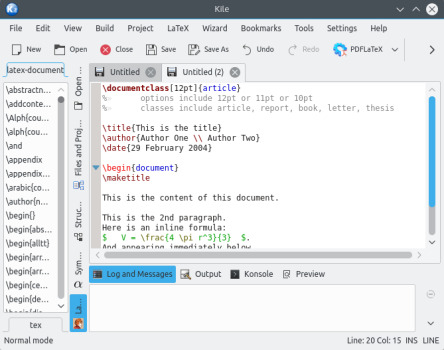
Todo esto y mucho más en una aplicación imprescindble para ser más eficiente si trabajamos con archivos de texto de forma profesional. Por cierto, también está disponible para Windows.
Más información; Kile
La entrada Editor de LaTex para KDE: Kile se publicó primero en KDE Blog.
Skanlite, una aplicación de escaneo de imágenes
Parece mentira. A pesar de todos los años que estoy publicando en el blog todavía no he comentado todas las aplicaciones que ofrecen los desarrolladores de la Comunidad KDE. Y eso que esta la he utilizado en innumerables ocasiones. Os presento, Skanlite, una aplicación de escaneo de imágenes con decenas de opciones que se adapta a cualquier tipo de necesidades.
Skanlite, una aplicación de escaneo de imágenes
Hoy os traigo una aplicación que te vendrá muy bien si tienes un escáner o una impresora multfunción en tu casa u oficina y necesitas pasar a formato digital tus fotografías.
Se trata de Skanlite, una sencilla aplicación para escanear y guardar imágenes en multitud de formatos. Está optimizada para escáneres de superficie plana.
Además de fotos y documentos, Skanlite puede escanear diapositivas y filminas con los escáneres admitidos.
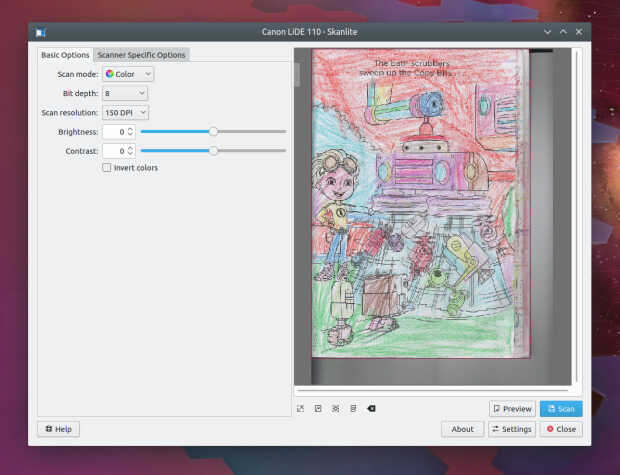
Otras características destacables son:
- Diálogo para guardar las imágenes escaneadas o para guardarlas inmediatamente en la carpeta indicada con nombres generados automáticamente y en el formato indicado.
- Permite el uso de escáneres en red.
- Vista previa con función de selección para el escaneo final.
- Escanear múltiples selecciones de una imagen.
- Además de los habituales escáneres USB, también funciona con escáneres en red.
Skanlite tiene licencia GPL-2.0+ y GFDL-1.3 , y agradece vuestra colaboración en el reporte de errores en este enlace de bugs.kde, así como mejoras en su traducción.
Skanlite se basa en libksane, una interfaz proporcionada por KDE para librerías SANE para controlar escáneres. También funciona con escáneres en red.
Por cierto, la Comunidad KDE también tiene otra aplicación similar llamada SkanPage que está orientada más a documentos escritos al estilo Simple-Scan de Gnome, información que tengo gracias a un usuario del grupo de Telegram de la Comunidad KDE – Cañas y Bravas, al cual os invito a participar.
Más información: Skanlite – Aplicaciones de KDE
La entrada Skanlite, una aplicación de escaneo de imágenes se publicó primero en KDE Blog.
GNOME 43 Wallpapers
GNOME 43 Wallpapers
Evolution and design can co-exist happily in the world of desktop wallpapers. It's desirable to evolve within a set of constraints to create a theme in time, set up a visual brand that doesn't rely on putting a logo on everything. At the same time it's healthy to stop once in a while, do a small reflection on what's perhaps a little dated and do a fresh redesign.

I took extra time this release to focus on refreshing the whole wallpaper set for 43. While the default wallpaper isn't a big departure from 3.38 hexagon theme, most of the supplemental wallpapers have been refreshed from the ground up. The video above shows a few glimpses of all the one way streets it took for the default to land back in the hexagons.
GNOME 42 was the first release to ship a bunch of SVG based wallpapers that embraced the flat colors and gradients and benefited from being just a few kilobytes in file size. It was also the first release to ship dark preference variants. All of that continues into 43.

Major change comes from addressing a wide range of display aspect ratios with one wallpaper. 43 wallpapers should work fine on your ultrawides just as well as portrait displays. We also rely on WebP as the file format getting a much better quality with a nice compression ratio (albeit lossy).
What's still missing are photographic wallpapers captured under different lighting. Hopefully next release.
Blender's geometry nodes is an amazing tool to do generative art, yet I feel like I've already forgotten the small fraction of what can be done that I've learned during this cycle. Luckily there's always the next release to do some repetition. Thanks to everyone following my struggles on the twitch streams.
The release is dedicated to Thomas Wood, a long time maintainer of all things visual in GNOME.
GNOME 43 Wallpapers
GNOME 43 Wallpapers
Evolution and design can co-exist happily in the world of desktop wallpapers. It’s desirable to evolve within a set of constraints to create a theme in time, set up a visual brand that doesn’t rely on putting a logo on everything. At the same time it’s healthy to stop once in a while, do a small reflection on what’s perhaps a little dated and do a fresh redesign.
I took extra time this release to focus on refreshing the whole wallpaper set for 43. While the default wallpaper isn’t a big departure from 3.38 hexagon theme, most of the supplemental wallpapers have been refreshed from the ground up. The video above shows a few glimpses of all the one way streets it took for the default to land back in the hexagons.
GNOME 42 was the first release to ship a bunch of SVG based wallpapers that embraced the flat colors and gradients and benefited from being just a few kilobytes in file size. It was also the first release to ship dark preference variants. All of that continues into 43.

Major change comes from addressing a wide range of display aspect ratios with one wallpaper. 43 wallpapers should work fine on your ultrawides just as well as portrait displays. We also rely on WebP as the file format getting a much better quality with a nice compression ratio (albeit lossy).
What’s still missing are photographic wallpapers captured under different lighting. Hopefully next release.
Blender’s geometry nodes is an amazing tool to do generative art, yet I feel like I’ve already forgotten the small fraction of what can be done that I’ve learned during this cycle. Luckily there’s always the next release to do some repetition. Thanks to everyone following my struggles on the twitch streams.
The release is dedicated to Thomas Wood, a long time maintainer of all things visual in GNOME.

Announcing the availability of two openSUSE mirrors in Mauritius
Yesterday, I attended an open source event organised by OSCA Mauritius and OceanDBA.

I was invited to speak at the event and I chose to explain a little about openSUSE, its different distributions and how we have managed to set up two mirrors to improve the performance of openSUSE updates in Mauritius.
Girish is a representative for OSCA Mauritius and he works at OceanDBA. He put all the effort into organising this event. At about 09h30, the conference room at Flying Dodo was almost full. Girish welcomed everyone and introduced the presentation themes for the day.

First presentation – Linux Kernel history by Chittesh Sham
Chittesh is a DevOps Engineer at Corel Corporation. He did a presentation on the Linux Kernel. He tried to summarise three decades of Linux history in one presentation. It was a very informative and fun prez.

Second presentation – Bash Scripting by Shravan Dwarka
Shravan is a Linux System Engineer at OceanDBA. He did a presentation on the Bourne Again SHell (Bash).

After explaining about Shells, Shravan gave a scenario where a database administrator had to automate backups and perform backup retention.

He then explained line by line how he wrote a Bash script to execute the backup.
Final presentation – openSUSE Mirrors in Mauritius
My presentation was last. It's been a while since I set up two openSUSE mirrors in Mauritius. Any openSUSE user on the island will now benefit from fast updates without having to configure anything on their openSUSE machine.
This event was an opportunity to make a public announcement about the mirrors and explain the process behind. That is, how I contacted sponsors for server/bandwidth in Mauritius and got in touch with the openSUSE Heroes to build the repo mirrors.
However, first I did a history lesson about S.u.S.E, SUSE and openSUSE. I clarified that openSUSE is a project and the various distributions have names like Leap, Leap Micro, Tumbleweed and MicroOS.

Then, I showed the tickets that I opened at openSUSE to get the ball rolling. Within a few days we had the mirrors set up.
I mentioned that the domain opensuse.mu is sponsored by the openSUSE project itself. Then, the Heroes created the records to point the domain & sub-domains to servers in Mauritius, sponsored by cloud.mu and Rogers Capital Technology Services.

While speaking about the mirrors, I explained how MirrorBrain works. It is an open source framework to run a content delivery network for mirror servers. The two openSUSE mirrors in Mauritius are mirror.opensuse.mu and mirror.rcts.opensuse.mu. To show how MirrorBrain works with these two servers, I opened get.opensuse.org to download the latest release of openSUSE Leap 15.4.
I selected the offline installation image and we checked the URL from which the image was downloading. It was the Rogers Capital Technology Services (RCTS) mirror server.
I SSH'ed on the cloud.mu mirror server to show how the rsync is done from the restricted rsync server of openSUSE.org. I did not SSH on the RCTS server because it requires a VPN (RCTS engineers take security very seriously 🤓). My VPN setup was on a different machine than the one I was doing my presentation on.
I explained the difference between rsync.opensuse.org and stage.opensuse.org, the former being a public rsync server. It can be used by anyone wishing to run a private openSUSE mirror for home or office use.
The conference room was packed with attendees which is a promising thing for an open source event.


At the end of the event, Joffrey Michaïe, the founder and CEO of OceanDBA addressed the attendees. He thanked the wonderful audience for showing up to the event. Joffrey explained that OceanDBA's business is built on open source technologies and that they have the open source philosophy at the heart of the company.

He was glad to see a lot of young folks attending the event and said that his company would be keen to sponsor such events again in the future. He mentioned that at the moment there are about fifteen open positions at OceanDBA and anyone wishing to apply could reach out to him directly or talk to any other personnel of the company.
The Managing Director of Rogers Capital Technology Services, Dev Hurkoo, and the Roshan Patroo, Manager at RCTS, attended the event. We met after my presentation. They both told me that they were impressed by the attendee turn-out for an open source event. Dev expressed his interest to support open source activities in the future too.
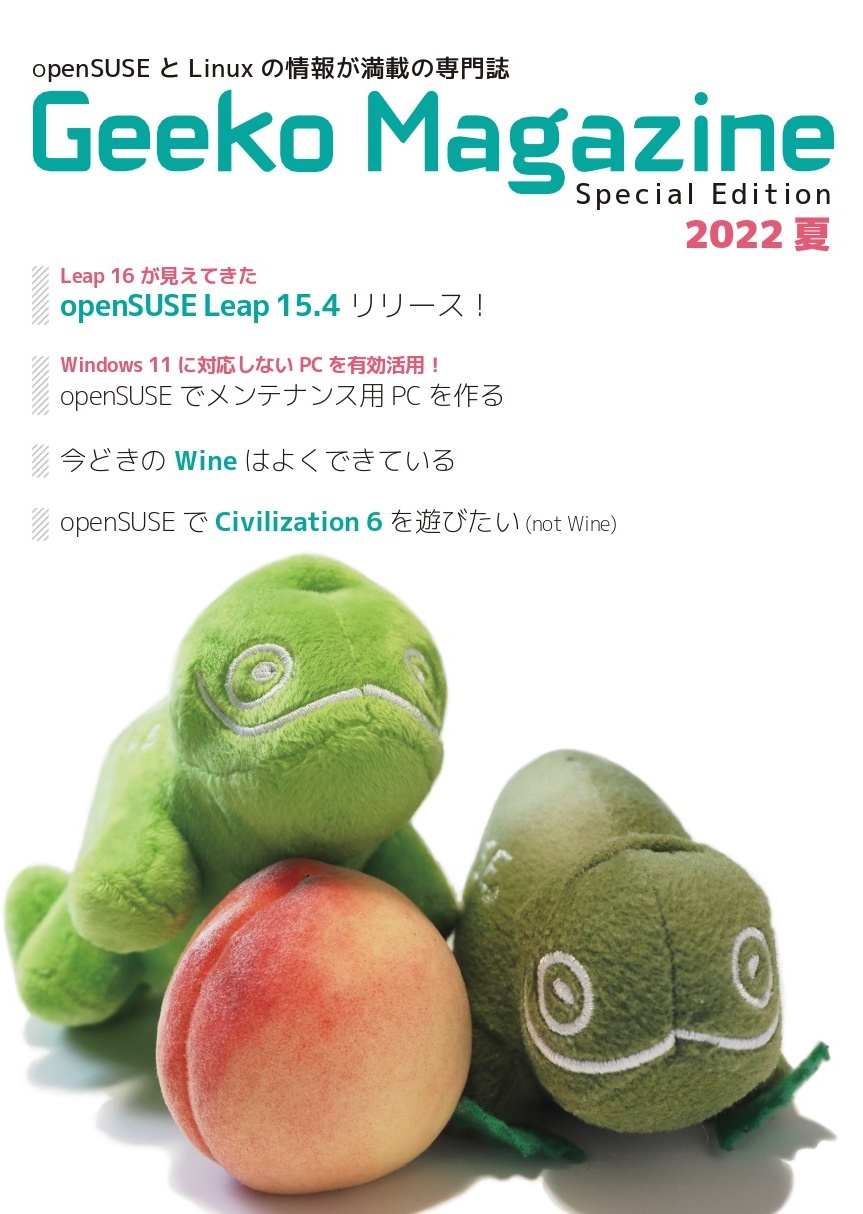
Geeko Magazine 2022 夏
今年の夏も Geeko Magazine を発行します。最初の頒布はコミックマーケット C100 1日目 8月13日(土)西2ホール す19b です。事前に入場券の購入が必要になりますので、ご注意ください。
Asociación Open EdTech
Hoy quiero presentar Open EdTech, una asociación que quiere dotar al mundo educativo de herramientas libres, tanto a nivel de hardware como software para garantizar una educación basada en una tecnología sostenible, duradera y de código abierto que apoye todas las formas de educación en línea.
Asociación Open EdTech
Lo descubrí gracias a un mensaje de Tàfol Nebot en el que hablaba de un congreso llamado Open Education Technology donde se decía «que en Francia las escuelas solo se utiliza Software Libre: Nextcloud, Moodle, BigBlueButton, Matrix, LibreOfficeOnline…» lo cual me llenó de alegría.
#OpenEdtechBCN RT: «A França, les escoles només utilitzen programari lliure. Nextcloud, Moodle, BigBlueButton, Matrix, LibreOfficeOnline.. Cada regió allotja la seva instància. El govern dona fons al programari que utilitzen i contribueix amb codi. Ponent @framaka. Vinga Suècia!» https://t.co/1FITZMRFk3
— Tàfol Nebot(@tafol) July 13, 2022
 (@tafol)
 De esta forma, decubro el congreso y, de paso, la asociación que nos define la «tecnología educativa» y su rama «Abierta»:
La tecnología educativa es el software y el hardware que apoya los procesos de enseñanza y aprendizaje. La Tecnología Educativa Abierta va más allá al ponerse a disposición de todos los educadores de una manera que promueve la disponibilidad, la estandarización, la seguridad, la longevidad y la colaboración en torno a mejoras y servicios en torno a esa tecnología. Es la diferencia entre una red social propietaria y algo como el correo electrónico (que nadie posee y todo el mundo utiliza).

Así, esta asociación tiene la visión de creer en una educación de calidad que requiere de una adaptación y colaboración constantes. Y, por tanto, se concreta en sutene como misión:
- Ser la voz de la tecnología educativa abierta como solución preferida para la educación.
- Ayudar a financiar el desarrollo y la promoción de la tecnología educativa abierta
No obstante, creo que se entiende mucho mejor la explicación que el mismísimo Tàfol me hizo ya que, de momento, esta asocación:
Está intentando hacer conciencia de la problemática de usar servicios de BigTech, de que lo datifiquen absolutamente todo y de las consecuencias que puede comportar si no se tiene soberanía digital.
Y, de momento, ofrecen un ecosistema educativo libre para instalar en un servidor propio (o contratado) las siguientes herramientas lbres: Moodle, Nextcloud, WordPress, Etherpad, correo electrònico,
Otras de sus iniciativas ha sido el congreso Open EdTech Gobal que se ha celebrado en Barcelona y que os recomiendo seguir, mientras investigo como ver sus vídeos, mediante la etiqueta #OpenEdtechBCN de Twitter.
Un poco de historia
Creo que esta iniciativa tiene un gran recorrido por delante, sobretodo si tenemos en cuenta algunas de las informaciones sobre la prohibición del uso de productos de la gran G en países como Dinamarca (Genbeta y Diario.es), lo cual puede hacer mirar a nuestros políticos por la senda correcta.
No obstante no nos desviemos del epígrafe y digamos que Open EdTech tiene su origne en unas denuncias de padres y madres que se veían obligados a usar GSuite en la educación de sus hijos e hijas. De esta forma contactaron con XNet, una asociación de defensa de los derechos digitales, e hicieron una propuesta al departamento de educación y en el ayuntamiento de Barcelona.
El consistorio de la ciudad aceptó hacer un pilotaje e hicieron una licitación. De esta forma unos pocos técnicos que se pusieron a trabajar y finalmente han puesto en marcha el pilotaje en unos pocos colegios de Barcelona en los que implementan un ‘ecosistema de aplicaciones llamada DD (Digitalització Democràtica) que consta de una interfaz que integra un conjunto de herramientas libres para asegurar una educación respetuosa.
La entrada Asociación Open EdTech se publicó primero en KDE Blog.