
 Member
10 Outils pour l’admin occupé
Avant qu’il ne soit trop tard, veuillez télécharger votre cadeau de Linux Magazine et leur partenaire TuxCare pour la fête des admins : https://linux-magazine.us2.list-manage.com/ Le contenu du la trousse à outils : Faire des recherches en ligne de commande Voir le trafic réseau Contrôler les tentatives de SSH Eliminer les metadata des URLs Et beaucoup …
10 Outils pour l’admin occupéRead More »
The post 10 Outils pour l’admin occupé appeared first on Cybersécurité, Linux et Open Source à leur plus haut niveau | Network Users Institute | Rouen - Normandie.

 baltolkien
Cómo colaborar con KDE
A raíz de una conversación por Telegram me he decidido hacer un entrada para recordar cómo colaborar con KDE según la documentación oficial de la misma Comunidad. Una excelente forma de recordar que para participar de forma activa con el Proyecto KDE solo hace falta querer hacerlo ya que las posibilidades son casi infinitas.
Cómo colaborar con KDE
¿Tienes interes por el Software Libre? ¿Te sientes en deuda con la Comunidad? ¿Quieres ofrecer tu tiempo libre y conocimientos para mejorar la vida de los demás y no sabes como? ¿Quieres aprender al tiempo que mejoras el Software Libre?
Si has respndido que sí a algunas de las las preguntas anteriores es posible que te interese participar de forma activa en la Comunidad del Conocimiento Libre… y si estás por este blog lo normal es que la Comunidad seleccionada sea la de KDE.
En el blog hemos hablado muchas veces de esto con entradas como «20 formas de colaboras con KDE (Y el Software Libre en general)» o «No puedes colaborar con tu tiempo con KDE… haz donaciones» . Pero como ésta Comunidad es muy organizada tiene una página específica que nos informa de las formas más habituales de colaborar con KDE.
El mensaje de bienvenida nos dice:
¡Bienvenido a la Comunidad KDE! Al unirte a nuestro equipo, formarás parte de un esfuerzo internacional de miles de personas que trabajan para ofrecer una increíble experiencia informática de Software Libre.
Conozca nuevos amigos, aprenda nuevas habilidades y marque la diferencia para millones de usuarios mientras trabaja con gente de todo el mundo. Esta página le dará una breve introducción y le ayudará a empezar a contribuir.
Queremos asegurarnos de que la Comunidad KDE siga siendo un lugar acogedor y amigable donde la gente pueda sentirse cómoda. Te pedimos que aprendas y cumplas el Código de Conducta de la Comunidad KDE cuando interactúes con el resto de la Comunidad KDE.
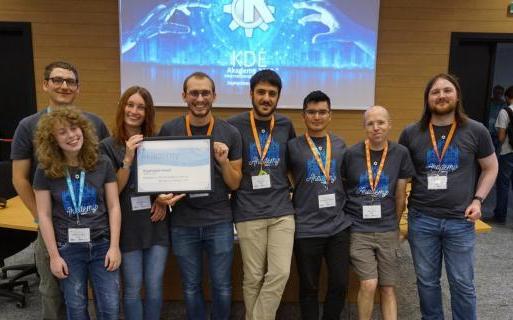
De esta forma, si vamos a la entrada nos hace un listado de algunas de las posibilidades, ya que éstas no son las únicas. Leámoslas y si quieres más información no dudes ir a la página de Get Involved:
- Informe de incidencias
- Clasificación de errores
- Desarrollo
- Calidad
- Accesibilidad
- Traducción
- Diseño de la interfaz visual y humana
- Documentación
- Asistencia al usuario
- Promoción
- Diseño de la web
- Gestión
- Donaciones
- Añadir tu proyecto a KDE
Y para finalizar nos explican que todavía se puede participar de otras formas más institucionalizadas:
En definitiva, si quieres colaborar aquí tienes unas cuantas formas de hacerlo y, si no encuentras la tuya, habla con los que ya están colaborando que seguro que encuentran tu hueco o coméntalo en el grupo de Telegram KDE – Cañas y Bravas.
La entrada Cómo colaborar con KDE se publicó primero en KDE Blog.
#openSUSE Tumbleweed revisión de las semanas 29, 30 y 31 de 2022
Tumbleweed es una distribución «Rolling Release» de actualización contínua. Aquí puedes estar al tanto de las últimas novedades.

openSUSE Tumbleweed es la versión «rolling release» o de actualización continua de la distribución de GNU/Linux openSUSE.
Hagamos un repaso a las novedades que han llegado hasta los repositorios estas semanas.
El anuncio original lo puedes leer en el blog de Dominique Leuenberger, publicado bajo licencia CC-by-sa, en este este enlace:
En estas tres semanas de paréntesis en cuanto a revisiones, las actualizaciones han seguido llegando a openSUSE Tumbleweed, aunque el periodo veraniego y de vacaciones lo ha ralentizado un poco.
En estas 3 semanas se han publicado un total de 8 snapshots (0718, 0719, 0725, 0728, 0729, 0731, 0801, 0802).
Estas han traido entre otras actualizaciones las de estos paquetes:
- Linux kernel 5.18.11
- Pipewire 0.3.55 & 0.3.56
- nvme-cli 2.1~rc0
- XOrg X11 SFFmpeg21.1.4
- ffmpeg 5.1
- qemu 7.0
- AppArmor 3.0.5
- Poppler 22.07.0
- polkit: que divide pkexec en varios paquetes para mejorar el rendimiento del sistema
La siguiente snapshot que se está probando es la 0804, (que en el momento de escribir este artículo ya se ha publicado).
Y esta y próximas snapshots traerán las siguientes actualizaciones:
- Mesa 22.1.4
- Mozilla Firefox 103.0.1
- AppArmor 3.0.6
- gdb 12.1
- Linux kernel 5.18.15, seguido por 5.19
- libvirt 8.6.0
- nvme-cli 2.1.1
- KDE Plasma 5.25.4
- Samba 4.16.4
- Postfix 3.7.2
- RPM 4.17.1
- python-setuptools 63.2.0
- Python 3.10.6
- CMake 3.24.0
Si quieres estar a la última con software actualizado y probado utiliza openSUSE Tumbleweed la opción rolling release de la distribución de GNU/Linux openSUSE.
Mantente actualizado y ya sabes: Have a lot of fun!!
Enlaces de interés
- ¿Por qué deberías utilizar openSUSE Tumbleweed?
- zypper dup en Tumbleweed hace todo el trabajo al actualizar
- ¿Cual es el mejor comando para actualizar Tumbleweed?
- ¿Qué es el test openQA?
- http://download.opensuse.org/tumbleweed/iso/
- https://es.opensuse.org/Portal:Tumbleweed

——————————–
openSUSE Tumbleweed – Review of the weeks 2022/29-31
Dear Tumbleweed users and hackers,
I was in the fortunate situation of enjoying two weeks of offline time. Took a little bit of effort, but I did manage to not start my computer a single time (ok, I cheated, checked emails, and staging progress on the phone browser). During this time, Richard has been taking good care of Tumbleweed – with the limitations that were put upon him, like reduced OBS worker powers and the like. In any case, I still do want to give you an overview of what changed in Tumbleweed during those three weeks. There was a total of 8 snapshots released (0718, 0719, 0725, 0728, 0729, 0731, 0801, 0802). A few of those snapshots have only been published, but no announcement emails were sent out, as there were also some mailman issues on the factory mailing list.
Those snapshot accumulated the following changes:
- Linux kernel 5.18.11
- Pipewire 0.3.55 & 0.3.56
- nvme-cli 2.1~rc0
- XOrg X11 SFFmpeg21.1.4
- ffmpeg 5.1
- qemu 7.0
- AppArmor 3.0.5
- Poppler 22.07.0
- polkit: split out pkexec into seperate package to make system hardening easier (to avoid installing it jsc#PED-132 jsc#PED-148).
The next snapshot being tested is currently 0804, which mostly looks good with some ‘weird’ things around transactional servers. This snapshot and the current state of staging projects promise to deliver these items soon (for any random value of time to fit into ‘soon’):
- Mesa 22.1.4
- Mozilla Firefox 103.0.1
- AppArmor 3.0.6
- gdb 12.1
- Linux kernel 5.18.15, followed by 5.19
- libvirt 8.6.0
- nvme-cli 2.1.1 (out of RC phase)
- KDE Plasma 5.25.4
- Samba 4.16.4
- Postfix 3.7.2
- RPM 4.17.1, with some major rework on the spec, i.e previously bundled things like debugedit and python-rpm-packaging are split out)
- python-setuptools 63.2.0
- Python 3.10.6
- CMake 3.24.0
An Update
There have been a lot of changes going on for me in the past few months. Without going onto a lot of details that I would rather not share, I’ve changed a lot in my personal and online life and I’ve taken on some new interests and possible changes in my future.
This blog has been running in one form or another for many years and I don’t want to get rid of it but it will be mainly focused on things that interest in me in the Usenet world.
My new blog is https://blog.syntopicon.info and it will be my new general-interest blog but also focused on my other upcoming interests that I’m not going to share here as much.
This blog is being moved to https://blog.theuse.net
By the way, why did I start hosting my own wordpress server again when I have an account on wordpress.com? Because worspress.com sucks. You can no longer create new blogs without a paid account. For the same cost of a paid account, I was able to buy a VPS server and have total control of everything and have plenty of resources left over to restart my usenet server, gemini server, and other services.

Xen, QEMU update in Tumbleweed
The openSUSE Tumbleweed produced five snapshots since last Thursday that have so far been released.
Among some of the packages updated this week besides those listed above in the headline were curl, ffmpeg, fetchmail, vim and more.
Snapshot 20220802 was released a couple hours ago and updated just four packages. The update of webkit2gtk3 2.36.5 fixed video playback for the Yelp browser. It and webkit2gtk3-soup2 also fixed a couple Common Vulnerabilities and Exposures. An update of yast2-trans provided some Slovak translations.
The update of xen 4.16.1_06 arrived in snapshot 20220801 and it offered several patches. One of those was a fix for a GNU Compiler Collection 13 compilation error and xen also addressed a CVE; CVE-2022-33745 had a wrong use of a variable due to a code move and lead to a wrong TLB flush condition. Another of the packages to arrive in the snapshot was an update of fetchmail 6.4.32; the package updated translations and added a patch to clean up some scripts. Many changes were made in the mozilla-nss 3.80 update, which added a few certificates and support for asynchronous client auth hooks. The package also removed the Hellenic Academic 2011 root certificate. Terminal multiplexer, tmux, updated to 3.3a and added systemd socket activation support, which can be built with -enable-systemd.
Snapshot 20220731 had many packages updated. ImageMagick jumped a few minor version to 7.1.0.44. The imaging package eliminated some warnings and a possible buffer overflow. The curl 7.84.0 update deleted two obsolete OpenSSL options and fixed four CVEs. Daniel Stenberg’s video went over CVE-2022-32205 at length, which could have effectively caused a denial of service possible for a sibling site. An update of kdump fixed a network-related dracut handling for Firmware Assisted Dump. An update of codec2 version 1.0.5 fixed a FreeDV Application Programming Interface backward compatibility issue in the previous minor version. An update of inkscape 1.2.1 fixes five crashes, more than 25 bugs and improved 15 user-interface translations. PDF rendering library poppler updated to version 22.07.0 and fixed a crash when filling in forms in some files. It also added gpg keyring validation for the release tarball. The 2.3.7 version of gpg2 fixed CVE-2022-34903 that, in unusual situations, could allow a signature forgery via injection into the status line. Other key packages to update in the snapshot were unbound 1.16.1, libstorage-ng 4.5.33, yast2-bootloader 4.5.2 and kernel-firmware 20220714.
The 20220729 snapshot delivered yast2 4.5.10, which jumped four minor versions; the new version added a method for finding a package according to a pattern and fixed libzypp initialization. Text editor vim 9.0.0073 fixed CVE-2022-2522 and a couple compiler warnings. Linux Kernel security module Apparmor 3.0.5 fixed a build error, had several profile and abstraction additions and removed several upstreamed patches. Both GCC 12 and ceph had some minor git updates with versions 12.1.1 and 16.2.9 respectively.
The 20220728 snapshot had two major version updates. The 7.0 version of qemu had a substantial rework of the spec files and properly fixed CVE-2022-0216. The generic emulator and virtualizer had several RISC-V additions; support for KVM and enablement of Hypervisor extension by default. The package also added new audio-dbus and ui-dbus subpackages, according to the changelog. The other major release was adobe-sourcehanserif-fonts 2.001. The new version added Hong Kong specific subset fonts and variable fonts for all regions for the decorative font. Another package to update in the snapshot was ffmpeg. The 5.1 version brought in IPFS protocol support and removed the X-Video Motion Compensation hardware acceleration. The snapshot also updated bind 9.18.5, sqlite2 3.39.2, virtualbox 6.1.36, zypper 1.14.55 and many other packages.

Paying technical debt in our accessibility infrastructure - Transcript from my GUADEC talk
At GUADEC 2022 in Guadalajara I gave a talk, Paying technical debt in our accessibility infrastructure. This is a transcript for that talk.
The video for the talk starts at 2:25:06 and ends at 3:07:18; you can click on the image above and it will take you to the correct timestamp.

Hi there! I'm Federico Mena Quintero, pronouns he/him. I have been working on GNOME since its beginning. Over the years, our accessibility infrastructure has acquired a lot of technical debt, and I would like to help with that.

For people who come to GUADEC from richer countries, you may have noticed that the sidewalks here are pretty rubbish. This is a photo from one of the sidewalks in my town. The city government decided to install a bit of tactile paving, for use by blind people with canes. But as you can see, some of the tiles are already missing. The whole thing feels lacking in maintenance and unloved. This is a metaphor for the state of accessibility in many places, including GNOME.

This is a diagram of GNOME's accessibility infrastructure, which is also the one used on Linux at large, regardless of desktop. Even KDE and other desktop environments use "atspi", the Assistive Technology Service Provider Interface.
The diagram shows the user-visible stuff at the top, and the infrastructure at the bottom. In subsequent slides I'll explain what each component does. In the diagram I have grouped things in vertical bands like this:
-
gnome-shell, GTK3, Firefox, and LibreOffice ("old toolkits") all use atk and atk-adaptor, to talk via DBus, to at-spi-registryd and assistive technologies like screen readers.
-
More modern toolkits like GTK4, Qt5, and WebKit talk DBus directly instead of going through atk's intermediary layer.
-
Orca and Accerciser (and Dogtail, which is not in the diagram) are the counterpart to the applications; they are the assistive tech that is used to perceive applications. They use libatspi and pyatspi2 to talk DBus, and to keep a representation of the accessible objects in apps.
-
Odilia is a newcomer; it is a screen reader written in Rust, that talks DBus directly.
The diagram has red bands to show where context switches happen when applications and screen readers communicate. For example, whenever something happens in gnome-shell, there is a context switch to dbus-daemon, and another context switch to Orca. The accessibility protocol is very chatty, with a lot of going back and forth, so these context switches probably add up — but we don't have profiling information just yet.
There are many layers of glue in the accessibility stack: atk, atk-adaptor, libatspi, pyatspi2, and dbus-daemon are things that we could probably remove. We'll explore that soon.
Now, let's look at each component separately.

For simplicity, let's look just at the path of communication between gnome-shell and Orca. We'll have these components involved: gnome-shell, atk, atk-adaptor, dbus-daemon, libatspi, pyatspi2, and finally Orca.

Gnome-shell implements its own toolkit, St, which stands for "shell toolkit". It is made accessible by implementing the GObject interfaces in atk. To make a toolkit accessible means adding a way to extract information from it in a standard way; you don't want screen readers to have separate implementations for GTK, Qt, St, Firefox, etc. For every window, regardless of toolkit, you want to have a "list children" method. For every widget you want "get accessible name", so for a button it may tell you "OK button", and for an image it may tell you "thumbnail of file.jpg". For widgets that you can interact with, you want "list actions" and "run action X", so a button may present an "activate" action, and a check button may present a "toggle" action.

However, ATK is just abstract interfaces for the benefit of toolkits. We need a way to ship the information extracted from toolkits to assistive tech like screen readers. The atspi protocol is a set of DBus interfaces that an application must implement; atk-adaptor is an implementation of those DBus interfaces that works by calling atk's slightly different interfaces, which in turn are implemented by toolkits. Atk-adaptor also caches some things that it already asked to the toolkit, so it doesn't have to ask again unless the toolkit notifies about a change.
Does this seem like too much translation going on? It is! We will see the reasons behind that when we talk about how accessibility was implemented many years ago in GNOME.

So, atk-adaptor ships the information via the DBus daemon. What's on the other side? In the case of Orca it is libatspi, a hand-written binding to the DBus interfaces for accessibility. It also keeps an internal representation of the information that it got shipped from the toolkit. When Orca asks, "what's the name of this widget?", libatspi may already have that information cached. Of course, the first time it does that, it actually goes and asks the toolkit via DBus for that information.

But Orca is written in Python, and libatspi is a C library. Pyatspi2 is a Python binding for libatspi. Many years ago we didn't have an automatic way to create language bindings, so there is a hand-writtten "old API" implemented in terms of the "new API" that is auto-generated via GObject Introspection from libatspi.
Pyatspi2 also has a bit of logic which should probably not be there, but rather in Orca itself or in libatspi.

Finally we get to Orca. It is a screen reader written in 120,000 lines of Python; I was surprised to see how big it is! It uses the "old API" in pyatspi2.
Orca uses speech synthesis to read out loud the names of widgets, their available actions, and generally any information that widgets want to present to the user. It also implements hotkeys to navigate between elements in the user interface, or a "where am I" function that tells you where the current focus is in the widget hierarchy.

Sarah Mei tweeted "We think awful code is written by awful devs. But in reality, it's written by reasonable devs in awful circumstances."
What were those awful circumstances?

Here I want to show you some important events surrounding the infrastructure for development of GNOME.
We got a CVS server for revision control in 1997, and a Bugzilla bug tracker in 1998 when Netscape freed its source code.
Also around 1998, Tara Hernandez basically invented Continuous Integration while at Mozilla/Netscape, in the form of Tinderbox. It was a build server for Netscape Navigator in all its variations and platforms; they needed a way to ensure that the build was working on Windows, Mac, and about 7 flavors of Unix that still existed back then.
In 2001-2002, Sun Microsystems contributed the accessibility code for GNOME 2.0. See Emmanuele Bassi's talk from GUADEC 2020, "Archaeology of Accessibility" for a much more detailed description of that history (LWN article, talk video).
Sun Microsystems sold their products to big government customers, who often have requirements about accessibility in software. Sun's operating system for workstations used GNOME, so it needed to be accessible. They modeled the architecture of GNOME's accessibility code on what they already had working for Java's Swing toolkit. This is why GNOME's accessibility code is full of acronyms like atspi and atk, and vocabulary like adapters, interfaces, and factories.
Then in 2006, we moved from CVS to Subversion (svn).
Then in 2007, we get gtestutils, the unit testing framework in Glib. GNOME started in 1996; this means that for a full 11 years we did not have a standard infrastructure for writing tests!
Also, we did not have continuous integration nor continuous builds, nor reproducible environments in which to run those builds. Every developer was responsible for massaging their favorite distro into having the correct dependencies for compiling their programs, and running whatever manual tests they could on their code.
2008 comes and GNOME switches from svn to git.
In 2010-2011, Oracle acquires Sun Microsystems and fires all the people who were working on accessibility. GNOME ends up with approximately no one working on accessibility full-time, when it had about 10 people doing so before.
GNOME 3 happens, and the accessibility code has to be ported in emergency mode from CORBA to DBus.
GitHub appears in 2008, and Travis CI, probably the first generally-available CI infrastructure for free software, appears in 2011. GNOME of course is not developed there, but in its own self-hosted infrastructure (git and cgit back then, with no CI).
Jessie Frazelle invents usable containers 2013-2015 (Docker). Finally there is a non-onerous way of getting a reproducible environment set up. Before that, who had the expertise to use Yocto to set up a chroot? In my mind, that seemed like a thing people used only if they were working on embedded systems.
But it is until 2016 that rootless containers become available.
And it is only until 2018 that we get gitlab.gnome.org - a Git-based forge that makes it easy to contribute and review code, and have a continuous integration infrastructure. That's 21 years after GNOME started, and 16 years after accessibility first got implemented.
Before that, tooling is very primitive.

In 2015 I took over the maintainership of librsvg, and in 2016 I started porting it to Rust. A couple of years later, we got gitlab.gnome.org, and Jordan Petridis and myself added the initial CI. Years later, Dunja Lalic would make it awesome.
When I took over librsvg's maintainership, it had few tests which didn't really work, no CI, and no reproducible environment for compilation. The book by Michael Feathers, "Working effectively with legacy code" describes "legacy code is code without tests".
When I started working on accessibility at the beginning of this year, it had few tests which didn't really work, no CI, and no reproducible environment.
Right now, Yelp, our help system, has few tests which don't really work, no CI, and no reproducible environment.
Gnome-session right now has few tests which don't really work, no CI, and no reproducible environment.
I think you can start to see a pattern here...

This is a chart generated by the git-of-theseus tool. It shows how many lines of code got added each year, and how much of that code remained or got displaced over time.
For a project with constant maintenance, like GTK, you get a pattern like in the chart above: the number of lines of code increases steadily, and older code gradually diminishes as it is replaced by newer code.

For librsvg the picture is different. It was mostly unmaintained for a few years, so the code didn't change very much. But when it got gradually ported to Rust over the course of three or four years, what the chart shows is that all the old code shrinks to zero while new code replaces it completely. That new code has constant maintainenance, and it follows the same pattern as GTK's.

Orca is more or less the same as GTK, although with much slower replacement of old code. More accretion, less replacement. That big jump before 2012 is when it got ported from the old CORBA interfaces for accessibility to the new DBus ones.

This is an interesting chart for at-spi2-core. During the GNOME2 era, when accessibility was under constant maintenance, you can see the same "constant growth" pattern. Then there is a lot of removal and turmoil in 2009-2010 as DBus replaces CORBA, followed by quick growth early in the GNOME 3 era, and then just stagnation as the accessibility team disappeared.
How do we start fixing this?

The first thing is to add continuous integration infrastructure (CI). Basically, tell a robot to compile the code and run the test suite every time you "git push".
I copied the initial CI pipeline from libgweather, because Emmanuele Bassi had recently updated it there, and it was full of good toys for keeping C code under control: static analysis, address sanitizer, code coverage reports, documentation generation. It was also a CI pipeline for a Meson-based project; Emmanuele had also ported most of the accessibility modules to Meson while he was working for the GNOME Foundation. Having libgweather's CI scripts as a reference was really valuable.
Later, I replaced that hand-written setup for a base Fedora container image with Freedesktop CI templates, which are AWESOME. I copied that setup from librsvg, where Jordan Petridis had introduced it.

The CI pipeline for at-spi2core has five stages:
-
Build container images so that we can have a reproducible environment for compiling and running the tests.
-
Build the code and run the test suite.
-
Run static analysis, dynamic analysis, and get a test coverage report.
-
Generate the documentation.
-
Publish the documentation, and publish other things that end up as web pages.
Let's go through each stage in detail.

First we build a reproducible environment in which to compile the code and run the tests.
Using Freedesktop CI templates, we start with two base images for "empty distros", one for openSUSE (because that's what I use), and Fedora (because it provides a different build configuration).
CI templates are nice because they build the container, install the build dependencies, finalize the container image, and upload it to gitlab's container registry all in a single, automated step. The maintainer does not have to generate container images by hand in their own computer, nor upload them. The templates infrastructure is smart enough not to regenerate the images if they haven't changed between runs.
CI templates are very flexible. They can deal with containerized builds, or builds in virtual machines. They were developed by the libinput people, who need to test all sorts of varied configurations. Give them a try!

Basically, "meson setup", "meson compile", "meson install", "meson test", but with extra detail to account for the particular testing setup for the accessibility code.
One interesting thing is that for example, openSUSE uses dbus-daemon for the accessibility bus, which is different from Fedora, which uses dbus-broker instead.
The launcher for the accessibility bus thus has different code paths and configuration options for dbus-daemon vs. dbus-broker. We can test both configurations in the CI pipeline.
HELP WANTED: Unfortunately, the Fedora test job doesn't run the tests yet! This is because I haven't learned how to run that job in a VM instead of a container — dbus-broker for the session really wants to be launched by systemd, and it may just be easier to have a full systemd setup inside a VM rather than trying to run it inside a "normal" containerized job.
If you know how to work with VM jobs in Gitlab CI, we'd love a hand!

The third stage is thanks to the awesomeness of modern compilers. The low-level accessibility infrastructure is written in C, so we need all the help we can get from our tools!
We run static analysis to catch many bugs at compilation time. Uninitialized variables, trivial memory leaks, that sort of thing.
Also, address-sanitizer. C is a memory unsafe language, so catching pointer mishaps early is really important. Address-sanitizer doesn't catch everything, but it is better than nothing.
Finally, a test coverage job, to see which lines of code managed to get executed while running the test suite. We'll talk a lot more about code coverage in the following slides.

At least two jobs generate HTML and have to publish it: the documentation job, and the code coverage reports. So, we do that, and publish the result with Gitlab pages. This "static web hosting inside Gitlab", which makes things very easy.

Adding a CI pipeline is really powerful. You can automate all the things you want in there. This means that your whole arsenal of tools to keep code under control can run all the time, instead of only when you remember to run each tool individually, and without requiring each project member to bother with setting up the tools themselves.

The original accessibility code was written before we had a culture of ubiquitous unit tests. Refactoring the code to make it testable makes it a lot better!

In a way, it is rewarding to become the CI person for a project and learn how to make the robots do the boring stuff. It is very rewarding to see other project members start using the tools that you took care to set up for them, because then they don't have to do the same kind of setup.

It is also kind of a pain in the ass to keep the CI updated. But it's the same as keeping any other basic infrastructure running: you cannot think of going back to live without it.

Now let's talk about code coverage.
A code coverage report tells you which lines of code have been executed, and which ones haven't, after running your code. When you get a code coverage report while running the test suite, you see which code is actually exercised by the tests.
Getting to 100% test coverage is very hard, and that's not a useful goal - full coverage does not indicate the absence of bugs. However, knowing which code is not tested yet is very useful!
Code that didn't use to have a good test suite often has many code paths that are untested. You can see this in at-spi2-core. Each row in that toplevel report is for a directory in the source tree, and tells you the percentage of lines within the directory that are executed as a result of running the test suite. If you click on one row, you get taken to a list of files, from which you can then select an individual file to examine.

As you can see here, librsvg has more extensive test coverage. This is because over the last years, we have made sure that every code path gets exercised by the test suite. It's not at 100% yet (and there are bugs in the way we obtain coverage for the c_api, for example, which is why it shows up almost uncovered), but it's getting there.
My goal is to make at-spi2-core's tests equally comprehensive.
Both at-spi2-core and librsvg use Mozilla's grcov tool to generate the coverage reports. Grcov can consume coverage data from LLVM, GCC, and others, and combine them into a single report.
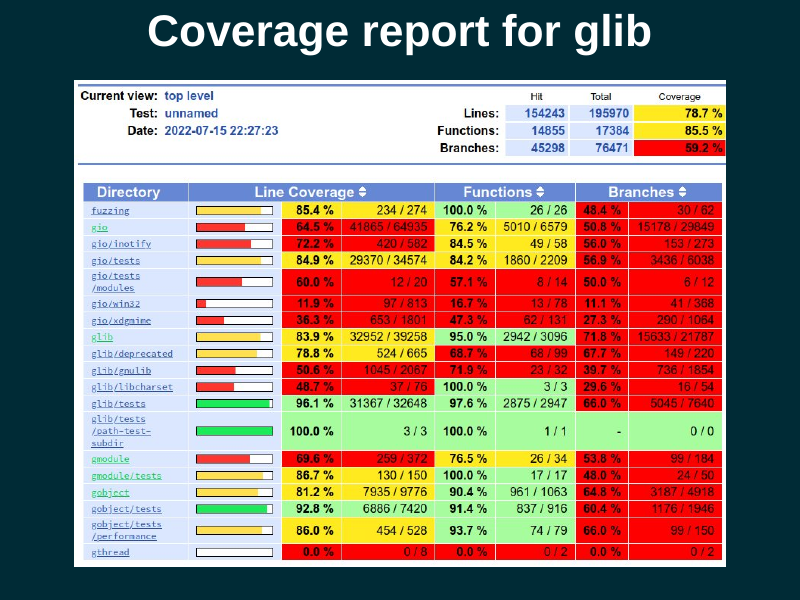
Glib is a much more complex library, and it uses lcov instead of grcov. Lcov is an older tool, not as pretty, but still quite functional (in particular, it is very good at displaying branch coverage).

This is what the coverage report looks for a single C file. Lines that were executed are in green; lines that were not executed are in red. Lines in white are not instrumented, because they produce no executable code.
The first column is the line number; the second column is the number of times each line got executed. The third column is of course the code itself.
In this extract, you can see that all the lines in the
impl_GetChildren() function got executed, but none of the lines in
impl_GetIndexInParent() got executed. We may need to write a test that
will cause the second function to get executed.

The accessibility code needs to process a bunch of properties in DBus objects. For example, the Python code at the top of the slide queries a set of properties, and compares them against their expected values.
At the bottom, there is the coverage report. The C code that handles each property is indeed executed, but the code for the error path, that handles an invalid property name, is not covered yet; it is color-coded red. Let's add a test for that!

So, we add another test, this time for the error path in the C code. Ask for the value of an unknown property, and assert that we get the correct DBus exception back.
With that test in place, the C code that handles that error case is covered, and we are all green.
What I am doing here is to characterize the behavior of the DBus API, that is, to mirror its current behavior in the tests because that is the "known good" behavior. Then I can start refactoring the code with confidence that I won't break it, because the tests will catch changes in behavior.

By now you may be familiar with how Gitlab displays diffs in merge requests.
One somewhat hidden nugget is that you can also ask it to display the code coverage for each line as part of the diff view. Gitlab can display the coverage color-coding as a narrow gutter within the diff view.
This lets you answer the question, "this code changed, does it get executed by a test?". It also lets you catch code that changed but that is not yet exercised by the test suite. Maybe you can ask the submitter to add a test for it, or it can give you a clue on how to improve your testing strategy.

The trick to enable that is to use the
artifacts:reports:coverage_report key in .gitlab-ci.yml. You have
your tools create a coverage report in Cobertura XML format, and you
give it to Gitlab as an artifact.
See the gitlab documentation on coverage reports for test coverage visualization.

When grcov outputs an HTML report, it creates something that looks and
feels like a <table>, but which is not an HTML table. It is just a
bunch of nested <div> elements with styles that make them look like
a table.
I was worried about how to make it possible for people who use screen readers to quickly navigate a coverage report. As a sighted person, I can just look at the color-coding, but a blind person has to navigate each source line until they find one that was executed zero times.
Eitan Isaacson kindly explained the basics of ARIA tags to me, and
suggested how to fix the bunch of <div> elements. First, give them
roles like table, row, cell. This tells the browser that the
elements are to be navigated and presented to accessibility tools as
if they were in fact a <table>.
Then, generate an aria-label for each cell where the report shows
the number of times a line of code was executed. For lines not
executed, sighted people can see that this cell is just blank, but has
color coding; for blind people the aria-label can be "no coverage"
or "zero" instead, so that they can perceive that information.
We need to make our development tools accessible, too!
You can see the pull request to make grcov's HTML more accessible.

Speaking of making development tools accessible, Mike Gorse found a bug in how Gitlab shows its project badges. All of them have an alt text of "Project badge", so for someone who uses a screen reader, it is impossible to tell whether the badge is for a build pipeline, or a coverage report, etc. This is as bad as an unlabelled image.
You can see the bug about this in gitlab.com.

One important detail: if you want code coverage information, your processes must exit cleanly!!!. If they die with a signal (SIGTERM, SIGSEGV, etc.), then no coverage information will be written for them and it will look as if your code got executed zero times.
This is because gcc and clang's runtime library writes out the
coverage info during program termination. If your program dies before
main() exits, the runtime library won't have a chance to write the
coverage report.

During a normal user session, the lifetime of the accessibilty daemons (at-spi-bus-launcher and at-spi-registryd) is controlled by the session manager.
However, while running those daemons inside the test suite, there is no user session! The daemons would get killed when the tests terminate, so they wouldn't write out their coverage information.
I learned to use Martin Pitt's python-dbusmock to write a minimal mock of gnome-session's DBus interfaces. With this, the daemons think that they are in fact connected to the session manager, and can be told by the mock to exit appropriately. Boom, code coverage.
I want to stress how awesome python-dbusmock is. It took me 80 lines of Python to mock the necessary interfaces from gnome-session, which is pretty great, and can be reused by other projects that need to test session-related stuff.

I am using pytest to write tests for the accessibility interfaces via DBus. Using DBus from Python is really pleasant.
For those tests, a test fixture is "an accessibility registry daemon tied to the session manager". This uses a "session manager fixture". I made the session manager fixture tear itself down by informing all session clients of a session Logout. This causes the daemons to exit cleanly, to get coverage information.

The setup for the session manager fixture is very simple; it just
connects to the session bus and acquires the
org.gnome.SessionManager name there.
Then we yield mock_session. This makes the fixture present itself to whatever needs to call it.
When the yield comes back, we do the teardown stage. Here we just
tell all session clients to terminate, by invoking the Logout method
on the org.gnome.SessionManager interface. The mock session manager
sends the appropriate singals to connected clients, and the clients
(the daemons) terminate cleanly.
I'm amazed at how smoothly this works in pytest.

The C code for accessibility was written by hand, before the time when we had code generators to implement DBus interfaces easily. It is extremely verbose and error-prone; it uses the old libdbus directly and has to piece out every argument to a DBus call by hand.

This code is really hard to maintain. How do we fix it?

What I am doing is to split out the DBus implementations:
- First get all the arguments from DBus - marshaling goo.
- Then, the actual logic that uses those arguments' values.
- Last, construct the DBus result - marshaling goo.

If you know refactoring terminology, I "extract a function" with the actual logic and leave the marshalling code in place. The idea is to do that for the whole code, and then replace the DBus gunk with auto-generated code as much a possible.
Along the way, I am writing a test for every DBus method and property that the code handles. This will give me safety when the time comes to replace the marshaling code with auto-generated stuff.

We need reproducible environments to build and test our code. It is not acceptable to say "works on my machine" anymore; you need to be able to reproduce things as much as possible.
Code coverage for tests is really useful! You can do many tricks with it. I am using it to improve the comprehensiveness of the test suite, to learn which code gets executed with various actions on the DBus interfaces, and as an exploratory tool in general while I learn how the accessibility code really works.
Automated builds on every push, with tests, serve us to keep the code from breaking.
Continuous integration is generally available if we choose to use it. Ask for help if your project needs CI! It can be overwhelming to add it the first time.
Let the robots do the boring work. Constructing environments reproducibly, building the code and running the tests, analyzing the code and extracting statistics from it — doing that is grunt work, and a computer should do it, not you.
"The Not Rocket Science Rule of Software Engineering" is to automatically maintain a repository of code that always passes all the tests. That, with monotonically increasing test coverage, lets you change things with confidence. The rule is described eloquently by Graydon Hoare, the original author of Rust and Monotone.
There is tooling to enforce this rule. For GitHub there is Homu; for Gitlab we use Marge-bot. You can ask the GNOME sysadmins if you would like to turn it on for your project. Librsvg and GStreamer use it very productively. I hope we can start using Marge-bot for the accessibility repositories soon.

The moral of the story is that we can make things better. We have much better tooling than we had in the early 2000s or 2010s. We can fix things and improve the basic infrastructure for our personal computing.
You may have noticed that I didn't talk much about accessibility. I talked mostly about preparing things to be able to work productively on learning the accessibility code and then improving it. That's the stage I'm at right now! I learn code by refactoring it, and all the CI stuff is to help me refactor with confidence. I hope you find some of these tools useful, too.

(That is a photo of me and my dog, Mozzarello.)
I want to thank the people that have kept the accessibility code functioning over the years, even after the rest of their team disappeared: Joanmarie Diggs, Mike Gorse, Samuel Thibault, Emmanuele Bassi.
Work Group Shifts to Feedback Session
Members of openSUSE’s Adaptable Linux Platform (ALP) community workgroup had a successful install workshop on August 2 and are transitioning to two install feedback sessions.
The first feedback session is scheduled to take place on openSUSE’s Birthday on August 9 at 14:30 UTC. The second feedback session is scheduled to take place on August 11 during the community meeting at 19:00 UTC.
Attendees of the workshop were asked to install MicroOS Desktop and temporarily use it. This is being done to gain some feedback on how people use their Operating System, which allows the work groups to develop a frame of reference for how ALP can progress.
The call for people to test spin MicroOS Desktop has received a lot of feedback and the workshop also provided a lot of feedback. One of the comments in the virtual feedback session was “stable base + fresh apps? sign me up”.
“stable base + fresh apps? sign me up.” - listed in comments during workshop
Two install videos were posted to the openSUSETV YouTube channel to help get people started with installing and testing MicroOS.
The video Installing Workshop Video (MicroOS Desktop) went over the expectations for ALP and then discussed experiences going through a testing spreadsheet.

The other video, which was not shown during the workshop due to time limitations, was called Installing MicroOS on a Raspberry Pi 400 and gave an overview on how to get MicroOS Desktop with a graphical interface running on the Raspberry Pi.

A final Lucid Presentation is scheduled for August 16 during the regularly scheduled workgroup.
People are encouraged to send feedback to the ALP-community-wg mailing list and to attend the feedback sessions, which will be listed in the community meeting notes.
Users can download the MicroOS Desktop at https://get.opensuse.org/microos/ and see instructions and record comments on the spreadsheet.
Recopilación del boletín de noticias de la Free Software Foundation – agosto de 2022
Recopilación y traducción del boletín mensual de noticias relacionadas con el software libre publicado por la Free Software Foundation.

La Free Software Foundation (FSF) es una organización creada en Octubre de 1985 por Richard Stallman y otros entusiastas del software libre con el propósito de difundir esta filosofía.
La Fundación para el software libre (FSF) se dedica a eliminar las restricciones sobre la copia, redistribución, entendimiento, y modificación de programas de computadoras. Con este objeto, promociona el desarrollo y uso del software libre en todas las áreas de la computación, pero muy particularmente, ayudando a desarrollar el sistema operativo GNU.
Además de tratar de difundir la filosofía del software libre, y de crear licencias que permitan la difusión de obras y conservando los derechos de autorías, también llevan a cabo diversas campañas de concienciación y para proteger derechos de los usuarios frentes a aquellos que quieren poner restricciones abusivas en cuestiones tecnológicas.
Mensualmente publican un boletín (supporter) con noticias relacionadas con el software libre, sus campañas, o eventos. Una forma de difundir los proyectos, para que la gente conozca los hechos, se haga su propia opinión, y tomen partido si creen que la reivindicación es justa!!
- En este enlace podéis leer el original en inglés: https://www.fsf.org/free-software-supporter/2022/august
- Y traducido en español (cuando el equipo de traducción lo tenga disponible) en este enlace: https://www.fsf.org/free-software-supporter/2022/agosto

Puedes ver todos los números publicados en este enlace: http://www.fsf.org/free-software-supporter/free-software-supporter
Después de muchos años colaborando en la traducción al español del boletín, desde inicios del año 2020 he decidido tomarme un descanso en esta tarea.
Pero hay detrás un pequeño grupo de personas que siguen haciendo posible la difusión en español del boletín de noticias de la FSF.
¿Te gustaría aportar tu ayuda en la traducción? Lee el siguiente enlace:
Por aquí te traigo un extracto de algunas de las noticias que ha destacado la FSF este mes de agosto de 2022
Acercándose a BIOS totalmente libres con el equipo técnico de la FSF
Del 13 de julio
Como parte de la recaudación de fondos de primavera de la FSF, el administrador sénior de sistemas, Ian Kelling, escribió un artículo que detalla el trabajo reciente del equipo técnico para migrar los últimos servidores que ejecutan BIOS no libres a otros que ejecutan BIOS libres.
Hubo muchos desafíos involucrados, pero el equipo técnico pudo enfrentar esos desafíos, y este artículo brinda una buena hoja de ruta para otras personas que planeen liberar sus computadoras de la red.
Publicado LibreJS 7.21.0
Del 21 de julio por Yuchen Pei
¡Hay una nueva versión de LibreJS, el complemento del navegador que lo ayuda a proteger su libertad!
Lea las notas de la versión, que detallan las correcciones de errores y las nuevas funciones, como una nueva prueba sin interfaz para desarrolladores de sitios web y documentación actualizada. Además, lea sobre la campaña Free JavaScript, que presenta a LibreJS como un recurso importante que se puede usar para navegar por Internet con libertad: https://www.fsf.org/campaigns/freejs.
Declaración de EFF sobre la adopción de la ley de servicios digitales y la ley de mercados digitales por parte del Parlamento de la UE
Del 5 de julio por la Electronic Frontier Foundation
La Electronic Frontier Foundation (EFF) publicó su declaración sobre la reciente aprobación por parte de la Unión Europea (UE) del «paquete de la Ley de Servicios Digitales». Hay algunas mejoras en las protecciones para los usuarios comunes, pero la DSA también obliga a las plataformas a evaluar y mitigar los riesgos sistémicos, y existe mucha ambigüedad sobre cómo resultará esto en la práctica. Mucho dependerá de cómo las plataformas de redes sociales interpreten sus obligaciones bajo la DSA y cómo las autoridades de la UE hagan cumplir la regulación.
Mientras tanto, organizaciones europeas como European Digital Rights (EDRi) han estado haciendo campaña contra lo que llaman «control de chat» durante meses. Los derechos de cifrado en las aplicaciones de chat y mensajería están en juego, y las organizaciones han formado diez principios de lo que significa, como dicen, «realmente defender a los niños en la era digital», que incluyen proteger el cifrado.
Tanto si vive dentro de la UE como si no, le recomendamos que se informe sobre los problemas y lo que está en juego. Lea la declaración completa de la EFF, respalde la lista de principios de EDRi en su sitio o en el sitio alemán https://chat-kontrolle.eu/ y lea lo que la FSF ha dicho anteriormente sobre la importancia del software libre en la tecnología de comunicación que realmente respeta la privacidad. La verdadera privacidad y seguridad dependen del software libre.
- https://www.eff.org/press/releases/eff-statement-eu-parliaments-formal-approval-digital-services-act-and-digital-markets
- https://edri.org/our-work/chat-control-10-principles-to-defend-children-in-the-digital-age/
- https://edri.org/wp-content/uploads/2022/02/EDRi-principles-on-CSAM-measures.pdf
- https://www.fsf.org/bulletin/2020/spring/privacy-encryption
Thomas Lord 1966-2022
Del 27 de julio por Trina Pudurs
Thomas Lord nació el 26 de abril de 1966 en Pittsburgh, Pensilvania. Apoyó el software libre durante toda su vida. Trabajó como empleado de la Free Software Foundation (FSF), desarrollando para el Proyecto GNU durante varios años a principios de la década de 1990.
La FSF reconoce y honra la contribución de Lord al software libre y su comunidad. Lamentamos la pérdida de Lord y expresamos nuestras condolencias a su familia, sus amigos y colegas.

Estas son solo algunas de las noticias recogidas este mes, pero hay muchas más muy interesantes!! si quieres leerlas todas (cuando estén traducidas) visita este enlace:
Y todos los números del «supporter» o boletín de noticias de 2022 aquí:
—————————————————————
Forum A l’asso de Rouen 2022
Cette année encore, notre association fondée en 2001 sera présente au forum des associations qui se tient le samedi 10 septembre 2022 de 10h à 18h sur les quais bas rive gauche entre le pont Guillaume-le-Conquérant et le pont Jeanne-d’Arc. Venez nous rencontrer au stand 107 et nous vous réserverons notre meilleur accueil. Toute la …
Forum A l’asso de Rouen 2022Read More »
The post Forum A l’asso de Rouen 2022 appeared first on Cybersécurité, Linux et Open Source à leur plus haut niveau | Network Users Institute | Rouen - Normandie.