
 Member
 CzP
CzPFriday the 13th: a lucky day :-)
I’m not superstitious, so I never really cared about black cats, Friday the 13th, and other signs of (imagined) trouble. Last Friday (which was the 13th) I had an article printed in a leading computer magazine in Hungary, and I gave my first IRL talk at a conference in well over two years. Best of all, I also met many people, some for the first time in real life.
Free Software Conference: sudo talk
Last Friday, I gave a talk at the Free Software Conference in Szeged. It was my first IRL conference talk in well over two years. I gave my previous non-virtual talk in Pasadena at SCALE; after that, I arrived Hungary only a day before flights between the EU and the US were shut down due to Covid.
I must admit that I could not finish presenting all my slides. I practiced my talk many times, so in the end, I could fit my talk into my time slot. However, I practiced the talk by talking to my screen. That gives no feedback, which is one of the reasons I hate virtual talks. At the event, I could see my audience and read from their faces when something was really interesting, or something was difficult to follow. In both cases, I improvised and added some more details. In the end, I had to skip three of my slides, including the summary. Luckily, all important slides were already shown. The talk was short, so the summary was probably not really missing. Once my talk was over, many people came to me for stickers, and to explain which of the features they learned about they plan to implement once they are back home.

Sudo logo
My talk was in Hungarian. Everything about sudo is in English in my head. I had to do some simultaneous interpreting from English to Hungarian, at least when I started practicing my talk. I gave an earlier version of this talk at FOSDEM in English. So, if you want to learn about some of the latest sudo features in English, you can watch it at the FOSDEM website at https://fosdem.org/2022/schedule/event/security_sudo/.
ComputerWorld: syslog-ng article
Once upon a time, I learned journalism in Hungarian. I even wrote a couple of articles in Hungarian half a decade ago. However, I’ve been writing only in English ever since. The syslog-ng blog, the sudo blog, and even my own personal blog where you read this, are all in English. Other than a few chats and e-mails, all my communication is in English.
Last week the Hungarian edition of ComputerWorld prepared with a few extra pages for the Free Software Conference. It also featured an article I wrote about some little known facts about syslog-ng. Writing in Hungarian was quite a challenge, just like talking in Hungarian. I tried to find a balance in the use of English words. Some people use English expressions for almost everything, so just a few words are actually in Hungarian. I hate the other extreme even more: when all words are in Hungarian, and I need to guess what the author is trying to say. I hope I found an enjoyable compromise.
I must admit, it was a great feeling to see my article printed. :-)
Meeting people: Turris, Fedora community
Last Friday I also met many people for the first time in person, or for the first time in person in a long while. I am a member of the Hungarian Fedora community. We met regularly earlier but not any more. I keep in touch with individual members over the Internet, but in Szeged, I could meet some of them in person and have some longer discussions.
If you checked the website of the conference, you could see that it was the first ever international version of the event. When I learned that the conference is not just for Hungarians but for the V4 countries as well, I reached out to the Turris guys. Their booth was super busy during the conference, but luckily, I had a chance to chat with them a bit. Two of their talks were at the same time as my talk, but I could listen to their third talk. It was really nice: I learned about the history of the project.
As you can see, my Friday the 13th was a fantastic day. I knock on wood hoping that Friday the 13th stays a lucky day. OK, just kidding :-)
5 lugares en los que encontrar tareas cron en Linux
En GNU/Linux puedes programar tus tareas cron de diferentes maneras

Puede que le sorprenda que la versión de cron que se ejecuta en su servidor hoy en día es en gran medida compatible con la especificación crontab escrita en la década de 1970.
Una desventaja de esta cuidadosa compatibilidad con versiones anteriores es que los trabajos, incluso en el mismo servidor, se pueden crear y programar de manera diferente.
Este artículo, es una traducción/adaptación de un artículo en inglés escrito por Shane Harter que puedes encontrar en este enlace:
1.- El crontab de usuario
En sistemas GNU/Linux, cada usuario tiene su propio crontab que puede ver y actualizar con el comando crontab. Para ver un listado de las tareas cron de tu usuario, puedes ejecutar:
crontab -l
El crontab de cada usuario es el lugar más fácil para añadir un nuevo trabajo para que se ejecute de manera automática cuando quiera, por lo que es el que se usa de manera frecuente y es el primer lugar en el que buscar cuando no se está seguro de cómo se ha programado una tarea.
Para editar una tarea crontab y añadir y/o modificar nuevas tareas puedes hacerlo mediante:
crontab -e
En los «logs» o registros de los sistemas GNU/Linux queda registrados, además de muchos otros eventos, qué tareas crontab se han realizado y de qué usuario del sistema son.
2.- El crontab del usuario root
Como cualquier otro usuario del sistema, también el usuario «root» de GNU/Linux puede tener establecidos sus propias tareas crontab.
Puedes iniciar sesión como «root» y listar si hay tareas de cron con el comando que hemos visto anteriormente.
3.- El archivo crontab del sistema
La forma original y que todavía se sigue utilizando para programar trabajos cron en todo el sistema, es agregando entradas en el archivo: /etc/crontab.
Para escribir en /etc/crontab requiere privilegios de usuario «root» y los trabajos programados se pueden ejecutar como cualquier usuario del sistema.
Si la primera palabra en su comando de trabajo coincide con una cuenta de usuario del sistema, el comando se ejecuta como ese usuario. Si no se especifica ningún usuario, se ejecuta como root.
Aquí el usuario tux realizará la siguiente tarea cron:
* 0 * * * tux /var/scripts/backup.sh
4.- Un archivo crontab en el propio directorio /etc/cron.d
En algún momento los desarrolladores se dieron cuenta de que era una mala práctica tener un único crontab en todo el sistema que pudiera ser cambiado por instaladores y herramientas automatizadas y nació el directorio /etc/cron.d/.
Los trabajos se programan usando /etc/cron.d copiando o creando un enlace simbólico a un archivo crontab. Al igual que los trabajos programados en /etc/crontab, la primera palabra del comando puede especificar opcionalmente el usuario para ejecutar el trabajo.
5.- Un script o comando en /etc/cron.hourly, /etc/cron.daily, etc
Cuando la programación de una tarea al detalle es menos importante que la simple frecuencia, se pueden crear trabajos cron copiando o enlazando un script en los directorios:
- /etc/cron.hourly – realiza tareas de a cada hora
- /etc/cron.daily – realiza tareas de a cada día
- /etc/cron.weekly – realiza tareas de a cada semana
- /etc/cron.monthly – realiza tareas de a cada mes
Bola extra
Como información extra, cuando los crontabs de usuarios individuales se editan mediante el comando crontab -e que hemos visto anteriormente, los archivos crontab se almacenan en /var/spool/cron.
No es buena idea editar esos archivos directamente y, en su lugar, es recomendable ejecutar crontab -e como el usuario que ejecutará el trabajo programado.
Si editas esos archivos en /var/spool/cron directamente, perderás el beneficio de la verificación de sintaxis que proporciona crontab -e y es posible que tu distribución de GNU/Linux no detecte los cambios realizados sin una recarga explícita del demonio cron.
¿Te ha resultado interesante la lectura? No hemos entrado al detalle de cómo crear tareas cron, algo que por la red se puede encontrar sin mucho problema, pero sí hemos visto donde podemos programar nuestras tareas cron.
Si aprendiste algo nuevo, o si hay algo que sabes que no se ha comentado aquí y que complementa lo escrito, usa los comentarios del blog para compartir lo que quieras.

Programa de Ujilliurex 2022 #ujilliurex
Hoy toca hacer más promoción del evento presencial que se va a celebrar el próximo 18 y 19 de mayo en la Universidad Jaume I de Castellón. Se trata de dar a conocer el programa de Ujilliurex 2022 un evento que une educación, Software Libre y Conocimiento Compartido a parte iguales.
Programa de Ujilliurex 2022 #ujilliurex
Aunque lo anuncié hace poco quiero seguir haciendo promoción de este evento que ya vuelve en la forma tradicional, es decir, presencial en el Aula Magna (HA1012AA) de la Facultad de Ciencias Humanas y Sociales de la Universidad Jaume I, conocida por casi todos como UJI.
Con14 ponencias tiene como principal objetivo difundir el uso y manejo de las TIC en la distribución LliureX entre la comunidad educativa (universitaria y no universitaria; infantil, primaria, secundaria y formación profesional).
Pero no me enrollo más y comparto con vosotros el listado de ponencias que podéis encontrar en su programa y que en mi humilde opinión dan una buena muestra de las muchas cosas que podemos hacer con nuestro alumnado, la tecnología y el Software Libre.
Miércoles 18 de mayo
- 17:00 La Competencia Digital Docente, análisis críTICo (seguimos sentando las bases y sin pisar la realidad) por Juan Francisco Álvarez Herrero
- 18:00 La competencia digital de los estudiantes en el contexto de la educación superior por Anna Sánchez-Caballé
- 19:15 Digitalización de la FP en la nube por David Montalva Furió
- 20:00 La importancia del código abierto en la CDD por Tàfol Nebot Gómez
- 20:15 Modelo de centro con Proxmox en un pequeño centro de secundaria por Eduardo Millán Martínez

Miércoles 18 de mayo
- 16:30 ASKER, tu generado de preguntas para Moodle por Baltasar Ortega Bort
- 16:50 Accesibilidad para todos por Juan Manuel Navarro Máñez
- 17:10 El ámbito de las TIC de la Subdirección General de Formación del Profesorado por Ignasi Climent Mateu
- 17:30 Plan Digital de Centro por Vicent Part Julio
- 19:00 Markdown y Apuntes por Angel Berlanas Vicente
- 19:200 Experiencia en la transformación de un centro educativo a distancia a Microsoft(CDC) desde el punto de vista docente por Piedad Soriano Montiel
- 19:40 I love Ruby: Scripting feliz! por David Vargas Ruiz
- 20:00 Casa domótica educativa por Jordi Mayné Grau
- 20:15 Uso de H5P19 por Tamara Expósito Ponce
¿Qué os parece el programa? ¿tenía razón? Ya lo sabéis, ayudad al éxito de este evento con vuestra difusión: Ujilliurex se lo merece.
La entrada Programa de Ujilliurex 2022 #ujilliurex se publicó primero en KDE Blog.

Zabbix Server 6.0 with container in GCP 安裝小記
Zabbix Server 6.0 with container in GCP 安裝小記
OS: openSUSE Leap 15.3 in GCP
Zabbix: 6.0 docker image
Cloud SQL: Postgres SQL
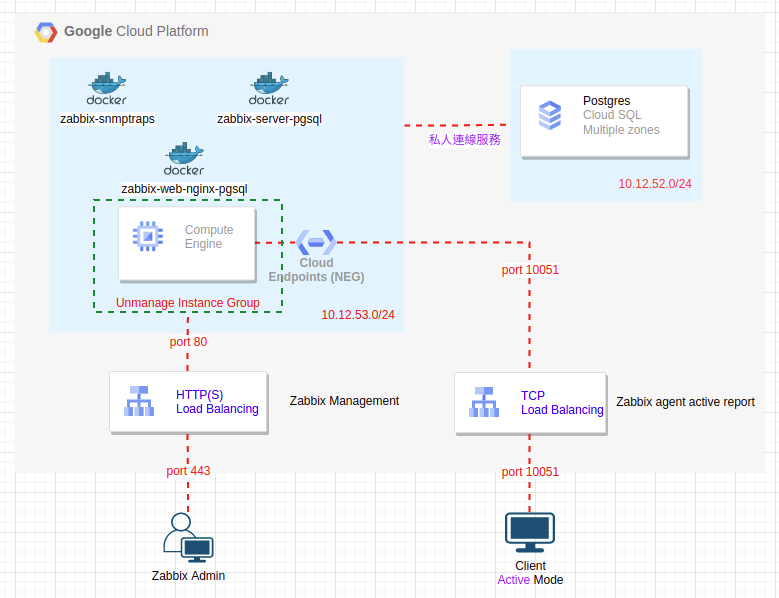
今天這篇 Zabbix 的安裝小記應該會更貼近提供服務的架構
先談一下規劃的想法
Zabbix 的服務提供使用容器的方式來提供
DB 的部份使用 Cloud SQL with Pregres SQL 來提供服務, 好處是全代管 / HA / 以及方便擴充 …
Cloud SQL 的介紹 https://cloud.google.com/sql
規劃兩個 Load Balancer 來對應 Zabbix 管理 以及 Zabbix agent 回報資訊
Zabbix 管理者或是 Zabbix agent 回報對應到 LB, 對之後的資源調度以及調整保留彈性
首先來建立 Cloud SQL
登入 GCP 並且到 Cloud SQL 頁面
點選 +CREATE INSTANCE

點選 Choose PostgreSQL

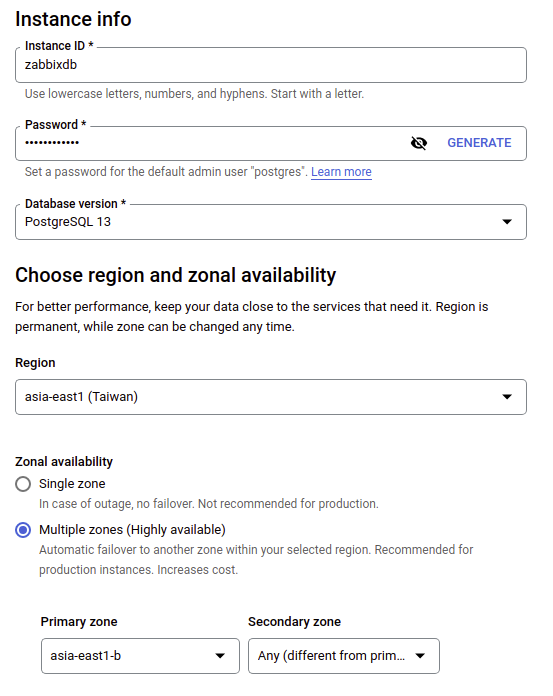
輸入 instance ID 名稱
輸入 DB密碼
選取 Database 版本 ( 我這邊使用 PostgreSQL 13, 請依照自己的需求調整 )
選取 Region ( 我這邊選的是 Taiwan )
Zonal availability 選 Multiple zone (Highly available) ( Primary zone 要不要指定看個人 )
Machine type 的部份
因為是實驗使用
我使用 Custom ( 1 vCPU / 3.75 GB Memory ) ( 請依照專案需求調整 )
Storage 使用 HDD 並自訂大小 500 GB ( 請依照專案需求調整 )

Connections 的部份
專案本身的 VPC 已經有建立自訂的 VPC 以及 Subnet
取消勾選 Public IP
勾選 Private IP
選取自訂的 VPC

如果遇到必須使用私人服務存取連線的提示
點選 SET UP CONNECTION
點選 ENABLE API
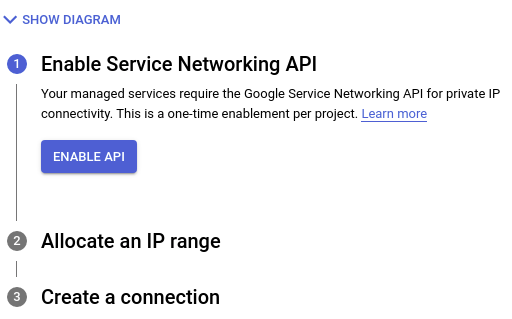
點選 Select one or more existing IP ranges or create a new one
點選 下拉式選單
點選 ALLOCATE A NEW IP RANGE
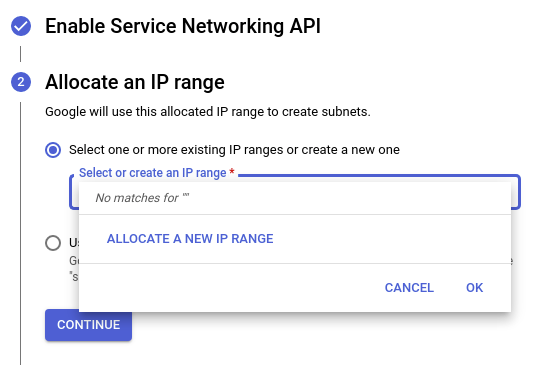
輸入 名稱, 輸入 分配的 IP 位址範圍
請勿與地端的 IP 位址重複
點選 CONTINUE

確認相關資訊
點選 CREATE CONNECTION

確認相關資訊
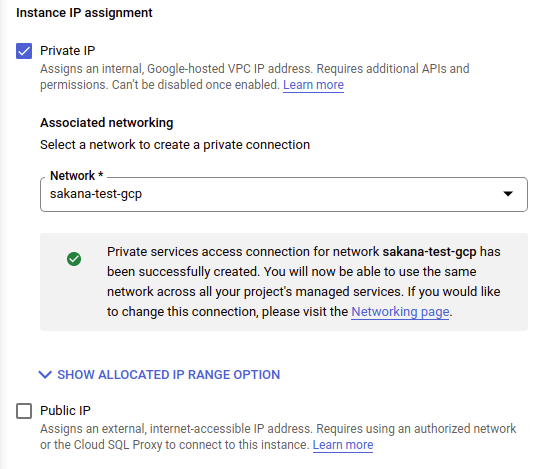
其他的部份按照預設
點選 CREATE INSTANCE
需要一點時間來建立
確認 Instance 已經建立完成
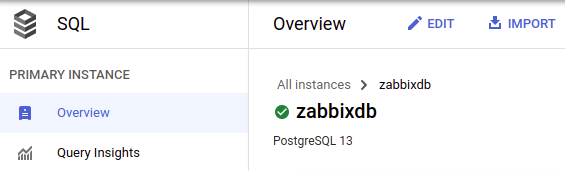
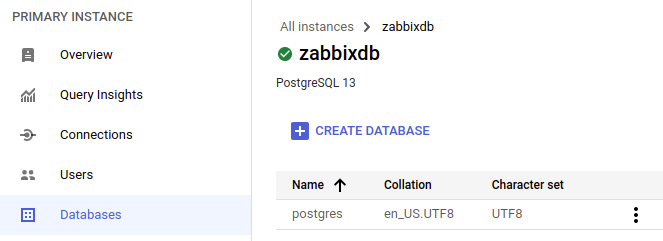
點選左方的 Databases 選單
點選 CREATE DATABASE
輸入 Database 名稱 zabbix
點選 CREATE
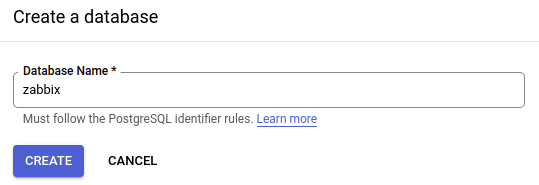
這邊大概就是使用 Cloud SQL 的好處之一, 可以直接在介面上建立 database
如果是使用 openSUSE 可能要使用 #zypper install postgresql 然後使用 psql -h xxx.xxx.xxx.xxx -U postgres 來進行連線, 然後再下 CREATE DATABASE zabbix;
接下來進行 Zabbix with container 的部份
在 GCP 建立 openSUSE leap 15.3 的 VM ( Compute Engine )
使用 Web SSH 或是 SSH 連入 openSUSE Leap 15.3, 並切換為 root
啟用 docker 服務, 設定開機啟動
# systemctl start docker
# systemctl enable docker
建立 zabbix-net 網路
# docker network create --subnet 172.20.0.0/16 --ip-range 172.20.240.0/20 zabbix-net
啟動相關 container
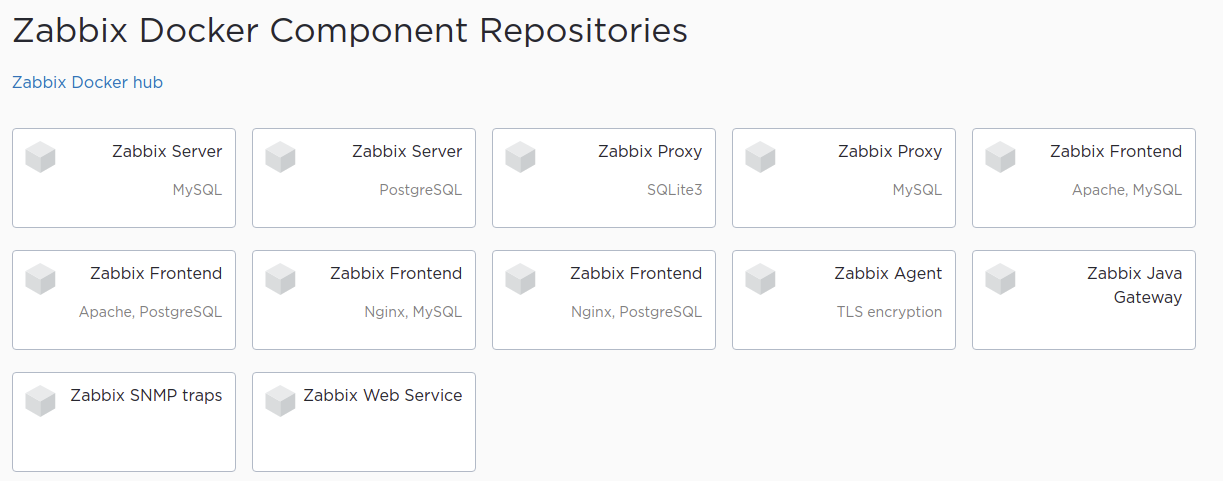
# docker run --name zabbix-snmptraps -t \
-v /zbx_instance/snmptraps:/var/lib/zabbix/snmptraps:rw \
-v /var/lib/zabbix/mibs:/usr/share/snmp/mibs:ro \
--network=zabbix-net \
-p 162:1162/udp \
--restart unless-stopped \
-d zabbix/zabbix-snmptraps:alpine-6.0-latest
# docker run --name zabbix-server-pgsql -t \
-e DB_SERVER_HOST="YOUR_DB_IP" \
-e POSTGRES_USER="postgres" \
-e POSTGRES_PASSWORD="YOUR_PW" \
-e POSTGRES_DB="zabbix" \
-e TZ=Asia/Taipei \
-e ZBX_ENABLE_SNMP_TRAPS="true" \
--network=zabbix-net \
-p 10051:10051 \
--volumes-from zabbix-snmptraps \
--restart unless-stopped \
-d zabbix/zabbix-server-pgsql:alpine-6.0-latest
DB_SERVER_HOST 的部份請對應到 Cloud SQL 的內部IP
POSTGRES_USER 對應到 CLOUD SQL 的 User name
POSTGRES_PASSWORD 對應到當初建立 Cloud SQL 輸入的密碼
加入 TZ=Asia/Taipei 之後發通知的時候才會對應到正確的時區
可以參考 Cloud SQL 的頁面資訊

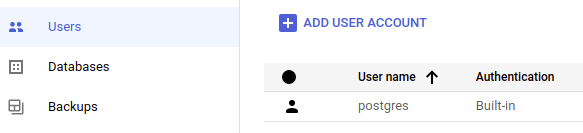
然後記得要在 GCP 的 Firewall 上面開放 port 10051 的存取
這樣之後 zabbix client 來存取的時候才不會 Timeout
# docker run --name zabbix-web-nginx-pgsql -t \
-e ZBX_SERVER_HOST="zabbix-server-pgsql" \
-e DB_SERVER_HOST="YOUR_DB_IP" \
-e POSTGRES_USER="postgres" \
-e POSTGRES_PASSWORD="YOUR_PW" \
-e POSTGRES_DB="zabbix" \
-e PHP_TZ="Asia/Taipei" \
--network=zabbix-net \
-p 443:8443 \
-p 80:8080 \
-v /etc/ssl/nginx:/etc/ssl/nginx:ro \
--restart unless-stopped \
-d zabbix/zabbix-web-nginx-pgsql:alpine-6.0-latest
確認 container 狀態
# docker ps
CONTAINER ID IMAGE COMMAND CREATED STATUS PORTS NAMES
238e05935125 zabbix/zabbix-web-nginx-pgsql:alpine-6.0-latest "docker-entrypoint.sh" 14 seconds ago Up 12 seconds 0.0.0.0:80->8080/tcp, :::80->8080/tcp, 0.0.0.0:443->8443/tcp, :::443->8443/tcp zabbix-web-nginx-pgsql
b6d16347aa21 zabbix/zabbix-server-pgsql:alpine-6.0-latest "/sbin/tini -- /usr/…" 5 minutes ago Up 5 minutes 0.0.0.0:10051->10051/tcp, :::10051->10051/tcp zabbix-server-pgsql
812544455ecd zabbix/zabbix-snmptraps:alpine-6.0-latest "/usr/sbin/snmptrapd…" 12 minutes ago Up 12 minutes 0.0.0.0:162->1162/udp, :::162->1162/udp zabbix-snmptraps
等等要安裝 Zabbix agent 監控 Zabbix Server 自己, 先觀察剛剛建立 zabbix-net 網段使用狀況
# docker network inspect zabbix-net
[
{
"Name": "zabbix-net",
"Id": "4af902735988ad791a12dbbb98afd1c88ec00de061c6c5ffb712ef78503e19d0",
"Created": "2022-05-12T13:53:29.638267706Z",
"Scope": "local",
"Driver": "bridge",
"EnableIPv6": false,
"IPAM": {
"Driver": "default",
"Options": {},
"Config": [
{
"Subnet": "172.20.0.0/16",
"IPRange": "172.20.240.0/20"
}
]
},
"Internal": false,
"Attachable": false,
"Ingress": false,
"ConfigFrom": {
"Network": ""
},
"ConfigOnly": false,
"Containers": {
"238e05935125afddf96794c674d3961a3de06741891bfe071c2c350ab0a764c1": {
"Name": "zabbix-web-nginx-pgsql",
"EndpointID": "0508d9d715ba3c78add4fc22d02e93af9cd740664e4a08e6639d8e8ce5a57bcc",
"MacAddress": "02:42:ac:14:f0:03",
"IPv4Address": "172.20.240.3/16",
"IPv6Address": ""
},
"812544455ecdfc79882cd1ec57e98a29dfd37b7c3c748b727e5884b2d5a15491": {
"Name": "zabbix-snmptraps",
"EndpointID": "2f1612243e2cc97ff942204b9c7c19779f5e45d446e8f3d5f4fce49cec29e018",
"MacAddress": "02:42:ac:14:f0:01",
"IPv4Address": "172.20.240.1/16",
"IPv6Address": ""
},
"b6d16347aa216ca6ff2f683bde533604207f5eb7285899ab4a06adebb1f12d57": {
"Name": "zabbix-server-pgsql",
"EndpointID": "206cdf98adda30bdea8f0584749e974b8d347d5e2dcbb335200e8a607e49d85a",
"MacAddress": "02:42:ac:14:f0:02",
"IPv4Address": "172.20.240.2/16",
"IPv6Address": ""
}
},
"Options": {},
"Labels": {}
}
]
這邊可以觀察到 目前 zabbix-server-pgsql 的 IP 為 172.20.240.2
# docker run --name zabbix-agent \
--network=zabbix-net \
-e ZBX_HOSTNAME="zabbix-server" \
-e ZBX_SERVER_HOST="172.20.240.2" \
--privileged \
--restart unless-stopped \
-d zabbix/zabbix-agent2:alpine-6.0-latest
ZBX_HOSTNAME 為要登記到 host 的主機名稱, 必須與 Configuration -- > Host 上面的 Host name 一致
ZBX_SERVER_HOST 為Server 的 IP 或是 FQDN
這個部份我用 #docker network inspect zabbix-net 查詢 Server IP
使用 --privileged 來啟用 Privileged mode, 有使用 Privileged 的話 Graph 會多了磁碟的相關資訊
因為 預設的 Zabbix Server host 設定無法移除 Interface 設定, 所以這個部份採取 Passive 的方式來進行, 然後是在此主機的 zabbix-net 比較沒有相關顧慮
執行 Zabbix 管理者密碼變更
在 GCP 的 Firewall 建立只允許自己固定IP 連入 port 80 的規則
我個人比較喜歡用 Tag 方式來套用, 不是全部套用

在剛剛建立的 openSUSE Leap 15.3 套用 Network tags, 讓防火牆生效
開啟網頁 http://YOUR_SERVER_IP
登入 Zabbix
預設帳號 Admin
密碼 zabbix
變更 Zabbix Admin 密碼 ( 建議馬上變更 )
User settings -- > Profile -- > Change password
Zabbix Server 的主機設定更新 ( 讓 zabbix agent 對應正確 )
在 Zabbix 頁面
Configuration -- > Hosts
點選 Zabbix server
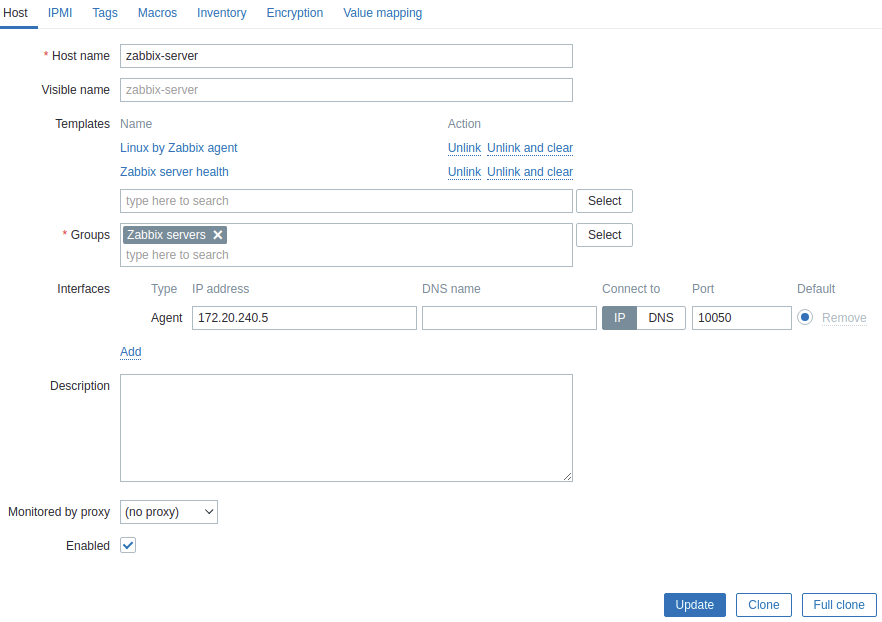
Host name 的部份填入剛剛 zabbix agent 2 的 ZBX_HOSTNAME ( zabbix-server )
Interfaces Agent 的 IP 從 127.0.0.1 改為目前 agent IP, 例如 172.20.240.4 ( 透過 #docker network inspect zabbix-net 查詢 Client IP )
點選 Update
放一段時間就會看到正常了

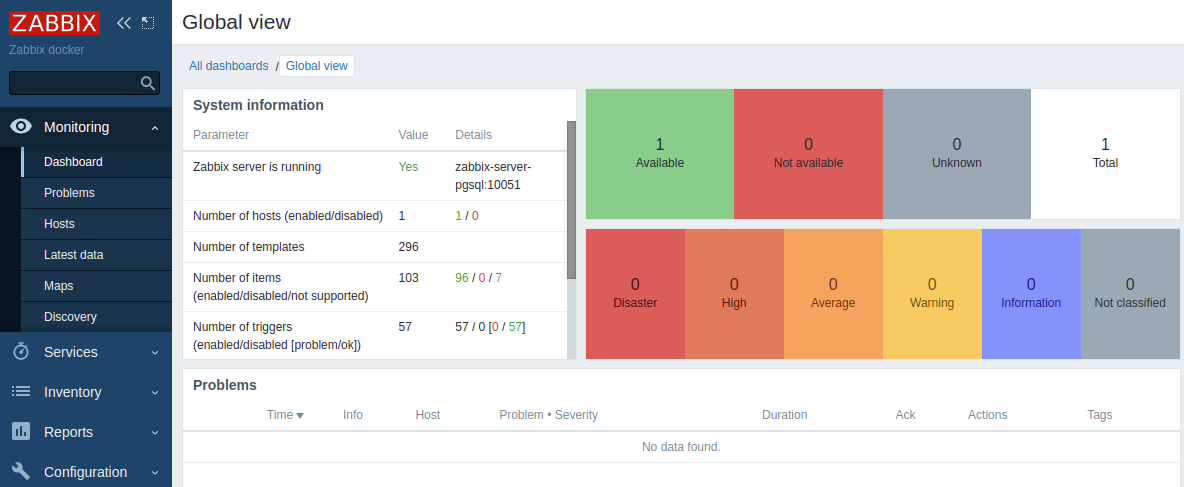
最後來建置 Load Balancer
如同我們上面的架構圖, 因為目前我們是將角色使用容器的方式放在 1 台 GCE 上面來執行, 上面有兩個角色會使用到
zabbix-web-nginx-pgsql
進行 Zabbix 服務管理與資訊呈現 -- port 80
zabbix-server-pgsql
接收 Zabbix agent 主動回報的資訊 -- port 10051
這邊規劃使用 2 個 Load Balancer 來接收上述兩個需求, 使用 LB 的好處是可以保持機器調度的彈性, Client 只要單一指向 LB 的 IP 或是 FQDN, 後面的架構要如何調整不會受到影響
但是由於我們是將這兩個角色放在一個 GCE 上面, 原則上 GCE 不能同時被 2 個 LB 連接, 所以另外一個使用 Network Endpoint Group (NEG) 來處理.
目前規劃如下
建立 TCP Load Balancer ( L4 )
接收 Zabbix Agent 主動回報的資訊
後端使用 NEG 來連接 GCE
建立 HTTP(S) Load Balancer ( L7 )
用來管理 Zabbix Server 相關設定與資訊的呈現
後端使用 Unmanaged Instance Group 來指定
在 Load Balancer 上面綁定憑證, 讓外部連線使用 Https 連線
首先來建立 TCP Load Balancer
在建立 Load balancer 之前, 我們先來建立 Unmanaged Instance Group 來指向我們的 GCE, 好讓等等的 LB 可以指定到我們的 GCE.
點選 左上角選單 Compute Engine -- > Instance groups
點選 CREATE INSTANCE GROUP

點選 New unmanaged instance group
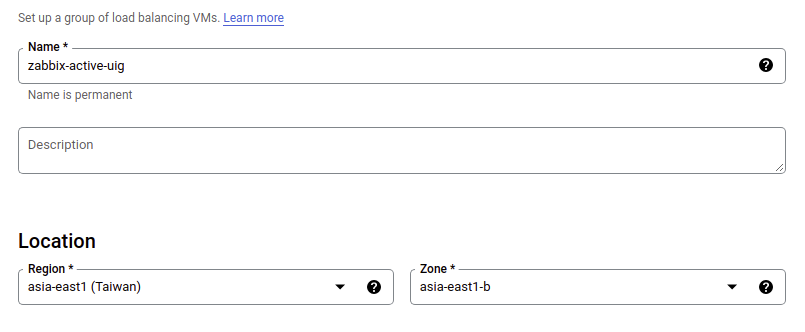
輸入名稱
選取 Region and Zone
Network and instance 部份
選取 VM 所在的 Network 與 Subnet
選取 Zabbix 所在的 VM

Port mapping 的部份
點選 ADD PORT
輸入 Port name 以及對應的 port

點選 CREATE 建立 Unmanaged Instace Group

確認建立資訊

接下來建立 TCP Load Balancer
點選左上角 選單, 點選 Network services -- > Load balancing

點選 CREATE LOAD BALANCER
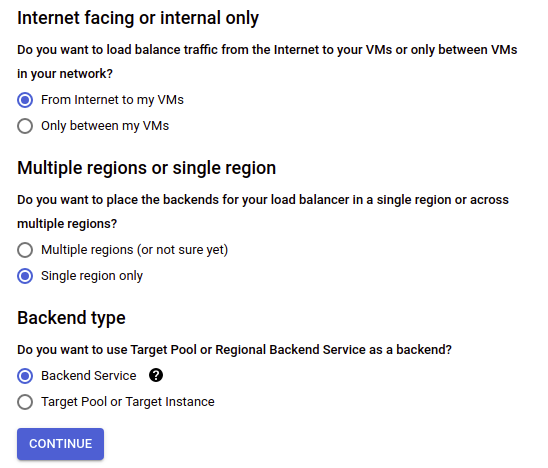
點選 TCP Load Balancing 的 START CONFIGURATION

這邊使用預設值即可
點選 CONTINUE
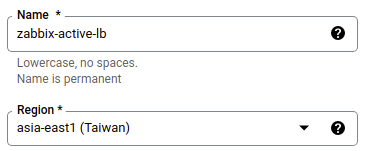
輸入名稱
選取 Region
右邊要設定 Backends
New backend 部份選取剛剛建立的 Unmanaged instance group
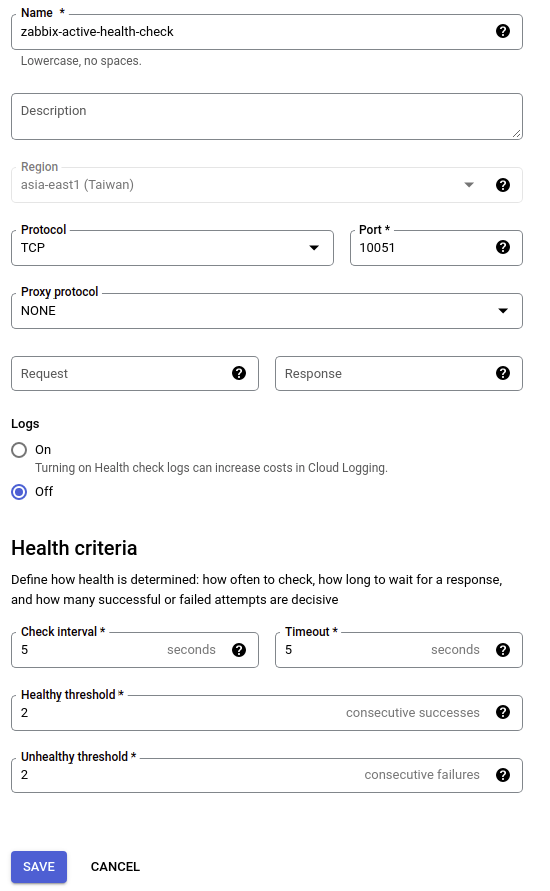
接下來要利用這個畫面建立 Health Check
點選 Health check 的下拉式選單, 點選 CREATE A HEALTH CHECK

輸入名稱
將 Port 改為 10051
點選 SAVE
確認 Backend 已經設定 UIG 以及 Health Check
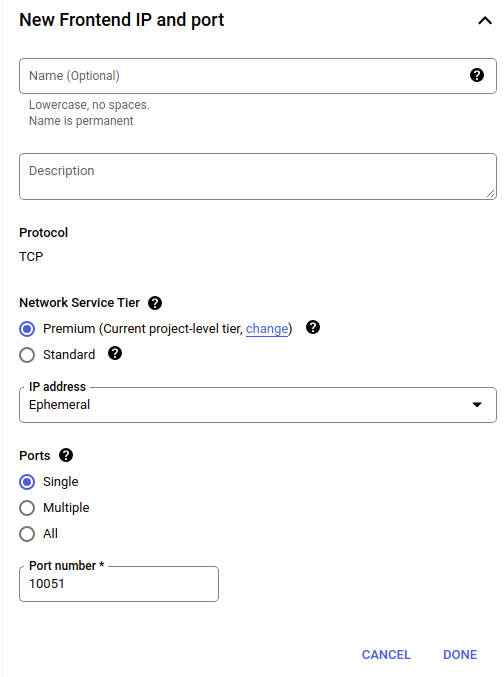
點選 Frontend configuration

這邊主要要將 Port 指定到 10051
在 Port number 輸入 10051
IP address 的部份可以考慮設定 Static IP
點選 DONE
點選 Review and finalize
觀察是否有缺漏?
點選 CREATE 建立
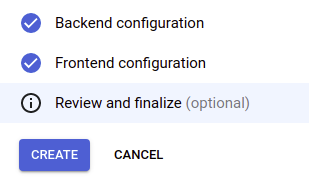
補充資訊
建立完成之後, 可能會遇到 Health Check 沒過的狀況

那是因為我們使用自己建立的 VPC and Subnet, 要另外開 Firewall Rules 允許 Google進行 Health Check, 請見官方文件

建立相對應的 Firewall 檢查就過了

接下來處理 HTTP(S) Load Balancer 建立
跟之前一樣, 在建立 HTTP(S) Load Balancer 之前, 我們先來建立 Network endpoint group (NEG), 以方便等等 LB 的連接
點選左上角 選單, 點選 Compute Engine -- > Network endpoint groups

點選 CREATE NETWORK ENDPOINT GROUP
輸入 名稱
選取 Network / Subnet / Zone
輸入 Default port 80
點選 CREATE
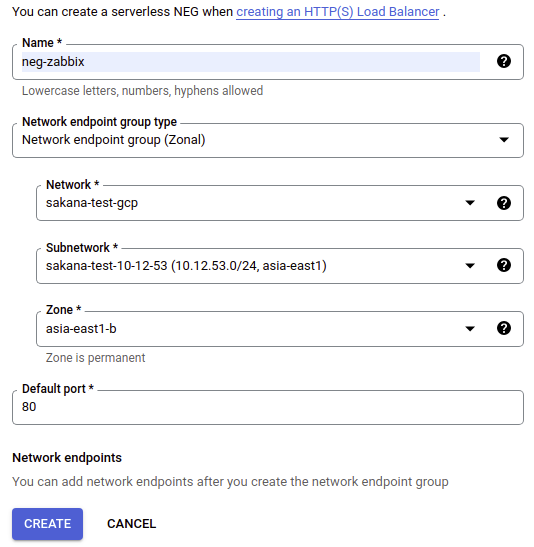
觀察建立後的資訊
目前連接的 Network endpoints 為 0
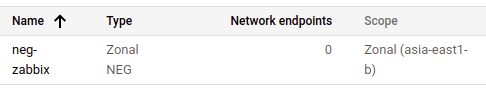
點選剛剛建立的 Network endpoint group ( neg-zabbix )
點選 ADD NETWORK ENDPOINT

在 VM Instance 的地方, 選取 Zabbix 所在的 VM
IP address 的部份, 輸入 Zabbix VM 的內部IP
點選 CREATE

接下來建立 HTTP(S) Load Balancer
點選左上角 選單, 點選 Network services -- > Load balancing
點選 CREATE LOAD BALANCER
點選 HTTP(S) Load Balancing 的 START CONFIGURATION
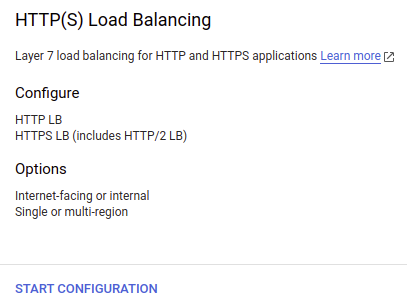
這邊一樣使用預設值
點選 CONTINUE

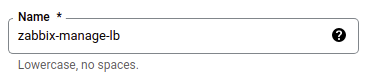
輸入 名稱
點選 Backend service & backend buckets 的下拉式選單
點選 CREATE A BACKEND SERVICE

輸入名稱
Backend type: 選取 Zonal network endpoint group
Protocol: 選取 HTTP

點選 Network endpoint group 的下拉式選單
選取剛剛建立的 Network endpoint group
設定 Maximum RPS (請按照需求設定)
點選 DONE

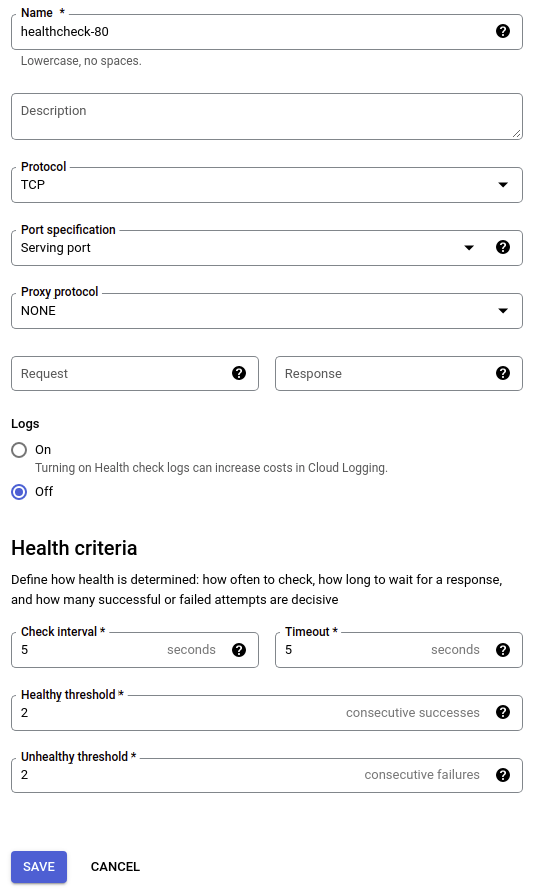
接下來設定 Health check
點選 Health Check 的下拉式選單
點選 CREATE A HEALTH CHECK

輸入名稱
其他按照預設值
點選 SAVE
點選 CREATE
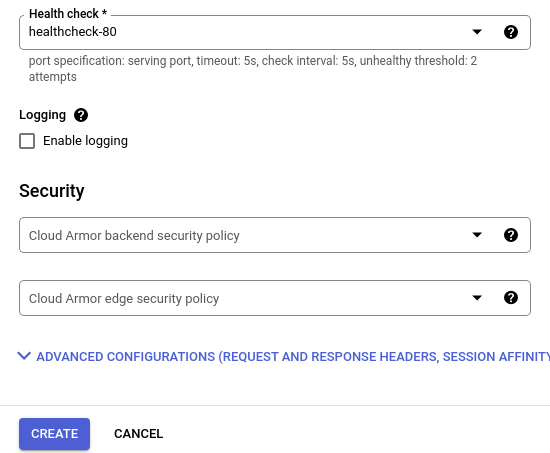
點選 OK
這樣 Backend 的部份就設定完成

點選 Frontend configuration
輸入名稱
Protocol: 選取 HTTPS(includes HTTP/2)
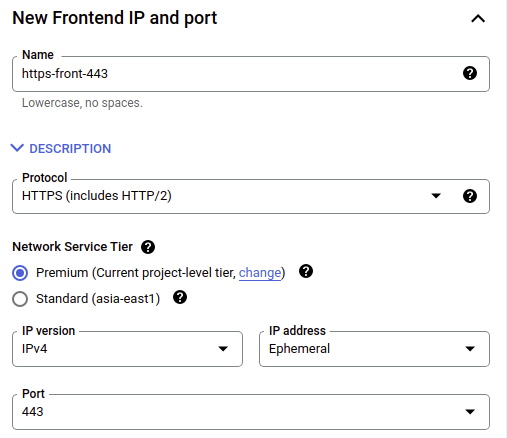
接下來處理憑證的部份
點選 Certificate 的下拉式選單
點選 CREATE A NEW CERTIFICATE

輸入名稱
這邊我是用自己的憑證
Certificate 的部份要貼上 公鑰與中繼憑證合併
Private Key 就貼上私鑰
憑證的部份可以參考我之前的文章 https://sakananote2.blogspot.com/2022/04/certbot-ssl-with-opensuse-leap-153-in.html
Certificate 就貼上 fullchain.pem 的內容
點選 CREATE

點選 Review and finalize
確認資訊無誤
點選 CREATE

確認 Load Balancer 狀態

Firewall 要允許的部份, 已經在上面說過了, 記得要開
最後一個步驟
建立一筆 FQDN 指向剛剛建立的 HTTP(S) Load balancer
例如 zabbix.YOUR.DOMAIN -- > 指向 LP IP
開啟 https://zabbix.YOUR.DOMAIN
確認可以正常使用 https 登入 Zabbix
~ 收工
~ Enjoy it
Reference
https://sakananote2.blogspot.com/2022/02/zabbix-server-60-with-container-in-azure.html
Microfusion 夥伴的幫忙 / 強者同事的筆記
https://sakananote2.blogspot.com/2022/04/certbot-ssl-with-opensuse-leap-153-in.html
Distrobox is Awesome
What is Distrobox?
Distrobox is a project that I learned about a few months ago from Fedora magazine.
Distrobox is a piece of software that will allow you to run containerized terminal and graphical-based applications from many Linux distributions on many other Linux distributions.
For example:
- You can run applications from Arch’s AUR on openSUSE.
- You can run applications from .deb files that are only available for Ubuntu on Fedora.
- You can run applications from an old version of Debian on a current Manjaro system without fighting with dependency hell.
- You can even run entire desktop environments on operating systems that never supported them.
Because the applications are running in containers, they do not interact with the base system’s package management system.
How have I been using Distrobox?
When I started using Distrobox, I started wondering what are the limits of what I could do with this system? I was able to install my favorite Usenet newsreader, Knode from Debian 8, and openSUSE on whatever system I wanted. It opened whole new doors for experimenting with software that may be long forgotten.
Could I run a simple windows manager like i3, Sway, or IceWM in Distrobox? It took some trial and error, but yes I could.
Now, with that said, we are working with containers. When you run an application in Distrobox, it mainly sees your actual home directory. Outside of your home directory, it sees the container’s filesystem. If you save something to your home directory, it gets saved to your real home directory and you can open it up like you could normally. If you save something to /usr/local/ or any other directory outside of your home directory, it will only be saved in the container and not to your actual base filesystem.
Let’s take that one step further. Let’s say I MATE as my base openSUSE desktop environment and I have 3 containers with other desktop environments. I have an Arch Distrobox container with i3, I have a Fedora Distrobox container with XFCE, and I have a Debian Distrobox container with IceWM. I can run applications from any of these containers on the base openSUSE MATE installation. However, I can’t run applications from Fedora on Debian or from Debian on Arch, etc. That’s the limitation with running these containers.
How do I run Windows Managers and Desktop Environments?
As I said earlier, this took a fair amount of trial and error to get this right, and I’m sure there are lots of things that could make this easier.
For instruction on actually installing Distrobox, check out the installation instruction page. This will vary depending on your Linux distro.
Let’s begin by installing the IceWM window manager in a Distrobox container. We’ll start with an Ubuntu container:
Create and enter the container:
distrobox-create ubuntu --image docker.io/library/ubuntudistrobox-enter ubuntu
Now that we’re in our new Ubuntu container, let’s install IceWM. This where things start getting difficult. Even if you’re a pro at installing packages in Ubuntu or Debian, it can be really difficult to understand what exactly you need to install. My suggestion is to start with the wiki for your distro of choice for the window manager to desktop environment that you’re trying to install.
According to the Ubuntu Wiki for IceWM, we need to install package for the base installation:
sudo apt-get install icewm
This will take some time to complete depending on your hardware.
Next, we need to see how to start IceWM. Part of the IceWM installation is the creation of /usr/share/xsessions/icewm-session.desktop. This is what tells your display manager how to start IceWM. Inside of this file is a line that says:
Exec=/usr/bin/icewm-session
This is the command that we will need to start IceWM. Let’s copy that file to our home directory and then use it again in a minute:
cp /usr/share/xsessions/icewm-session.desktop ~/
We can exit out of the container for now and work in the base OS:
exit
The way we run applications from inside of the container in our base OS is with the distrobox-enter command:
/usr/bin/distrobox-enter -T -n [container] -- "[app]"
This command would run the [app] application from the [container]. However, you can’t use this command in a desktop file like the icewm-session.desktop files that we saved earlier, so we need to make one more step to create a bash script to do this for is:
#!/bin/bash
xhost +SI:localuser:$USER
/usr/bin/distrobox-enter -T -n ubuntu -- "icewm-session"
xhost +SI:localuser:$USER will allow graphical applications to be run from containers only for the current user. Without this, the icewm-session application could not start.
Save that in /usr/local/bin or some other location in your path and make it executable with chmod.
sudo chmod +x /usr/local/bin/icewm
In the icewm-session.desktop file that we saved earlier, we can change Exec=/usr/bin/icewm-session to Exec=/usr/local/bin/icewm and then save it to the /usr/share/xsessions on our base OS:
sudo cp ~/icewm-session.desktop /usr/share/xsessions/icewm-session.desktop
Now when log out, you should see IceWM as an option in your display manager. When you log in with it, you will be in the Ubuntu container. Even if you are not running Ubuntu as your base OS, you will be like you did.

Summary
Distrobox is an amazing tool and I plan on using it as much as I can.
IceWM is probably not many people’s desktop of choice, but it is small, light on resources, and easy to get going. Take this as a sample of how you can use Distrobox to be so much more than just running applications. You can try our whole new Linux distros without fussing with VMs or changing your current distro.
#openSUSE Tumbleweed revisión de la semana 19 de 2022
Tumbleweed es una distribución «Rolling Release» de actualización contínua. Aquí puedes estar al tanto de las últimas novedades.

openSUSE Tumbleweed es la versión «rolling release» o de actualización continua de la distribución de GNU/Linux openSUSE.
Hagamos un repaso a las novedades que han llegado hasta los repositorios esta semana.
El anuncio original lo puedes leer en el blog de Dominique Leuenberger, publicado bajo licencia CC-by-sa, en este este enlace:
Esta semana de nuevo se han publicado 5 nuevas snapshots.
Entre las actualizaciones más importantes que han llegado a los repositorios, podemos destacar:
- Mesa 22.0.3
- Mozilla Firefox 100.0
- KDE Plasma 5.24.5
- Meson 0.62
- gpg 2.3.6: Verificación hasta cinco veces más rápida de firmas sueltas
- Linux kernel 5.17.5
- gnome-shell & mutter 42.1
- Poppler 22.05.0
- Virtualbox 6.1.34
- GCC 12.1 – con la snapshot 0510, gcc12 se ha convertido en el compilador predeterminado de la distro. Así que se espera una gran actualización de todos los paquetes que tengas instalados en tu equipo.
- systemd 250.5
Esto es bastante impresionante, pero no acaba aquí. Todavía hay paquetes que se están actualizando y que llegaran próximamente. Entre los paquetes que podemos destacar:
- KDE Gear 22.04.1
- Linux kernel 5.17.7
- GStreamer 1.20.2
- Perl 5.34.1
- Python 3.10 como intérprete predeterminado de Python
Si quieres estar a la última con software actualizado y probado utiliza openSUSE Tumbleweed la opción rolling release de la distribución de GNU/Linux openSUSE.
Mantente actualizado y ya sabes: Have a lot of fun!!
Enlaces de interés

——————————–
Actualización de mayo del 2022 de KDE Frameworks
Seguimos con el segundo trimestre del año y siguen las entradas recurrentes de las actualizaciones mensuales de rigor que demuestra que los desarrolladores de KDE no dejan de trabajar en sus librerías. Así que se congratulan en anunciar la actualización de mayo del 2022 de KDE Frameworks. Con esta se llega a la versión 5.94, un suma y sigue de compromiso y constancia que no parece que tenga un final cercano, y que ofrece una novedad, como mínimo, controvertida.
Actualización de mayo del 2022 de KDE Frameworks
Actualización de mayo del 2022 de KDE Frameworks
A pesar de que para los usuarios corrientes esta noticia sea algo confusa ya que no se trata de realzar una nueva aplicación ni de una nueva gran funcionalidad del escritorio, el desarrollo de KDE Frameworks tiene repercusiones directas en él a medio y largo plazo.
La razón de esta afirmación es que KDE Frameworks es básicamente la base de trabajo de los desarrolladores para realizar sus aplicaciones, es como el papel y las herramientas de dibujo para un artista: cuanto mejor sea el papel y mejores pinceles tenga, la creación de una artista será mejor.

De esta forma, las mejoras en KDE Frameworks facilitan el desarrollo del Software de la Comunidad KDE, haciendo que su funcionamiento, su estabilidad y su integración sea la mejor posible.
El sábado 14 de mayo de 2022 ha sido lanzado KDE Frameworks 5.94, la nueva revisión del entorno de programación sobre el que se asienta Plasma 5, el escritorio GNU/Linux de la Comunidad KDE, y las aplicaciones que se crean con para él.
Más información: KDE
La constancia del equipo de desarrollo de la Comunidad KDE
Hay que recordar que los desarrolladores de KDE decidieron lanzar actualizaciones mensuales de este proyecto y lo están cumpliendo con puntualmente. La idea es ofrecer pocas pero consolidadas novedades, a la vez que se mantiene el proyecto evolucionando y siempre adaptándose al vertiginoso mundo del Software Libre.
Una gran noticia para la Comunidad KDE que demuestra la evolución continua del proyecto que continua ganando prestigio en el mundo de los entornos de trabajo Libres.
¿Qué es KDE Frameworks?
Para los que no lo sepan, KDE Frameworks añade más de 70 librerías a Qt que proporcionan una gran variedad de funcionalidades necesarias y comunes, precisadas por los desarrolladores, testeadas por aplicaciones específicas y publicadas bajo licencias flexibles. Como he comentado, este entorno de programación es la base para el desarrollo tanto de las nuevas aplicaciones KDE y del escritorio Plasma 5.

Aquí podéis encontrar un listado con todos estos frameworks y la serie de artículos que dedico a KDE Frameworks en el blog,
Recuerda que puedes ver una introducción a Frameworks 5.0 en su anuncio de lanzamiento.
La entrada Actualización de mayo del 2022 de KDE Frameworks se publicó primero en KDE Blog.
openSUSE Tumbleweed – Review of the week 2022/19
Dear Tumbleweed users and hackers,
This week you ‘only’ had to update your machine 5 times – for the snapshots 0505, which was for some reason not announced, 0506, 0507, 0509, and 0510 (the last one fresh off the press). 0508 would have been ok, but QA was slightly slower than OBS and so the new snapshot moved to QA before the old one was completely tested. Oops. Anyway, nothing was lost, all good things from that snapshot are still shipped, just a day later.
So, what did those 5 snapshots bring you? The most interesting changes include:
- Mesa 22.0.3
- Mozilla Firefox 100.0
- KDE Plasma 5.24.5
- Meson 0.62
- gpg 2.3.6: Up to five times faster verification of detached signatures
- Linux kernel 5.17.5
- gnome-shell & mutter 42.1 (late arrivals to the GNOME 42.1 update)
- Poppler 22.05.0
- Virtualbox 6.1.34
- GCC 12.1 – with snapshot 0510, gcc12 has become the distro default compiler. All packages have been attempted to be rebuilt. This also means that the recently enabled FullRelRo support (-z now) is enabled across the board. There are currently about 370 build failures reported in openSUSE:Factory (non-ring packages)
- systemd 250.5
This makes for quite an impressive list in just one week. Granted, a few of those things had been in staging areas for a while (days to weeks).
And as you’re already used to, this is no reason to stop. Au contraire: the stagings are already filled again with the following presents:
- KDE Gear 22.04.1
- Attempting to build the distro using FORTIFY_SOURCE=3 instead of FORTIFY_SOURCE=2
- Linux kernel 5.17.7
- GStreamer 1.20.2
- Perl 5.34.1
- Python 3.10 as the default interpreter
Ujilliurex 2022, vuelve la edición presencial
Hoy Quiero invitaros a la próxima edición de Ujilliurex 2022, un evento que vuelve a ser presencial como lo fue durante unos años. Ujilliurex es un evento que se celebra en la Universidad Jaume I de Castellón y que tiene como objetivo prncipal la difusión del Software Libre,.
Ujilliurex 2022, vuelve la edición presencial
La conversión de eventos presenciales a virtuales fue una constante este últimos años. Ujilliurex no fue la excepción en su edición de 2020 y del 2021, pero gracias a la aparción de las vacunas y al control que tenemos en este momento del COVID 19 ha pasado a ser presencial en esta edición del 2022.
Este año viene con interesantes ponencias centradas los dás 18 y 19 de mayo y para participar en él es recomendable la inscripción, que podéis realizar en este enlace.
¿Qué es Ujilliurex?
Se trata de un evento que tiene bastante solera en la provincia de Castellón en el que teniendo como protagonista la distribución de la Generalitat Valenciana Lliurex se presentan novedades sobre ésta y sobre otros proyectos libres.
Concretamente sus objetivos fundamentales son:
- Difundir el uso y manejo de las TIC en la distribución LliureX entre la comunidad educativa universitaria
- Promover la coordinación, el intercambio y la discusión de conocimientos y experiencias entre profesores universitarios, especialmente de los departamentos con una mayor implicación tanto en la parte educativa de los futuros docentes (Depto. Educación), como posibles usuarios de Lliurex como herramienta en su especialidad (Depto. de Traducción e Interpretación y Depto. de Estudios Ingleses), con docentes de centros educativos de la comunidad valenciana, especialmente de los departamentos de idiomas y Coordinadores de Tecnologías de la Información (Coordinadores TIC).
- Compartir conocimiento y debatir sobre el contenido de la distribución y la utilización de diversas aplicaciones de la distribución
- Iniciar una serie de contactos entre las entidades organizadoras de la jornada y los asistentes de los diferentes centros y departamentos.
La entrada Ujilliurex 2022, vuelve la edición presencial se publicó primero en KDE Blog.

GCC 12 Becoming Default Compiler in Tumbleweed
More than a month after preparing the default compiler for openSUSE Tumbleweed to be switched to GNU Compiler Collection 12, the latest snapshot passed openQA and is making GCC12 the default compiler for the rolling release.
A complete rebuild of snapshot 20220510 is syncing with the mirrors and should soon be a zypper dup away from users changing their rolling release’s default compiler. Being a complete rebuild, it might take some time to sync with the mirrors, but developers can soon have the newest GCC for their development.
“OpenQA did not notice anything weird in this snapshot, the reported errors are generally unchanged to 0509, which is a good sign,” wrote release manager Dominique Leuenberger on the factory mailing list. “Hope you will enjoy the snapshot - now built with GCC12”!
The snapshot the day prior, 20220509, updated git 2.36.1. The minor git update provided a few fixes to include a fix for the git submodule update. Text editor vim took care of a Common Vulnerability and Exposure in its 8.2.4877 version update; the fix of CVE-2022-1381 closes a vulnerability that could cause the crashing software, the modifying of memory and was capable of a possible remote execution. Virtual machine users had five CVE fixes with the virtualbox 6.1.34 update. VM host and guest fixes affected by the 5.14 Linux Kernel were also fixed with the update. However, Tumbleweed users received the update of the 5.17.5 Linux Kernel in the snapshot. The 22.05.0 update of the PDF rendering library poppler had code improvements and added the TSV mode, which is a mode to edit a table like a file. Encrypting and signing data and communications is up to five times faster with verification of detached signatures thanks to the gpg2 2.3.6 update and GnuPG doubled the detached signing speed and the AES256.OCB encryption speed. Other updates in the snapshot included gnome-shell 42.1, libstorage-ng 4.5.10, yast2 4.5.3, autoyast2 4.5.1, and z3 4.8.17.
The 100th version of Mozilla Firefox arrived in snapshot 20220506. The new version brings in Picture-in-Picture that supports video captions on websites that use WebVTT (Web Video Text Track) format. Firefox spell checking now checks spelling in multiple languages. An update of clamav 0.103.6 fixed a CVE for a possible infinite loop vulnerability in the TIFF file parser and another CVE of a possible memory leak in the HTML file parser. KDE users had an update of plasma 5.24.5 in the snapshot. The updated Plasma improved the stability of different source integration with the Discover Flatpak backend. The update also fixed the unlocking of Wayland sessions with KWin. An update of the 3D graphics driver Mesa fixed most of the major drivers in the 22.0.3 release and added the AArch64 architecture. An update of openconnect 8.20 added support for the Array Networks SSL VPN. The openexr package, which is a professional-grade image storage format for the motion picture industry, updated to version 3.1.5; it updated the Continuous Integration workflow matrix and fixed a build failure for one of the Linux distros. Other packages to update in the snapshot were font rendering library freetype2 2.12.1, LibreOffice 7.3.3.2, re2c 3.0 and caching DNS resolver unbound 1.15.0.