
 Member
 baltolkien
Primera actualización de KDE Gear 22.04
La Comunidad KDE es una comunidad responsable y no solo se preocupa en lazar novedades sino que también en mejorarlas. Me complace presentar la primera actualización de KDE Gear 22.04 que apareció hace casi un mes. Más estabilidad para nuestros entornos de trabajo.
Primera actualización de KDE Gear 22.04
A pesar de lo que puedan pensar muchas personas, las aplicaciones no son perfectas. Entre las líneas de código se pueden colar errores de tipografía o que el usuario realice alguna opción que en un principio no estaba prevista por los desarrollador, por poner solo un par de ejemplos de imperfecciones.
Este no es un problema del Software Libre ya que el Software actual funciona de esta manera ya que no se piensa en él como un producto final que se encierra en una caja y se olvida. En la actualidad se sabe que el Software está vivo y sería estúpido ir guardando las mejoras sin dejarlas a disposición del gran público.
Con esto se gana en rapidez y evolución pero puede aumentar el número de errores (por norma general) leves, los cuales son subsanables con pequeñas actualizaciones.
La Comunidad KDE lo tiene claro: grandes lanzamientos cada cuatro meses y actualizaciones mensuales para subsanar errores.

Por ello me congratula compartir con vosotros la primera actualización de KDE Gear 22.04 que nos ofrece más de 120 errores resueltos entre aplicaciones, librerías y widgets, algo que mejora el rendimiento del sistema.
Por poner un par de ejemplos que podemos ver en la lista de cambios de KDE Gear 22.04:
- Dolphin: el panel de la terminal se mantendrá sincronizado con los cambios rápidos de carpeta ahora.
- Kate: arreglado el bloqueo al restaurar la sesión.
- Kalendar: arreglado el botón de «próxima semana» en la vista de la semana.
Más información:KDE Gear 22.04
La entrada Primera actualización de KDE Gear 22.04 se publicó primero en KDE Blog.
Maintaina Horde: Tumbleweed and PHP 8.1
PHP 8.1 is available off the shelf in openSUSE Tumbleweed. I will shortly prepare a PHP 8.1 / tumbleweed version of the maintaina Horde containers. These will initially be broken due to some outdated language constructs. As PHP 7.4 will EOL by the end of this year, I decided not to bother with PHP 8.0 and ensure compatibility with PHP 8.1 right away, while staying compatible with PHP 7.4 until end of year. This is not fun. PHP 8.x provides several features which allow for more concise code. I will not be able to use them.
This also means that for the time being I will produce code which you may find more verbose than necessary. While Constructor promotion is mostly about being less verbose, Readonly Properties and Enums kill some of the pro-method arguments in the eternal discussion if getter methods or public properties are more appropriate interfaces. Union Types and Intersection Types allow a flexibility of method interfaces which PHP 7.4 can only emulate. You can get far by type hints for static analysis combined with boilerplate guard code inside a method and dropping type hints all along or using insufficient surrogate interfaces. But it is really not shiny. Maintaining software which shows its age has its tradeoffs.
Improving Calc support for 16384 columns
So I enabled support for up to 16384 columns in Calc by default some time ago, but just getting it to work was not necessarily the end of the work. Making Calc have 16 times more columns means that any operation that works on entire columns is suddenly 16 times slower, or even worse. Similarly this could easily lead to 16x more memory used. So the support not only needs to work, but it also needs to be usable.
It theory adding a number of empty columns to the end of a spreadsheet should not make a difference, but in practice it does. With 1024 columns it is not as necessary to ignore those empty columns as it is with 16k, and a lot of the code dates back to the times when Calc supported even fewer colums (256?), where a being little inefficient here or there didn't show. But now it suddently did.
For example, if you protect or hide all unused columns until the end of the spreadsheet, then hitting the right arrow key on the last accessible cell makes Calc check all cells to the right for whether it's possible to go into them. And checking whether a column is hidden requires searching the list of column information, which is not trivial (it's compacted in order not to waste memory). The barely noticeable cost of this with 1024 columns got large enough to cause noticeable delays. Fortunately the ColHidden() function is smart enough to return the first and last column in the compacted range where the flag is equal, the code doing the cursor navigation just up until now didn't bother using that information, but now it needed to do so.
Another example, and that's quite a large topic, is allocating columns. If most of those new columns are not actually used, then it makes sense to allocate them only when needed, right? That will save memory, and it will make things faster too, because there is no need to check those empty columns. That idea got implemented back when this 16k work was started by others, adding e.g. function GetColumnsRange() that clamped the range to the allocated columns, but the problem is that in practice this is not as simple as that.

Except then, GetColumnsRange() clamping to allocated columns becomes incorrect, because now it's possible to have set data even beyond allocated columns, such as this bold flag. So I changed GetColumnsRange() to simply return the given range, without any adjustments, and then added the better-named GetAllocatedColumnsRange() for cases where the code knows it wants only the allocated range.
Somewhat similarly to the bold case, merely showing or going to an unallocated column should not allocate it. Otherwise hit e.g. Ctrl+Right one time too many and the cursor going to column XFD would make all columns get allocated. But that causes yet another complication - I am now at an unallocated column and all operations should either detect the column is not allocated and return, or allocate the column if needed. The initial 16k work added CreateColumnIfNotExists() exactly to protect such accesses and allocate the column if needed. It's just that this needed adding to quite many places, and some were still missing it, and others were calling it unnecessarily causing unnecessary column allocations. So I needed to work on these over time. I eventually went as far as change Calc to initially allocate just one column. Since before that Calc used to allocate 64 columns by default, a number of places missing such checks kept working because normally people didn't work with more than 64 columns (and so this 64 default was a reasonable choice at the time, as there was really a lot to check and fix). Now that I have changed this to just one column and fixed all tests, it looks like I've rooted them all out (at least I'm still getting only very few bugreports about something breaking :) ).
Drawing, somewhat unexpectedly, turned out to be a possible performance problem too. There are few ways in which cells to the left can affect drawing of cells to the right. If you enter a too-long text into a cell, it will overflow to the right, into the space of the next cell, or possibly even several cells. So when Calc is drawing let's say a couple of cells around the 10000th column, it actually needs to check also all the 10000 columns before. Somebody back in the day thought about optimizing it, and so before Calc draws cells, function FillInfo() first collects information about all the cells to draw and also all the cells to the left. What possibly(?) was an optimization with 256 or 1024 column is a problem with 16384 columns. Even allocating and clearing all the memory actually had a noticeable performance impact. Sadly, as sometimes happens to be the case with optimizations from the OpenOffice.org times, whoever wrote this made it slow. Function FillInfo() collects all data necessary for drawing a cell into struct CellInfo, and all that info is collected also for all the cells to the left, even though most of it is not used for them. So I had to find out what was necessary and split that out (and provide proper abstraction, because real programmers back in the day used direct data access, right).

Some of the problems can be even a bit funny. Have you created e.g. a named range called DAY1, NUM1, LOG10 or even DOG10? Well, now you can't, since now those are valid cell addresses, going up to XFD1. So Calc now needed special backwards compatibility code for this.
I expect the real test of this comes when it becomes part of the LibreOffice 7.4 release or Collabora Online. But so far it seems to work rather well.
This work is funded/sponsored by DEVxDAO as part of its mission to support open source and transparent research and development of emerging technologies and frameworks.

Notícia do Ano: Módulo da NVIDIA opensource!

A NVIDIA acaba de publicar o módulo do kernel da GPU para o Linux com código aberto sobre a licença GPL/MIT. Após a versão R515, o código fonte está disponível no github https://github.com/NVIDIA/open-gpu-kernel-modules.
Para mim o ano já acabou de notícias boas, pois esta versão é um passo significativo para o mundo de visão computacional no sistema operacional GNU/Linux, assim trazendo uma maior integração com o sistema operacional e com os desenvolvedores da comunidade para contribuírem de volta.
Para provedores de distribuição Linux, os módulos de código aberto aumentam a facilidade de uso, como também melhorar a experiência de distribuição do driver da GPU NVIDIA. A Canonical e a SUSE são capazes de empacotar imediatamente os módulos de kernel abertos com o Ubuntu e SUSE Linux Enterprise Distributions.
Os desenvolvedores terão total transparência do código, isto ajudará a melhorar ainda mais a qualidade e a segurança do driver da GPU NVIDIA. A cada lançamento do driver, a NVIDIA compartilhara o código-fonte no GitHub . Os patches enviados pela comunidade são revisados e, se aprovados, integrados em uma versão futura do driver.
Funcionalidade compatível
A primeira versão dos módulos de kernel da GPU opensource é R515. Será disponibilizado o código-fonte com suas versões completas e empacotadas dos drivers.
Nesta versão de opensource, o suporte para GPUs GeForce e Workstation encontra-se na versão alfa. O modulo do kernel opensource funciona com o mesmo firmware mas devendo obedecer o número da versão.
Opção de instalação
A versão R515 contém versões pré-compiladas do driver de código fechado e dos módulos de kernel de código aberto. O usuário pode fazer a escolha no momento da instalação de qual módulo instalar.A NVIDIA tem trabalhado com Canonical, Red Hat e SUSE na melhor prática de empacotamento, implantação e suporte.

SUSE
Markus Noga, Gerente Geral, Business Critical Linux na SUSE
“Nós da SUSE estamos animados que a NVIDIA está lançando seu driver de modo kernel de GPU como código aberto. Este é um verdadeiro marco para a comunidade de código aberto e computação acelerada. A SUSE se orgulha de ser a primeira grande distribuição Linux a oferecer esse avanço com o SUSE Linux Enterprise 15 SP4 em junho. Juntos, a NVIDIA e a SUSE potencializam suas necessidades de computação acelerada por GPU em nuvem, data center e borda com uma cadeia de fornecimento de software segura e excelência em suporte.”
Mais informações no site original: https://developer.nvidia.com/blog/nvidia-releases-open-source-gpu-kernel-modules/

La necesidad de compartir recursos computacionales en Bioinformática, próxima charla de GNU/Linux València
Es un hecho incuestionable que compartir ideas y datos fue uno de los motores que hizo que la ciencia despegara de la forma que lo hizo hace un par de siglos. Y si queremos seguir mejorando en este aspecto en campos como la medicina este espíritu debe ir más allá para encontrar curas a enfermedades tan duras como el cáncer. Es por ello que la charla «La necesidad de compartir recursos computacionales en Bioinformática» que ha organizado GNU/Linux València es de vital difusión.
La necesidad de compartir recursos computacionales en Bioinformática, próxima charla de GNU/Linux València
Me complace presentaros un nuevo evento de la Asociación sin Ánimo de Lucro GNU/Linux València. que según podemos leer en el anuncio oficial de la Asociación nos hablará de:
La Bioinformática nos ayuda a resolver problemas clínicos o biológicos con abordajes computacionales.
En estos trabajos se emplean grandes volúmenes de información que requieren el uso de repositorios públicos y herramientas de acceso libre, para el análisis de los datos ómicos y la interpretación de sus resultados. Durante esta sesión, hablaremos de los principales recursos utilizados en esta área de trabajo e investigación.
Y para ello se contará con Francisco García-García, jefe de la Unidad de Bioinformática y Bioestadística del Centro de Investigación Príncipe Felipe (CIPF) y que nos dará una pincelada sobre este importantísimo aspecto de la medicina.
Es este caso será el 25 de mayo a las 17:30 GTM+1 (huso horario de la España peninsular) y podrá seguirse en en línea utilizando los servicios de Big Blue Button (BBB para los amigos) en este enlace.
Por cierto, para los que no lo sepan con exactitud (como era mi caso) según el National Human Genome Research Institute (NHGRI), la Bioinformática es una subdisciplina de la biología y las ciencias computacionales que se encarga de adquirir, almacenar, analizar y diseminar la información biológica, en gran parte correspondiente a las secuencias de ADN y aminoácidos. La Bioinformática usa programas informáticos que tienen muchas aplicaciones, como por ejemplo: determinar las funciones de genes y proteínas, establecer relaciones evolutivas y predecir la conformación tridimensional de las proteínas.
Más información: GNU/Linux València
La entrada La necesidad de compartir recursos computacionales en Bioinformática, próxima charla de GNU/Linux València se publicó primero en KDE Blog.
openSUSE.Asia Summit 2022のボランティアスタッフ募集
openSUSE.Asia Summit は、コントリビューターやファンがアジア全域から参加者が集まる、アジア地域の年次openSUSEカンファレンスです。このイベントでは、openSUSEディストリビューションとそのコミュニティ、個人や企業で使用するアプリケーション、そしてオープンソースの文化について、主に焦点を当てています。
2014年から、openSUSE.Asia Summitはオフラインで開催され、コミュニティの人たちが実際に会う非常に良い機会でした。しかしながら、COVID-19の影響により、2020年のサミットはキャンセルせざるを得ませんでした。そして2021年、サミットはインドチームによりオンラインで開催されました。
openSUSE.Asia Summit 2022はどうなる?
openSUSE.Asia Summit 2022はハイブリッドイベントとなります。
中心となるオンラインサミットと共に、各国/地域でのオフラインイベントをそれぞれ開催します。
アジア全体パート(オンライン + サテライトのオフライン)
- 各アジア地域から参加しやすいよう、4:00 – 6:00 UTC(13:00 – 15:00 JST)を目安に開催します。
- 基調講演、招待講演などを予定しています。
ローカルパート(オンライン/オフライン – 開催場所に依る)
- 各国、各地は、COVID-19の影響や制限を熟慮した上で、オフラインイベントを開催することができます。
- 開催内容はそれぞれの開催場所によって異なります。それぞれの開催場所で、トークセッション、ワークショップ、ミートアップなどが企画されます。
ボランティアにお願いしたいこと
このイベントを実現する為、ボランティアを募集しています。今年はボランティアはどの地域からでも参加できます。
ボランティアにお願いしたいことは以下の通りです。
- アジア地域パートの準備の為のレギュラーオンラインミーティングに参加してください(今は金曜日の 13:00 UTC <22:00 JST>にSlackで行っています。)
- ローカルパートのイベントを企画し、アジア地域パートとスケジュール調整を行ってください
- オンラインカンファレンスを手伝い、ボランティア同士のミーティングのスケジュールを調整してください
- オフラインイベントを開催してください(openSUSE.Asia Summitの実行委員に相談し、必要なサポートを受けることができます)
ボランティアに興味がありましたら、5月30日までに簡単な自己紹介と共にメールを opensuseasia-summit@googlegroups.com までお送りください。

※訳者コメント※
今年のopenSUSE.Asia Summitは、メインのオンラインイベントと、各地域のローカルイベントのハイブリッド開催となりました。ボランティアスタッフには、オンラインイベント、ローカルイベントの両方(もしくは片方)のお手伝いをして頂ければと思っています。興味を持たれましたら、上記の実行委員連絡先や、ユーザ会の方へご連絡ください。疑問・質問なども遠慮なくお問い合わせください。

Post-Mortem: Conflict with ruby standard gems on May 10, 2022
Controla el tiempo de trabajo en el PC con Workrave – plasmoides de KDE (196)
Parece ser que existen más de un sistema para reducir el peligro de sufrir estrés por culpa del uso del ordenador. Hace un tiempo hable de la técnica Pomodoro, con su consiguiente plasmoide adaptado a Plasma: Tomatoid. En realidad ya presenté antes Fokus, que hacía lo mismo pero con un aspecto visual diferente. Hoy os presento el plasmoide número 196 que también controla el tiempo de trabajo en el PC y que tiene por nombre Workrave y que nos ayudará a prevenir enfermedades nerviosas provocadas por movimientos repetitivos o por mantener demasiado tiempo posiciones estáticas, muy comunes entre los programadores.
Controla el tiempo de trabajo en el PC con Workrave – plasmoides de KDE (196)
Según podemos leer en la Wikipedia, las lesiones por esfuerzo repetitivo o trastorno musculoesquéletico (RSI) son términos utilizados para referirse a una serie de condiciones discretas que pueden estar asociados con las tareas repetitivas, esfuerzos intensos, vibraciones, compresión mecánica, o posiciones sostenidas durante un determinado tiempo.
Para evitarlas se ha creado un software llamado Workrave que ayuda a la recuperación y prevención de las RSI, ya que supervisa el uso del teclado y del ratón y, a partir de esta información, le avisa con frecuencia para que haga microdescansos, descansos y restrinja el uso diario del ordenador.
La aplicación la podemos instalar en nuestro equipo con lo que tendremos ya listo para utilizarlo (mirad la página oficial para saber como hacerlo), pero para los usuarios de Plasma también podemos tenerlo en forma de plasmoide para que se integre mejor en nuestro entorno de trabajo. Este widget es una creación de wojnilowicz que además nos permite configurar parámetros como la activación o desactivación de pausas o aspectos visuales.
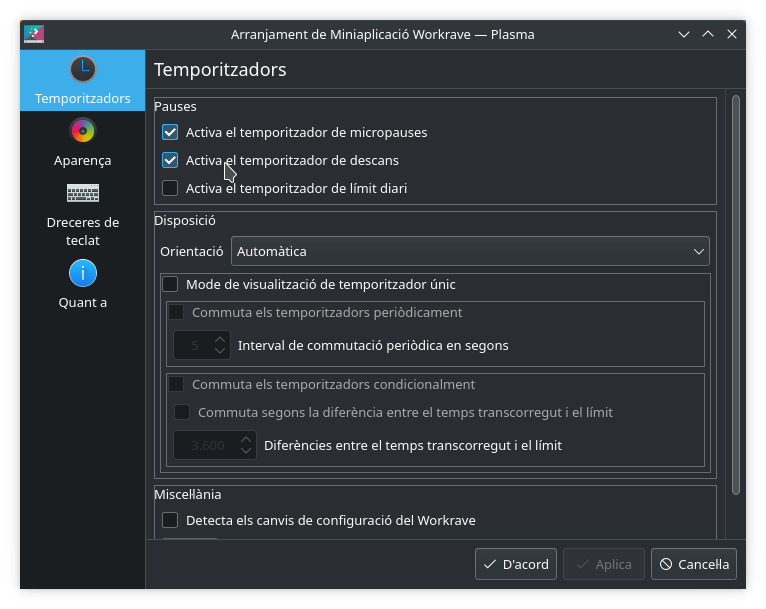
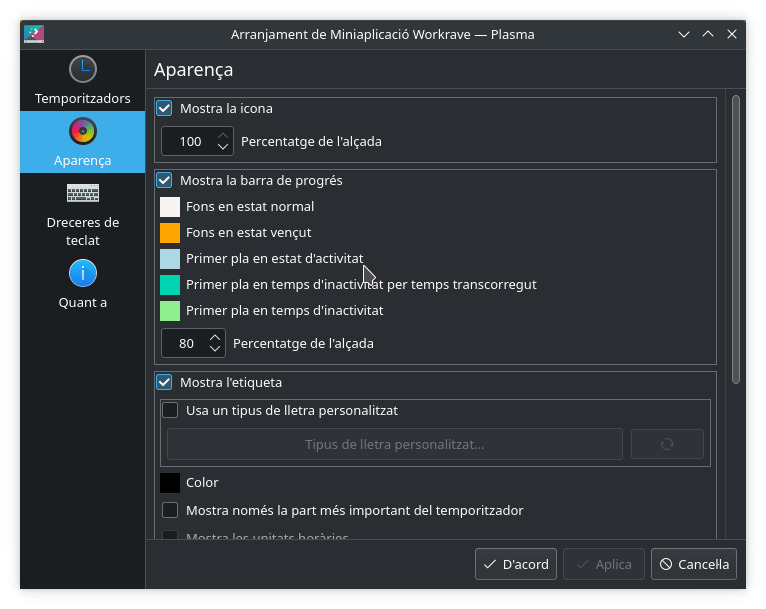
Y como siempre digo, si os gusta el plasmoide podéis “pagarlo” de muchas formas en la nueva página de KDE Store, que estoy seguro que el desarrollador lo agradecerá: puntúale positivamente, hazle un comentario en la página o realiza una donación. Ayudar al desarrollo del Software Libre también se hace simplemente dando las gracias, ayuda mucho más de lo que os podéis imaginar, recordad la campaña I love Free Software Day de la Free Software Foundation donde se nos recordaba esta forma tan sencilla de colaborar con el gran proyecto del Software Libre y que en el blog dedicamos un artículo.
Más información: KDE Store
¿Qué son los plasmoides?
Para los no iniciados en el blog, quizás la palabra plasmoide le suene un poco rara pero no es mas que el nombre que reciben los widgets para el escritorio Plasma de KDE.
En otras palabras, los plasmoides no son más que pequeñas aplicaciones que puestas sobre el escritorio o sobre una de las barras de tareas del mismo aumentan las funcionalidades del mismo o simplemente lo decoran.
La entrada Controla el tiempo de trabajo en el PC con Workrave – plasmoides de KDE (196) se publicó primero en KDE Blog.
Mix de novedades de KDE Gear 22.04
La Comunidad KDE anunció hace unos días que había sido lanzado KDE Gear 22.04, es hora de terminar la revisión de sus novedades. Empecé con Dolphin, seguí con Konsole y después hablé de Kate y finalizo con el mix de novedades de KDE Gear 22.04 donde se hablan de pequeñas mejoras en muchas aplicaciones.
Mix de novedades de KDE Gear 22.04

Última entrega de esta serie de la actualización de aplicaciones de la Comunidad de KDE de este mes de abril, y lo hago con el listado de pequeñas mejoras de alguno programas insignias:
Okular ha mejorado su usabilidad y amigabilidad: ahora se muestra una pantalla de bienvenida cuando se abre sin ningún documento y también le avisa inmediatamente cuando va a firmar un documento sin disponer de certificados digitales válidos.
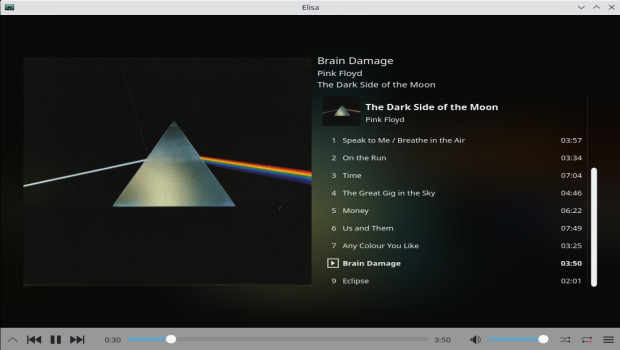
Elisa, el elegante y moderno reproductor de música de KDE, ha mejorado la experiencia en pantallas táctiles, es más rápido, más estable y permite arrastrar y soltar archivos de música y de listas de reproducción desde el gestor de archivos a su panel de lista de reproducción.
Skanpage, la utilidad de escaneo de KDE, puede compartir ahora los documentos escaneados (incluidos los PDF con múltiples páginas) usando el sistema general de KDE para compartir, que le permite enviar documentos a aplicaciones de mensajería instantánea, servicios de nube en línea, redes sociales y a otros dispositivos mediante Bluetooth.
Spectacle añade la funcionalidad para recortar, escalar, deshacer, rehacer y, en general, hacer más cosas con las capturas de pantalla. También se recordará el estado de cualquier cambio que haga en las preferencias de anotación la próxima vez que inicie el programa.
Gwenview, el visor de imágenes de KDE, detecta y le guía durante la instalación de importadores de cámaras que carecen de paquetes de soporte. También dispone de una nueva función de Vista previa de la impresión para cuando necesite una copia en papel.
KDE Itinerary, el asistente de viajes de KDE (también disponible para su teléfono), mejora la compatibilidad con más compañías ferroviarias (como Renfe y Amtrak) y aéreas. También dispone de información meteorológica más detallada y de un escáner de códigos de barra integrado para que pueda escanear la información de sus billetes y pases directamente desde la aplicación.
Más información: KDE
La entrada Mix de novedades de KDE Gear 22.04 se publicó primero en KDE Blog.
Novedades de Kate de KDE Gear 22.04
La Comunidad KDE anunció hace unos días que había sido lanzado KDE Gear 22.04, es hora de empezar a revisar que nos trae de nuevo. Empecé con Dolphin, seguí con Konsole y ahora es el momento de hablar de las novedades de Kate de KDE Gear 22.04.
Novedades de Kate de KDE Gear 22.04

Para quienes no lo conozcan les parecerá que Kate es un simple editor de texto, pero para muchos desarrolladores es mucho, pero que mucho, más. De hecho, en el artículo del anuncio de KDE Gear 22.04 inician su sección de novedades con un «Kate es mucho más que un editor de texto.»
Y es que este «simple» editor incorpora funciones que lo hacen ideal para la edición de documentos en HTML, LaTeX y Markdown, y proporciona utilidades que lo convierten en un excelente entorno de programación y desarrollo.
Y no solo eso sino que también incluye compatibilidad completa con Git, la coloración de sintaxis y el uso de «fragmentos» (plantillas para código de uso frecuente).
Otras característica de Kate son:
- MDI, división de ventana, pestañas de ventana
- Revisión de la ortografía
- Admite fin de línea CR, CRLF, LF
- Admite codificación ( (utf-8, utf-16, ascii, etc.)
- Conversión de codificación
- Función de buscar y sustituir basada en expresiones regulares
- Potente resaltado de sintaxis y de emparejado de paréntesis
- Plegado de código y de texto
- Función hacer y deshacer infinita
- Modo de selección de bloque
- Sangrado automático
- Uso de completación automática
- Integración con la línea de órdenes
- Admite numerosos protocolos mediante el uso de kioslaves (http, ftp, ssh, webdav, etc.)
- Arquitectura de complementos para el componente de aplicación y de editor.
- Accesos rápidos personalizables
- Línea de órdenes integrada
- Uso de scripts de JavaScript
Pues a todo lo anterior se debe sumar las siguientes novedades de Kate de KDE Gear 22.04
- Ahora Kate se inicia más rápidamente.
- Se ha trabajado para facilitar la exploración en los directorios de los proyectos y así encontrar archivos más rápido
- Se ha mejorado para que se más fácil diferenciar archivos con el mismo nombre que están situados en distintos lugares.
- Remodelado el menú.
- Majorado el sangrado del código y en la compatibilidad con Wayland,
Más información: KDE
La entrada Novedades de Kate de KDE Gear 22.04 se publicó primero en KDE Blog.