
 Member
 CzP
CzPAnalyzing Apache HTTPD logs in syslog-ng
Recently, I started my own blog, and as Google Analytics seems to miss a good part of visitors, I wanted to analyze my web server logs myself. I use syslog-ng to read Apache logs, process them, and store them to Elasticsearch. Along the way, I resolve the IP address using a Python parser, analyze the Agent field of the logs, and also use GeoIP to locate the user on the map.
From this blog, you can learn how I built my configuration. Note that once I was ready, I realized that my configuration is not GDPR compliant, so I also show you which parts to remove from the final configuration :-).
Read the rest of my blog at https://www.syslog-ng.com/community/b/blog/posts/analyzing-apache-httpd-logs-in-syslog-ng
Bazsi, founder of the syslog-ng project is looking for your feedback. He writes:
“In the past few weeks I performed a round of discussions/interviews with syslog-ng users. I also spent time looking at other products and analyst reports on the market. Based on all this information I’ve come up with a list of potential strategic directions for syslog-ng to tackle. Focusing on these and prioritizing features that fall into one of these directions ensures that syslog-ng indeed moves ahead.”
- The Edge
- Cloud Native
- Observability
- Application awareness
- User friendliness
You can read the rest if his blog and provide him (and the syslog-ng team) with feedback at https://syslog-ng-future.blog/syslog-ng-on-the-long-term-a-draft-on-strategic-directions/

syslog-ng logo
Curso de Vim: Actualizado vimtutor a la versión 1.7
Vimtutor es un recurso para empezar a aprender lo básico de Vim que viene incluido de manera predeterminada y donde aprenderemos a dar nuestros primeros pasos en el editor Vim

Para empezar a usar el editor Vim hay muchos recursos en los que aprender los primeros pasos y las primera nociones de uso de este gran editor.
Uno puede ser este blog y la serie de artículos que he realizado, la guía que he traducido, etc…
Pero Vim trae incorporado de manera predeterminada un tutor que hace un repaso somero de lo básico, para empezar a adentrarnos en este editor. Se llama vimtutor. Y está disponible en español.
Este artículo es una nueva entrega del curso “improVIMsado” que desde hace meses vengo publicando en mi blog sobre el editor Vim y que puedes seguir en estos enlaces:
- https://victorhckinthefreeworld.com/tag/vim/
- https://victorhck.gitlab.io/comandos_vim/articulos.html
Y para aprender Vim (de la manera más inteligente) aquí tienes esta útil guía:
Abre una terminal en tu distribución de GNU/Linux y escribe:
vimtutor
Esto nos abrirá un documento en el que se irá repasando lo básico del editor Vim. Veremos cómo movernos usando las teclas hjkl, salir de Vim, los comandos básicos y poco a poco nos adentraremos en otros conceptos simples.
Es una forma ideal para sin salir de Vim ir leyendo y practicando. Por que esta guía quiere ser eminentemente práctica. Así mientras vas aprendiendo lo básico podrás practicar.
De hecho, tal como se comenta en el propio vimtutor, la idea no es que simplemente vayas memorizando comandos, si no que los pruebes y los practiques. Así será más sencillo ver lo fácil que es utilizar este potente editor de texto.
Pero este vimtutor en español estaba un poco desfasado. La versión en español hacía más de 2 años que no se actualizaba.
Mientras que la versión en inglés se había corregido y ampliado a la versión 1.7, la versión en español seguía en la versión 1.4 con algunos errores tipográficos y sin incluir las últimas modificaciones.
Así que eché mano de git, y del editor Vim y lo he actualizado a la versión 1.7. en un commit en GitHub:
En donde el propio Bram Moolenar desarrollador de Vim dijo que se iba a aceptar la actualización y pronto estará disponible junto con otras muchas mejoras y correcciones que incorporen las nuevas versiones de Vim.
Un placer colaborar con este pequeño aporte a Vim. No soy desarrollador, así que aporto en lo que puedo, y en este caso como en otros muchos la traducción es una buena forma de hacerlo.

Lanzada la quinta actualización de Plasma 5.24
Tal y como estaba previsto en el calendario de lanzamiento de los desarrolladores, ayer martes 3 de mayo la Comunidad KDE comunicó que había sido lanzada la quinta actualización de Plasma 5.24, que no será la última porque esta es una versión de soporte extendido. Una noticia que aunque es esperada y previsible es la demostración palpable del alto grado de implicación de la Comunidad en la mejora continua de este gran entorno de escritorio de Software Libre.
Lanzada la quinta actualización de Plasma 5.24
No existe Software creado por la humanidad que no contenga errores. Es un hecho incontestable y cuya única solución son las actualizaciones. Es por ello que en el ciclo de desarrollo del software creado por la Comunidad KDE se incluye siempre las fechas de las actualizaciones.

De esta forma, el martes 3 de mayo ha sido lanzada la quinta actualización de Plasma 5.24, la cual solo trae (que no es poco) soluciones a los bugs encontrados en esta semana de vida del escritorio y mejoras en las traducciones. Es por tanto, una actualización 100% recomendable.
Más información: KDE
Las novedades de Plasma 5.24 LTS
Aún tengo pendiente el resumen de las novedades pero he aquí la lista preliminar de ellas.
- Mejoras en las funciones de KRunner con el asistente de ayuda.
- Desbloqueo de la pantalla y autentificación de las aplicaciones con tus huellas dactilares.
- Nuevo y espectacular fondo de pantalla de Ken Vermette para Plasma 5.24 «Honeywave»
- Breeze amplía la función que permite elegir los colores de acento (introducida en Plasma 5.23) y ahora permite elegir cualquier color que desee, en caso de que los colores preseleccionados no sean de vuestro agrado.
- El tema por defecto Plasma Breeze ha recibido un refresco visual para que se ajuste más al estilo de Breeze de las aplicaciones, mejorando la coherencia visual entre ellas.

- Para que las notificaciones críticas de Plasma destaquen, ahora vienen con una franja naranja en el lateral para distinguirlas visualmente de los mensajes menos urgentes.
- Muchos widgets han recibido nuevas funciones y mejoras sutiles que mejoran su aspecto, la relevancia de su información y la facilidad para navegar por ellos.
- Los menús contextuales del Administrador de tareas se han aclarado y simplificado.
- Retorno de la la vista general para gestionar todos los escritorios y aplicaciones

- Se han añadido mejoras al Color Nocturno, a la hoja de pruebas de los altavoces en la página de Audio de los Ajustes del Sistema y a la función de límite de carga de la batería.
- Discover da la opción de reiniciar automáticamente después de que se haya completado una actualización., haciendo click en la casilla de verificación situada en la parte inferior de la página de Actualizaciones.
- Wayland continúa a buen ritmo con un gran número de mejoras, como la compatibilidad con colores de más de 8 bits, auriculares de RV con un rendimiento óptimo y tabletas de dibujo.
Más información: KDE
La entrada Lanzada la quinta actualización de Plasma 5.24 se publicó primero en KDE Blog.
Sudo for blue teams: how to control and log better
Sudo had many features to help blue teams in their daily job even before 1.9 was released. Session recordings, plugins and others made sure that most administrative access could be controlled and problems easily detected. Version 1.9 introduced Python support, new APIs, centralized session recordings, however some blind spots still remained. Learn how some of the latest sudo features can help you to better control and log administrative access to your hosts. You will learn about JSON logging in sudo, chroot support, logging sub-commands, and how to work with these logs in syslog-ng.
You can read the rest of my blog at https://www.sudo.ws/posts/2022/05/sudo-for-blue-teams-how-to-control-and-log-better/

Sudo logo

YaST Development Report - Chapter 3 of 2022
These last few weeks have been very intensive days in the YaST team. Significant changes are coming to the SUSE and openSUSE worlds. Have you heard about SUSE ALP (Adaptable Linux Platform)? We are quite active in some discussions, research and workgroups about that topic. But, of course, we are continuing to work hard on YaST and on our D-Installer side project. So, let’s go with a summary of the most interesting features and fixes.
One-click Migration
Since openSUSE Leap 15.3, binary RPMs are shared between SUSE Linux Enterprise Server 15 and openSUSE Leap. Closing the gap between openSUSE and SUSE makes feasible the migration from openSUSE Leap to SLE without reinstalling the system completely. Migrating the system takes some steps, and sometimes manual intervention is required when the process goes wrong. Now, YaST offers a new client that simplifies the migration from openSUSE Leap to SLE, allowing to rollback the system in case that something fails.
Systemd and YaST Services
YaST provides three systemd services: YaST2-Firstboot.service, YaST2-Second-Stage.service and autoyast-initscripts.service. Some adjustments in the dependencies of those services were needed to make them to work correctly, see for example this and this. Adapting systemd dependencies is not a trivial task. There are always edge scenarios to consider, and we plan to continue working in this area.
Download and Installation Progress
While installing packages, YaST showed a dialog with quite some information about the steps being performed. For example, the dialog provided information about the downloading progress of each package, what package is being installed, etc. But the new version of libyzpp deployed in SLE 15 SP4 is able to perform operations in parallel such as downloading, installing or verifying packages. Keeping that rich progress dialog while performing operations in parallel was very challenging. After evaluating different options, finally it was decided to significantly simplify the progress dialog, making it compatible with parallel operations. Now, the dialog only contains a progress bar with the information about the total amount of packages pending to install and the download progress. The dialog also shows a secondary progress bar in a popup for some theoretically quick tasks taking longer than they should.
Other Interesting Improvements
-
Making AutoYaST more robust when setting the owner of files for the autoinst_files step.
-
Improvements in the way YaST imports users from other systems.
-
Packages yast2-nis-server and yast2-nis-clients were dropped from openSUSE Tumbleweed, although they are still maintained for openSUSE Leap and SUSE SLE.
-
YaST was adapted to call external commands in a more robust way. Research and more details can be found here.
-
AutoYaST does not export the resume kernel parameter anymore, and it only imports such a parameter if the indicated device exists. The AutoYaST documentation was extended to explain this new behavior.
-
Fixed missing help texts in the YaST Expert Partitioner.
-
Generating translations from XML files is correctly done now.
-
YaST does not fail anymore when using the installation media as part of the target system. This implies changes in different parts of YaST, like this, this or this.
-
The cockpit-wicked module was adapted to the latest changes in wicked for managing wireless network configurations.
D-Installer
Little by little we are able to invest more resources into our D-Installer side project. We are closer to finish the first iteration of our roadmap. Here is a summary of the main features developed since the first public release:
- Add reboot button.
- Ask for confirmation before installing.
- D-Bus API to ask questions to clients.
- Unmount target disk after installing.
- Fix language selector.
- Convert D-Installer into a real Cockpit module.
- Add support for yaml file configuration.
- Add support for remote installation.
Our beloved ruby-dbus gem also keeps evolving, supporting all the new features we demand for D-Installer. If you are interested in what is new in this great library, please have a look at its latest pull requests. And of course, we encourage you to give D-Installer a try. You can easily test it thanks to the D-Installer live image. We would like to know your opinion.
Please, remember that D-Installer is an experimental installer and it is still under development. We recommend to use a virtual machine to prevent any possible data loss.
Keep in Touch
As commented, we are very busy lately and our blogging cadence has been affected. We will do our best for blogging as frequently as possible with all the news from the YaST land. Meanwhile, do not hesitate to reach us in the usual channels: yast-devel and factory mailing lists at openSUSE, and at the #yast channel at libera IRC. Or even directly commenting on GitHub, whichever suits you better. See you soon and have a lot of fun!
Probando #openSUSE con 24H24L
Un vídeo en el que hago de «padrino» de Jose Jimenez que está detrás del proyecto 24H24L mientras el prueba openSUSE

José Jimenez creador del proyecto 24H24L está también llevando a cabo otro proyecto llamado: «probando distros». Que consiste en hacer un repaso de una distribución con alguna persona que use esa distribución de GNU/Linux de manera habitual.
En este caso ha querido probar openSUSE y me pidió si quería participar de la charla y que fuera su cicerone haciendo un repaso a esta distribución de GNU/Linux mientras él me iba preguntando dudas.
Después de buscar una fecha y hora que nos cuadrara a ambos, el pasado viernes 29 de abril de 2022 en el canal de Telegram @UnDíaUnaAplicación grabamos el paseo por openSUSE en directo mientras se retransmitía.
Pero si no pudiste asistir, el evento todo se grabó y José lo ha subido a PeerTube y YouTube para verlo en diferido cuantas veces quieras.
José Jimenez me confesó que usaba Fedora desde hace 20 años (eso sí es fidelidad, ¡pero en ese camino estoy yo con openSUSE!) y ha querido probar otras distribuciones de GNU/Linux.
Y para probarlas ha querido hacerlo junto con una persona que utilice esa distribución y que le vaya guiando, respondiendo dudas, dando consejos de uso, etc…
Ha probado Nitrux, ha probado Mabox y en esta ocasión le tocó el turno a openSUSE y para la ocasión descargó la versión Leap de publicaciones periódicas (anuales).
Instaló openSUSE Leap con escritorio Xfce en una máquina virtual y con ella en marcha le fui dando mis consejos a las dudas que surgían.
Principalmente estuvimos viendo de manera somera la herramienta de configuración del sistema llamada YaST y en concreto solo la parte de añadir repositorios e instalar software.
YaST es una herramienta modular que realiza muchas tareas de configuración en diferentes partes de nuestro openSUSE, lo que pudimos ver fue una muy pequeña parte de todo lo que ofrece esta herramienta.
Como complemento a YaST, también pudimos ver un poco por encima zypper, la herramienta de gestión de software y repositorios para la línea de comandos.
La verdad es que tenía un poco de miedo por no poder responder sus dudas, pero creo que salvé la situación bastante bien y traté de explicar bien los conceptos y preguntas que me formuló.
Ahora sois vosotros y vosotras la que tenéis que judgar si el paseo por openSUSE puede ser interesante para las personas recién llegadas. Tenéis los vídeos disponibles en PeerTube:
https://fediverse.tv/w/5QJ3mnqQTWKf2KiyHswn7Y
Y también disponible en YouTube en este enlace (copia y pega en el navegador o en un software que utilices):
https://www.youtube.com/watch?v=7abjnr_jZ1w
Al final se me pasó la hora de charla que casi ni me enteré… Se me hizo muy corto y me gustó mucho la experiencia de explicar de manera visual qué es openSUSE y cómo empezar a manejarla.
Quedaron muchos temas que tratar, pero no había que saturar. Espero que os guste el vídeo y os anime a probar esta distribución de GNU/Linux.

Lanzado Kdenlive 22.04, ahora compatible con la arquitectura M1 de Apple
Todavía me queda comentar el grueso de las actualizaciones de abril de las KDE Gear. En esta ocasión voy a cmenzar con el editor de vídeos no-lineal de la Comunidad. Y es que ha sido lanzado Kdenlive 22.04, una versión muy interesante que nos ofrece más estabilidad, algunas novedades y compatibilidad con la arquitectura M1 de Apple.
Lanzado Kdenlive 22.04, ahora compatible con la arquitectura M1 de Apple
Para quienes no lo conozcan, Kdenlive es el editor de vídeos no-lineal de KDE, una aplicación multiplataforma muy demanda por los usuarios de fácil uso y llena de posibilidades. Sus mejoras en estabilidad han sido impresionantes en los últimos tiempos, y su facilidad de uso lo hacen ideal para todo tipo de usuarios.
Y si a estas características se les une un equipo de desarrollo que está ofreciendo multiplataforma de calidad creciente en cada una de sus nuevas versiones principales estamos ante en una Killer App cada vez más famosa, incluso entre usuarios de sistemas privativos.
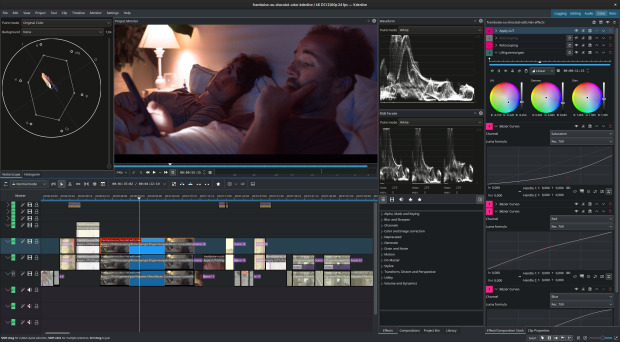
Este pasado 2 de mayo fue anunciado oficialmente en su blog la versión 22.04, la cual nos ofrece las siguientes e interesantes funcionalidades, que el equipo de desarrollo ha resumido de la siguiente manera:
El equipo de Kdenlive se complace en anunciar el lanzamiento de la versión 22.04. Este ciclo de desarrollo viene con más de 300 commits, la mayoría centrados en la estabilidad y el pulido, que van desde el empaquetado hasta las mejoras de la interfaz de usuario.
Además de las mejoras en las versiones de Windows y macOS, Kdenlive se ejecuta ahora en la arquitectura M1 de Apple e incluye compatibilidad inicial con la gama completa de colores de 10 bits en todas las plataformas, aunque hay que tener en cuenta que el color de 10 bits aún no funciona con efectos. Kdenlive también ofrece automáticamente la transcodificación de vídeos con velocidad de fotogramas variable a un formato fácil de editar, y algunos filtros, como Desenfoque, Levantamiento/Gama/Ganancia, Viñeta y Espejo, son ahora de hilos cortados, lo que mejora la velocidad de renderizado.
Y más novedades que me guardo para una futura entrada.
Más información: Kdenlive
La entrada Lanzado Kdenlive 22.04, ahora compatible con la arquitectura M1 de Apple se publicó primero en KDE Blog.
Iconos 3D para tu PC con Flat no more 2
El tema de los iconos del sistema es tan personal como la ropa que nos ponemos. Así que lo mejor es tener algo de variedad en la Comunidad para que cada cual utilice el que más le gusta. En los últimos tiempos se puso de moda los iconos minimalistas, plano, neon o coloridos, es gratificante encontrar otras colecciones de iconos que rompen esa tendencia, como es el caso de Flat no more 2, unos iconos 3D parra tu PC, una revisión de los Flat No More que presenté hace tiempo.
Iconos 3D para tu PC con Flat no more 2
Cambiar el tema de iconos de un escritorio es una de las formas de personalización casi más completa que puedes realizar sobre tu PC, ya que cambia totalmente el aspecto del mismo a la hora de interaccionar con tus aplicaciones, documentos y servicios.
Para el escritorio Plasma de la Comunidad KDE hay cientos de temas disponibles, y en el blog le hemos dedicado muchos artículos a ir presentando algunos de ellos, pero siempre aparece alguno nuevo o remozado que hace que siempre le volvamos a dedicar una nueva entrada.
De esta forma me complace presentar el tema de iconos Flat no more 2, una excelente colección de iconos detallados para Plasma que destaca por su aspecto 3D, sus colores y su contraste. Seguro que no deja indiferente a nadie.
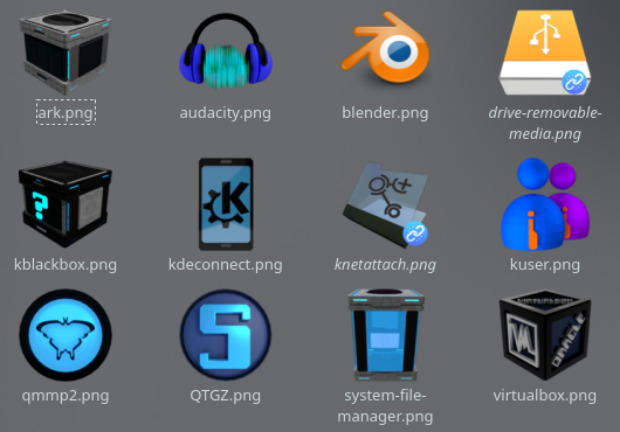
Y como siempre digo, si os gusta el pack de iconos Fat no more 2 podéis “pagarlo” de muchas formas en la nueva página de KDE Store, que estoy seguro que el desarrollador lo agradecerá: puntúale positivamente, hazle un comentario en la página o realiza una donación. Ayudar al desarrollo del Software Libre también se hace simplemente dando las gracias, ayuda mucho más de lo que os podéis imaginar, recordad la campaña I love Free Software Day 2017 de la Free Software Foundation donde se nos recordaba esta forma tan sencilla de colaborar con el gran proyecto del Software Libre y que en el blog dedicamos un artículo.
Más información: KDE Store
La entrada Iconos 3D para tu PC con Flat no more 2 se publicó primero en KDE Blog.
Dia de la libertad del hardware 2022
Este evento es como el Guadiana, a veces se me pasa y otros años no. Se trata de la celebración que habitualmente organiza Caliu del Dia de la Llibertat del Maquinari 2022 (Dia de la libertad del hardware 2022) en Barcelona el próximo 14 de mayo que se enmarca dentro del Hardware Freedom Day. Un evento donde la Comunidad KDE suele estar muy presente y que este año no va a ser una excepción.
Dia de la libertad del hardware 2022
La convocatoria se ha realizado en catalán, y la podéis ver en la página del evento organizado por Caliu, pero me he tomado la libertad de traducirla para el blog e intentar conseguir dos objetivos: llamar la atención para que vaya más gente e inspirar a otras organizaciones a realizar acciones parecidas en su zona local.
Este año Caliu lo vuelve a celebrar, como hizo de forma continua desde el 2015 hasta el 2017 (como mínimo) un poco más tarde y lo anuncia de la siguiente forma:
Caliu celebrará el Día de la Libertad del Hardware el 14 de mayo al espacio joven La Fontana de Barcelona. La idea será de reunir ponentes para hacer cuatro charlas relacionadas con algún aspecto del hardware libre.

Según leemos en la Wikipedia:
El Día de la Libertad de Hardware es una celebración anual organizada por la Fundación Libertad Digital. El objetivo del Día de la Libertad de Hardware es celebrar el espíritu del hardware abierto y concienciar a más personas para que utilicen y contribuyan a proyectos libres y de hardware. El primer Día de la Libertad de Hardware se celebró el 20 de abril de 2013. La fecha de 2022 es el 16 de abril.
La información de interés y las charlas son las siguientes:
- Espacio Jove La Fontana Data
- Caller Gran de Gràcia, 190,192
De momento no hay listado de charlas, así que en cuanto las tenga las comparto con todos vosotros. Y, de momento, solo conozco este evento en toda España, así que si sabéis de otro lugar donde se celebre no dudéis en comentarlo.
La entrada Dia de la libertad del hardware 2022 se publicó primero en KDE Blog.
El Atareao en Podcast Linux #153
Bienvenidos a un nuevo episodio de los audios de Juan Febles, y este en concreto es la continuación del #152 que ya promocioné en el blog hace poco. En el capítulo de hoy tenemos a el Atareado en Podcast Linux, con el que podréis escuchar sus reflexiones sobre los paquetes de instalación de aplicaciones .deb, flatpak, snap y AppImage.
El Atareao en Podcast Linux #153

De un tiempo a esta parte estoy publicando casi todas las entregas que realiza Juan de su Podcast Linux, y la razón radica es que últimamente estoy enganchado a sus audios… y todos me parecen interesantes y promocionables.
En esta ocasión en la hora y poco de programa Juan habla de forma distendida con Lorenzo Carbonell, con el que hablan de las alternativas que tenemos para instalar aplicaciones en nuestro sistemas GNU/Linux.
Además se hace un repaso a los múltiples proyectos de divulgación que tiene Lorenzo y que honran su sobrenombre: el Atareao.
En palabras de Juan:
¡¡¡Muy buenas amante del Software Libre!!!
Bienvenido a otra entrega, la número 153, de Podcast Linux. Un saludo muy fuerte de quien te habla, Juan Febles. Hoy vuelve con nosotros Lorenzo Carbonell, Bloguero, podcaster y desarrollador en GNU/Linux, lo puedes escuchar cada lunes y jueves en su podcast y leer cuando quieras en atareao.es
Enlaces:
- Blog Atareao: https://www.atareao.es/
- Podcast Atareao: https://www.atareao.es/podcasts/
- Mastodon: https://atareao.es/mastodon
- Twitter: https://twitter.com/atareao
- Fediverse.tv: https://fediverse.tv/c/atareao
- Youtube: https://www.youtube.com/c/atareao
- Github: https://github.com/atareao
- Canal de Telegram: https://t.me/canal_atareao
Así que os invito a escuchar esta charla distendida de Lorenzo Carbonell con Juan Febles de más de una hora que seguro que no os defraudará como no lo ha hecho conmigo. ¡Dentro audio!
Más información: Podcast Linux
Sigue a Podcast Linux
Aprovecho para animaros a seguir Podcast Linux en algunos de los canales de comunicación que tiene:
- Twitter: https://twitter.com/podcastlinux
- Mastodon: https://mastodon.social/@podcastlinux/
- Correo: podcastlinux@disroot.org
- Web: https://podcastlinux.com/
- Telegram: https://t.me/podcastlinux
- Telegram Juan Febles: https://t.me/juanfebles
- Youtube: https://www.youtube.com/PodcastLinux
- Feed Podcast Linux: https://podcastlinux.com/feed
- Feed Linux Express (Audios Telegram): https://podcastlinux.com/Linux-Express/feed
La entrada El Atareao en Podcast Linux #153 se publicó primero en KDE Blog.