
15 Tahun openSUSE-ID

Hari ini, Sabtu 23 Juli 2022, Komunitas openSUSE Indonesia merayakan ulang tahun yang ke 15.
Berikut ini tangkapan layar mengenai sejarah pembentukan Komunitas openSUSE Indonesia yang sempat diambil cuplikan layarnya dari halaman http://wiki.opensuse-id.org:80/index.php?title=Sejarah_Komunitas_openSUSE_Indonesia yang sudah mati.


 hpj
hpjGNOME at 25: A health checkup
Around the end of 2020, I looked at GNOME's commit history as a proxy for the project's overall health. It was fun to do and hopefully not too boring to read. A year and a half went by since then, and it's time for an update.
If you're seeing these cheerful-as-your-average-wiphala charts for the first time, the previous post does a better job of explaining things. Especially so, the methodology section. It's worth a quick skim.
What's new
- Fornalder gained the ability to assign cohorts by file suffix, path prefix and repository.
- It filters out more duplicate authors.
- It also got better at filtering out duplicate and otherwise bogus commits.
- I added the repositories suggested by Allan and Federico in this GitHub issue (diff).
- Some time passed.
Active contributors, by generation
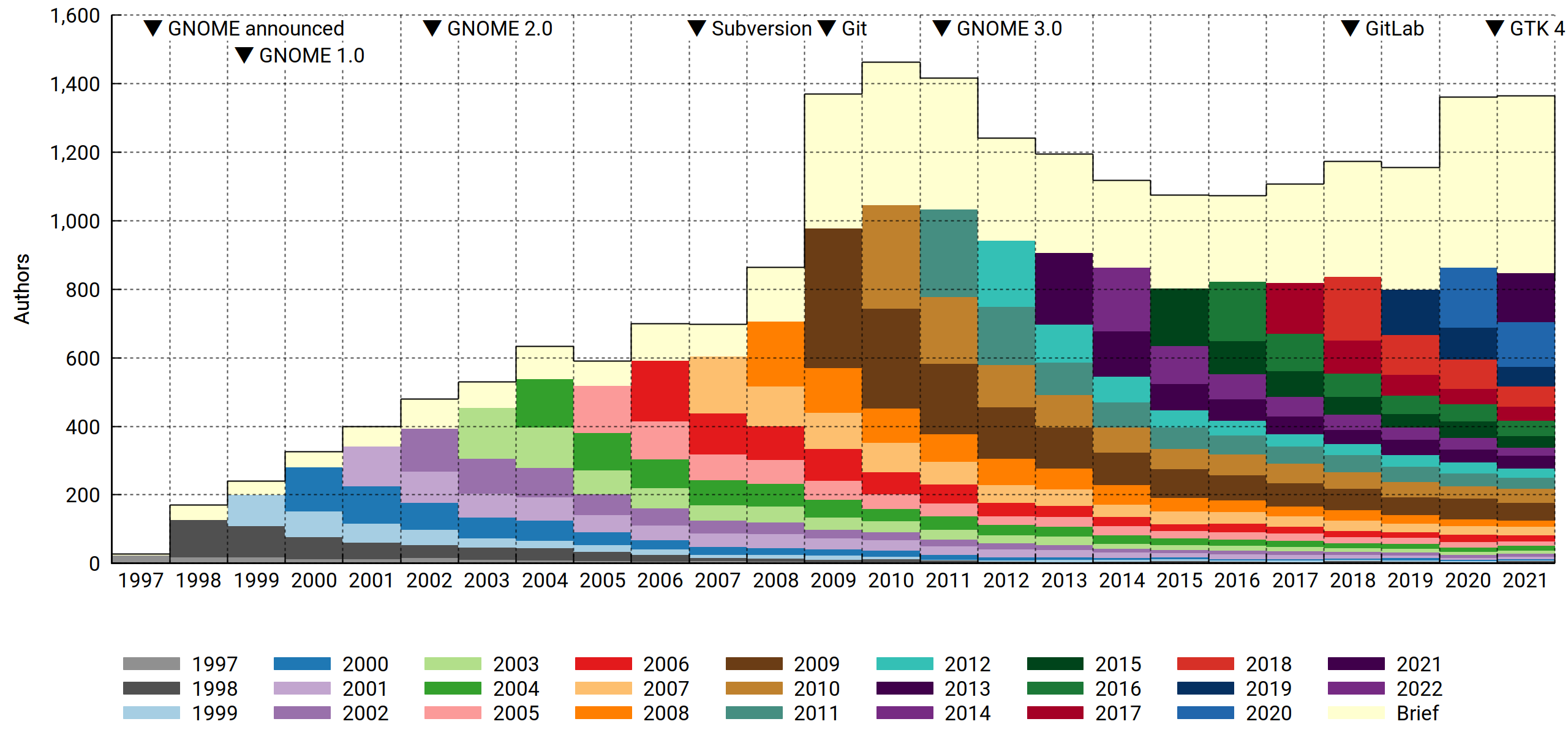
As expected, 2020 turned out interesting. First-time contributors were at the gates, numbering about 200 more than in previous years. What's also clear is that they mostly didn't stick around. The data doesn't say anything about why that is, but you could speculate that a work-from-home regime followed by a solid staycation is a state of affairs conductive to finally scratching some tangential — and limited — software-themed itch, and you'd sound pretty reasonable. Office workers had more time and workplace flexibility to ponder life's great questions, like "why is my bike shed the wrong shade of beige" or perhaps "how about those commits". As one does.
You could also argue that GNOME did better at merging pull requests, and that'd sound reasonable too. Whatever the cause, more people dipped their toes in, and that's unequivocally good. How to improve? Rope them into doing even more work! And never never let them go.
2021 brought more of the same. Above the 2019 baseline, another 200 new contributors showed up, dropped patches and bounced.
Active contributors, by affiliation

Unlike last time, I've included the Personal and Other affiliations for this one, since it puts corporate contributions in perspective; GNOME is a diverse, loosely coupled project with a particularly long and fuzzy tail. In terms of how spread out the contributor base is across the various domains, it stands above even other genuine community projects like GNU and the Linux kernel.
Commit count, by affiliation
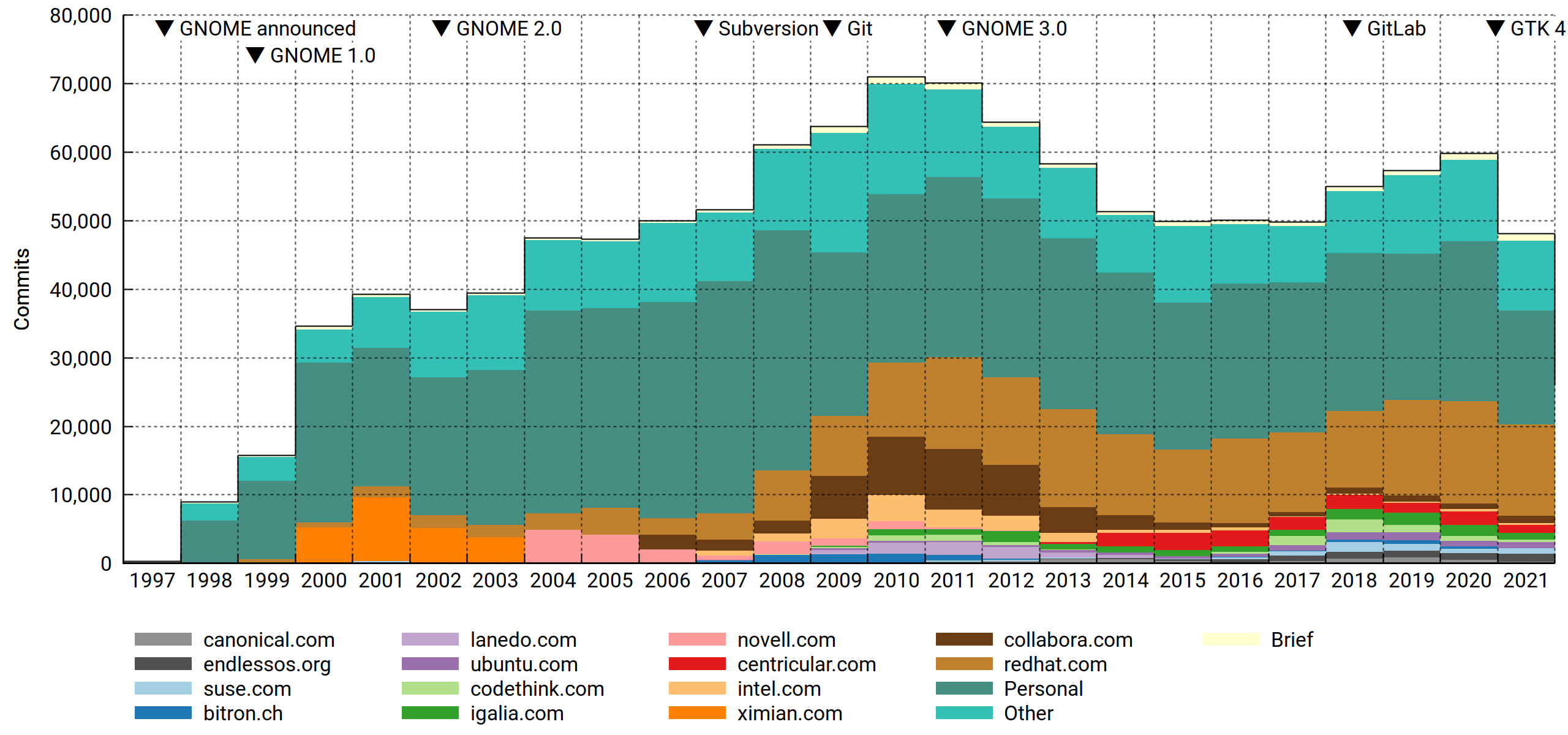
To be fair, the volume of contributions matters. Paid developers punch way above their numbers, and as we've seen before, Red Hat throws more punches than anyone. Surely this will go on forever (nervous laugh).
Eazel barely made the top-15 cut the last time around. It's now off the list. That's what you get for pushing the cloud, a full decade ahead of its time.
Active contributors, by repository
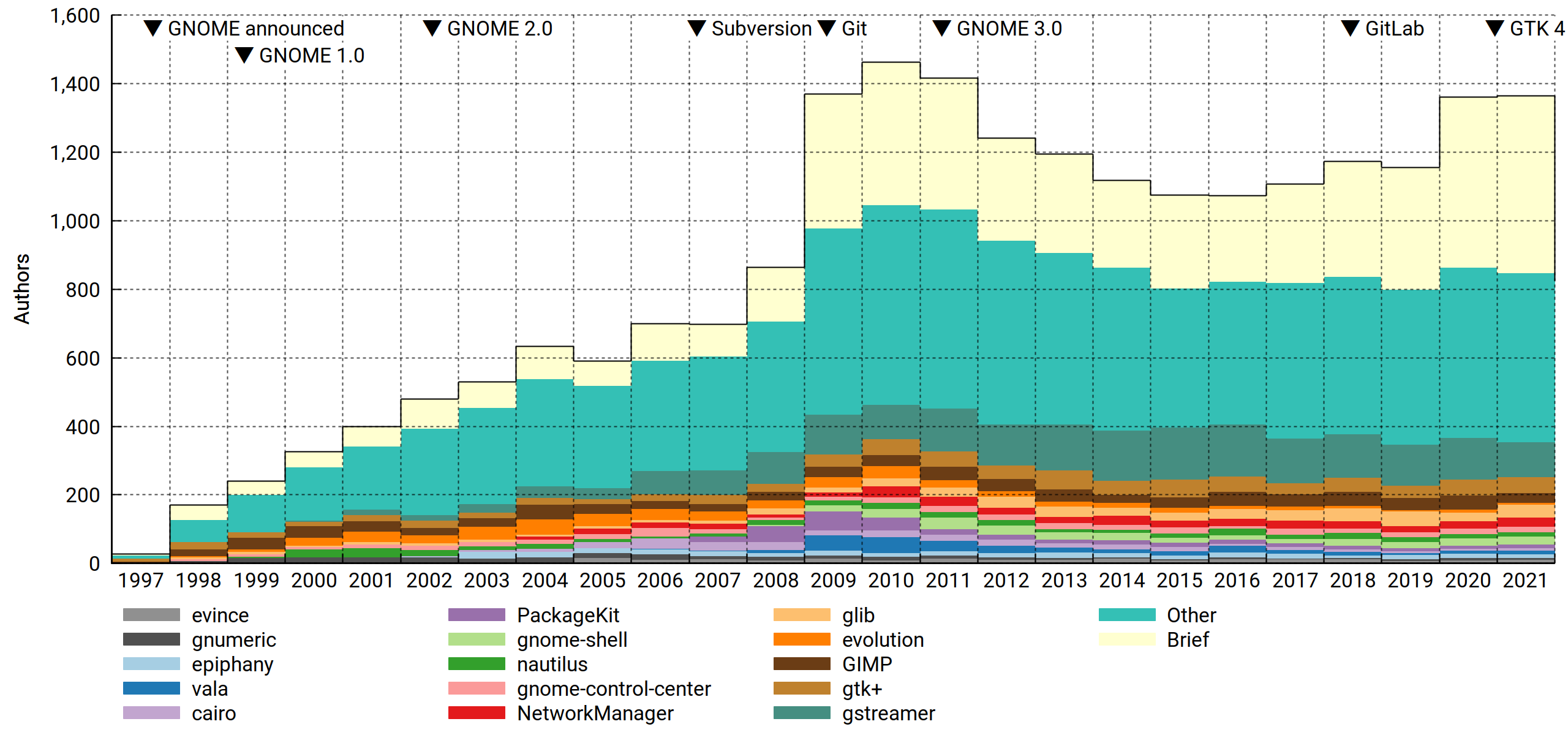
Slicing the data per repository makes for some interesting observations:
- Speaking of Eazel… Nautilus may be somewhat undermaintained for what it is, but it's seen worse. The 2005-2007 collapse was bad. In light of this, the drive to reduce complexity (cf. eventually removing the compact view etc) makes sense. I may have quietly gnashed my teeth at this at one point, but these days, Nautilus is very pleasant to use for small tasks. And for Big Work, you've got your terminal, a friendly shell and the GNU Coreutils. Now and forever.
- Confirming what "everyone knows", the maintainership of Evolution dwindled throughout the 2010s to the point where only Milan Crha is heroically left standing. For those of us who drank long and deep of the kool-aid it's something to feel apprehensive (and somewhat guilty) about.
- Vala played an interesting part in the GNOME infrastructure revolution of 2009-2011. Then it sort of… waned? Sure, Rust's the hot thing now, but I don't think it could eat its entire lunch.
- GLib is seriously well maintained!
Commit count, by repository

With commit counts, a few things pop out that weren't visible before:
- There's the not at all conspicuously named Tracker, another reminder of how transformative the 2009-2011 time frame really was.
- The mid-2010s come off looking sort of uneventful and bland in most of the charts, but Builder bucked that trend bigly.
- Notice the big drop in commits from 2020 to 2021? It's mostly just the GTK team unwinding (presumably) after the 4.0 release.
Active contributors, by file suffix
I devised this one mainly to address a comment from Smeagain. It's a valid concern:
There are a lot of people translating with each getting a single commit for whatever has been translated. During the year you get larger chunks of text to translate, then shortly before the release you finish up smaller tasks, clean up translations and you end up with lots of commits for a lot of work but it's not code. Not to discount translations bit you have a lot of very small commits.
I view the content agnosticism as a feature: We can't tell the difference in work investment between two code commits (perhaps a one-liner with a week of analysis behind it vs. a big chunk of boilerplate being copied in from some other module/snippet database), so why would we make any assumptions about translations? Maybe the translator spent an hour reviewing their strings, found a few that looked suspicious, broke out their dictionary, called a friend for advice on best practice and finally landed a one-line diff.
Therefore we treat content type foo the same as content type bar, big commits the same as small commits, and when tallying authors, few commits the same as many — as long as you have at least one commit in the interval (year or month), you'll be counted.
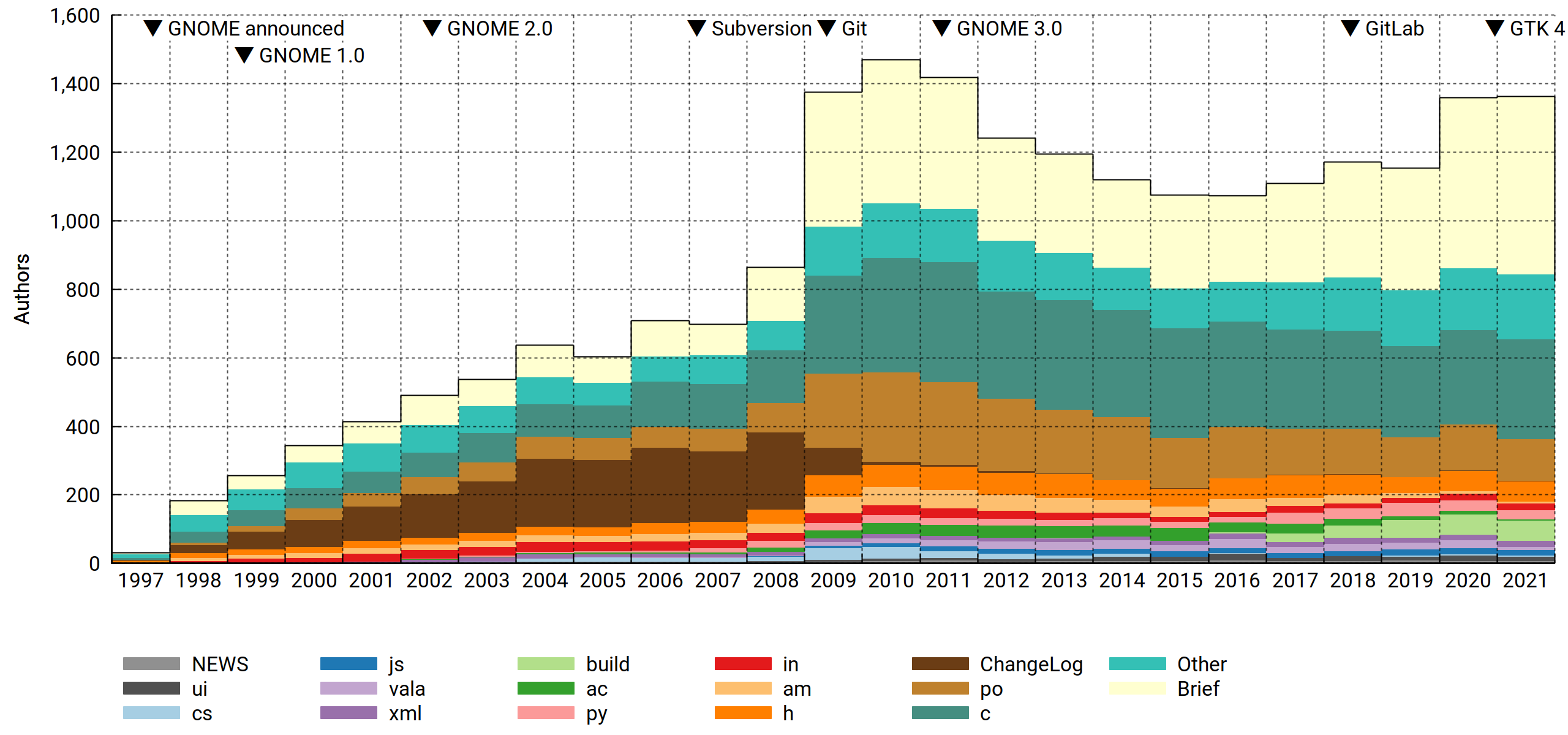
However! If you look at the commit logs (and relevant infrastructure), it's pretty clear that hackers and translators operate as two distinct groups. And maybe there are more groups out there that we didn't know about, or the nature of the work changed over time. So we slice it by content type, or rather, file suffix (not quite as good, but much easier). For files with no suffix separator, the suffix is the entire filename (e.g. Makefile).
A subtlety: Since each commit can touch multiple file types, we must decide what to do about e.g. a commit touching 10 .c files and 2 .py files. Applying the above agnosticism principle, we identify it as doing something with these two file types and assign them equal weight, resulting in .5 c commits and .5 py commits. This propagates up to the authors, so if in 2021 you made the aforementioned commit plus another one that's entirely vala, you'll tally as .5 c + .5 py + 1.0 vala, and after normalization you'll be a ¼ c, ¼ py and ½ vala author that year. It's not perfect (sensitive to what's committed together), but there are enough commits that it evens out.
Anyway. What can we tell from the resulting chart?
- Before Git, commit metadata used to be maintained in-band. This meant that you had to paste the log message twice (first to the ChangeLog and then as CVS commit metadata). With everyone committing to ChangeLogs all the time, it naturally (but falsely) reads as an erstwhile focal point for the project. I'm glad that's over.
- GNOME was and is a C project. Despite all manner of rumblings, its position has barely budged in 25 years.
- Autotools, however, was attacked and successfully dethroned. Between 2017 and 2021,
acandamgradually yielded to Meson'sbuild. - Finally, translators (
po) do indeed make up a big part of the community. There's a buried surprise here, though: Comparing 2010 to 2021, this group shrank a lot. Since translations are never "done" — in fact, for most languages they are in a perpetual state of being rather far from it — it's a bit concerning.
The bigger picture
I've warmed to Philip's astute observation:
Thinking about this some more, if you chop off the peak around 2010, all the metrics show a fairly steady number of contributors, commits, etc. from 2008 through to the present. Perhaps the interpretation should not be that GNOME has been in decline since 2010, but more that the peak around 2010 was an outlier.
Some of the big F/OSS projects have trajectories that fit the following pattern:
f (x) = ∑ [n = 1:x] (R * (1 – a)(n – 1))
That is, each year R new contributors are being recruited, while a fraction a of the existing contributors leave. R and a are both fairly constant, but since attrition increases with project size while recruitment depends on external factors, they tend to find an equilibrium where they cancel each other out.
For GNOME, you could pick e.g. R = 130 and a = .15, and you'd come close. Then all you'd need is some sharpie magic, and…
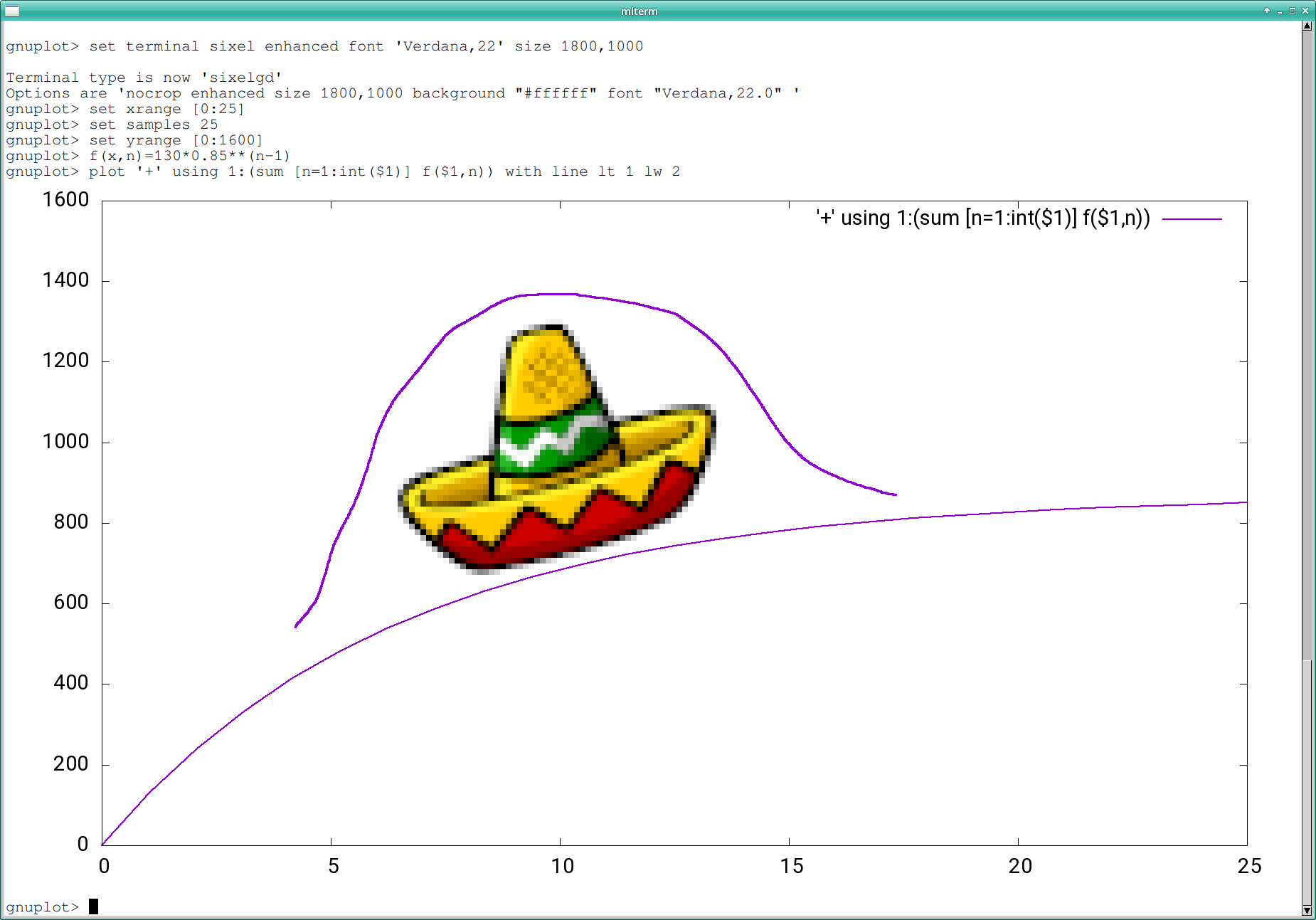
Not a bad fit. Happy 25th, GNOME.

 Member
Playing with Common Expression Language
Common Expression Language (CEL) is an expression language created by Google. It allows to define constraints that can be used to validate input data.
This language is being used by some open source projects and products, like:
- Google Cloud Certificate Authority Service
- Envoy
- There’s even a Kubernetes Enhancement Proposal that would use CEL to validate Kubernetes’ CRDs.
I’ve been looking at CEL since some time, wondering how hard it would be to find a way to write Kubewarden validation policies using this expression language.
Some weeks ago SUSE Hackweek 21 took place, which gave me some time to play with this idea.
This blog post describes the first step of this journey. Two other blog posts will follow.
Picking a CEL runtime
Currently the only mature implementations of the CEL language are written in Go and C++.
Kubewarden policies are implemented using WebAssembly modules.
The official Go compiler isn’t yet capable of producing WebAssembly modules that can be run outside of the browser. TinyGo, an alternative implementation of the Go compiler, can produce WebAssembly modules targeting the WASI interface. Unfortunately TinyGo doesn’t yet support the whole Go standard library. Hence it cannot be used to compile cel-go.
Because of that, I was left with no other choice than to use the cel-cpp runtime.
C and C++ can be compiled to WebAssembly, so I thought everything would have been fine.
Spoiler alert: this didn’t turn out to be “fine”, but that’s for another blog post.
CEL and protobuf
CEL is built on top of protocol buffer types. That means CEL expects the input data (the one to be validated by the constraint) to be described using a protocol buffer type. In the context of Kubewarden this is a problem.
Some Kubewarden policies focus on a specific Kubernetes resource; for example,
all the ones implementing Pod Security Policies are inspecting only Pod resources.
Others, like the ones looking at labels or annotations attributes, are instead
evaluating any kind of Kubernetes resource.
Forcing a Kubewarden policy author to provide a protocol buffer definition of the object to be evaluated would be painful. Luckily, CEL evaluation libraries are also capable of working against free-form JSON objects.
The grand picture
The long term goal is to have a CEL evaluator program compiled into a WebAssembly module.
At runtime, the CEL evaluator WebAssembly module would be instantiated and would receive as input three objects:
- The validation logic: a CEL constraint
- Policy settings (optional): these would provide a way to tune the constraint. They would be delivered as a JSON object
- The actual object to evaluate: this would be a JSON object
Having set the goals, the first step is to write a C++ program that takes as input a CEL constraint and applies that against a JSON object provided by the user.
There’s going to be no WebAssembly today.
Taking a look at the code
In this section I’ll go through the critical parts of the code. I’ll do that to help other people who might want to make a similar use of cel-cpp.
There’s basically zero documentation about how to use the cel-cpp library. I had to learn how to use it by looking at the excellent test suite. Moreover, the topic of validating a JSON object (instead of a protocol buffer type) isn’t covered by the tests. I just found some tips inside of the GitHub issues and then I had to connect the dots by looking at the protocol buffer documentation and other pieces of cel-cpp.
TL;DR The code of this POC can be found inside of this repository.
Parse the CEL constraint
The program receives a string containing the CEL constraint and has to
use it to create a CelExpression object.
This is pretty straightforward, and is done inside of these lines
of the evaluate.cc file.
As you will notice, cel-cpp makes use of the Abseil
library. A lot of cel-cpp APIs are returning absl::StatusOr
// invoke API
auto parse_status = cel_parser::Parse(constraint);
if (!parse_status.ok())
{
  // handle error
  std::string errorMsg = absl::StrFormat(
      "Cannot parse CEL constraint: %s",
      parse_status.status().ToString());
  return EvaluationResult(errorMsg);
}

// Obtain the actual result
auto parsed_expr = parse_status.value();
Handle the JSON input
cel-cpp expects the data to be validated to be loaded into a CelValue
object.
As I said before, we want the final program to read a generic JSON object as input data. Because of that, we need to perform a series of transformations.
First of all, we need to convert the JSON data into a protobuf::Value object.
This can be done using the protobuf::util::JsonStringToMessage
function.
This is done by these lines
of code.
Next, we have to convert the protobuf::Value object into a CelValue one.
The cel-cpp library doesn’t offer any helper. As a matter of fact, one of
the oldest open issue of cel-cpp
is exactly about that.
This last conversion is done using a series of helper functions I wrote inside
of the proto_to_cel.cc file.
The code relies on the introspection capabilities of protobuf::Value to
build the correct CelValue.
Evaluate the constraint
Once the CEL expression object has been created, and the JSON data has been converted into a `CelValue, there’s only one last thing to do: evaluate the constraint against the input.
First of all we have to create a CEL Activation object and insert the
CelValue holding the input data into it. This takes just few lines of code.
Finally, we can use the Evaluate method of the CelExpression instance
and look at its result. This is done by these lines of code,
which include the usual pattern that handles absl::StatusOr<T> objects.
The actual result of the evaluation is going to be a CelValue that holds
a boolean type inside of itself.
Building
This project uses the Bazel build system. I never used Bazel before, which proved to be another interesting learning experience.
A recent C++ compiler is required by cel-cpp. You can use either gcc (version 9+) or clang (version 10+). Personally, I’ve been using clag 13.
Building the code can be done in this way:
CC=clang bazel build //main:evaluatorThe final binary can be found under bazel-bin/main/evaluator.
Usage
The program loads a JSON object called request which is then embedded
into a bigger JSON object.
This is the input received by the CEL constraint:
{
  "request": < JSON_OBJECT_PROVIDED_BY_THE_USER >
}
The idea is to later add another top level key called
settings. This one would be used by the user to tune the behavior of the constraint.
Because of that, the CEL constraint must access the request values by
going through the request. key.
This is easier to explain by using a concrete example:
./bazel-bin/main/evaluator \
  --constraint 'request.path == "v1"' \
  --request '{ "path": "v1", "token": "admin" }'
The CEL constraint is satisfied because the path key of the request
is equal to v1.
On the other hand, this evaluation fails because the constraint is not satisfied:
$ ./bazel-bin/main/evaluator \
  --constraint 'request.path == "v1"' \
  --request '{ "path": "v2", "token": "admin" }'
The constraint has not been satisfied
The constraint can be loaded from file. Create a file
named constraint.cel with the following contents:
!(request.ip in ["10.0.1.4", "10.0.1.5", "10.0.1.6"]) &&
  ((request.path.startsWith("v1") && request.token in ["v1", "v2", "admin"]) ||
  (request.path.startsWith("v2") && request.token in ["v2", "admin"]) ||
  (request.path.startsWith("/admin") && request.token == "admin" &&
  request.ip in ["10.0.1.1",  "10.0.1.2", "10.0.1.3"]))
Then create a file named request.json with the following contents:
{
  "ip": "10.0.1.4",
  "path": "v1",
  "token": "admin",
}
Then run the following command:
./bazel-bin/main/evaluator \
  --constraint_file constraint.cel \
  --request_file request.json
This time the constraint will not be satisfied.
Note: I find the
_symbols inside of the flags a bit weird. But this is what is done by the Abseil flags library that I experimented with. 🤷
Let’s evaluate a different kind of request:
./bazel-bin/main/evaluator \
  --constraint_file constraint.cel \
  --request '{"ip": "10.0.1.1", "path": "/admin", "token": "admin"}'
This time the constraint will be satisfied.
Summary
This has been a stimulating challenge.
Getting back to C++
I didn’t write big chunks of C++ code since a long time! Actually, I never had a chance to look at the latest C++ standards. I gotta say, lots of things changed for the better, but I still prefer to pick other programming languages 😅
Building the universe with Bazel
I had prior experience with autoconf & friends, qmake and cmake, but I
never used Bazel before.
As a newcomer, I found the documentation of Bazel quite good. I appreciated
how easy it is to consume libraries that are using Bazel. I also like how
Bazel can solve the problem of downloading dependencies, something
you had to solve on your own with cmake and similar tools.
The concept of building inside of a sandbox, with all the dependencies vendored, is interesting but can be kinda scary. Try building this project and you will see that Bazel seems to be downloading the whole universe. I’m not kidding, I’ve spotted a Java runtime, a Go compiler plus a lot of other C++ libraries.
Bazel build command gives a nice progress bar. However, the number of tasks to
be done keeps growing during the build process. It kinda reminded me of the old
Windows progress bar!
I gotta say, I regularly have this feeling of “building the universe” with Rust, but Bazel took that to the next level! 🤯
Code spelunking
Finally, I had to do a lot of spelunking inside of different C++ code bases: envoy, protobuf’s c++ implementation, cel-cpp and Abseil to name a few. This kind of activity can be a bit exhausting, but it’s also a great way to learn from the others.
What’s next?
Well, in a couple of weeks I’ll blog about my next step of this journey: building C++ code to standalone WebAssembly!
Now I need to take some deserved vacation time 😊!
⛰️ 🚶👋

Community Work Group Discusses Next Edition
Members of openSUSE had a visitor for a recent Work Group (WG) session that provided the community an update from one of the leaders focusing on the development of the next generation distribution.
SUSE and the openSUSE community have a steering committee and several Work Groups (WG) collectively innovating what is being referred to as the Adaptable Linux Platform (ALP).
SUSE’s Frederic Crozat, who is one of ALP Architects and part of the ALP steering committee, joined in the exchange of ideas and opinions as well as provided some insight to the group about moving technical decisions forward.
The vision is to take step beyond of what SUSE does with modules like in SUSE LInux Enterprise (SLE) 15. This is not really seen on the openSUSE side. On the SLE side, it’s a bit different, but the point is to be more flexible and agile with development. The way to get there is not yet fully decided, but one thing that is certain is containerization is one of the easiest ways to ensure adaptability.
“If people have their own workloads in containers or VMs, the chance of breaking their system is way lower,” openSUSE Leap release manager Lubos Kocman pointed out in the session. “We’ll need to make sure that users can easily search and install ‘workloads’ from trusted parties.”
In some cases, people break their systems by consuming software outside of the distribution repository. Some characterizations of ALP have been referred to as strict use of containers such as flatpaks, but it’s better to reference the items as workload. There were some efforts planned for Hack Week to provide documentation regarding the workload builds.
There was confirmation that there will be no migration path from SLES to ALP, which most think would mean the same for Leap to ALP, but this does not necessarily apply for openSUSE as people are not being stopped from writing upgradeable scripts.
Working on the community edition is planned after the proof of concept, but the community is actively involved with developing the proof of concept. Some points brought up were that the intial build will aim at a build on Intel and then expand later with other architectures.
The community platform is being referred to as openSUSE ALP during its development cycle with SUSE to be concise with planning the next community edition.
Migrar un repositorio git de GitHub a Codeberg
Vamos a ver cómo migrar un repositorio de git propio de GitHub a Codeberg una opción comunitaria y más respetuosa con el software libre

GitHub se ha convertido hace años en el sitio más conocido en el que desarrolladores y colaboradores hospedan su código en repositorios git que permiten la colaboración, el aporte, la mejora, etc.
Hace unos años Microsoft compró GitHub, la mayor empresa de software privativo conocida por sus oscuras artimañas (Adoptar, extender, extinguir) a la hora de imponder sus estrategias cerradas y de puro monopolio, era dueña de un gran sitio en el que se hospedaban multitud de proyectos de software libre.
Con semejante curriculum a sus espaldas, la compra de GitHub por Microsoft fue vista con recelo. Y aunque en GitHub se hospedaba gran cantidad de software libre, el propio sitio no es muy amigable con el propio software libre.
El fundador y antiguo CEO de GitHub no estaba muy a favor del software libre, el código de la propia página no es libre y además su uso hace que haya que ejecutar software privativo en el navegador. ¿Y qué podemos hacer?
La asociación Software Freedom Conservacy ha puesto en marcha una campaña llamada «GiveupGitHub» o «Abandona GitHub» para concienciar sobre la necesidad de que proyectos de software libre no «fuercen» a sus usuarios a usar servicios privativos. O a que usuarios no usen servicios privativos.
Una de las opciones sobre las que ya escribí en el blog hace tiempo de Codeberg. Un servicio comunitario de hospedaje de repositorios git basado en software libre como es Gitea.
En Codeberg puedes apoyar a la comunidad que mantiene el servicio con una donación y así poder tener tu código en un sitio amigable con el software libre, o puedes abrirte una cuenta sin donar.
Migrar un repositorio de GitHub a Codeberg
En este tutorial veremos cómo migrar a Codeberg un repositorio git que tenemos hospedado en GitHub.
En Codeberg
Para ello, lo primero y principal es que tengas cuenta en ambos servicios. Ahora entramos en nuestra cuenta de Codeberg y en la parte superior derecha sobre el símbolo «+» seleccionamos: «Nueva migración»
Seleccionamos el servicio desde el que queremos migrar, en este caso desde GitHub y rellenamos los datos que nos aparecen en la siguiente página.
En la primera casilla pegamos la dirección url del proyecto que queremos migrar de GitHub.
En la segunda deberemos poner el «Token» de acceso de GitHub para poder realizar la migración.
Para conseguir ese Token, que es una contraseña que nos generará y nos dará acceso a nuestros datos de GitHub, vamos a nuestro perfil de GitHub.
En GitHub
En GitHub en la parte superior derecha en nuestro avatar pinchamos y seleccionamos la opción «settings» y en la nueva ventana en la lista de la izquierda seleccionamos la última opción «Developer settings» seleccionando Personal Tokens en la nueva pantalla.
Pulsamos sobre el botón «Generate new Token» y confirmamos nuestra contraseña para acceder.
En la primera casilla le asignamos un nombre, por ejemplo: «migración_codeberg» y le asignamos una fecha de caducidad, por ejemplo 7 días. Puedes darle más o menos en función de si vas a usarla más o menos tiempo.
En las opciones que podrá controlar ese Token, yo escogí «repo → full control of privates repositories» para que tenga todos los derechos.
Y pulsamos sobre el botón «Generate token» y nos mostrará una serie de números y letras aleatorios. ¡Ten cuidado! mantén bien a salvo esa cadena, ya que si alguien la obtiene tendrá acceso a todos tus repositorios con pleno derecho.
Copiamos el Token generado y lo guardamos bien.
Volvemos a Codeberg donde nos habíamos quedado
Regresamos a la página de configuración de migración donde nos habíamos quedado en Codeberg, ahora ya con el Token de GitHub generado y copiado.
Lo pegamos en la segunda casilla, le ponemos un nombre y una descripción (podemos copiar la que teníamos en GitHub) y pulsamos sobre «Migrar Repositorio». Al terminar tendremos una copia idéntica del repositorio que teníamos en GitHub.
Ahora si queremos podemos borrar o archivar como solo lectura el repositorio de GitHub, y añadiendo en el README una nota de que has migrado a un nuevo servicio que respeta a los usuarios y que está basado en software libre y un enlace a tu nuevo repositorio en Codeberg.
También borraremos la copia local del repositorio git de nuestro equipo, y clonaremos el nuevo repostorio de Codeberg sobre el que ya podremos trabajar.
Espero que os haya resultado útil y que os planteeis el cambio de servicio para vuestros repositorios git si es que os apetece o se puede hacer.
Codeberg no tiene detrás una gran empresa que factura millones y que puede aportar recursos para mantener un sitio con un montón de funcionalidades y opciones. Pero es una opción más que válida y útil más acorde con la filosofía del software libre y los hackers.
Enlaces de interés
- https://codeberg.org
- https://gitea.io/
- https://docs.github.com/es/authentication/keeping-your-account-and-data-secure/creating-a-personal-access-token
- https://sfconservancy.org/GiveUpGitHub/
- https://victorhckinthefreeworld.com/2020/07/06/codeberg-alternativa-github-gitlab/

openSUSE.Asia Summit 2022 発表提案募集
※訳者注:セッションは英語での発表となります。また、英語版の告知より数日経っています。
本日、openSUSE.Asia Summit 2022 メイントラックの発表提案募集を告知できることをうれしく思います。openSUSE.Asia Summitの実行委員では、様々な活動背景や様々なオープンソースソフトウェアの推進者のスピーカーを探しています。 openSUSE.Asia Summitは毎年アジアでオープンソースソフトウェアを使うことを推進するために企画されており、openSUSEコミュニティ(コントリビューターとユーザーの両方)にその価値を認められているイベントです。昨年のインドチームによって開催されたバーチャルサミットに引き続き、8回目の開催となる openSUSE.Asia Summit 2022 は openSUSEオンラインボランティアチームによって、9月末に開催されます。過去のAsia Summitはインドネシア、中国、台湾、日本、韓国、インドなどから多くの方が参加しました。
今年のイベントは2パートから成ります:Asia Summit メイントラックと、それぞれのアジアの国/地域で開催される、オンラインやオフラインのローカルパートです。今回の募集はAsia Summitのメイントラックになります。Asia Summitメイントラックはオンラインカンファレンスツールを使ったオンラインでの開催のみとなります。トークは基本的にライブ中継になります。しかし、あらかじめ録画しておいたビデオを流す事も出来ます。
トピック
openSUSE.Asia Summit 2022は、openSUSEに関連するトピックや、次のようなトピックを募集しますークラウド、仮想化、コンテナ、コンテナオーケストレーション、Linuxデスクトップ環境やソフトウェアなど。なぜならopenSUSEは様々なFLOSSプロダクトを集めたものだからです。トピックの例は次のようなものですが、これらに限らなくても大丈夫です。
- openSUSE(Leap、Tumbleweed、Open Build Service、openQA、YaST)
- openSUSE Kubic & MicroOS、クラウド、仮想化、コンテテやコンテナオーケストレーション
- 組み込みやIoT
- セキュリティ(アクセス制御、暗号化、脆弱性マネジメント)
- デスクトップ環境やソフトウェア(GNOME、KDE、XFCE)
- オフィススイート、グラフィックスソフト、マルチメディア(LibreOffice、Calligra、GIMP、Inkscape)
- 多言語対応(インプットメソッド、翻訳)
- openSUSEで動いているその他のソフトウェア
技術的では無いトピックを歓迎していることにも注目してください。例えば以下のようなトピックです。
- FLOSS技術の解説
- 開発、品質保証、翻訳
- Tips & Tricks、体験談(成功、失敗問わず)、ベストプラクティス
- マーケティング、コミュニティマネジメント
- 教育
セッションの種類
これらの2種類の発表提案を募集しています。
- プレゼンテーションを使った、基調講演かロングトーク(30分+Q&A)
- プレゼンテーション有り/無しどちらでもよしとする、ショートトーク(15分+Q&A)
オンラインセッションは聞き手が注意力を保つのが難しい為、トークは短く魅力的なものを心がけて下さい。
スケジュール
- 締切:2022年7月31日
- 採用通知:8月15日週
- カンファレンス:
- 9/30日(金) 10:00 UTC – 15:00 UTC(日本時間 19:00 – 24:00)
- 10/1日(土) 4:00 UTC – 7:00 UTC(日本時間 13:00 – 16:00)
発表提案の登録方法
イベントページにご登録下さい。
- 発表提案は英語で書いて下さい。また、適切なタイトルと共に、150〜500字の長さでお願いします。
- 発表とスライドは英語でお願いします。
- 登録前にスペルチェックや文法チェックを行うようお願いします。 LibreOffice Extensions Languagetool や、grammarly が使えます。
- プロフィールの経歴も評価対象になります。ご自身の活動状態・背景を忘れずに記載して下さい。
- openSUSE Conference code of Conduct に従って下さい。発表提案の登録成功後、詳細を入力するフォームのリンクが送付されます。
プロポーザル作成ガイド
発表提案がトピックに関するものや関連するものであることを明確にしてください
例えば、セキュリティやデスクトップアプリケーションに関するトークの場合、アプリケーションのインストールから始まると良いでしょう。
発表提案がそうである理由を含めて下さい
理由として次のようなものが含まれるでしょう
- アプリケーション/技術/ソリューションに必要とされている
- 提案されているソリューションの機能の展望
- 想定聴者(初心者、貢献者)の学習
もし発表提案の書き方やプレゼンテーションの準備に不明な所や確認したい所があれば、お気軽にソーシャルメディアでローカルチームに連絡したり、運営委員に質問したりしてください。
運営委員連絡先
プログラムに関するご質問などは次のメールアドレスにお問い合わせ下さい。
opensuseasia-summit@googlegroups.com
それでは、openSUSE.Asia Summit 2022でお会いできることを楽しみにしています。

YaST Development Report - Chapter 5 of 2022
We have been a bit silent lately in this blog, but there are good reasons for it. As you know, the YaST Team is currently involved in many projects and that implies we had to constantly adapt the way we work. That left us little time for blogging. But now we have reached enough stability and we hope to recover a more predictable and regular cadence of publications.
So let’s start with this post including:
- Some notes about the new scope of the blog
- The announcement of D-Installer 0.4
- A brief introduction to Iguana, a container-capable boot image
- Progress on containerized YaST
- Some Cockpit news
Adjusting the Scope
As you know, SUSE is developing the next generation of the SUSE Linux family under the code-name ALP (Adaptable Linux Platform). If you are following the activity in that front, you also know several so-called work groups has been constituted to work on different areas.
The YaST Team is deeply involved on two of those work groups, the ones named “1:1 System Management” and “Installation / Deployment”. You can read more details about the mission of each group and the technologies we are developing in the wiki page linked at the previous paragraph.
Since this blog is a well-established communication channel with the (open)SUSE users, we decided we will use it to report the progress on all the projects related to those work groups. That goes beyond the scope of YaST itself and even beyond the scope of the YaST Team, since the mentioned work groups also include other SUSE and openSUSE colleages. But we are sure our readers will equally enjoy the content.
D-Installer Reaches Version 0.4
Let’s start with an old acquaintance of this blog. In several previous posts we have already described D-Installer, our effort to expose the power of YaST through a more reusable and modern set of interfaces. We recently reached an important milestone in its development with the first version including a multi-process architecture. In previous versions, the user interface could not respond to user interaction if any of the D-Installer components was busy (reading the repositories metadata, installing packages, etc.). The new D-Installer v0.4 includes the first steps to definitely solve that problem and also other interesting features you can check at this release announcement. There are even a couple of videos to see it in action without risking your systems!
As you can see in the first of those videos, we improved the product selection screen and now D-Installer can download and install Tumbleweed, Leap 15.4 or Leap Micro 5.2.
But a new YaST-related piece of software cannot be really considered as fully released until it is submitted to openSUSE Tumbleweed. We plan to do that in the upcoming days, to ensure future development of D-Installer remains fully integrated with our beloved rolling distribution.
A New Reptile in the Family
Of course, D-Installer needs to run on top of a working Linux system. That could be the openSUSE
LiveCD (as we do to test the prototypes) or some kind of minimal installation media. What if that
minimal system is just a container completely tailored to execute D-Installer? It could work as
long as you have a certain initrd (ie. boot image) with the capability of grabbing and executing
containers. Say hello to
Iguana.
Iguana is at an early stage of development and we cannot guarantee it will keep its current form or name, but it’s already able to boot on a virtual machine (and likely on real hardware) and execute a predefined container. We tried to run a containerized version of D-Installer and it certanly works! We plan to evolve the concept and make Iguana able to orchestrate several containers, which will give us a very flexible tool for installing or fixing a system in all kind of situations.
Progress on Containerized YaST
Just as we are looking into D-Installer as a way to reuse the YaST capabilities for system installation, you know we are also looking into containerization as a way to expand the YaST scope regarding system configuration. And we also have some news in that front.
First of all, we adapted more YaST modules to make them work from a container. As a result, you can now access all this functionality:
- Configuration of timezone, keyboard layout and language
- Management of software and repositories
- Firewall setup
- Configuration of iSCSI devices (iSCSI LIO target)
- Management of system services
- Inspection of the systemd journal
- Management of users and groups
- Printers configuration
- Administration of DNS server
We are working on adapting more YaST modules as we write this. We hope to soon add boot loader or Kdump configuration to the portfolio. Maybe even the YaST Partitioner if everything goes fine.
On the other hand, we restructured the container images to rely on SLE BCI, which results on smaller and better supported images. But that was just a first step, we are now actively working on reducing the size of the current images even further. Stay tuned for more news and some numbers.
Cockpit with a Green Touch
Although using a containerized version of YaST will always be an option. Is expected that the main tool for performing interactive administration of an individual ALP host will be Cockpit. So we are also investing on improving the Cockpit experience on (open)SUSE systems. And nothing gives a better experience that a properly green user interface!
We improved the theming support for Cockpit (in an unofficial way, not adopted by upstream) and used
that new support to make it look better thanks to the new
cockpit-suse-theme package.

We took the opportunity to update the version of all Cockpit packages available at openSUSE Tumbleweed. So if you are a Tumbleweed user, it’s maybe a good time to give a first try to Cockpit!
I’ll Be Back!
As mentioned at the beginning of this post, we want to get back to the good habit of posting regular status updates, although they will not longer be so focused around (Auto)YaST. In exchange you will get news about Cockpit, D-Installer, Iguana and containers. So stay tuned for more fun!
MicroOS Desktop Use to Help with ALP Feedback
Participants from the openSUSE community working on the upcoming release of the Adaptable Linux Platform (ALP) encourage people to try openSUSE MicroOS Desktop to gain user perspectives on its applicability.
Users are encouraged to try out MicroOS Desktop by installing it and using it on a laptop or workstation for a week or so. By doing this, users develop a frame of reference for how ALP can progress; the community wants to gain feedback about what users think about ALP’s usability, how it fits user workflows and more. The community would like to see critiques and evaluations that work for users. People are encouraged to send feedback to the ALP-community-wg mailing list.
The temporary use of the MicroOS Desktop will help developers assess how to move forward with ALP’s Proof of Concept (PoC).
Currently MicroOS Desktop has both GNOME and KDE’s Plasma as an option.
ALP’s PoC does not currently have a Desktop requirement, but one is expected to land in a snapshot shortly after the PoC.
Several workgroups (WG) are involved and engineers are aiming for an initial PoC release of ALP in the fall. There are also plans to to do an ALP Workshop and Install Fest (as a hybrid in-person/virtual event) during the openSUSE.Asia Summit 2022 if the ALP PoC release becomes available before the summit, which is on Sept. 30 and Oct. 1.
Discussions related to flatpaks and how they will fit into the wider ALP ecosystem alongside RPMs and other packages continue to be discussed among community members and stakeholders.
Charlas Clementina: Compartir archivos entre dispositivos android y tu PC
Siempre lo digo… cuando crees que conoces todo lo que se hace en el mundo del Software Libre aparece una pequeña ventana que te muestra otra inmensa sala llena de decenas de proyectos. Esto me ha pasado con las Charlas Clementina, un grupo creado para difundir la cultura libre en educación en Argentina. Y se bautiza en el blog promocionando un charla: Compartir archivos entre dispositivos android y tu PC, una ponencia que tendrá lugar el próximo 19 de julio a las 20:00 UTC -3, o lo que es lo mismo, las 02:00 del miércoles 20 en la península ibérica.
¿Qué es Clementina?
Descubro un nuevo grupo personas que se dedica a la divulgación de la cultura libre en educación en Argentina. Su nombre es Clementina y es una lástima que no los haya conocido antes pues parece que son muy activos.
Evidentemente, como ellos mismos dicen en su página web, la divulgación de la cultura libre incluye Software libre, Hardware Libre y licencias, y su publico objetivo son aquellas personas que «recién empiezan».
Para participar nos invitan a navegar por su web o crearse una cuenta de clementina y abrir algún tema en los foros del Foro de debate general. También los podéis encontrar en Twitter y tienen grupo de Telegram.
Charlas Clementina: Compartir archivos entre dispositivos android y tu PC
Una de las actividades más prolíficaas que ofrecen son sus charlas, las cuales tienen su propia sección en la web pero que parece ser que no están puestas todas, ya que, por ejemplo, la que os comento hoy no está anunciada.
Se trata de una charla de José González titulada «Compartir archivos entre dispositivos android y tu PC, notificaciones vía KDE Connect» en la que nos contará las maravillas de una aplicación de sobras conocida por los lectores del blog y que ocupa un rinconcito en mi corazón.

Como se puede ver en el cartel del anuncio se podrá seguir en directo, y seguramente se quedará grabada, en los servicios de fediverse.tv, concretamente en el enlace: https://fediverse.tv/w/wb5ziRiBAFWJizQv12cNFG
La entrada Charlas Clementina: Compartir archivos entre dispositivos android y tu PC se publicó primero en KDE Blog.
