Echemos un vistazo a las novedades de Agama 20 y la recién publicada versión 21 del nuevo instalador para SUSE y openSUSE.
Agama 19 se publicó en marzo de 2026, desde entonces hasta hoy muchas cosas se han estado mejorando. Echemos un vistazo a las novedades de Agama 20 y la recién publicada versión 21 del nuevo instalador para SUSE y openSUSE.
Esta es una traducción/adaptación del anuncio oficial en inglés. El anuncio oficial lo podéis leer en el siguiente enlace:
Y pocas cosas son más visibles en un sistema GNU/Linux que su entorno de escritorio. Durante la instalación, la mayoría de las distribuciones openSUSE ofrecen una amplia variedad de escritorios para elegir. Pero openSUSE no tiene ninguno de esos entornos como opción predeterminada. Como consecuencia, el usuario debe tomar una decisión consciente durante la instalación.
Eso no era lo suficientemente evidente en versiones anteriores de Agama. Como resultado, era muy fácil acabar instalando un sistema sin ninguna interfaz gráfica. Encontrar así el sistema, nada más teminar la instalación podría resultar abrumador para muchos usuarios, especialmente para los recién llegados a openSUSE o GNU/Linux en general.
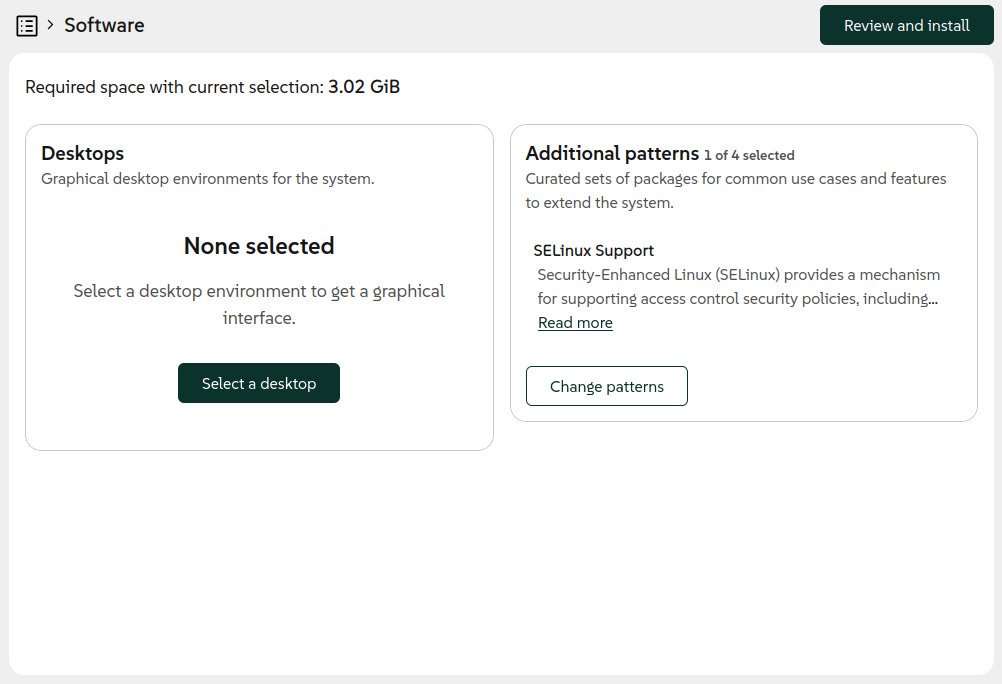
Ahora la situación se presenta con mayor claridad en la pantalla principal de resumen del instalador y en la sección de selección de software, en la que se muestra una información y una advertencia de que no se ha escogido ningún entorno de escritorio.
También se ha aprovechado para repensar varios aspectos de la forma utilizada para seleccionar patrones de paquetes. Ahora funciona de una manera más coherente con el resto de la interfaz de Agama y presenta la información de una forma más útil.
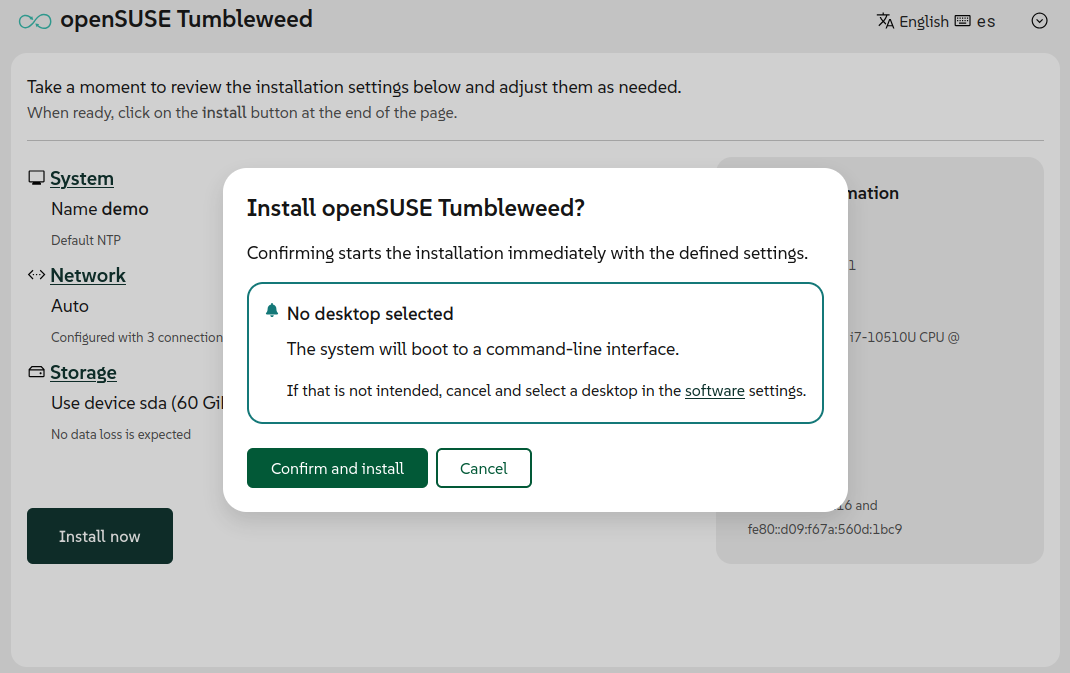
Además de todo eso, se añadió un recordatorio sobre la posible falta de entorno de escritorio en el diálogo de confirmación para algunas distribuciones como openSUSE Tumbleweed, Slowroll o Leap 16.1.
Mejor gestión de redes en la interfaz web
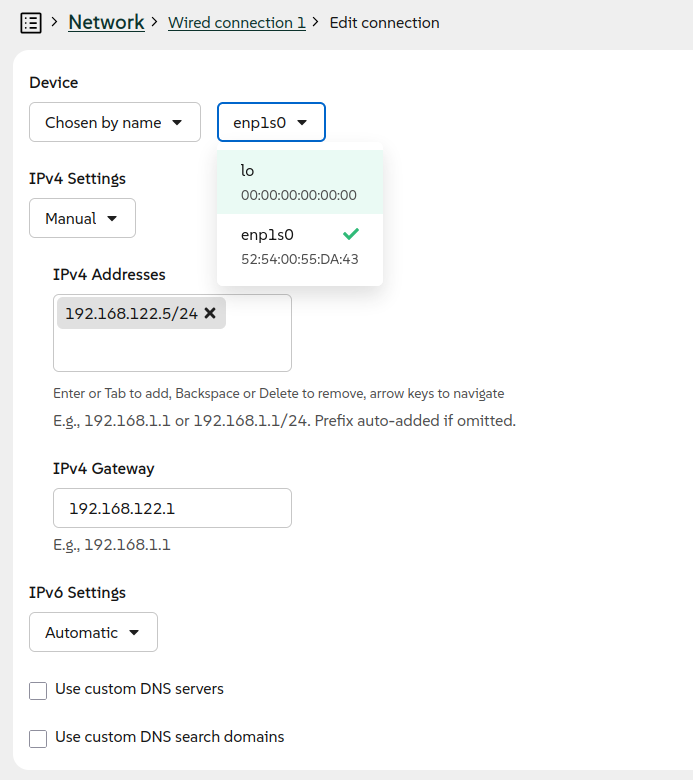
La interfaz de usuario para configurar la red también recibió un nuevo diseño importante en estas versiones 20 y 21. El resultado más visible es un formulario completamente rediseñado para crear y modificar conexiones de red.
Con el nuevo formulario, se mejora la interfaz web con la capacidad de configurar más tipos de conexiones, además de Ethernet y Wi-Fi. En versiones anteriores, era necesario usar el formato de configuración Agama basado en JSON para establecer una conexión de red, un puente o una conexión VLAN.
Con Agama 21 ahora es posible configurar una conexión de enlace o puente directamente desde la interfaz de usuario. Como siempre, Agama ofrece ajustes predeterminados razonables para cada tipo de conexión, pero también permite configurar manualmente varios aspectos avanzados.
Restringir el acceso a la red al instalador
Hablando de instalaciones y red, Agama permite controlar el proceso de instalación a través de la red desde otro ordenador o dispositivo móvil. Pero esa es una característica que podría tener implicaciones de seguridad en algunos escenarios.
Ahora es posible desactivar el acceso remoto con la opción de arranque inst.remote=0. Cuando se utiliza, el instalador solo puede ser accedido localmente desde la máquina que se está instalando.
Mejoras de usabilidad en las herramientas de línea de comandos
Además de todas las nuevas funciones de instalación mencionadas, la interfaz de línea de comandos también recibió varias mejoras para hacerla más útil para seguir el estado actual del proceso de instalación.
Tanto si automatizas el proceso de instalación como si simplemente prefieres trabajar desde el terminal, las herramientas de CLI mejoradas ofrecen una mejor visibilidad de lo que Agama está haciendo en cada momento. Estas mejoras facilitan la monitorización de procesos de instalación, la resolución de problemas y la integración de Agama en tus flujos de trabajo de automatización existentes.
Todo esto, junto con otras mejoras avanzadas como instalar en una configuración LVM existente, o soporte para systemd-boot, así como enlaces de descarga de la ISO, código, etc. lo tienes disponible en el anuncio oficial:
Esta semana se han publicado 6 Snapshots (0514, 0515, 0516, 0518, 0519, y 0520)
Estos son los cambios más relevantes:
AppArmor 5.0.0
KDE Plasma 6.6.5
fwupd 2.1.3
GStreamer 1.28.3
Linux kernel 7.0.6, 7.0.7 & 7.0.9
Ruby 4.0.4
Apache 2.4.67
gpg 2.5.20
pipewire 1.6.5
librsvg 2.62.2
PostgreSQL 18.4
La siguiente snapshot (0514) ya está en control de calidad y, a menos que surja algún problema, debería publicarse hoy mismo.
Y para próximas snapshots, ya se están preparando las siguientes actualizaciones:
Agama 21
Gcc16
Poppler 26.05.0
Si quieres estar a la última con software actualizado y probado utiliza openSUSE Tumbleweed la opción rolling release de la distribución de GNU/Linux openSUSE.
Mantente actualizado y ya sabes: Have a lot of fun!!
This week is quite difficult for me to estimate how busy it was in Tumbleweed, as I was spending the whole week at a conference and, right now, I am on the train on my way back home. Nevertheless, I want to try to summarize for you what has happened during the last week, and what snapshots you have received.
Last week I had already mentioned the upcoming integration of AppArmore 5.0 and the fact that we have observed a new curl profile causing some hiccups. Sadly, beyond that, more profiles were added/improved, which hit quite a few wifi users (wpa_supplicant profile), and we did not catch that in openQA. The main tests on openQA are geared towards the default installation, which is based on SELinux by now. There are a few additional tests intentionally added for AppArmor (which is how we found out about the cURL profile). Secondly, it only appears in combination with WiFi/wpa_supplicant, which we do test in openQA (there mainly for wpa2-enterprise integration) – but as you can imagine, the combination AppArmor/WiFi is missing. Thanks to all the users who reported the issue, and special thanks to Christian for fixing the issue as fast as he did!
Besides that, of course, more has happened. A total of 6 snapshots (0514, 0515, 0516, 0518, 0519, and 0520) were built, tested, and published, shipping these changes:
AppArmor 5.0.0
KDE Plasma 6.6.5
fwupd 2.1.3
GStreamer 1.28.3
Linux kernel 7.0.6, 7.0.7 & 7.0.9
Ruby 4.0.4
Apache 2.4.67
gpg 2.5.20
pipewire 1.6.5
librsvg 2.62.2
PostgreSQL 18.4
The pipeline currently contains these changes/updates:
Vuelven las charlas y talleres a Linux Center València, el espacio creado por Slimbook para la divulgación del Software Libre. De esta forma me complace compartir otras sesión matinal espectacular, un Workshop: IA Agéntica y Automatización Total en Linux Center València en su sede de Paterna. ¡No te lo pierdas!
Workshop: IA Agéntica y Automatización Total en Linux Center València
Ya es un clásico del blog hablar de la compañía valenciana de ensamblaje de dispositivos compatibles 100% con el Software Libre conocida como Slimbook. Tras su primera charla en de IA de abril parece que le han cogido el gusto y de eventos vuelven a promocionar el Software Libre mediante actividades comunitarias que realizan en su Linux Center.
De esta forma el próximo sábado 6 de junio vamos a poder disfrutar de una sesión triple de talleres en la sede de Slimbook en Ronda de la Química s/n, Edificio ABM L’Andana, 7ª planta, Frente a Parque Técnológico 46980 Paterna, Valencia.
El programa es el siguiente:
Workshop: IA Agéntica y Automatización Total
Tras el éxito y el «ambientazo» de nuestra primera jornada, en Linux Center damos un paso más allá. Ya no solo se trata de hablar con la IA, sino de construir sistemas que actúan, deciden y ejecutan.
En este workshop te sumergirás en una experiencia totalmente hands-on. No es teoría: es ingeniería de agentes sobre hardware de alto rendimiento.
Para que la experiencia sea óptima, Slimbook pone a disposición de los asistentes equipos Slimbook One, mini PCs de gran potencia en los que realizaremos todas las prácticas del taller (trabajaremos por parejas). Si prefieres traer tu propio portátil, no hay inconveniente, pero te pedimos que nos avises con antelación para organizar el espacio de trabajo.
09:45 – Apertura de puertas Recepción de asistentes y bienvenida.
10:00 – Ponencia: Arquitecturas Agénticas con OpenClawImpartida por Chaume Sánchez. La nueva generación de automatización ya está aquí. En esta sesión aprenderás a diseñar sistemas inteligentes que no se limitan a procesar texto, sino que actúan. Veremos cómo crear agentes IA conectados a herramientas externas, con gestión de memoria y capaces de resolver flujos complejos utilizando OpenClaw. El objetivo: pasar de «usar la IA» a «construir soluciones reales».
10:40 – Ponencia: Hermes, automatización extrema y privacidad sin compromisosImpartida por Lorenzo Carbonell. ¿Es posible tener una automatización total sin entregar tus datos? En esta charla exploraremos Hermes, una aproximación a la automatización de alto nivel donde la soberanía de la información es el pilar fundamental. Descubre cómo integrar herramientas potentes en tu flujo de trabajo diario manteniendo el control absoluto bajo Linux.
11:00 – Café y Networking Pausa de 30 minutos para compartir impresiones, resolver dudas con los ponentes y conectar con otros miembros de la comunidad.
11:30 – Workshop Práctico: Integración y Cacharreo Hands-on Pasamos a la acción. En esta parte final, trabajaremos por parejas (6 parejas) con equipos Slimbook One para poner en práctica lo aprendido:
¿Qué vas a aprender?
Hardware Pro: Uso de equipos Slimbook One para despliegue local.
OpenClaw Deep Dive: Creación de sistemas con capacidad de toma de decisiones.
Conectividad: Integración de agentes con herramientas externas y mensajería instantánea.
Escalabilidad: Cómo pasar de un experimento personal a una solución profesional.
Información Importante
Metodología: Trabajo por parejas (fomentando la colaboración técnica).
Perfil: Pensado para perfiles técnicos o «makers» con ganas de trastear y llevarse algo funcionando.
Plazas: Si el anterior taller se llenó, este volará. La combinación de hardware dedicado, comunidad y práctica real es limitada. Localización: Linux Center (Grupo Odín). Ronda de la Química s/n Edificio ABM L’Andana, 7ª planta Frente a Parque Técnológico 46980 Paterna, Valencia
Tras un parón nada habitual de un mes me congratula presentaros el episodio 73 de KDE Express, titulado » Kubuntu 26.04 y Studio por fin traen Plasma 6 a las masas» donde David Marzal no obsequia con el repaso de las últimas noticias del mundo KDE y del Software Libre en general.
Episodio 73 de KDE Express: Kubuntu 26.04 y Studio por fin traen Plasma 6 a las masas
Comenté hace ya bastante tiempo que había nacido KDE Express, un audio con noticias y la actualidad de la Comunidad KDE y del Software Libre con un formato breve (menos de 30 minutos) que complementan los que ya generaba la Comunidad de KDE España, aunque ahora estamos tomándonos un tiempo de respiro por diversos motivos, con sus ya veteranos Vídeo-Podcast que todavía podéis encontrar en Archive.org, Youtube, Ivoox, Spotify y Apple Podcast.
De esta forma, a lo largo de estos 73 episodios, promovidos principalmente por David Marzal, nos han contado un poco de todo: noticias, proyectos, eventos, etc., convirtiéndose (al menos para mi) uno de los podcast favoritos que me suelo encontrar en mi reproductor audio.
En palabras de David:
Temas tratados en el episodio 73: Krita, Kookbook, Drawy, Kubuntu, Ubuntu Studio, Phoronix, GNOME, Plasma, FreeBSD, EndeavourOS, KDE Linux, Thunderbird, Firefox, OsmAnd…
Si no ves nada tras esta línea, es que tu app no sabe leer bien el feed RSS, avísales o prueba otra
Apps
Krita 5.3 y 6.0 lanzadas. En cuanto a funcionalidades son prácticamente idénticas, solo que la rama 6.0 es la nueva que usa Qt6 y más Wayland, y puede ser menos estable que la de Qt 5. Las novedades, como no las controlo, simplemente os dejo el enlace donde las explican mejor que yo.
Uno para poder modificar el quantum y la frecuencia de muestreo de PipeWire directamente.
Y otro que muestra el título de la ventana activa al estilo macOS, para uno de los 3 layouts disponibles.
Skanpage sustituye a Skanlite para escanear documentos.
Comparativa de Phoronix en la que KDE Plasma 6.6 sale muy bien parada respecto a GNOME 50. Y Wayland sobre X11 es una pequeña mejora.
Dotfiles para transformar tu ArchLinux con Plasma.
El plan de FreeBSD para ofrecer Plasma en el menú de instalación se retrasó de la 15.0 a la 15.2.
Dedoimedo hace una review bastante larga y Wayland-hater de Kubuntu 26.04. Su conclusión es que está mucho mejor que las anteriores, pero sigue soñando con un mundo sin bugs o regresiones.
Y, para compensar, nos enseña lo potente que es la opción de aplicar opciones de ventana en Plasma.
EndeavourOS ya instala por defecto Plasma Login Manager en vez de SDDM.
Managing System Extensions on openSUSE MicroOS with sysextmgrcli
If you are running openSUSE MicroOS, you already know the drill: the root filesystem is read-only,
and transactional updates are the law of the land.
But what happens when you need to add software or system extensions without rebooting or messing with
your base OS layers?
E.g. You need strace or gdb to debug a running application, but a reboot to install this tools would
change the situation.
Enter System Extensions (sysext images) and the utility designed to make them manageable: sysextmgrcli.
What is sysextmgrcli?
At its core, sysextmgrcli is a command-line client for managing systemd-sysext images and has been written
by Thorsten Kukuk. It is designed specifically to play nice with the atomic nature of MicroOS.
Instead of forcing you to use sudo for every query, it talks to a background daemon (sysextmgrd) via
Varlink. This architecture allows unprivileged users to list existing system extension images without
needing root permissions, while the daemon handles the heavy lifting of downloads and verification via systemd-pull.
For security reasons, root provileges are still required for installing or updating sysext images.
The Architecture: Smart Snapshots
One of the cleverest things about sysextmgrcli is how it handles storage to be efficient and “rollback-safe”:
/var/lib/sysext-store: This is where the actual image files live. Since /var is a separate subvolume
shared across all Btrfs snapshots, you only store the image once, saving disk space. If you have no network available,
that’s the location for storing offline or even own build sysext images via e.g. an USB device.
/etc/extensions: This directory contains symlinks to the images in the store. Because /etc is part of
your root snapshot, the extensions are tied to your current system state.
Why does this matter? If you perform a system rollback, your symlinks roll back too. This ensures the active
sysext images always match the OS version you are currently booted into.
Essential Commands
Getting started is straightforward. Here are the primary commands you’ll use to manage your extensions:
1. Listing and Checking Images
Want to see what’s available or if your images are compatible with your current OS version?
# List all images and report compatibility
sysextmgrcli list

# Check for updates and verify compatibility
sysextmgrcli check
2. Installing New Extensions
You can install by providing a name and a source URL. The tool automatically handles SHA256 verification and
checks if it fits your OS.
Updates are handled by comparing local files against remote manifests. If a newer version matches your current snapshot, it gets pulled down and symlinked.
# Update existing images to the latest compatible versions
sysextmgrcli update

# Clean up: Remove images in the store that are no longer referenced by any snapshot
sysextmgrcli cleanup
The “Activation” Catch
It is important to note that sysextmgrcli is a manager, not an activator. It handles the logistics: downloading, version checking, and symlinking. To actually “plug in” the extensions to your running system, you still use standard systemd-sysext commands:
Manual activation: systemd-sysext merge
Manual deactivation: systemd-sysext unmerge
Enable at boot: systemctl enable systemd-sysext.service
Available default system extention (sysext) images:
Just call sysextmgrcli install git ; systemd-sysext merge and use it…
You do not need ‘git’ anymore on your system ?
Just call systemd-sysext unmerge and it is not available anymore…
sysextmgrcli bridges the gap between static immutable infrastructure and the need for flexible system additions. By leveraging the Btrfs directory structure of MicroOS, it ensures your system remains clean, version-synced, and easy to manage.
We know, we know. We skipped a blog post for version 20 and you may be wondering what happened. The
truth is that we were heads-down working on several significant improvements and decided to focus on
shipping rather than writing. But don't worry - this release announcement covers the most relevant
changes introduced in both versions 20 and 21.
In exchange for the delay we offer you an extensive list of impressive enhancements, covering
several aspects of the installation experience and including some long-awaited features. Let's go
through the most visible novelties.
And few things are more visible in a GNU/Linux system than its desktop environment. During
installation, most openSUSE distributions provide a wide range of desktops to select from. But
openSUSE does not endorse any of those environments as the default option. As a consequence, the
user needs to make a conscious decision during installation.
That was not obvious enough in previous versions of Agama. As a result, it was too easy to end up
installing a system with no graphical interface at all. The resulting text-based system could be
daunting for many users, especially newbies to openSUSE or GNU/Linux in general.
Now the situation is more clearly presented in the main summary screen of the installer and in the
software selection section.
We took the opportunity to rethink several aspects of the form used to select patterns. Now it works
in a way that is more consistent with the rest of the Agama interface and it presents the
information in a more useful way.
In addition to all that, a reminder about the potentially missing desktop was added in the
confirmation dialog for some distributions like openSUSE Tumbleweed, Slowroll or Leap 16.1.
Usability improvements go beyond the software management. The user interface for configuring the
network also received some serious attention in these releases. The most visible result is a
completely redesigned form to create and modify network connections.
With the new form, we are now in the position to enrich the web interface with the ability to
configure more types of connections, in addition to Ethernet and Wi-Fi. In previous releases, it was
necessary to use the JSON-based Agama configuration format in order to setup a network bonding, a
bridge or a VLAN connection. With Agama 21 it is now possible to configure a bonding or bridge
connection directly from the user interface. As usual, Agama offers reasonable default settings for
each kind of connection but it also allows to setup several advanced aspects manually.
Support for VLAN connections is on its way and will be included in the upcoming version of the Agama
web interface. Hopefully these new features will fulfill the wishes of those users who have been
requesting a more powerful user interface to configure the network.
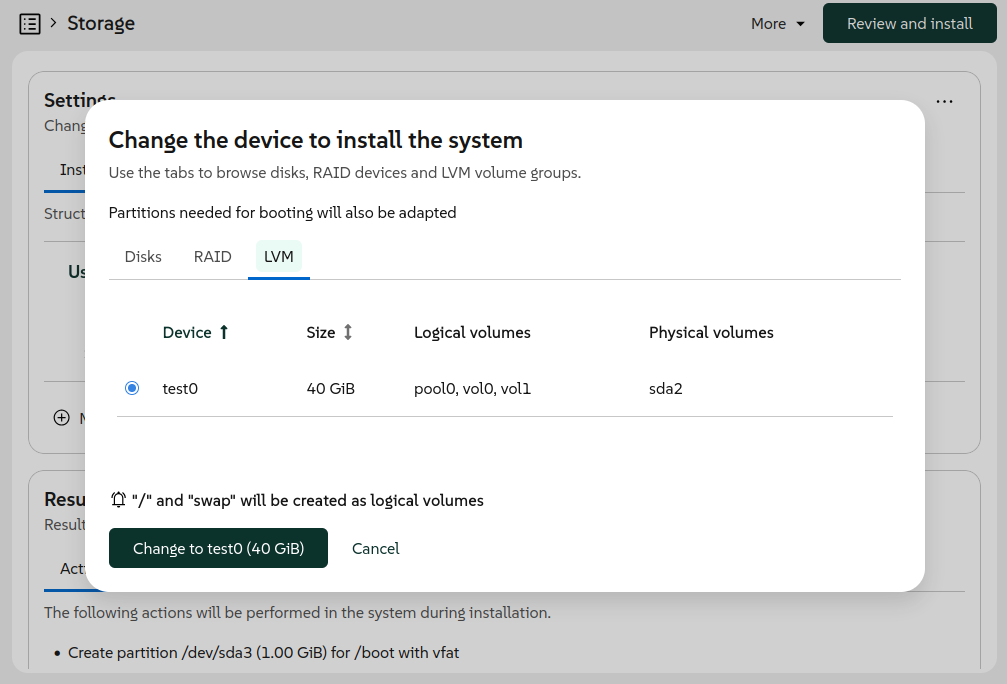
But if there is a feature that has been long awaited by some users, that is the ability to reuse
existing LVM volume groups and logical volumes. If you had an existing LVM setup on your system,
previous versions of Agama couldn't take advantage of it. Now it is possible thanks to a new feature
that, as usual, is built at two levels.
On the one hand, the JSON configuration format was expanded to support all kind of operations with
existing volume groups and logical volumes. That includes expanding the volume groups with new
physical volumes and also mounting, formatting and resizing all kind of logical volumes. It is even
possible to create new thin volumes in a reused thin pool.
On the other hand, the web user interface now allows to select an existing volume group as
destination for the installation and also as additional device to create or reuse more logical
volumes.
The user interface also makes it possible to define what to do with the current logical volumes in
the same way that it can be done for the current partitions of a disk.
So far, Agama has always installed Grub2 as boot loader for all distributions. At least, that was
the idea, although Systemd-boot slipped through the cracks in some openSUSE Tumbleweed installations
due to changes introduced in the internals shared between YaST and Agama.
But in EFI environments, it seems there is a trend among many
Linux distributions to adopt the
UAPI Boot Loader Specification.
And we do not want Agama to fall behind.
Although Grub2 is still used unconditionally in many scenarios, now every distribution ("product" in
Agama's jargon) can define which boot loader to install in some supported EFI systems. Products can
choose between Grub2, Systemd-boot or openSUSE's Grub2-BLS. In the latter two cases, Agama will
adhere to the mentioned UAPI Boot Loader Specification.
Based on the chosen boot loader, Agama automatically adapts the partitioning and uses the
corresponding methodology and tools to configure the TPM to automatically unlock encrypted devices,
if the user decided to do so.
For products that still rely on Grub2, like the beta versions of openSUSE Leap 16.1 and SUSE
Enterprise Linux Server 16.1, the user can force the usage of Systemd-boot where possible by
starting the installation with the boot argument inst.systemd_boot_preview=1.
As most of our readers surely know, the Network Time Protocol (NTP) is typically used to set the
date and time of computers through the network connection. That normally works out of the box if the
network offers access to the Internet or if the address of a local NTP server is provided as part of
the automatic network configuration (eg. using DHCP). But sometimes some manual configuration is
needed.
Agama now allows to explicitly set the list of NTP sources (pools, servers and peers) using the JSON
format. It also supports automatic conversion from the corresponding ntp-client section of an
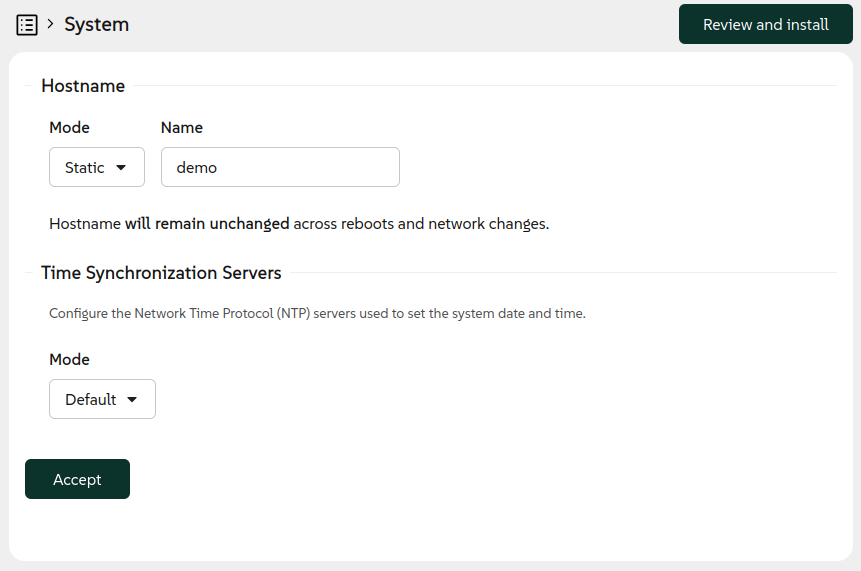
AutoYaST profile. Last but not least, the web interface now offers a new "System" section
accommodating the configuration of both the hostname and the NTP sources.
But there is an important aspect to consider. In order to establish secure network connections, the
date and time must be aligned with the date and time of the other system and all the involved
certificates. For network-based installations, in which secure connections may be needed already in
order to fetch the installation media, that implies the NTP configuration must happen at a very
early stage of the booting process. For that, the installation media now supports the special
boot argumentrd.ntp that
allows to setup the NTP sources.
Agama will take care to persist to the installed system any setting configured through Agama itself
or by using the rd.ntp boot option.
Speaking of installations and network, you already know that by default Agama allows to control the
installation process over the network from another computer or mobile device. But that is a feature
that could come with security implications in some scenarios.
Now it is possible to disable the remote access with the inst.remote=0 boot option. When used, the
installer can be accessed only locally from the machine being installed.
Apart from all the mentioned new installer features, the command-line interface also received
several enhancements to make it more useful for tracking the current state of the installation
process. Whether you are automating installations or just prefer working from the terminal, the
improved CLI tools provide better visibility into what Agama is doing at any given moment. These
improvements make it easier to monitor installations, debug issues and integrate Agama into your
existing automation workflows.
As you can see, we have not been idle lately. After these two feature-packed releases we are
planning to shift our focus a bit more toward stabilization and polish. That doesn't mean
development is slowing down, though! We still plan to release Agama 22 in about a month, and it will
include some cool new features alongside the stability improvements.
El incansable trabajo de promoción que está realizando Nate (ahora con ayuda de otros desarrolladores) en su blog sigue su ritmo. Cada semana hace un resumen de las novedades más destacadas, pero no en forma de telegrama, sino de artículo completo. Su cita semanal no falla y desde hace un tiempo que le voy a siguiendo semana tras semana, traduciendo sus artículos al castellano utilizando los magníficos traductores lo cual hará que la gente que no domine el inglés esté al día y que yo me entere bien de todo. Bienvenidos pues a «Lanzamiento de la beta de 6.7» de «Esta semana en Plasma«. Espero que os guste.
Lanzamiento de la beta de 6.7 – Esta semana en Plasma
Nota: Artículo original en Blogs KDE. Traducción realizada utilizando Perplexity. Esta entrada está llena de novedades de la Comunidad KDE. Mis escasos comentarios sobre las mejoras entre corchetes.
¡Bienvenido a una nueva edición de This Week in Plasma! Esta semana publicamos una beta pública de Plasma 6.7, lista para ser probada. Se coló una función de última hora para el teclado virtual… y con eso, ahora queda congelado para nuevas funciones, y la atención se centrará en pulirlo y corregir errores durante el próximo mes o dos. Así que vamos a echar un vistazo:
Mejoras notables
Plasma 6.7
Ahora puedes configurar qué hace que aparezca el teclado virtual de Plasma. (Kristen McWilliam, Xaver Hugl y Yelsin Sepulveda, kwin MR #9206 y plasma-workspace MR #6548)
La función por ventana “Ocultar de la retransmisión de pantalla” ahora también oculta la ventana de las capturas de pantalla estáticas. Se ha renombrado en consecuencia. (Elliot Flint, kwin MR #9171) [Esto está bien para hacer directos y poder tener el guion delante].
Ahora puedes permitir que una aplicación que controla los dispositivos de entrada lo haga siempre que lo solicite, en lugar de tener que autorizarla cada vez. (David Redondo, xdg-desktop-portal-kde MR #496 y flatpak-kcm MR #175)
Plasma 6.8 – ¡Primeras novedades!
¡El teclado virtual de Plasma ahora tiene un diseño y modo de funcionamiento dedicados para el idioma amárico! (Abenezer Wesenseged, plasma-keyboard MR #118) [KDE quiere ser para todo el mundo].
La página Redes de Ajustes del sistema ahora te permite configurar puntos de acceso inalámbricos para seleccionar automáticamente un canal. (Mickaël Thomas, plasma-nm MR #523)
Mejoras en la interfaz de usuario
Plasma 6.6.6
Se han hecho legibles para el lector de pantalla Orca un par de botones de la página Fuentes de Ajustes del sistema. (Nicolas Fella, KDE Bugzilla #519471)
Plasma 6.7
Discover ahora agrupa por defecto los elementos de su página “Instalado” en categorías. ¡Esto hace mucho más fácil encontrar lo que buscas! (Tobias Fella, KDE Bugzilla #423344) [Gestionar el maremagnum de aplicaciones disponibles hace que se deba ir puliendo todas las opciones].
Las notificaciones de Plasma ahora se deslizan desde fuera de la pantalla en lugar de desvanecerse al aparecer. Se ve realmente bien y ayuda a llamar la atención sobre las nuevas notificaciones sin ser demasiado llamativo. (Vlad Zahorodnii, kwin MR #9139) [Esto puede ser interesante].
Se ha mejorado la capacidad del Lanzador de aplicaciones Kickoff para abrir el elemento que buscaste con una pulsación muy rápida de la tecla Intro después de escribir muy deprisa. (Christoph Wolk, KDE Bugzilla #519579)
Gwenview ahora está configurado como el visor SVG predeterminado de Plasma, por lo que estos archivos ya no se abrirán con GIMP por defecto. (Darafei Praliaskouski, plasma-desktop MR #3712) [Eso es integración, no obstante, seguro que se puede cambiar].
Se han realizado varias mejoras en el flujo de trabajo para desbloquear la sesión usando una tarjeta inteligente. (Andreas Lundqvist, kscreenlocker MR #310)
El ajuste de ventana “Mantener por encima de las demás” se ha movido al nivel superior del menú contextual de la barra de título para que puedas acceder a él más fácilmente. Se consideró que probablemente sea uno de los elementos más usados, así que debería estar más a mano. (Vlad Zahorodnii, kwin MR #9201) [Así es].
Corrección de errores importantes
[No comento las correcciones de errores ya que son bastante evidentes].
Plasma 6.6.6
Se ha corregido un problema que hacía que Plasma se bloqueara al reiniciarse usando systemctl restart --user plasma-plasmashell.service en sistemas con varias pantallas y varios paneles. (Nate Graham, KDE Bugzilla #515234)
Se ha corregido un problema que hacía que Plasma se bloqueara al cambiar de Actividades usando el widget Selector de actividades en sistemas con varias pantallas. (Marco Martin, KDE Bugzilla #520065)
Ahora, al clonar un panel, también se copian correctamente los iconos de los lanzadores independientes. (Marco Martin, KDE Bugzilla #519502)
La aplicación Monitor del sistema y los sensores ya no siguen informando de una actividad de red fantasma cuando el sistema no está conectado a ninguna red. (Kartikeya Tyagi, KDE Bugzilla #508516)
Escribir en el escritorio para invocar KRunner ahora también funciona al pulsar teclas del teclado numérico. (Marco Martin, KDE Bugzilla #504304)
Las reseñas de aplicaciones en Discover ya no se duplican si instalas, desinstalas y vuelves a instalar la aplicación mientras Discover permanecía abierto. (Tobias Fella, discover MR #1325)
Frameworks 6.27
Se ha corregido un problema de diseño que a veces podía romper Discover por completo cuando el idioma del sistema estaba configurado en árabe, chino o japonés. (Akseli Lahtinen, KDE Bugzilla #517091)
El repositorio de Breeze Icons ya no utiliza de forma inapropiada iconos de terceros con copyright. (Nate Graham y Martin Sh., KDE Bugzilla #487595)
Se ha corregido un problema sutil en el diálogo común del navegador de iconos que impedía seleccionar un icono estándar del tema de iconos activo después de haber elegido primero un icono desde una ubicación específica del disco. (Christoph Wolk, KDE Bugzilla #520007)
Mejoras de rendimiento y aspectos técnicos
Plasma 6.7
Se ha implementado soporte para la “codificación progresiva” en el servidor de escritorio remoto integrado de Plasma, que puede usarse cuando un cliente no soporta la codificación H.264, no dispone de sus códecs o cuando la codificación progresiva resulta más eficiente en ancho de banda. (David Edmundson, krdp MR #165 y krdp MR #173)
Se ha mejorado el rendimiento y reducido la latencia del servidor de escritorio remoto integrado de Plasma. (David Edmundson, krdp MR #170)
Se ha implementado soporte para la versión 3.2 del protocolo Wayland Text Input. (David Edmundson, kwin MR #8970)
Cómo puedes ayudar
KDE se ha vuelto importante en el mundo, y tu tiempo y contribuciones han ayudado a llegar hasta aquí. A medida que crecemos, necesitamos tu apoyo para mantener KDE sostenible.
Más allá de eso, puedes ayudar a KDE involucrándote directamente en cualquier otro proyecto. Donar tiempo es realmente más impactante que donar dinero. Cada colaborador marca una gran diferencia en KDE — ¡no eres un número ni un engranaje en una máquina! No tienes que ser programador, existen muchas otras oportunidades.
También puedes ayudar haciendo una donación. Esto ayuda a cubrir costes operativos, salarios, gastos de viaje para colaboradores y, en general, a mantener KDE llevando Software Libre al mundo.
How can you learn syslog-ng? There are many possibilities, depending on your time and budget. Possibilities range from tutorial series through reading the documentation to instructor-led training. Find out which one is for you!
Hoy me salgo un poco del mundo KDE para promocionar un nuevo evento que nace. Se trata de la I Jornada sobre Software Libre e Inteligencia Artificial Abierta que se va a celebrar en Madrid el 6 de julio (algo que me alegra porque pienso que promocionamos poco los eventos que se hacen en la capital).
I Jornada sobre Software Libre e Inteligencia Artificial Abierta
Queramos o no la IA está aquí y no se va a ir. Es imparable como lo fue la aparición de la web, las redes sociales, la Wikipedia o el Software Libre.
Al fin y al cabo, es una herramienta que podemos utilizar para hacer cosas mejores. Eso si, siempre y cuando se utilice con cabeza, con espíritu crítico y sin una fe ciega. Si no se hace así, por experiencia a varios niveles, los resultados no son buenos.
Es por ello que debemos conocer su funcionamiento, sus opciones, sus limitaciones y sus aspectos éticos; pero sobre todo, como desde el Software Libre podemos utilizar de forma efectiva todo su potencial y como ponerlo al servicio de todo el mundo… en caso contrario veremos crecer otro muro social y otra desigualdad
Por esta razón me ha encantado encontrarme con seLIA, un nuevo evento que se celebrará el 6 de julio en Madrid, una jornada dirigida a personas desarrolladoras, investigadoras, estudiantes, profesorado, profesionales, activistas del software libre y cualquier persona interesada en la Inteligencia Artificial desde una perspectiva abierta.
En palabras de los organizadores:
La I Jornada sobre Software Libre e Inteligencia Artificial Abierta invita a la comunidad a presentar propuestas para compartir conocimientos, experiencias, herramientas e ideas en torno a la intersección entre software libre e IA abierta.
Buscamos contribuciones variadas, tanto técnicas como reflexivas, que fomenten un ecosistema de inteligencia artificial más abierto, transparente y colaborativo.
Y en este momento están en la fase de búsqueda de ponencias que traten sobre alguno de estos temas:
Software libre aplicado directamente a la Inteligencia Artificial
Modelos de IA «abiertos» (al menos con los pesos disponibles públicamente)
Herramientas, bibliotecas o plataformas libres para IA
Experiencias prácticas de uso de IA libre u abierta
Desarrollo de modelos, infraestructuras o flujos de trabajo abiertos
Casos de adopción en empresa, universidad, administración o comunidades
Aspectos éticos, sociales, legales o filosóficos de la IA abierta
Consejos e ideas para iniciarse en IA con software libre
Buenas prácticas para compartir modelos, datos y resultados
Eso si, las charlas presentadas deben cumplir uno de estos dos requisitos:
Tratar sobre software libre directamente relacionado con IA
Tratar sobre modelos de IA abiertos, entendiendo como mínimo que los pesos estén disponibles públicamente
Así que ya sabes, si tienes una propuesta no te duermas en los laureles, tienes hasta el 15 de junio.

 Member
 Victorhck



Información Importante

 Información Importante