
Leap Micro Beta Available for Testers
People browsing through openSUSE’s websites may spot something new on get.opensuse.org.
Leap Micro, which is currently showing the 5.2 beta version, is for containerized and virtualized workloads. It is immutable and ideal for host-containers and described as an ultra-reliable, lightweight operating system that experts can use for compute deployments. The community version of Leap Micro is based on SUSE Linux Enterprise Micro and leverages the enterprise hardened security of twins SUSE Linux Enterprise and openSUSE Leap, which merges this to a modern, immutable, developer-friendly OS platform.
Leap Micro has several use cases for edge, embedded/IoT deployments and more. Leap Micro is well suited for decentralized computing environments, microservices, distributed computing projects and more. The release will help developers and IT professionals to build and scale systems for uses in aerospace, telecommunications, automotive, defense, healthcare, robotics, blockchain and more. Leap Micro provides automated administration and patching.
Leap Micro has similarities of MicroOS, but Leap Micro does not offer a graphical user interface or desktop version. It is also based on SUSE Linux Enterprise and Leap rather than a variant of Tumbleweed, which MicroOS bases its release on.
Leap release manager Luboš Kocman announced the availability of the images on the factory mailing list.
Users wanting to test out Leap Micro should look at the openSUSE wiki page. Those using a preconfigured image with Raspberry Pi or Intel bases should view the combustion and ignition documentation. Users will need to label the volume name ignition on the usb-drive. This can be done via disk utility (format partition) or sudo e2label /dev/sdY ignition. If the config.ign file has the following: passwordHash : O9h4s2UUtAtok, the password will be password. Leap Micro has the current openSUSE default, which is PermitRootLogin = without-password. Therefore users need to supply a pubkey via combustion; this is a known issue and will be fixed.
Users should know that zypper is not used with Leap Micro, but transactional-update is used instead.


 Member
 Victorhck
Parcheando el reproductor moc en openSUSE
Veamos cómo parchear el reproductor de música moc en openSUSE para solucionar un bug

Ya hace un tiempo escribí en el blog sobre el reproductor de música moc para la terminal:
Es mi reproductor preferido, porque es sencillo, ligero y hace lo que tiene que hacer. Permitir reproducir mi música local, así como música en streaming de servicios que utilizo como soma.fm.
Pero desde hace unas semana me dejó de funcionar. Al ejecutarlo me devolvía este error:
*** buffer overflow detected ***: terminated
Durante un tiempo de resigné, volviendo a utilizar Amarok como reproductor y esperando que alguna nueva actualización de Tumbleweed devolviera la funcionalidad a este reproductor.
Pero el tiempo pasaba y el error no se solucionaba, ¿qué podía hacer yo con mis pocos conocimientos técnicos? Finalmente conseguí parchear moc para openSUSE gracias a usuarios con más conocimientos técnicos que aportan al software libre, veamos cómo.
Lo primero es hacer una búsqueda del error en tu buscador de internet favorito que respete tu privacidad del erro. A mí me llevó a un bug reportado en Arch que hacía referencia a este mismo error en esta distribución de GNU/Linux.
En ese error un usuario llamado Joan Bruguera, con conocimientos técnicos suficientes para la tarea, había investigado sobre la causa del error, provocado por una actualización de glibc a la versión 2.35.
Este mismo usuario había creado un parche que solucionaba el problema. En el mismo reporte se indicaban los pasos para aplicar el parche en Arch, pero claro para openSUSE Tumbleweed la cosa sería distinta.
Para openSUSE, sería cuestión de descargar el código fuente, aplicar el parche en el archivo correspondiente y compilar de nuevo todo mediante ./configure && make install para conseguir que moc volviera a funcionar en mi equipo.
Descargué los archivos del código fuente, apliqué el parche en el archivo utf8.c y me dispuse a compilar el código de nuevo. Pero me faltaban algunas librerías necesarias para compilar… La primera libdb estaba en mis repositorios, pero otra llamada libpopt no aparecía. Había una llamada lipopt0 pero como tenía otro nombre aquello no iba a funcionar.
Durante este proceso de aprendizaje e investigación, envié lo que había encontrado al encargado del mantenimiento de moc y abrí un bug bugzilla de openSUSE.
El encargado de moc me respondió muy amablemente e intercambiamos algunos correos sobre el bug, el parche reportado por Joan, las dificultades de compilar el software en mi equipo, etc.
Como no podía compilar en mi equipo, decidí hacerlo en el servicio de compilación que usa openSUSE para crear los paquetes de software llamado Open Build Service y con una instancia montada que puedes encontrar en build.opensuse.org donde la comunidad crea todo el software que se empaqueta en openSUSE para distintas versiones y arquitecturas.
Lo primero fue buscar el software en cuestión. Encontrado el proyecto puedes «forkearlo» del original en una versión derivada en un repositorio personal.
Esto es algo similar a un repositorio git en un servicio de hospedaje onlines como GitLab, Codeberg o GitHub. Hay un repositorio principal, y lo puedes «forkear» a tu espacio propio.
En mi repositorio personal, subí el parche creado por Joan, y modifiqué el archivo «spec» que sirve como guía para indicar al servicio de compilación qué tiene que hacer y qué paquetes son necesarios para compilar. En ese archivo le indiqué que también tuviera en cuenta el nuevo parche creado.
Una vez terminado, el servicio compila todo el software y crea los binarios y paquetes listos para usarse en openSUSE para diferentes versiones y diferentes arquitecturas. También es posible crear paquetes para otras distribuciones como Debian, etc.
Terminó de compilar con éxito todo, así que lo siguiente es hacer una petición para que el paquete de tu repositorio personal sea admitido en el repositorio principal si el mantenedor del paquete de openSUSE lo ve conveniente.
Tras algunos comentarios para corregir ciertos problemas y modificar otros archivos de información, ha sido admitido, así que próximamente todas las personas que usen moc en openSUSE y que sufrieran este problema verán que se ha solucionado.
Este es a grandes trazos el procedimiento seguido y cómo un tipo como yo con pocos conocimientos técnicos puede aportar pequeñas mejoras en el software libre.
No quiere ser este texto un baño de mira qué cosas hago. La principal razón de este artículo es tratar de incentivar a que tú, lector o lectora de este blog, que disfruta del software libre te animes a reportar errores o malfuncionamientos que encuentres en tu distribución de GNU/Linux o en el software que utilices.
Que reportes por los medios que sean los adecuados en cada caso, correo o servicios de seguimiento de errores. Que lo hagas siempre siguiendo las elementales reglas de cortesía, siempre con buen ánimo y aportando toda la información técnica que puedas.
También comentar, que muchas cosas no se solucionan al instante, y que hay muchas personas que mantienen el software de manera no profesional y lo hacen quitándose tiempo personal.
Así que paciencia y buenas palabras e información técnica serían los tres ingredientes de los que me gustaría que te quedases de este artículo.
Si has llegado hasta este párrafo, te agradezco la lectura y espero que te haya resultado interesante. He obviado detalles técnicos, mis conocimientos son limitados, pero podría extenderme en algunos si tienes interés.
Agradecer a Joan el parche, agradecer al mantenedor de moc y a las personas con más conocimientos técnicos que ayudan de manera constructiva a solucionar errores que cometemos quienes andamos más escasos de conocimientos técnicos.
Enlaces de interés
- https://moc.daper.net/
- https://bugs.archlinux.org/task/74041
- https://bugzilla.opensuse.org/
- https://github.com/joanbm
- https://build.opensuse.org

Publicado el programa de charlas de Linux APP Summit 2022
Como sabrán los seguidores del blog, este mes de abrl se celebrará en Rovereto, Italia, Linux App Summit 2022, evento importante y ya consolidado para la evolución de los escritorios Libres. Hoy me congratula anunciar que ha sido publicado el programa de charlas de Linux App Summit 2022 en el que aparecen grandes nombres de desarrolladores tanto de KDE como de GNome.
Publicado el programa de charlas de Linux APP Summit 2022
El 29 y 30 de abril de 2022, en Rovereto se va a celebrar la Linux App Summit (LAS), un evento que fue sido acogido con grandes expectativas entre la Comunidad Linuxera y que año tras años va cumpliéndolas. Y es que la reunión, aunque solo sea por dos días, de desarrolladores de KDE y de Gnome bajo un mismo evento crea unas sinergías importantes para el crecimientos de estos entornos de trabajo … y de cualquier otro que para eso los códigos se comparten.
Hay que recordar,que el objetivo de LAS es acelerar el crecimiento del ecosistema de aplicaciones Linux reuniendo a todos los involucrados en la creación de una gran experiencia de usuario de aplicaciones Linux. En otras palabras, que los desarrolladores de los dos grandes escritorios libres intercambien ideas con el fin de mejorar ambos proyectos.
El Call For Papers (CFP), o la presentación de charlas, finalizó hace un tiempo y el hace ben poco fue anunciado el programa de charlas que podéis consultar en la página web del evento. Hay que destacar este año se empieza con una modalidad híbrida, que combinará sesiones presenciales y a distancia, incluyendo charlas, paneles y preguntas. Además, los vídeos de LAS se transmitirán en directo en su canal de YouTube.

Es muy difícil elegir charlas, no obstante me arriesgo a elegir unas cuantas de cada día a las que asistiría gustosamente, sin desmerecer a las demás:
- Flathub: now and next por Jorge Castro et al
- Getting Good: Gaming on Linux por Heather Ellsworth
- Your app on the Steamdeck
- Screen sharing in online meetings on Wayland
- How we develop apps in KDE por Aleix Pol
- Energy Conservation and Energy Efficiency with Free Software por Joseph De Veaugh-Geiss
- The New Architecture for Printing and Scanning – What Application and GUI Developers Need to Know por Till Kamppeter
La entrada Publicado el programa de charlas de Linux APP Summit 2022 se publicó primero en KDE Blog.

OBS Workflows, At Your Service!
FLISOL 2022 de Oviedo, 23 de abril
Para que no se diga que hay favoritismos. Si ayer hablaba de FLISOL Tenerife 2022 que se celebrará el 23 de abril, hoy toca hablar de FLISOL 2022 de Oviedo que también lo celebrar el 23 de este mes. Una nueva oportunidad de iniciarse en el mundo del Software Libre y conocer esa maravillosa Comunidad.
FLISOL 2022 de Oviedo, 23 de abril

Igual que ayer, antes de empezar con el meollo del artículo es interesante hacer una breve introducción. Y es que cada año, desde 2008, el cuarto sábado de abril se organizan unas jornadas de difusión de Software Libre de forma simultánea en multitud de lugares del planeta. Este evento recibe el nombre de FLISOL y como principal objetivo es promover el uso del software libre mediante charlas y eventos.
Hace ya 12 años se organizó por primera vez en Oviedo (el primero de Europa), por lo que en 2022 será la 13ª vez que se realice. Y es que lo gratificante de la experiencia y la importancia de apoyar y difundir el Software Libre en nuestro entorno, nos motiva a continuar año tras año.
Esta edición de FLISOL 2022 de Oviedo está organizado por Pica Pica Hacklab y todavía no está concretado el programa, así que estad atentos a su página web oficial.
Más información: FLISOL 2023 de Oviedo
¿Qué es Flisol?
Para los que todavía no conozcan Flisol, se trata de un evento «… de difusión de Software Libre más grande en Latinoamérica y está dirigido a todo tipo de público: estudiantes, académicos, empresarios, trabajadores, funcionarios públicos, entusiastas y aun personas que no poseen mucho conocimiento informático…»
La asistencia es gratuita y su principal objetivo es promover el uso del software libre, dando a conocer al público en general su filosofía, alcances, avances y desarrollo.
Tenemos un canal de telegram donde los asistentes al evento recibirán información actualizada GRUPO DE TELEGRAM PARA ASISTENTES.
La entrada FLISOL 2022 de Oviedo, 23 de abril se publicó primero en KDE Blog.
FLISOL Tenerife 2022 se celebrará este abril
Me complace compartir con todos vosotros que FLISOL Tenerife 2022 se celebrará este abril, concretamente el 23 de este mes. Una nueva oportunidad de iniciarse en el mundo del Software Libre y conocer esa maravillosa Comunidad.
FLISOL Tenerife 2022 se celebrará este abril
Antes de empezar con el meollo del artículo es interesante hacer una breve introducción. Y es que cada año, desde 2008, el cuarto sábado de abril se organizan unas jornadas de difusión de Software Libre de forma simultánea en multitud de lugares del planeta. Este evento recibe el nombre de FLISOL y como principal objetivo es promover el uso del software libre mediante charlas y eventos.
AC, antes del Covid, este evento tenía unas 3 o 4 sedes en España, siendo Tenerife una de las clásicas (el año pasado ya hablé de su evento). Es por ello que me complace anunciar que el próximo sábado 23 de abril de 2022, de 09:00 a 14:00h, desde la Oficina de Software Libre de la Universidad de La Laguna se organizan unas jornadas de instalación de software libre en el Aula Polivalente del Edificio Central, consultar el mapa en Web: https://flisol.info/FLISOL2022/Espana/Tenerife Edificio de Servicios al Alumnado de Anchieta.
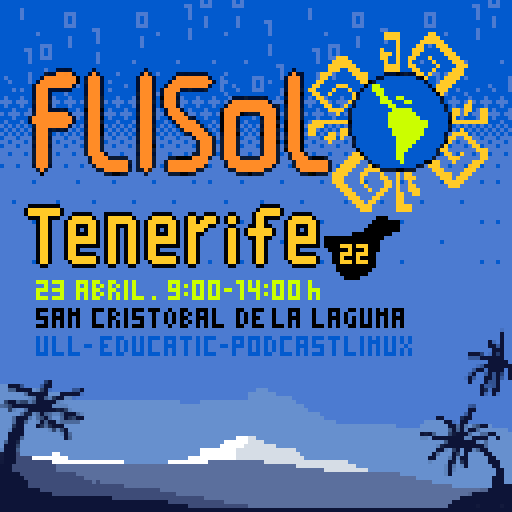
Además, para completar la jornada se realizarán otras actividades que todavía están por determinar, así que estad atento a su página de Gitlab donde los organizadores están colocando toda la información de evento.
Métodos de contacto:
- Web: https://flisol.info/FLISOL2022/Espana/Tenerife
- Correo: flisoltenerife@disroot.org
- Mastodon: https://txs.es/@flisoltenerife
- Peertube: https://tuvideo.encanarias.info/accounts/flisoltenerife
- Archive.org: https://archive.org/details/@flisoltenerife
- Twitter: https://twitter.com/flisoltenerife
- Grupo Telegram: https://t.me/flisoltenerife19/
Más información: FLISOL 2022 de Tenerife
¿Qué es Flisol?
Para los que todavía no conozcan Flisol, se trata de un evento «… de difusión de Software Libre más grande en Latinoamérica y está dirigido a todo tipo de público: estudiantes, académicos, empresarios, trabajadores, funcionarios públicos, entusiastas y aun personas que no poseen mucho conocimiento informático…»
La entrada FLISOL Tenerife 2022 se celebrará este abril se publicó primero en KDE Blog.
Long time no post
For the past year, I’ve been posting to a private server that I was running. Now that server is offline because I need to save money and so I’ll be writing here again.

NERF – Campo de Radiância Neurais
Esta tecnologia é impressionante apresentada pela NVIDIA, Neural graphics primitives (NeRF) reconstrói cenas 3D a partir de imagens 2D. A técnica utiliza a predição do campo de radiância , ou seja, prevendo a cor da luz que irradia em qualquer direção. Segundo a NVIDIA este princípio computacional é a mais rápida até o presente momento. Assim proporcionando um tempo 1000x menor com renderizações em 1080p em insignificantes milissegundos.
Principais evoluções:
- utilização uma determinada GPU para a tarefa do algoritmo de renderização/treinamento, que são muito mais rápidos do que tensores densos;
- uma eficaz pequena rede neural, mais rápida do que rotinas de multiplicação de matriz de em geral;
- e por último, tecnica da NVIDIA (codificação de grade de hash multiresolução), e disponibiliza uma melhor velocidade/qualidade comparado as outras técnicas.
NeRF utiliza a lib CUDA Toolkit e a biblioteca Tiny CUDA Neural Networks. O código fonte esta disponível nesta página; de acordo com a NVIDIA, a rede neural é leve o suficiente para rodar facilmente em uma única GPU.
Less is More
Spending less and less time on each track in Weeklybeats is making me a little nervous as to whether I will be able to finish such a marathon.
However a radical constraint of a single hour to lay down a pattern and record a jam, perhaps spending a few extra minutes to produce a video, has been extremely satisfying.

Even not being able to figure out how to do dual mono mix on the M8 is not a show stopper in such scenario (apologies to every one using headphones).
I hope a proper spring comes soon as I can't wait to FPV. This one pack in the garden was painful on the fingers.
Less is More
Spending less and less time on each track in Weeklybeats is making me a little nervous as to whether I will be able to finish such a marathon.
However a radical constraint of a single hour to lay down a pattern and record a jam, perhaps spending a few extra minutes to produce a video, has been extremely satisfying.
Even not being able to figure out how to do dual mono mix on the M8 is not a show stopper in such scenario (apologies to every one using headphones).
I hope a proper spring comes soon as I can’t wait to FPV. This one pack in the garden was painful on the fingers.