
openSUSE Selected as Mentor Organization
The openSUSE Project has been selected as a Google Summer of Code 2022 mentor organization.
Being selected as one of the 203 open-source projects for GSoC gives openSUSE mentors an opportunity to guide aspiring student developers looking to gain experience with open-source projects.
openSUSE’s dedicated website 101.opensuse.org offers several projects for GSoC students. Projects available this year include quality assurance testing project openQA, input framework ibus, user-space implementation PRoot and configuration management project Uyuni.
Projects listed on the mentoring website include working with programming languages like Python, Perl and c/c++.
The list of those projects are:
- Dynamic detection of error conditions from openQA test results
- Container-based backend for openQA
- iBus customized theme enhancement
- A new Test Framework for Salt
- Build Uyuni Client Tools packages for Debian with debbuild
- Convert Systems list pages from JSP to ReactJS
- Implementing libseccomp in PRoot
- Root / CARE and Intel SGX
- Unprivileged containers with PRoot
As a mentoring organization, eligible students will have an opportunity between April 4 and April 19 to submit an application proposal to the GSoC program site. Students should interact with openSUSE mentors through github via comments on the projects. The program is open to university students aged 18 or over.
The annual international program focuses on bringing student developers into open source software development. Students work with open-source organizations on a 10-week programming project during the school break.
Interested students are asked to visit the mentoring website and Google Summer of Code website for more information about the projects and the application process.
The openSUSE Project has participated in several GSoC events since 2006.

 Member
 baltolkien
El gestor de tareas de Plasma 5.24
Todavía me queda trabajo para poder describir una a una las novedades de Plasma 5.24 LTS. Os recuerdo que el entorno de trabajo de la Comunidad KDE que fue actualizado el pasado 8 de febrero, y nos ofrecía un buen número de nuevas o refinadas funcionalidades. Empecé el repaso de las misma con las novedades del escritorio (referido al fondo de pantalla), seguí con las mejoras visuales , las notificaciones más eficientes, la bandeja del sistema y hoy toca hablar del gestor de tareas de Plasma 5.24, otro componente importante del escritorio.
El gestor de tareas de Plasma 5.24
Tener un lugar donde tener un botón lanzador de aplicaciones, se agrupen las ventanas, nos de acceso a la bandeja del sistema y no de la hora es algo básico para un gran número de usuarios.
Es por ello que los desarrolladores de KDE le dieron una importancia vital dotándola de muchas opciones de personalización y configuración. No obstante, se trata de una elemento que sigue puliéndose para alcanzar la perfección.

Esta nueva versión del gestor de tareas de Plasma 5.24 nos ofrece las siguientes novedades:
- Al situar el cursor sobre cualquier elemento del Gestor de tareas, la ayuda emergente que muestra la miniatura de la ventana se carga ahora mucho más rápidamente
- Los menús de contexto del Gestor de tareas se han clarificado y simplificado. A modo de ejemplo, Iniciar nueva instancia es ahora Abrir nueva ventana, y ya no aparece para las aplicaciones que solo pueden tener una única ventana principal.
- El elemento Más acciones se ha desplazado a la parte inferior del menú y se ha cambiado su nombre a solo Más.
- Ahora se muestra un control de volumen para las ventanas que estén reproduciendo sonido.
Justo podemos ver esta última novedad en el siguiente vídeo.
Más información: KDE
Recopilación del boletín de noticias de la Free Software Foundation – marzo de 2022
Recopilación y traducción del boletín mensual de noticias relacionadas con el software libre publicado por la Free Software Foundation.

La Free Software Foundation (FSF) es una organización creada en Octubre de 1985 por Richard Stallman y otros entusiastas del software libre con el propósito de difundir esta filosofía.
La Fundación para el software libre (FSF) se dedica a eliminar las restricciones sobre la copia, redistribución, entendimiento, y modificación de programas de computadoras. Con este objeto, promociona el desarrollo y uso del software libre en todas las áreas de la computación, pero muy particularmente, ayudando a desarrollar el sistema operativo GNU.
Además de tratar de difundir la filosofía del software libre, y de crear licencias que permitan la difusión de obras y conservando los derechos de autorías, también llevan a cabo diversas campañas de concienciación y para proteger derechos de los usuarios frentes a aquellos que quieren poner restricciones abusivas en cuestiones tecnológicas.
Mensualmente publican un boletín (supporter) con noticias relacionadas con el software libre, sus campañas, o eventos. Una forma de difundir los proyectos, para que la gente conozca los hechos, se haga su propia opinión, y tomen partido si creen que la reivindicación es justa!!
- En este enlace podéis leer el original en inglés: https://www.fsf.org/free-software-supporter/2022/march
- Y traducido en español (cuando el equipo de traducción lo tenga disponible) en este enlace: https://www.fsf.org/free-software-supporter/2022/marzo

Puedes ver todos los números publicados en este enlace: http://www.fsf.org/free-software-supporter/free-software-supporter
Después de muchos años colaborando en la traducción al español del boletín, desde inicios del año 2020 he decidido tomarme un descanso en esta tarea.
Pero hay detrás un pequeño grupo de personas que siguen haciendo posible la difusión en español del boletín de noticias de la FSF.
¿Te gustaría aportar tu ayuda en la traducción? Lee el siguiente enlace:
Por aquí te traigo un extracto de algunas de las noticias que ha destacado la FSF este mes de marzo de 2022
Publicación de los libros blancos financiados por la FSF sobre cuestiones relacionadas con Copilot
Del 24 de febrero
En nuestra convocatoria de ponencias, presentamos varias áreas de interés. La mayoría de estas áreas se centraron en la ley de derechos de autor, las cuestiones de propiedad del código generado por IA y los impactos legales para los autores de GitHub que usan GNU u otra(s) licencia(s) de copyleft para sus obras. Nos complace anunciar la investigación proporcionada por la comunidad en estas áreas y mucho más.
Intel SGX proves Blu-ray DRM is defective by design
Del 15 de febrero
Continuando con la desaprobación del SGX en los procesadores, el DRM implementado por Intel hará que las transmisiones 4K se degraden a 1080p de menor calidad. Esta es una mala noticia para cualquiera que se vea afectado por este cambio, pero también el resultado inevitable de un diseño defectuoso. Comuníquese con Intel para informarles que deben mostrar respeto a sus usuarios y nunca implementar funciones diseñadas para DRM.
Lo caro que pueden costarle los cartuchos de tinta baratos
Del 19 de febrero por Miles Brignall
Durante años, Hewlett-Packard (HP) ha utilizado actualizaciones de firmware para obligar a los usuarios a comprar su tinta. HP afirma que la tinta creada por otros fabricantes infringe sus derechos de autor y utiliza la gestión de restricciones digitales (DRM) para evitar que los usuarios utilicen otra tinta.
La peor línea de tiempo: una empresa de impresión está poniendo ahora DRM en el papel
Del 15 de febrero por Cory Doctorow
Las nuevas impresoras de Dymo utilizan chips de identificación por radiofrecuencia (RFID) para implementar DRM, lo que restringe los rollos de etiquetas que se pueden utilizar. Esta empresa está tratando de aprovechar su poder injusto para generar ganancias a expensas de los usuarios.

Estas son solo algunas de las noticias recogidas este mes, pero hay muchas más muy interesantes!! si quieres leerlas todas (cuando estén traducidas) visita este enlace:
Y todos los números del «supporter» o boletín de noticias de 2022 aquí:

—————————————————————

ZAPCon 2022 Não percam!

Como membro do time OwaspZAP, tenho o prazer de convidá-los ao ZAPCon 2022 que acontecerá no dia 08 e 09 de Março. Este evento virtual é todos os usuários de ZAP e aqueles que desejam aprimorar a seguranças de suas soluções.
Em um fuso horário diferente? Sem problemas. Todas as palestras e workshops do ZAPCon serão gravados, para que você possa assisti-los após a live, no seu próprio ritmo, desde que esteja registrado no ZAPCon.
O tema deste ano para o ZAPCon é ‘Leveling Up’. Mas o que isso realmente significa? Subir de nível é fazer mais com o ZAP.
Se você está apenas começando ou tem experiência com a ferramenta, o ZAPCon o ajudará a fazer mais. Abordaremos tópicos para casos de uso críticos (como automação, testes de segurança de APIs e execução de ZAP em escala) para que os usuários possam se sentir mais confiantes em suas habilidades.
Mas há muito mais que Leveling Up implica. O ZAPCon deste ano lançará as bases para uma comunidade mais forte, uma ferramenta mais robusta e uma base de usuários mais engajada.


What You Watch Is What You Get
Lanzado digiKam 7.6, puliendo el gran gestor de imágenes de KDE
El mejor gestor de imágenes de la Comunidad KDE (y una de las mejores del mercado tanto libre como privado) sigue su desarrollo. De esta forma ha sido lanzado digiKam 7.6, una nueva versión de la séptima rama principal que se ha dedicado a solucionar errores y preparar el futuro.
Lanzado digiKam 7.6, puliendo el gran gestor de imágenes de KDE

Ayer 5 de marzo fue lanzado digiKam 7.6 la nueva versión de uno de los gestores de imágenes más completo que puedes encontrar en el mundo GNU/Linux, e incluso en el mundo privativo.
Este nuevo digiKam sigue recibiendo un intenso trabajo que se inició en esta rama y que nos ofrecía la renovación del algortimo de reconocimiento de caras (esta vez basado en el Aprendizaje Profundo)
Esta nueva versión menor (pero importante) se ha centrado a pulir errores para darle estabilidad, aunque siempre hay algunas novedades:
- Se ha corregido la compatibilidad de ICU con el Framework Qt.
- El paquete AppImage utiliza ahora Qt 5.15 LTS.
- Actualización del Framework KDE y de Libraw
- Publicado el manifiesto de todos los componentes de Rolling Release
- Nuevo plugin de vista de flujo que utiliza diseños de mampostería
Más información: Digikam 7,6
Las novedades de digiKam 7
Aunque gran parte del trabajo para esta nueva versión, como he dicho, se lo ha llevado el reconocimiento facial con interesantes mejoras, digiKam también nos ofrece jugosas novedades. Hagamos un repaso:
- Mejoras reconocimiento facial como:
- Porcentaje de acierto de un 97%.
- Mejoras en rapidez y eficiencia en el uso de recursos.
- Posibilidad de detectar caras no-humanas. ¡También podremos tener registradas a nuestras mascotas!
- Posibilidad de detectar caras borrosas, cubiertas, pintadas, parciales, etc.
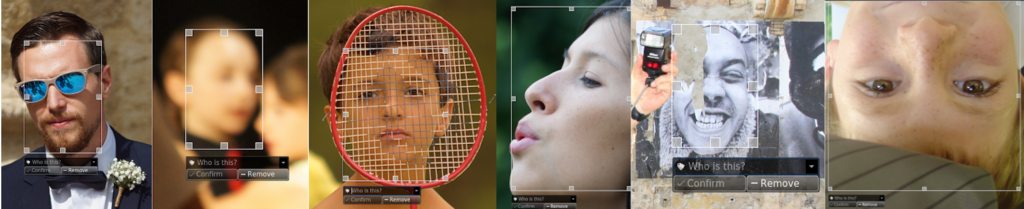
- Nuevo soporte para ficheros RAW files para nuevas cámaras como Canon CR3 o Sony A7R4.
- Mejorado el soporte para las imágenes con formato HEIF.
- Mejoras en el paquete binario con soporte para FlatPak.
- Nueva herramienta, ImageMosaicWall, para crear una imagen basada en otra colección de fotos.
- Nuevas opciones para escribir información de geolocalización en los metadatos del archivo.
- El plugin HTMLGallery introduce un nuevo tema llamado «Html5Responsive».
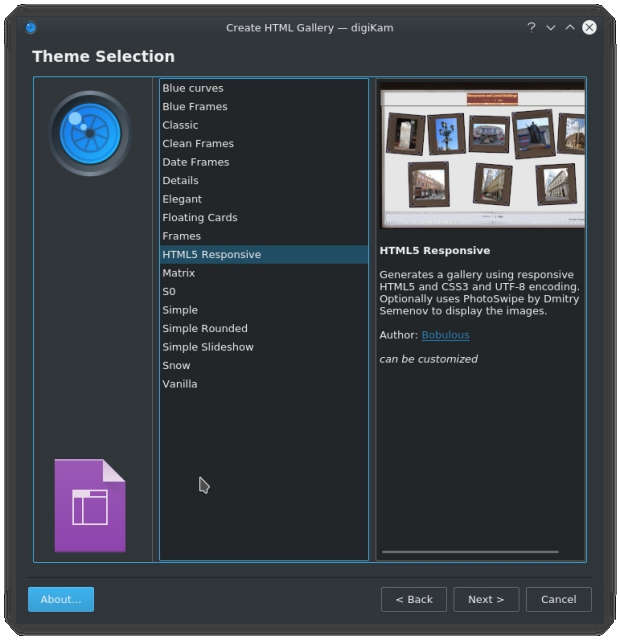
Y, por supuesto, muchos errores solucionados, con lo que parece que tendremos la mejor versión de digiKam que puede tener vuestro ordenador.
¿Qué es digiKam?
La mejor forma de definir digiKam es buscar como se describe esta aplicación de userbase.kde.org y realizar una pequeña síntesis:
«DigiKam es una aplicación que te permite la importación de fotografías desde cámaras, creación de álbumes, etiquetado con fechas, temas y otras propiedades, utilidades de búsqueda excelentes y modificación de imágenes en masa.»

openSUSE Leap 15.4 Beta testing
I tested the Leap 15.4 Beta GNOME Desktop today on a Lenovo ThinkPad X250. The installation went through without any hiccup and I documented every step of the installation in a Twitter thread.
One thing that I noticed was new in the installer is the icon to change the color theme during installation. This was not present when I tested the Leap 15.4 Alpha distribution.
On the top-right corner of the installer there is a moon icon which can be clicked to select a different theme for the installer. Five themes are available which contain three dark and two light variants.

The default theme is set to the installation.qss style sheet.
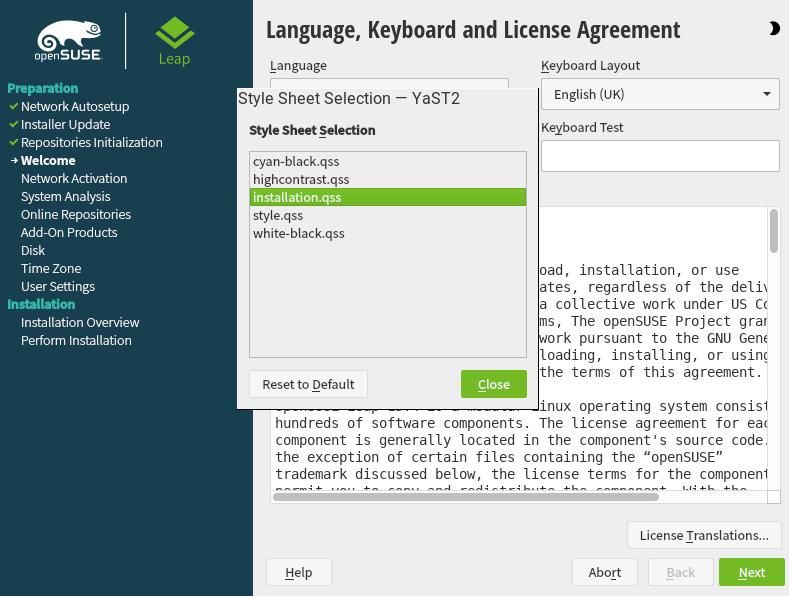
The cyan-black , highcontrast and white-black are dark themes while installation and style are light themes.
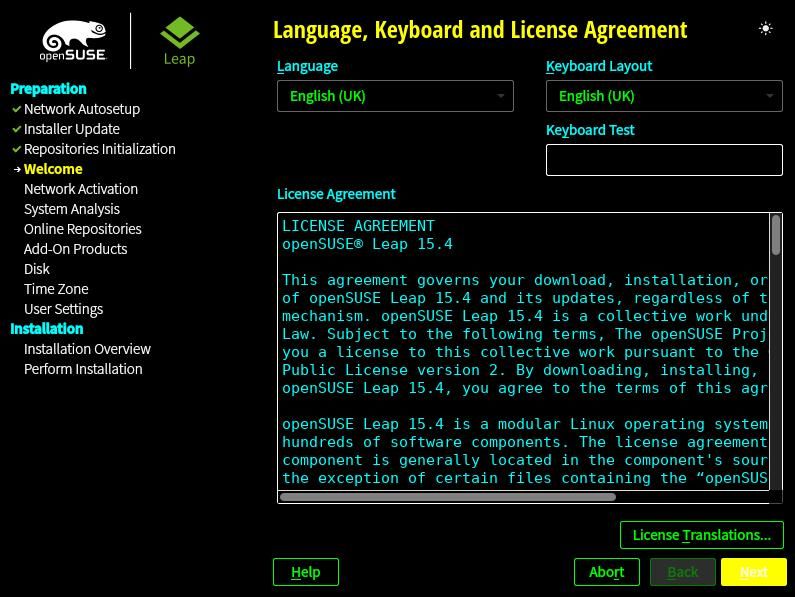
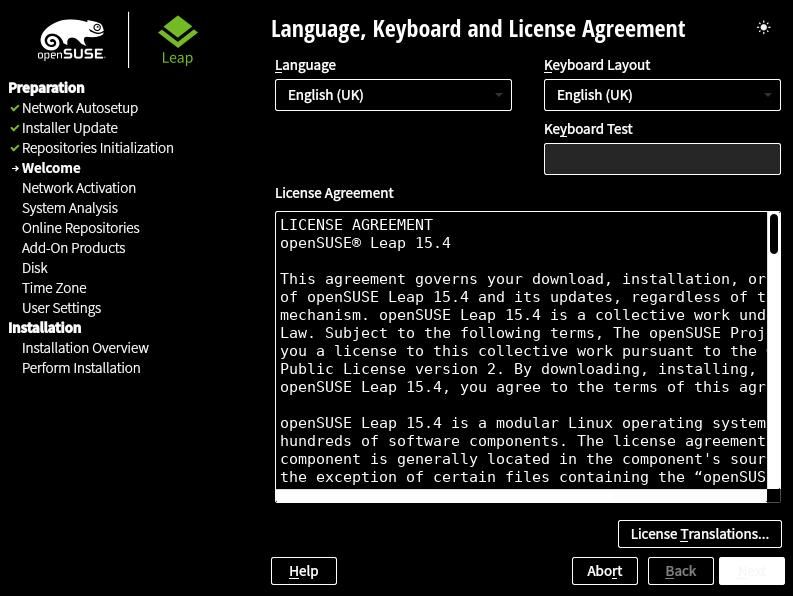
I took the above screenshots using the Leap 15.4 Beta image on VirtualBox to get clear images. In the Twitter thread I took pictures of the installation process and the theme selection on a laptop.
The installer light and dark themes. pic.twitter.com/uEI6OJ2sIz
— Ish Sookun (@IshSookun) March 5, 2022
In either installation I did not encounter any bug while setting up GNOME Desktop with defaults.
Conoce KDE Eco – vídeo de presentación
Hace un tiempo que fue presentado pero todavía es algo desconocido para la mayoría. De esta forma Así que creo que la gente todavía no conoce KDE Eco y es conveniente promocionarlo, ¿y qué mejor manera de hacerlo que con un vídeo?
Un tema que nos debe preocupar es el alto consumo energético que necesita la sociedad humana para casi todas las actividades que realizamos. Este alto consumo se traduce en el agotamiento de las fuentes de energía tradicionales y en un aumento de la contaminación que aboca a nuestro planeta a una cambio climático ultrarrápido de terribles consecuencias medioambientales.
Todo esto sin contar las consecuencia económicas, que a lo largo de este 2022 estamos padeciendo en primera persona todas las familias con las subidas de luz y de gas por motivos diversos.
Es por ello que debemos empezar a pensar en un aspecto que solía estar desantendido en todo nuestro ecosistema de aplicaciones: el consumo eléctrico de nuestro Software.

De esta forma, y tal y como comenté hace un tiempo, la Comunidad KDE esta trabajando de forma colaborativa con el Proyecto de Eficiencia Energética FOSS (FEEP) y Blauer Engel para FOSS (BE4FOSS) para ayudar a las comunidades de código abierto y libre a producir software más respetuoso con el medio ambiente. Esta iniciativa tan loable ha recibido el nombre de KDE Eco y, bajo mi punto de vista, tendrá una importancia capital en el futuro.

Conoce KDE Eco – vídeo de presentación

Así que, y para resumirlo en breves palabras, KDE apoya a los proyectos antes mencionados proporcionando a las comunidades directrices y apoyo para optimizar el software que se produce para que sea más energéticamente eficiente y tenga una vida útil más larga.
Si se consigue certificar que el Software creado cumple con las directrices del Blauer Engel para FOSS se consigue el sello que lo verifica y proporciona la seguridad que dicho software es lo más respetuoso que se puede ser en estos momentos.
Y para promocionar esta iniciativa os invito visualizar y compartir su vídeo de presentación.
Por cierto, Alemania ha declarado el 5 de marzo Día de la Conservación de la Energía. Por tanto, hoy es un día excepcional para unirse a la inciativa KDE Eco!
Más información: KDE Eco | Celebrate Energy Conservation Day With KDE Eco

Zabbix Agent2 6.0 with container in Azure 安裝小記
Zabbix Agent2 6.0 with container in Azure 安裝小記
OS: openSUSE Leap 15.3 in Azure
Zabbix: Zabbix agent 2 6.0 docker image

上一篇文章寫如何使用 container 的方式來建立 Zabbix 6.0
今天來實作使用 container 的方式來建立 Zabbix Agent 進行資訊回報
首先先在 Azure 上面建立 VM
openSUSE Leap 15.3
大小: Standard B1ms (1 vcpu,2 GiB 記憶體) ( NT$ 596.76 / 每月, 0.8175 TWD/hr ), Blog 是實驗性質所以沒有開太大, 請依照實際的專案調整.
接下來可以觀察 Zabbix 原廠的 Download 頁面

Zabbix Agent 的頁面會被導向到 https://hub.docker.com/r/zabbix/zabbix-agent
但是如同我們上一篇文章所提到的, Zabbix agent 有分 zabbix agent 與 zabbix agent2
這次我們要實作的是 Zabbix Agent 2
因為他有 Docker for Zabbix Agent 2 的範本可以套用, 可以觀察主機上的 container 相關資訊
聽說效率比較好
相關頁面在這邊 https://hub.docker.com/r/zabbix/zabbix-agent2
我們要執行的方式是 使用 Active 方式來對 Zabbix Server 進行回報
測試 Zabbix Agent 2 安裝 with Privileged ( 其他 Linux 使用, active 方式 )
建立一台新的 openSUSE Leap 15.3
==== 在 Zabbix Client 主機上面 ====
啟用 docker 服務
# systemctl start docker
設定開機啟用 docker 服務
# systemctl enable docker
還沒有執行 Zabbix agent 之前先到 Zabbix Dashboard 觀察資訊

目前的 hosts 只有 Server 自己 1 個
執行 Zabbix Agent2 的 container
# docker run --name test-client-20220305-zabbix-agent \
-e ZBX_HOSTNAME="test-client-20220305" \
-e ZBX_ACTIVESERVERS="210.59.6.220" \
--privileged \
--restart unless-stopped \
-d zabbix/zabbix-agent2:alpine-6.0-latest
ZBX_ACTIVESERVERS 為Server 的 IP 或是 FQDN
ZBX_SERVER_HOST 不知道為何會跟 ZBX_ACTIVESERVERS 相衝突, 取消就可以存取的到了
ZBX_HOSTNAME 為要登記到 host 的主機名稱, 必須與 Configuration -- > Host 上面的 Host name 一致
使用 --privileged 來啟用 Privileged mode, 有使用 Privileged 的話 Graph 會多了磁碟的相關資訊
使用 --restart 來控制重啟方式
觀察資訊
# docker ps
CONTAINER ID IMAGE COMMAND CREATED STATUS PORTS NAMES
e5f9a1130b56 zabbix/zabbix-agent2:alpine-6.0-latest "/sbin/tini -- /usr/…" About a minute ago Up About a minute 10050/tcp, 31999/tcp test-client-20220305-zabbix-agent
另外可以使用 docker logs 指令來觀察相關資訊
# docker logs test-client-20220305-zabbix-agent
因為我們沒有採取自動註冊的方式
所以在 Zabbix Server 的 Dashboard 目前看到的 hosts 還是 1 台
之後會來寫自動註冊的小記 :)
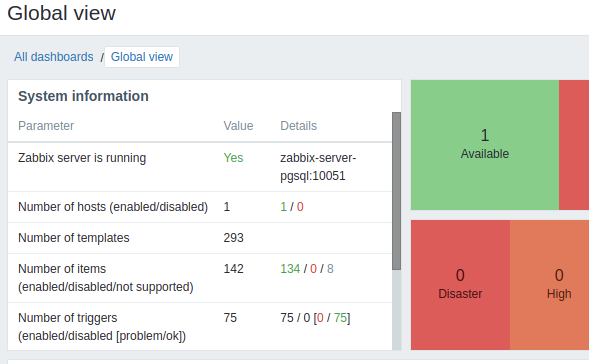
接下來就要進行相關設定
登入 Zabbix Server 管理頁面
Configuration -- > Hosts -- > 點選 Create host
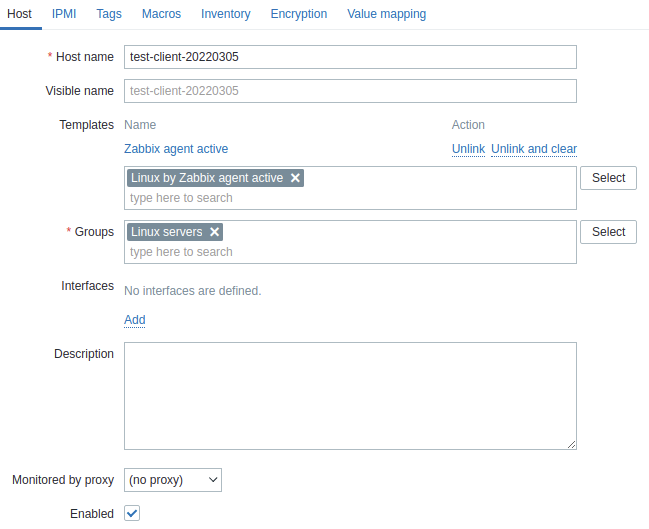
這邊主要輸入 Host name
必須與 Client 的 HOSTNAME 符合, 剛剛已經說過
選取要歸屬的 Group 以及套用的 Template
這邊我是選 Linux by Zabbix agent active
點選 Add 加入 Host
觀察 Dashboard 的 System information
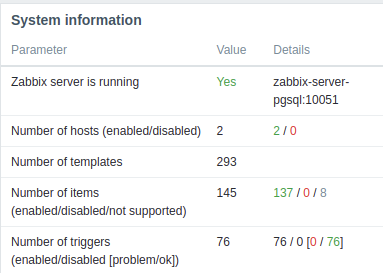
觀察 Monitoring 的 Hosts

這邊如果是使用 Active 的方式來進行回報, 會沒有 Availabitty 的 ZBX icon
點選 Graph 來觀察相關資訊

接下來對 client 進行主機大小的調整, 看看 Zabbix Agent 會不會發現
我將原來的主機從 Standard B1ms (1 vcpu,2 GiB 記憶體) 調整為 Standard B2ms (2 vcpu,8 GiB 記憶體)
調整的過程中, Azure 會進行機器重開機
另外也測試 再執行 zabbix agent 的 container 時, --restart 有沒有生效
觀察 Zabbix Server 上面的 Dashboard

果然就有看到 restarted 的告警
另外觀察 Graph
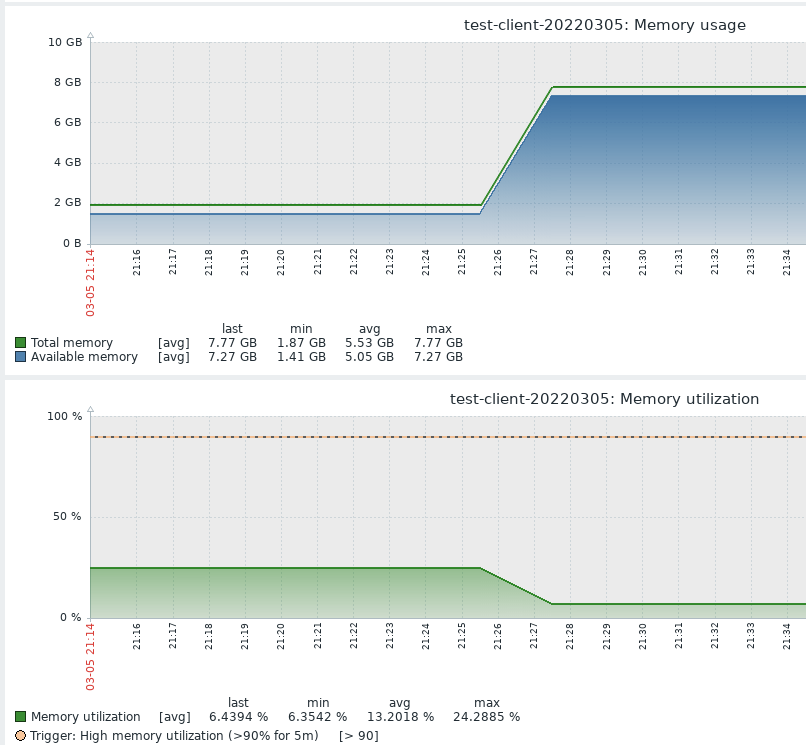
也有看到相關變化
接下來就是放著進行一系列觀察 :)
~ enjoy it
Reference:
#openSUSE Tumbleweed revisión de la semana 9 de 2022
Tumbleweed es una distribución «Rolling Release» de actualización contínua. Aquí puedes estar al tanto de las últimas novedades.

openSUSE Tumbleweed es la versión «rolling release» o de actualización continua de la distribución de GNU/Linux openSUSE.
Hagamos un repaso a las novedades que han llegado hasta los repositorios esta semana.
El anuncio original lo puedes leer en el blog de Dominique Leuenberger, publicado bajo licencia CC-by-sa, en este este enlace:
Semana casi plena de actualizaciones. 6 nuevas snapshots en 7 días:
(0225, 0226, 0227, 0228, 0301 y 0302).
Los cambios más importantes que han llegado a los repositorios son:
- ModemManager 1.18.6
- Mesa 21.3.7
- freerdp 2.6.0
- Nodejs 17.5.0
- Linux kernel 5.16.11
- Python 3.6 ha sido eliminado
- firewalld 1.1.0
- screen 4.9.0
- NetworkManager 1.36.0
- pipewire 0.3.47
- Ruby 3.1.1
Y ya preparándose para próximas semanas:
- KDE Gear 21.12.3
- Poppler 22.03.0
- Rust 1.59
- go 1.16.15 & 1.17.8
- Binutils 2.38
- GCC 12
Si quieres estar a la última con software actualizado y probado utiliza openSUSE Tumbleweed la opción rolling release de la distribución de GNU/Linux openSUSE.
Mantente actualizado y ya sabes: Have a lot of fun!!
Enlaces de interés
-
-
- ¿Por qué deberías utilizar openSUSE Tumbleweed?
- zypper dup en Tumbleweed hace todo el trabajo al actualizar
- ¿Cual es el mejor comando para actualizar Tumbleweed?
- Comprueba la valoración de las «snapshots» de Tumbleweed
- ¿Qué es el test openQA?
- http://download.opensuse.org/tumbleweed/iso/
- https://es.opensuse.org/Portal:Tumbleweed
-

——————————–