
 Vojtaeus
Kurz práce v příkazové řádce Linuxu nejen pro MetaCentrum 2022
Nebojte se příkazové řádky Linuxu! Je to mocný a přívětivý nástroj umožňující efektivně zpracovat i velká data a zautomatizovat činnosti. Prakticky shodně funguje příkazová řádka i v Apple macOS, BSD a dalších UNIXových systémech, nejen v Linuxu. Kurz je vhodný pro úplné začátečníky i mírně pokročilé. Jediným vstupním požadavkem je zájem (nebo potřeba) pracovat v příkazové řádce, typicky na linuxovém výpočetním serveru.

 Member
Installing openSUSE Tumbleweed on the Enclustra Mars MA3
As part of my school internship at TEM Messtechnik I got the oppertunity to work on the Enclustra Mars MA3, a FPGA SoC with two ARMv7 cores. This post describes the process of getting Linux (more precisely, openSUSE Tumbleweed) to work on this SoC.
Requirements
In order to build and install all the needed files, you’re gonna need the following:
- 1x Enclustra Mars MA3
- 1x Enclustra Mars EB1
- A computer capable of running Linux, in this case openSUSE Tumbleweed
- A computer running Windows (we need it for the flash tool)
- 1x MicroSD Card.
Setting up the build environmentee
Setting up the build environment is not difficult, but it is not a “clean” way of using a Linux system. We’re gonna need some packages that are not maintained anymore and are therefore not avaliable in the openSUSE Tumbleweed repositories. Installing packages from unofficial repositorys can be dangerous for your system though, so the first thing we’re gonna do is create a filesystem snapshot:
snapper create --description "Snapshot before installing Enclustra build environment"
This will create a Btrfs snapshot so that we can rollback (snapper rollback)to the state of the system before installing the build environment. Because no --cleanup-algorithm is specified this snapshot will not get removed after a certain period of time.
First, we need to add some repositorys:
sudo zypper ar https://download.opensuse.org/repositories/Kernel:/tools/openSUSE_Factory/Kernel:tools.repo
sudo zypper ref
Now we can install all the dependencies we need:
sudo zypper install gcc48 gcc48-c++ git autoconf bc curl glibc-32bit mercurial unzip wget make patch openssl-devel python3-termcolor
In addition, we need a really old version of python-dialog, which is not avaliable for Tumbleweed, so we need to install it manually from an unsupported repository:
sudo zypper in https://download.opensuse.org/repositories/openSUSE:/Leap:/42.3/standard/noarch/python-dialog-3.3.0-8.1.noarch.rpm
Under normal circumstances, you should never ever install a package from Leap in Tumbleweed! The only reason we can do this here is that Leap 42.3 won’t change anymore (since it is discontinued) and I tested that everything works. Never do this regularly!!! You have been warned.
We need to set the default compiler:
sudo update-alternatives --install /usr/bin/gcc gcc /usr/bin/gcc-4.8 50
sudo update-alternatives --install /usr/bin/g++ g++ /usr/bin/g++-4.8 50
sudo update-alternatives --install /usr/bin/cc cc /usr/bin/gcc-4.8 50
Now, we can finally install the buildtool:
git clone https://github.com/enclustra-bsp/bsp-altera.git && cd bsp-altera
Since we want to get openSUSE Tumbleweed running instead of the default (bare bones) Linux Enclustra provides, we do not need to build the root filesystem. We do need to build however a bootloader (U-Boot) and a Linux Kernel. Both these parts are part of the openSUSE distribution, but the versions in the repositorys are not compatible with the Mars MA3, so we need to build the versions provided by Enclustra. The version of the Linux kernel provided is not up to date though, but I won’t go into detail on how to build an upstream Linux kernel in this post.
To start the build process, run
./build.sh -d Mars_MA3/Mars_EB1/MMC -x Linux -x U-Boot
The process is going to take some time, so go grab some tea (or coffee, if you prefer that for whatever reason…).
After the build succeeds, you can find the build results in a folder named out_<timestamp>_<module>_<board>_<bootmode>.
In my case that is out_20211105094426_Mars_MA3_Mars_EB1_MMC.
Partitionizing the SD Card
The SoC expects a specific partitionizing on our SD card, which we need to create manually using fdisk (replace /dev/mmcblk0 with the block name of the SD card):
sudo fdisk /dev/mmcblk0
Use fdisk as the following:
Welcome to fdisk (util-linux 2.36.2).
Changes will remain in memory only, until you decide to write them.
Be careful before using the write command.

Device does not contain a recognized partition table.
Created a new DOS disklabel with disk identifier 0x99faaaa1.

Command (m for help): o
Created a new DOS disklabel with disk identifier 0x8c918d1b.

Command (m for help): n
Partition type
   p   primary (0 primary, 0 extended, 4 free)
   e   extended (container for logical partitions)
Select (default p): p
Partition number (1-4, default 1): 2
First sector (2048-16777215, default 2048):
Last sector, +/-sectors or +/-size{K,M,G,T,P} (2048-16777215, default 16777215): +2M

Created a new partition 2 of type 'Linux' and of size 2 MiB.

Command (m for help): a2
Selected partition 2
The bootable flag on partition 2 is enabled now.

Command (m for help): n
Partition type
   p   primary (1 primary, 0 extended, 3 free)
   e   extended (container for logical partitions)
Select (default p): p
Partition number (1,3,4, default 1): 1
First sector (6144-16777215, default 6144):
Last sector, +/-sectors or +/-size{K,M,G,T,P} (6144-16777215, default 16777215): +200M

Created a new partition 1 of type 'Linux' and of size 200 MiB.

Command (m for help): t
Partition number (1,2, default 2): 1
Hex code or alias (type L to list all): c

Changed type of partition 'Linux' to 'W95 FAT32 (LBA)'.

Command (m for help): n
Partition type
   p   primary (2 primary, 0 extended, 2 free)
   e   extended (container for logical partitions)
Select (default p): p
Partition number (3,4, default 3): 3
First sector (415744-16777215, default 415744):
Last sector, +/-sectors or +/-size{K,M,G,T,P} (415744-16777215, default 16777215):

Created a new partition 3 of type 'Linux' and of size 7.8 GiB.

Command (m for help): w
The partition table has been altered.
Syncing disks.
After the partitioning is done, we can download the Tumbleweed root filesystem, which gets built by the openSUSE Build Service. Our SoC has an armv7 architecture, so we need the rootfs for that specific architecture.
Download the image wget:
wget http://download.opensuse.org/ports/armv7hl/tumbleweed/appliances/openSUSE-Tumbleweed-ARM-JeOS.armv7-rootfs.armv7l.tar.xz
You’re also gonna need my deploy script, which makes flashing everything to a MicroSD card really simple. Download it and make it executable:
wget https://code.opensuse.org/KaratekHD/MA3/raw/main/f/deploy.py
chmod +x deploy.py
Usage of the deploy script is really simple:
usage: deploy.py [-h] -r ROOTFS -d DEVICE -i INPUT_DIR

Deploy openSUSE Tumbleweed to the Mars MA3.

optional arguments:
  -h, --help            show this help message and exit
  -r ROOTFS, --rootfs ROOTFS
                        Path to rottfs.tar
  -d DEVICE, --device DEVICE
                        Deviceprefix to deploy to (e.g. /dev/mmcblk0p)
  -i INPUT_DIR, --input_dir INPUT_DIR
                        Build files generated by build.sh
An example of using the deploy script:
./deploy.py \\
-d /dev/sdb \\
-r /home/jens/bsp-altera/openSUSE-Tumbleweed-ARM-JeOS.armv7-rootfs.armv7l.tar.xz \\
-i out_Mars_MA3_Mars_EB1_MMC/
Replace the paths with the ones matching for your situation.
Warning: If your SD-Card is the block device /dev/sdb, use dev/sdb as the parameter for -d. If your block device is e.g. /dev/mmcblk0 , you’ll need to use /dev/mmvblk0p as the parameter for -d.
Also, it is important that you use an absolut path for the rootfs, even if it is located in the same directory.
The script will ask for your root password and then
- Format the partitions of the SD card with the required file systems
- Flash the preloader and the Linux Kernel
- Extract the rootfs to the SD card
An example output would be:
Formatting partition 1 with fat32...
mkfs.fat 4.2 (2021-01-31)
Formatted partition 1
Formatting partition 3 with ext2...
mke2fs 1.46.4 (18-Aug-2021)
/dev/sdb3 contains a ext2 file system labelled 'rootfs'
	last mounted on / on Thu Jan  1 01:00:01 1970
Proceed anyway? (y,N) y
Creating filesystem with 15539968 4k blocks and 3891200 inodes
Filesystem UUID: b229ef5a-d94a-4851-bd70-c8c00c52fadb
Superblock backups stored on blocks:
	32768, 98304, 163840, 229376, 294912, 819200, 884736, 1605632, 2654208,
	4096000, 7962624, 11239424

Allocating group tables: done
Writing inode tables: done
Writing superblocks and filesystem accounting information: done

Formatted partition 3
Flashing preloader...
512+0 records in
512+0 records out
262144 bytes (262 kB, 256 KiB) copied, 0.0645477 s, 4.1 MB/s
Preloader flashed!
Syncing...
Synced!
Mounting /mnt/rootfs
Mounting /mnt/boot
Copying files to /mnt/boot
- uImage
- devicetree.dtb
- fpga.rbf
- u-boot.img
- uboot.scr
Removing everything from /mnt/rootfs...
Extracting rootfs from /home/jens/bsp-altera/openSUSE-Tumbleweed-ARM-JeOS.armv7-rootfs.armv7l.tar.xz to /mnt/rootfs...
Extracted /home/jens/bsp-altera/openSUSE-Tumbleweed-ARM-JeOS.armv7-rootfs.armv7l.tar.xz to /mnt/rootfs
Syncing...
Umounting devices...
Done
After the script did its magic, it’s time to move on.
Building U-Boot
In our experiences, we couldn’t get the SoC to use the U-Boot image deployed to the SD Card. U-Boot is, however, required to boot the Linux kernel, so we need some other way to get U-Boot to run, which, in this case, is to flash it to the QSPI Flash of the SoC itself.
In order to do this, we need to build a version of U-Boot that works from QSPI. To do this, navigate to the build directory and run
./build.sh -d Mars_MA3/Mars_EB1/QSPI -x U-Boot
Now, navigate into the output folder (e.g. ./out_Mars_MA3_Mars_EB1_QSPI) and transfer u-boot.img and preloader-mkimage.bin to the Windows PC.
Setting up the board
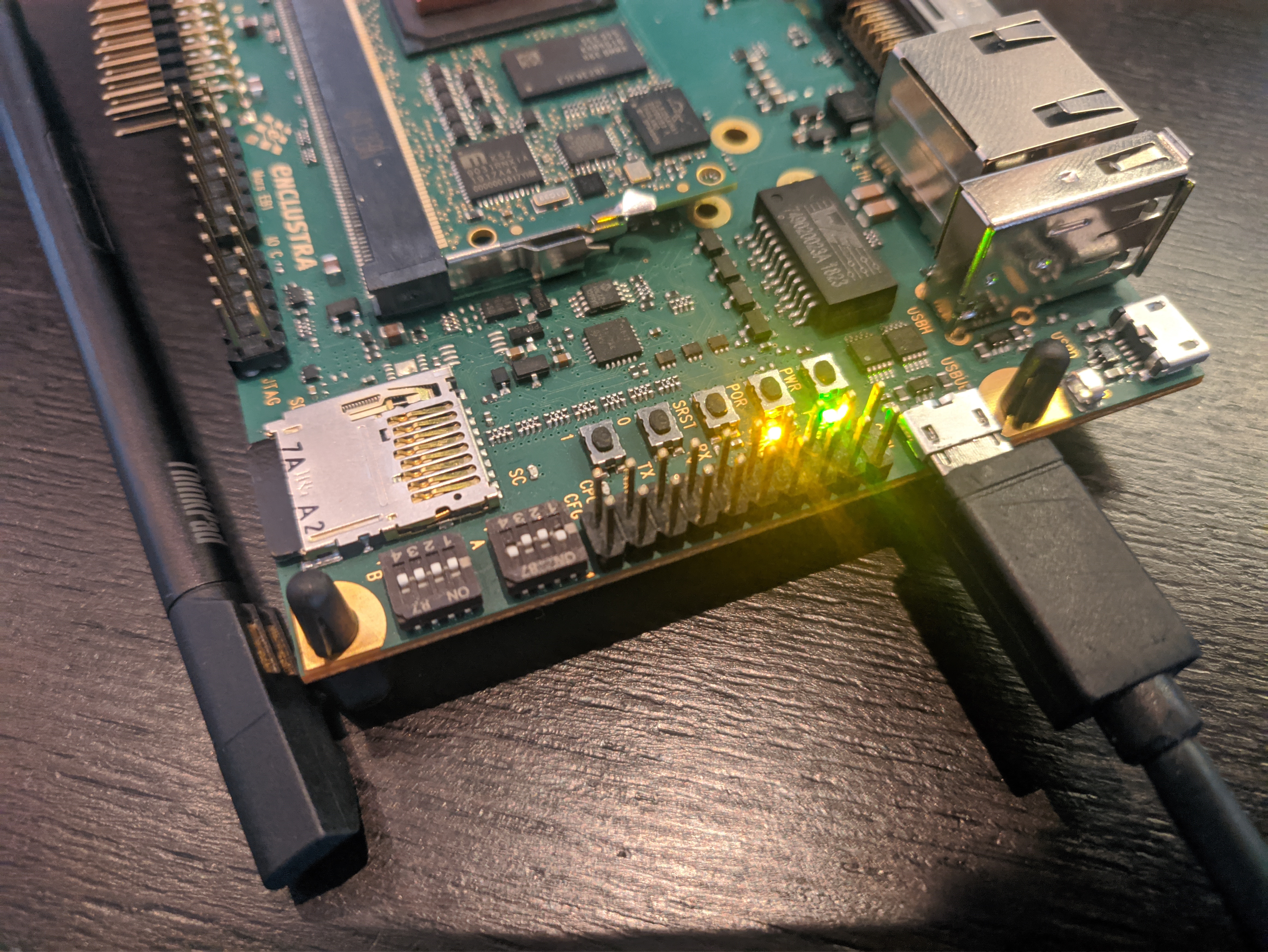 In order to get the board to boot from the QSPI Flash (and aafter that from the SD card) and to give us a seral output, we need to set up the dipswitches (see above) as following:
| Dipswitch | Value |
|---|---|
| A1 | On |
| A2 | Off |
| A3 | Off |
| A4 | On |
| B1 | Off |
| B2 | Off |
| B3 | Off |
| B4 | Off |
Now you can connect a Micro-USB cable to USBUB (see the image above) and use it to flash to the QSPI and use a serial console as described below.
Flashing the bootloader
Connect the Board to the Windows PC via USB, power it using the dc input on the evaluation board and click on “Enumerate” in MCT. Make sure no other serial devices are connected to your PC. For example a USB-Jtagger can cause problems. The board should show up in the list.
In the “Operation” drop-down menu, select “Erase”, select “Full chip” and click on the “Erase” button:
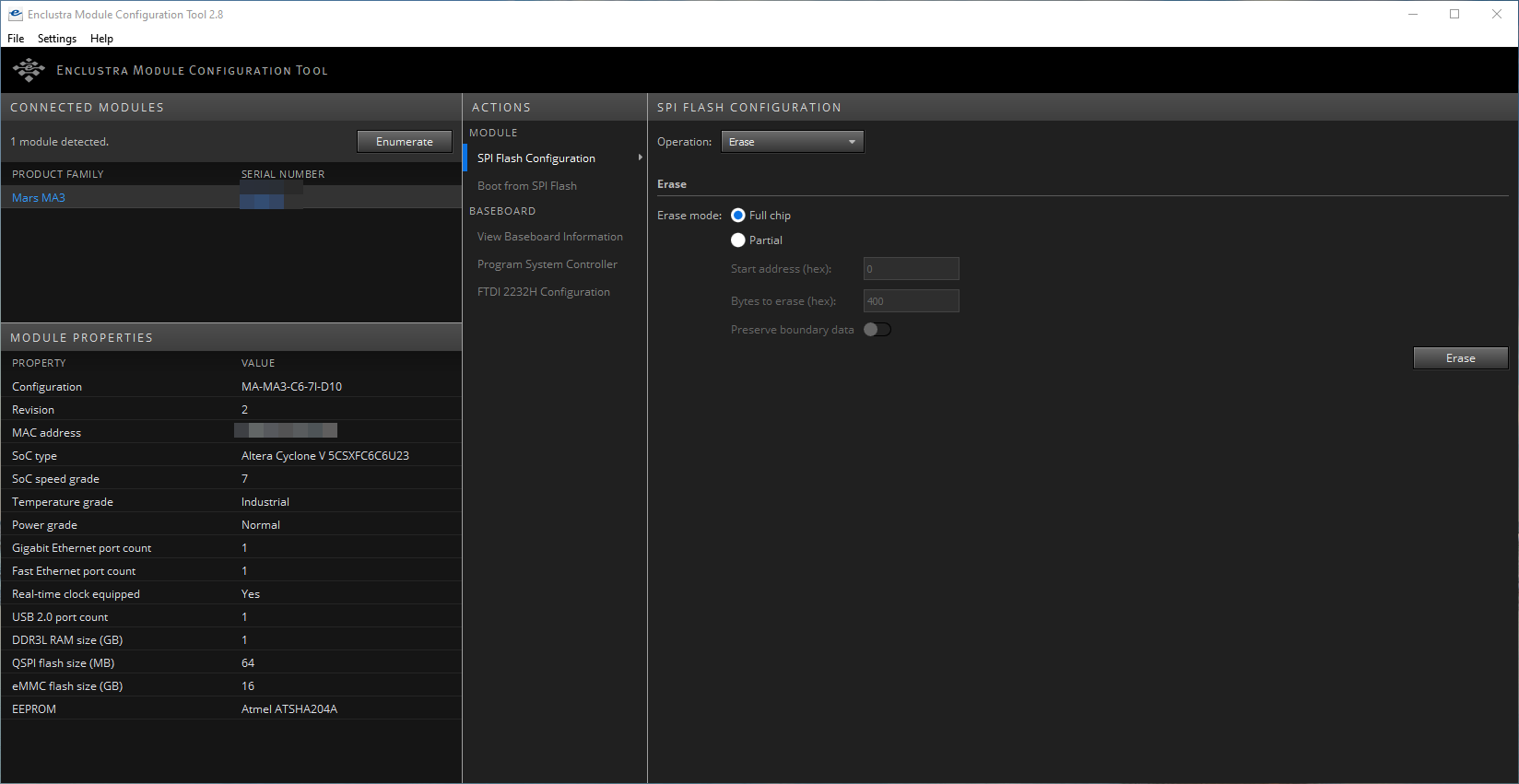
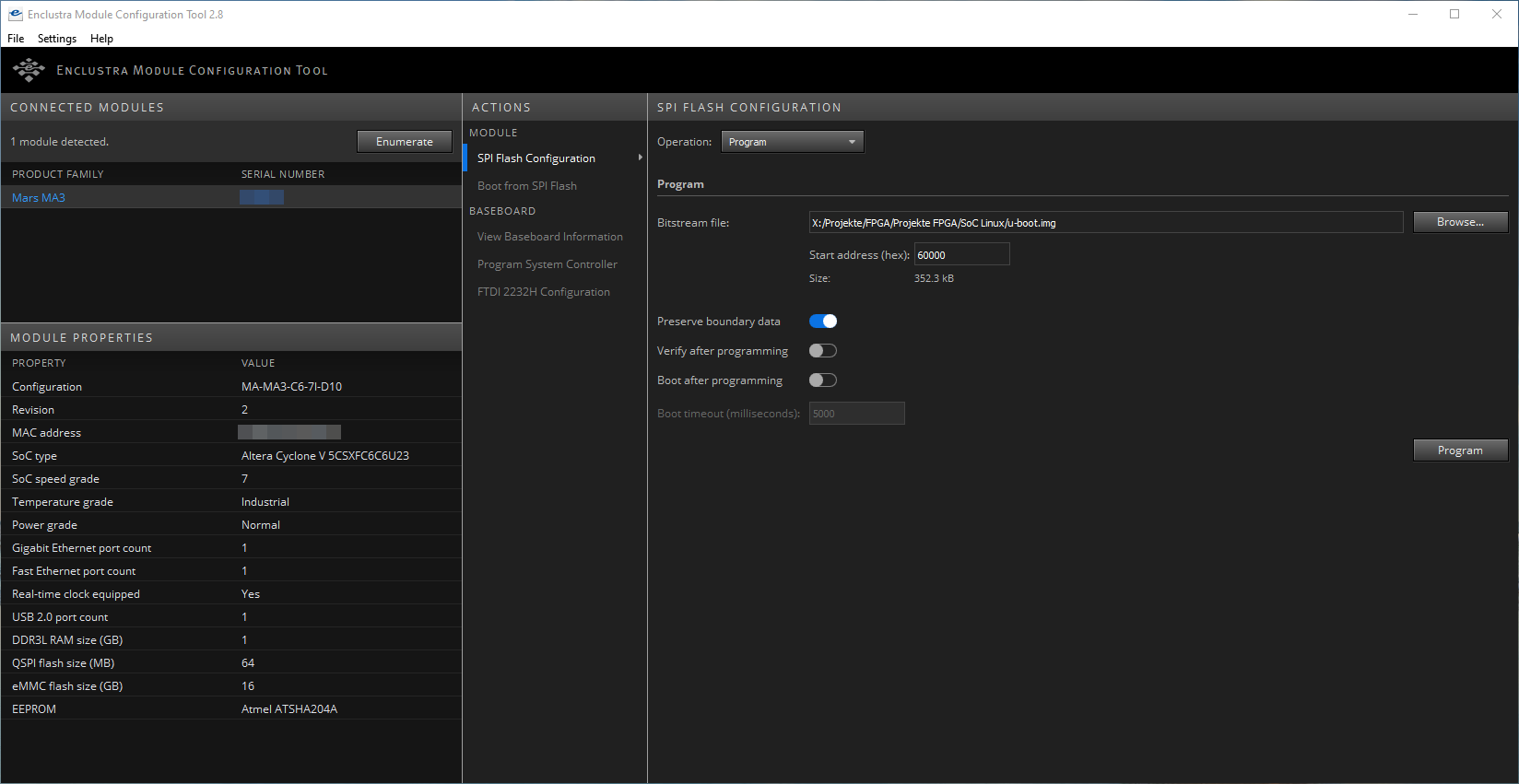
In the next step, select “Program” from the “Operation” drop-down menu. Set the Start address to 0, enable “Preserve boundary data” and disable “Boot after programming”. Now select the preloader-mkimage.bin file as the Bitstream file and click on “Program”.
Once the preloader has been flashed, set the Start address to 6000 and select the U-boot.img file as the bitstream file. Keep the rest of the settings as descibed above and click “Program” again.
Connecting to a serial console
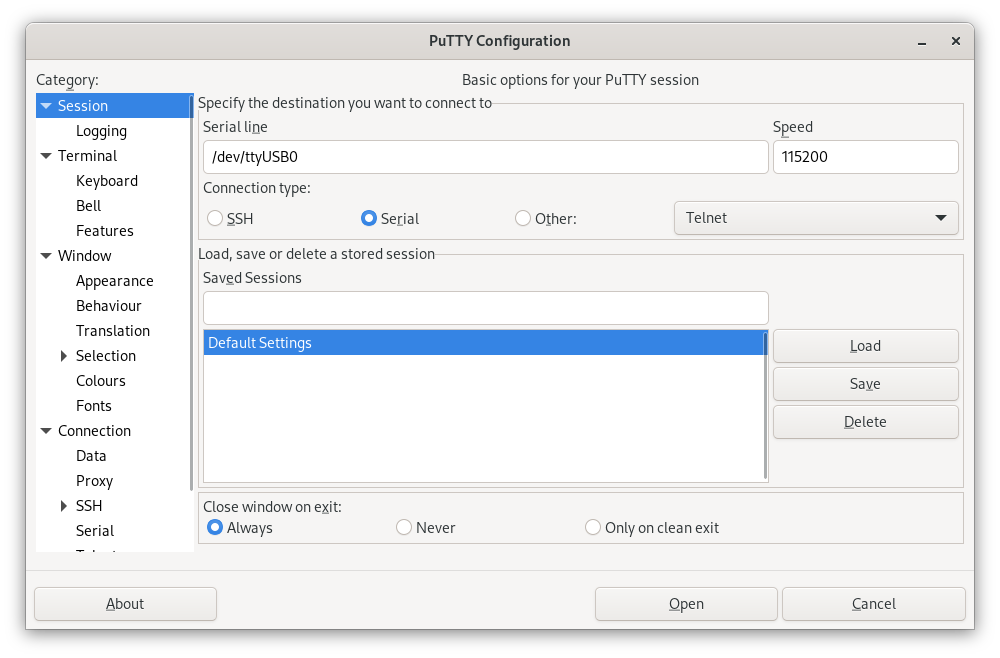
Now connect the Board to a PC via USB (TODO @Phillip: Switches für Serielle Konsole?). Use Putty, Minicom, Picocom or whatever tool you prefer to use to connect via serial to the Board, just make sure to set the Baudrate to 115200.
Configuring U-Boot
With a serial console connected, power on the Board. You’ll see some output, but wait until you see a little arrow (=>) in the line at the bottom.
Now, type
setenv bootcmd "run mmcboot"
saveenv
Now your board will boot from the SD card by default. Now it’s time to actually boot Linux, so power off the board. U-Boot does not have a shutdown command, so just pull the power plug.
Booting the Linux operating system
Insert the MicroSD card into the slot on the Board. and power on the board. This time you should get a lot more output then before, because this time it actually boots into Linux. There are gonna be a lot of lines starting with [OK] in green, but also a few starting with a red [FAILED]. That’s fine though, everything works even with these minor failures.
Once it’s done booting, you should see something like this on the serial console:
Welcome to openSUSE Tumbleweed 20211107 - Kernel 4.15.0-g506369939 (ttyS0).

eth0:

localhost login:
That’s it! You succesfully installed openSUSE Tumbleweed on your Mars MA3, sou you can now use it like every regular Tumbleweed machine. The default credentials are root:linux, so make sure to change them using passwd before doing anything else. I also recommend to do a quick zypper dup before starting to work on the SoC.
Further reading
- Enclustra Build Environment documentation
- openSUSE on your ARM board
- Source code for the deploy script

KDE Gear, GNOME Update in Tumbleweed
Tumbleweed pulled back from the frequency of snapshots released last week, but still had a good amount of releases this week.
After continuous daily releases from Oct. 27 to Nov. 2, openSUSE Tumbleweed put together another three consecutive snapshots.
Snapshot 20211106 was an extremely large snapshot and brought software updates from GNOME, KDE, Mozilla and more. An update of gnome-software 41.1 brought various minor User Interface tweaks and fixes. The package improved metadata support for snaps and added the new GNOME Circle apps to the featured carousel. The 41.1 version of gnome-shell fixed some crashes and some erratic scrolling in GTK apps. KDE Gear 21.08.3 brought several fixes for Kdenlive. The video editor fixed the muting of audio, some resize and alignment issues and the behavior of incorrect wipe and slide transitions while resizing. KDE’s document viewer Okular fixed bookmark menu actions that were missing after switching tabs and Konqi fans who like to book travel have support for German Eurowings booking confirmation in the KItinerary package. Mozilla Thunderbird 91.3.0 fixed eight Common Vulnerabilities and Exposures. One of the CVE fixes for the email client involved disabling the Opportunistic Encryption feature because a network attacker could forward a connection from the browser to port 443 to port 8443. The disabled feature could cause the email browser to treat the content of port 8443 as the same-origin with HTTP. The Application Programming Interfaces with the gawk 5.1.1 update now handles Multiple Precision Floating-Point Reliable Library and GNU Multiple Precision Arithmetic Library values slightly differently, which requires different memory management for those values. The 1.2.4 update of PackageKit improved the thread safety of an operation cancellation and added a specific error code when a user declines an interaction. There were a few updates for YaST packages like yast2-network 4.4.29, which fixed a crash when checking if a virtual interface is connected. Other packages to update in the snapshot were evolution-ews 3.42.1, glib2 2.70.1, libvirt 7.9.0 and many other packages.
Just four packages arrived in snapshot 20211105 snapshot. The first of the 41.1 GNOME packages arrived in the snapshot. gnome-chess and gnome-remote-desktop. The latter had some adjustments for frame PipeWire data. There was some clean up with the network configuration package wicked in the 0.6.67 version along with changes in the dbus configuration. The aws-cli 1.21.6 package had multiple API changes and relaxed a version dependency for python-docutils.
Snapshot 20211104 brought more than a dozen updated packages. The removal of duplicated config entries and the construct of the snippets based on the main config were made with busybox 1.34.1. ClamAV 0.103.4 added virus-name suffixes to the alerts, which trigger when a scan limit has been exceeded, and the anti-virus package fixed some issues related to email parsing. The Chinese manual pages were updated with the man-pages-zh_CN 1.6.3.6 update and several pypi packages where updated including python-Pillow 8.4.0, python-boto3 1.19.6 and major version python-pyOpenSSL 21.0.0.

Vídeo de PinePhone Pro con Linux
Hoy me apetece compartir con vosotros el vídeo de PinePhone Pro con Linux, el nuevo dispositivo móvil que pronto estará en las manos de los desarrolladores que están trabajando en crear uno de los primeros móviles con sistema GNU/Linux de fábrica y con Plasm Mobile como interfaz de usuario.
Vídeo de PinePhone Pro con Linux
Como comenté hace poco, el pasado 15 de noviembre de 2020, la Comunidad KDE anunció que,junto con Pine64 ofrecía al mercado el primer dispositivo móvil, conocido como teléfono o smartphone, con Plasma Mobile, llamado PinePhone KDE Community Edition.
La idea era ofrecer un teléfono a precio bajo para que los desarrolladores y simpatizante del Software Libre puedan tener un dispositivo con el que trastear y romper el hielo entre estos dos mundos.
Una vez conseguido este objetivo llegaba la segunda fase de este proyecto y menos de un año después, la compañía Pine64 ha anunciado un nuevo dispositivo compatible con sistemas GNU/Linux: PinePhone Pro.
Ya he realizado una breve reseña de este dispositivo, pero en aras de darle todavía más promoción he pensado compartir también el vídeo de lanzamiento.
Aprovecho el artículo para aumentar la información sobre el teléfono ya que según leemos en la página web de Pn64, los pedidos anticipados de PinePhone Pro se empezaron a reservar por parte de los desarrolladores a partir del pasado 15 de octubre, y se espera tenerlos entregados en diciembre de este mismo año.
Por esto motivo, y a pesar de que estamos en una gran crisis de suministro de todo tipo de componentes, se han asegurado los componentes necesarios y el tiempo de trabajo en la fábrica para producir una gran tirada de PinePhone Pro en noviembre. De esta forma también está previsto que los primeros usuarios recibirán sus unidades del smartphone a principios de 2022.

Para finalizar os recuerdo que el sistema operativo por defecto del PinePhone Pro es Manjaro Linux con KDE Plasma Mobile, pero se espera que sea compatible con la mayoría de los sistemas operativos ya disponibles para el PinePhone original.
Survey Results of Packagers, Maintainers Posted
The openSUSE Project has posted results from a recent survey that ran between Oct. 7 and Oct. 29.
The aim was to gather more information from open-source developers, development teams, packagers and maintainers. The survey also aimed to determine the satisfaction level of contributors and better understand the complexities and challenges they encounter with the project’s development. The survey provided an area to comment and provide suggestions to improve relevant aspects of the project and its tools.
An email to the factory mailing list about the results has provided fun discussions. The highest majority of people submitting the survey were between the ages of 35 and 49. Almost 90 percent were from the northern hemisphere and almost 60 percent had a university degree. A vast majority had or are working in the Information Technology field. On average, maintainers and packagers interact with 11.34 people for their development projects.
More information about the results can be found on the openSUSE wiki.
Lanzada la tercera actualización de Plasma 5.23
Tal y como estaba previsto en el calendario de lanzamiento de los desarrolladores, hoy martes 9 de noviembre la Comunidad KDE ha comunicado que ha sido lanzada la tercera actualización de Plasma 5.23. Una noticia que aunque es esperada y previsible es la demostración palpable del alto grado de implicación de la Comunidad en la mejora continua de este gran entorno de escritorio de Software Libre.
Lanzada la tercera actualización de Plasma 5.23
No existe Software creado por la humanidad que no contenga errores. Es un hecho incontestable y cuya única solución son las actualizaciones. Es por ello que en el ciclo de desarrollo del software creado por la Comunidad KDE se incluye siempre las fechas de las actualizaciones.

De esta forma, el martes 9 de noviembre ha sido lanzada la tercera actualización de Plasma 5.23, la cual solo trae (que no es poco) soluciones a los bugs encontrados en esta semana de vida del escritorio y mejoras en las traducciones. Es por tanto, una actualización 100% recomendable.
Más información: KDE
Las novedades básicas de Plasma 5.22
Aún tengo pendiente el resumen de las novedades pero he aquí la lista preliminar de ellas.
- Nuevo fondo para el escritorio
- Nuevo tema: Brisa — Océano azul que mejora el aspecto de Plasma y aclara su cometido.
- Nuevos efectos visuales permanentes: los elementos activos de una ventana de diálogo, por ejemplo, se «iluminan» cuando la ventana obtiene el foco, las casillas de verificación muestran marcas reales y los botones de radio se encienden como bombillas.
- Las barras de desplazamiento y los controles numéricos son más grandes, haciéndolos más accesibles y fáciles de usar en las pantallas táctiles
- Nueva opción que le permite escoger los colores de acentuación del escritorio.
- Diálogo con una cuenta atrás al cambiar la resolución de pantalla.
- Nuevas opciones para Activar, desactivar o recordar el estado del Bluetooth.
- Reescrito grandes partes del código del lanzador de aplicaciones para hacerlo más rápido y fácil de usar.
- Mejoras en la bandeja del sistema.
- Mejoras en Wayland.
Más información: KDE
Sequence – making PatternDB creation for syslog-ng easier
Sequence – making PatternDB creation for syslog-ng easier
We are well into the 21st century, but most of the log messages still arrive in an unstructured format. For well over a decade, syslog-ng had a solution to turn unstructured messages into name-value pairs, called PatternDB. However, creating a pattern database for PatternDB from scratch is a source of major pain. Or rather, it was: sequence-rtg – a fork of the sequence log analyzer – provides a new hope! It can easily create ready-to-use patterns for your most frequent log messages.
Sequence-rtg is still in beta phase, and therefore is a bit rough around the edges. However, once you deal with the initial struggles of creating the database, it works just fine. Especially if you have lots of log messages. My experience was that the more log messages and larger batch sizes I had, the better quality patterns were generated.
Read my blog at https://www.syslog-ng.com/community/b/blog/posts/sequence-making-patterndb-creation-for-syslog-ng-easier
Configuraciones alternativas del teclado con Plasma de KDE
En el escritorio Plasma de KDE podemos de una manera sencilla realizar configuraciones alternativas del teclado

Hace un tiempo, en el blog escribí cómo poder intercambiar la tecla Escape y Bloqueo de Mayúsculas, lo que facilita a la hora de editar en el editor Vim:
En ese artículo para realizar la tarea había que modificar diferentes archivos de configuración, etc. Pero si, como yo, utilizas Plasma de la comunidad KDE como entorno de escritorio para tu distribución GNU/Linux o similar podemos realizar esta y muchas otras tareas de una manera gráfica más sencilla.
Para ello, abrimos las preferencias del sistema para configurar nuestro escritorio Plasma y en la casilla de búsqueda escribimos teclado o bien vamos a la sección: Hardware → Dispositivos de entrada → Teclado. Y vamos a la pestaña Avanzado.
Marcamos la opción de «Configurar opciones de teclado» y se nos habilita un gran menú de opciones donde podemos configurar un montón de características del teclado. En concreto vamos a configurar cómo funcionan las teclas Escape y la tecla de Bloque Mayúsculas.
Vamos al apartado de Comportamiento de Bloq Mayús y en mi caso he seleccionado que la tecla de Bloqueo Mayúsculas sea un Escape adicional, pero si pulso Shift siga funcionando como Bloqueo Mayúsculas.
Pero si habéis entrado en el menú, veréis que hay un montón más de posibilidades y opciones. Y al igual que esta configuración muchas otras que podemos adaptar a nuestro hardware y nuestra forma de trabajo para personalizarlo a nuestros gustos.
Otra opción que tengo activada es la combinación de teclas Ctrl+Alt+Back Space para matar el servidor gráfico. Podéis echar un vistazo a todas las opciones disponibles para que descubráis alguna que os interese.
Bola extra
Y ya que estamos en esta sección de las preferencias del sistema del teclado, ahora vayamos a la pestaña Distribuciones, donde podremos configurar distintas distribuciones de nuestro teclado y además nos mostrará un gráfico de nuestro teclado y las teclas que están mapeadas.
Seleccionamos la distribución de teclado que queramos (en mi caso solo tengo una) y pulsamos sobre el botón Vista Previa. Se nos abrirá una ventana con el mapeado de nuestro teclado.
Puede que en alguna ocasión nos pueda ser útil para reportar una solución o un problema en un foro, o sitio de ayuda… Es simplemente una curiosidad que descubrí hace unos días y quería compartirla por el blog.
¿Ya conocías estos menús de configuraciones del teclado? ¿Tienes algún truco más sobre esta sección de Preferencias del Sistema de Plasma? Compártelo en los comentarios.


User Documentation for SCM/CI Workflow Integration and More
Project seeks Candidates for openSUSE Board Election
The openSUSE Project is seeking nominations and applications for openSUSE Board candidacy. The projecct also looks to gain more members leading up to the elections.
A notice was sent by the election committee informing project members of the timeline for the election process.
There are two seats open for this election cycle. The call for nominations and applications will continue until Monday, Nov. 22. If you would like to nominate a member from the openSUSE community or declare yourself as a candidate, please send an email to the election committee at election-officials@opensuse.org.
The process is scheduled to take place in three phases. Phase 0, which is the current phase, announces the election schedule, seeks candidates to run for the board and has membership drive for people who want to become members of the project. Phase 1 continues with the membership drive to gain new members and declared candidates, who will be announced in this phase, can begin campaigning. Moving to the final Phase 2, members can begin casting votes for the candidates while the candidates can continue to campaign for votes. Phase 2 is scheduled to begin on Dec. 13 and the results are expected on the last day of 2021.
Only openSUSE members are eligible to run for openSUSE Board openings.