
 Member
 baltolkien
Lanzada la tercera actualización de Plasma 5.21
Tal y como estaba previsto en el calendario de lanzamiento de los desarrolladores, hoy martes 16 de marzo la Comunidad KDE ha comunicado que ha sido lanzada la tercera actualización de Plasma 5.21. Una noticia que aunque es esperada y previsible es la demostración palpable del alto grado de implicación de la Comunidad en la mejora continua de este gran entorno de escritorio de Software Libre.
Lanzada la tercera actualización de Plasma 5.21
No existe Software creado por la humanidad que no contenga errores. Es un hecho incontestable y cuya única solución son las actualizaciones. Es por ello que en el ciclo de desarrollo del software creado por la Comunidad KDE se incluye siempre las fechas de las actualizaciones.

De esta forma, el martes 16 de marzo ha sido lanzada la tercera actualización de Plasma 5.21, la cual solo trae (que no es poco) soluciones a los bugs encontrados en esta semana de vida del escritorio y mejoras en las traducciones. Es por tanto, una actualización 100% recomendable.
Más información: KDE
Las novedades básicas de Plasma 5.21
Os dejo las novedades más destacada de esta nueva versión son:
- Nuevo lanzador de aplicaciones que presenta una interfaz de usuario de doble panel, mejoras en la navegación con el teclado y con el ratón, mejor accesibilidad y soporte para idiomas con escritura de derecha a izquierda.
- Mejoras visuales en el tema por defecto de Plasma que disponen ahora de una combinación de colores renovada y lucen un nuevo estilo de barra de encabezado unificado con un aspecto limpio y refrescante.
- Presentación de Breeze Crepúsculo («Twilight») nevo tema oficial disponible que combina lo mejor de los temas claros y oscuros.

- Nueva interfaz de información del sistema llamdo Plasma System Monitor para monitorizar los recursos del sistema construido sobre Kirigami y un servicio de estadísticas del sistema llamado «KSystemStats».
- Mejoras y avances importantes en Kwin con Wayland cuyo código de composición de KWin se ha refactorizado mejorando la latencia (tiempo de respuesta del escritorio) .
- Nueva página para las «Preferencias del sistema»: las preferencias del cortafuegos de Plasma. Este módulo de configuración le permite ajustar y editar el cortafuegos de su sistema y constituye una interfaz gráfica para «UFW» y «firewalld».
Depurando un error en una tarea cron en Rapsberry Pi
Veamos cómo buscar pistas sobre porqué una tarea cron en mi Raspbery Pi no me funcionaba

Recientemente tuve que volver a instalar NextCloud Pi, basado en Debian, en mi sistema Raspberry, porque después de un problema dejé inutilizado el sistema.
Después de configurar todo de manera sencilla, gracias a las herramientas que ofrece NextCloud Pi, quise restablecer un par de tareas cron que tenía habilitadas.
Pero pude comprobar después de un tiempo que esas tareas no se estaban ejecutando. ¿Cómo tirar del hilo para tratar de ver qué estaba mal? Aquí te dejo unos trucos.
- Comprueba el código escrito. La mayoría de las veces es eso el problema. Quizás te falta una ruta, quizás está mal, quizás confundiste un 0 con una O, quizás… revisa minuciosamente el código escrito.
- Comprueba que has escrito correctamente las fechas en las que quieres que se ejecuta. En la red hay numerosos tutoriales para ver cómo se hace.
- Cuando te refieras a un comando o un archivo, asegúrate que el usuario que ejecuta la tarea tiene derechos y que invocas al comando o archivo con rutas absolutas (consulta con pwd o whereis la ruta del archivo o comando)
- Echa un vistazo a /var/mail y comprueba el contenido del archivo tu_usuario donde encontrarás salidas relacionadas con tu tarea cron si ha sido fallida. Grep o la búsqueda de Vim puede ayudarte a buscar dentro del archivo.
- Habilita los registros que generan las tareas cron. Para ello primero habilita que se guarden registros, debes editar el archivo /etc/rsyslog.conf y quitar el comentario (eliminado el símbolo #) o añadir la línea: cron.* /var/log/cron.log
- Después de eso debes reiniciar el sistema de registros con: sudo service rsyslog restart y sudo service cron restart
- Y consultar los archivos que genere las tareas cron en /var/log/cron.log
Con esto yo dí con el problema y se restablecieron las tareas cron que tenía configuradas, volviendo a funcionar correctamente.
Por cierto, puedes hacer una copia de seguridad de tus tareas cron mediante:
crontab -l > archivo.txt
El comando crontab -l muestra por pantalla el contenido de la tarea cro y en este caso lo redireccionamos a un archivo para guardarlo para futuras ocasiones.
¿Te ha servido? ¿Tienes otros trucos que te resultan útiles? Compártelos en los comentarios del blog.


KDE Plasma 5.21 on openSUSE Tumbleweed | Better Then Ever
Anunciado Linux App Summit 2021 en línea
La noticia es algo vieja pero es que a veces éstas se solapan unas con otras y no encuentro el momento de buscarle un hueco y dedicarle como se merece una entrada. Y es que ha sido anunciado Linux App Summit 2021 en línea del 13 al 15 de mayo. Otra oportunidad de conocer las fortalezas de los dos entornos de trabajo más importantes de GNU/Linux: KDE y Gnome.
Anunciado Linux App Summit 2021 en línea
Como ya he dicho en otros artículos aunque este blog siempre ha sido de KDE (el nombre del mismo da alguna pista) nunca ha sido anti-gnome. Creo que la colaboración, aunque sea entre proyectos paralelos, es beneficiosa para la Comunidad GNU/Linux.
Justo eso es el objetivo del evento Linux App Summit, que lleva celebrándose hace unos años, que va cogiendo cada vez más impulso y que se ha convertido en un clásico en el blog y que reúne bajo un mismo techo, aunque sea virtual, a los desarrolladores de los entornos de trabajo KDE y Gnome para que compartan ideas, código y conocimiento.

De este modo me congratulo en compartir con vosotros que ha sido anunciado Linux App Summit 2021 en línea del 13 al 15 de mayo en los mejores servidores y en directo para todo el mundo.
El cierre de «Call for Papers» es hasta el 15 de marzo (que es hoy, aunque seguro que lo amplían) así que para abril supongo que tendremos el anuncio de las charlas.
El registro ya está abierto, así que os podéis apuntar en este enlace con lo que podréis estar más informados de este interesante encuentro.
Más información: Linux App summit 2021
packagesの説明文書を訳しつつ、使えるものを探してみました(X編)
前回は I でしたが、今回は X です。
カテゴリ X では、やはり X Window System 関連のものがかなりあるようです。
また、xroach のような、プリミティブな X 機能を使うソフトウェアのいくつかは動きませんでした。
パッケージ名 xfishtank
バージョン fishtank-2.5-1.2
結果 ◎
詳細
昔ながらの、Xの画面を水族館にするソフトウェアです。最近では知らない人も多いかと思いますので取り上げてみました。全画面を使いますので、ちょっとした息抜き用です。スクリーンセーバの機能はありません。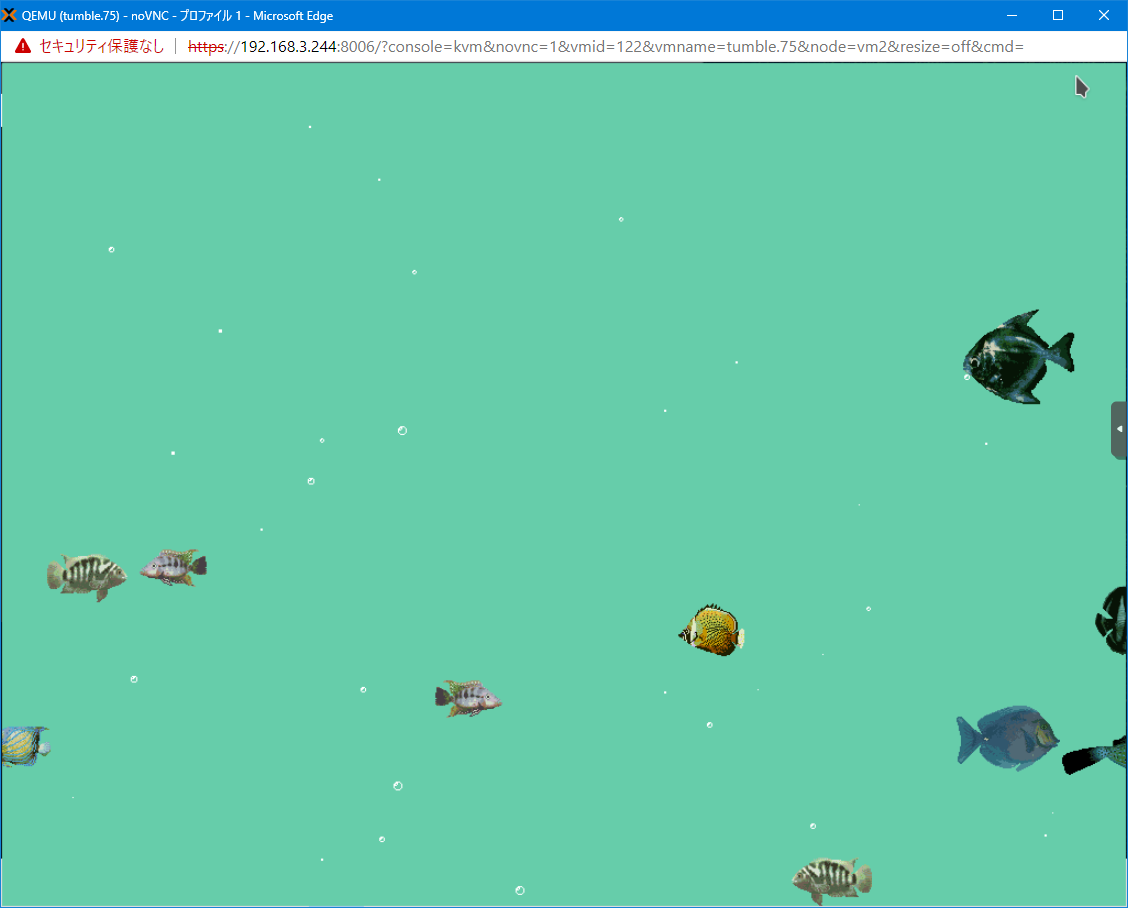
パッケージ名 xpra
バージョン xpra-4.0.6-3.2
結果 ×
詳細
セッションを保持しながらリモートのサーバに接続できるソフトウェアです。X 版 screen であると、ドキュメントには記載があります。
しかし、Thumbleweed では、Pythonのコードでエラーを吐き、動きませんでした。openSUSE 15.2 では一応起動はしましたがうまく繋がりませんでした。たぶん色々と動かすためには調整が必要そうです。
Leadership Language Lessons from Star Trek

Growing up, an influential television character for me was Jean Luc Picard from Star Trek the Next Generation.
Picard was a portrayal of a different sort of leader to most. Picard didn’t order people about. He didn’t assume he knew best. He wasn’t seeking glory. In his words: “we work to better ourselves, and the rest of humanity”. The Enterprise was a vehicle for his crew to better themselves and society. What a brilliant metaphor for organisations to aspire to.
My current job title is “Director of engineering”. I kind of hate it. I don’t want to direct anybody. I represent them as part of my first team. People don’t report to me; I support people. My mission is to clarify so they can decide for themselves, and to help them build skills so they can succeed.
Director is just a word, but words matter. Language matters.
Picard was an effective leader in part due to the language he used. Here’s a few lessons we can learn from the way he talked.
“Make it So!”
Picard is probably best known for saying “make it so!”.
This catchphrase says so much about his leadership style. He doesn’t bark orders. He gives the crew the problems to solve. He listens to his crew and supports their ideas. His crew state their intent and he affirms (or not) their decisions.
I think “Make it so” is even more powerful than the more common “very well” or “do it”, which are merely agreeing with the action being proposed.
“Make it so” is instead an agreement with the outcome being proposed. The crew are still free to adjust their course of action to achieve that outcome. They won’t necessarily have to come back for approval if they have to change their plan to achieve the same outcome. They understand their commander’s intent.
And of course it’s asking for action “wishing for a thing does not make it so”
“Oh yes?”
Picard’s most common phrase was not affirming decisions, but “oh yes”. Because he was curious, he would actively listen to his crew. He sought first to understand.
It’s fitting that he says this more than make it so. Not everything learned requires action. It’s easy to come out of retrospectives with a long list of actions. I’d rather we learned something and took no actions than took action without learning anything.
“Suggestions?”
In “Cause and Effect” (The one with Captain Fraiser Crane) there’s an imminent crisis. The Enterprise is on a collision course with another ship and are unable to maneuver. What does Picard do? Resort to command and control? No; despite the urgency he asks for suggestions from the crew. Followed by a “make it so” agreement to act.
Asking for suggestions during a crisis requires enough humility to realise your crew or team is collectively smarter than you are. Picard trusts his team to come up with the best options.
He is also willing to show vulnerability, even during a crisis. His ego doesn’t get in the way.
In this episode, the crew did not automatically follow the suggestion of the most senior person in the room. The solution to the crisis is eventually found in the second suggestion, after they tried the first. They succeeded because they had diverged and discovered options first, before converging on a solution.
The crew were aware of the other options open to them, and when the first failed they acted to try another (successful) option. Crucially, they did not wait for their captain to approve it. There wasn’t time to let the captain make the decision, but they were free to try the other options because they’d been told to “make it so” not “do it”.
To achieve the best outcomes as a team, intentionally seek divergent ideas first before converging on a decision. Avoid converging too soon on an idea that sounds promising, when others in the group may have better ideas. If your first choice doesn’t work out you will be able to try the other ideas that came up.
“Nicely done!”
Picard made sure his crew knew when he thought they had done well. Even when they violated orders! He was not one to blindly follow orders himself and he praised his crew when they violated orders for good reasons.
Data’s violation of orders is met not with a reprimand but a “nicely done!”; when Data questions it Picard responds “The claim ‘I was only following orders’ has been used to justify too many tragedies in our history”
How different might the tech industry be if more people carefully considered whether doing what they’ve been told is the right or wrong thing to do?
The post Leadership Language Lessons from Star Trek appeared first on Benji's Blog.
Java 16 Pattern Matching Fun
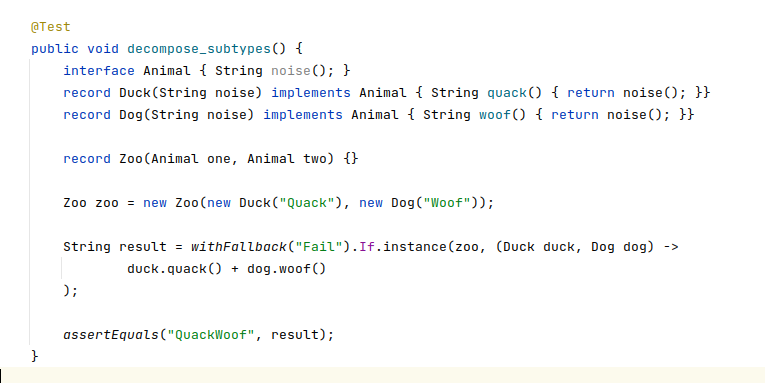
Java 16 brings Pattern Matching for instanceof. It’s a feature with exciting possibilities, though quite limited in its initial incarnation.
Basic Pattern Matching
We can now do things like
Object o = "hello";
if (o instanceof String s) {
    System.out.println(s.toUpperCase());
}
Note the variable “s”, which is then used without any casting needed.
Deconstructing Optionals
It would be even nicer if we could deconstruct structured types at the same time. I think it’s coming in a future version, but I’m impatient. Let’s see how close we can get with the current tools.
One thing we can do is use a function on the left hand side of this expression.
Let’s consider the example of dealing with unknown values in Java. There’s a fair amount of legacy to deal with. Sometimes you’ll get a value, sometimes you’ll get a null. Sometimes you’ll get an Optional<T> , sometimes you’ll get an Optional<Optional<T>> etc.
How can we make unknowns nicer to deal with?
We could create a little utility function that lets us convert all of these forms of unknown into either a value or not. Then match with an instanceof test.
Object unknown = Optional.of("Hello World");
assertEquals(
       "hello world",
       unwrap(unknown) instanceof String s
               ? s.toLowerCase()
               : "absent"
);
Thanks to instanceof pattern matching we can just use the string directly, without having to resort to passing method references i.e optional.map(String::toLowercase)
The unwrap utility itself uses pattern matching against Optional to recursively unwrap values from nested optionals. It also converts nulls and Optional.empty() to a non-instantiatable type for the purposes of ensuring they can never match the above pattern.
static Object unwrap(Object o) {
   if (o instanceof Optional> opt) {
       return opt.isPresent() ? unwrap(opt.get()) : None;
   } else if (o != null) {
       return o;
   } else {
       return None;
   }
}
static class None {
   private None() {}
   public static final None None = new None();
}
Here’s several more examples, if you’d like to explore further.
Deconstructing Records
What about more complex structures? Now that we have record types, wouldn’t it be great if we can deconstruct them to work with individual components more easily. I think until more powerful type patterns exist in the language we’ll have to diverge from the instanceof approach.
I previously showed how we could do this for records we control, by having them implement an interface. What about records we do not control? How can we deconstruct those?
This is about the closest I can get to what I’d hope would be possible as a first class citizen in the language in future.
record Name(String first, String last) {}
Object name = new Name("Benji", "Weber");
If.instance(name, (String first, String last) -> {
   System.out.println(first.toLowerCase() + last.toLowerCase()); // prints benjiweber
});
It takes a record (Name) and a lambda where the method parameters are of the same types as the component types in the record. It deconstructs the record component parts and passes them to the lambda to use (assuming the record really matches).
We could also use as an expression to return a value, as long as we provide a fallback for the case when the pattern does not match.
Object zoo = new Zoo(new Duck("Quack"), new Dog("Woof"));

String result = withFallback("Fail").
    If.instance(zoo, (Duck duck, Dog dog) ->
       duck.quack() + dog.woof()
    ); // result is QuackWoof
So how does this work?
If.instance is a static method which takes an Object of unknown type (we hope it will be a Record), and a lambda function that we want to pattern match against the provided object.
How can we use a lambda as a type pattern? We can use the technique from my lambda type references article—have the lambda type be a SerializableLambda which will allow us to use reflection to read the types of each parameter.
static  void instance(Object o, MethodAwareTriConsumer action) {

}
So we start with something like the above, a method taking an object and a reflectable lambda function.
Next we can make use of pattern matching again to check if it’s a record.
static  void instance(Object o, MethodAwareTriConsumer action) {
   if (o instanceof Record r) {
	// now we know it's a record
   }
}
Records allow reflection on their component parts. Let’s check whether we have enough component parts to match the pattern.
static  void instance(Object o, MethodAwareTriConsumer action) {
   if (o instanceof Record r) {
       if (r.getClass().getRecordComponents().length < 3) {
           return;
       }

	 // at this point we have a record with enough components and can use them.
   }
}
Now we can invoke the passed action itself
action.tryAccept((T) nthComponent(0, r), (U) nthComponent(1, r), (V) nthComponent(2, r));
Where nthComponent uses reflection to access the relevant component property of the record.
private static Object nthComponent(int n, Record r)  {
   try {
       return r.getClass().getRecordComponents()[n].getAccessor().invoke(r);
   } catch (Exception e) {
       throw new RuntimeException(e);
   }
}
tryAccept is a helper default method I've added in MethodAwareTriConsumer. It checks whether the types of the provided values match the method signature before trying to pass them. Avoiding ClassCastExceptions
interface MethodAwareTriConsumer extends TriConsumer, ParamTypeAware {
   default void tryAccept(T one, U two, V three) {
       if (acceptsTypes(one, two, three)) {
           accept(one, two, three);
       }
   }
   default boolean acceptsTypes(Object one, Object two, Object three) {
       return paramType(0).isAssignableFrom(one.getClass())
               && paramType(1).isAssignableFrom(two.getClass())
               && paramType(2).isAssignableFrom(three.getClass());
   }

   default Class> paramType(int n) {
       int actualParameters = method().getParameters().length; // captured final variables may be prepended
       int expectedParameters = 3;
       return method().getParameters()[(actualParameters - expectedParameters) + n].getType();
   }
}
Then put all this together and we can pattern match against Objects of unknown type, and deconstruct them if they're records matching the provided lambda type-pattern.
record Colour(Integer r, Integer g, Integer b) {}

Object unknown = new Colour(5,6,7); // note the Object type

int result = withFallback(-1).
    If.instance(unknown, (Integer r, Integer g, Integer b) ->
       r + g + b
    );

assertEquals(18, result);
Degrading safely if the pattern does not match
Object unknown = new Name("benji", "weber");

int result = withFallback(-1).
    If.instance(unknown, (Integer r, Integer g, Integer b) ->
       r + g + b
    );

assertEquals(-1, result);
Code for the record deconstruction and several more examples all in this test on github. Hopefully all this will be made redundant by future enhancements to Java's type patterns :)
The post Java 16 Pattern Matching Fun appeared first on Benji's Blog.
Actualización de marzo del 2021 de KDE Frameworks
En este tercer mes del año siguen las entradas recurrentes de las actualizaciones mensuales de rigor que demuestra que los desarrolladores de KDE no dejan de trabajar. Así que se congratulan en anunciar la actualización de marzo del 2021 de KDE Frameworks. Con esta se llega a la versión 5.80, un suma y sigue de compromiso y constancia que no parece que tenga un final cercano.
Actualización de marzo del 2021 de KDE Frameworks
A pesar de que para los usuarios corrientes esta noticia sea algo confusa ya que no se trata de realzar una nueva aplicación ni de una nueva gran funcionalidad del escritorio, el desarrollo de KDE Frameworks tiene repercusiones directas en él a medio y largo plazo.
La razón de esta afirmación es que KDE Frameworks es básicamente la base de trabajo de los desarrolladores para realizar sus aplicaciones, es como el papel y las herramientas de dibujo para un artista: cuanto mejor sea el papel y mejores pinceles tenga, la creación de una artista será mejor.
De esta forma, las mejoras en KDE Frameworks facilitan el desarrollo del Software de la Comunidad KDE, haciendo que su funcionamiento, su estabilidad y su integración sea la mejor posible.
El pasado sábado 14 de marzo de 2021 ha sido lanzado KDE Frameworks 5.80, la nueva revisión del entorno de programación sobre el que se asienta Plasma 5, el escritorio GNU/Linux de la Comunidad KDE, y las aplicaciones que se crean con para él.
Hay que recordar que los desarrolladores de KDE decidieron lanzar actualizaciones mensuales de este proyecto y lo están cumpliendo con puntualmente. La idea es ofrecer pocas pero consolidadas novedades, a la vez que se mantiene el proyecto evolucionando y siempre adaptándose al vertiginoso mundo del Software Libre.
Una gran noticia para la Comunidad KDE que demuestra la evolución continua del proyecto que continua ganando prestigio en el mundo de los entornos de trabajo Libres.
Más información: KDE
¿Qué es KDE Frameworks?
Para los que no lo sepan, KDE Frameworks añade más de 70 librerías a Qt que proporcionan una gran variedad de funcionalidades necesarias y comunes, precisadas por los desarrolladores, testeadas por aplicaciones específicas y publicadas bajo licencias flexibles. Como he comentado, este entorno de programación es la base para el desarrollo tanto de las nuevas aplicaciones KDE y del escritorio Plasma 5.

Aquí podéis encontrar un listado con todos estos frameworks y la serie de artículos que dedico a KDE Frameworks en el blog,
Recuerda que puedes ver una introducción a Frameworks 5.0 en su anuncio de lanzamiento.
Syslog-ng & Pi day
Today is March 14th, or as many geeks refer to it: Pi day. On this occasion, I would like to show you a syslog-ng configuration, which prints a huge π on the screen, and two recent articles that feature syslog-ng on the Raspberry Pi.
Printing π
The following configuration – that I got from my colleagues – prints a huge π sign on screen. Create a new configuration, copy and paste the configuration below and save it on your host running syslog-ng with the name pi.conf:
@version: 3.31
@include "scl.conf"

template-function "pi-art" "

      3.141592653589793238462643383279
    5028841971693993751058209749445923
   07816406286208998628034825342117067
   9821    48086         5132
  823      06647        09384
 46        09550        58223
 17        25359        4081
           2848         1117
           4502         8410
           2701         9385
          21105        55964
          46229        48954
          9303         81964
          4288         10975
         66593         34461
        284756         48233
        78678          31652        71
       2019091         456485       66
      9234603           48610454326648
     2133936            0726024914127
     3724587             00660631558
     817488               152092096

";

block source pi-art(...) {

example-msg-generator(template("$(pi-art)") `__VARARGS__`);

};

log {
  source { pi-art(); };

   destination { file("/dev/stdout"); };
};
What happens in this configuration?
-
As usual, the syslog-ng configuration starts with a version number declaration. The current version is 3.31, but I also tested this config with syslog-ng version 3.26.
-
We include scl.conf (SCL is the syslog-ng configuration library). It contains many useful configuration snippets. None of them is used here, but we are too much used to including it :-)
-
We define a custom template function, called “pi-art” that shows a huge π sign.
-
The source block is also named “pi-art” and calls example-msg-generator() to print the π character once each second, using the previously defined template function.
-
Finally, the log statement connects the pi-art() source with the standard output (our screen).
How to test it? Start syslog-ng in the foreground with the freshly saved configuration:
syslog-ng -F -f pi.conf
syslog-ng on the Raspberry Pi
Recently, Pi day is not just about physics and mathematics (and eating pies), but also about the Raspberry Pi. Syslog-ng runs on these tiny machines and I contributed two articles to the Pi day article series on https://opensource.com/:
-
Containers became widely popular because of Docker on Linux, but there are much earlier implementations, including the jail system on FreeBSD. A container is called a `jail` in the FreeBSD terminology. The jail system was first released in FreeBSD 4.0, way back in 2000, and it has been continuously improved since then. While 20 years ago it was used mostly on large servers, now you can run it on your Raspberry Pi.
From this article, you can learn the major differences between containers on Linux and FreeBSD, getting started with FreeBSD on the Raspberry Pi, and creating your first two containers using Bastille, a jail management application for FreeBSD: https://opensource.com/article/21/3/bastille-raspberry-pi -
I have lived in 100-plus-year-old brick houses for most of my life. They look nice, they are comfortable, and usually, they are not too expensive. However, humidity is high in winter in my climate, and mold is a recurring problem. A desktop thermometer that displays relative humidity is useful for measuring it, but it does not provide continuous monitoring.
In comes the Raspberry Pi: it is small, inexpensive, and has many sensor options, including temperature and relative humidity. It can collect data around the clock, do some alerting, and forward data for analysis.
From this article, you can learn not just about how to forward sensor data from your Raspberry Pi to Elasticsearch using syslog-ng, but also how relative humidity is changing when opening the windows for shorter or longer periods of time: https://opensource.com/article/21/3/sensor-data-raspberry-pi
If you have questions or comments related to syslog-ng, do not hesitate to contact us. You can reach us by email or even chat with us. For a list of possibilities, check our GitHub page under the “Community” section at https://github.com/syslog-ng/syslog-ng. On Twitter, I am available as @Pczanik.
packagesの説明文書を訳しつつ、使えるものを探してみました(I編)
前回 は W でしたが、今回は I です。
パッケージ名 i18nspector
バージョン i18nspector-0.26-1.2
結果◎
詳細
.po ファイルのエラーチェックをするプログラムです。.POT なども処理できます。試しに、linux jm project で翻訳しているファイルを処理してみたところ、結構エラーが出ました。
% i18nspector ./jm/jm/manual/util-linux/po4a/man8/lsblk.po
I: ./jm/jm/manual/util-linux/po4a/man8/lsblk.po: boilerplate-in-initial-comments 'Copyright (C) YEAR Free Software Foundation, Inc.'
I: ./jm/jm/manual/util-linux/po4a/man8/lsblk.po: boilerplate-in-initial-comments 'This file is distributed under the same license as the PACKAGE package.'
I: ./jm/jm/manual/util-linux/po4a/man8/lsblk.po: boilerplate-in-initial-comments 'FIRST AUTHOR <EMAIL@ADDRESS>, YEAR.'
P: ./jm/jm/manual/util-linux/po4a/man8/lsblk.po: no-language-header-field
I: ./jm/jm/manual/util-linux/po4a/man8/lsblk.po: unable-to-determine-language
W: ./jm/jm/manual/util-linux/po4a/man8/lsblk.po: boilerplate-in-project-id-version 'PACKAGE VERSION'
W: ./jm/jm/manual/util-linux/po4a/man8/lsblk.po: no-report-msgid-bugs-to-header-field
W: ./jm/jm/manual/util-linux/po4a/man8/lsblk.po: boilerplate-in-last-translator 'FULL NAME <EMAIL@ADDRESS>'
E: ./jm/jm/manual/util-linux/po4a/man8/lsblk.po: inconsistent-trailing-newlines msgid 'B<lsblk> lists information about all available or the specified block devices.  The B<lsblk> command reads the B<sysfs> filesystem and B<udev db> to gather information. If the udev db is not available or lsblk is compiled without udev support than it tries to read LABELs, UUIDs and filesystem types from the block device. In this case root permissions are necessary.'
ちなみにファイルの最初の所は
# SOME DESCRIPTIVE TITLE
# Copyright (C) YEAR Free Software Foundation, Inc.
# This file is distributed under the same license as the PACKAGE package.
# FIRST AUTHOR <EMAIL@ADDRESS>, YEAR.
#
msgid ""
msgstr ""
"Project-Id-Version: PACKAGE VERSION\n"
"POT-Creation-Date: 2020-09-20 15:12+0900\n"
"PO-Revision-Date: 2020-10-10 18:04+0900\n"
"Last-Translator: FULL NAME <EMAIL@ADDRESS>\n"
"Language-Team: Linux JM project <linuxjm-discuss@lists.osdn.me>\n"
"Language: \n"
"MIME-Version: 1.0\n"
"Content-Type: text/plain; charset=UTF-8\n"
"Content-Transfer-Encoding: 8bit\n"
となっているので、言語の指定が無いなどを指摘しています。
Qt の linguist などでもエラー表示を出しますが、マニュアルを見る限りかなり色々なチェックをしているようですので、翻訳終了後にこのプログラムを使って見るのも良いかもしれません。
パッケージ名 icmpinfo
バージョン icmpinfo-1.11-715.11
結果 ◎
詳細
icmp の受信状況を表示するだけのプログラムです。同等のことは tcpdump でも出来ますが、このプログラムはicmp の受信に特化しています。その分簡単に使えて見やすい、という利点はあります。
結果はこんな感じになります。
# icmpinfo -vv
icmpinfo: Icmp monitoring in progress...
Mar  2 11:38:44 ICMP_Echo < 192.168.3.11 sz=2008(+20)
Mar  2 11:38:45 ICMP_Echo < 192.168.3.11 sz=2008(+20)
Mar  2 11:38:46 ICMP_Echo < 192.168.3.11 sz=2008(+20)
Mar  2 11:38:47 ICMP_Echo < 192.168.3.11 sz=2008(+20)
Mar  2 11:38:48 ICMP_Echo < 192.168.3.11 sz=2008(+20)
Mar  2 11:38:50 ICMP_Echo < 192.168.3.11 sz=2008(+20)
パッケージ名 input-pad
バージョン input-pad-1.0.99.20140916-4.6
結果 ○
詳細
画面上に仮想キーボードを表示して、それをマウスでクリックしてテキストベースのアプリケーションに入力するツールです。細かくカテゴリが選べるなど、結構良く出来ています。
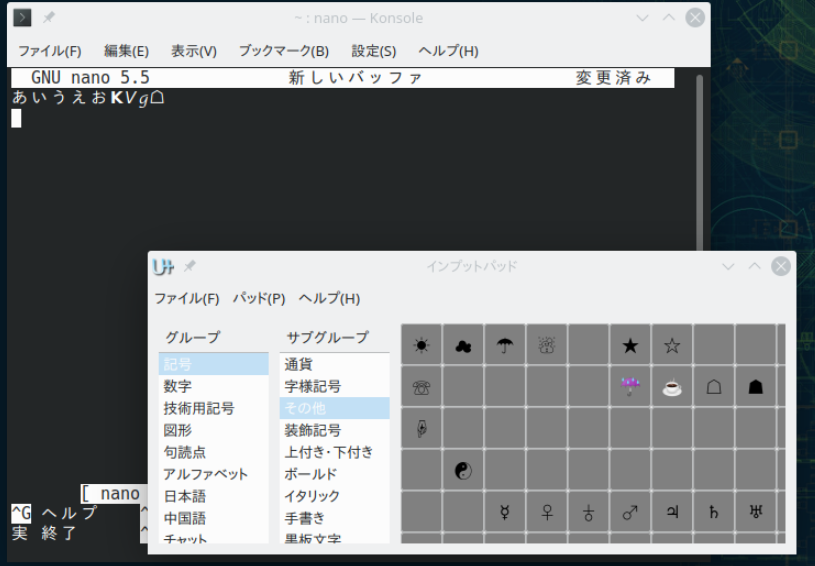
起動時にはカスタム文字表示になっていますが、ユニコードでのすべての文字を表示するモードや、キーボードレイアウトを表示することも出来ます。
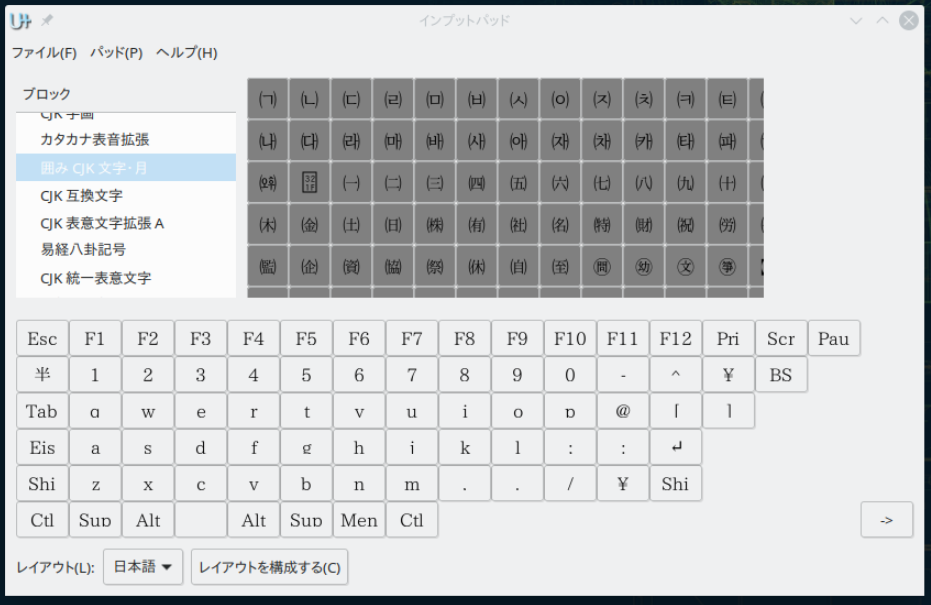
コードポイントで入力することも出来ます。
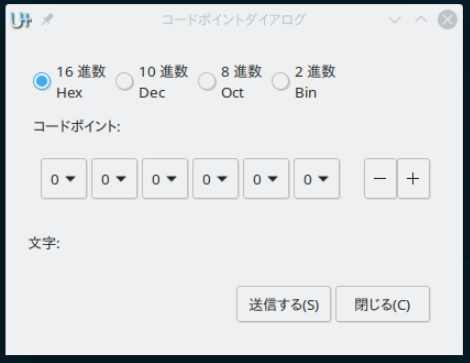
ただ、インプットメソッドの一部として提供されているわけではないので、GUIなアプリケーションとのレン回は出来ないようです。ターミナルからinput-pad を起動し、そのターミナルで動作するアプリケーションに入力することになります。ターミナルから GUI なプログラム (たとえば Libre Office)を起動してもそちらには文字を入力できません。ですので、利用範囲は少し限定されてしまうかもしれません。