
 Member
 baltolkien
Lanzada la cuarta actualización de Plasma 5.22
Tal y como estaba previsto en el calendario de lanzamiento de los desarrolladores, ayer martes 27 de julio la Comunidad KDE ha comunicado que ha sido lanzada la cuartaº actualización de Plasma 5.22. Una noticia que aunque es esperada y previsible es la demostración palpable del alto grado de implicación de la Comunidad en la mejora continua de este gran entorno de escritorio de Software Libre.
Lanzada la cuarta actualización de Plasma 5.22
No existe Software creado por la humanidad que no contenga errores. Es un hecho incontestable y cuya única solución son las actualizaciones. Es por ello que en el ciclo de desarrollo del software creado por la Comunidad KDE se incluye siempre las fechas de las actualizaciones.

De esta forma, el martes 27 de julio ha sido lanzada la cuarta actualización de Plasma 5.22, la cual solo trae (que no es poco) soluciones a los bugs encontrados en esta semana de vida del escritorio y mejoras en las traducciones. Es por tanto, una actualización 100% recomendable.
Más información: KDE
Las novedades básicas de Plasma 5.22
La lista principal de las novedades de Plasma 5.22 son las siguientes:
- Grandes mejoras visuales, donde destaca la nueva funcionalidad de transparencia adaptativa: esto significa que el panel y los widgets que contiene serán agradablemente translúcidos por norma general, aunque se volverán completamente opacos si existen ventanas maximizadas para evitar cualquier distracción.
- Nueva pantalla de inicio de las Preferencias del Sistema donde además de las acciones más habituales que solemos hacer los usuarios tendremos el acceso a los módulos que más utilizamos.
- Mejoras en las actualizaciones en diferido, útiles para algunos usuarios, no tanto para otros, y que como es habitual en esta versión se han pulido para contentar a todos.
- Los widgets de la Bandeja del sistema (situados normalmente en la parte inferior derecha del panel) son mucho más consistentes en aspecto y también más útiles
- Mejoras en KWin, Wayland, el lanzador de «todo» Kunner y, por supuesto, en las notificaciones.
Más información: KDE

Novos códigos All Star Tower Defense (update 9)

As seguir a lista dos últimos códigos do jogo All Tower Defense que podem ser trocados por joias gratuitas, que você usa para invocar novos personagens para ajudar na defesa contra seus inimigos.
- specialkingluffy100k – 150 gemas (novo)
- illbewatchingyou – 300 gemas (novo)
- gamebreakingvisits101 – 250 gemas (novo)
- nowherescoredeal – 250 gemas (novo)
- Minishutdown – 200 gemas
- mrworldwide – 300 gemas
- morecodeforyouxd – 175 gemas
- codeofprisma – 250 gemas [Servidor privado]
- Codeoflight – 250 gemas [Servidor Privado]
- listentothemusic132 – 175 gemas
- howareyoutodaymyfriendo – 175 gemas [Servidor Privado]
- NAVYXFLAME4CODE – 150 gemas
- fruitysubmoe – 250 gemas
- 4thofjulyupdate – 250 gemas
- lesgolesgoyuuh – 150 gemas
- supertime – 150 gemas
- biggerthanlife1 – 150 gemas
- 600klikes – 175 gemas
- fruitgame – 150 gemas
- updatejune2021 – 250 gemas
- addnewunitstobannerfix – 150 gemas
- fruit – 550 gemas
- 2021memorialday2021x – 150 gemas
- Update53021 – 150 gemas
- lovetobrazil – 150 gemas
- addnewunitstobannerfix – 150 gemas
- diamondnowina – 150 gemas
- ohmahgawdskill – 150 gemas
- yellowsix – 150 gemas
- tysmfor1mfavorite – 720 gemas
- jahajha – 150 gems
- smoothcriminal2 – 150 gems
- freedom – 150 gems
- lieawake – 150 gems
- likeapartyonthelist – 150 gems
- shotofmemories – 150 gems
- quickshut – 100 gems
- ohmahgawdskill – 150 gemas (novo)
- yellowsix – 150 gemas (novo)
- tysmfor1mfavorite – 720 gemas (novo)
- jahajha – 150 gems
- smoothcriminal2 – 150 gems
- freedom – 150 gems
- lieawake – 150 gems
- likeapartyonthelist – 150 gems
- shotofmemories – 150 gems
- quickshut – 100 gems
Running openSUSE in a FreeBSD jail using Bastille
Why?
Last week, when the latest version of Bastille, a jail (container) management system for FreeBSD was released, it also included experimental Linux support. Its author needed Ubuntu, so that was implemented. I prefer openSUSE, so with some ugly hacks I could get openSUSE up and running in Bastille. I was asked to document it in a blog. This topic does not fit the sudo or syslog-ng blogs, where I regularly contribute. However it involves two of my favorite operating systems: FreeBSD, which I started to use in 1994 and (open)SUSE, which I started to use in 1996. This is how my personal blog was born after years of procrastination :-)
Note. OpenSUSE in a FreeBSD jail is barely usable. The way I installed it is an ugly hack, even in my own view. But it works, and some people might find it useful…
Some preparations
First of all, you need FreeBSD and you need the latest Bastille installed. I do not know if this version is already available in FreeBSD ports, I installed it using git based on the instructions on the Bastille documentation at: https://bastille.readthedocs.io/en/latest/chapters/installation.html#git.
Before going on to play with Linux I made sure that everything works with Bastille as expected. So, I followed my blog from earlier and created a syslog-ng jail using Bastille: https://www.syslog-ng.com/community/b/blog/posts/running-syslog-ng-in-bastille-revisited Note, that /usr/local/etc/bastille/bastille.conf is not installed when installing from git. Copy /usr/local/etc/bastille/bastille.conf.sample to bastille.conf
Once I made sure that Bastille works fine with FreeBSD jails, the next step was to get Ubuntu working. Just as with FreeBSD-based jails in Bastille, first you need to bootstrap it. If Linux support is not yet enabled, Bastille can do that for you: modify configuration files and load the necessary kernel modules.
root@fb130:~ # bastille bootstrap focal
sysrc: unknown variable 'linprocfs_load'
sysrc: unknown variable 'linsysfs_load'
sysrc: unknown variable 'tmpfs_load'
linprocfs_load, linsysfs_load, tmpfs_load not enabled in /boot/loader.conf or linux_enable not active. Should I do that for you?  (N|y)
y
Loading modules
kldload: can't load tmpfs: module already loaded or in kernel
Persisting modules
linux_enable: NO -> YES
linprocfs_load:  -> YES
linsysfs_load:  -> YES
tmpfs_load:  -> YES
W: Probably required module fdescfs is not loaded
I: Retrieving InRelease
I: Retrieving Packages
I: Validating Packages
I: Resolving dependencies of required packages...
I: Resolving dependencies of base packages...
I: Checking component main on http://archive.ubuntu.com/ubuntu...
I: Retrieving adduser 3.118ubuntu2
I: Validating adduser 3.118ubuntu2
I: Retrieving apt 2.0.2
[...]
Now you can create your first Linux-based jail to test that everything works as expected:
root@fb130:~ # bastille create -L ubuntu focal 10.17.89.51
Valid: (10.17.89.51).
[ubuntu]:
ubuntu: created

Fetching packages...
Selecting previously unselected package adduser.
(Reading database ... 0 files and directories currently installed.)
Preparing to unpack .../adduser_3.118ubuntu2_all.deb ...
Unpacking adduser (3.118ubuntu2) ...
[...]
Get:3 http://archive.ubuntu.com/ubuntu focal/main Translation-en [506 kB]
Fetched 1741 kB in 1s (1841 kB/s)
Reading package lists... Done
Building dependency tree... Done
All packages are up to date.
Verify that the second jail is up and running:
root@fb130:~ # jls
   JID  IP Address      Hostname                      Path
     2  10.17.89.50     alcatraz                      /usr/local/bastille/jails/alcatraz/root
     3  10.17.89.51     ubuntu                        /usr/local/bastille/jails/ubuntu/root
root@fb130:~ #
You can now reach the console, install software and enjoy your first Linux jail in Bastille.
root@fb130:~ # bastille console ubuntu
[ubuntu]:
Welcome to Ubuntu 20.04 LTS (GNU/Linux 3.17.0 x86_64)

 * Documentation:  https://help.ubuntu.com
 * Management:     https://landscape.canonical.com
 * Support:        https://ubuntu.com/advantage

Last login: Sun Jul 25 19:32:28 UTC 2021 on pts/0
root@ubuntu:~# uname -a
Linux ubuntu 3.17.0 FreeBSD 13.0-RELEASE-p3 #0: Tue Jun 29 19:46:20 UTC 2021 x86_64 x86_64 x86_64 GNU/Linux
root@ubuntu:~# apt-get install python3-bs4
Reading package lists... Done
Building dependency tree
Reading state information... Done
The following additional packages will be installed:
  libxslt1.1 python3-chardet python3-html5lib python3-lxml python3-soupsieve python3-webencodings
[...]
Installing openSUSE
There is no dedicated installation method yet for openSUSE. And I am not aware of a tool similar to debootstrap for openSUSE, that could bootstrap a distribution. Instead of that I downloaded a ready to use openSUSE operating system image and replaced the content of the Ubuntu directory under /usr/local/bastille/releases/Ubuntu_2004 with the openSUSE image.
root@fb130:~ # cd /usr/local/bastille/releases/
root@fb130:/usr/local/bastille/releases # ls
13.0-RELEASE					Ubuntu_2004
root@fb130:/usr/local/bastille/releases # mv Ubuntu_2004 Ubuntu_2004.orig
root@fb130:/usr/local/bastille/releases # mkdir Ubuntu_2004
root@fb130:/usr/local/bastille/releases # wget http://download.opensuse.org/distribution/leap/15.3/appliances/opensuse-leap-dnf-image.x86_64-lxc-dnf.tar.xz
--2021-07-26 22:36:42--  http://download.opensuse.org/distribution/leap/15.3/appliances/opensuse-leap-dnf-image.x86_64-lxc-dnf.tar.xz
Resolving download.opensuse.org (download.opensuse.org)... 195.135.221.134, 2001:67c:2178:8::13
Connecting to download.opensuse.org (download.opensuse.org)|195.135.221.134|:80... connected.
HTTP request sent, awaiting response... 302 Found
Location: http://downloadcontent.opensuse.org/distribution/leap/15.3/appliances/opensuse-leap-dnf-image.x86_64-15.3.0-lxc-dnf-Build9.150.tar.xz [following]
--2021-07-26 22:36:42--  http://downloadcontent.opensuse.org/distribution/leap/15.3/appliances/opensuse-leap-dnf-image.x86_64-15.3.0-lxc-dnf-Build9.150.tar.xz
Resolving downloadcontent.opensuse.org (downloadcontent.opensuse.org)... 195.135.221.157, 2001:67c:2178:8::27
Connecting to downloadcontent.opensuse.org (downloadcontent.opensuse.org)|195.135.221.157|:80... connected.
HTTP request sent, awaiting response... 200 OK
Length: 45147784 (43M) [application/octet-stream]
Saving to: ‘opensuse-leap-dnf-image.x86_64-lxc-dnf.tar.xz’

opensuse-leap-dnf-image.x86_64-lxc-dnf.tar.xz               100%[=========================================================================================================================================>]  43.06M  10.7MB/s    in 4.3s

2021-07-26 22:36:46 (10.1 MB/s) - ‘opensuse-leap-dnf-image.x86_64-lxc-dnf.tar.xz’ saved [45147784/45147784]

root@fb130:/usr/local/bastille/releases # cd Ubuntu_2004
root@fb130:/usr/local/bastille/releases/Ubuntu_2004 # tar xf ../opensuse-leap-dnf-image.x86_64-lxc-dnf.tar.xz
There are more images available on the openSUSE download site, but the above one seemed to be small enough and still contain package management. It is the latest stable release, Leap 15.2 is still available and Tumbleweed provides you with a cutting edge rolling-release distribution.
Next, create another jail based on the Ubuntu image, which in practice contains now openSUSE. There will be plenty of error messages, as the script tries to run Debian package management tools, but in the end there will be an openSUSE image up and running:
root@fb130:~ # bastille create -L opensuse focal 10.17.89.52
Valid: (10.17.89.52).
[opensuse]:
opensuse: created

Fetching packages...
rm: cannot remove '/var/cache/apt/archives/rsyslog*.deb': No such file or directory
/bin/bash: dpkg: command not found
/bin/bash: dpkg: command not found
/bin/bash: apt: command not found
root@fb130:~ #
You can verify that something is up and running:
root@fb130:~ # jls
   JID  IP Address      Hostname                      Path
     1  10.17.89.50     alcatraz                      /usr/local/bastille/jails/alcatraz/root
     2  10.17.89.51     ubuntu                        /usr/local/bastille/jails/ubuntu/root
     3  10.17.89.52     opensuse                      /usr/local/bastille/jails/opensuse/root
Unfortunately the bastille console command does not work with openSUSE. Not even after the missing dependencies are installed. You can still access the running jail using jexec. In this case the command is, where 3 is the JID:
root@fb130:~ # jexec 3 /bin/bash
opensuse:/ # uname -a
Linux opensuse 3.17.0 FreeBSD 13.0-RELEASE-p3 #0: Tue Jun 29 19:46:20 UTC 2021 x86_64 x86_64 x86_64 GNU/Linux
opensuse:/ # dnf update
openSUSE Leap 15.3 - OSS                                                                                                                                                                                      0.0  B/s |   0  B     00:00
Errors during downloading metadata for repository 'opensuse-leap-oss':
  - Curl error (6): Couldn't resolve host name for http://download.opensuse.org/distribution/leap/15.3/repo/oss/repodata/repomd.xml [Could not resolve host: download.opensuse.org]
Error: Failed to download metadata for repo 'opensuse-leap-oss': Cannot download repomd.xml: Cannot download repodata/repomd.xml: All mirrors were tried
openSUSE Leap 15.3 - OSS - Updates                                                                                                                                                                            0.0  B/s |   0  B     00:00
Errors during downloading metadata for repository 'opensuse-leap-oss-update':
  - Curl error (6): Couldn't resolve host name for http://download.opensuse.org/update/leap/15.3/oss/repodata/repomd.xml [Could not resolve host: download.opensuse.org]
Error: Failed to download metadata for repo 'opensuse-leap-oss-update': Cannot download repomd.xml: Cannot download repodata/repomd.xml: All mirrors were tried
openSUSE Leap 15.3 - Updates from Backports for SUSE Linux Enterprise                                                                                                                                         0.0  B/s |   0  B     00:00
Errors during downloading metadata for repository 'opensuse-leap-sle-backports-update':
  - Curl error (6): Couldn't resolve host name for http://download.opensuse.org/update/leap/15.3/backports/repodata/repomd.xml [Could not resolve host: download.opensuse.org]
Error: Failed to download metadata for repo 'opensuse-leap-sle-backports-update': Cannot download repomd.xml: Cannot download repodata/repomd.xml: All mirrors were tried
openSUSE Leap 15.3 - Updates from SUSE Linux Enterprise                                                                                                                                                       0.0  B/s |   0  B     00:00
Errors during downloading metadata for repository 'opensuse-leap-sle-update':
  - Curl error (6): Couldn't resolve host name for http://download.opensuse.org/update/leap/15.3/sle/repodata/repomd.xml [Could not resolve host: download.opensuse.org]
Error: Failed to download metadata for repo 'opensuse-leap-sle-update': Cannot download repomd.xml: Cannot download repodata/repomd.xml: All mirrors were tried
Ignoring repositories: opensuse-leap-oss, opensuse-leap-oss-update, opensuse-leap-sle-backports-update, opensuse-leap-sle-update
allow_vendor_change is disabled. This option is currently not supported for downgrade and distro-sync commands
Dependencies resolved.
Nothing to do.
Complete!
As you can see, networking does not work either. It’s a missing /etc/resolve.conf, which is easy to resolve (pun intended):
root@fb130:~ # cp /etc/resolv.conf /usr/local/bastille/jails/opensuse/root/etc/
root@fb130:~ #
Now you can jexec again into the openSUSE jail, install software packages and enjoy :)
opensuse:/ # dnf install python3-beautifulsoup4
Last metadata expiration check: 0:03:34 ago on Mon Jul 26 21:02:50 2021.
allow_vendor_change is disabled. This option is currently not supported for downgrade and distro-sync commands
Dependencies resolved.
==============================================================================================================================================================================================================================================
 Package                                                           Architecture                                      Version                                               Repository                                                    Size
==============================================================================================================================================================================================================================================
Installing:
 python3-beautifulsoup4                                            noarch                                            4.8.2-1.18                                            opensuse-leap-oss                                            191 k
Installing dependencies:
 python3-soupsieve                                                 noarch                                            1.9.5-1.17                                            opensuse-leap-oss                                             68 k

Transaction Summary
==============================================================================================================================================================================================================================================
Install  2 Packages

Total download size: 259 k
Installed size: 1.3 M
Is this ok [y/N]: y
Downloading Packages:
(1/2): python3-soupsieve-1.9.5-1.17.noarch.rpm                                                                                                                                                                444 kB/s |  68 kB     00:00
(2/2): python3-beautifulsoup4-4.8.2-1.18.noarch.rpm                                                                                                                                                           1.2 MB/s | 191 kB     00:00
----------------------------------------------------------------------------------------------------------------------------------------------------------------------------------------------------------------------------------------------
Total                                                                                                                                                                                                         1.5 MB/s | 259 kB     00:00
Running transaction check
Transaction check succeeded.
Running transaction test
Transaction test succeeded.
Running transaction
  Preparing        :                                                                                                                                                                                                                      1/1
  Installing       : python3-soupsieve-1.9.5-1.17.noarch                                                                                                                                                                                  1/2
  Installing       : python3-beautifulsoup4-4.8.2-1.18.noarch                                                                                                                                                                             2/2
  Verifying        : python3-beautifulsoup4-4.8.2-1.18.noarch                                                                                                                                                                             1/2
  Verifying        : python3-soupsieve-1.9.5-1.17.noarch                                                                                                                                                                                  2/2

Installed:
  python3-beautifulsoup4-4.8.2-1.18.noarch                                                                                 python3-soupsieve-1.9.5-1.17.noarch

Complete!
What is next?
I’m still not convinced how useful it is, but you can run openSUSE on FreeBSD using Bastille. You can try other openSUSE images, install more software in the jail, etc. Note, that Linux support is still experimental in Bastille, and running openSUSE is an ugly hack. But as this hack lets me run my two favorite operating systems together, I love this hack :-)
Syslog-ng 3.33: the MQTT destination
Version 3.33 of syslog-ng introduced an MQTT destination. It uses the paho-c client library to send log messages to an MQTT broker. The current implementation supports version 3.1 and 3.1.1 of the protocol over non-encrypted connections, but this is only a first step.
From this blog, you can learn how to configure and test the mqtt() destination in syslog-ng.
Before you begin
To use the MQTT destination of syslog-ng, you need to use at least syslog-ng version 3.33. It is not yet included in most Linux distributions, but luckily it is available in some 3rd-party syslog-ng repositories. You can find a list of them at https://www.syslog-ng.com/products/open-source-log-management/3rd-party-binaries.aspx MQTT support is usually included in a sub-package of syslog-ng, often called syslog-ng-mqtt. You also need an MQTT broker, where you can forward log messages using the mqtt() destination.,
For my tests, I used Fedora 34 with the Mosquitto MQTT broker and syslog-ng installed from the unofficial Copr repository.
Configuring syslog-ng
If your distribution of choice supports it, create a new configuration file under the /etc/syslog-ng/conf.d/ directory with a .conf extension. Otherwise, append the configuration below to syslog-ng.conf.
destination d_mqtt {
  mqtt (
    address("tcp://localhost:1883"),
    topic("test/$HOST"),
    fallback-topic("syslog/fallback")
    template("$MESSAGE")
    qos(1)
  );
};

log {
    source(s_sys);
    destination(d_mqtt);
};
The MQTT destination has three mandatory options:
-
address() defines where to send log messages: it includes the hostname (or IP address) and the port number of the MQTT broker. These values work if the broker is running on localhost at the default port.
-
topic() defines in which topic syslog-ng stores the log message. You can also use templates here, and use, for example, the $HOST macro in the topic name hierarchy.
-
fallback-topic() is used when syslog-ng cannot post a message to the originally defined topic (which can include invalid characters coming from templates).
Optional parameters of the MQTT destination include:
-
template(), where you can configure the message template sent to the MQTT broker. By default, the template is: “$ISODATE $HOST $MSGHDR$MSG”
-
qos stands for quality of service and can take three values in the MQTT world. Its default value is 0, where there is no guarantee that the message is ever delivered. Setting it to 1 makes sure that the message is delivered at least once, while 2 ensures that a message is delivered exactly once. Obviously, 0 has the best performance, while 2 can be much slower.
The log statement connects the local log sources with the MQTT destination. Note, that the name of the source might be different, depending on syslog-ng.conf. Configurations on Fedora and RHEL call the local log source s_sys, by default.
Testing
As mentioned in the introduction, I used the Mosquitto MQTT broker for testing. There are dozens of others listed at https://mqtt.org/software/, verifying incoming messages is different for each software.
Once you reloaded syslog-ng to ensure that the configuration takes effect, you are ready for testing. We use two utilities for testing:
-
logger sends syslog messages to the local server
-
mosquitto_sub is part of the Mosquitto MQTT broker software and can subscribe to messages arriving on a broker
First start mosquitto_sub in a terminal:
mosquitto_sub -h localhost -p 1883 -t 'test/+'
This will listen to incoming messages on the broker on all subtopics under the “test” topic. “+” is a wildcard here.
Next, you can send some log messages using the logger command:
logger this is a test
And you should see the line appear in the output of mosquitto_sub:
2021-07-26T16:39:55+02:00 fedora34.localdomain root[3077]: this is a test
What is next?
This is just the first step in adding MQTT support to syslog-ng. Your feedback is very welcome about this new feature. Detailed problem reports help to make the next version more robust while positive feedback lets us know that the feature is in use and it is worth developing it further.
-
If you have questions or comments related to syslog-ng, do not hesitate to contact us. You can reach us by email or even chat with us. For a list of possibilities, check our GitHub page under the “Community” section at https://github.com/syslog-ng/syslog-ng. On Twitter, I am available as @Pczanik.

Digest of YaST Development Sprints 127 & 128
It’s summer in Europe and that means vacations for most members of the YaST Team at SUSE. Although that may imply less frequent blogging, we have some news to share with you today, like:
- Taking over the development of the (open)SUSE Release Tools
- Improvements in the new
check-profilecommand - Finished migration from Travis CI to GitHub Actions
- Several interesting bug fixes
Let’s go into some details
Release Tools: YaST Team to the Rescue!
As you all know, developing and maintaining complex software distributions like openSUSE Leap, Tumbleweed or SUSE Linux Enterprise is not an easy task. Specially since we want to ensure all of them stay independent but at the same time closely related, and since they keep evolving in new directions like Kubic, MicroOS and SLE Micro.
Our beloved Open Build Service is the key component that makes all that possible. But some extra tools are needed in addition to OBS in order to manage the complexity of the (open)SUSE distributions. Those extra tools are hosted and developed in a GitHub repository simply called openSUSE-release-tools. For years, the development process of those tools has been highly unstructured (not to say “slightly chaotic”), with more than 60 contributors but no clear mid-term strategy. Although that is not necessarily bad, some sustained and directed development is needed to solve some of the challenges we have ahead of us and to fix some pitfalls in the current development process of the openSUSE and SUSE products and distributions.
The YaST Team was chosen for such a task, so we will steadily take over development and maintenance
of the tools in that repository. As first steps, we improved a lot the documenation. That includes
extending the README
file and adding new
documents like an inventory of
tools and a summary of
the processes in
which those tools are involved. We also extended and updated the automated tests and implemented
an easy new check in the factory-auto bot.
We have way more ambitious plans for the future, but we are still learning and discovering new stuff in that repository every day.
Improvements in the AutoYaST Profile Validation
As you may know, we recently introduced a YaST client to validate complex profiles that include Embedded Ruby, rules and classes and/or scripts. Generally, such a validation could be done without root permissions, but there are some situations where superuser privileges are required.
To mitigate the implications, we introduced several improvements in the check-profile tool. You
can see the details in the description of the corresponding pull
request.
From Travis CI to GitHub Actions - Migration Completed
Some months ago, we started switching the continuous integration on all YaST repositories from using Travis CI to GitHub Actions. The main reason was that GitHub Actions are directly integrated in GitHub so it is easier to use - no need for extra account, less problems with authentication or permissions…
The transition is finished now. It was easy because both services are quite similar, although
support for Docker is more straightforward in GitHub Actions. In this service, the actions are
defined in YAML files in the .github/workflows subdirectory. We created several
templates for the YaST packages.
If you want to know more, read the GitHub Actions documentation.
Interesting bug fixes
Although we spend a significant time of our sprints fixing bugs, we usually don’t blog about that part of the job because we understand is not the most exciting one. But this time we would like to highlight some pull request you may find interesting for several reasons. Including better handling of failures while analyzing the system, of variables in repository urls and of SSH authorized keys.
We keep working
As mentioned before, the YaST Team is not at full speed due to the vacation season. But we hope to keep delivering interesting stuff in many fronts and we will try to keep you all updated. Meanwhile, do as we do and have a lot of fun!
Nace KDE Express, podcast ligeros de KDE España
Siempre es una buena noticia que aparezca una nueva iniciativa que ayude a la promoción del proyecto KDE. Es por ello que me complacen anunciar que nace KDE Express, una nuevo proyecto de integrantes de KDE España que propone realizar podcast ligeros con temática kdeera. ¿Qué os parece? A mi, genial.
Nace KDE Express, podcast ligeros de KDE España
Desde que el 31 de julio del 2014 Aleix Pol y un servidor iniciamos la andadura de KDE España en el mundo de los podcast ya ha llovido mucho.
Estos primeros audios cortos de 20 minutos fueron creciendo hasta adquirir el formato actual de los Podcast de KDE España de unas 2 horas de duración. La razón ha sido el cambio de enfoque ya que ahora se profundiza mucho en los temas.
Es evidente que a mucho oyentes les gustará, pero nos consta que hay otros que les «tira para atrás» audios tan largos. Esta es la razón del nacimiento de KDE Express, un nuevo proyecto de la Asociación KDE España, aunque mejor que se describan ellos mismos:
«Buenas, tenemos el placer de presentaros este nuevo podcast de la comunidad KDE España, en el que trataremos noticias y la actualidad de esta nuestra comunidad con un formato breve (max 30 minutos) para complementar los diferentes formatos en los que ya se divulga actualmente (video-podcast y blog).«
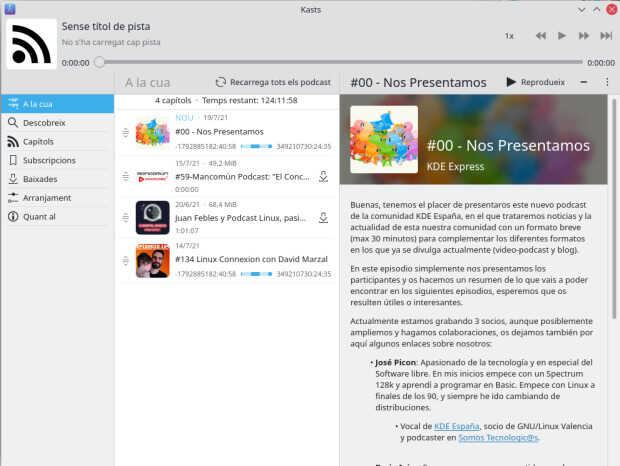
Los participantes de estos podcast son conocidos del blog, así seguro que os suenan. De nuevo, mejor que se presenten ellos mismos:
-
José Picon: Apasionado de la tecnología y en especial del Software libre. En mis inicios empece con un Spectrum 128k y aprendí a programar en Basic. Empece con Linux a finales de los 90, y siempre he ido cambiando de distribuciones.
- Vocal de KDE España, socio de GNU/Linux Valencia y podcaster en Somos Tecnologic@s.
-
Brais Arias: Es una persona comprometida con el software libre, socio de KDE España, ha participado y participa en otras comunidades, como por ejemplo GPUL.
- También participa en Mancomún Podcast.
-
David Marzal: Administrador de sistemas GNU/Linux de profesión, apasionado por el software libre y la sostenibilidad @ResiduoCero y @ResiduoCeroRM de vocación. Intentando poner mi granito de arena para tener un mundo y una sociedad mejor y más libre.
- Mantengo un Listado de Canales, Grupos, Bots y Recursos de Telegram de todo tipo pero con un especial foco en el FLOSS y la sostenibilidad.
- Colaborador adoptivo del Podcast GNU/Linux Valencia.
- Me podéis encontrar por Mastodon o Telegram
De momento llevan publicados dos capítulos, pero seguro que pronto son muchos más.
Más información: KDE Express | Feed | Anuncio de KDE España
Integrar los botones de la ventana en Thunderbird
Un tutorial para integrar los botones de la ventana de Plasma (no sé si servirá para otros gestores de escritorio) dentro de la propia ventana de Thunderbird

Desde hace tiempo, quería que Thunderbird, mi cliente de correo favorito integrase los botones de la ventana de cerrar, maximizar y minimizar dentro de la propia aplicación, sin la barra de título superior, similar a como lo hace Firefox.
Lo he estado buscando mucho y hoy, después de dar vueltas por muchos hilos en inglés lo he conseguido (no pongo enlaces a fuentes porque ha sido un cúmulo de enlaces). Para que no te toque a ti dar tantas vueltas te lo comento aquí, por si tu también quieres ahorrarte espacio en la pantalla.
Yo tengo Thuderbird 78.12, en openSUSE Tumbleweed, no sé si estará disponible para versiones inferiores. Estos son los pasos:
- Vamos al menú del icono de las tres rayas horizontales en la parte superior derecha
- Preferencias y en la sección de General bajamos hasta abajo del todo
- Pulsamos sobre “Editor de configuración” y aceptamos para entrar (similar al about:config de Firefox)
- Y en la caja de búsqueda escribimos: mail.tabs.drawInTitlebar
- Pasamos ese valor a True
Y ya está, Thunderbird en Plasma, quita la parte de la ventana que muestra los botones y estos pasan a integrarse dentro de Thunderbird.
Pruébalo con otra versión de thunderbird o con otro gestor de escritorio como Xfce, Gnome o el que uses y comparte en los comentarios si también te funciona.

Letras en GCompris – A fondo @g_compris (12)
Sigo aprovechándome de una publicación de Valencia Tech en la que se realizaba un listado completo de juegos que ofrece GCompris he empezado una serie donde se describen con más detalles las actividades. Seguimos la serie con la subsección de «Letras» en GCompris, la cual pertenece a la parte de lenguaje de esta suite ofimática y que, como es evidente, es la base de la misma.
Letras en GCompris – A fondo @g_compris (12)
Para poder tener claro lo que hacen las aplicaciones de GCompris he pensado hacer una revisión a su enorme colección de juegos y actividades, realizando una simple captura de pantalla y una breve descripción.
Ya hemos descrito la secciones de:
- Descubre la computadora
- Juegos de lógica
- Bellas Artes
- Música
- Historia y Geografía
- Juegos
- Matemáticas: Numeración
- Matemáticas: Aritmética
- Matemáticas: Medidas
- Puzzles
Y ya es hora de hablar de la actividades de la sección «Letras» de GCompris donde nos encontramos casi con más de una decena de miniaplicaciones pensada para que los más pequeños aprendan los principios de la lectura y la escritura. Empecemos el repaso.
Teclado para niños: básicamente se trata de que aparezcan en pantalla las letras que se pulsen. De hecho esta aplicación ya apareció en la sección Descubre la computadora.

Un procesador de texto para niños: un simple programa que simula un procesador de texto básico pero con opciones para guardar y cargar ficheros de texto. También apareció en la sección Descubre la computadora.

Dibujar letras: unes los puntos para ir formando letras mayúsculas.

Secuencia del alfabeto: pilota un helicóptero y captura poco a poco todas las letras del alfabeto

Pulsa sobre una letra minúscula; pulsa sobre una letra mayúscula: dos actividades muy parecidas en la que debemos pulsar sobre el vagón que tiene la letra que nos dictan.


Letras sencillas: desde cielo caen letras, pulsa su correspondencia en el teclado antes de que toquen el suelo.

Juego de memoria de asociación de mayúsculas y minúsculas contra Tux: empareja letras en sus dos grafías más rápido y de forma más eficaz que tu rival informático.

Juego de memoria de asociación de mayúsculas y minúsculas contra Tux: empareja letras en sus dos grafías más rápido y de forma más eficaz que tu rival humano.

Descubre el sistema braille: conoce y aprende las bases del lenguaje para personas invidentes de forma lúdica.

Diversión en braille: es hora de practicar lo aprendido en la actividad anterior. Un piloto nos muestra una letra y debemos ponerla en braille antes de que desaparezca de la pantalla.


Deactivating connect.opensuse.org
Our community portal, reachable via https://connect.opensuse.org, accompanied our community now since 2010. A long, long time. Especially, if you compare it with Facebook (which started in 2006) or LinkedIn (who became an international company in 2010).
While Facebook and LinkedIn are meanwhile multi-billion dollar markets, our community portal is meanwhile mainly used to organize the openSUSE members and being a “contact point” for members, who provide their profiles to help others to contact them.
Over 20,000 actively registered users and 100 groups might give an idea about the diversity and agility of the openSUSE community. From artists to musicians over to local user groups and groups for all the different window managers and their lovers. Everyone found a place here in the openSUSE universe.
But time flies by quickly - and especially the technology sector never stands still. Today, we need to announce the final shut down of our community portal. The reason is simple: while we asked multiple times for help and someone who wants to actively maintain and administrate the service, nobody stepped up. As we can not secure the application any longer without big time investments, we decided to shut it down and let it rest in peace instead.
By doing this, we apologize for the trouble that this decision might cause to some people. We tried our best to support you over all the years by running the service as long as possible. But if nobody steps up and wants to take over the work any longer, it’s better to say ‘good bye’ instead to wait until the Hackers of the world share the data of our users.
An era comes to an end. A nice one, indeed. But it also means that there might be a new era on the horizon. Some new tools that have a maintainer and someone who takes care of them.
Look at our Forums, our Wikis, Mailing Lists or the new Matrix service. We will not stop to support you, we will do our best to keep you and your data secure.
The plan for membership management and applications to take place using Pagure.
Remember to have a lot of fun!
Lars - in the name of the openSUSE heroes -
Gestor de podcast Kasts, nueva aplicación KDE
Hoy me complace dedicar el artículo al gestor de podcast Kasts, la nueva aplicación de la Comunidad KDE destinada a administrar estos audios que tan populares se han vuelto y que nos ofrecen información y entretenimiento en cantidades industriales.
Gestor de podcast Kasts, nueva aplicación KDE
Los podcast llegaron a mi vida para quedarse por la cantidad de información que nos pueden proporcionar de las más diversas fuentes. Mis preferidos son los de actualidad (pero poca que me saturan), historia, videojuegos y, por supuesto, GNU/Linux.
De hecho, desde hace unos años participo en los de KDE España y, esporádicamente, en otros como Compilando Podcast, 24H24L o Mancomun, por citar unos pocos.
Esta tendencia creciente no ha pasado desapercibida a los desarrolladores de KDE que han creado para Plasma Mobile, el interfaz para móviles de la Comunidad KDE, su propio gestor de podcast, que recibe el nombre de Kasts.

No obstante, lo mejor no es que el teléfono libre de KDE tendrá su aplicación nativa para escuchar podcast, sino que como Kasts está creado utilizando Kirigami, también tenemos el gestor disponible para nuestros escritorios.
Puedes descargar e instalar Kasts desde Flaptpak y poder disfrutar de sus funciones básicas, extraídas de Muy Linux, donde le han dedicado un artículo:
- Suscribirse a programas mediante enlaces
- Realzar búsquedas integradas en PodcastIndex
- Importar y exportar las suscripciones
- Guardar el tiempo de reproducción entre sesiones
- Acelerar o retardar la velocidad de reproducción.
Las novedades de julio de Kasts
El desarrollo de Kasts está en pleno desarrollo, como muestra el informe de las actualizaciones de julio de Plasma Mobile que nos informan de las siguientes mejoras:
- Swapnil implementó una página de descubrimiento que permite buscar podcasts en https://podcastindex.org.
- Bart ha añadido una función para reanudar las descargas de episodios de podcasts. La página de descargas se ha adaptado para mostrar las categorías de descarga, descarga parcial y descarga completa.
- Swapnil ha modificado la configuración de la velocidad de reproducción. Al hacer clic en el botón de velocidad, ahora se abre una lista superpuesta. Esta lista incluye ahora las velocidades de reproducción más lentas.
- Bart ha añadido un botón a la notificación de errores. Esto permite abrir directamente la lista de errores. Esta lista de errores también se puede abrir desde la página de Configuración (antes era una pestaña de la página de Descargas).
- En los sistemas que ejecutan NetworkManager, Kasts ahora puede comprobar si una conexión medida está en uso (por ejemplo, una conexión LTE en el PinePhone).
- Bart ha introducido nuevos ajustes para permitir/no permitir la comprobación de las actualizaciones de podcast, la descarga de episodios o la descarga de imágenes en dichas conexiones.
- Swapnil ha añadido el resaltado de la página actualmente seleccionada en el menú principal. Esto debería facilitar la navegación.
- Bart añadió nuevos ajustes para determinar lo que sucede cuando los episodios se marcan como reproducidos: los episodios pueden ser eliminados inmediatamente o la próxima vez que Kasts se inicie.
- Swapnil añadió varios tooltips. También añadió teclas de acceso rápido: el espacio reproducirá/pausará la reproducción y la n saltará a la siguiente pista.