
 Member
 vavai
vavaiTips Penggunaan Email
Bagi rekan-rekan yang hendak/sedang melamar pekerjaan, baik untuk PNS, instansi pemerintah tertentu maupun swasta dan memerlukan isian email (untuk notifikasi/konfirmasi), ada baiknya perhatikan hal-hal sebagai berikut :
- Jika menggunakan email public, sebaiknya gunakan email gmail. Gmail sampai dengan saat ini masih merupakan email server dengan kualitas anti spam yang bagus namun juga sanggup menangani jumlah kiriman email dalam jumlah besar
- Jika sudah punya email lain (misalnya Yahoo atau Hotmail dan lain-lain), silakan buat 1 buah email khusus di gmail untuk keperluan ini. HP maupun laptop memiliki kemampuan setup multi email, jadi punya 2 email dalam 1 HP bukan masalah yang sulit
- Saat mengisi alamat email, pastikan penulisannya benar dan valid. Jangan sampai kans lolos penerimaan malah hilang hanya gara-gara email tidak valid.
Contoh email tidak valid :
- @gmail.co.id
- @ yahoo.com.id
- @gmal.com
- @yahoo.comom
- @gmaill.com
- @gmail.con
- @gmail.c0m
Itu adalah contoh beberapa diantaranya. Apakah banyak? Banyak sekali. Sebagai gambaran, dari 1000 email bisa belasan atau puluhan yang salah emailnya. Sebagai contoh, saya pernah mendapati ada blast email sebanyak 350 ribu dan belasan ribu diantaranya email tidak valid.
Sebagai catatan tambahan, jika kamu seorang apps developer, sebaiknya tambahkan kemampuan validasi email. Di Github ada banyak contoh API atau algoritma validasi email yang bisa mencegah email salah/typo sebelum disimpan. Banyak kejadian, apps developer tidak melakukan pengecekan dan langsung menyimpan data email yang diinputkan oleh user.
Banyaknya email salah/tidak valid akan merusak reputasi pengiriman email karena dianggap mengirim email ke alamat inexistent.
- Selalu isi subject email. Email tanpa subject biasanya terkena blacklist atau dipenalti sebagai spam
- Sebaiknya Menulis Subject dalam Pola Title Case : Misalnya “Lamaran Pekerjaan Staff IT : Muhammad Rivai Andargini”. Jangan menulis CAPS LOCK alias HURUF KAPITAL semua karena anti spam biasanya memberikan penalti beberapa score point untuk penggunaan huruf kapital
- Gunakan alamat email yang baik dan jangan menggunakan nama yang “nyeleneh”. Meski mungkin ingin menunjukkan jati diri, belum tentu pihak penerima memahami maksud si pengirim, apalagi jika digunakan untuk email komunikasi resmi. Contoh alamat email nyeleneh misalnya : nita_cantique, An4k_4l4y

- Baca petunjuk cara mengirim email yang diminta. Perhatikan penulisan subject, isi email maupun batasan maksimum jumlah attachment. Jika attachment dibatasi hanya 1 MB misalnya, umumnya email diatas kapasitas tersebut akan otomatis direject. Ingat, perusahaan/lembaga menerima banyak sekali lamaran, jangan sampai lamaran sudah terkena blacklist padahal belum dibaca sama sekali.

Untuk tambahan tips lainnya bisa lihat disini ya :
#openSUSE Tumbleweed revisión de la semana 49 de 2020
Tumbleweed es una distribución “Rolling Release” de actualización contínua. Aquí puedes estar al tanto de las últimas novedades.

openSUSE Tumbleweed es la versión “rolling release” o de actualización continua de la distribución de GNU/Linux openSUSE.
Hagamos un repaso a las novedades que han llegado hasta los repositorios estas semanas.
El anuncio original lo puedes leer en el blog de Dominique Leuenberger, publicado bajo licencia CC-by-sa, en este enlace:
La semana 49 ha sido una semana normal en lo que al desarrollo de Tumbleweed se refiere. OpenQA ha funcionado correctamente bloqueando alguna snapshot que hubiera causado problemas. Así que todo ha ido como se espera de una distribución estable “rolling release”.
Durante esta semana se han publicado 5 snapshots 1127, 1129, 1130, 1201 y 1202.
Los cambios más significativos que han traído son:
- Mozilla Firefox 83.0
- Grep 3.6: la variable de entorno GREP_OPTIONS ya no afectará al comportamiento de grep
- GNOME 3.38.2
- Linux kernel 5.9.11
Y próximamente podremos disfrutar de estas actualizaciones:
- KDE Plasma 5.20.4
- KDE Applications 20.12
- icu 68.1
- brp-check-suse
- RPM 4.16
- Ruby 3.0
- openssl 3.0
Si quieres estar a la última con software actualizado y probado utiliza openSUSE Tumbleweed la opción rolling release de la distribución de GNU/Linux openSUSE.
Mantente actualizado y ya sabes: Have a lot of fun!!
Enlaces de interés
-
-
- ¿Por qué deberías utilizar openSUSE Tumbleweed?
- zypper dup en Tumbleweed hace todo el trabajo al actualizar
- ¿Cual es el mejor comando para actualizar Tumbleweed?
- Comprueba la valoración de las “snapshots” de Tumbleweed
- ¿Qué es el test openQA?
- http://download.opensuse.org/tumbleweed/iso/
- https://es.opensuse.org/Portal:Tumbleweed
-

——————————–

使用 certbot 取得 Let’s Encrypt 憑證 with openSUSE in Azure 小記2
使用 certbot 取得 Let’s Encrypt 憑證 with openSUSE in Azure 小記2
上次寫使用 certbot 建立 Let’s Encrypt 憑證是 2020/9/15
一般來說是簽發 90 天, 所以最近就有收到 Let's Encrypt certificate expiration notice for domain 通知信件.
今天就是來寫如何手動取得憑證的小記
OS: openSUSE Leap 15.2 in Azure
DNS provider: gandi.net
首先會看到 Let’s Encrypt 官方網頁對套件做法已經改變, 他把他包進 snap 裡面
You'll need to install snapd and make sure you follow any instructions to enable classic snap support
snap 安裝on openSUsE文件如下
==== 原有 certbot 方式驗證是否仍可取得憑證 ====
在使用 snap 方式之前, 先來驗證如果是舊有的 certbot 指令是否可以取得 Let’s Encrypt 憑證
可以參考之前的文章
使用 zypper 指令安裝
# zypper install python3-certbot
# certbot certonly --manual --preferred-challenges=dns -d ines.tw
驗證還是可以取得相關憑證的
==== 使用 snap 方式安裝並驗證可否取得憑證 ====
暫時小結論: 使用 snapd 目前會有 apparmor 問題, 所以暫時我還是使用 python3-certbot 來處理
使用 zypper 指令 新增 repo
# zypper addrepo --refresh https://download.opensuse.org/repositories/system:/snappy/openSUSE_Leap_15.2 snappy
Adding repository 'snappy' .............................................................................................[done]
Repository 'snappy' successfully added
URI : https://download.opensuse.org/repositories/system:/snappy/openSUSE_Leap_15.2
Enabled : Yes
GPG Check : Yes
Autorefresh : Yes
Priority : 99 (default priority)
Repository priorities are without effect. All enabled repositories share the same priority.
匯入 GPG Key
# zypper --gpg-auto-import-keys refresh
Retrieving repository 'Debug Repository' metadata ......................................................................[done]
Building repository 'Debug Repository' cache ...........................................................................[done]
Retrieving repository 'Update Repository (Debug)' metadata .............................................................[done]
Building repository 'Update Repository (Debug)' cache ..................................................................[done]
Retrieving repository 'Non-OSS Repository' metadata ....................................................................[done]
Building repository 'Non-OSS Repository' cache .........................................................................[done]
Retrieving repository 'Main Repository' metadata .......................................................................[done]
Building repository 'Main Repository' cache ............................................................................[done]
Retrieving repository 'Source Repository' metadata .....................................................................[done]
Building repository 'Source Repository' cache ..........................................................................[done]
Retrieving repository 'Main Update Repository' metadata ................................................................[done]
Building repository 'Main Update Repository' cache .....................................................................[done]
Retrieving repository 'Update Repository (Non-Oss)' metadata ...........................................................[done]
Building repository 'Update Repository (Non-Oss)' cache ................................................................[done]
Retrieving repository 'snappy' metadata -----------------------------------------------------------------------------------[-]
Automatically importing the following key:
Repository: snappy
Key Name: system:snappy OBS Project <system:snappy@build.opensuse.org>
Key Fingerprint: 4F2FA05B 2C6589C3 FD12055E F7C6E425 ED340235
Key Created: Sat Oct 31 16:59:39 2020
Key Expires: Mon Jan 9 16:59:39 2023
Rpm Name: gpg-pubkey-ed340235-5f9d97fb
Retrieving repository 'snappy' metadata ................................................................................[done]
Building repository 'snappy' cache .....................................................................................[done]
All repositories have been refreshed.
Upgrade package cache
# zypper dup --from snappy
Loading repository data...
Reading installed packages...
Computing distribution upgrade...
Nothing to do.
安裝 snapd
# zypper install snapd
Loading repository data...
Reading installed packages...
Resolving package dependencies...
The following 3 NEW packages are going to be installed:
snapd squashfs system-user-daemon
3 new packages to install.
Overall download size: 15.0 MiB. Already cached: 0 B. After the operation, additional 68.0 MiB will be used.
Continue? [y/n/v/...? shows all options] (y): Y
安裝完之後, 雖然官方文件說 You then need to either reboot, logout/login or source /etc/profile to have /snap/bin added to PATH.
但是我試過, #source /etc/profile 不一定會把 /snap/bin 加入 $PATH, 還是登出登入比較保險
# systemctl enable --now snapd
這一招還不錯, 起動 snapd 的同時, 設定開機啟動, 以往我都是分開兩個指令執行
# snap install core
error: cannot perform the following tasks:
- Setup snap "core" (10444) security profiles (cannot setup profiles for snap "core": cannot create host snap-confine apparmor configuration: cannot reload snap-confine apparmor profile: cannot load apparmor profiles: exit status 1
apparmor_parser output:
AppArmor parser error for /var/lib/snapd/apparmor/profiles/snap-confine.core.10444 in /var/lib/snapd/apparmor/profiles/snap-confine.core.10444 at line 2: Could not open 'tunables/global'
安裝失敗, apparmor 有問題
官方文件有提到 Tumbleweed 要額外設定 snapd.apparmor
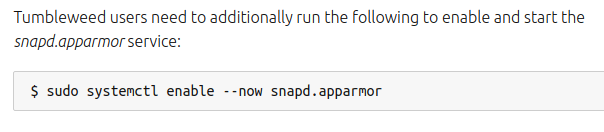
在 openSUSE Leap 15.2 使用該指令會找不到相關服務, snpad 也不是 openSUSE 的主要做法, 暫時先放棄
===================
暫時來說, 目前會先使用 python3-certbot 做法, 除非哪天只能在 snapd 才能取得再考慮 :)
~ enjoy it
Reference
Trucos KDE (10): controlando el volumen de forma alternativa
Seguimos con otro capítulo de la sección que presenté hace un tiempo y que está teniendo un ritmo de publicación adecuado por parte de la cuenta de Youtube de KDE Commnity. Bienvenidos a Trucos KDE (10), una entrada donde solo repasaremos, como viene siendo habitual, uno de los trucos que está publicando el grupo de promoción de la Comunidad KDE con el objetivo de mostrar al mundo algunas de las cosas sencillas que ofrecen. En esta nueva edición veremos el truco de contralar el volumen de forma alternativa
Trucos KDE (10): controlando el volumen de forma alternativa
Controlar el volumen de tu escritorio Plasma es realmente sencillo ya que no hace falta ni siquiera hacer un click.
Y es que solamente debes pasar el cursor por encima del indicador de volumen en la bandeja de sistema del plasma (sin hacer clic, sin arrastrar) y ¡simplemente mueve esa rueda! 

Y como es habitual, a continuación tenéis el vídeo demostrativo el que, como siempre, es más fácil verlo en acción que realizar una descripción:
Si os ha gustado el truco no olvidéis compartirlo y darle un «me gusta», estas cosas siempre ayuda en el desarrollo del Software Libre.
Listado de los trucos
Ya hemos llegado a la decena de trucos que la Comunidad KDE y es hora de empezar a hacer un listado de los consejos que hemos promocionado en el blog:
- Trucos KDE (I): KDE Connect y Konsole
- Trucos KDE (II): cambiar fondo de pantalla y subir imágenes
- Trucos KDE (III): gráficas con Krunner y encontrando ventanas
- Trucos KDE (IV): abrir archivos desde consola y mix de efectos
- Trucos KDE (V): cambiando el tamaño de las ventanas
- Trucos KDE (VI): configurando plasmoides
- Trucos KDE (VII): guardando notas en el escritorio
- Trucos KDE (VIII): filtrando en Dolphin
- Trucos KDE (IX): creando anotaciones en Okular
openSUSE Tumbleweed – Review of the week 2020/49
Dear Tumbleweed users and hackers,
Week 49 felt like a normal week, with no disasters happening, steady rolling distribution, openQA being on our side, blocking one snapshot that could have caused quite some pain to you, the users. So all in all, exactly what we want from a stable, rolling distribution. And this still resulted in 5 snapshots released during this week (1127, 1129, 1130, 1201, 1202).
The main changes in those five snapshots included:
- Mozilla Firefox 83.0
- Grep 3.6: the GREP_OPTIONS environment variable no longer affects grep’s behavior
- GNOME 3.38.2
- Linux kernel 5.9.11
In the staging projects, these changes are being tested and worked on:
- KDE Plasma 5.20.4
- KDE Applications 20.12 (currently RC being tested)
- icu 68.1: breaks a couple of builds (Staging:I)
- brp-check-suse: a bug fix in how it detected dangling symlinks (it detected them, but did not fail as it was supposed to)
- permissions package: prepares for easier listing, while supporting a full /usr merge
- RPM 4.16: still a few packages build failures (postgresql, Mozilla *, openblas)
- Ruby 3.0: mainly YaST not ready for that switch
- First experiments with rpmlint 2.0 started in Staging:M
- openssl 3.0: currently alpha 9 in Staging:O
TIPS: zypper でローカルにインストールされたパッケージ一覧を表示する
2020-12-08 コマンドの引数にコメントをいただき、一部修正しました。
openSUSE でインストール済みのパッケージ一覧を表示するときには、 rpm -qa コマンドを使っていました。しかし、Proxmox VE で使うコンテナイメージには rpm コマンドが含まれていませんでした。もちろんzypper コマンドで rpmコマンドを入れれば良いのですが、zypper コマンドだけで出来る方法がないか考えてみました。結果、
zypper –no-refresh se -i -t package
で代用することが出来ることが分かりました。結果はこんな感じになります。リモートリポジトリの検索を全部やめてしまえばローカルだけになる、と言う仕掛けです。
S | Name | Summary | Type
—+———————————–+————————————————————————–+——–
i+ | aaa_base | openSUSE Base Package | package
i+ | apache2 | The Apache Web Server | package
i+ | apache2-example-pages | Example Pages for the Apache 2 Web Server | package
i | apache2-prefork | Apache 2 “prefork” MPM (Multi-Processing Module) | package
i | apache2-utils | Apache 2 utilities | package
i+ | apparmor-abstractions | AppArmor abstractions and directory structure | package
i+ | apparmor-parser | AppArmor userlevel parser utility | package
i | augeas | An utility for changing configuration files | package
i | augeas-lenses | Official set of lenses for use by libaugeas0 | package
i | bash | The GNU Bourne-Again Shell | package
No puedo crear tablas en LibreOffice Base – Solucionado
Hace mucho tiempo que no escribo de cómo solucionar errores de las aplicaciones, lo cual es una buena noticia ya que significa que no tengo muchas. No obstante hoy he solucionado un problema que un compañero me ha contado. Básicamente me ha dicho que «No puedo crear tablas en LibreOffice Base», con lo cual he hecho lo de siempre, bucear un poco en Google y encontrar la solución, solo me queda compartirla con vosotros para que no se pierda.
No puedo crear tablas en LibreOffice Base – Solucionado
Afortunadamente en mi colegio se potencia el uso del Sofware Libre entre el alumnado. No por nada todos los ordenadores de la sala de informática utilizan KDE Neon y los portátiles de los alumnos o bien tienen KDE Neon o Antix Linux.
Los problemas son muy pocos y los alumnos lo utilizan sin ningún problema, de tal forma que el profesor de informática del Centro, en su afán de utilizar cada vez más y más Software Libre, ha pensado utilizar LibreOffice Base para explicar las bases de datos.

La sorpresa ha saltado cuando al intentar crear una tabla en un nueva base de datos con LibreOffice Base le ha saltado el siguiente error:
«The connection to the external data source could not be established. No SDBC driver was found for the URL ‘sdbc:embedded:hsqldb’.»
Rápidamente me ha consultado y en minutos hemos encontrado la solución en el siguiente foro de Linux Mint, la cual se resume en los siguientes pasos:
- Asegurarse que el entorno Java está habilitado. Para ello básicamente es ir a: Herramientas-> Opciones ->LibreOffice -> Advanced y comprobar que está seleccionada la opción Java.
- Instalar el paquete libreoffice-sdbc-hsqldb de la forma habitual: abrir una consola y escribir: sudo apt install libreoffice-sdbc-hsqldb
Una vez realizados los dos pasos, cerrar y volver abrir LibreOffice (si estaba abierto) y ya lo tendremos.
Es un error tonto que debería estar resuelto y que voy a ver cómo lo puedo reportar para que esté solucionado de serie.

Digest of YaST Development Sprint 114
Fortunately, Christmas is around the corner and the year 2020 is coming to an end. But the YaST team is not thinking about going on holidays yet. Quite the contrary, we have been working on a broad range of topics as usual. So let’s have a look at some of them.
Polishing the Cockpit Wicked Module
At the end of the sprint, we released a new version of our Cockpit Wicked module. This release does not include big changes but a set of bug fixes and small improvements. Actually, at this point, we have decided to shift our focus from adding features to polishing the module as much as possible.

As part of this new focus, we have asked our usability experts how to build a better user experience. Additionally, we have started the process to make the module available for translation in our Weblate instance to get it properly localized.
On the other hand, the initial research for the Cockpit Transactional Update module is over. We are now working on documenting our requirements to resume the development work soon.
Better Support for tmpfs in the Partitioner
While introducing the new storage stack in SLE 15, we decided to drop support for creating tmpfs
entries in the /etc/fstab using AutoYaST. After all, systemd is already taking care of handling
such file
systems.
However, our users want this behavior back and we are now introducing proper handling in YaST for
tmpfs file systems.
As a first step, we added support in the partitioner to manage those entries. Please, beware that
YaST will only take care the devices listed in /etc/fstab. Any tmpfs file system created by
systemd or any other mechanism is out of our scope.
By the way, we already started to work on AutoYaST support, so stay tuned if you are one of those users missing this feature.
Open Discussion: Easy Way to Change Installer Settings
For quite some time, there has been a feature request to allow changing the installer settings at runtime. However, we are still unsure how it should look and which use cases we should cover.
The discussion is still ongoing, but we have opened a GitHub issue to discuss it further. So, if you feel you can help, feel free to join the conversation.
But That’s Not All
As usual, we have been working on many more things. So let’s select a few of them that you might find interesting:
- Fix detection of para-virtualized guests in Kdump (yast-kdump#118.
- Fix the product selection when using the full media (yast-installation#895).
- Move from Travis to GitHub Actions. It is still a work in progress, but the most relevant repositories have already been adapted. Check the yast2 repository if you want to see an example.
- Better detection of Btrfs subvolumes prefix (yast-storage-ng#1168).
What’s next?
We have just started the last sprint of 2020. We will slow down our work around our Cockpit modules because we feel that it is time to listen to others to decide what’s next. But we plan to work on many different things, like the storage layer, LibYUI, the installer reconfiguration feature… So if you are curious about what we can achieve during this sprint, let’s meet here in around two weeks.
Memasang GitHub CLI pada openSUSE
Apa itu GitHub CLI? GitHub CLI adalah fungsi GitHub di baris perintah, berupa pull request, issue, dan konsep GitHub lainnya ke terminal di tempat Anda bekerja dengan git dan kode Anda. Jadi sehabis mendorong kode ke repo, kita bisa langsung membuat pull request tanpa perlu kembali ke peramban, begitu juga ketika membuat issue, dan lain sebagainya. GitHub CLI ini dibangun untuk mengurangi context switching dari terminal ke peramban dan sebaliknya. Menarik bukan.
Cara memasang di openSUSE (baik Leap maupun Tumbleweed) cukup dengan menjalankan tiga perintah berikut, yaitu menambahkan repo, menyegarkan repo, lalu memasang paket GitHub CLI.
sudo zypper addrepo https://cli.github.com/packages/rpm/gh-cli.repo

sudo zypper ref

sudo zypper install gh
Mudah bukan? Selamat mencoba

Mojolicious, PHP, grep update in Tumbleweed
Half a dozen openSUSE Tumbleweed snapshots have been released since last week’s blog update for Geekos’ favorite rolling release.
Six packages were updated in the most recent 20201202 snapshot. An updated keyring was signed and obsolete documentation macros were removed in the update of mtools 4.0.26, which is a collection of utilities to access MS-DOS disks from GNU and Unix without mounting them. The timing and password encrypting/decrypting package python-scrypt updated to version 0.8.17 and added additional test vectors from Request for Comments. Another PyPI package python-atpublic updated from version 1.0 to version 2.1.1; the package dropped Python 3.4 and 3.5 and added Python 3.8 and 3.9. Someone was excited because the package also fixed the doctests to run and pass, which was highlighted with an exclamation point in the changelog - congrats. The other packages to update in the snapshot were fcitx-qt5 1.2.5, libmodulemd 2.10.0 and perl-Types-Serialiser 1.01.
The first snapshot to arrive this month was 20201201. Three YaST packages were updated; the update of yast2-installation 4.3.22 fixed the full media product selection during the setup. Fingerprint reader package fprintd provided proper hotplug support and authentication now requires a new print to enroll with the 1.90.4 version. Other packages to update in the snapshot were the gaming library for game controllers libmanette 0.2.6, libyui-qt-pkg 2.48.5 and the real-time web application framework perl-Mojolicious 8.66.

The 20201130 snapshot updated php 7.4.13, which brought several bug fixes including a fix for OpenSSL that had an OCB mode failure. The second update of the Linux Kernel came in the snapshot; the 5.9.11 kernel fixed the arm64 handling of the erratum 1418040 that had prevented a CPU from onlining. The universal messaging library zeromq updated to version 4.3.3 and fixed a Denial-of-Service Common Vulnerabilities and Exposures on CURVE/ZAP-protected servers by unauthenticated clients.
ImageMagick 7.0.10.43 arrived in the largest snapshot of the week - 20201129. The image creator, editor and modifier provided better support for TIFF YCbCr photometric and added support for the FilmLight FL32 image format. The bugfix release for GNOME updated several GNOME 3.38.2 packages including the personal management application evolution, calculator, control center, gnome-desktop, maps and gnome-music, which provided a fix for new songs retrieval when they are added and fixed a playlist sorting crash. Improvements were made to the user manual in the 3.38.1 gedit update. Another text editor, vim, fixed some popup failures in the 8.2.2039 update. Flatpak 1.8.3 made the in-memory summary cache more efficient and fixed an authentication error and authentications that were getting stuck in a loop. Other packages to update in the snapshot were autoyast2 4.3.63, dconf-editor 3.38.2, libostree 2020.8 and vala 0.50.2.
A new major version of Mozilla Firefox arrived in snapshot 20201127. Firefox 83.0 is getting faster and improves page load performance by up to 15 percent, page responsiveness by up to 12 percent, and reduced memory usage by up to 8 percent, according to the project’s release notes. Command-line utility grep 3.6 fixed the GREP_OPTIONS environment variable to no longer affect grep’s behavior. The jhbuild package, which is used to building collections of source packages, updated to version 3.38.0+3. Command line pdf converter qpdf fixed the handful of integer overflows in version 10.0.4 and libX11 bumped up from a 1.6 to 1.7 version because of new Application Programming Interfaces.
Snapshot 20201125, which arrived after last week’s blog was released, brought an update to the 3D graphics package Mesa 20.2.3, the 5.9.10 Linux Kernel, Node.js 14.15.1, Qt 5.15.2 and python-h2.