
SOGo calendar synchronization breaks due to emoji in the event title
An emoji can break a calendar. 😳
I am using the SOGo Groupware. I noticed that certain emojis in the event title would prevent calendar apps from synchronizing using the CalDAV protocol. I checked the logs but could not find much. I had my doubts about what could be causing it. Then, this bug report confirmed that I should investigate on the UTF-8 encoding support.
I checked the database character set.
MariaDB [sogo]> select @@character_set_database;
+--------------------------+
| @@character_set_database |
+--------------------------+
| utf8                     |
+--------------------------+
1 row in set (0.001 sec)
The database name is sogo and we are using MariaDB.
I found the character set to be utf8, to my surprise. I had to dig a little further to understand what was wrong with it.
It turned out that the MariaDB utf8 character set supports a maximum of three bytes per character. Therefore, emojis being four bytes long weren't being inserted into the database. Consequently, that breaks the calendar synchronization. The solution was to use the utf8mb4 character set which supports four bytes per multi-byte character.
I altered the database character set and collation.
MariaDB [sogo]> ALTER DATABASE sogo CHARACTER SET = utf8mb4 COLLATE = utf8mb4_unicode_ci;I also applied it to every table in the database, e.g:
MariaDB [sogo]> ALTER TABLE sogo_store CONVERT TO CHARACTER SET utf8mb4 COLLATE utf8mb4_unicode_ci;Afterwards, I could create events using an emoji in the title. The event would synchronize across my calendar apps but the emoji would not show. It would appear as four questions marks (????) instead.
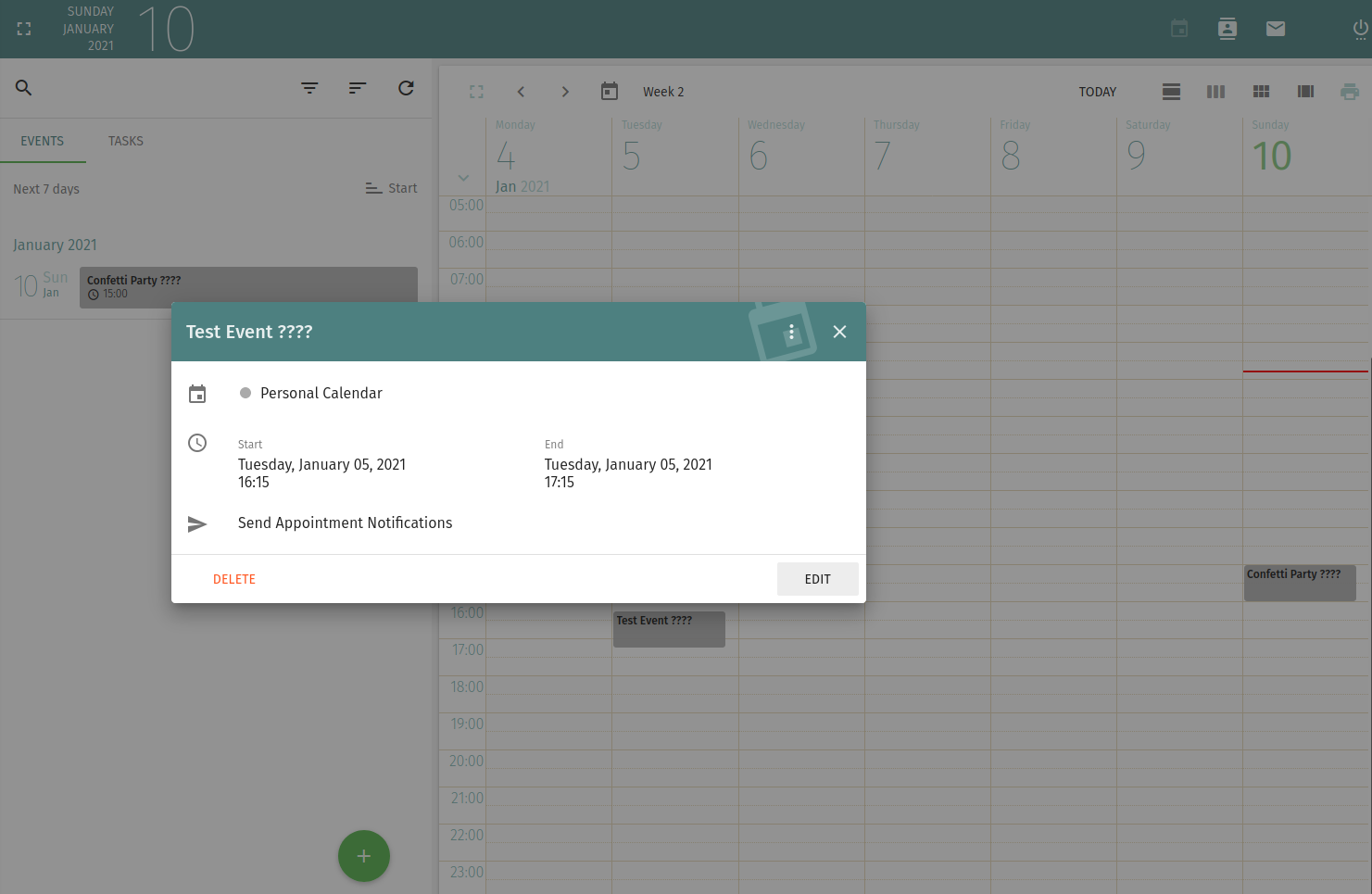
A little bit of further digging and I found that SOGo needs to be made aware of the full unicode support. It should be specified in the /etc/sogo/sogo.conf configuration file.
MySQL4Encoding = "utf8mb4";Restart the SOGo service. Emojis should be then accepted in the event titles.
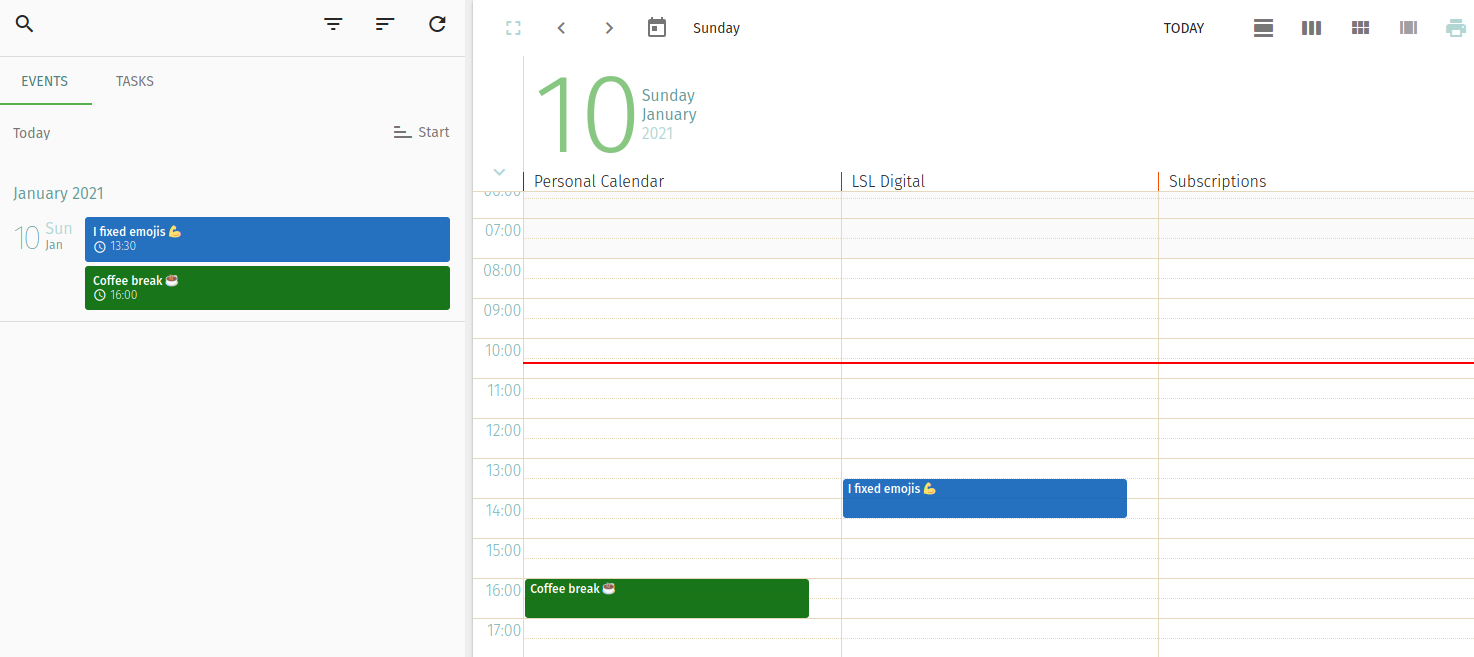
I can now put my recurrent coffee breaks in the calendar. ☕

 Member
 baltolkien
Actualización de enero del 2021 de KDE Frameworks
Año nuevo y siguen las entradas recurrentes de las actualizaciones mensuales de rigor que demuestra que los desarrolladores de KDE no dejan de trabajar ni en fiestas navideñas. Así que se congratulan en anunciar la actualización de enero del 2021 de KDE Frameworks. Con esta se llega a la versión 5.78, un suma y sigue de compromiso y constancia que no parece que tenga un final cercano.
Actualización de enero del 2021 de KDE Frameworks
A pesar de que para los usuarios corrientes esta noticia sea algo confusa ya que no se trata de realzar una nueva aplicación ni de una nueva gran funcionalidad del escritorio, el desarrollo de KDE Frameworks tiene repercusiones directas en él a medio y largo plazo.
La razón de esta afirmación es que KDE Frameworks es básicamente la base de trabajo de los desarrolladores para realizar sus aplicaciones, es como el papel y las herramientas de dibujo para un artista: cuanto mejor sea el papel y mejores pinceles tenga, la creación de una artista será mejor.
De esta forma, las mejoras en KDE Frameworks facilitan el desarrollo del Software de la Comunidad KDE, haciendo que su funcionamiento, su estabilidad y su integración sea la mejor posible.
El pasado sábado 9 de enero de 2020 ha sido lanzado KDE Frameworks 5.78, la nueva revisión del entorno de programación sobre el que se asienta Plasma 5, el escritorio GNU/Linux de la Comunidad KDE, y las aplicaciones que se crean con para él.
Hay que recordar que los desarrolladores de KDE decidieron lanzar actualizaciones mensuales de este proyecto y lo están cumpliendo con puntualmente. La idea es ofrecer pocas pero consolidadas novedades, a la vez que se mantiene el proyecto evolucionando y siempre adaptándose al vertiginoso mundo del Software Libre.
Una gran noticia para la Comunidad KDE que demuestra la evolución continua del proyecto que continua ganando prestigio en el mundo de los entornos de trabajo Libres.
Más información: KDE
¿Qué es KDE Frameworks?
Para los que no lo sepan, KDE Frameworks añade más de 70 librerías a Qt que proporcionan una gran variedad de funcionalidades necesarias y comunes, precisadas por los desarrolladores, testeadas por aplicaciones específicas y publicadas bajo licencias flexibles. Como he comentado, este entorno de programación es la base para el desarrollo tanto de las nuevas aplicaciones KDE y del escritorio Plasma 5.

Aquí podéis encontrar un listado con todos estos frameworks y la serie de artículos que dedico a KDE Frameworks en el blog,
Recuerda que puedes ver una introducción a Frameworks 5.0 en su anuncio de lanzamiento.
#openSUSE Tumbleweed revisión de la semana 1 de 2021
Tumbleweed es una distribución “Rolling Release” de actualización contínua. Aquí puedes estar al tanto de las últimas novedades.

openSUSE Tumbleweed es la versión “rolling release” o de actualización continua de la distribución de GNU/Linux openSUSE.
Hagamos un repaso a las novedades que han llegado hasta los repositorios estas semanas.
El anuncio original lo puedes leer en el blog de Dominique Leuenberger, publicado bajo licencia CC-by-sa, en este enlace:
Pues ya hemos estrenado el año 2021 y las celebraciones navideñas llegan a su fin. Aún así en esta primera semana se han publicado 6 snapshots en Tumbleweed (0101, 0102, 0103, 0104, 0105 y 0106).
Estos son los cambios más notables que han llegado a los repositorios:
- Linux kernel 5.10.4; este kernel causa algunos problemas en hardware Intel, asegúrate de echar un vistazo a este comnetario en bugzilla https://bugzilla.opensuse.org/show_bug.cgi?id=1180543
- Mozilla Firefox 84.0.1
- Mesa 20.3.2
Y las actualizaciones de paquetes de software que pronto podremos disfrutar serán:
- Plasma 5.20.5
- KDE Applications 20.12.1
- Linux kernel 5.10.5
- Xfce 4.16.0
- icu 68.1
- RPM 4.16
- Autoconf 2.70
- Rpmlint 2.0
- openssl 3
Si quieres estar a la última con software actualizado y probado utiliza openSUSE Tumbleweed la opción rolling release de la distribución de GNU/Linux openSUSE.
Mantente actualizado y ya sabes: Have a lot of fun!!
Enlaces de interés
-
-
- ¿Por qué deberías utilizar openSUSE Tumbleweed?
- zypper dup en Tumbleweed hace todo el trabajo al actualizar
- ¿Cual es el mejor comando para actualizar Tumbleweed?
- Comprueba la valoración de las “snapshots” de Tumbleweed
- ¿Qué es el test openQA?
- http://download.opensuse.org/tumbleweed/iso/
- https://es.opensuse.org/Portal:Tumbleweed
-

——————————–
openSUSE Tumbleweed – Review of the week 2021/01
Dear Tumbleweed users and hackers,
A new year is already upon us, the first week of it is already. We humans might have to get used to writing ‘2021’ instead of ‘2020’, for Tumbleweed, this seems not to matter at all. The week has kicked off strong with 6 snapshots (0101, 0102, 0103, 0104, 0105, and 0106). The number of incoming submissions is also increasing again, showing that contributors are returning from their well-deserved holiday.
The most interesting changes in snapshots published this week were:
- Linux kernel 5.10.4; this kernel does cause some issues on Intel hardware, make sure to see https://bugzilla.opensuse.org/show_bug.cgi?id=1180543 and the workaround documented in comment#3
- Mozilla Firefox 84.0.1
- Mesa 20.3.2
The staging projects mostly contain the same major changes in planning, but work to get them ready is in progress:
- Plasma 5.20.5
- KDE Applications 20.12.1
- Linux kernel 5.10.5
- Xfce 4.16.0
- icu 68.1: breaks a few things like postgresql. Staging:I
- Multiple versions of python 3 parallel installable. Adding to python 3.8, version 3.6 will be reintroduced. Python modules will be built for both versions.
- RPM 4.16: all build issues in Staging:A have been fixed, the earlier reported crash on upgrades is also fixed. Final QA run in progress
- brp-check-suse: a bug fix in how it detected dangling symlinks (it detected them, but did not fail as it was supposed to)
- permissions package: prepares for easier listing, while supporting a full /usr merge
- Autoconf 2.70: breaks quite a few packages, Staging:C. NOTE: in some cases, it now implicitly starts gtkdocize; but at least for distro bootstrap packages (ring0) we cannot BuildRequire gtk-doc. So we must trick autoreconf with GTKDOCIZE=true
- Rpmlint 2.0: experiments ongoing in Staging:M
- openssl 3: not much progress, Staging:O still showing a lot of errors.
Cómo instalar Lutris, un gestor de juegos para Linux
Esta semana estoy algo jugón y quiero compartir con todos vosotros cómo instalar Lutris, un gestor de juegos para Linux, que me está encantando y que presenté hace bien poco.
Cómo instalar Lutris, un gestor de juegos para Linux

En primer lugar quiero recordar que es Lutris que no es más que una aplicación que busca centralizar todos los juegos que tu equipo pueda ejecutar recopilando los juegos que tengas tiendas virtuales como GOG, Humble Bumble o la todopoderosa Steam y, además, gestionará los juegos que tengas instalados en tu equipo, tanto nativos como emulados. Eso si, es una aplicación que se apoya en la creación de Scripts de instalación creados por la Comunidad, así que tiene la potencia de las personas detrás de ella.
Lutris es una aplicación que utiliza Python 3 y las librerías GTK, y su instalación es muy sencilla en casi todas las distribuciones pero creo que es bueno hacer una explicación para aquellos usuarios que todavía no tienen mucha experiencia en el mundo GNU/Linux.
Estamos ante un proyecto personal de Mathieu Comandon que necesita todo el apoyo que le podamos dar, así que os recomiendo visitar su página de donaciones si os gusta el proyecto y queréis financiarlo de algún modo (toda donación es bienvenida, por pequeña que sea).
Si nos vamos a la página de descargas de Lutris vemos que tenemos una explicación detallada para decenas de distribuciones, así que yo solo explicaré unas cuantas.

Ubuntu y derivadas
Empezamos con Ubuntu y derivadas (entre las que se encuentran KDE Neon o Kubuntu), Elementary y Linux Mint.
En este caso Lutris no está en los repositorios oficiales, así que seguiremos estos pasos:
Abrimos un terminal o una consola y escribir lo siguiente para añadir el repositorio a tu sistema, evidentemente te pedirá el password de superusuario (que se escribe pero no se ve):
sudo add-apt-repository ppa:lutris-team/lutrisA continuación vamos a escribir dos comandos, el primero actualiza tus repositorios y el segundo instala Lutris.
sudo apt update
sudo apt install lutris
Debian
Para los usuarios de Debian el proceso es similar. Abrir en una consola y escribir (creo que no debo ser más específicos ya que los usuarios de esta distribución no necesitan tantos detalles):
echo "deb http://download.opensuse.org/repositories/home:/strycore/Debian_10/ ./" | sudo tee /etc/apt/sources.list.d/lutris.list
wget -q https://download.opensuse.org/repositories/home:/strycore/Debian_10/Release.key -O- | sudo apt-key add -
apt update
apt install lutris
Otras distribuciones
En las siguientes distribuciones Solus, opeSUSE, Arch Linux, Manjaro, Fedora y Clear Linux, Lutris está en sus repositorios básicos, así que simplemente se debe ejecutar en consola la orden de instalación:
Solus: sudo eopkg it lutris
openSUSE: sudo zypper in lutris
Arch Linux y Manjaro:  sudo pacman -S lutris
Manjaro:  sudo dnf install lutris
Clear Linux:  sudo swupd bundle-add lutris
Y, finalmente, en distribuciones como Mageia, Gentroo, CentOS, Pop!_OS o Slackware simplemente buscad en sus Centros de Software.
Y bien, con estas simples instrucciones ya lo tendréis, ahora simplemente falta configurar Lutris, pero eso ya es otra historia.

Tumbleweed Rolls Into The New Year
The holidays might be over and the new year is here, but users of openSUSE Tumbleweed didn’t see any difference in the amount of snapshots released over the holiday season.
Tumbleweed snapshots have been rolling out daily before toasting to new beginnings last week.
Providing a fresh point of view for the new year, snapshot 20210106 brought an update to the 3D graphics package Mesa with version 20.3.2. The update brings in several new features upgrading from the 20.2.4 version with new Radeon Vulkan drivers and web rendering with EGL_KHR_swap_buffers_with_damage on X11. Two Common Vulnerabilities and Exposures exploits were fixed in an update of nodejs14 with version 14.15.4; CVE-2020-8265, which could corrupt memory leading to a Denial of Service exploit, and CVE-2020-8287, which had an HTTP Request Smuggling weakness, were both fixed. Xen had a patch update and removed some code. Other packages to update in the snapshot were busybox 1.32.1, libstorage-ng 4.3.78 and a few others.
Snapshot 20210105 updated a single package with the update of terminus-bitmap-fonts 4.49.1. The newer version added Open Type Bitmap support and altered ascii to be more useful with a back quote.
The Mozilla Firefox browser received its first minor version update of the year with 84.0.1 in the 20210104 snapshot. AV1 decoder dav1d 0.8.1 updated and fixed a regression caused by the picture buffer pool in its previous minor version release. Email retriever fetchmail 6.4.15 fix cross-compilation with OpenSSL. Ruby code style checkers (rubygem-rubocop](https://rubygems.org/gems/rubocop/versions/0.42.0) had a lengthy amount of style changes updating from version 1.4.2 to 1.7.0. Style/MethodDefParentheses ignores endless method definitions since parentheses are always required. Other packages updated in the snapshot were perl-Image-ExifTool 12.13, perl-Mojolicious 8.70, utf8proc 2.6.1 and more.
The updated of the Linux Kernel was one of two packages updated in snapshot 20210103. The 5.10.4 Linux Kernel had several arm64 fixes to include a fix of the GPIO memory size. The other package was a major version update to the utility for managing the LIBNVDIMM subsystem; the ndctl 71 package fixed documentation and now supports the new device-dax subdivision functionality added in the 5.10 kernel.
Two timezone packages were updated in the 20210102 snapshot. The third package to receive an update in the snapshot was the high-performance email content filter amavisd-new to version 2.12.1; the package’s specfile was cleaned a bit and changes were made to prevent re-encoding of the notification templates.
The New Year’s Day snapshot, 20210101, provided updates to CoreFreq, rubygem-grape 1.5.1, rubygem-net-ldap 0.17.0 and xapps 2.0.4.
Importar una clave de cifrado en Thunderbird con OpenPGP
Veamos cómo importar un archivo de una clave en formato .asc a nuestro Thunderbird para enviar un correo cifrado a ese destinatario

Como ya pudiste leer en el blog hace tiempo, desde la versión 78 del cliente de correo Thunderbird, este software viene incorporado con OpenPGP para la gestión del cifrado de correos de manera nativa, sin la necesidad de utilizar Enigmail.
Veamos cómo podemos añadir una clave de cifrado de un contacto, para poder cifrar y descifrar correos con ese contacto.
Método 1
Si tenemos la clave pública del contacto en un archivo en nuestro equipo en formato .asc para importar esta a Thunderbird deberemos ir a nuestra cuenta, en el menú de las barras horizontales:
Configuración de la cuenta → Cifrado de extremo a extremo → Administrador de claves OpenPGP
En la ventana emergente escogemos:
Archivo → Importar clave público desde archivo
Se nos abrirá el explorador de archivos para seleccionar el archivo .asc con la firma pública de nuestro contacto. La seleccionamos y aceptamos. Y ya podremos comunicarnos con correos cifrados de extremo a extremo.
Método 2
Si el contacto nos envía su clave pública adjunta en un correo. Al llegar a nuestra bandeja de entrada y leer su correo, podemos hacer clic sobre el adjunto con el botón derecho del ratón y adjuntar la clave pública a mi lista de claves.
Método 3
Importar la clave pública en Thunderbird desde un servidor de claves. Si nuestro contacto ha subido su clave pública a un servidor de claves, podremos descargarla desde allí.
De manera predeterminada busca en el servidor https://keys.openpgp.org/ así que es buena idea subir nuestra clave pública a ese servidor de claves para que pueda ser buscada y añadida desde ese servidor por quien quiera contactar con nosotros mediante un correo cifrado.
Enlaces de interés
- https://kb.mailfence.com/kb/import-openpgp-public-key-thunderbird/
- https://support.mozilla.org/en-US/kb/openpgp-thunderbird-howto-and-faq
Sirva este artículo como nota personal. Y muy contento si a ti también te sirve como guía al cifrado de correos con Thunderbird y OpenPGP integrado.

Visita a las instalaciones de Linux Center y Slimbook
El pasado 17 de noviembre tuve el placer de realizar una visita a las instalaciones de Linux Center y Slimbook por diversos motivos entre el que se encontraba charlar con Alejandro López, su gerente. Este un breve reportaje fotográfico de dicha visita.
Visita a las instalaciones de Linux Center y Slimbook
Antes de empezar a escribir nada quiero agradecer al personal de Slimbook y a su gerente, Alejandro López, su amabilidad y la atención que recibí en las horas que pude estar con ellos. Es una verdadera gozada poder visitar un empresa como Slimbook.
En primer lugar quiero poner en contexto mi visita, ya que se realizó en plena pandemia y por tanto, Linux Center està inactivo y Slimbook apenas puede recibir visitas, y eso se nota en las imágenes tomadas, como en esta primera de la mesita de recepción.

En segundo lugar comentar que hay pingüinos por todas partes: peluches, fotos, figuras, pegatinas, cojines, etc., lo cual demuestra el amor de Slimbook por el Software Libre. Estoy seguro que no van de compras a ningún sitio sin mirar si encuentran alguna cosa con forma de pingüino.
Nada más entrar a las instalaciones de Slimbook vemos su pequeña exposición, repleta de sus productos y que van desde el último KDE Slimbook III hasta su Kimera Aqua con refrigeración líquida pasando por el Slimbook One. Toda una gozada y envidia ver todos esos dispositivos funcionar con GNU/Linux.


Si nos dirigimos al fondo de la exposición nos encontramos 3 puertas. La frontal corresponde a la sala de reuniones, donde como buenos frikis han dispuesto las «Bolas de Drac» para invocar al Dragón cuando sea necesario. Eso si, por el camino nos encontraremos con varios pingüinos:



A la derecha nos encontramos la sala de conferencias de Linux Center, pequeña pero suficiente para albergar encuentros linuxeros:


A la izquierda se encuentra la sala «Tech Room», el futuro hogar de makers que quiere hospedar Slimbook, pero que de momento se ha quedado en «Stand By» por motivos víricos. Un motivo para volver a las instalaciones en un futuro. Flanqueándolo, un televisor Slimbook (  )
)


Si volvemos a la puerta de entrada por la pared de la «Tech Room» vemos un inspirador vinilo que no puedo evitar compartir con vosotros, el libro de visitas y la única petición que nos hacen.


Una vez de vuelta al recibidor tenemos la puerta al corazón de Slimbook, que en realidad es donde se toman las decisiones y se realizan las pruebas, el montaje de los ordenadores se realizan en una nave industrial. Por motivos de confidencialidad no puedo mostrar el interior pero os muestro que nos encontramos las siguientes puertas:


Y los siguientes detalles:

Nevera GNU/linuxera 
Y más pingüinos

Aquí terminaba mi visita pero no podía irme sin dejar constancia de mi visita (disculpad por mi penosa caligrafía) y tomar unas imágenes del maravilloso KDE Slimbook III.


openSUSE Community Publishes End of Year Survey Results
The openSUSE community has published the End of the Year Community Survey results.
The results provided some significant information about the project’s tools, its distributions, the demographics of the users as well as how the community is contributing to the project.
The highest percentage of users were between the ages of 35 and 49, according to the results. More than half the respondents were from Europe; the Americas made up roughly a quarter of the respondents and Asia 10 percent. Both Oceania and Africa respondents had similar percentages below 2 percent.
The respondents were predominantly males working in the IT industry with more than 10 years experience with a NIX system; almost half were college educated. A little less than 20 percent were pursuing an education and under the age of 25. Many identified themselves as tech hobbyists and used both openSUSE Leap and Tumbleweed equally. A majority of contributors to the project provided user support or did packaging and maintenance.
The majority of respondents used KDE’s Plasma for their desktop environment followed closely by GNOME and Xfce respectively; more than 92 percent were satisfied or very satisfied with the desktop environment. Use of Graphics Processing Units were pretty evenly split between Intel, Nvidia and AMD respectively.
Less than 900 respondents identified pain points, which were evenly spread around topics like finding software, installing software, installation, unsupported hardware and documentation. A large majority were unaware of openSUSE on mobile, but expressed interest in the comments section.
Many seemed to be motivated to try openSUSE from blogs, magazine articles or through podcasts, yet a large majority of respondents felt openSUSE was underrated/underrepresented by open source and Linux influencers.
More details about the End of the Year Community Survey results can be found on the openSUSE Wiki.
12 mejores juegos en Linux del 2020 según Make Tech Easier
En este día de reyes me apetece compartir los 12 mejores juegos en Linux del 2020 según Make Tech Easier, un listado que demuestra que jugar en GNU/Linux no es algo imposible.
12 mejores juegos en Linux del 2020 según Make Tech Easier
Cada cierto tiempo me gusta hacer un artículo como este, y suele ser enero el mes más habitual para hacerlo. El año pasado hice uno con los 12 juegos gratuitos y de código abierto para GNU/Linux y este año me he decido por juegos más comerciales.
El objetivo de hacerlo es mostrar que jugar en GNU/Linux no es solo posible sino que en muchas ocasiones funciona incluso mejor.
En esta ocasión los creadores del vídeo son Make Teach Easier y nos ofrecen sus 12 mejores juegos en Linux del 2020, la mayor parte de ellos utilizando proton de Steam pero plenamente funcionales. Los hay de todo tipo y de precios variados (incluso gratuitos), así que no hay excusa.
Como es habitual, a continuación hago el listado de los mismos por si alguien simplemente quiere la información:
- A Short hike: un precioso juego que tiene como objetivo subir una montaña desarrolado y publicado por el programador canadiense Adam Robinson-Yu. Vía: wikipedia
- Crusaders Kings 3: juego de gran estrategia ambientado en la Edad Media, desarrollado por Paradox Development Studio y publicado por Paradox Interactive como secuela de Crusader Kings (2004) y Crusader Kings II (2012). Via: wikipedia
- Total War: Warhammer 2: otro videojuego de estrategia desarrollado por The Creative Assembly. Vía: wikipedia
- Desperados 3: videojuego de táctica de tiempo real desarrollado por Mimimi Games y publicados por THQ Nordic. Vía: wikipedia
- Dying Light: Enhaced Edition: juego de acción en primera persona del género Horror de supervivencia, el cual se desarrolla durante un apocalipsis zombie. Vía: wikipedia
- Sid Meier’s: Civilization VI: videojuego de estrategia por turnos perteneciente a la serie Civilization. El juego fue desarrollado por Firaxis Games y distribuido por 2K Games y Take-Two Interactive. Vía: wikipedia

- Pillars of eternity II: Deadfire: Juego de rol desarrollado por Obsidian Entertainment y publicado por Versus Evil. . Vía: wikipedia
- Slay the Spire: videojuego roguelike, RPG de cartas y mazmorras desarrollado por MegaCrit y publicado por Humble Bundle. Vía: wikipedia
- Dead Cells: videojuego híbrido entre el género de exploración de mazmorras o roguelike, y metroidvania, creando su propio género, “roguevania”, desarrollado por el estudio Motion Twin. Vía: wikipedia
- Team Fortress 2: videojuego multijugador de disparos en primera persona desarrollado y publicado por Valve Corporation. Vía: wikipedia
- Dota 2: videojuego perteneciente al género de Arena de batalla en línea ARTS («estrategia de acción en tiempo real»), también conocido como MOBA. Vía: wikipedia
- Juegos Open-Source: no se trata de un juego sino un listado rápido de juegos libres y gratuitos como la saga Doom.