
Participate in Hacktoberfest, Help Develop Contributions
The month-long, virtual-festival event that celebrates open source contributions, Hacktoberfest, is coming soon and members of the openSUSE community can make a difference.
The event that is in its seventh year and run by Digital Ocean and DEV encourages people to make their first contributions to open source projects.
The event is for developers, designers who contribute artwork, people who can contribute to documentation,and more.
As the event brings more awareness to open-source projects and encourages contributions that benefit communities, having developers and community members available to help people who want to contribute can be beneficial to the project.
Community members can help by guiding new contributors, creating educational content for the project, providing a list of the resources available and creating meetups.
Natnael Getahun plans on coordinating some of the efforts for openSUSE’s presence during Hacktoberfest and has asked for help from community members who are willing to help contributors and expand the events efforts around openSUSE related projects.
A list of ideas for projects during Hacktoberfest are being developed on the openSUSE Etherpad.
Hacktoberfest is open to everyone and there are rules that apply to receive Hacktoberfest Swag and Hacktoberfest Quality Standards that need to be met.

 Member
 baltolkien
Actualización de las aplicaciones de KDE de agosto de 2020
Llega el octavo mes del año y ya tenemos entre nosotros las gran actualización de las aplicaciones de KDE de agosto de 2020, una fecha seleccionada por la Comunidad para que una gran parte de sus programas cambien de numeración por la acumulación de mejoras. La hora de actualizarse ha llegado.
Actualización de las aplicaciones de KDE de agosto de 2020
Es complicado llevar al unísono todo el ecosistema que representan las aplicaciones KDE, no obstante creo que la Comunidad lo lleva bastante bien y la mayor parte de ellas siguen el ritmo que se espera de ellas.
Es por ello que me complace compartir con vosotros que hoy se ha lanzado la actualización de las aplicaciones de KDE de agosto de 2020, que viene muy cargada de novedades como viene siendo habitual en los meses de abril, agosto y diciembre.
El anuncio oficial dice así:
«Docenas de aplicaciones de KDE están recibiendo nuevas versiones del servicio de lanzamiento de KDE. Nuevas características, mejoras en la usabilidad, rediseños y correcciones de errores contribuyen a ayudar a impulsar su productividad y a hacer que este nuevo lote de aplicaciones sea más eficiente y agradable de usar«
En un primer visionado destacan las mejoras en Dolphin, digiKam, Konsole, Yakuake, Kate o Elisa, siendo algo menores en Gwenview, Okular o KRDC , por nombrar unas cuantas.
Además, no olvidemos, que muchas de ellas reciben una limpieza de bugs, con lo que se convierten en más estables.

Hoy simplemente quería dejar constancia de la actualización, dejando en próximas entradas (a medida que las vaya probando) el comentario sobre las mejoras. Estad seguros que no tardaré mucho en hacerlo.
No obstante, los más curiosos podéis consultar el anuncio oficial para ver más detalles y poner en marcha vuestra aplicación favorita para actualizar y disfrutar ya del trabajo de estos meses de los desarrolladores.
Más información: KDE

Noodlings 19 | BIOS Games Serving the NDI™ Plugin

"Rust does not have a stable ABI"
I've seen GNOME people (often, people who have been working for a long time on C libraries) express concerns along the following lines:
- Compiled Rust code doesn't have a stable ABI (application binary interface).
- So, we can't have shared libraries in the traditional fashion of Linux distributions.
- Also Rust bundles its entire standard library with every binary it compiles, which makes Rust-built libraries huge.
These are extremely valid concerns to be addressed by people like myself who propose that chunks of infrastructural libraries should be done in Rust.
So, let's begin.
The first part of this article is a super-quick introduction to shared libraries and how Linux distributions use them. If you already know those things, feel free to skip to the "Rust does not have a stable ABI" section.
How do distributions use shared libraries?
If several programs run at the same time and use the same shared library
(say, libgtk-3.so), the operating system can load a single copy of
the library in memory and share the read-only parts of the code/data
through the magic of virtual memory.
In theory, if a library gets a bugfix but does not change its
interface, one can just recompile the library, stick the new .so in
/usr/lib or whatever, and be done with it. Programs that depend on
the library do not need to be recompiled.
If libraries limit their public interface to a plain C ABI (application binary interface), they are relatively easy to consume from other programming languages. Those languages don't have to deal with name mangling of C++ symbols, exception handlers, constructors, and all that complexity. Pretty much every language has some form of C FFI (foreign function interface), which roughly means "call C functions without too much trouble".
For the purposes of a library, what's an ABI? Wikipedia says, "An ABI defines how data structures or computational routines are accessed in machine code [...] A common aspect of an ABI is the calling convention", which means that to call a function in machine code you need to frob the call and stack pointers, pass some function arguments in registers or push some others to the stack, etc. Really low-level stuff. Each machine architecture or operating system usually defines a C standard ABI.
For libraries, we commonly understand an ABI to mean the machine-code
implications of their programming interface. Which functions are
available as public symbols in the .so file? To which numeric
values do C enum values correspond, so that they can be passed to
those functions? What is the exact order and type of arguments that
the functions take? What are the struct sizes, and the order and
types and padding of the fields that those functions take? Does one
pass arguments in CPU registers or on the stack? Does the caller or
the callee clean up the stack after a function call?
Bug fixes and security fixes
Linux distributions generally try really hard to have a single
version of each shared library installed in the system: a single
libjpeg.so, a single libpng.so, a single libc.so, etc.
This is helpful when there needs to be an update to fix a bug,
security-related or not: users can just download the updated package
for the library, which when installed will just stick in a new .so
in the right place, and the calling software won't need to be updated.
This is possible only if the bug really only changes the internal code without changing behavior or interface. If a bug fix requires part of the public API or ABI to change, then you are screwed; all calling software needs to be recompiled. "Irresponsible" library authors either learn really fast when distros complain loudly about this sort of change, or they don't learn and get forever marked by distros as "that irresponsible library" which always requires special handling in order not to break other software.
Sidenote: sometimes it's more complicated. Poppler (the PDF rendering library) ships at least two stable APIs, one Glib-based in C, and one Qt-based in C++. However, some software like texlive uses Poppler's internals library directly, which of course does not have a stable API, and thus texlive breaks frequently as Poppler evolves. Someone should extend the public, stable API so that texlive doesn't have to use the library's internals!
Bundled libraries
Sometimes it is not irresponsible authors of libraries, but rather that people who use the libraries find out that over time the behavior of the library changes subtly, maybe without breaking the API or ABI, and they are better off bundling a specific version of the library with their software. That version is what they test their software against, and they try to learn its quirks.
Distros inevitably complain about this, and either patch the calling
software by hand to force it to use the system's shared library, or
succeed in getting patches accepted by the software so that they have
a --use-system-libjpeg option or similar.
This doesn't work very well if the bundled version of the library has extra patches that are not in a distro's usual patches. Or vice-versa; it may actually work better to use the distro's version of the library, if it has extra fixes that the bundled library doesn't. Who knows! It's a case-by-case situation.
Rust does not have a stable ABI
By default indeed it doesn't, because the compiler team wants to have the freedom to change the data layout and Rust-to-Rust calling conventions, often for performance reasons, at any time. For example, it is not guaranteed that struct fields will be laid out in memory in the same order as they are written in the code:
struct Foo {
    bar: bool,
    baz: f64,
    beep: bool,
    qux: i32,
}
The compiler is free to rearrange the struct fields in memory as it
sees fit. Maybe it decides to put the two bool fields next to each
other to save on inter-field padding due to alignment requirements;
maybe it does static analysis or profile-guided optimizations and
picks an optmal ordering.
But we can override this! Let's look at data layout first, and then calling conventions.
Data layout for C versus Rust
The following is the same struct as above, but with an extra #[repr(C)] attribute:
#[repr(C)]
struct Foo {
    bar: bool,
    baz: f64,
    beep: bool,
    qux: i32,
}
With that attribute, the struct will be laid out just as this C struct:
#include <stdbool.h>
#include <stdint.h>

struct Foo {
    bool bar;
    double baz;
    bool beep;
    int32_t qux;
}
(Aside: it is unfortunate that gboolean is not bool,
but that's because gboolean predates C99, and clearly standards from
20 years ago are too new to use. (Aside aside: since I wrote that
other post, Rust's repr(C) for bool is actually defined as C99's bool;
it's no longer undefined.))
Even Rust's data-carrying enums can be laid out in a manner friendly to C and C++:
#[repr(C, u8)]
enum MyEnum {
    A(u32),
    B(f32, bool),
}
This means, use C layout, and a u8 for the enum's discriminant. It
will be laid out like this:
#include <stdbool.h>
#include <stdint.h>

enum MyEnumTag {
        A,
        B
};

typedef uint32_t MyEnumPayloadA;

typedef struct {
        float x;
        bool y;
} MyEnumPayloadB;

typedef union {
        MyEnumPayloadA a;
        MyEnumPayloadB b;
} MyEnumPayload;

typedef struct {
        uint8_t tag;
        MyEnumPayload payload;
} MyEnum;
The gory details of data layout are in the Alternative Representations section of the Rustonomicon and the Unsafe Code Guidelines.
Calling conventions
An ABI's calling conventions detail things like how to call functions in machine code, and how to lay out function arguments in registers or the stack. The wikipedia page on X86 calling conventions has a good cheat-sheet, useful when you are looking at assembly code and registers in a low-level debugger.
I've already written about how it is possible to write Rust code to
export functions callable from C; one uses the extern "C" in the
function definition and a #[no_mangle] attribute to keep the symbol
name pristine. This is how librsvg is able to have the following:
#[no_mangle]
pub unsafe extern "C" fn rsvg_handle_new_from_file(
    filename: *const libc::c_char,
    error: *mut *mut glib_sys::GError,
) -> *const RsvgHandle {
    // ...
}
Which compiles to what a C compiler would produce for this:
RsvgHandle *rsvg_handle_new_from_file (const gchar *filename, GError **error);
(Aside: librsvg still uses an intermediate C library full of stubs that just call the Rust-exported functions, but there is now tooling to produce a .so directly from Rust which I just haven't had time to investigate. Help is appreciated!)
Summary of ABI so far
It is one's decision to export a stable C ABI from a Rust library. There is some awkwardness in how types are laid out in C, because the Rust type system is richer, but things can be made to work well with a little thought. Certainly no more thought than the burden of designing and maintaining a stable API/ABI in plain C.
I'll fold the second concern into here — "we can't have shared libraries in traditional distro fashion". Yes, we can, API/ABI-wise, but read on.
Rust bundles its entire standard library with Rust-built .so's
I.e. it statically links all the Rust dependencies. This produces a large .so:
- librsvg-2.so (version 2.40.21, C only) - 1408840 bytes
- librsvg-2.so (version 2.49.3, Rust only) - 9899120 bytes
Holy crap! What's all that?
(And I'm cheating: this is both with link-time optimization turned on,
and by running strip(1) on the .so. If you just autogen.sh && make
it will be bigger.)
This has Rust's standard library statically linked (or at least the bits of that librsvg actually uses), plus all the Rust dependencies (cssparser, selectors, nalgebra, glib-rs, cairo-rs, locale_config, rayon, xml5ever, and an assload of crates). I could explain why each one is needed:
- cssparser - librsvg needs to parse CSS.
- selectors - librsvg needs to run the CSS selector matching algorithm.
- nalgebra - the code for SVG filter effects uses vectors and matrices.
- glib-rs, cairo-rs - draw to Cairo and export GObject types.
- locale_config - so that localized SVG files can work.
- rayon - so filters can use all your CPU cores instead of processing one pixel at a time.
- Etcetera. SVG is big and requires a lot of helper code!
Is this a problem?
Or more exactly, why does this happen, and why do people perceive it as a problem?
Stable APIs/ABIs and distros
Many Linux distributions have worked really hard to ensure that
there is a single copy of "system libraries" in an installation.
There is Just One Copy of /usr/lib/libc.so, /usr/lib/libjpeg.so,
etc., and packages are compiled with special options to tell them to
really use the sytem libraries instead of their bundled versions, or
patched to do so if they don't provide build-time options for that.
In a way, this works well for distros:
-
A bug in a library can be fixed in a single place, and all applications that use it get the fix automatically.
-
A security bug can be patched in a single place, and in theory applications don't need to be audited further.
If you maintain a library that is shipped in Linux distros, and you break the ABI, you'll get complaints from distros very quickly.
This is good because it creates responsible maintainers for libraries that can be depended on. It's how Inkscape/GIMP can have a stable toolkit to be written in.
This is bad because it encourages stagnation in the long term. It's
how we get a horrible, unsafe, error-prone API in libjpeg that can
never ever be improved because it would requires changes in tons of
software; it's why gboolean is still a 32-bit int after
twenty-something years, even though everything else close to C has
decided that booleans are 1 byte. It's how Inkscape/GIMP take many
years to move from GTK2 to GTK3 (okay, that's lack of paid developers
to do the grunt work, but it is enabled by having forever-stable APIs).
However, a long-term stable API/ABI has a lot of value. It is why the Windows API is the crown jewels; it is why people can rely on glib and glibc to not break their code for many years and take them for granted.
But we only have a single stable ABI anyway
And that is the C ABI. Even C++ libraries have trouble with this, and people sometimes write the internals of a library in C++ for convenience, but export a stable C API/ABI from it.
High level languages like Python have real trouble calling C++ code precisely because of ABI issues.
Actually, in GNOME we have gone further than that
In GNOME we have constructed a sweet little universe where GObject Introspection is basically a C ABI with a ton of machine-generated annotations to make it friendly to language bindings.
Still, we rely on a C ABI underneath. See this exploratory twitter thread on advancing the C ABI from Rust for lots of food for thought.
Single copies of libraries with a C ABI
Okay, let's go back to this. What price do we pay for single copies of libraries that, by necessity, must export a C ABI?
-
Code that can be conveniently called from C, maybe from C++, and moderately to very inconvently from ANYTHING ELSE. With most new application code being written definitely not in C, maybe we should reconsider our priorities here.
-
No language facilities like generics or field visibility, which are not even "modern language" features. Even C++ templates get compiled and statically linked into the calling code, because there's no way to pass information like the size of
TinArray<T>across a C ABI. You wanted to make some struct fields public and some private? You are out of luck. -
No knowledge of data ownership except by careful reading of the C function's documentation. Does the function free its arguments? How - with
free()org_free()ormy_thing_free()? Or does the caller just lend it a reference? Can the data be copied bit-by-bit or must a special function be called to make a copy? GObject-Introspection carries this information in its annotations, while the C ABI has no idea and just ships raw pointers around.
More food for thought note: this twitter thread says this about the C++ ABI: "Also, the ABI matters for whether the actual level of practicality of complying with LGPL matches the level of practicality intended years ago when some project picked LGPL as its license. Of course, the standard does not talk about LGPL, either. LGPL has rather different implications for Rust and Go than it does for C and Java. It was obviously written with C in mind."
Monomorphization and template bloat
While C++ had the problem of "lots of template code in header files", Rust has the problem that monomorphization of generics creates a lot of compiled code. There are tricks to avoid this and they are all the decision of the library/crate author. Both share the root cause that templated or generic code must be recompiled for every specific use, and thus cannot live in a shared library.
Also, see this wonderful article on how different languages implement generics, and think that a plain C ABI means we have NOTHING of the sort.
Also, see How Swift Achieved Dynamic Linking Where Rust Couldn't for more food for thought. This is extremely roughly equivalent to GObject's boxed types; callers keep values on the heap but know the type layout via annotation magic, while the library's actual implementation is free to have the values on the stack or wherever for its own use.
Should all libraries export APIs with generics and exotic types?
No!
You probably want something like a low-level array of values,
Vec<T>, to be inlined everywhere and with code that knows the
type of the vector's elements. Element accesses can be inlined to a
single machine instruction in the best case.
But not everything requires this absolute raw performance with everything inlined everywhere. It is fine to pass references or pointers to things and do dynamic dispatch from a vtable if you are not in a super-tight loop, as we love to do in the GObject world.
Library sizes
I don't have a good answer to librsvg's compiled size. If gnome-shell merges my branch to rustify the CSS code, it will also grow its binary size by quite a bit.
It is my intention to have a Rust crate that both librsvg and gnome-shell share for their CSS styling needs, but right now I have no idea if this would be a shared library or just a normal Rust crate. Maybe it's possible to have a very general CSS library, and the application registers which properties it can parse and how? Is it possible to do this as a shared library without essentially reinventing libcroco? I don't know yet. We'll see.
A metaphor which I haven't fully explored
If every application or end-user package is kind of like a living organism, with its own cycles and behaviors and organs (dependent libraries) that make it possible...
Why do distros expect all the living organisms on your machine to share The World's Single Lungs Service, and The World's Single Stomach Service, and The World's Single Liver Service?
You know, instead of letting every organism have its own slightly different version of those organs, customized for it? We humans know how to do vaccination campaigns and everything; maybe we need better tools to apply bug fixes where they are needed?
I know this metaphor is extremely imperfect and not how things work in software, but it makes me wonder.
Tumbleweed Snapshots bring Kernel 5.8, Hypervisor FS Support with Xen Update
This week openSUSE Tumbleweed delivered four snapshots that brought in a new mainline kernel for the distribution as well as a package for Xen that removes previous requirements of parsing log data or writing custom hypercalls to transport the data, and custom code to read it.
The latest snapshot, 20200810, brought the 5.8.0 Linux Kernel that had a fix for missing check in vgacon scrollback handling and an additional commit from the previous version improves load balancing for SO_REUSEPORT, which can be used for both TCP and UDP sockets. The GNU Compiler Collection 10 update includes some Straight Line Speculation mitigation changes. GNOME had a few package updates in the snapshot with updates to accerciser 3.36.3, web browser epiphany 3.36.4 and GNOME games gnome-mines 3.36.1 and quadrapassel 3.36.04. The snapshot is trending at a rating of 84, according to the Tumbleweed snapshot reviewer.
The urlscan 0.9.5 was the lone software package updated in snapshot 20200807. The version removed a workaround for fixing a python web browser bug, added an -R option to reverse URL/context output and provides clipboard support for Wayland.
Several Python related packages were updated in the stable 20200806 snapshot; these include updates to python-matplotlib 3.3.0, python-pycryptodome 3.9.8, python-python-xlib 0.27, python-pyzmq 19.0.2, python-redis 3.5.3 and python-urllib3 1.25.10. Point-to-Point Protocol communications daemon ppp 2.4.8 added new pppd options that included an IPv6 default route with a nodefaultroute6 to prevent adding an IPv6 default route. The 2.28.4 webkit2gtk3 version fixed several crashes and rendering issues as well as a half dozen Common Vulnerabilities and Exposure fixes. Hypervisor package xen had an update to the 4.14.0 version. The package corrected its license name and had some contributions from Intel, Citrix and QubesOS, which uses openQA for testing, contributed to the Linux stubdomains. The updated version offers Hypervisor FS support.
The snapshot that started off this week’s Tumbleweed review arrived in snapshot 20200805. This snapshot brought an updated version of Mozilla Firefox version 68.11.0; the updated version addressed seven CVEs, which included one fix of a leak with WebRTC’s data channel. The system daemon package sssd 2.3.1 provided new configuration options and fixed many regressions in Group Policy Object (GPO) that was introduced in the previous version. Xfce Windows manager xfwm4 4.14.4 fixed some complication warnings and the 2.23 transactional-update package added a “run” command to be able to execute a single command in a new snapshot as well as a “–drop-if-no-change” option to discard snapshots if no changes were performed. The snapshot recorded a stable rating of 99, according to the Tumbleweed snapshot reviewer.

Gérer son onduleur APC sous openSUSE
Afin de protéger votre installation informatique des surtensions et pannes électriques, il peut être utile de la raccorder à un onduleur. Il est même possible de relier cet onduleur à votre installation openSUSE afin de le gérer au mieux.
Cet article fait suite à un fil sur le forum où il est question d'un APC Back-UPS ES 550. Cela doit toutefois être facilement transposable pour tout onduleur APC connecté avec un port USB pour la communication avec le PC.
Mise en place
Tout d'abord, on installe APCUPSD :
sudo zypper in apcupsdPuis on crée un fichier de configuration dans /etc/default/apcupsd par la commande :
sudo $EDITOR /etc/default/apcupsddans lequel on ajoute la ligne suivant dans ce fichier :
ISCONFIGURED=yesConfiguration du service
On configure maintenant le démon apcupsd en éditant le fichier /etc/apcupsd/apcupsd.conf:
sudo $EDITOR /etc/apcupsd/apcupsd.confChercher et modifier les variables suivantes comme indiqué ci-dessous (noter DEVICE reste vide pour ES550G en usb) :
UPSNAME ES550G
UPSCABLE usb
UPSTYPE usb
DEVICE
NISIP 127.0.0.1
On peut maintenant démarrer et activer le service avec la commande:
sudo systemctl enable --now apcupsdTest
Il est enfin possible de tester que tout fonctionne correctement:
sudo apcaccess statusce qui devrait retourner quelque chose comme:
APC      : 001,034,0836
DATE     : 2020-08-10 21:06:43 +0200
HOSTNAME : hostname.dom.tld
VERSION  : 3.14.14 (31 May 2016) suse
UPSNAME  : ES550G
CABLE    : USB Cable
DRIVER   : USB UPS Driver
UPSMODE  : Stand Alone
STARTTIME: 2020-08-10 19:10:20 +0200
MODEL    : Back-UPS ES 550G
STATUS   : ONLINE
LINEV : 240.0 VoltsLibreOffice 7.0: Las estadísticas después de una semana desde su publicación
La comunidad de LibreOffice comparte los números de las estadísticas después de una semana desde la publicación de LibreOffice 7.0

El pasado 5 de agosto de 2020 se publicó LibreOffice 7, una nueva versión mayor de este conjunto de herramientas ofimáticas de software libre, multiplataforma y gratuitas.
El proyecto después de una semana, ha compartido algunos de los números que han provocado esta publicación. Echemos un vistazo a la repercusión que esta publicación ha causado.
422.938 descargas
Según el proyecto en esta semana, según su página oficial de descargas esos son los números de descargas. Que serán más, ya que los usuarios de GNU/Linux actualizamos o descargamos el paquete desde los repositorios no desde su página de descargas.
113.235 visionados de su anuncio de prensa
El anuncio oficial fue visto por personas de todo el mundo, y fue incluido en muchos sitios webs. Anuncio que fue traducido a muchos idiomas, gracias a la colaboración indispensable de los traductores de la comunidad de LibreOffice.
54.079 Tweets
El anuncio en la red social de Twitter, fue visto por casi 55.000 personas, y tuvo 763 likes y se compartió 508 veces. Número muy lejanos de los obtenidos en su cuenta en Mastodon donde solo obtuvo 79 likes y se compartió 97 veces. Las cifras en Facebook también fueron muy numerosas.
48.874 vistas de su vídeo
El vídeo con las nuevas funcionalidades de LibreOffice 7.0 en YouTube llegó a los 130 comentarios y más de 1.300 likes. También han subido el vídeo a PeerTube.
1.509 votos en Reddit
También la publicación del anuncio en Reddit recabó más de 250 comentarios.
Buenas cifras para un proyecto de software libre tan importante como este y una alternativa de software libre y comunitaria a aplicaciones privativas y de estándares cerrados.
¿Fuiste una de las personas que interactuaste con LibreOffice el día de la publicación? Si no es así nunca es tarde para mostrar tu agradecimiento, darle un like y difundir esta gran pieza de software libre.

Cifras de instalación de software de #KDE en Windows Store
Echemos un vistazo a las cifras de descarga de software libre del proyecto KDE desde Windows Store

El utilizar un sistema privativo como es Windows, no hace que no sea posible utilizar software libre siempre que podamos. Yo en mi trabajo tengo instaladas varias herramientas de KDE y otras que son software libre.
Así desde hace tiempo, la comunidad de KDE ofrece algunas de sus herramientas disponibles para instalar en Windows desde lo que se llama Windows Store.
Una buena manera de llegar a usuarios, de dar a conocer el proyecto y de mostrar las buenas opciones libres que existen y que se desarrollan de manera comunitaria.
En el blog oficial de el editor Kate, han compartido las cifras de descarga de las herramientas de KDE en los últimos 30 días. Cifras prácticamente similares al número de instalaciones, no simples descargas.
Veamos las cifras de los últimos 30 días:
- Okular – Más que un lector de PDF – 4.421 adquisiciones
- Kate – Editor de texto avanzado – 3.641 adquisiciones
- Filelight – Visualizador de uso de disco – 1.390 adquisiciones
- Kile – Un editor de Latex amigable – 530 adquisiciones
- KStars – Software de astronomía – 287 adquisiciones
- Elisa – Un reproductor de música moderno – 141 adquisiciones
En esa lista echo de menos las cifras del software de dibujo digital Krita. Pero vemos que un buen número de usuarios utilizan software de KDE y cómo Okular ha tomado el primer puesto en la lista.
También comparten las cifras totales de instalaciones, desde que ofrecen su software en Windows Store:
- Kate – 53.919 adquisiciones
- Okular – 45.885 adquisiciones
- Filelight – 9.033 adquisiciones
- Kile – 5.446 adquisiciones
- KStars 2.935 adquisiciones
- Elisa – 1.710 adqusiciones
Yo creo que son muy buenas cifras. Pero la comunidad de KDE quiere poner a disposición de usuarios de Windows más software libre desarrollado por la comunidad. Y hay una lista de tareas de próximas herramientas a portar a este sistema.
Por supuesto, siempre son bienvenidos, los reportes de errores, y demás problemas encontrados en estos sistemas, para poder ir mejorando el producto.
¿También utilizas software de KDE en Windows? ¿Sabías que había esta opción disponible?


openSUSE Leap 15.2 安裝小記
openSUSE Leap 15.2 安裝小記
openSUSE Leap 15.1 Lifetime 到 2020/11
15.2 可以撐到 2021/12
三個月前才認命的動手安裝 openSUSE Leap 15.2
安裝前處理
使用 imagewriter 建立 openSUSE 安裝USB
整理 /home/sakana 目錄
使用 du -h --max-depth=1 /home/sakana 檢查
清掉不要的檔案, 特別是 ~/.cache , ~/.config 內兩大瀏覽器內有站很大空間的 cache
因為有很多相關的 config 在個人家目錄內, 所以先把舊的 openSUSE Leap 15.1 的 /home 目錄, 使用# tar cvf home.tar /home 進行打包到隨身碟 ( 不要使用 .gz 方式, 會比較快速 )
新機器再使用 tar 指令還原回來
這次也是使用 USB 來進行安裝,
== 安裝過程小記==
這次建立的時候我還是選擇 GNOME 桌面
磁碟區分割的部分, 使用引導的方式安裝, 因為一直出線開機分割區的警告, 所以我就用引導式
刪除所有分割區
建立獨立分割區 XFS
根目錄取消 Btrfs 快照
===============
Network Manager:
openSUSE Leap 15.2 預設為 Network Manager
Google Chrome:84.0
https://www.google.com/intl/zh-TW/chrome/browser/
還是會有驗證性問題, 但是功能沒有差異
為了進行google 登入,先使用 Google 驗證App, 後面來處理yubikey
home 資料回覆:
因為有很多相關的 config 在個人家目錄內, 所以先把舊的 openSUSE Leap 15.0 的 /home 目錄, 使用# tar cvf home.tar /home 進行打包到隨身碟 ( 不要使用 .gz 方式, 會比較快速 )
新機器再使用 tar 指令還原回來
Notes
Ifconfig 預設沒有安裝, 要使用 ip address show
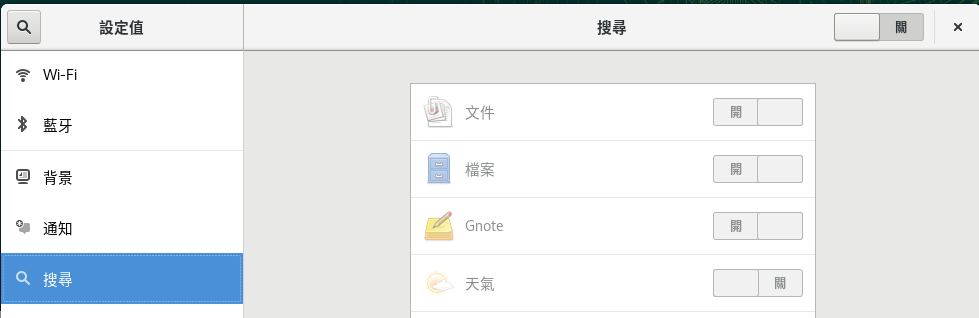
關閉GNOME裡面的搜尋功能預設關閉 (點選右上角的設定按鈕), 因為我覺得用不到
中文輸入法問題:
在系統內新增中文輸入法, 目前使用 ibus
以 system_key( windows ) + 空白鍵 切換輸入法
取消 USB 為安裝來源:
# yast2 repositories
Freemind:
使用one click install 安裝 http://software.opensuse.org/package/freemind
我是使用 editors 那個來源的 ymp 檔案安裝
將.mm 的檔案指定用 freemind 開啟
新增 Packman 套件庫:
使用 #yast2 repositories 加入社群版本的Packman
#yast2 repositories
Firefox Sync:
登入 Firefox Sync, 會處理之前有下載的 Plugin
例如 https://addons.mozilla.org/zh-TW/firefox/addon/video-downloadhelper/
flash-player:
# zypper install flash-player
Telegram desktop:
播放器:
# zypper install vlc vlc-codecs
Mp4 codec 應該是要安裝 vlc-codecs, 需要 Packman 套件庫
過程會安裝 ffmpeg-3
並將 .rmvb 以及 .mp4 預設播放器設定為 VLC
安裝 ffmpeg ( 會把提供者從 openSUSE 換成 Packman )
# zypper install ffmpeg-3
這樣的好處是使用 youtube-dl 可以轉換 mp3 格式
參考之前的文章 http://sakananote2.blogspot.tw/2014/06/opensuse-131.html
透過 youtube-dl -F 來觀察可以下載的格式
# zypper install youtube-dl
> youtube-dl -F http://www.youtube.com/watch?v=13eLHrDcb1k
[youtube] Setting language
[youtube] 13eLHrDcb1k: Downloading video webpage
[youtube] 13eLHrDcb1k: Downloading video info webpage
[youtube] 13eLHrDcb1k: Extracting video information
Available formats:
22 : mp4 [720x1280]
18 : mp4 [360x640]
43 : webm [360x640]
5 : flv [240x400]
17 : mp4 [144x176]
指定要下載的格式進行下載 (請注意 -f 是小寫)
> youtube-dl -f 22 http://www.youtube.com/watch?v=13eLHrDcb1k
下載為 mp3
首先要安裝 ffmpeg 套件
>youtube-dl http://www.youtube.com/watch?v=13eLHrDcb1k --extract-audio --audio-format mp3
Skype:
目前的版本是 8.51.0.72 的版本
https://www.skype.com/zh-Hant/download-skype/skype-for-linux/downloading/?type=weblinux-rpm
下載 RPM 版本用軟體安裝就裝好了 :)
使用 #yast2 sound 調整音效
GNOME Extension:
參考調校小記
主要是裝 chrome 內的 GNOME Shell integration
然後到 https://extensions.gnome.org/
選想裝的 Extension, 調爲 on 就好
裝了
TopIcons Plus
NetSpeed
可以用下列指令觀察
> gnome-tweak-tool
不過我覺得從 https://extensions.gnome.org/ 最快
.7z 支援:
# zypper install p7zip
imagewriter:
# zypper install imagewriter
用來製作開機 USB
rdesktop 安裝與測試:
#zypper install freerdp
執行方式
#xfreerdp -g 1280x1024 -u administrator HOST_IP
修改 LS_OPTIONS 變數
# vi /etc/profile.d/ls.bash
把 root 的 LS_OPTIONS 的 -A 移除
修改 HISTSIZE 變數
# vi /etc/profile
修改 HISTSIZE 的筆數
Yubico Key:
如果 linux 沒有抓到 Yubico 的 U2F Key可以使用以下步驟
讓 linux 支援 Yubico , 我是參考 https://www.yubico.com/faq/enable-u2f-linux/
作法
將 https://raw.githubusercontent.com/Yubico/libu2f-host/master/70-u2f.rules 另存新檔
存到 /etc/udev/rules.d/70-u2f.rules
將 linux 重開機, 接下來就可以使用了 :-)
ansible 安裝:
目前版本 2.9.6
#zypper install ansible
Docker 安裝:
目前版本 19.03.11
#zypper install docker
將使用者 sakana 加入 docker 群組
#systemctl start docker
#systemctl enable docker
Dropbox 103.4.383版 :
openSUSE Leap 15.2 預設不支援 dropbox
參考官方網站上面斷頭的安裝方式來安裝
> cd ~ && wget -O - "https://www.dropbox.com/download?plat=lnx.x86_64" | tar xzf -
接下來,請從新建立的 .dropbox-dist 資料夾執行 Dropbox 精靈。
> ~/.dropbox-dist/dropboxd
順便安裝 Nautilus 相關套件
# zypper install nautilus-extension-dropbox變更主機名稱:
#yast2 lan
Filezilla 安裝:
#zypper install filezilla
smartgit 安裝:
參考 http://sakananote2.blogspot.tw/2016/01/opensuse-leap421-smartgit.html
下載 smartgit-linux-20_1_4.tar.gz
http://www.syntevo.com/smartgit/download
解壓縮到 /opt
# tar zxvf smartgit-linux-*.tar.gz -C /opt/
建立 link 讓一般使用者也能使用
# ln -s /opt/smartgit/bin/smartgit.sh /usr/local/bin/smartgit
安裝 git
# zypper install git
建立 個人的 ssh key ( 這次沒有作, 因為將舊的 /home 還原回來 )
> ssh-keygen -t dsa
將 ssh 的公鑰 id_dsa.pub 新增到 Github 的 Settings -- > SSH and GPG Keys ( 這次沒有作, 因為將舊的 /home 還原回來 )
接下來就是以一般使用者的身份執行 smartgit 指令
> smartgit
這次沒有發生 一般使用者發生找不到 jre 路徑
解法, 目前是在 ~/.smartgit/smartgit.vmoptions 檔案內
將 jre 指向 /opt/smartgit/jre
> cat ~/.smartgit/smartgit.vmoptions
jre=/opt/smartgit/jre
按照上面的參考設定
# zypper install alacarte
設定 smart git icon 使用 alacarte
> alacarte
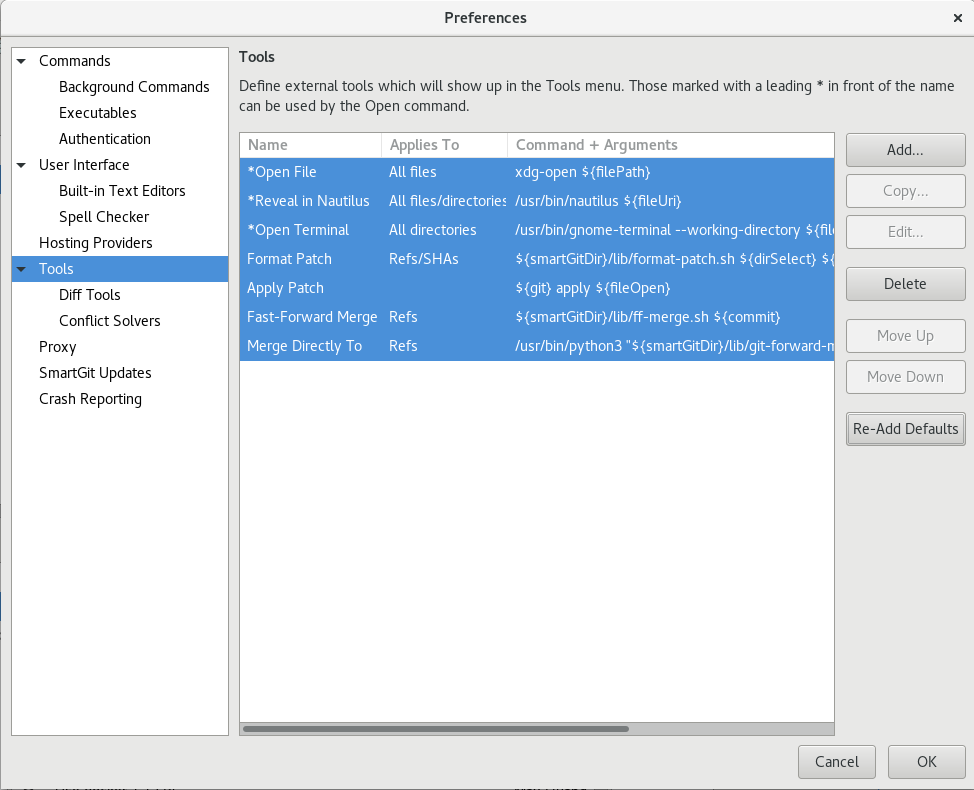
在設定好之後如果發現無法直接開啟資料夾 ( 資料夾上面按右鍵 -- > Open )
在 Edit -- > Preferences --> 點選 Tools -- > 點選 Re-Add Defaults 得到解決
Azure-cli 安裝:
版本: 2.10.1
參考 http://sakananote2.blogspot.com/2018/07/kubernetes-in-azure-with-opensuse-leap.html
匯入 rpm key
# rpm --import https://packages.microsoft.com/keys/microsoft.asc
新增 Azure CLI 的 repo
# zypper addrepo --name 'Azure CLI' --check https://packages.microsoft.com/yumrepos/azure-cli azure-cli
安裝 azure-cli 套件
# zypper install --from azure-cli -y azure-cli
使用互動的方式登入 azure ( 現在已經不需要輸入機器碼, 直接驗證帳號就可以 )
> az login
AWS Cli 安裝:
版本: 2.0.39
# curl "https://awscli.amazonaws.com/awscli-exe-linux-x86_64.zip" -o "awscliv2.zip"
# unzip awscliv2.zip
# ./aws/install
# aws --version
aws-cli/2.0.39 Python/3.7.3 Linux/5.3.18-lp152.19-default exe/x86_64.opensuse-leap.15
將補齊的指令 寫到或是修改到個人家目錄的 .bashrc 內
echo "complete -C '/usr/local/bin/aws_completer' aws" >> /root/.bashrc
Google Cloud SDK ( gcloud )安裝:
參考 http://sakananote2.blogspot.com/2019/04/gsutil-google-cloud-storage-in-opensuse.html
安裝 gcloud
但是目前實務上是使用容器的方式來執行
> tar zxvf google-cloud-sdk-305.0.0-linux-x86_64.tar.gz
> ./google-cloud-sdk/install.sh
Visual Studio Core 相關 :
參考 http://sakananote2.blogspot.com/2019/01/visual-studio-code-with-opensuse-leap-15.html
安裝 vscode
# rpm --import https://packages.microsoft.com/keys/microsoft.asc
# sh -c ' echo -e "[code]\nname=Visual Studio Code\nbaseurl=https://packages.microsoft.com/yumrepos/vscode\nenabled=1\ntype=rpm-md\ngpgcheck=1\ngpgkey=https://packages.microsoft.com/keys/microsoft.asc" > /etc/zypp/repos.d/vscode.repo '
# zypper refresh
# zypper install code
安裝 vscode extension ( 這次沒有作, 因為將舊的 /home 還原回來 )
AWS Toolkit for Visual Studio Code
Bracket Pair Colorizer
Code Time
Git Graph
GitHub Pull Requests
GitLens
Kubernetes
Python
REST Client
GitHub Pull Requests and Issues
PPSSPP 安裝:
#zypper install ppsspp
這個版本沒有安裝的, 以後要安裝就看之前的筆記
http://sakananote2.blogspot.com/2019/08/opensuse-leap-151.html
Sqlitebrowser
VMware workstation Pro 15
Nextcloud client 安裝, crontab 設定
PDF Viewer - Foxit:
hexchat
這樣又可以再戰一年 :p
~ enjoy it
參考
http://sakananote2.blogspot.com/2019/08/opensuse-leap-151.html
http://sakananote2.blogspot.com/2019/01/opensuse-leap-15-2.html
http://sakananote2.blogspot.com/2017/11/opensuse-leap-423.html
http://sakananote2.blogspot.tw/2017/07/opensuse-leap-423-beta.html
http://sakananote2.blogspot.tw/2016/11/opensuse-leap-422.html
http://sakananote2.blogspot.tw/2016/12/opensuse-leap422-gnomeextension.html
http://sakananote2.blogspot.com/2018/07/kubernetes-in-azure-with-opensuse-leap.html
http://sakananote2.blogspot.com/2019/01/visual-studio-code-with-opensuse-leap-15.html
http://sakananote2.blogspot.com/2019/03/aws-cli-with-opensuse-leap-15.html
使用 tcpdump 確認 custom header 小記
使用 tcpdump 確認 custom header 小記

工作上面, 因為業務需求, 可能會在 CDN 設定上加入自訂的 header
但是要如何證明這個 custom header 真的有生效呢?
可能的做法
Origin Server 將 header 記錄到 log 內
在後端的 Origin Server 使用 tcpdump 觀察封包
本次的做法就是在 Origin Server 上面使用 tcpdump 方式觀察
參考網路上的做法
# tcpdump -n -v dst host 192.168.1.64 and tcp dst port 80 and 'tcp[tcpflags] & (tcp-push) !=0'
-n 不使用名稱解析, 用 IP 表示
-v 顯示詳細訊息, 也有看到其他人用 -vvvs 1600 來顯示更多的訊息
dst host 目的主機 192.168.1.64, 這個部分請換成 Origin Server 的 IP, 或是調整為自己的條件
tcp dst port 80 針對目的 port 80
'tcp[tcpflags] & (tcp-push) !=0'
針對符合 TCP Flag 為 push, 前後要加上單引號
這樣就可以觀察 CDN 設定的 custom header 有沒有生效
~ enjoy it
Reference