
 Member
SAD DNS n’est pas tristounet mais plutôt une calamité

 Victorhck
GitLab, GitHub o Wikipedia en modo oscuro
Veamos cómo poder establecer el modo oscuro de manera nativa en GitLab o herramientas para hacerlo en GitHub o en la Wikipedia

Desde hace tiempo me siento más cómodo con los fondos oscuros cuando visito webs. Y algunas de las que más visito quizás son GitLab, GitHub y de vez en cuando la Wikipedia.
Estas páginas, como muchas otras tienen un fondo blanco que “me quema los ojos” cuando las visito ¿también te pasa a ti?
Si también te sientes más cómodo/a con los fondos oscuros, veamos cómo cambiar el fondo blanco de las páginas mencionadas, por otros oscuros. Algunos de manera nativa y otros con herramientas externas.
Ya comenté que servicios de alojamiento de código como Codeberg, integran un modo oscuro de forma nativa en su web, ajustándolo en su configuración.
También GitLab tiene esa opción, cosa que he descubierto hace poco. Y aunque a fecha de hoy todavía está en fase experimental, ya se puede utilizar y es funcional.
Para establecer el modo oscuro en la interfaz de GitLab, vamos hasta nuestro icono en la parte superior derecha → Configuración → Preferencias. Y podremos seleccionar Dark Mode.
Ya dispondremos de un cómodo color oscuro para la interfaz de GitLab, por lo que si la utilizamos mucho, junto con nuestra terminal a la hora de trabajar en nuestros repositorios git, será muy cómodo.
Si usas también GitHub, esta web no tiene un modo oscuro de manera nativa, algo que viene siendo demandado por los usuarios desde hace tiempo. Pero podemos recurrir a herramientas externas en nuestro navegador que hagan ese cambio de manera muy efectiva.
Para ello, instalaremos primero la herramienta Stylus en nuestro navegador (aquí tienes el enlace si utilizas Firefox)
Con esta herramienta podremos crear un estilo que se aplique a una página web específica. Pero no hace falta que lo creemos nosotros. Tienes en GitHub un repositorio con el código ya creado para disfrutar de un GitHub en modo oscuro.
Con Stylus ya instalado, y pinchando sobre este enlace, se instalará el estilo para GitHub con un fondo oscuro. Que tendrá este aspecto:
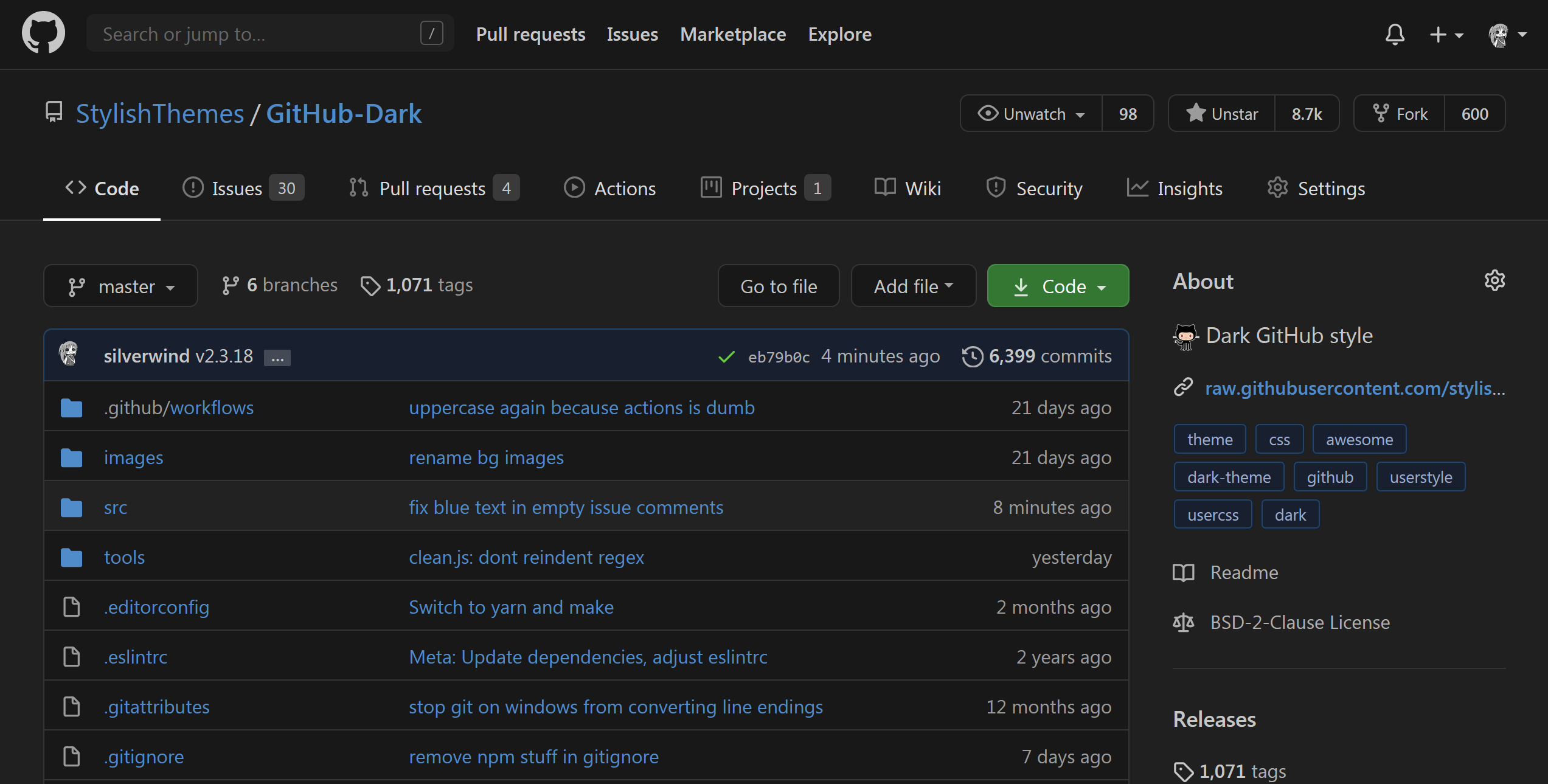
Yo creo que tus ojos te lo agradecerán…
Y ya que estamos, otra página que suelo visitar con frecuencia y que también tiene un prominente color blanco es la Wikipedia.
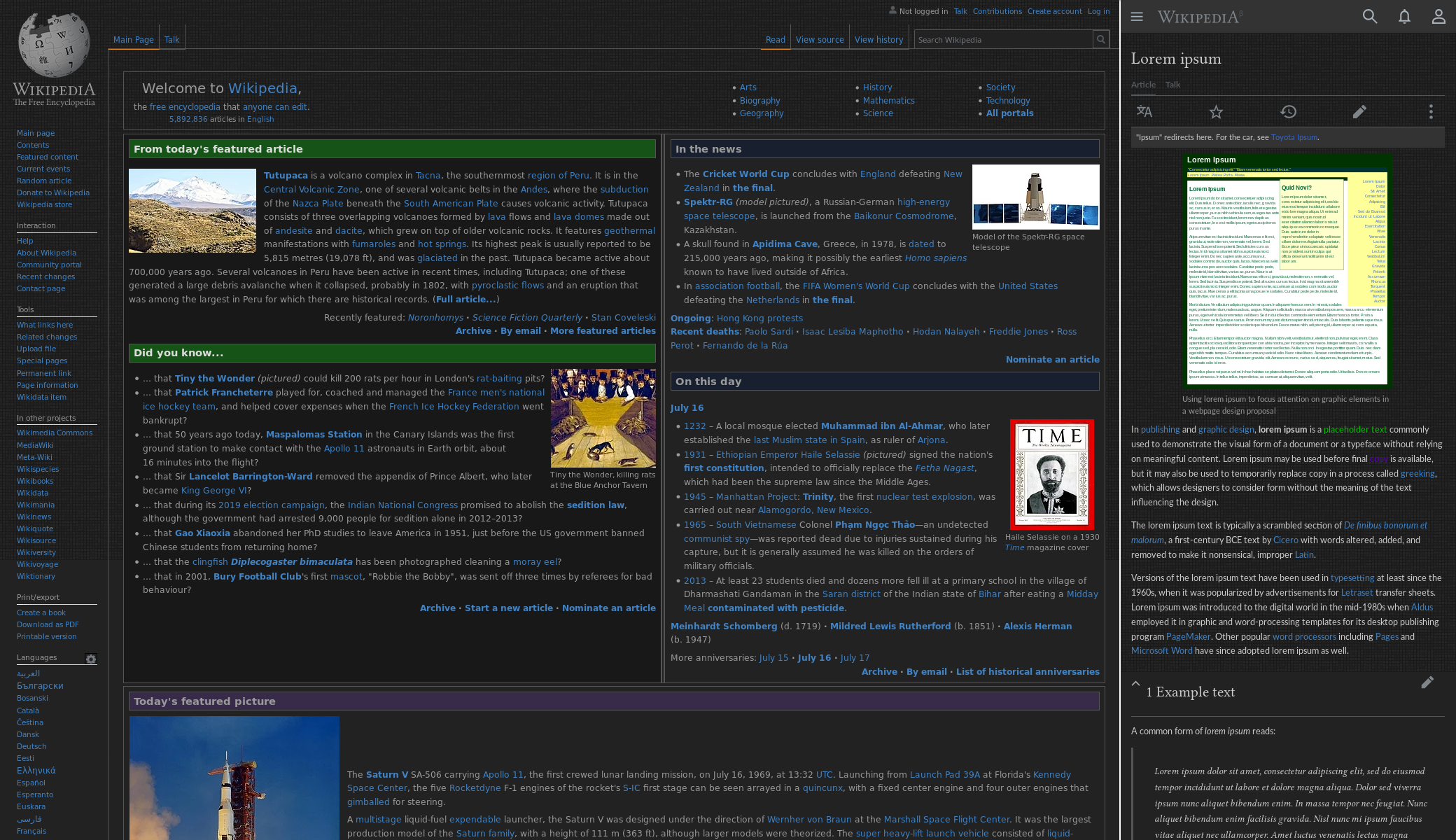
Pero también en Stylus encontramos una hoja de estilo con un fondo oscuro para la Wikipedia, así que la instalamos et voila! No está mal ¿verdad?
Recopilación del boletín de noticias de la Free Software Foundation – noviembre de 2020
Boletín de noticias relacionadas con el software libre publicado por la Free Software Foundation.

La Free Software Foundation (FSF) es una organización creada en Octubre de 1985 por Richard Stallman y otros entusiastas del software libre con el propósito de difundir esta filosofía.
La Fundación para el software libre (FSF) se dedica a eliminar las restricciones sobre la copia, redistribución, entendimiento, y modificación de programas de computadoras. Con este objeto, promociona el desarrollo y uso del software libre en todas las áreas de la computación, pero muy particularmente, ayudando a desarrollar el sistema operativo GNU.
Además de tratar de difundir la filosofía del software libre, y de crear licencias que permitan la difusión de obras y conservando los derechos de autorías, también llevan a cabo diversas campañas de concienciación y para proteger derechos de los usuarios frentes a aquellos que quieren poner restricciones abusivas en cuestiones tecnológicas.
Mensualmente publican un boletín (supporter) con noticias relacionadas con el software libre, sus campañas, o eventos. Una forma de difundir los proyectos, para que la gente conozca los hechos, se haga su propia opinión, y tomen partido si creen que la reivindicación es justa!!
- En este enlace podéis leer el original en inglés: https://www.fsf.org/free-software-supporter/2020/november
- Y traducido en español en este enlace: https://www.fsf.org/free-software-supporter/2020/noviembre

Puedes ver todos los números publicados en este enlace: http://www.fsf.org/free-software-supporter/free-software-supporter
Después de muchos años colaborando en la traducción al español del boletín, desde inicios de este año 2020 he decidido tomarme un descanso en esta tarea.
Pero hay detrás un pequeño grupo de personas que siguen haciendo posible la difusión en español del boletín de noticias de la FSF.
¿Te gustaría aportar tu ayuda en la traducción? Lee el siguiente enlace:
Por aquí te traigo un extracto de algunas de las noticias que ha destacado la FSF este mes de noviembre de 2020
La FSF llama a la participación de la comunidad para ayudar a actualizar la lista de proyectos de software libre de Alta Prioridad
Del 28 de octubre
La FSF ha hecho una llamada por retroalimentación de la comunidad para ayudar a montar una actualización a la lista de proyectos de software de alta prioridad de la fundación (HPP).
La iniciativa de la lista de proyectos HPP llama la atención sobre áreas de desarrollo y proyectos específicos de importancia estratégica para el objetivo de la libertad de todos los usuarios de ordenadores. La lista HPP ayuda a guiar a los voluntarios, desarrolladores, financieros, y empresas a proyectos donde sus habilidades y recursos se puedan utilizar, ya sea en la codificación, el diseño gráfico, la escritura, las contribuciones financieras, o el activismo.
Gracias por formar parte de la celebración de nuestro 35º cumpleaños.
Del 16 de octubre
A pesar de que el trigésimo quinto cumpleaños de la Fundación de Software Libre pasó relativamente en silencio, nuestra semana de cumpleaños ha estado llena de acción. Comenzamos con una solicitud de videos de cumpleaños y donaciones, después la presentación de los magníficos diseños del trigésimo quinto cumpleaños de David Revoy, seguidos por el anuncio del programa para la celebración del cumpleaños y un elegante y nuevo diseño de la página Web, y por último, presentamos nuestro nuevo vídeo educativo, “Rewind”.
El viernes 9 de octubre, terminamos la semana con una celebración en linea que proporcionó un amplio panorama del pasado, presente y planes para el futuro de nuestro ambicioso movimiento social, con personalidades, tanto antiguas como nuevas, ofreciendo sus puntos de vista y perspectivas.
- https://www.fsf.org/blogs/community/thank-you-for-being-a-part-of-our-35th-birthday-celebration
- https://www.fsf.org/news/fsf-celebrates-thirty-fifth-anniversary-with-week-of-surprises-and-online-event
- https://www.fsf.org/blogs/community/join-the-fsf-for-an-online-birthday-celebration-on-friday-october-9th
- https://www.fsf.org/blogs/community/fsf-at-35-join-us-in-celebrating-the-incredible-community
Servicios de streaming, cuidado: El Día Internacional contra la DRM (IDAD) se celebra el 4 de diciembre
Del 22 de octubre
El decimocuarto Día Internacional contra el DRM (IDAD) está por llegar, y la campaña Defectuoso por Diseño (DbD) necesita de tu ayuda para correr la voz. Este año, El día anual en protesta por las restricciones digitales (DRM) será el 4 de diciembre, y se centrará en el injusto uso de DRM por parte de los servicios de streaming. Necesitamos tu ayuda para difundir ese mensaje tanto entre los activistas anti-DRM así como entre aquellos que simplemente les preocupa cómo en un mundo con continuos avances tecnológicos, nuestras libertades digitales están cada vez más amenazadas.
¡La FSF ahora está en PeerTube!
Del 29 de octubre
PeerTube es una plataforma de vídeo descentralizada y federada impulsada por ActivityPub y WebTorrent. Gracias a Framasoft, la FSF tiene ahora una cuenta en PeerTube, alojada en la instancia de Framatube, donde publicaremos los vídeos de la FSF a partir de ahora. Nuestros anteriores videos animados están ahora disponibles, y los videos de la celebración del aniversario de la FSF35 serán publicados pronto. Por supuesto, seguiremos publicando todos los vídeos en nuestra instancia GNU de MediaGoblin.
Trisquel GNU/Linux 9.0 está aquí para aquellos que buscan un 100% de libertad para sus PCs
Del 19 de octubre por Marius Nestor
La distribución Trisquel GNU/Linux 9.0, basada en Ubuntu, está ahora disponible. Trisquel está construida sólo con software libre, para aquellos que buscan un 100% de libertad para su computación, y es la distribución GNU/Linux utilizada por la FSF.
Más de dos años después de Trisquel GNU/Linux 8.0 LTS “Flidas,” que sigue siendo respaldada con actualizaciones de seguridad hasta Abril de 2021, Trisquel GNU/Linux 9.0 nombrada “Etiona” (continuando con la tradición de la distro de nombrar los nuevos lanzamientos con nombres de la mitología celta), y promete ser uno de los lanzamientos más pulidos hasta ahora, y también el más actualizado.

Estas son solo algunas de las noticias recogidas este mes, pero hay muchas más muy interesantes!! si quieres leerlas todas (cuando estén traducidas) visita este enlace:
Y todos los números del “supporter” o boletín de noticias de 2020 aquí:

—————————————————————

openSUSE Regular Board Election 2020
At this time of the year the Regular Board Election of openSUSE knocks at the door. Yesterday, Ariez Vaccha, from the openSUSE Election Committee, announced on the election on the project's mailing list.
The election wiki page has been updated with all relevant information.

The poster is a courtesy of our friends from the openSUSE Indonesia community.

openSUSE Board Election 2020 announced
The openSUSE Regular Board Election has been announced for the 15th of December 2020. Results will be published on the new year’s eve, i.e 31st December. Call for nominations and applications for the openSUSE Board candidacy is now open.
It’s election time (again)!
Yes, but this time, it is the regular board election that is happening. The previous elections that were conducted during the past year were due to ad-hoc and unforeseen circumstances. However, as per the regular election cycle, we have three seats that are going to be vacant on the openSUSE Board in December. They are the seats of Axel Braun, Marina Latini and Stasiek Michalski. Note that Stasiek was elected this year to replace Christian Boltz whose term ends in 2020. However, Stasiek is opting out from this election due to personal commitments.
My friend from the Election Committee, Ariez Vachha, made the election announcement on the project mailing list yesterday. The election wiki page has been updated accordingly, which includes the usual election schedule poster. That’s courtesy of our friends from the openSUSE Indonesia community.
At the time of writing this blog post, that is less than 24 hours since the annoucement of the election, we received emails from three members who wish to stand as candidate in this election. It’s a very good start.
The call for nominations and applications will continue until Sunday 29th of November. If you would like to nominate a member from the openSUSE community, please send us an email, election-officials@opensuse.org. We will be glad to inform the member about his/her nomination.
This article first appeared at https://sysadmin-journal.com/opensuse-board-election-2020-announced/.
Y mañana una agradable sorpresa
Menos de un día hasta la gran revelación. Mira este espacio. pic.twitter.com/XuNPpOyg9k
Y mañana una agradable sorpresa

三大雲平台工具容器升級小記 - 使用 openSUSE Leap 15.2 Container
三大雲平台工具容器升級小記 - 使用 openSUSE Leap 15.2 Container
OS: container with openSUSE Leap 15.2
上次升級是 2020/8/2 , 這次會來升級的原因是
升級 gcloud 版本
升級 azure-cli 版本
升級 aws cli 版本
先整理結果
升級前
OS: openSUSE Leap 15.2
awscli: aws-cli/2.0.36 Python/3.7.3
gcloud: Google Cloud SDK 303.0.0
azure-cli: 2.9.14.
ansible: 2.9.11
升級後
OS: openSUSE Leap 15.2
awscli: aws-cli/2.1.1 Python/3.7.3
gcloud: Google Cloud SDK 318.0.0
azure-cli: 2.14.2
ansible: 2.10.3
AWS CLI v2 安裝文件
GCP Cloud SDK 版本
這次的做法還是會透過 docker build 指令來進行
我有比較過 docker build 以及使用現有的 docker image 修改後再使用 docker commit 建立的 image 大小還是很有差異的
Dockerfile 的部分我是拿之前 openSUSE Leap 15.2 來修改
修改細節
Update time
修改 pip3 安裝 boto 與 boto3
Google SDK 版本還有下載的檔案路徑以及檔案名稱
列出 diff 的結果給大家參考
> diff opensuseLeap152_ansible_20200802_Dockerfile opensuseLeap151_ansible_20200531_Dockerfile
6c6
< # update: 20200802
---
> # update: 20201114
12c12
< # Install python3-pip, upgrade pip, ansible[azure], boto
---
> # Install python3-pip, upgrade pip, ansible[azure], boto, boto3
16c16
< pip3 install boto
---
> pip3 install boto boto3
64c64
< # Install google cloud SDK 303.0.0
---
> # Install google cloud SDK 318.0.0
66,67c66,67
< RUN wget https://dl.google.com/dl/cloudsdk/channels/rapid/downloads/google-cloud-sdk-303.0.0-linux-x86_64.tar.gz && \
< tar zxvf google-cloud-sdk-303.0.0-linux-x86_64.tar.gz && \
---
> RUN wget https://dl.google.com/dl/cloudsdk/channels/rapid/downloads/google-cloud-sdk-318.0.0-linux-x86_64.tar.gz && \
> tar zxvf google-cloud-sdk-318.0.0-linux-x86_64.tar.gz && \
Dockerfile 內容如下
我檔案的名稱取名爲 opensuseLeap152_ansible_20201114_Dockerfile
# openSUSE Leap 15.2 with ansible, azure-cli, aws cli, gcloud
FROM opensuse/leap:15.2
# Author
# MAINTAINER 已經棄用, 之後要使用 LABEL 方式
# update: 20201114
LABEL maintainer="sakana@cycu.org.tw"
# Set LANG for UTF-8 - for Chinese
ENV LANG C.UTF-8
# Install python3-pip, upgrade pip, ansible[azure], boto, boto3
RUN zypper install -y python3-pip && \
pip3 install --upgrade pip && \
pip3 install ansible[azure] && \
pip3 install boto boto3
# Install openssh, set ls alias
RUN zypper install -y openssh
RUN echo "alias ls='ls --color=tty'" >> /root/.bashrc
# Install wget, download azure_rm.py, set permission
RUN zypper install -y wget
# azure_rm.py no need to download
# Starting with Ansible 2.8, Ansible provides an Azure dynamic-inventory plug-in
# https://docs.ansible.com/ansible/latest/plugins/inventory/azure_rm.html
# old azure_rm.py URL https://raw.githubusercontent.com/ansible/ansible/devel/contrib/inventory/azure_rm.py
#
# Create working directory in /root
RUN mkdir /root/.azure && \
mkdir /root/.aws && \
mkdir /root/playbook && \
mkdir -p /root/.config/gcloud && \
wget https://raw.githubusercontent.com/sakanamax/LearnAnsible/master/template/ansible.cfg && \
mv /ansible.cfg /root && \
wget https://raw.githubusercontent.com/sakanamax/LearnAnsible/master/template/hosts && \
mv /hosts /root
#### Azure ####
# Install azure-cli
RUN zypper install -y curl && \
rpm --import https://packages.microsoft.com/keys/microsoft.asc && \
zypper addrepo --name 'Azure CLI' --check https://packages.microsoft.com/yumrepos/azure-cli azure-cli && \
zypper install --from azure-cli -y azure-cli
#install vim tar gzip jq unzip less bind-utils iputils groff
RUN zypper install -y vim tar gzip jq unzip less bind-utils iputils groff
RUN echo "set encoding=utf8" > /root/.vimrc
#### AWS ####
# Install awscli v1
#RUN pip3 install awscli
#RUN echo "source /usr/bin/aws_bash_completer" >> /root/.bashrc
# Install awscli v2
RUN curl "https://awscli.amazonaws.com/awscli-exe-linux-x86_64.zip" -o "awscliv2.zip" && \
unzip awscliv2.zip && \
/aws/install
RUN echo "complete -C '/usr/local/bin/aws_completer' aws" >> /root/.bashrc
#### GCP ####
# Install google cloud SDK 318.0.0
ENV CLOUDSDK_CORE_DISABLE_PROMPTS 1
RUN wget https://dl.google.com/dl/cloudsdk/channels/rapid/downloads/google-cloud-sdk-318.0.0-linux-x86_64.tar.gz && \
tar zxvf google-cloud-sdk-318.0.0-linux-x86_64.tar.gz && \
/google-cloud-sdk/install.sh && \
echo "if [ -f '/google-cloud-sdk/path.bash.inc' ]; then . '/google-cloud-sdk/path.bash.inc'; fi" >> /root/.bashrc && \
echo "if [ -f '/google-cloud-sdk/completion.bash.inc' ]; then . '/google-cloud-sdk/completion.bash.inc'; fi" >> /root/.bashrc
使用 docker build 指令建立 image
> docker build -t sakana/ansible_opensuse152:20201114 -f ./opensuseLeap152_ansible_20201114_Dockerfile .
使用 -f 指定 Dockerfile 名稱
最後是 ” . “ 目前的目錄
測試 container image
> docker run -v ~/.aws:/root/.aws -v ~/.azure:/root/.azure -v ~/.config/gcloud:/root/.config/gcloud -it sakana/ansible_opensuse152:20201114 /bin/bash
測試結果 OK, 建立 tag
觀察資訊
> docker images
REPOSITORY TAG IMAGE ID CREATED SIZE
sakana/ansible_opensuse152 20201114 9f8d6b777cc9 10 minutes ago 1.82GB
opensuse/leap 15.2 da63484e1af5 4 days ago 106MB
sakana/ansible_opensuse152 latest d1bb9da2d2e1 3 months ago 1.66GB
建立 tag
> docker tag 9f8d6b777cc sakana/ansible_opensuse152:latest
登入 docker
> docker login
上傳 image
> docker push sakana/ansible_opensuse152:20201114
> docker push sakana/ansible_opensuse152:latest
完工, 以後使用就用
> docker run -v ~/.aws:/root/.aws -v ~/.azure:/root/.azure -v ~/.config/gcloud:/root/.config/gcloud -it sakana/ansible_opensuse152 /bin/bash
~ enjoy it
Reference:
http://sakananote2.blogspot.com/2020/08/opensuse-leap-152-container.html
https://sakananote2.blogspot.com/2020/05/aws-cli-v2-with-opensuse-leap-151.html
http://sakananote2.blogspot.com/2020/01/python-3-with-opensuse-leap-151.html
http://sakananote2.blogspot.com/2019/07/with-opensuse-leap-15-container.html
http://sakananote2.blogspot.com/2019/05/ansible-azure-cli-awscli-gcloud-with.html
http://sakananote2.blogspot.com/2019/11/with-opensuse-leap-151-container.html
#openSUSE Tumbleweed revisión de la semana 46 de 2020
Tumbleweed es una distribución “Rolling Release” de actualización contínua. Aquí puedes estar al tanto de las últimas novedades.

openSUSE Tumbleweed es la versión “rolling release” o de actualización continua de la distribución de GNU/Linux openSUSE.
Hagamos un repaso a las novedades que han llegado hasta los repositorios estas semanas.
El anuncio original lo puedes leer en el blog de Dominique Leuenberger, publicado bajo licencia CC-by-sa, en este enlace:
La semana 46 ha sido muy productiva en lo referente a la publicación de nuevas snapshots, un total de 6 son las que han llegado a los repositorios de openSUSE Tumbleweed con jugosas actualizaciones.
Los cambios más destacables son:
- AppArmor 3.0
- libvirt 6.9.0
- binutils 2.35
- Mozilla Firefox 82.0.3
- GStreamer 1.18.1
- KDE Applications 20.08.3
Entre los cambios que están en la recámara y que próximamente llegarán a los repositorios podemos destacar paquetes de software como:
- firewalld: con cambios de iptables a nftables
- Cambios en la herramienta YaST
- KDE Plasma 5.20.3
- Linux kernel 5.9.8
- glibc
- brp-check-suse
- GNOME 3.38.1
- RPM 4.16
- Ruby 3.0
- openssl 3.0
Si quieres estar a la última con software actualizado y probado utiliza openSUSE Tumbleweed la opción rolling release de la distribución de GNU/Linux openSUSE.
Mantente actualizado y ya sabes: Have a lot of fun!!
Enlaces de interés
-
-
- ¿Por qué deberías utilizar openSUSE Tumbleweed?
- zypper dup en Tumbleweed hace todo el trabajo al actualizar
- ¿Cual es el mejor comando para actualizar Tumbleweed?
- Comprueba la valoración de las “snapshots” de Tumbleweed
- ¿Qué es el test openQA?
- http://download.opensuse.org/tumbleweed/iso/
- https://es.opensuse.org/Portal:Tumbleweed
-

——————————–
KRunner-Spotify, gestiona tu lista de Spotify en Plasma
«Alt + F2» o «Alt + barra espaciadora» es una de las combinaciones de teclado más utilizadas en mi día a día con el escritorio Plasma. Esta mágica combinación ejecuta Krunner, una aplicación del sistema que facilita la ejecución de las más diversas tareas. Aunque la que solemos utilizar diariamente es la simple ejecución de aplicaciones es posible añadir algunas más como esta llamada KRunner-Spotify, que como su nombre indica nos permitirá gestionar la lista de canciones de este servicio de streaming.
KRunner-Spotify, gestiona tu lista de Spotify en Plasma
Siempre me pasa cuando estoy en un ordenador de M$ o de la manzana. pulso «Alt + F2» y no pasa nada, lo cual me recuerda que si quiero eficacia y alto rendimiento debo irme a escritorios GNU/Linux.
Y es que al pulsar la combinación «Alt + F2» o «Alt + barra espaciadora» ejecuto una pequeña aplicación cuya interfaz es un pequeño campo de texto que se suele abrir en la parte superior de la pantalla y que recibe el nombre de KRunner.
Con é se pueden hacer multitud de tareas sencilla como utilizar una calculadora, corrector ortográfico, conversor de unidades, envío directo de mails, abrir carpetas, buscar o instalar aplicaciones e incluso ejecutar comandos.
Pero es que además, en la KDE Store nos encontramos incluso con nuevas funcionalidades como la que presento hoy llamada KRunner-Spotify.
Esta nueva característica, que debemos instalar, nos permite controlar fácilmente Spotify usando KRunner.

El plugin utiliza Spotify para interactuar con la API web de Spotify y con sólo unas pocas palabras el usuario puede controlar Spotify de forma sencilla, incluso si Spotify no se ejecuta en el mismo dispositivo en el que se está ejecutando KRunner.
En otras palabara, ya sea que estés jugando a Spotify en tu teléfono, Chromecast(Audio), Smart TV o cualquier otro dispositivo, ¡puedes controlarlo usando este plugin! ¿No es asombroso?
Más información: KDE Store
openSUSE Tumbleweed – Review of the week 2020/46
Dear Tumbleweed users and hackers,
Overall, week 46 was good. A steady flow of new snapshots, staging projects that keep on moving – and we delivered 6 snapshots during this week (1105, 1106, 1107, 1108, 1110, and 1111).
The most noteworthy changes include:
- AppArmor 3.0
- libvirt 6.9.0
- binutils 2.35
- Mozilla Firefox 82.0.3
- GStreamer 1.18.1
- KDE Applications 20.08.3
The staging projects are currently all filed, with more or less impacting changes. The bigger things there are:
- firewalld: switch from iptables backend to nftables
- The YaST changes as promised in https://yast.opensuse.org/blog/2020-11-10/sprint-112
- KDE Plasma 5.20.3
- Linux kernel 5.9.8
- glibc: CET enablement (Intel Control-flow Enforcement Technology)
- brp-check-suse: a bug fix in how it detected dangling symlinks (it detected the, but did not fail as it was supposed to) is causing some package build failures now (Staging:A at this moment)
- permissions package: prepares for easier listing, while supporting a full /usr merge
- GNOME 3.38.1: some openQA tests need adjustments, but getting closer
- RPM 4.16: still a few packages build failures
- Ruby 3.0: mainly YaST not ready for that switch
- First experiments with rpmlint 2.0 started in Staging:M
- openssl 3.0: currently alpha 9 in Staging:O