
 Member
 Victorhck
Wahay conferencias de audio de manera segura, autónoma, descentralizada y de software libre
Wahay es una nueva aplicación de software libre para realizar conferencias de audio utilizando Mumble sobre la red Tor para añadir cifrado y anonimato

Hace unos días por la red Mastodon, gracias a Rafael Bonifaz me enteraba de una aplicación para realizar conferencias por voz llamada Wahay, que utilizaba dos piezas de software libre tan maduras como Mumble y la red Tor.
El proyecto, está en fases tempranas de desarrollo, por lo que lo ideal es que lo pruebe mucha gente y reporten problemas, posibles nuevas funcionalidades, aporten en el desarrollo, etc.
Me pareció un interesante proyecto, pero yo todavía no he tenido tiempo para probarlo, así que para escribir un artículo en el blog, prefería que Rafael Bonifaz me explicara de primera mano qué es Wahay y alguna cosa más.
Así que tuvo la amabilidad de hacer llegar esas preguntas por correo, al grupo de desarrollo de la aplicación, para darme más información de primera mano sobre el proyecto. Vamos con esa entrevista…
Victorhck: Primero de todo, me gustaría que te presentaras a los lectores.
Rafael Bonifaz: Mi nombre es Rafael Bonifaz y soy miembro activo de la comunidad de software libre de Ecuador desde el año 2005. Fui coordinador nacional de los 3 primeros FLISOLes y desde el año 2012 vengo promoviendo el uso de software libre para la defensa de la privacidad en Internet.
Actualmente trabajo en el Centro de Autonomía Digital (CAD).
Vhck: ¿Qué es Wahay?
RB: Wahay es una aplicación que permite realizar conferencias de audio de manera segura, autónoma y descentralizada. Para lograr esto se combina el sistema de conferencias de voz Mumble con los Servicios Cebolla de Tor.
Cualquier persona que utilice Wahay puede iniciar una conferencia de audio y otras personas tienen la posibilidad de unirse a la misma a través de una URL.
Para que esto funcione no es necesario tener un proveedor de servicios, hosting, dirección IP pública o incluso un administrador de sistemas. La comunicación es autónoma entre los participantes gracias a los Servicios Cebolla.
Eso sí, al combinar Voz/IP con Tor va a existir un pequeño retardo en el envío y recepción del audio. La experiencia de uso de Wahay se parece más a una conversación por Walkie Talkie que a una conferencia convencional por Internet. Una persona debe hablar a la vez y se utiliza la tecla \<ctl derecho\> para hablar.
Vhck: Curioso nombre ¿de dónde proviene?
RB: Wahay viene del Quechua del Cusco y significa llamar.
Vhck: ¿Cómo surgió el proyecto, ¿Qué lo motivó? ¿Quién ha participado en su desarrollo?
RB: Wahay es desarrollado por el Centro de Autonomía Digital (CAD). Somos una organización sin fines de lucro creada para desarrollar herramientas libres para proteger la privacidad y la seguridad en Internet.
Tenemos proyectos propios como Wahay y CoyIM (cliente XMPP seguro); en el pasado creamos la versión 4 del protocolo OTR, y hemos colaborado con otros proyectos como Let’s Encrypt, Tor, Tails y Enigmail.
Durante el último año decidimos hacer pruebas de comunicaciones de Voz/IP a través de la red Tor. Nuestra primera prueba de concepto fueron unos scripts creados para Tails que permiten la comunicación a través de Mumble mediante los servicios cebolla de Tor.
Al comprobar que esta solución era funcional, pero no accesible para personas no técnicas, decidimos hacer un sistema que permita realizar llamadas de Voz/IP a través de Tor pero que sea fácil de utilizar, de ahí nació Wahay.
Vhck: ¿Para qué plataformas está disponible y cómo se puede probar?
RB: Al momento Wahay está disponible para Linux. Tenemos repositorios disponibles para distribuciones populares, un binario genérico que se puede instalar en cualquier Linux y además bundles para ciertas versiones de Ubuntu, Debian y Fedora, los mismos que se pueden utilizar sin instalar.
Tenemos asimismo documentación que explica paso a paso cómo instalar cada una de estas opciones.
Vhck: ¿Bajo qué licencia está publicado? ¿Cómo puedo participar?
RB: Wahay está publicado bajo la licencia GPL v3 y nuestro código fuente está disponible en Github.
La mejor forma de colaborar es utilizar el sistema. Para reportar errores o recomendaciones, les sugerimos hacerlo a través de la plataforma de Github.
Vhck: ¿Qué metas tiene el proyecto a corto/medio plazo?
RB: En el corto plazo nos interesa que la gente utilice Wahay, lo pruebe y nos den su retroalimentación para mejorar la aplicación.
En el mediano plazo queremos que Wahay funcione en los sistemas operativos Windows y Mac para que más gente se beneficie de las características de seguridad y autonomía que provee la aplicación.

Hasta aquí la entrevista, en la que nos ha dejado claro las motivaciones y lo que realiza el software Wahay que han desarrollado.
Como extra, te dejo un enlace de una entrevista de radio en un programa argentino que le realizaron a Rafael Bonifaz utilizando Wahay:
También te dejo un enlace en el que puedes probar Wahay gracias a Docker:
Te animo a que lo pruebes y les ayudes en lo que puedas, ya sea dando un feedback de tu uso, o ayudando en el desarrollo de esta nueva herramienta de software libre.
Enlaces de interés

Dynamic Global Themes, cambia tu tema Plasma automáticamente – Plasmoides de KDE (147)
Cuando creía que la personalización del escritorio Plasma de la Comunidad KDE llegaba a su punto más alto, llega Dynamic Global Themes, un plasmoide que es capaz de programar el cambio de tu tema Plasma cada tres horas a lo largo del día. Francamente, increíble.
Dynamic Global Themes, cambia tu tema Plasma automáticamente – Plasmoides de KDE (147)
Creado por el incombustible Adhe, me complace presentar una plasmoide que lleva la personalización del escritorio Plasma a otro nivel, ya que permite que él solo vaya cambiando a lo largo del día de Tema general.
El plasmoide se llama Dynamic Global Themes y básicamente se trata de un progamador semanal que nos activa los temas Plasma que queramos en periodos de 3 horas:
Siendo más concretos permite:
- Cambiar globalmente el Tema de Plasma.
- Cambiar el fondo de pantalla del escritorio y de la pantalla de bloqueo.
- Añadir algún que otro script que se ejecute en el cambio.
Sencillamente, espectacular. Ideal para utilizar el mismo dispositivo en clase o en en casa.

Y como siempre digo, si os gusta el plasmoide podéis “pagarlo” de muchas formas en la fluida página de KDE Store, que estoy seguro que el desarrollador lo agradecerá: puntúale positivamente, hazle un comentario en la página o realiza una donación. Ayudar al desarrollo del Software Libre también se hace simplemente dando las gracias, ayuda mucho más de lo que os podéis imaginar, recordad la campaña I love Free Software Day de la Free Software Foundation donde se nos recordaba esta forma tan sencilla de colaborar con el gran proyecto del Software Libre y que en el blog dedicamos un artículo.
Más información: KDE Store
¿Qué son los plasmoides?
Para los no iniciados en el blog, quizás la palabra plasmoide le suene un poco rara pero no es mas que el nombre que reciben los widgets para el escritorio Plasma de KDE.
En otras palabras, los plasmoides no son más que pequeñas aplicaciones que puestas sobre el escritorio o sobre una de las barras de tareas del mismo aumentan las funcionalidades del mismo o simplemente lo decoran.

Highlights of YaST Development Sprints 99 and 100
One hundred development sprints, that’s a nice rounded number… and a good moment to rethink the way we write and publish our reports.
Yes, you read it right. This post will be the last one following our traditional format, assuming something can already be called “traditional” after four and a half years. As we will explain at the end of this post, subsequent reports will look more as a digest with links to information and not that much as a traditional blog post that tries to tell a story.
But the Age of the Digest has not come yet. Let’s close the Age of the Stories with a last blog post covering several topics:
- A better editor for the
<partitioning>section of AutoYaST - Improved YaST support for advanced LVM and Btrfs features
- Ensuring YaST is not left behind in the migration to
/usr/etc - Taking XML processing in YaST to the next level
Many of those topic are clearly oriented into the mid-term future and, as such, it will take some time until they reach stable versions of openSUSE Leap or SUSE Linux Enterprise. Unless told otherwise, the changes described in this post will only be visible in the short term for openSUSE Tumbleweed users.
AutoYaST UI: Improve Editing Drives
Let’s start with an exception to the rule just mentioned. That is, something many users will see soon in their systems, since we plan to release it as a maintenance update for both 15.1 and 15.2 and the corresponding SLE versions.
As part of the initiative to modernize AutoYaST, the user interface for creating or editing the profile’s partitioning section has been finally revamped. That means no more missing storage features such as Bcache, RAIDs, Btrfs multi-device file systems, etc.

Apart from allowing to set every supported attribute by the AutoYaST partitioning section, during the rewrite we tried to keep the module as simple as possible to easy the user interaction, not only distributing the fields to put related stuff together and not having a crammed interface but also avoiding warnings and confirmation popup for each change done.

Of course, there is room for improvement yet, but at least we did the first step getting rid of the complex and broken old UI to start working in a simpler one.

Recognizing LVM Advanced Features
As you know, YaST can be used to configure storage setups combining several technologies like MD RAID, bcache, Btrfs and LVM. Not every single feature of each one of those technologies can be tweaked using YaST, since would lead to a completely unmanegable interface and a hardly predictable behavior.
But even if YaST cannot create certain advanced configurations, it should be able to recognize them, display them in the interface and allow simple modifications.
In the last couple of sprints we have focused in teaching YaST how to deal with advanced LVM features. Now it is able to detect and use LVM RAID, mirror logical volumes and LVM snapshots, both thick and thin ones.
YaST does not allow to create such setups and we don’t plan to support that in a foreseable future. But users that already use those LVM features will now be able to use YaST for some operations and to have a more complete and accurate picture of their storage configuration. In addition, the partial support for such technologies makes easier the upgrade process for systems using them.
Probing Btrfs Snapshot Relations and Two Peculiarities
On a purely technical level, all the additions explained above imply adding new possibilities to the so-called devicegraph which is used by libstorage-ng to represent any system. That included representing the LVM snapshots and the relations between origins and snapshots. That being done, it should be easy enough to go one step further and also recognize and represent those relations for btrfs subvolumes… except for two peculiarities.
The first one is that a btrfs snapshot can be both the child and the snapshot of the same subvolume. Suppose we have a btrfs mounted at /test. First we create a subvolume and then a snapshot of it:
cd /test
btrfs subvolume create origin
btrfs subvolume snapshot origin origin/snapshot
Now “snapshot” is a child of “origin” since it is placed directly under “origin” in the directory structure. In the devicegraph this means we have parallel edges (the gray for the child and the green for the snapshot):
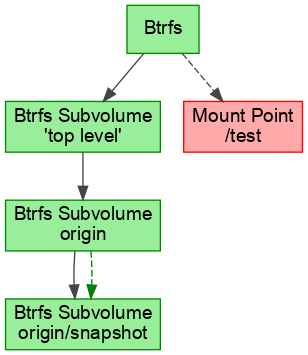
The second peculiarity comes from the freedom of btrfs to rename and move subvolumes. We can move “origin” under “snapshot”:
mv origin/snapshot .
mv origin snapshot
The resulting devicegraph has a cycle:
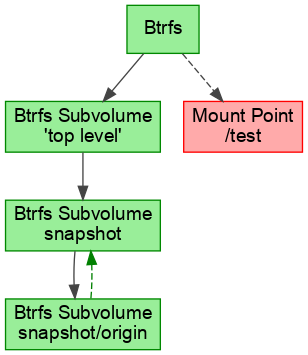
So far that could not happen and some algorithms assumed that the devicegraph is always a directed acyclic graph (DAG). To remedy those algorithms we let them operate on a filtered devicegraph that hides the snapshot relations. Those filters were also added lately to libstorage-ng for LVM snapshots.
Now that libstorage-ng contains the mechanisms to deal with all these circumstances, we can think about offering advanced Btrfs options in YaST. But that will take some time since it comes with some challenges, with the design of the interface not being exactly the smallest one. Meanwhile, you can play around with this new libstorage-ng feature using the “probe” command included in the package “libstorage-ng-utils”, as long as you enable the experimental feature with the new variable “YAST_BTRFS_SNAPSHOT_RELATIONS”.
YAST_BTRFS_SNAPSHOT_RELATIONS=yes /usr/lib/libstorage-ng/utils/probe --display
Automatic Check for New /usr/etc/ Files
As we have already mentioned in previous
reports,
more and more parts of the distribution are changing the way they organize their
configuration files. Things are moving from single configuration files in
/etc to a layered structure that starts at /usr/etc and includes multiple
files with different orders of precedence.
The YaST developers need to know when a file location is changed so we could
adapt YaST to read and write to the correct location. Otherwise it could easily
happen that the YaST changes would be ignored and we would get bug reports
later. Therefore we implemented a regular check which scans for all etc
configuration files in Tumbleweed and reports new unknown files.
The script is run once a week automatically at Travis. It downloads the repository metadata file which contains a list of files from all packages. It also contains files which are marked as “ghost”, these files are not part of the package but might be created by RPM post-install script or by user. We just compare the found files with a known list.
Some implementation details of that script may be interesting for our more
technical readers, since it uncompresses a *.xml.gz file and parses the XML on
the fly while downloading. That means it does not need to temporarily save the
file to disk or need it loaded whole in memory. That is really important in this
case because the unpacked XML is really huge, it has more than 650MB!
Improvements in YaST’s XML Parser
And talking about technical details, you may remember a couple of sprints ago we mentioned we had started a small side project to improve YaST’s XML parser. Now we can report significant progress on that front.
Let’s first clarify that we are not trying to re-invent the wheel by writing just another low-level parser to deal with XML internals. We are relying on existing parsers to rethink the way YaST serializes data into XML and back. All that with the following goals:
- Ensuring consistency of information when data is transformed into XML and then into raw data again, with our previous tools some information got silently lost in translation.
- Report accurate errors if something goes wrong during the mentioned transformation, so we know whether we can trust the result.
- Possibility of validating the XML at an early stage of (Auto)YaST execution.
- Reduce the amount of code we need to maintain.
- Make hand writting of XML easier.
We wrote quite some details about how we are achieving each one of those goals just to realize all that fits better into a separate dedicated blog post. Stay tuned if you are interested in those technical details. If you are not, you may be wondering how all this affects you as a final user. So far, the advantages will be specially noticeable for AutoYaST users. More consistent and shorter XML enables easier editing of the AutoYaST profile. Schema validation allows early warning when the XML is malformed. And the more precise error reporting will prevent silent failures caused by errors in the AutoYaST profile that can lead to subsequent problems in the system.
We keep moving
The future will not only bring a better AutoYaST, more LVM and Btrfs capabilities or a new XML parser. As mentioned at the beginning of this post, we will also change a bit the way we communicate the changes implemented in every YaST development sprint.
We currently invest quite some effort every two weeks putting all the information together in the form of a text that can be read as a consistent and self-contained nice story, and that is not always that easy. We feel time has come to try an alternative approach.
From now on, our sprint reports will consist basically in a curated and organized list of links to pull requests at Github. On one hand, the YaST Team puts a lot of effort into writing comprehensive and didactic descriptions for each pull request. On the other hand, our readers are usually more interested in some particular topics than in others. So we feel such digest will provide a good overview allowing the readers to focus on some topics by checking the descriptions of the corresponding pull requests.
We will still publish those summaries in this blog. And we will continue publishing occasional extra posts dedicated to a single topic, like the one about the revamped XML parser we just mentioned some lines above.
So, see you soon in this blog and in all our usual communication channels… and keep having a lot of fun!
Developing Software for Linux on Mainframe at Home
When developing for architectures that are not mainstream, developers often have challenges to get access to current systems that allow to work on a specific software. Especially when asking to fix an issue that shows up only on big endian hardware, the answer I repeatedly get is, that it’s hard to get access to an appropriate machine.
I just recently saw reports that told that the qemu project made substantial progress with supporting more current Mainframe hardware. Thus I thought, how hard could it be to create a virtual machine that allows to develop for s390x on local workstation hardware.
It turned out to be much easier than I thought. First, I did a standard install of tumbleweed for s390x, which went quite easy. But then I remembered that also the OBS supports emulators, and specifically qemu to run virtual machines.
I got myself a recent version of qemu-s390 from the Virtualization project:
osc repourls Virtualization
...
su
cd /etc/zypp/repos.d && \
wget https://download.opensuse.org/repositories/Virtualization/openSUSE_Leap_15.1/Virtualization.repo
zypper install --allow-vendor-change qemu-s390
exit
After this, we are almost done. The next part is to checkout some package from OBS and try to build it:
mkdir ~/obs && cd $_
osc co openSUSE:Factory:zSystems cmsfs
cd openSUSE:Factory:zSystems/cmsfs
Now, you can run the build locally with the ‘osc’ command. You will have to specify the amount of memory you want to give to the resulting virtual machine, in my case here, it is 8GByte:
osc build --vm-type qemu --vm-memory=8192 standard s390xBuilding locally is nice, but how about working on that software? That is where the fun begins. Typically you would be able to do a chroot to a local directory when building in a chroot environment. So, lets just do some beginner error and run osc with the chroot command:
osc chroot --vm-type qemu --vm-memory=8192 standard s390xTo my big surprise, that command did not complain. I just opened up a second terminal, and found that in the background some processes were heavily working, and after a while, I was actually placed into a shell.
To double check, I ran ‘cat /proc/cpuinfo’ and yes, I am placed into a s390x virtual machine!
Putting things together: All you have to do, to have a running s390x virtual machine crafted for some specific package with all latest updates is:
- Get the package source from OBS
- Run osc chroot
I think that is really great functionality. Thanks to the excellent OBS team that made this work out of the box without much hassle. Great Job!!!

openSUSE for INNOVATORS Project is born
It is with great enthusiasm that I announce the INNOVATORS for openSUSE project, is an initiative to share projects, articles and news about innovative projects on the openSUSE platform developed by the community and public and private companies.
All information on this wiki is related to innovative projects that use augmented reality technology, artificial intelligence, computer vision, robotics, virtual assistants and any and all innovative technology (in all hardware plataforms ).
This initiative search collaborators for the project, the objective is to show the power of the openSUSE platform in innovative projects. To send suggestions, criticisms or be part of the INNOVATORS openSUSE community, send an email to the administrator Alessandro de Oliveira Faria (A.K.A. CABELO) at the email cabelo@opensuse.org.
To inaugurate the openSUSE for INNOVATORS project, we announced the ISOLALERT software created to combat COVID-19 by monitoring social isolation with computer vision. More information HERE
openSUSE Leap "15.2" Enters Release Candidate Phase
The openSUSE community, contributors and release engineers for the project have entered into the release candidate phase today after the Build “665.2” snapshot was released for the upcoming openSUSE Leap “15.2” version.
In an email to the openSUSE Factory mailing list, Leap release manager Lubos Kocman recommended Beta and RC users using the “zypper dup” command in the terminal prior switching to the General Availability (GA).
The release candidate signals the package freeze for software that will make it into the distribution. Among some of the packages that are expected in the release are KDE’s Plasma “5.18” Long-Term-Support version, GNOME “3.34” and Xfce “4.14”. New package for Artificial Intelligence and data scientist will be in the release. The release will also contain the tiling Wayland compositor Sway, which is a drop-in replacement for the i3 window manager for X”11”. The DNF package manager has been rebased to version “4.2.19”, which brings many fixes and improvements. In addition, a lightweight C implementation of DNF called “Micro DNF” is now included. Pagure, which provides an easy, customizable, lightweight solution for setting up your own full-featured Git repository server, has been updated to version “5.10.0”. A list of some of the packages in Leap “15.2” can be found on the openSUSE Wiki.
During the development stage of Leap versions, contributors, packagers and the release team use a rolling development method that are categorized into phases rather than a single milestone release; snapshots are released with minor version software updates once passing automated testing until the final release of the Gold Master (GM). At that point, the GM becomes available to the public (GA expected on July “2”) and the distribution shifts from a rolling development method into a supported release where it receives maintenance and security updates until its End of Life (EOL). The EOL of openSUSE Leap “15.1” is six months after the release of Leap “15.2”, so users of “15.1” will need to update by the beginning of “2021”.
Kocman listed the following important dates related to the release: June “22”: Translation deadline for packages June “23”: Final package submission deadline June “23”: Translation deadline for infrastructure June “25”: Gold Master followed by a public release the next week on Thursday, July 2.

Stop Presse: Raspberry Pi 4 avec 8Go de RAM est disponible dès aujourd’hui
Consultez le test içi : https://www.clubic.com/raspberry-pi/actualite-2332-le-raspberry-pi-4-8gb-est-disponible-des-aujourd-hui.html Il va sans dire que NUI va acquerir ce modèle rapidement pour installer openSUSE et SUSE et probablement le tout en kubernettes 🙂 Have a lot of fun !
The post Stop Presse: Raspberry Pi 4 avec 8Go de RAM est disponible dès aujourd’hui appeared first on Network Users Institute - Cybersécurité, Intégration de Linux & Logiciels Libres à Rouen, Normandie..
Entrevista a Freewear (III), una empresa comprometida con el Software Libre
Finalizamos esta serie con la Entrevista a Freewear (III), última parte de la serie de tres en las que he decidido dividir este artículo dedicado a esta empresa de artículos relacionados con el Software Libre. Así que, bienvenidos a la tercera parte de la entrevista a Freewear: finalizamos la sección de KDE, vemos algún detalle del proceso de elaboración de sus productos y las pinceladas finales.
Entrevista a Freewear (III), una empresa comprometida con el Software Libre
[Viene de Entrevista a Freewear (II), una empresa comprometida con el Software Libre]
Finalizamos la parte de KDE, una Comunidad muy dinámica que me gustaría que os diera mucho trabajo en todos los sentidos ¿tenéis pensado alguna novedad para la Comunidad KDE?
→ Procuramos estar muy atentos a los cambios (el último no hace mucho) en el logo oficial o las distintas variantes de Konqi. También nos permitimos alguna licencia particular y poco ortodoxa, como la impresión del logo con un barniz serigráfico sobre camiseta negra. Es la camiseta ‘KDE Dark’, que por cierto encantó a Jens Reuterberg, diseñador de KDE. Es raro el año en el que no introducimos alguna novedad, sobre todo orientada a no repetir y repetirse en el material que la comunidad encuentre en el stand de FreeWear en los eventos.

Un vistazo al interior de FreeWear
No quisiera que os pusierais muy técnicos, pero ¿cuál es proceso de elaboración de vuestros productos? ¿utilizáis Software Libre?
→ Utilizamos Inkscape como programa vectorial para generar los fotolitos serigráficos. El formato vectorial es vital en serigrafía. Solo muy ocasionalmente usamos Gimp para formatos bitmap, muy raramente utilizados. Tenemos un ordenador cautivo con W. 7 para mover el software de nuestro plotter Roland. Lamentablemente, no queda más remedio: si quieres plottear, tiene que ser con el software específico del fabricante, que al menos, admite el formato ‘svg’ . Y ese software solo ‘corre’ en W. y Mac.
Y, vosotros en vuestros dispositivos personales, ¿qué utilizáis y porqué?
→ Ubuntu. No somos programadores aunque hacemos nuestros pinitos. La página está desarrollada en FOSS y la conexión de la página con la gestión de stocks y envíos, también. El hermano de Xulia tiene mucho que ver en todo el mecanismo, que va de la recepción de un pedido a través de la web a su proceso, envío y almacenamiento ‘histórico’ para poder donarlo a posteriori. Y a cumplir con el fisco, cosa que también hacemos desde aquí.
Sin afán de pavoneo, somos muy autosuficientes y no tenemos ni gestoría. Nos sentimos identificados con la filosofía FOSS y salvo el borrón del plotter, queremos ser consecuentes con el producto que ofrecemos desde la filosofía que lo genera.

Cursillo de serigrafía que impartío Freewear hace ya tiempo a la gente de ‘AGPI’ (Asociación Galega de Profesionais da Ilustración).
Para finalizar, vuestro minuto de oro. ¿qué queréis decirle nuestros lectores?
→ Que sigan ahí con la fidelidad e ilusión que nos han mantenido en funcionamiento y permitido vivir de este trabajo ya bastantes años. Somos conscientes de que 2020 es un punto de inflexión dramático. Pero hasta creemos que podremos participar en los eventos, de hecho (os mantendremos informados) intentaremos hacerlo. Nos implicaría envíos individualizados, un proceso muy laborioso y no exento de complicaciones, pero nos encantaría lograrlo y contribuir a el ‘sentimiento de grupo’ que daría ponerte una camiseta en remoto del evento.
También intentaremos tener nuestra tienda-plató virtual en una esquinita de la pantalla de los eventos. En esas estamos. No bajamos los brazos aunque, como todo el mundo, observamos este desplome intentando escapar de los cascotes para seguir construyendo. A ver si podemos. Si algo nos ayuda es vivir en el campo, cultivar nuestra huerta y que la parte baja de nuestra casa sea FreeWear, oficina y taller. Si no, ni estaríamos hablando de esto.

Pantalla con el logo de KDE. La zona de la K (tela sin emulsión) permite pasar la tinta.
Muchas gracias por vuestro tiempo, estoy seguro que los lectores le habrá encantado las respuestas.
→ Batolkien, el agradecimiento es nuestro. El más afectuoso y cordial saludo a toda la gente que nos ha permitido llegar desde finales de 2005 hasta Mayo de 2020. Y esperamos poder seguir. Gracias, de corazón, a todos y a a todas por ayudarnos a conseguirlo. Y a seguir. Y de paso, desearos la mayor suerte en esta nueva realidad.
Xulia y Ramón.
Capítulos anteriores:
KDE Applications, Wireshark, IceWM update in Tumbleweed
The last week has produced a total of three openSUSE Tumbleweed snapshots bringing the total amount of snapshots for the month to 18.
All 18 snapshots have recorded a stable rating above 91, according to the Tumbleweed snapshot reviewer. With 14 of them, recording a rating of 99 and the last two snapshots trending at a 99 rating.
The most recent 202000526 snapshot provided the 3.2.4 release of Wireshark. The new version fixed a Common Vulnerabilities and Exposures where it was possible to make Wireshark crash by injecting a malformed packet onto the wire or by convincing someone to read a malformed packet trace file. Linux Kernel 5.6.14 re-established support for RTL8401 chip version. DNS server and client utilities package bind 9.16.3 fixed to security problems and added engine support for OpenSSL Edwards-curve Digital Signature Algorithm implementation. Document viewer evince 3.36.1 updated translations, fixed an incorrect markup in the Czech User Interface and updated the French help image. SSL VPN client package openconnect 8.10 installed a bash completion script and fixed a potential buffer overflow with security communications library GnuTLS. GNOME’s 0.30.10 image organizer shotwell, which was the subject of a recently settled a patient lawsuit, modified web publishing authentication to comply with Google’s requirements.
Snapshot 202000523 updated the rest of KDE ‘s Applications 20.04.1 stack. Among the fixes highlighted for the release are having kio-fish only store passwords in KWallet if the user asked for it, Kdenlive video editor had many stability updates, and fixes were made to the JuK music player that sometimes crashed. DNS resolver package unbound 1.10.1 offered up two security fixes for CVE 2020-12662 and 2020-12663. Perl Compatible Regular Expressions (pcre2) updated to version 10.35 and the Ruby code style checking tool rubygem-rubocop had multiple community contributions in the recent update to version 0.83.0, which added new features, support and fixes.
Application 20.04.1 began updating in Tumbleweed’s 202000523 snapshot where the file manager Dolphin received a crash fix if no Konsole is installed. The ImageMagick package fixed a black line bug when converting gif images in the snapshot. There was added filesystem UUID support in the erofs-utils 1.1 package update. The package for the window manager for the X Window System, icewm, updated to version 1.6.5 and fix for positioning of splash window on multi-head displays. IceWM also provided fixes and updates for both the configure and the cmake build. The Mail Transport Agent, postfix, updated to 3.5.2; the release fixed a bug introduced in postfix 2.2 where a Transport Layer Security (TLS) error for a database client caused a false ‘lost connection’ error for an Simple Mail Transfer Protocol (SMTP) over a TLS session in the same Postfix process. Python3 3.8.3 fix possible memory leak and improved error reporting and sudo 1.9.0 updated the default TLS listener to only be enabled when either the TLS certificate file is explicitly specified in sudo_logsrvd.conf or the default TLS certificate file exists in the file system.

No, Microsoft no ama al “open source”, o no lo acaba de entender bien
¿Sigue Microsoft con su estrategia de “adoptar, extender y extinguir? Parece que sí valiéndose de software de código abierto

Los gestores de paquetes de software que disfrutamos en GNU/Linux para instalar software confiable y seguro es algo que hasta hace relativamente poco no había en un sistema operativo como Windows de Microsoft.
Por eso instalar software en Microsoft era toda una aventura. Sus usuarios solían buscar el software (normalmente con licencia de pago para su uso) por webs dudosas, con dudosos paquetes ya sin restricciones o serials y cracks para hacer que aquello funcionara.
Desde nuestros sistemas con GNU/Linux y nuestros repositorios llenos de software libre listo para ser instalado, miramos esas prácticas con asombro.
Ahora ya tienen repositorios con software para su sistema operativo, que llaman con un nombre más “cool” como “Store”. Y recientemente ya han sacado un gestor de software llamado Winget (que incluso en webs sobre GNU/Linux escriben artículos al respecto).
Pero Microsoft ha cambiado, ahora ama al “open source” (no digan eso de software libre que es muy “extremista”), además ha liberado software y es propietaria de GitHub el sitio por excelencia donde desarrollar software, en gran mayoría publicado con licencias libres GNU GPL, u otras licencias permisivas.
Pero ¿qué hago escribiendo en el blog sobre Microsoft? y ¿entonces Microsoft dejó su política de “adoptar, extender y extinguir“? Pues parece que no lo ha abandonado del todo.
Los desarrolladores de Microsoft han anunciado la versión de Winget un gestor de software para su sistema operativo Windows. Que hace lo que hace herramientas como apt, zypper, yaourt, dnf, en GNU/Linux. Buscar un software, instalarlo, gestionar las fuentes, comprobar que son fiables, etc.
Hasta aquí todo bien. El problema es que su software está basado en un software llamado AppGet desarrollado por Keivan Beigi, un desarrollador canadiense con el que Microsoft se puso en contacto y al que acabó dando de lado. Pero vamos por partes.
Keiva Beigi, desarrolló AppGet, no por ganar dinero, no por ser famoso, si no, porque quería un gestor de paquetes similar a los sistemas *nix para Windows.
En agosto de 2019 Microsoft se puso en contacto con él para decirle que le gustaba su herramienta, y que les gustaría que desarrollara esa herramienta para su sistema operativo.
El desarrollador, le gustó la idea, un proyecto que había iniciado como una necesidad personal, estaba ahora en el punto de mira de Microsoft. Por lo que acordaron después de correos y reuniones que trabajaría contratado para Microsoft para seguir desarrollando y mejorando dicha herramienta.
Hubo encuentros incluso en Redmond, y entrevistas con varias personas de Microsoft, hasta que un buen día no hubo más comunicación por parte de Microsoft.
Hasta que 6 meses después se encuentra con que Microsoft ha publicado algo llamado Winget (podían haber cambiado algo más el nombre) y que el funcionamiento básico, la estructura de archivos, la terminología y el manifiesto están “basados” en la aplicación que él había desarrollado.
Incluso le envían un correo al desarrollador diciéndole que publicarán un anuncio y que su herramienta es software libre, así que si quiere puede colaborar en ella. WTF!
Sí, el desarrollador creó el paquete con una licencia libre, que permite el uso de ese, pero una empresa como Microsoft que factura millones, debería tener algo más de clase y contratar a quien creó la herramienta para seguir haciéndola crecer (algo que deberían haber tenido desde hace años).
El desarrollador está enfadado en la manera en la que Microsoft ha gestionado todo esto, las expectativas que le crearon y la callada como respuesta antes de la sorpresa final.
Así que ha decidido seguir con su aplicación en modo mantenimiento, hasta que el 1 de agosto de 2020 definitivamente deje de mantener su aplicación, ya que no puede competir con la “copia” de Microsoft.
¿Microsoft realmente ama el “open source”? ¿Realmente ama Linux? O lo que realmente ama es seguir manteniendo su cuota y ve que el software libre y las soluciones basadas en GNU/Linux son más fuertes, mejores y con mayor proyección en el mercado del software (no hablo de ordenadores personales, eso ya no es el negocio).
En fín, estos son los hechos, tu mismo puedes buscar las respuestas y si quieres compartirlas con respeto en los comentarios. Mi ánimo pesimista, me hacen desconfiar y recelar de sus actitudes, por mucho marketing con el que quieran camuflarlo.
Enlaces de interés
- https://keivan.io/the-day-appget-died/
- https://devblogs.microsoft.com/commandline/windows-package-manager-preview/
- https://github.com/appget/appget
- https://blog.desdelinux.net/winget-el-nuevo-administrador-de-paquetes-abierto-que-desarrolla-microsoft/
- https://es.wikipedia.org/wiki/Adoptar,_extender_y_extinguir
