
 Member
 baltolkien
Entrevista a Freewear (II), una empresa comprometida con el Software Libre
Seguimos con la Entrevista a Freewear (II), segunda parte de la serie de tres en las que he decidido partir este artículo dedicado a esta empresa de artículos relacionados con el Software Libre. Así que, bienvenidos a la segunda parte: motivación, Comunidad y KDE.
Entrevista a Freewear (II), una empresa comprometida con el Software Libre
[Viene de Entrevista a Freewear (I), una empresa comprometida con el Software Libre]
Entiendo que son tiempos duros para Freewear debido a la cancelación de los enventos pero espero que eso no sea una carga excesivamente pesada, ¿cuál es la motivación que os impulsa a seguir luchando?
→ Los contactos, la web y el taller nos han permitido llegar hasta aquí. Son demasiados años de esfuerzo como para abandonar el barco que nos da de comer. Hemos conseguido multitud de contactos y amistades en el mundillo y, con cierta edad, no nos planteamos otra cosa que seguir. La incertidumbre del futuro es peor como efecto que la propia causa, con total respeto a quienes lamentablemente la han sufrido. Estamos en una situación delicada y debemos afinar muy bien. Mucha gente está -lamentablemente- mucho peor. Dos meses escasos han destruido muchas cosas, quizá con un anclaje real de papel mojado. No podemos predecir nada. Somos pesimistas pero tenazmente cabezotas. A ver que pasa.

Freewear y la Comunidad de FLOSS
En el mundo del Software Libre la Comunidad es importante ¿os habéis sentido miembros de la misma a lo largo de estos años?
→ Si, y eso que no somos informáticos. Es una relación, un bucle de retroalimentación. Siempre hemos percibido aprecio y afecto, que intentamos corresponder. Total y absolutamente integrados, desde un plano colateral, pero no menos importante pues cubrimos una ámbito quizá vacío y por tanto, una pieza más del puzzle.
Vayamos a asuntos legales, ¿cómo hacéis para poder imprimir logos de proyectos libres? ¿tenéis algún tipo de acuerdo con las empresas, Comunidades, Proyectos, asociaciones o particulares?
→ Pedimos siempre permiso explícito que a veces se plasma (como en el caso de KDE e.V. y otras organizaciones) en un acuerdo de colaboración formal y firmado. Otras organizaciones son más laxas o simplemente nos confían tras un cruce de mails la capacidad para comercializar sus camisetas, etc. Nosotros preferimos siempre acuerdos firmados y concretos. En algunas ocasiones no se producen pero la confianza que forja el tiempo y nuestras escrupulosas donaciones permiten afianzar esa confianza.

Como vemos, a pesar de la maquinaria el proceso es muy manual.
Alguna anécdota, que se pueda contar, de algún evento (cambio de color de una camiseta, camisetas KDE a una Guadec, un envío que llegó a Córdoba (España) en vez de Córdoba (América), etc.)
→ Siempre recordaremos la recepción de un pedido y su pago vía transferencia. Acto seguido, una llamada de teléfono del padre del cliente que ‘aplazó’ dicho pedido al resultado de las calificaciones en Junio de su retoño. Nos partimos de risa, padre incluido. El retoño aprobó las suficientes para que a finales de Junio recibiéramos vía libre para el envío.
FreeWear y la Comunidad KDE
Aunque supongo que para vosotros todos los Proyectos Libres son importantes pero, y espero que la respuesta sea que si, ¿tenéis algún vínculo especial con la Comunidad KDE?.
→ Sin ánimo de ‘rosca’, quizá el mayor. Tenemos a KDE (empezamos con KDE Hispano en 2006) como el detonante, junto con Gnome y Debian de nuestra actividad. Hablamos de catorce años de relación, con KDE España y también -y en mayor medida si cabe, por motivos obvios- con KDE e.V. al no faltar el encargo habitual de camisetas para las Akademy-es y las Akademy, donde como sabréis, siempre y gracias al trabajo de mucha gente, siempre hay una mesa con nuestros materiales a disposición. No hemos conseguido una relación tan larga y estrecha con ninguna otra organización.
Ya que estamos ¿qué productos KDE específicos ofrecéis? ¿se pueden pedir productos específicos o especiales?
→ Camisetas, polos, sudaderas, gorras, mugs, cojines, pegatinas y vinilos para colocar el ordenadores o incluso vehículos. Siempre estamos abiertos a sugerencias que técnicamente sean factibles, incluso a la petición por parte de una persona de ‘su’ camiseta específica KDE.
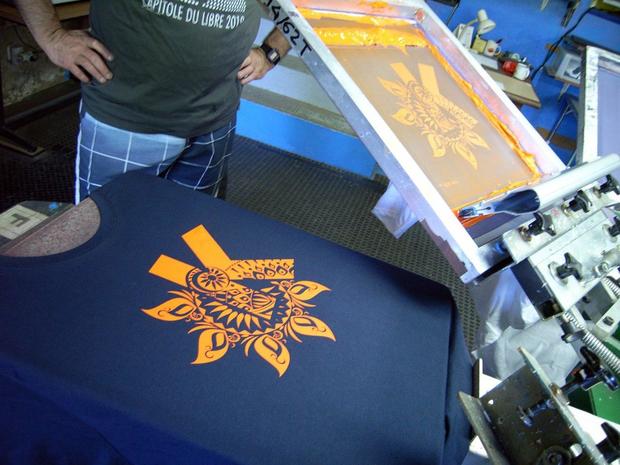
Imprimiendo la preciosa camiseta de KDE India.
Y hasta aquí la segunda parte de la entrevista, en la tercera y última veremos el futuro de Freewear y alguna intimidad. Yo de vosotros no me lo perdería.
Abrir una lista con los archivos editados recientemente en #Vim
La opción de ver una lista de archivos recientes de otros editores de texto era algo que echaba de menos en el editor Vim… hasta ahora. Te cuento cómo

Estando en Vim ¿nunca has querido/necesitado tener que abrir un archivo que has editado recientemente, sin necesidad de tener que abrir el navegador o el NerdTree para ir a la ruta del archivo y abrirlo?
Este artículo viene a formar parte de la serie de artículos sobre Vim que desde hace meses vengo escribiendo en mi blog. Los puedes encontrar recopilados en estos enlaces:
- https://victorhckinthefreeworld.com/tag/vim/
- https://victorhck.gitlab.io/comandos_vim/articulos.html
Poco a poco voy aprendiendo más de Vim y no ha sido hasta hace poco que he aprendido cómo poder navegar por esa lista de archivos editados recientemente y poder abrir el archivo deseado.
¡Incluso le he creado un atajo de teclado! Te lo cuento todo
Lo primero decir que el comando para abrir esa lista de archivos recientes abiertos con Vim es cualquiera de estas dos opciones (la opción larga y la corta):
:browse oldfiles:bro ol
Al ejecutar el comando Vim nos presenta una lista con todos los archivos recientes con su ruta. ¡Vaya, así que ahí han estado todo el rato!
Podemos navegar por la lista buscando el archivo que queremos, cuando lo encontremos, pulsaremos q y después el número del archivo y se abrirá en nuestro editor Vim.
Pero como ya aprendimos qué era eso de la tecla <leader> y cómo configurarla a nuestro gusto, vamos a asignar un atajo de teclado a una tecla para que nos abra esa lista y no tener que escribir el comando anterior.
Para eso, en el archivo de configuración .vimrc lo abrimos y en mi caso le he asignado la tecla e que al pulsarla con la tecla <leader> me ejecutará el comando. Así que he añadido lo siguiente:
nnoremap e :bro ol <cr>
¡Bola extra!
Si has abierto Vim, y quieres abrir el último archivo editado en Vim, no hace falta ni que ejecutes este comando, simplemente con la combinación de teclas Ctrl+o+o abrirá el último archivo editado, si sigues pulsando o abrirá archivos anteriores.
¡Ale! otro pequeño problema resuelto en Vim. Seguro que a tí también te resultará interesante. Pero si sabes de otra forma de hacerlo, no dudes en compartirla en los comentarios.


Looking for candidates for the 2020 GNOME Foundation elections
I forgot to write this a few days ago; I hope it is not too late.
The GNOME Foundation's elections for the Board are coming up, and we are looking for candidates. Of the 7 directors, we are replacing 4, and the 3 remaining positions remain for another year. You could be one of those four.
I would like it very much if there were candidates and directors that fall outside the box of "white male programmer"; it is unfortunate that for the current Board we ended up with all dudes. GNOME has a Code of Conduct to make it a good place to be.
Allan Day wrote a review of the Board's activies for the last year. We are moving from a model where the Board does a little bit of everything, to one with a more strategic role — now that the Foundation has full-time employees, they take care of most of the executive work.
The call-for-candidates is open until May 29, so hurry up!
Sincronizar varios paneles de Konsole
Veamos cómo poder sincronizar varios paneles del emulador de terminal Konsole, para que lo que escribamos en uno se copie en otros

Haz clic sobre la imagen para ampliar
Aunque en el blog he escrito y dado a conocer otros emuladores de terminal como Alacritty, Kitty o Terminology, al final siempre utilizo Konsole, el emulador de terminal de la comunidad KDE.
Tiene las funcionalidades que necesito como el poder abrir paneles, pestañas, abrir enlaces, configurar atajos de teclado y muchas otras cosas que desconocía.
Como es el caso del pequeño tutorial que hoy os traigo, se trata de una funcionalidad muy útil cuando estás conectado a varias máquinas mediante ssh y quieres ejecutar los mismos comandos en todas ellas a la vez.
También puede servir para ejecutar los mismos comandos en diferentes directorios de nuestro equipo al mismo tiempo, como por ejemplo actualizar varios repositorios de Git a la vez
Veamos cómo poder sincronizar diversos paneles de Konsole y que lo que escribamos en uno se copie en los que queramos:
- Abrimos Konsole
- Mediante los atajos de teclado Ctrl+Shift+( o Ctrl+Shift+) podemos dividir la vista en distinto paneles con división en vertical u horizontal respectivamente
- Nos “logueamos” en las máquinas ssh que queramos en cada uno de los paneles, o en las ubicaciones que queramos.
- Ejecutamos el atajo de teclado Ctrl+Shift+.
- Seleccionamos cuales de los paneles abiertos queremos que se sincronicen con el principal
- Ahora lo que escribamos en este se copia/sincroniza/replica en los seleccionados
- Para parar la sincronización podemos volver a pulsar Ctrl+Shift+. y deseleccionar todo o simplemente pulsar Ctrl+Shift+/ para parar la sincronización
Desconocía esta funcionalidad de Konsole ¿No me digas que no es útil? Otro ejemplo de una gran pieza de software libre creada por la comunidad de KDE.
Fuente en este mensaje de la cuenta de Twitter (o en Nitter) de KDE:
Entrevista a Freewear (I), una empresa comprometida con el Software Libre
Bienvenidos a la Entrevista a Freewear (I), una serie de artículos de tres partes en formato entrevista que he decidido realizar a esta empresa de camisetas, sudaderas y otros complementos relacionados con el Software Libre y que con agrado y suma amabilidad han aceptado contestar. Como no me gustan los artículos largos, he pensado dividir la entrevista en varias entradas, así será más fácil de leer. Os dejo con la primera de las tres partes que la componen.
Entrevista a Freewear (I), una empresa comprometida con el Software Libre
En primer lugar quisiera agradeceros que podáis dedicar unos minutos de vuestro tiempo a contestar estas preguntas y desearos que vosotros y los vuestros os encontréis bien en estos tiempos tan extraños que nos ha tocado vivir.
Como es costumbre, aunque creo que los lectores del blog ya os conocen, quisiera que vosotros mismos os presentarais ¿quienes sois?
→Para nosotros es un placer y el agradecimiento es mutuo. Últimamente tenemos más tiempo que el habitual y también deseamos que la comunidad esté bien en estos tiempos que ‘nos han’ tocado vivir.
Somos FreeWear.org. Un taller de impresión y una tienda on-line, aunque también, -como sabéis-, realizamos encargos. Somos una pareja vida y trabajo (Xulia y Ramón). Llevamos trabajando desde 2006, primero como ‘Killermundi.org’ y ya, desde 2008 y plenamente volcados en el FOSS como ‘FreeWear.org’.
Ramón es licenciado en Historia Contemporánea y Xulia en Bellas Artes. Sería largo pormenorizar nuestras trayectorias profesionales, pero el caso es que en 2004 decidimos ser nuestros propios jefes y embarcarnos en este proyecto.
Si no tengo entendido mal, en realidad sois una pequeña empresa gallega que ha sido capaz de llegar a todo el mundo del Software Libre. ¿estoy equivocado?
→No. Es un tópico decir que a base de mucho esfuerzo, pero es real. También la ayuda providencial sin la que esto no hubiera sido posible de Ismael, hermano de Xulia e ingeniero de sistemas, el padre de nuestra web y guía en todo el proceso de contactos con organizaciones FOSS.

Ramón y Xulia insolando una pantalla serigráfica para la impresión de camisetas
Volvamos la vista atrás ¿Cómo se inició FreeWear? ¿Cómo fueron los primeros años?
→Como comentamos antes, no empezamos como FreeWear, antes éramos KillerMundi, en que el había un apartado FOSS pero nuestro catálogo tocaba otros palos. Vendíamos, además de en web, en tiendas físicas. La crisis de 2008 nos llevó a la decisión de centrarnos en el software libre, y ahí nació FreeWear.
El presente de Freewear
En la actualidad, ¿qué productos ofrecéis? ¿se pueden adquirir en alguna tienda física? Y si la respuesta es negativa, ¿cómo los puedo adquirir?
→ Los productos que ofrecemos son los que podéis ver en la web, donde también podéis encargar productos personalizados, desde un encargo de camisetas (u otros ítems) a una sola prenda.
No vendemos en tiendas físicas, solo en la web y en eventos FOSS (que ojalá pronto vuelvan). El envío de material FreeWear para su venta en eventos FOSS (con donación a la organización local, además de la donación de siempre a la organización correspondiente) ha sido hasta ahora la piedra angular de nuestro trabajo.
Hagamos un ejercicio de análisis ¿Cuál es vuestro producto estrella? ¿Cuál pensabais que iba a triunfar pero no lo hizo? ¿y al revés?
→ Python y Vim son las organizaciones de las que más hemos vendido, y últimamente también Arch. En sentido contrario, de Django hemos vendido menos de lo que esperábamos. En cuanto a ítems, lo que más se venden son camisetas y sudaderas, y últimamente bastantes mugs.

Primera pasada de verde a una camiseta de Vim
Toquemos un tema delicado, ¿cómo estabais a principios de años y como os ha afectado esta situación de Pandemia mundial por el COVID’19?
→ 2018 fue nuestro año estrella. En 2019 percibimos un bajón notable en el segundo semestre. El comienzo de 2020 fue malo, y ya en febrero, con la suspensión de la PyCon XI en Florencia nos percatamos de la que se venía encima.
Con todos los eventos presenciales suspendidos, intentaremos llevar las camisetas al domicilio de cada participante en el evento online y en ese menester nos encontramos. Y además, estamos plenamente centrados en la web, en concreto en conseguir acuerdos con nuevas organizaciones, cosa por cierto más difícil que hace diez años. Percibimos quizá un cambio generacional y de mentalidad, quizá -podemos equivocarnos- una menor apertura o interés a colaborar en las organizaciones de nuevo cuño.
Y hasta aquí la primera parte de la entrevista, en la segunda veremos sus motivaciones, su relación con la Comunidad y, especialmente, con KDE.
Aprovecho para indicar que a partir de ahora el blog tendrá un banner-anuncio de Freewear.org que he decidido poner de forma desinteresada, con el ánimo de ayudar a esta empresa comprometida con con Software Libre.
Feliz dia do orgulho NERD!

Dia do Orgulho NERD, data escolhida em função do primeiro filme da série Star Wars, o Episódio IV: Uma Nova Esperança, em 25 de maio de 1977entre outros motivos.


KesDict, un traductor en el escritorio Plasma – Plasmoides de KDE (146)
El objetivo de la personalización de un escritorio es proporcionar el entorno de trabajo más eficiente para cada usuario. Por esta razón el escritorio Plasma de la Comunidad es intratable, y un buen ejemplo de esto es KesDict, un diccionario que podemos tener en nuestro escritorio por si necesitamos consultar a menudo sus entradas.
KesDict, un traductor en el escritorio Plasma – Plasmoides de KDE (146)
Tanto si estás adquiriendo vocabulario de tu lengua materna o si estás aprendiendo un nuevo idioma, en muchas ocasiones tener un vocabulario a mano puede venir muy bien.
Evidentemente, puedes tener uno físico es una gran opción pero quizás te convenga más tener uno virtual a golpe de ratón y teclado, como es el caso del plasmoide 146 que trato en el blog.
Se trata de KesDict, un simple widget creado por Libre Hat que nos ofrece un traductor Español-Inglés y vicenversa que no solo te ofrece la palabra traducida sino que te muestras frases en las que se utiliza la expresión en cuestión.

Y como siempre digo, si os gusta el plasmoide podéis “pagarlo” de muchas formas en la fluida página de KDE Store, que estoy seguro que el desarrollador lo agradecerá: puntúale positivamente, hazle un comentario en la página o realiza una donación. Ayudar al desarrollo del Software Libre también se hace simplemente dando las gracias, ayuda mucho más de lo que os podéis imaginar, recordad la campaña I love Free Software Day de la Free Software Foundation donde se nos recordaba esta forma tan sencilla de colaborar con el gran proyecto del Software Libre y que en el blog dedicamos un artículo.
Más información: KDE Store
¿Qué son los plasmoides?
Para los no iniciados en el blog, quizás la palabra plasmoide le suene un poco rara pero no es mas que el nombre que reciben los widgets para el escritorio Plasma de KDE.
En otras palabras, los plasmoides no son más que pequeñas aplicaciones que puestas sobre el escritorio o sobre una de las barras de tareas del mismo aumentan las funcionalidades del mismo o simplemente lo decoran.
Sigue las novedades de PlanetaLibre desde un canal xmpp/Jabber
Si utilizas de manera habitual Xmpp/jabber, ahora tienes un canal en el que podrás seguir las novedades sobre GNU/Linux y software libre que lleguen al agregador PlanetaLibre

Ya hace algo más de 1 año que nació el proyecto PlanetaLibre, un agregador de noticias, que recopila feeds de webs y blogs en español con temática sobre GNU/Linux y software libre y que las pone a disposición de quien quiera en una página de GitLab:
La idea es que con el código que creó Selairi y disponible en GitHub, cualquiera se pueda montar su propio agregador de noticias de las webs que le interesen.
Yo hice este para difundir webs y blogs sobre GNU/Linux para los más frikis del lugar, y me gusta ver que el proyecto crece, con contribuciones de personas que aportan su grano de arena.
Puedes seguir los feeds de la web desde tu lector de RSS, o puedes seguirlo mediante una aplicación para Ubuntu Touch. Y ahora tienes un método más para estar informado de lo que pasa en PlanetaLibre.
Hace unos días el usuario Suso Comesaña, me decía que había montado un canal Xmpp/Jabber en el que poder seguir las novedades que se publiquen en PlanetaLibre.
- xmpp://planetalibre@salas.suchat.org
Así que si eres un habitual de este medio de contacto, ahora puedes añadir esta sala en la que llegarán las novedades que publiquen los blogs y webs añadidos en PlanetaLibre.
El canal lo ha puesto en marcha Suso, y con una tarea Cron montada en un equipo suyo y un software llamado feed2omb, se publican en el canal los feeds.
Gracias a Suso, así hay más alternativas de seguir los feeds, pero no olvidéis también visitar los sitios y comentar, que siempre es de agradecer recibir comentarios! 
Y si conocéis algún blog que encaje en la temática y publique de forma regular y queréis que se incluya, simplemente me lo comentáis y será incluido.

Avalon menu, otro lanzador de aplicaciones para Plasma – Plasmoides de KDE (145)
No me canso de presentar lanzadores de aplicaciones en Plasma. Como he dicho en varias entradas, buscar y ejecutar los programas en el entorno de trabajo Plasma de la Comunidad KDE es altamente personalizable. Hoy os presento Avalon menu, otro lanzador de aplicaciones de dos columnas que destaca por su elegancia.
Avalon menu, otro lanzador de aplicaciones para Plasma – Plasmoides de KDE (145)
Seguimos con las posibilidades de personalización de Plasma 5 en cuanto a lanzadores de aplicaciones. Al lanzador tradicional, a su versión reducida, al lanzador de aplicaciones a pantalla completa y a Tiled Menu, el clon del menú de Windows, se les han unido poco a poco otros lanzadores como UMenu, Minimal Menu, Simple Menu, Launchpad Plasma, Ditto Menu, Kpple o los Menu X y Menu Z.
A todos los anteriores se les une Avalon menu es un lanzador de aplicaciones creado por Adhe, otro de los desarrolladores habituales de este tipo de complementos, que nos ofrece un elegante menú de dos columnas que destaca por su elegancia.

Y como siempre digo, si os gusta el plasmoide podéis “pagarlo” de muchas formas en la fluida página de KDE Store, que estoy seguro que el desarrollador lo agradecerá: puntúale positivamente, hazle un comentario en la página o realiza una donación. Ayudar al desarrollo del Software Libre también se hace simplemente dando las gracias, ayuda mucho más de lo que os podéis imaginar, recordad la campaña I love Free Software Day de la Free Software Foundation donde se nos recordaba esta forma tan sencilla de colaborar con el gran proyecto del Software Libre y que en el blog dedicamos un artículo.
Más información: KDE Store
¿Qué son los plasmoides?
Para los no iniciados en el blog, quizás la palabra plasmoide le suene un poco rara pero no es mas que el nombre que reciben los widgets para el escritorio Plasma de KDE.
En otras palabras, los plasmoides no son más que pequeñas aplicaciones que puestas sobre el escritorio o sobre una de las barras de tareas del mismo aumentan las funcionalidades del mismo o simplemente lo decoran.
El software de dibujo digital #Krita ya está disponible para #Android y ChromeOS
Krita es un fantástico software para dejar volar tu lado más artístico, y ya puedes disfrutarlo en tablets con Android y equipos con ChromeOS

Ilustración con Krita. Autor: Ramón Miranda
Krita quiere llegar a donde están los usuarios, para que estos independientemente de la plataforma que utilicen puedan disfrutar de la potencia y profesionalidad de este software libre para realizar sus dibujos digitales.
Desde hace tiempo, Krita está disponible no solo para plataformas como GNU/Linux, también para MacOS e incluso Windows y disponible desde la Windows Store.
Ahora también está disponible una versión Beta para tabletas con Android y dispositivos con ChromeOS.
Gracias al duro trabajo de Sharaf Zaman, Krita ya está disponible en la Google Play Store disponible para instalar en tabletas con Android y Chromebooks, no está disponible para teléfonos móviles con Android.
Esta versión Beta de Krita para Android está basada en la versión 4.2.9 de Krita, es la versión completa de escritorio de Krita, por lo que la interfaz de usuario no ha sido rediseñada, pero por lo menos ya se puede empezar a probarla.
A diferencia de la versión disponible en la Windows Store y en Steam, en la Play Store de Google no se pide dinero por instalarla, así incentivan a los usuarios a probarla, pero se puede apoyar a la comunidad de Krita donando algo de dinero, que siempre es necesario para el mantenimiento de un proyecto.
Para instalar Krita tienes dos opciones:
- Krita en Google Play
- De manera alternativa, in Play Store, cambia a la pestaña “Early access” y busca org.krita. (Ver las instrucciones de Google para Early Access. Quizás tengas que bajar un poco hasta encontrar a Krita entre las opciones.)
Notas
- Disponible para tablets con Android y Chromebooks.
- Actualmente no es compatible con teléfonos con Android
- Si instalaste una de las compilaciones que hizo Sharaf primero debes desinstalar esa versión para probar esta oficial en versión Beta.
Enlaces de interés
- https://krita.org/en/item/first-krita-beta-for-android-and-chromeos-in-play-store/
- https://krita.org/es

Realizado con Krita: Autor: David Revoy