
 Member
 baltolkien
Shake, sacude y minimiza las ventanas de Plasma
Cuando crees que el control de los elementos de Plasma no puede ser más completa, la Comunidad KDE te sorprende. Hoy os quiero presentar Shake, un script de Kwin muy original que permite minimizar las ventanas de forma muy original. queEspero que os guste.
Shake, sacude y minimiza las ventanas de Plasma
 Lo cierto es que lo acabo de poner y no sé si lo voy a utilizar, pero estoy seguro que cuando mis alumnos lo vean en funcionamiento les va a encantar.
De la mano de Zzang nos llega un script para Kwin que dota de una funcionalidad muy original a las ventanas de escritorio Plasma 5. Se trata de Shake, un pequeña funcionalidad que nos permite minimizar las ventanas que tengamos abiertas sacudiendo la que estemos utilizando.
Es evidente que lo mejor para ver realmente el funcionamiento de este Script de KWin es ver un vídeo.
Hay que insistir que al programador de este Shake le encantará que le deis me gusta en la KDE Store y que le comentéis como os funciona. Os recuerdo que ayudar al desarrollo del Software Libre también se hace simplemente dando las gracias, ayuda mucho más de lo que os podéis imaginar, recordad la campaña I love Free Software Day 2017 de la Free Software Foundation donde se nos recordaba esta forma tan sencilla de colaborar con el gran proyecto del Software Libre y que en el blog dedicamos un artículo.
Más información: KDE Store – KWin Scripts – Shake
Cómo instalar Sticky Widows Snapping
La instalación de este Script es muy sencilla ya que se realiza directamente desde las Preferencias del Sistema. Los pasos exactos son los siguientes:
- Iniciamos el Lanzador de aplicaciones o Kickoff
- Clicamos en la Preferencias del sistema.
- Ahora pinchamos en Gestión de Ventanas.
- Nos dirigimos a la sección de Guiones de KWin.
- Ahora pinchamos en Obtener nuevos guiones.
- Buscamos Shake y pinchamos en Instalar.
- Ahora activamos el guión y pulsamos en Aplicar.
Sencillo y, a partir de ahora, imprescindible en todos mis escritorios Plasma de mis ordenadores.
GitLab Issues, controla tus proyectos GitLab en Plasma – Plasmoides de KDE (144)
Hoy me toca una entrada muy fácil de hacer ya que hice una muy similar con GitHub Issues hace muy poco. Os presento GitLab Issues, el plasmoide 144 de la serie que nos permite controlar tus proyectos GitLab en Plasma , el escritorio de la Comunidad KDE.
GitLab Issues, controla tus proyectos GitLab en Plasma – Plasmoides de KDE (144)
De la mano de Zren, uno de los creadores más activos de plasmoides, nos llega GitLab Issues, un widget que nos permite tener información de los proyectos alojados en GitLab con las siguientes características (que son básicamente las misma que GitHub Issues):
- Mostrar la primera página de las entradas de un repo de GitLab.
- Mostrar Abierto, Cerrado o Todos las entradas + Solicitudes de subida.
- Poder ordenar por Creado, Actualizado, y # Comentarios.
- Enumerar el número de comentarios como página web.
- Utilizar los mismos octiconos que la página web.
- Ocultar el fondo cuando se usa como un widget de escritorio.
- Ocultar el encabezado.
- Cambiar el icono del panel.
- La lista se almacena localmente, por lo que reiniciar el Plasmashell constantemente (por ejemplo: los desarrolladores de plasma) no es un problema.

Y como siempre digo, si os gusta el plasmoide podéis “pagarlo” de muchas formas en la fluida página de KDE Store, que estoy seguro que el desarrollador lo agradecerá: puntúale positivamente, hazle un comentario en la página o realiza una donación. Ayudar al desarrollo del Software Libre también se hace simplemente dando las gracias, ayuda mucho más de lo que os podéis imaginar, recordad la campaña I love Free Software Day de la Free Software Foundation donde se nos recordaba esta forma tan sencilla de colaborar con el gran proyecto del Software Libre y que en el blog dedicamos un artículo.
Más información: KDE Store
¿Qué son los plasmoides?
Para los no iniciados en el blog, quizás la palabra plasmoide le suene un poco rara pero no es mas que el nombre que reciben los widgets para el escritorio Plasma de KDE.
En otras palabras, los plasmoides no son más que pequeñas aplicaciones que puestas sobre el escritorio o sobre una de las barras de tareas del mismo aumentan las funcionalidades del mismo o simplemente lo decoran.
Voro, presidente de GNU/Linux València en Podcast Linux #104
Sigo con el repaso de los programas de los podcast de Juan Febles. En esta ocasión por he decidido dar un pequeño salto y situarme en el 104 ya que está dedicado a Voro, actual presidente de la Asociación GNU/Linux València, y un promotor del Software Libre a través de su canal de Youtube, la organización de eventos y realización de podcast.
Voro, presidente de GNU/Linux València en Podcast Linux #104
 Tengo el placer de conocer personalmente a Voro y una cosa destaca de él: rezuma buen rollo y optimismo por lo cuatro costados. Y es que a los cinco minutos de conocerlo parece que lo conoces de toda la vida.
Entre esa característica y una voz grave, pausada y segura, el episodio 104 de Podcast Linux realizado codo a codo con Juan Febles es una delicia. Se trata de un episodio especialmente recomendado para aquellos que piensan que solo los programadores pueden desarrollar el Software Libre.
De esta forma, a lo largo de una hora, que pasa volando, Voro y Juan hablan de cómo introducir el Software Libre al público en general, de las aficiones de Voro, del trabajo de la Asociación GNU/Linux València (inicio, evolución , iniciativas como eventos y su servidor Jitsi abierto,y el actual estado de admisión de socios ¡a qué estáis esperando!), el auge del SL en la capital del Turia(gracias a Slimbook, Vant, Valencia Tech y Las Naves, entre otros) y muchos otros temas tangentes más.
Como siempre, os dejo los audios para que los podáis escuchar:
Web: https://www.voromv.com
Twitter: https://twitter.com/VOROMV
Youtube: https://www.youtube.com/voromv
GNU/Linux Valencia: https://gnulinuxvalencia.org
- Twitter: @podcastlinux
- Mastodon: @podcastlinux
- Telegram Juan Febles: @juanfebles
- Correo: podcastlinux@avpodcast.net
- Web: avpodcast.net/podcastlinux
- Blog: https://podcastlinux.com
Podcast Linux forma parte de la red de podcasting Avpodcast y esta alojado en Neodigit.net, un proveedor de confianza con instalaciones en España.
Memasang Collabora Office (Snapshot) pada openSUSE Tumbleweed

Apa itu Collabora Office? Collabora Office adalah enterprise office suite dari LibreOffice, office suite Open Source yang paling banyak digunakan di dunia.
Apakah Anda pernah mencoba Collabora Office? Mari kita coba snapshot terbaru. Anda juga dapat mencobanya di openSUSE Leap.
- Unduh dan impor kunci
wget https://www.collaboraoffice.com/Collabora-Office-6.2-Snapshot/Linux/yum/repodata/repomd.xml.key && sudo rpm --import repomd.xml.key - Tanbah repositori
sudo zypper addrepo 'https://www.collaboraoffice.com/Collabora-Office-6.2-Snapshot/Linux/yum' 'Collabora Office 6.2 Snapshot' - Segarkan
sudo zypper ref - Pasang
sudo zypper install collaboraoffice
Enjoy!
SUSE y Elecktrobit aliados para modelar el futuro de los coches autónomos y conectados
SUSE se asocia con la empresa Elektrobit para transformar el futuro de los coches inteligentes autónomos y conectados con sistemas operativos basados en Linux

La movilidad tal como la conocemos parece ser que está a punto de cambiar para siempre. Ya no suena futurista leer noticias relacionadas con vehículos autónomos, conectados y eléctricos.
Los vehículos (no sé si para bien o para mal) ya no son solo unos chásis propulsados por un motor. El futuro (si alguien puede predecirlo) parece ser el replantearse ese patrón que hasta ahora conocíamos.
Por eso SUSE se ha asociado con la empresa Elektrobit para juntos ofrecer una alternativa potente y segura para ese nuevo futuro de la innovación automovilística con sistemas operativos basados en Linux.
Combinando la experiencia de Elektrobit dentro de la automoción y la experiencia de SUSE en el campo de Linux, juntos tratarán de ofrecer una plataforma de software para automóviles que satisfaga los requerimientos clave que necesitan.
Aspectos clave como la seguridad, la fiabilidad, la transparencia, la posibilidad de actualizaciones al día, sistemas fiables, son las prioridades cuando se adaptan soluciones de código abierto a las necesidades que requieren los automóviles.
Todas esas caracterísiticas son cruciales cuando se tratan de un coche, y deben ser soluciones en las que el usuario final pueda confiar.
Los vehículos definidos por software traen nuevas experiencias y retos tanto a fabricantes como a los conductores. Estos ya no necesitarán sentarse para actualizar el firmware.
Las actualizaciones ya no deberían ser algo a realizar de manera puntual en un servicio técnico, si no algo que se realice de manera transparente para el usuario final que debería disfrutar de sistemas abiertos, actualizados y parcheados.
Los coches autónomos significan coches conducidos y gestionados por software, y Linux debería ser el centro neurálgico que asegure el rendimiento y la seguridad de ese software esencial.
Pero todos sabemos que hasta el software más probado y comprobado, necesita ser actualizado y mantenido. Se necesitan corregir errores nuevos que se encuentran o solucionar problemas de seguridad que se reporten.
SUSE tiene experiencia en hacer eso con el software que desarrolla y aporta, por lo que puede poner esa experiencia en crear soluciones basadas en Linux adaptadas al automóvil y las nuevas tecnologías que están por llegar.
Este es el comienzo en el que empezar a utilizar tecnologías y software abierto para trabajar en contextos donde la seguridad es tan importante y quizás empezar a utilizarla en otros aspectos como la sanidad, la tecnología aeroespacial o más allá. En aspectos de la ciencia ya es algo usual ver equipos con Linux en el epicentro de las tareas más importantes.
Espero que este giro hacia tecnologías abiertas, tenga más respeto por la libertad y la privacidad de los usuarios al utilizar estos elementos conectados.
Más información:
- https://suse.com/c/suse-innovates-at-the-edge-with-elektrobit-to-transform-how-cars-operate/
- https://www.elektrobit.com/


Welcome PDF Quirk
How often have you scanned a letter, a certificate or whatever and looked for the right way to call $UTILITY to convert it to a PDF that can be shared via internet?
For this very common use case I could not find a tool to make that really easy for the Linux desktop. Given my mission to help making the Linux desktop more common in the small business world (do you know Kraft?) I spent some time starting this little project.
Please welcome PDF Quirk, the desktop app to easily create PDFs out of images from storage or directly from the scanner!
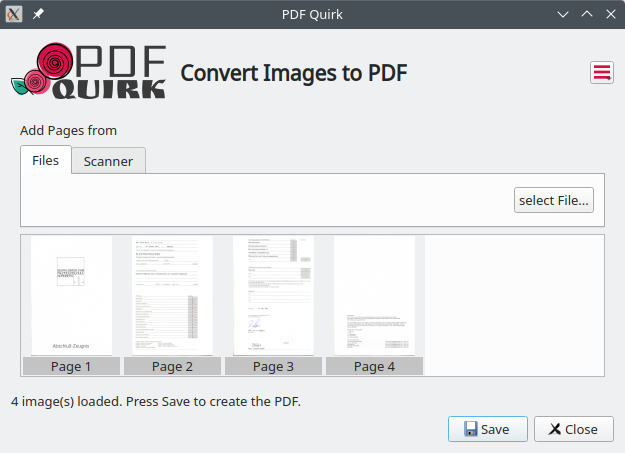
It is just what this screenshot shows: A one page app to pick images from either the harddisk or from a scanner if configured, and save it right away to a multi page PDF file. The only option is to have either monochrome or color scan. No further scan chi-chi, just nice PDFs within seconds.
Of course I did not want to spend too much time and reinvent the wheel. PDF Quirk uses ImageMagicks convert utility and the command line scan client scanimage of the SANE Project in the background. Both are welknown standard commands on Linux, and serve well for this purpose.
Maybe you find PDF Quirk useful and wanna try it. You find it on Github, or packages on the openSUSE Buildservice.
Contributions and comments are very welcome. It is a fun little project!

Looking for exceptions with awk
Sometimes you just need to search using awk or want to use plain bash to search for an exception in a log file, it’s hard to go into google, stack overflow, duck duck go, or any other place to do a search, and find nothing, or at least a solution that fits your needs.
In my case, I wanted to know where a package was generating a conflict for a friend, and ended up scratching my head, because I didn’t want to write yet another domain specific function to use on the test framework of openQA, and I’m very stubborn, I ended up with the following solution
journalctl -k | awk 'BEGIN {print "Error - ",NR; group=0}
/ACPI BIOS Error \(bug\)/,/ACPI Error: AE_NOT_FOUND/{ print group"|",
	$0; if ($0 ~ /ACPI Error: AE_NOT_FOUND,/ ){ print "EOL"; group++ };
}'
This is short for:
- Define
$START_PATTERN as /ACPI BIOS Error \(bug\)/,and$END_PATTERN as /ACPI Error: AE_NOT_FOUND/ - Look for
$START_PATTERN - Look for
$END_PATTERN - If you find
$END_PATTERNadd anEOLmarker (that is not needed, since the group variable will be incremented)
And there you go: How to search for exceptions in logs, of course it could be more complicated, because you can have nested cases and whatnot, but for now, this does exactly what I need:
EOL
10| May 20 12:38:36 deimos kernel: ACPI BIOS Error (bug): Could not resolve symbol [\_SB.PCI0.LPCB.HEC.CHRG], AE_NOT_FOUND (20200110/psargs-330)
10| May 20 12:38:36 deimos kernel: ACPI Error: Aborting method \PNOT due to previous error (AE_NOT_FOUND) (20200110/psparse-529)
10| May 20 12:38:36 deimos kernel: ACPI Error: Aborting method \_SB.AC._PSR due to previous error (AE_NOT_FOUND) (20200110/psparse-529)
10| May 20 12:38:36 deimos kernel: ACPI Error: AE_NOT_FOUND, Error reading AC Adapter state (20200110/ac-115)
EOL
11| May 20 12:39:12 deimos kernel: ACPI BIOS Error (bug): Could not resolve symbol [\_SB.PCI0.LPCB.HEC.CHRG], AE_NOT_FOUND (20200110/psargs-330)
11| May 20 12:39:12 deimos kernel: ACPI Error: Aborting method \PNOT due to previous error (AE_NOT_FOUND) (20200110/psparse-529)
11| May 20 12:39:12 deimos kernel: ACPI Error: Aborting method \_SB.AC._PSR due to previous error (AE_NOT_FOUND) (20200110/psparse-529)
11| May 20 12:39:12 deimos kernel: ACPI Error: AE_NOT_FOUND, Error reading AC Adapter state (20200110/ac-115)
EOL
12| May 20 13:37:41 deimos kernel: ACPI BIOS Error (bug): Could not resolve symbol [\_SB.PCI0.LPCB.HEC.CHRG], AE_NOT_FOUND (20200110/psargs-330)
12| May 20 13:37:41 deimos kernel: ACPI Error: Aborting method \PNOT due to previous error (AE_NOT_FOUND) (20200110/psparse-529)
12| May 20 13:37:41 deimos kernel: ACPI Error: Aborting method \_SB.AC._PSR due to previous error (AE_NOT_FOUND) (20200110/psparse-529)
12| May 20 13:37:41 deimos kernel: ACPI Error: AE_NOT_FOUND, Error reading AC Adapter state (20200110/ac-115)
EOL
So I could later write some code that looks per string, separates the string using the pipe | discards the group id, and adds that record to an array
of arrays or hashes: [ {group: id, errors: [error string .. error string] ]
Reverse Image Search – Service menu para KDE (12)
Decidido, a partir de esta entrada voy a numerar los Service Menu que voy presentando en el blog. Así que el número 12, que seguramente no será el número exacto de los compartidos, corresponder al Reserve Image Search, un Service Menu para Plasma que nos permite buscar imágenes similares a la que tenemos en nuestro disco duro.
Reverse Image Search – Service menu para KDE (12)
La idea de los Service Menu es simple, añadir al botón derecho de Plasma en Dolphin la opción de realizar cualquier acción que se nos ocurra. Algunos de ellos pueden ser incorporados a las acciones por defecto de Dolphin.
Hoy me complace presentar Reserve Image Search, un Service Menu de Eusonig (cuyo nick oculta a una persona más que conocida en el mundo KDE España y que admiro por sus conocimientos) con el que podemos hacer la búsqueda de imágenes similares a la que tenemos en nuestro ordenador utilizando los servicios de Bing, Google, TinEye y Yandex.

Hay que insistir que al programador de este Reverse Image Search le encantará que le deis me gusta en la KDE Store y que le comentéis como os funciona. Os recuerdo que ayudar al desarrollo del Software Libre también se hace simplemente dando las gracias, ayuda mucho más de lo que os podéis imaginar, recordad la campaña I love Free Software Day 2017 de la Free Software Foundation donde se nos recordaba esta forma tan sencilla de colaborar con el gran proyecto del Software Libre y que en el blog dedicamos un artículo.
Más información: KDE Store
¿Qué son los Dolphin Service Menu?
La personalización de KDE y Plasma está más que demostrada y prueba de ello son los Dolphin Service Menu, que no son más que la posibilidad de disponer un menú auxiliar en el gestor de archivos Dophin o en Konqueror que se activa con el botón derecho del ratón.
Con ellos tendremos nuevas acciones como:
- Accesos directos a los servicios de Dropbox.
- Accesos directos a las acciones de 7zG.
- Realizar acciones como root automáticamente.
- Enviar un adjunto con el Thunderbird
Y muchos más como hemos explicado en varias ocasiones en el blog. Puedes encontrar estos servicios se pueden encontrar en la sección Dolphin Service Menu en la Store de KDE.

openSUSE Talks at SUSECON Digital
SUSECON Digital 2020 starts today and it is free to register and participate in SUSE’s premier annual event. This year features more than 190 sessions and hands-on training from experts.
There are less than a handful of openSUSE related talks. The first openSUSE related talk is about openSUSE Kubic and takes place on May 20 at 14:00 UTC. In the presentation, attendees will receive an update about the last year of openSUSE Kubic development and see a demonstration on deploying Kubernetes with Kubic-control on a Raspberry Pi 4 cluster. Attendees will see how to install new nodes with YOMI, which is the new Salt-based auto installer that was integrated into Kubic.
The next talk is about open-source licenses. The talk will focus on the legal review app used by SUSE lawyers and the openSUSE Community. The app called Cavil was developed as an open source application to verify the use of licenses in open source software that help lawyers to evaluate risk related to software solutions. The talk scheduled for June 3 at 13:00 UTC will explain the ease of use for the lawyers and how the model significantly increases the throughput of the ecosystem.
The last openSUSE related talks centers on openSUSE Leap and SUSE Linux Enterprise. The talk will take place on June 10 at 13:30 UTC. Attendees will learn about the relationship between openSUSE Leap and SUSE Linux Enterprise 15, how it is developed and maintained and how to migrate instances of Leap to SLE.
The event as a whole is a great opportunity for people who are familiar with open-source and openSUSE. People who just want to learn more about the technology free of cost also have a great opportunity to experience the openness of SUSE and the event.
Convertir un archivo en Markdown a html con el editor #Vim
Veamos cómo Vim puede “traducir” un archivo en formato Markdown a un formato html

Recientemente tuve la necesidad de tener que convertir un archivo que estaba en formato markdown a un formato html y pensé que seguro que con Vim se podría hacer de alguna manera… y la hay!!
Este artículo viene a formar parte de la serie de artículos sobre Vim que desde hace meses vengo escribiendo en mi blog. Los puedes encontrar recopilados en estos enlaces:
- https://victorhckinthefreeworld.com/tag/vim/
- https://victorhck.gitlab.io/comandos_vim/articulos.html
Seguro que ha complementos para Vim que realizan esta tarea de conversión de markdown a html, pero veamos cómo realizar esta tarea con Vim y Markdown.
Lo primero que tenemos que hacer es descargar markdown, descomprimir, dar permisos de ejecución y ubicar en alguna ruta de nuestro $PATH de nuestro sistema GNU/Linux. Yo por ejemplo lo tengo en:
/usr/local/bin/
Si quieres saber en qué ruta lo puedes meter, ejecuta:
echo $PATH
y mete el paquete en alguna carpeta en las rutas que se muestran
Ahora abrimos en Vim nuestro archivo en Markdown, y ejecutamos el siguiente comando:
:%! /usr/local/bin/markdown --html4tags
Y “automágicamente” en Vim se cambiará el formato a html. Deberemos revisar si todo el documento se ha “traducido” correctamente y después añadir cabeceras de documento html, llamadas a css y otras cosas que queramos…
Pero si esta tarea es algo que realizamos frecuentemente, lo mejor es asignarle un atajo de teclado con la tecla “leader” que ya aprendimos qué es y cómo asignarla.
Para ello añadimos en nuestro archivo .vimrc
"Markdown a HTML
nmap <leader>md :%!/usr/local/bin/markdown --html4tags <cr>
Así cuando tengamos un archivo en markdown que queramos convertir simplemente presionaremos:
<leader>+md
¡y se hará la magia! Espero que te haya resultado interesante ¿usas algún complemento para realizar esta tarea de conversión? compártela en los comentarios.
