
 Member
 baltolkien
6 formas de seguir a KDE España
En este mundo cada vez más diversificado pero más unid ola presencia en las redes sociales es imprescindible y la asociación española de desarrolladores, usuarios y simpatizantes de KDE lo sabe. Así que aprovechando la nueva presencia de KDE España en Instagram, os quiero recordar 6 formas de seguir a KDE España en este mundo 2.0.
6 formas de seguir a KDE España
Aunque la mayoría de los seguidores del blog lo sabrán, KDE tiene en España una excelente cantera de programadores, promotores, diseñadores, ideólogos, traductores, etc. Un buen día decidieron crear una asociación con el objetivo de dinamizar el desarrollo y uso del entorno de escritorio KDE.
Como no podía ser de otra manera, esa organización recibió el nombre de KDE España. Entre sus misiones está organizar Akademy-es, coordinar diferentes grupos de trabajo promocionar al máximo KDE y el Software Libre.
Para conocer mejor esta asociación os podéis dirigir a su página web, donde podéis ver sus últimas novedades y las informaciones básicas de las Akademy-es, así como objetivos, sus estatutos, etc.
No obstante, esta página se centra básicamente en cosas muy institucionales relacionadas con KDE, pero si queréis saber más cosas sobre lanzamientos, aplicaciones, diseños, vídeos, noticias sobre otros Proyectos Libres os aconsejo nuestras noticias en las diferentes redes sociales que tenemos.
1. Instagram
De momento tenemos pocos seguidores, a la vez que pocas publicaciones, pero no se puede dejar de lado una de las redes sociales más populares entre los jóvenes: Instagram.
En esta red social encontrarás el lado más humano. Esperemos que crezca mucho con el tiempo.

2. Telegram
Lo anuncié en su tiempo, pero no lo había puesto en un artículo de este tipo. KDE España también está presente en la cada vez más popular red de mensajería instantánea Telegram.

2. Mastodon
Una red social que se ha añadido pero que no he promocionado en el bog (mal, muy mal Balta) al entramado de vías de comunicación de KDE España ha sido Mastodon la alternativa libre de Twitter.
Esta red la teníamos pendiente desde hace un tiempo y ahora nos hemos metido de llena en ella. De momento tenemos pocos seguidores pero esperamos crecer rápidamente. En realidad nos gustaría solo utilizar esta y Diáspora, pero en ocasiones no se pueden utilizar solo proyectos libres.

3. Twitter
Evidentemente, también estamos en la red más cotilla de todas: Twitter. En esta red ya tenemos más de 1500 seguidores y es la que se suele utilizar para retransmitir eventos como Akademy-es que se pueden seguir mediante la etiqueta #akademyes.

4. Facebook
Otro canal que tenemos abierto es nuestra página de Facebook, donde podéis encontrar las misma noticias que en Twitter. Para los que solo utilizan la red social de Mark. Lamentablemente, es una red que tenemos poco cuidada ¿alguien se anima a ayudarnos a que esto no pase?

5. LinkedIn
Para finalizar no podría faltar la red social más enfocada a los profesionales. De esta forma también puedes encontrar noticias de KDE y del Software Libre en el grupo de KDE España en LinkedIn.

Como se puede comprobar, múltiples formas de conocer todo lo que se cuece en la organización KDE España, y eso sin olvidar las listas de correo, Planet KDE en Español, los foros de KDE o los canales de irc…. Y lo que tiene que llegar.
No obstante, todo esto requiere tiempo y trabajo por parte de los integrantes de un grupo de Comunicación de KDE España que últimamente se ve desbordado. Así que, si quieres contribuir al Software Libre de una forma sencilla, no dudes en echarnos una mano. El proyecto KDE te lo agradecerá.

Introducing the MetaInfo Creator
 This year’s FOSDEM conference was a lot of fun – one of the things I always enjoy most about this particular conference (besides having some of the outstanding food you can get in Brussels and meeting with friends from the free software world) is the ability to meet a large range of new people who I wouldn’t usually have interacted with, or getting people from different communities together who otherwise would not meet in person as each bigger project has their own conference (for example, the amount of VideoLAN people is much lower at GUADEC and Akademy compared to FOSDEM). It’s also really neat to have GNOME and KDE developers within reach at the same place, as I care about both desktops a lot.
An unexpected issue
This blog post however is not about that. It’s about what I learned when talking to people there about AppStream, and the outcome of that. Especially when talking to application authors but also to people who deal with larger software repositories, it became apparent that many app authors don’t really want to deal with the extra effort of writing metadata at all. This was a bit of a surprise to me, as I thought that there would be a strong interest for application authors to make their apps look as good as possible in software catalogs.
A bit less surprising was the fact that people apparently don’t enjoy reading a large specification, reading a long-ish intro guide with lots of dos and don’ts or basically reading any longer text at all before being able to create an AppStream MetaInfo/AppData file describing their software.
Another common problem seems to be that people don’t immediately know what a “reverse-DNS ID” is, the format AppStream uses for uniquely identifying each software component. So naturally, people either have to read about it again (bah, reading!  ) or make something up, which occasionally is wrong and not the actual component-ID their software component should have.
The MetaInfo Creator
It was actually suggested to me twice that what people really would like to have is a simple tool to put together a MetaInfo file for their software. Basically a simple form with a few questions which produces the final file. I always considered this a “nice to have, but not essential” feature, but now I was convinced that this actually has a priority attached to it.
So, instead of jumping into my favourite editor and writing a bunch of C code to create this “make MetaInfo file” form as part of appstreamcli, this time I decided to try what the cool kids are doing and make a web application that runs in your browser and creates all metadata there.
So, behold the MetaInfo Creator! If you click this link, you will end up at an Angular-based web application that will let you generate MetaInfo/AppData files for a few component-types simply by answering a set of questions.
The intent was to make this tool as easy to use as possible for someone who basically doesn’t know anything about AppStream at all. Therefore, the tool will:
- Generate a rDNS component-ID suggestion automatically based on the software’s homepage and name
- Fill out default values for anything it thinks it has enough data for
- Show short hints for what values we expect for certain fields
- Interactively validate the entered value, so people know immediately when they have entered something invalid
- Produce a .desktop file as well for GUI applications, if people select the option for it
- Show additional hints about how to do more with the metadata
- Create some Meson snippets as pointers how people can integrate the MetaInfo files into projects using the Meson build system
For the Meson feature, the tool simply can not generate a “use this and be done” script, as each Meson snippet needs to be adjusted for the individual project. So this option is disabled by default, but when enabled, a few simple Meson snippets will be produced which can be easily adjusted to the project they should be part of.
The tool currently does not generate any release information for a MetaInfo file at all, This may be added in future. The initial goal was to have people create any MetaInfo file in the first place, having projects also ship release details would be the icing on the cake.
I hope people find this project useful and use it to create better MetaInfo files, so distribution repositories and Flatpak repos look better in software centers. Also, since MetaInfo files can be used to create an “inventory” of software and to install missing stuff as-needed, having more of them will help to build smarter software managers, create smaller OS base installations and introspect what software bundles are made of easily.
I welcome contributions to the MetaInfo Creator! You can find its source code on GitHub. This is my first web application ever, the first time I wrote TypeScript and the first time I used Angular, so I’d bet a veteran developer more familiar with these tools will cringe at what I produced. So, scratch that itch and submit a PR!  Also, if you want to create a form for a new component type, please submit a patch as well.
C developer’s experience notes for Angular, TypeScript, NodeJS
This section is just to ramble a bit about random things I found interesting as a developer who mostly works with C/C++ and Python and stepped into the web-application developer’s world for the first time.
For a project like this, I would usually have gone with my default way of developing something for the web: Creating a Flask-based application in Python. I really love Python and Flask, but of course using them would have meant that all processing would have had to be done on the server. One the one hand I could have used libappstream that way to create the XML, format it and validate it, but on the other hand I would have had to host the Python app on my own server, find a place at Purism/Debian/GNOME/KDE or get it housed at Freedesktop somehow (which would have taken a while to arrange) – and I really wanted to have a permanent location for this application immediately. Additionally, I didn’t want people to send the details of new unpublished software to my server.
TypeScript
I must say that I really like TypeScript as a language compared to JavaScript. It is not really revolutionary (I looked into Dart and other ways to compile $stuff to JavaScript first), but it removes just enough JavaScript weirdness to be pleasant to use. At the same time, since TS is a superset of JS, JavaScript code is valid TypeScript code, so you can integrate with existing JS code easily. Picking TS up took me much less than an hour, and most of its features you learn organically when working on a project. The optional type-safety is a blessing and actually helped me a few times to find an issue. It being so close to JS is both a strength and weakness: On the one hand you have all the JS oddities in the language (implicit type conversion is really weird sometimes) and have to basically refrain from using them or count on the linter to spot them, but on the other hand you can immediately use the massive amount of JavaScript code available on the web.
Angular
The Angular web framework took a few hours to pick up – there are a lot of concepts to understand. But ultimately, it’s manageable and pretty nice to use. When working at the system level, a lot of complexity is in understanding how the CPU is processing data, managing memory and using the low-level APIs the operating system provides. With the web application stuff, a lot of the complexity for me was in learning about all the moving parts the system is comprised of, what their names are, what they are, and what works with which. And that is not a flat learning curve at all. As C developer, you need to know how the computer works to be efficient, as web developer you need to know a bunch of different tools really well to be productive.
One thing I am still a bit puzzled about is the amount of duplicated HTML templates my project has. I haven’t found a way to reuse template blocks in multiple components with Angular, like I would with Jinja2. The documentation suggests this feature does not exist, but maybe I simply can’t find it or there is a completely different way to achieve the same result.
NPM Ecosystem
The MetaInfo Creator application ultimately doesn’t do much. But according to GitHub, it has 985 (!!!) dependencies in NPM/NodeJS. And that is the bare minimum! I only added one dependency myself to it. I feel really uneasy about this, as I prefer the Python approach of having a rich standard library instead of billions of small modules scattered across the web. If there is a bug in one of the standard library functions, I can submit a patch to Python where some core developer is there to review it. In NodeJS, I imagine fixing some module is much harder.
That being said though, using npm is actually pretty nice – there is a module available for most things, and adding a new dependency is easy. NPM will also manage all the details of your dependency chain, GitHub will warn about security issues in modules you depend on, etc. So, from a usability perspective, there isn’t much to complain about (unlike with Python, where creating or using a module ends up as a “fight the system” event way too often and the question “which random file do I need to create now to achieve what I want?” always exists. Fortunately, Poetry made this a bit more pleasant for me recently).
So, tl;dr for this section: The web application development excursion was actually a lot of fun, and I may make more of those in future, now that I learned more about how to write web applications. Ultimately though, I enjoy the lower-level software development and backend development a bit more.
Summary
Check out the MetaInfo Creator and its source code, if you want to create MetaInfo files for a GUI application, console application, addon or service component quickly.
Richard Stallman de gira por la Comunidad Valenciana
Este mes de marzo promete ser épico. Si nada lo impide vamos a tener este 2020 a Richard Stallman de gira por la Comunidad Valenciana en sus 3 capitales: Alicante, Castellón y València. Todo un gran acontecimiento que debemos promocionar al máximo y este blog no va a quedarse con los brazos cruzados.
Richard Stallman de gira por la Comunidad Valenciana
 No es la primera vez que está por mi tierra, estuvo en 2016 y en el 2018, pero me los perdí. En esta ocasión me pilla muy cerca, y en un día y una hora que hacen que las posibilidades de poder asistir son muy altas.
De esta forma, según podemos leer en la página web de la Asociación GNU/Linux València (si, ya es una asociación, ¡asociate!) uno de los padres del Software Libre, Richard Stallman, va a realizar una pequeña gira por la Comunidad Valenciana.
Lo datos básicos son los siguientes:
- Miércoles 25 18:30 Sala La Mutant. Carrer de Joan Verdeguer, 22 46024 València
- Viernes 27 16:00 E dificio IVAM-CADA. Calle Rigoberto Albors, 8 03801 Alcoy Alicante
- Lunes 30 18:30 Sala La Bohemia. Calle Ciscar, 14 12003 Castellón
Vía: GNU/Linux València
¿Quién es Richard Stallman?
Por si alguien no lo conoce, a principios de los ochenta Richard M. Stallman, un físico, decidió abandonar su trabajo en el MIT para emprender el duro camino de desarrollar por completo un sistema operativo y aplicaciones para los usuarios que fuera completamente “libre”. A este proyecto se le conoce como GNU. Así que fundó la Free Software Foundation (FSF) y empezó a asentar las bases jurídicas para compartir legalmente el código de los programas, creando así las licencias libres como la GPL.
En la actualidad Richard ya no trabaja como desarrollador de software, está dedicado en cuerpo y alma a liderar el movimiento del software libre y dedica la mayor parte de su tiempo en dar conferencias alrededor del mundo y atender a los medios de comunicación.

使用 curl 測試 CDN 小記
- -I, --head (HTTP FTP FILE) Fetch the headers only! 顯示 Headers
- Cache-Control:
- public: 如果回應標記為「public」,即使具備關聯的 HTTP 認證,甚至回應狀態碼無法正常快取,回應也可以供使用者快取。在大多數情況下,「public」並不是必要項目,因為明確的快取資訊 (例如「max-age」) 已表示 回應可供快取。
- max-age=31536000
- 最多快取 31536000 秒, 也就是 365 天
- X-Cache: 是否在 CDN 有快取
- HIT: 在 CDN 上有快取
- MISS: 在 CDN 上面沒有快取, 會跟原站抓
- X-Amz-Cf-Pop: 這個欄位是快取的站, 這邊可以觀察是 Taipei 的 Pop 點
- 但是不同的供應商, 會有不同的欄位, Cloudflare 可能就是 CF-RAY: 56fc8a38f94545d0-TPE
- ETag:
- ETag HTTP 標題傳遞驗證權杖, 透過驗證權杖進行高效率的資源更新檢查:如果資源未變更,則不會傳輸任何資料

- Expires: 過期時間
- 瀏覽器收到這個 Response 之後就會把這個資源給快取起來,當下一次使用者再度造訪這個頁面或是要求這個圖片的資源的時候,瀏覽器會檢視「現在的時間」是否有超過這個 Expires。如果沒有超過的話,那瀏覽器「不會發送任何 Request」,而是直接從電腦裡面已經存好的 Cache 拿資料。
- 從 Chrome 觀察
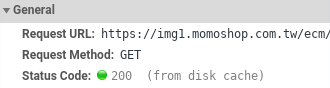
- RFC2616 規範 max-age 會蓋掉 Expires, 所以實際上用到的是 Cache-Control: max-age
- X-cache: Miss from cloudfront ( Cloudfront 上面沒有快取 ), 所以 CDN 會跟原站抓
- 這邊也可以觀察到沒有 age 的 header, 也就是說沒有物件在 CDN 上已經快取的時間
- 也可以去觀察 x-cache-server 以及 x-image-server 資訊
- last-modified:
- 會跟 If-Modified-Since 搭配使用, 如果超過時間但是沒有變動, 還是會從快取出
- 這邊可以觀察到 CloudFront 已經有資料, 然後也有 age 的資料
- 這邊使用 -v 來顯示詳細資訊
- --tlsv1.0 指定使用 TLS 1.0 協定
- 這邊可以觀察到 使用 TLS 1.0 是被拒絕的
- 其實如果沒有特別指定, 會用比較高的版本去連接
- 這邊可以觀察 TLS 1.1 and TLS 1.2 都支援
- -k, --insecure
- -s, --silent, Silent or quiet mode. Don't show progress meter or error messages.
- -v, --verbose
- -o, --output <file>
- public
- 可以由任何快取給存取
- private
- 快取只給一個使用者使用,且不能被共用的快取伺服器給儲存過。隱私視窗(無痕模式)的快取就可能是這樣子。
- no-cache
- 快取伺服器在把已儲存的複製版本傳給請求者之前,先會送一個請求給網頁伺服器做驗證
- no-store
- 快取不該存取任何的使用者請求或者伺服器的回覆。每個請求都是送到原始的伺服器去取得資源。
- 參考 firefox 上面的文件 https://developer.mozilla.org/zh-TW/docs/Web/HTTP/Caching
#openSUSE Tumbleweed revisión de la semana 10 de 2020
Tumbleweed es una distribución “Rolling Release” de actualización contínua. Aquí puedes estar al tanto de las últimas novedades.

openSUSE Tumbleweed es la versión “rolling release” o de actualización continua de la distribución de GNU/Linux openSUSE.
Hagamos un repaso a las novedades que han llegado hasta los repositorios esta semana
El anuncio original lo puedes leer en el blog de Dominique Leuenberger, publicado bajo licencia CC-by-sa, en este enlace:
¡Las máquinas de Tumbleweed van a todo gas! Se han publicado esta semana 6 nuevas snapshots 0227, 0228, 0229, 0301, 0303 y 0304.
Llegaron actualizaciones a los repositorios como:
- Zypper 1.14.34: ¡Atención! Esta versión ya no admite parámetros abreviados (por ejemplo:
zypper install --no-rya no se aceptará, necesitarás escribir el comando completo--no-recommends) - GCC 10 está disponible y ofrece las librerías básica para el sistema
- KDE Plasma 5.18.2
- Linux kernel 5.5.6
- Muchos cambios en varios módulos de YaST
- gimp 2.10.18
En el futuro podremos ver más actualizaciones como por ejemplo:
- Python 3.8: que si todos los tests van bien se publicará la semana que viene
- binutils 2.34
- Qt 5.15.0 (actualmente se están probando las versiones beta)
- Ruby 2.7: posiblemente junto con la eliminación de Ruby 2.6
- GCC 10 como compilador predeterminado
- GNU Make 4.3
- RPM
Si quieres estar a la última con software actualizado y probado utiliza openSUSE Tumbleweed la opción rolling release de la distribución de GNU/Linux openSUSE.
Mantente actualizado y ya sabes: Have a lot of fun!!
Enlaces de interés
-
-
- ¿Por qué deberías utilizar openSUSE Tumbleweed?
- zypper dup en Tumbleweed hace todo el trabajo al actualizar
- ¿Cual es el mejor comando para actualizar Tumbleweed?
- Comprueba la valoración de las “snapshots” de Tumbleweed
- ¿Qué es el test openQA?
- http://download.opensuse.org/tumbleweed/iso/
- https://es.opensuse.org/Portal:Tumbleweed
-

——————————–
Sesi Berbagi: FLOSS & Creative Commons Dalam Pendidikan & Pekerjaan



Course of work with molecular data in R 2020 in České Budějovice
R is nowadays probably the most powerful tool for calculations of all kinds. There are plenty of modules available for work with molecular data. Those will be introduced during the course. The course will be taught from October 19th to Friday 23rd (see below). The course will be exclusively on-line, there will be no personal meeting.

openSUSE Summit Dublin Canceled
The openSUSE Summit Dublin has been canceled due to the cancellation of some talks and the cancellation of the in-person SUSECON 2020 in Dublin.
Concerns over the developing situation of COVID-19 coronavirus lead to the decision to cancel the openSUSE Summit Dublin as the venue would have been shared with SUSECON and is no longer available for the summit.
Contact ddemaio (@) opensuse.org if you have any questions concerning the summit.
openSUSE Tumbleweed – Review of the week 2020/10
Dear Tumbleweed users and hackers,
Tumbleweed – full steam ahead! There have been 6 snapshots in the last week, some with quite some changes. The snapshots were 0227, 0228, 0229, 0301, 0303 and 0304.
The changes include:
- Zypper 1.14.34: beware! This version no longer supports abbreviated command line parameters (e.g
zypper install --no-ris no longer accepted, you need to spell--no-recommendsout) - GCC 10 is available and provides base libraries to the system
- KDE Plasma 5.18.2
- Linux kernel 5.5.6
- Many changes in various YaST modules
- gimp 2.10.18
The future will bring those changes, sooner or later:
- Python 3.8: The latest fixes should be there. IF nothing new shows up, this will ship next week
- binutils 2.34
- Qt 5.15.0 (currently betas being tested)
- Ruby 2.7 – possibly paired with the removal of Ruby 2.6
- GCC 10 as the default compiler
- Removal of Python 2
- GNU Make 4.3
- RPM: change of database format to ndb
Lanzada la gran actualización de marzo de las aplicaciones de KDE
Me complace compartir con vosotros que ha sido lanzada la gran actualización de marzo de las aplicaciones de KDE, tal y como estaba previsto en el calendario de lanzamientos. Es hora de actualizar nuestro sistema, solucionar pequeños errores y mejorar las traducciones. Una demostración más del compromiso constante de la Comunidad KDE con sus usuarios en su proceso de mejora continua.
Lanzada la gran actualización de marzo de las aplicaciones de KDE
El pasado 13 de diciembre de 2019 fue la fecha marcada en su calendario por la Comunidad KDE para lanzar la gran actualización de cara al final de año del conjunto de sus aplicaciones. Al llegar al tercer mes desde este lanzamiento los desarrolladores de KDE ya han puesto a disposición de los usuarios la gran actualización de marzo de las aplicaciones de KDE
Como es habitual en este tipo de actualizaciones, hay pocas mejoras ya que principalmente se han solucionado errores en aplicaciones y, como es habitual, mejorado las traducciones. Si queréis ver todos los cambios os aconsejo leer el «changelog» completo.
No obstante, y siguiendo lo iniciado en la última actualización de KDE aplicaciones, los desarrolladores han creído conveniente resaltar las novedades de KDE Aplicaciones 19.12.3 con un poco más de detalle:
- Novedades en el gestor de microblogging Choqok.
- Mejoras en KPMcore y KDE Partition Manager, el gestor de particiones de KDE.
- Mejoras en el etiqueta de miniaturas en KPhotoAlbum.
- El editor de etiquetas mp3 Kid3 ha sido movido a kdereview, el primer paso para recibir nuevos lanzamientos.
- La aplicación Rocket.chat Ruqola está listo para ser lanzado en la próxima gran revisión.
- Nueva aplicación en la Store de Windows: Elisa.


Así que se trata de una actualización 100% recomendado por que solo puede mejorar tu sistema, sin darte ningún problema. ¿A qué esperas?
Más información: KDE.org