
 Member
 Victorhck
Nueva imagen para el sitio de noticias oficial de #openSUSE
La página oficial de noticias del proyecto openSUSE recibe una actualización y ofrece una imagen renovada.

El sitio de noticias del proyecto openSUSE ofrece una nueva imagen, más moderna y que además facilita el poder colaborar de una manera más sencilla.
El proyecto openSUSE ha renovado su sitio de noticias, ha pasado de una plantilla en WordPress, a un sitio estático creado con Jekyll y gestionado desde GitHub.
Además gracias a este nuevo sistema de publicaciones es más sencillo colaborar con algún artículo que tengas en mente (el idioma de publicación deberá ser en inglés)
Si no se te ocurre algún tema sobre el que quieras escribir, te ofrecen un listado de temas que pudieran ser tratados en próximos artículos.
Deberás escribir tu artículo en formato MarkDown, tomando como punto de partida una plantilla propuesta para facilitar la tarea. Una vez terminado envías tu artículo y abres un “Pull Request”.
El artículo será revisado y se publicará si se considera interesante. Anímate a colaborar, compartiendo tus conocimientos sobre openSUSE.
Como dice Geeko: Have a lot of fun!!

Disponible el decimotercer número de la revista digital SoloLinux
El tiempo vuela, y una medida del mismo se ha convertido en ver la publicación de esta iniciativa. Hoy me congratula compartir que ya está disponible el decimotercer número de la revista digital SoloLinux, con lo que se se supera la docena de números. Hora de promocionarlo un poco y leerla con detenimiento.
Disponible el decimotercer número de la revista digital SoloLinux
Hubo un tiempo en que las revistas sobre Linux digitales estuvieron de moda en el blog. Tenemos todavía a Atix, que continua con sus publicaciones (lo cual me alegra) y Full Circle Magazine (en inglés, gracias Vampiro Nocturno), y antes teníamos a Linux+, Papirux, Begins o TuxInfo, por citar algunas discontinuadas.
Desde hace un tiempo una revista digital SoloLinux tiene su entrada mensual en el blog, tener todas las alternativas posibles para compartir conocimiento es algo que caracteriza al Conocimiento Libre.
Ya tenemos disponible el decimotercer número de la revistas digital SoloLinux, el cual llega cargado de contenidos y con el siguiente índice.

- Reparar el sistema de archivos con fsck
- Como ejecutar un comando cada x segundos con watch
- Cómo copiar un archivo a varias carpetas o directorios
- Comando lsmod en linux
- Uso del comando dmesg en linux
- Instalar sudo en Android
- Cómo eliminar Snap completamente del sistema
- Como usar el comando w con ejemplos
- Uso y ejemplos del comando who
- Qué son los procesos en linux y cómo identificarlos
- Como iniciar, detener, reiniciar, habilitar MariaDB y MySQL
- Diferencias entre MySQL y MariaDB
- Saber a qué proceso corresponde un PID
- Diferencias entre Systemd y SysVinit (SysV)
- Cómo listar las tareas cron programadas en linux
- Verificar el sistema de archivos en el proceso de arranque
- Cómo hacer un gif animado con Gimp
- Solución a la vulnerabilidad de sudo 2020
- Extraer las claves wifi WPA / WPA2 con Fluxion
- Microsoft Defender Advanced Threat Protection llega a linux
- Ahorrar batería con TLP en linux
- Qué es Load Average en linux, explicado por un sysadmin
- Inxi: Identificar el hardware del sistema
- Cómo borrar y formatear dispositivos usb correctamente
- Nuevo controlador NVIDIA 440.64 lanzado para linux
- Instalar Android en Ubuntu y derivados
- Probar distribuciones linux sin instalarlas con DistroTest
- Los mejores linux del 2020 para ejecutar desde un USB
- Generador de passwords con selector de seguridad
- Alerta de batería baja: script bash
- Comparar tamaños de cadenas y enteros con un script bash
La revista puede ser descargada o simplemente visualizarla en línea, ya que se cuelga en diferente servicios como Calameo. A continuación os dejo los enlaces de descarga y visualización directa de los cuatro primeros números.
Además, recordar que desde el número anterior se ha abierto el canal oficial sololinux.es de Telegram: https://t.me/sololinux_es
Descarga:
Visualización directa:
Evidentemente, este proyecto no se centra en exclusivo a los contenidos de su web y está abierto a colaboraciones de todo tipo. De esta forma si estas interesado en insertar publicidad en nuestra revista, o quieres que publiquemos algún articulo que hayas escrito tu mismo, puedes contactar con «Adrián» por correo electrónico.
Muchos ánimos en este nuevo proyecto ya que facilita la difusión del Software Libre de una forma que ya no es tan habitual en estos tiempos pero que es igual de válida.

My Toolbelt
Here is my personal hardware & software stack. The things I use and enjoy on a daily basis since a long time. The software is pretty much the standard in Free Software development stack. Don't expect to find anything you don't know here. I write this because people keep asking me, especially in mentoring situations.
Operating System: openSUSE Tumbleweed
It's my Linux of choice. Why? Because it's the German Engineering version of Linux: Long heritage, a certain kind of stiffness and it's super tidy. The rolling nature of Tumbleweed gives me the stability and the velocity I need. It brings all the standard Linux tools through a kick ass package manager (zypper). And it embodies what makes the Free Software eco system great: software diversity. openSUSE tries very hard to treat all software as first class citizen of the distribution.
Okay I admit it, I have been involved in making this Linux distribution for decades. So take this as pure bragging on my part. What it also means for me is that it's super easy to "scratch my itch" a.k.a. understand things, fix bugs, implement features and find the right people to poke. I can only recommend this to you, find a Linux home, help to maintain it and make it your own.
Desktop Environment: GNOME
The thing I like most about GNOME is that it get's out of my way. It's restraint, simplistic, straight forward. And yet, if I want to do a thing I have never done before, it'll have an opinion on how to do it. I also dig the esthetics, I think I actually switched to it because it's soo damn beautiful to look at.
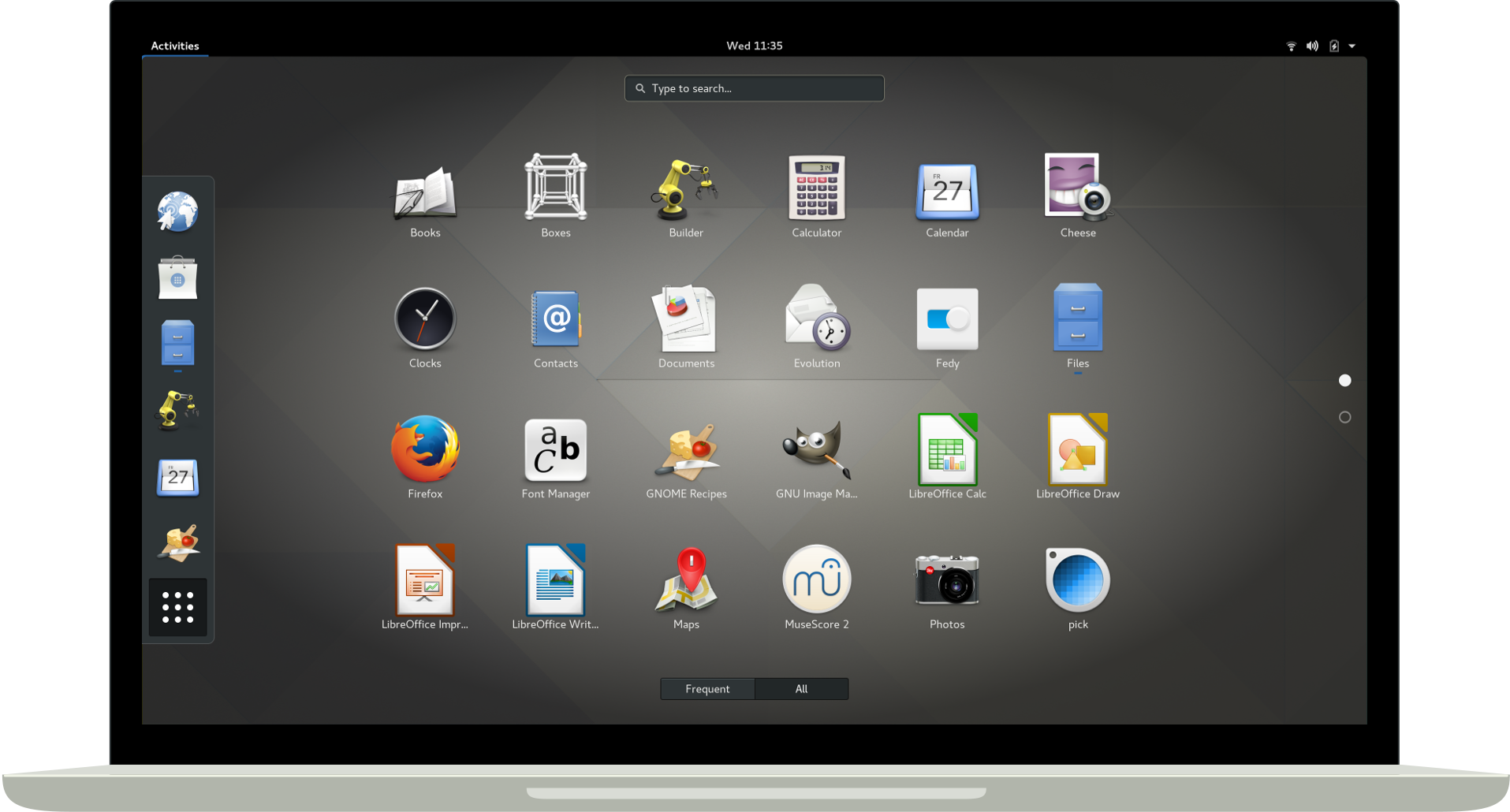
GNOME 3 Desktop by gnome.org
Shell: zsh
Well, any shell. I couldn't live without all those glorious one-liners like
for i in *; do echo mv $i `echo $i |sed 's/.rb/_spec.rb/'`; done or
history | awk '{print $2}' | sort | uniq -c | sort -nr |head -n 20. Utilizing all those
programs that do only one thing, but one thing well. cp, mv, echo, grep, cat, awk, sed, find,
head, tail, curl, test, sleep and so on and so on. What a wonderful chest of lego bricks, ready for you to plug
together your own world. Also, I literally grew up in bash. It was shell scripting that introduced
me to software development. And I will forever be fascinated by it, despite all the sneeze from the more
sophisticated languages. Shell scripting is messy, raw, dangerous. Shell scripting is beautifully punk!
Browser: Mozilla Firefox
I think, not counting the Linux kernel, Firefox is the only piece of software I used all my life (if you think of netscape communicator as ancestor). It's because the single most important quality of Firefox is progress. Tabs, add-ons, session restore, firebug, sync, mobile version and now built in privacy. Mozilla has been steadily pushing it's flagship product forward. It might not always be the first to market, it might not always be perfect from the start but it is always moving forward relentlessly. That is a rare quality. We all should pray that Mozilla continues this despite the google browser monopoly. BTW how the flying f**k is that monopoly OK with 65% of you? Don't you remember any computing history? </rant>
Source Code Management: git
In the meanwhile all projects I contribute to use git. I like git for being the right amount of clever CLI.
That opens the pager only in the right moment, corrects me if I typo or let's me extend it, just by nameing a
command git-diff-to-deploy. And I really dig the file based approach which means that I can often recover my idiot mistakes by nervously mocking around in .git. It shows that the people maintaining this are seriously dog-fooding their own product day in and day out.
Source Code Collaboration: github
With github I have a love-hate relationship. I admire the idea, the product and many of the people who build it. I build a tool in the same space of the industry (developer tooling) using the same technology (Ruby on Rails) and github people set the gold standard in collaboration workflows since years. I only humbly follow their set out examples.
But I really don't like them riding and emphasizing the network effect. And I flat out hate that such a large piece of software in my stack is closed source. Quite frankly I do not understand how anyone at Microsoft can justify to their mirror that github is not Free Software. It's not like anyone will ever be able to take any business away from github.com which value is the number of people using it. As you can see with me and my projects, that ship has sailed a long time ago. Why do you have to deny me my software freedoms if I can't use them to hurt you in any way?
I am a Ruby on Rails developer, I know a thing or two about collaborating on software. I want to send a pull-requests fixing gripes or missing functionality I have with github itself. Why the hell can't I do that? Why do people have to resort to write browser extensions to be able to collaborate on github functionality. This is insane! </rant>
Mailer: Mozilla Thunderbird
Thunderbird is the only piece of software in this list I'm not very passionate about. It helps me reading, finding and writing mail from my four imap accounts in one single interface. It does so better than any mail user agent, web mailer or mobile app I have tried so far. Yet I have the feeling there should be something better. Can't seem to find it though, despite really searching. Guess Churchill was right: Thunderbird is the worst MUA, except for all the others.
Editor: Visual Studio Code and vim
I fire up vim when I need to do a quick script, jog down a note, edit configuration files or for a quick
fix. Visual Studio Code is what I use for deep dive bug fixes or feature development. About vim I like most
the raw power that comes with it. Doing something like gqaw or v<end>~ is gold.
But I have a problem with vim: I easily remember a small set of things for a long time, but I have not much capacity
to remember 50 keyboad shortcuts forever ¯\_(ツ)_/¯ That's why I need a user interface that guides me and offers
me a place to search visually for what I want to do. CTRL+p+fold level+click is exactly that.
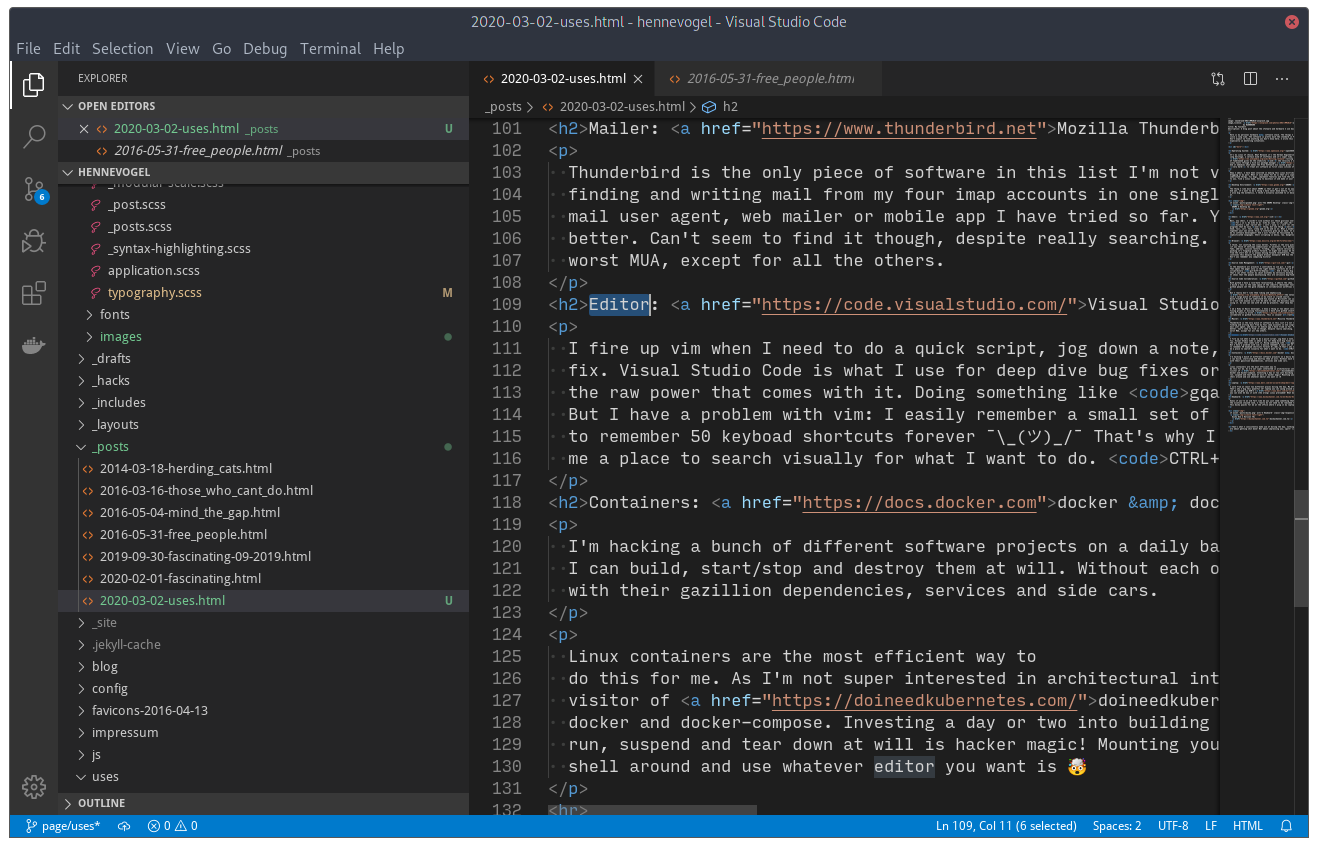
Visual Studio Code by Henne Vogelsang licensed CC BY 4.0
Containers: docker & docker-compose
I'm hacking a bunch of different software projects on a daily basis. I need them compartmentalized so I can build, start/stop and destroy them at will. Without each of them compromising the other, or my system, with their gazillion dependencies, services and side cars.
Linux containers are the most efficient way to do this for me. As I'm not super interested in architectural intricacies of container runtimes and a frequent visitor of doineedkubernetes.com, I'm kind of habituated to docker and docker-compose. Investing a day or two into building a development environment that you can set up, run, suspend and tear down at will is hacker magic! Mounting your local file system into it, so your can shell around and use whatever editor you want is 🤯
Laptop: Dell XPS 13 (9380)
I work from at least two different places during the day. My office, meeting room, home office etc. That's why I dig this powerful 13" laptop you can swing around with ease. It also features a nice enough keyboard, can be charged via USB-C (power bank ready) and you can even be buy it with (the wrong) Linux preloaded! What more can you ask from hardware?
Keyboard: Ducky One 2 Horizon TKL
Guess if you're an old fart like me you just need something that feels a bit like a model M keyboard. But please without the nicotine stained look. This ducky quacks for me at the office where I plug in my laptop into a docking station.
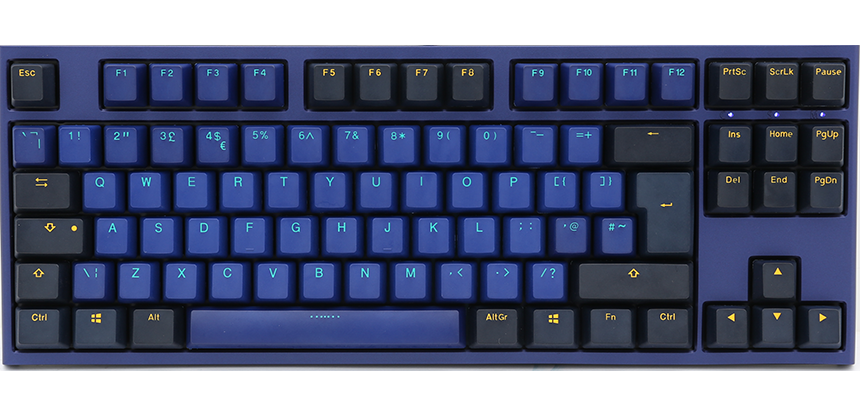
Ducky One 2 Horizon TKL duckychannel.com.tw
That's what I consistently make use of during the day, nothing spectacular right? Of course not, those things are about getting shit done! Not about impressing you, sport! 😜
Ganadores del concurso de vídeos de la Comunidad KDE 2020
Ya tenemos entre nosotros los ganadores del concurso de vídeos de la Comunidad KDE 2020 cuya temática se centraba en el entorno de escritorio Plasma y en las aplicaciones KDE. Ha sido una decisión difícil para el jurado, pero al final se han debido decantar por uno. Conozcamos a los ganadores y a los finalistas.
Ganadores del concurso de vídeos de la Comunidad KDE 2020
En primer lugar pongámonos en antecedentes por si alguien no sabe de qué estamos hablando. El pasado diciembre se anunció el primer concurso de fondos de pantalla y vídeos promocionales de la Comunidad KDE. Fue anunciado en el dot y en el blog a su debido tiempo.
Se trataba de un intento de seguir promocionando el trabajo de la Comunidad KDE al tiempo que se daba la oportunidad de que los creativos se llevaran honor, gloria y, porqué no decirlo, unos pedazos de equipos informáticos.
Pues bien, hace un tiempo conocimos el ganador del concurso de Fondo de Pantalla (Volna), es hora de conocer a los de la categoría de vídeos.

Categoría vídeo promocional de escritorio Plasma
El ganador del concurso vídeo promocional del escritorio Plasma de la Comunidad KDE ha sido Skye Fentras con su vídeo «Plasma 2020». Como se decía en las bases del concurso, además de tener el gran honor de representar a toda la Comunidad, Skye obtendrá un fantástico ordenador gamer TUXEDO, con un poderoso Intel core i7, 16GB de RAM, 250GB NVMe SSD, 2TB HDD y una tarjeta de vídeo Nvidia GTX1050Ti.
Los finalistas han sido KonqiDragon con su vídeo «Plasma 5.18 Promo», Nayam Amarshe con «This is Plasma» y Kubee por «This is Plasma». Estos finalistas recibirán un pack compuesto por una gorra de béisbol KDE, un peluche de Tux y algunos detalles más.
Por supuesto, podéis ver estos vídeo en la página del anuncio oficial: https://dot.kde.org/2020/02/25/kde-video-competition-winners
Categoría vídeo promocional de aplicaciones KDE
El ganador del concurso vídeo promocional de las aplicaciones KDE de la Comunidad ha sido KonqiDragon con su vídeo «KDE applications Promo» que además del honor recibirá un TUXEDO InfinityBox, que ofrece un Intel core i3 con 16GB de RAM y un disco duro sólido de 250GB of SSD.
Los finalistas han sido Katia con «Dolphin File Manager» y «Meet KDE Applications», y Tauheedelahee por «KDE Plasma Applications Promotional Video». Como en la categoría anterior estos finalistas recibirán un pack compuesto por una gorra de béisbol KDE, un peluche de Tux y algunos detalles más.
Por supuesto, podéis ver estos vídeo en la página del anuncio oficial: https://dot.kde.org/2020/02/25/kde-video-competition-winners
Más información: KDE

openSUSE community welcomes new board member
The results of the openSUSE Board election were published on 1 February 2020. The community welcomed Sarah Julia Kriesch and Simon Lees as they started their new term.
However, ten days later, Sarah stepped down, leaving a vacant seat on the board. Under such circumstance and the board election rules, the sitting board may appoint someone until the next board election.
On 27 February 2020, openSUSE Chairman Gerald Pfeifer, announced the appointment of Vinzenz Vietzke as board member. His appointment was unanimously supported by the Board and the openSUSE Election Officials.
The appointment of Vinzenz, aka Vinz, on the Board was welcomed by the community.

KDE Plasma 5.18 on openSUSE Tumbleweed | Awesome-Sauce
Fascinating! February 2020
The universe is full of captivating, compelling and exquisite things. The internet, the most complete representation of humanity, is no different in that regard. Both are vast, seemingly endless and full of places you should know about. Let me share content that has moved me, in some way, in the last month. February was mostly inter-personal stuff like ethics, hiring or collaborating remote. Enjoy.
YubiKey 5C Nano a product by yubico
Some collegue of mine mentioned andOTP and good Free Software citizen I am, moved all of my 2FA to it. Doing so made me think of checking support for hardware security modules on Linux again. Ordered this YubiKey, now I'm off 2FA with my phone and just touch my laptop when asked. Thanks WebAuthn! One of those "Why they heck did I not do this earlier?" moments.
A student guide for navigating ethical issues in the tech industry by Mozilla
I have no idea why Mozilla says this is for students? Clearly this is for everybody! Be it people considering going into the tech industry (like students), people already in it or even people who just want to know what it going on in this cesspool.
Especially if you are in this industry already: Read this, think about it, talk about it with your peers, dive deeper into this topic. Do this so you can help to save the environment you probably planed to work the rest of your life in. Ethics help them who help themselves!
git sparse-checkout a post by Derrick Stolee
An experimental git command that allows you to checkout one or more sub-directories of a repo. Primarily meant for monorepos with gazillion of projects in it. But I think this could also turn out to be usefull for other situations. Like skipping large infrequently used directories etc. Check it out!
The 2020 State of Remote Work a survey by Buffer.com
No real shockers this year, the concept of distributed teams is humming along. One thing I find interesting about this is how much the top challenges are also the top challenges of (larger) Free Software communities. If you reach a certain size your community fractures because people start their own communication neighborhoods. Mailing lists, forums, IRC etc. Each group get's enough information about the community (mostly from wanderers between the neighborhoods) so they feel they don't miss out. Yet, some important things fall through the cracks. Frequent cries for unification of groups are either ignored or end up in XKCD#927. In the end, you just live with it and realize that you can't streamline a large amount of people to this degree.
And I think loneliness is also at the root of many of the problems that Free Software communities face. Especially I suspect this to be the top reason for contributor churn. You can't vent at the time you're angry about something in the code base. You don't have anyone to share your joy with, at the time you finally feel confident enough to open this super cool feature pull request. You have to context switch to something else because no one is around at the time you need to know why this code behaves like it behaves. Those situations are just a little less fulfilling than they are if you're together with people. And this will bite at your willingness to continue, one at a time. And that's how you can eat an elephant.
Often I'd wish we would not have been such punks in the Free Software movement. That we instead collectively focused some of the time and energy we've spend on creating software on figuring out what happened to us and between us. We made collaboration among free equals into a viable option to be creative. But we were to lazy to write the documentation how to organize people doing it...
The Horrifically Dystopian World of Software Engineering Interviews a post by Jared Nelsen
One persons odyssey through many of the ridicolous hiring practices in play today. And the best analysis of why this is like it is I have read to today.
We are being consumed by our own mythology. We all know algorithm challenges are a contrived game. Why are we measuring people and not learning about people?
I start to feel bad for the nail, as much as this hits it on the head. Or as Chelsea puts it “Smart” is Not a Hiring Criterion.
Tools I found interesting
- flameshot · A screenshot tool
- scc · Fastest LOC counter possible
-
Browser Lazy Load · Coming to a browser near you
<img src="image.png" loading="lazy"> - Git Command Explorer · Interactive git documentation
- explorabl.es · A hub for learning through play!
- hackertyper · A neat way to show non-nerds what you do for a living
- capycorder · Generating capybara request specs by clicking in your browser
Talks I enjoyed
- Compassionate—Yet Candid—Code Reviews by April Wensel
- Salary Negotiation Workshop by Josh Doody
- Implementing a Strong Code-Review Culture by Derek Prior
- Single-Vendor Open Source Firms by Prof. Dr. Dirk Riehle
- Vom Ich zum Wir by maha and Kai Biermann
Neat stuff! Hope some of it makes you think/act in new ways, as it has me.
#openSUSE Tumbleweed revisión de la semana 9 de 2020
Tumbleweed es una distribución “Rolling Release” de actualización contínua. Aquí puedes estar al tanto de las últimas novedades.

openSUSE Tumbleweed es la versión “rolling release” o de actualización continua de la distribución de GNU/Linux openSUSE.
Hagamos un repaso a las novedades que han llegado hasta los repositorios esta semana
El anuncio original lo puedes leer en el blog de Dominique Leuenberger, publicado bajo licencia CC-by-sa, en este enlace:
Durante esta semana se han publicado 4 nuevas “snapshots” (0220, 0222, 0224 y 0226) – lo que viene siendo la media durante estas semanas. Han traido a los repositorios actualizaciones esperadas y muy interesantes:
- zsh 5.8
- Mesa 19.3.4 & Mesa 20.0
- libcap 2.32
- GNOME 3.34.4
- KDE Plasma 5.18.1
- LLVM 6 ha sido eliminado de los repositorios
- ncurses 6.2
- Linux kernel 5.5.5
- Mozilla Firefox 73.0.1: no lanzará el modo Wayland dentro de una sesión Wayland
- MariaDB 10.4.12
Además de todo esto, para próximas actualizaciones se espera que lleguen cosas como:
- Zypper 1.14.34: ¡Atención! Esta versión ya no soporta el comando abreviado de línea de comandos (por ejemplo:
zypper in --no-rya no será aceptado) - KDE Plasma 5.18.2
- Qt 5.15.0 (actualmente se están probando las versiones beta)
- Ruby 2.7 – posiblemente emparejado con la eliminación de Ruby 2.6
- GCC 10
- Python 3.8
- Eliminación de Python 2
- GNU Make 4.3
- RPM: cambios de formatos de la base de datos a ndb
Si quieres estar a la última con software actualizado y probado utiliza openSUSE Tumbleweed la opción rolling release de la distribución de GNU/Linux openSUSE.
Mantente actualizado y ya sabes: Have a lot of fun!!
Enlaces de interés
-
-
- ¿Por qué deberías utilizar openSUSE Tumbleweed?
- zypper dup en Tumbleweed hace todo el trabajo al actualizar
- ¿Cual es el mejor comando para actualizar Tumbleweed?
- Comprueba la valoración de las “snapshots” de Tumbleweed
- ¿Qué es el test openQA?
- http://download.opensuse.org/tumbleweed/iso/
- https://es.opensuse.org/Portal:Tumbleweed
-

——————————–

openSUSE News fait peau neuve

Dans un article publiée ce jour, Stasiek Michalski a annoncé le changement de plate-forme du site news.opensuse.org sur lequel lui et l'équipe Marketing travaillaient depuis un moment. Le site News-o-o utilise désormais Jekyll au lieu de Wordpress ce qui devrait rendre les contributions bien plus faciles. En effet, tout comme pour notre blog Alionet, il suffira désormais aux contributeurs de cloner le dépôt Git du site, d'y ajouter leur article et de faire une pull request.
Ampliado el plazo para presentar tu charla para Akademy-es 2020 de Málaga
Hace tiempo que se anunció la sede y desde ese momento el blog va dando los detalles necesarios para ir abriendo boca. Y es que en menos de dos mesesse celebrará en Málaga la reunión anual en España de usuarios y desarrolladores de KDE, Akademy-es 2020. Concretamente se celebrará del 24 al 26 de mayo, dentro del famoso OpenSouthCode, y es el momento de seguir preparando el programa. Y como se suele hacer en casi todos los evento, se ha ampliado el plazo para presentar tu charla para Akademy-es 2020 de Málaga y muestra a toda el mundo tu proyecto personal o comunitario.
Ampliado el plazo para presentar tu charla para Akademy-es 2020 de Málaga
Recordemos que en Akademy-es se realizarán las típicas charlas que presentan las novedades tanto de las aplicaciones como de las herramientas de programación, sin olvidar de los proyectos activos o de aquellos de los que se quieren lanzar en un futuro cercano.


En anteriores ediciones en estas charlas (extraído del programa de Akademy-es 2018 de Valencia) descubrimos 5 maravilla de Plasma 5, aprendimos más de Discover, conocimos la asociación KDE España, vimos a Mycroft en directo, vimos pinceladas de un posible futuro de KDE, aprendimos como colaborar con KDE sin ser programador, conocimos mejor la relación de Slimbook con KDE, aprendimos a hacer aplicaciones para el móvil y tuvimos un mesa debate de la gente de GNU/Linux Valencia, entre otras cosas.
¿Y qué encontraremos en esta edición? Pues depende de ti, ya que si tienes algún tema que crees que interesará a la Comunidad KDE y sus simpatizantes, no lo dudes a y presenta tu charla para Akademy-es 2020. Ya tenemos un buen número de propuestas pero sabemos que en ocasiones nos despistamos con las fechas y es una pena que no puedas presentar la tuya por un despiste.
Si quieres más información visita la web oficial de Akademy-es 2020, no obstante aquí te lo puedo contar yo:
Para proponer actividades se deberá enviar un correo a akademy-es-org@kde-espana.es antes del 19 8 de marzo con un resumen breve de la presentación.
 Es importante tener en cuenta las siguientes consideraciones:
- Se puede elegir entre dos formatos de charlas:
- Charlas de 30 minutos.
- Lightning talk de 10 minutos.
- Si la duración de las charlas propuestas no se ajusta a ninguno de estos dos esquemas (por ejemplo, si se necesita más tiempo), esto debe indicarse claramente en la comunicación.
- Se permitirá a KDE España la distribución bajo una licencia libre de todo el material utilizado para la realización de la actividad, así como de la grabación de la misma.
- La charla puede ser tanto a nivel de usuario como de nivel técnico.
Se trata de una gran oportunidad de darte a conocer en el mundo KDE y en el mundo del Software Libre en general.
Más información: Akademy-es 2020
¿Qué es Akademy-es?
Akademy-es (#akademyes, que es la etiqueta para las redes sociales) es evento más importante para los desarrolladores y simpatizantes de KDE, que se ha ido celebrando desde el 2006 con éxito creciente.
En general, las Akademy-es son el lugar adecuado para conocer a los desarrolladores, diseñadores, traductores, usuarios y empresas que mueven este gran proyecto.
En ellas se realizan ponencias, se presentan programas, se hace un poco de caja para los proyectos libres (camisetas, chapas, etc) pero sobre todo se conoce a gente muy interesante y se cargan baterías para el futuro.
Podéis repasar las anteriores ediciones en estas entradas del blog: