
 sakana
使用 gcloud 建立 openSUSE Leap 15 GCE with startup-script 小記
- 這邊我有透過 -v 把本機上面的三個平台的設定檔掛載到容器內, 還有 .ssh 目錄 也掛載上面, 因為 google 的 SSH 金鑰 也會存放在裡面
- 這邊我有實驗過, 不可以將兩個指令用 && 串接, 會失敗, 所以就先拆開為兩行, 以後再找原因
- --project 是因為我有多個 profile 所以指定那一個專案
- 使用指定 --image-family 方式來取得最新的 image, 而不是 --image 指定某個版本 image
AWS CLI 指令建立 EC2 機器 with Userdata 小記
- 將 ec2-user 密碼設定為 lab-password
- 開啟 sshd 使用密碼驗證, 重啟 sshd 服務讓設定生效
- 在容器內中文註解有問題, 所以我先把註解用英文
- Image-id
- # aws ec2 describe-images --filters 'Name=name,Values=openSUSE*'
- Subnet-id
- # aws ec2 describe-subnets
- Security-group-id
- # aws ec2 describe-security-groups
- Key-name
- # aws ec2 describe-key-pairs


desktop-file-utils 0.24 released
One thing one can do in this amazing summer heat, is cut the 0.24 release of desktop-file-utils. It's rather a small thing, but since the last few releases have been happening at roughly three-year intervals I felt it merited a quick post.
Changes since 0.23
desktop-file-validate
- Allow desktop file spec version 1.2 (Severin Glöckner).
- Add Budgie, Deepin, Enlightenment and Pantheon to list of registered desktop environments (fdo#10, fdo#11, fdo#16, oldfdo#97385) (Ikey Doherty, sensor.wen, Joonas Niilola, David Faure).
update-desktop-database
- Sort output lines internally to conserve reproducibility (fdo#12) (Chris Lamb).
- Use pledge(2) on OpenBSD to limit capabilities (fdo#13) (Jasper Lievisse Adriaanse).
Common
- Fix missing ; when appending to a list not ending with one (oldfdo#97388) (Pascal Terjan).
- Add font as valid media type (Matthias Clasen).
- Fix broken emacs blocking compile (fdo#15) (Hans Petter Jansson, reported by John).
About
desktop-file-utils contains command line utilities for working with desktop entries:
- desktop-file-validate: Validates a desktop file according to the desktop entry specification.
- desktop-file-install: Installs a desktop file to the applications directory after applying optional modifications.
- update-desktop-database: Updates the database containing a cache of MIME types handled by desktop files.
Thanks to everyone who contributed to this release! And an extra big thanks to Daniel Stone for his patient freedesktop.org support.

 Member
Constructors
Have you ever had these annoyances with GObject-style constructors?
-
From a constructor, calling a method on a partially-constructed object is dangerous.
-
A constructor needs to set up "not quite initialized" values in the instance struct until a construct-time property is set.
-
You actually need to override
GObjectClass::constructed(or was it::constructor?) to take care of construct-only properties which need to be considered together, not individually. -
Constructors can't report an error, unless you derive from
GInitable, which is not in gobject, but in gio instead. (Also, why does that force the constructor to take aGCancellable...?) -
You need more than one constructor, but that needs to be done with helper functions.
This article, Perils of Constructors, explains all of these problems very well. It is not centered on GObject, but rather on constructors in object-oriented languages in general.
(Spoiler: Rust does not have constructors or partially-initialized structs, so these problems don't really exist there.)
(Addendum: that makes it somewhat awkward to convert GObject code in
C to Rust, but librsvg was able to solve it nicely with
<buzzword>the typestate pattern</buzzword>.)

Back In Time for Data Backups on openSUSE | Retrospective
Bodhi Linux 5.0 | Review from an openSUSE User

Desk lamp

Some time ago, I wanted to make my own desk lamp. It should provide soft, bright task lighting above my desk, no sharp shadows that could cover part of my work area, but also some atmospheric lighting around the desk in my basement office. The lamp should have a natural look around it, but since I made it myself, I also didn’t mind exposing some of its internals.

I had oak floor boards that I got from a friend (thanks, Wendy!) lying around. which I used as base material for the lamp. I combined these with some RGBW led strips that I had lying around, and a wireless controller that would allow me to connect the lamp to my Philips Hue lighting system, that I use throughout the house to control the lights. I sanded the wood until it was completely smooth, and then gave it an oild finish to make it durable and give it a more pronounced texture.


The center board is covered in 0.5mm aluminium sheets to dissipate heat from the LED strips (again, making them last longer) and provide some extra diffusion of the light. This material is easy to work with, and also very suitable to stick the led strips to. For the light itself, I used SMD5050 LED strips that can produce warm and cold white light, as well as RGB colors. I put 3 rows of strips next to each other to provide enough light. The strips wrap around at the top, so light is not just shining down on my desk, but also reflecting from walls and ceiling around it. The front and back are another piece of wood to avoid looking directly into the LEDs, which would be distractive, annoying when working and also quite ugly. I attached a front and back board as well to the lamp, making it into an H shape.

The controller (a Gledopto Z-Wave controller, that is compatible with Philips Hue) is attached to the center board as well, so I just needed to run 2 12V wires to the lamp. I was being a bit creative here, and thought “why not use the power cables also to have the lamp hanging from the ceiling?”. I used coated steel wire, which I stripped here and there to have power run through steel hooks screwed into the ceiling to supply the lamp with power while also being able to adjust its height. This ended up creating a rather clean look for the whole lamp and really brought the whole thing together.
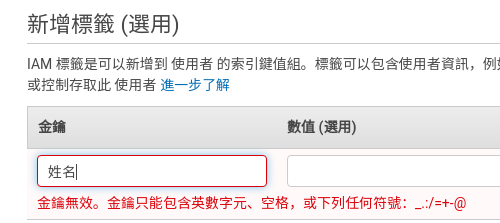
AWS 以console 及 aws-cli 新增IAM使用者小記

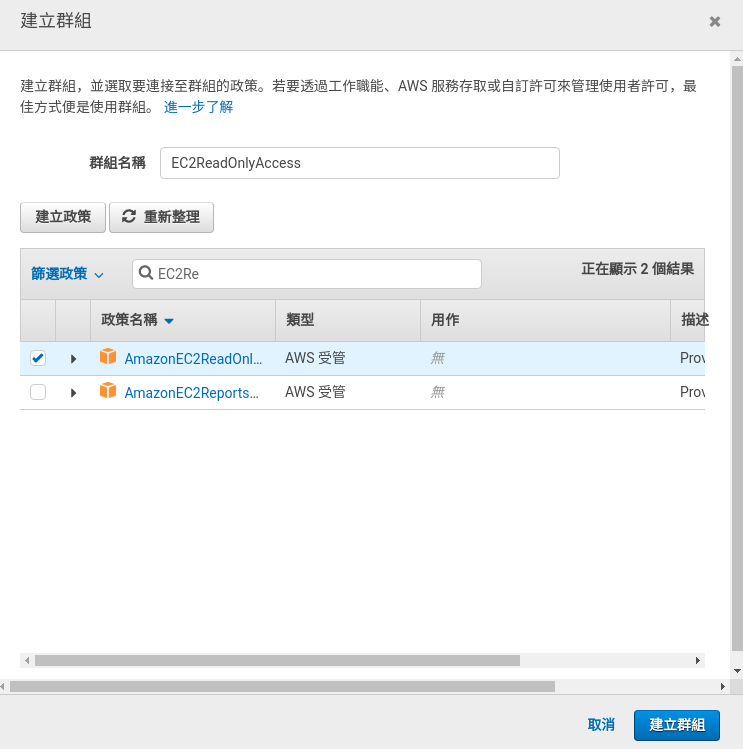
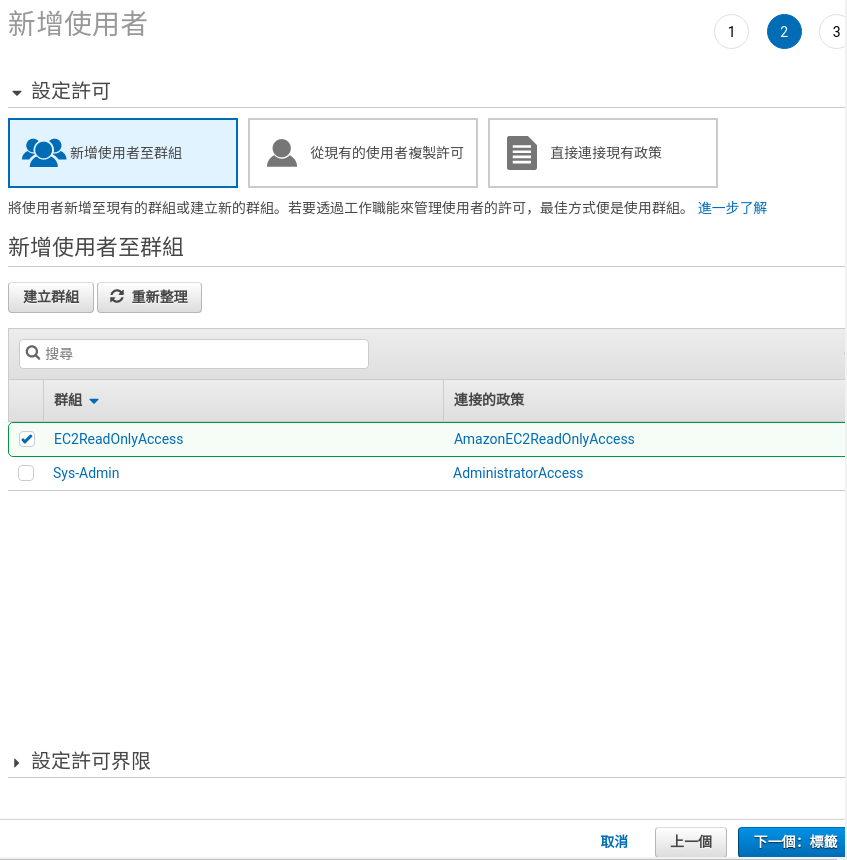
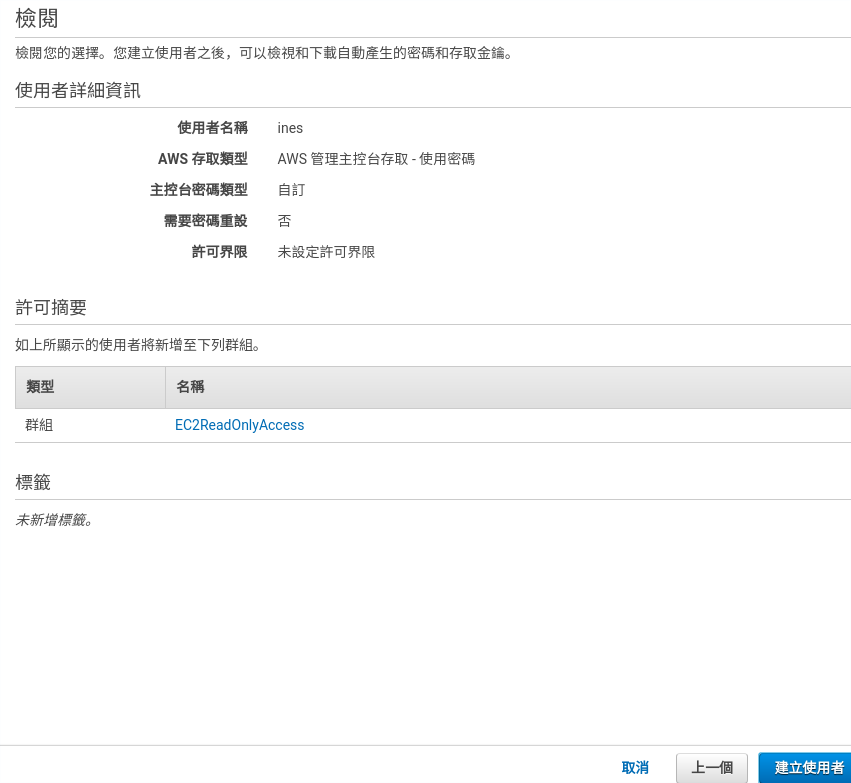
- 這邊可以觀察到有 2 種 ARN, 官方ARN以及有帶 使用者帳號ID 的 ARN
- 這邊一定要用 egrep 而不是 grep
- 實做上發現在 Linux 與 Mac 都可以用指令上 中文 tag, 但是在 container 內還不行, 改天來找一下原因
使用 Ansible 安裝 netdata on GCP 小記
- 已經裝了三個雲端平台的工具還有 Ansible 環境
- 這邊我有透過 -v 把本機上面的三個平台的設定檔掛載到容器內, 還有 .ssh 目錄 也掛載上面, 因為 google 的 SSH 金鑰 也會存放在裡面
- --project 是因為我有多個 profile 所以指定那一個專案
- 這邊要用 使用者@SERVER_NAME, 因為預設不允許讓 root 登入
- 使用者帳號就要看當初 GCE 內的 SSH 金鑰使用者名稱
- 相關檔案可以在 Github 上面找到 https://github.com/sakanamax/LearnAnsible/tree/master/playbook/general/netdata

GUADEC: Να πάω ή να μην πάω;

Όπως γνωρίζετε, συνεισφέρω σε πολλά projects ανοικτού λογισμικού. Σχεδόν όλα οργανώνουν την ετήσια μάζωξη (την λένε συνέδριο), όπου συναντιούνται οι προγραμματιστές και χρήστες του εν λόγω project. Τις περισσότερες φορές, το οικονομικό αποτελεί πρόβλημα για την συμμετοχή. Το αεροπορικό και η διαμονή είναι τα έξοδα που θα πρέπει να δώσεις συγκεντρωμένα. Η διατροφή στην πόλη διεξαγωγής είναι ίσως λίγο ακριβότερη από την πόλη σου (αν βέβαια έτρωγες συνέχεια έξω).
Τα projects διαθέτουν τα λεγόμενα travel support programs (δείτε του GNOME και του openSUSE) όπου σας βοηθούν οικονομικά στην μεταφορά και την διαμονή σας, συνήθως έως 80%. Θα μου πείτε γιατί όχι 100%; Γιατί απλά θα το βλέπατε σαν ταξιδιωτικό γραφείο και όχι σαν project στο οποίο συνεισφέρετε. Τα projects ανοικτού λογισμικού μπορούν να σας υποστηρίξουν οικονομικά και σε τοπικά συνέδρια όπου θα προωθήσετε το συγκεκριμένο project.
Όμως ας αφήσουμε τον πρόλογο. Ένα από τα πολλά project που συνεισφέρω είναι και το GNOME. Το GNOME διοργανώνει κάθε χρόνο το συνέδριο GUADEC (και για την Ασία το GNOME.Asia). Κάθε χρόνο λοιπόν, κοινότητες στην Ευρώπη παίρνουν το χρίσμα να διοργανώσουν το GUADEC. Φέτος λοιπόν οι τυχεροί ήταν κάτι παιδιά από τη Θεσσαλονίκη. Ο Θάνος, η Βίβια, ο Σεμπάστιαν και εγώ, ξεκινήσαμε την έρευνα να δούμε εάν μπορούμε να διοργανώσουμε το GUADEC στη Θεσσαλονίκη. Κάναμε τις επαφές μας και φτιάξαμε την υποψηφιότητά μας. Το αποτέλεσμα; Διοργανώστε το GUADEC. Άρα για να σας απαντήσω το ερώτημα του τίτλου, ΕΓΩ ΠΡΕΠΕΙ ΝΑ ΠΑΩ.

Τι πρέπει να γνωρίζετε:
1. Θα διεξαχθεί στο Πανεπιστήμιο Μακεδονίας. Το Πανεπιστήμιο Μακεδονίας είναι συνδιοργανωτής του συνεδρίου. Μας έχει βοηθήσει όσο δεν φαντάζεστε. Τόσο καιρό δεν το έχουμε προωθήσει ως συνδιοργανωτή. Η αλήθεια είναι ότι έχουμε επικεντρωθεί σε λειτουργικά του συνεδρίου παρά στην προώθηση.
2. Η ημερομηνία είναι η 23 έως τις 28 Αυγούστου. Πρόγραμμα δεν έχει βγει επίσημα αλλά έχουν γίνει δεκτές οι ομιλίες και σύντομα θα βγει το επίσημο πρόγραμμα. Γενικά να γνωρίζετε ότι 23-25 θα είναι οι κύριες ημέρες με τις ομιλίες και οι άλλες 3 θα είναι ημέρες για να hackάρετε το GNOME. Θα υπάρχει θεματολογία, δεν θα είναι πολύ χαλαρά. Βέβαια εμείς θα είμαστε στον χώρο από πιο νωρίς. Σίγουρα από τις 20-21 του μηνός αλλά μην σας πω και πιο νωρίς.
3. Στα πιο βασικά τώρα. Για να έρθετε στο συνέδριο, πρέπει να κάνετε την εγγραφή σας εδώ https://registration.guadec.org. Αρχικά πρέπει να κάνετε το registration και να πάρετε το εισιτήριό σας και έτσι να μας βοηθήσετε να ξέρουμε για πόσα άτομα θα ετοιμάσουμε υλικά, φαγητό, καφέδες κλπ. Εάν δεν αντέχετε οικονομικά, μπορείτε να μπείτε στα επίσημα κανάλια και να ρωτήσετε πως μπορείτε να μπείτε δωρεάν (ΠΑΡΑΚΑΛΩ ΝΑ ΜΗΝ ΡΩΤΑΤΕ ΕΜΕΝΑ. ΘΑ ΣΑΣ ΠΑΡΑΠΕΜΠΩ ΣΤΑ ΚΑΝΑΛΙΑ). Μια εναλλακτική είναι να γίνετε εθελοντής (θα τα πούμε αργότερα αυτά). Εάν δεν είστε από τη Θεσσαλονίκη και θέλετε να μείνετε κάπου οικονομικά, μπορείτε να μείνετε στο προτεινόμενο hostel. Βρίσκεται στο κέντρο της πόλης, πολύ κοντά είναι τα πάντα σε φαγητό, διασκέδαση. Παίρνει λίγο χρόνο μέχρι το Πανεπιστήμιο Μακεδονίας αλλά σε σχέση με άλλες χώρες που έχω πάει, είναι ΠΟΛΥ ΚΟΝΤΑ. Τέλος, καλό είναι να πάρετε και την προσφορά για την σίτιση. Περιέχει 3 μεσημεριανά (μας είπανε ότι θα σκάσετε στο φαγητό. Επίσης θα έχει όλα τα ειδικά γεύματα λακτόζες, γλουτένες, βίγκαν, μίγκαν, σίγκαν κλπ) και 9 καφέδες (μην στεναχωριέστε, υπάρχει και καφετέρια για παραπάνω καφέ). Στην γύρω περιοχή δεν έχει κάποιο γυράδικο. Πρέπει να περπατήσετε 10 λεπτά για να βρείτε κάποιο στην Καμάρα.
Όταν τελειώστε, θα ερωτηθείτε και εάν θέλετε να συμμετάσχετε σε κάποια extra social event όπως εκδρομή στη θάλασσα, πικ-νικ, ποδόσφαιρο κλπ.
Τώρα θα με ρωτήσετε, ρε φιλαράκι, δεν έχω αποφασίσει να γραφτώ. Μπορώ να έρθω τελευταία στιγμή; Θεωρητικά ναι αλλά θα είναι λίγο προχειροδουλειά. Δηλαδή δεν θα έχετε εκτυπωμένο το όνομά σας στο καρτελάκι σας, θα έχετε ένα εκτυπωμένο χαρτί για τη μάσα κλπ.
4. Βλέπεις τα παραπάνω και λες ότι θέλεις να είσαι εθελοντής (για να μπεις και τζάμπα). Τι θα κάνεις; Η αλήθεια είναι ότι δεν ξέρω να σου απαντήσω. Όμως αυτό που μπορώ να σου πω είναι να γραφτείς στην λίστα https://mail.gnome.org/mailman/listinfo/guadec-list και να πεις (στα αγγλικά) ότι θέλεις να γίνεις εθελοντής. Ποια είναι τα επόμενα βήματα; Έτσι για να ξέρεις πάνω κάτω, θα μαζευτούν νωρίτερα (ίσως 22 το μεσημεροβράδυ) για να μπει ο καθένας στο πόστο του. Τι πόστα; Κάποιος στις εγγραφές, κάποιος θα εκφωνεί ποιος είναι ο επόμενος ομιλητής (ή να ψάχνει να τον βρει στην καφετέρια), να κουβαλήσει κάποια πράγματα, στήσιμο-ξεστήσιμο κλπ κλπ.
5. Τα μπλουζάκια που θα τυπωθούν είναι καταπληκτικά. Άλλο να σας το λέω, άλλο να τα φοράτε. Απλά σας λέω ότι είναι το νούμερο 37 στο gitlab όσοι θέλετε σπόιλερ.
Να ευχαριστήσω προσωπικά (θα γίνει και επίσημα) τους χορηγούς γιατί χωρίς χορηγούς, συνέδριο δεν γίνεται. Χαίρομαι ιδιαίτερα για το openSUSE διότι ως γνωρίζετε είμαι από τους πρωτοπόρους που κάναμε την αρχή στην Ελλάδα και καταφέραμε να φέρουμε το συνέδριο στη Θεσσαλονίκη.
Όσοι έχετε έρθει σε κάποιο συνέδριο στο εξωτερικό (και όσοι δεν έχετε έρθει σας ενημερώνω τώρα), θα ξέρετε ότι δεν υπάρχει κάποιο αποδεικτικό ότι παρακολούθησες το συνέδριο ή ότι ήσουν εθελοντής. Προφανώς δεν μπορείς να αποδείξεις ότι ήσουν μέσα στις ομιλίες και δεν έπινες μπύρες σε όλο το συνέδριο. Όμως αυτό που θα γίνει είναι ότι την επόμενη έκδοση GNOME 3.34 θα την ονομάσουν Θεσσαλονίκη. Οπότε μπορείτε να βοηθήσετε στις μεταφράσεις της έκδοσης 3.34. Αν δεν ξέρετε πως, μην ρωτάτε εμένα. Διαβάστε την σελίδα της συμμετοχής και μετά μπορώ να σας απαντήσω σε συγκεκριμένες ερωτήσεις (ΟΧΙ ΓΕΝΙΚΟΥ ΤΥΠΟΥ).
Επίσης φροντίστε όταν έρθετε να μιλήσετε με κόσμο, με εταιρίες. Οι χορηγοί σίγουρα θα έρθουν για να προσλάβουν κάποιον από τους τοπικούς συμμετέχοντες (οι ξένοι ήδη δουλεύουν). Συζητιέται πολύ και ο θεσμός των newcomers. Θα υπάρχουν πολλοί νεοφερμένοι που θα προσπαθήσουμε να τους βάλουμε να μιλήσουν με πεπειραμένους ώστε να νιώσουν ευπρόσδεκτοι.
Τέλος για τους λάτρεις των celebrities, θα έρθει και ο ένας από τους ιδρυτές του GNOME, ο Federico Mena Quintero. Υπάρχουν και άλλα μεγάλα ονόματα. Μέχρι τότε όμως, σηκωθείτε από καρέκλες, πολυθρόνες, ντιβάνια, μπαουλοντίβανα και να σας βλέπω να γράφεστε...