
 hpj
hpjBattle of the Bilerps: Image Scaling on the CPU
I've been on a quest for better bilerps lately. "Bilerp" is, of course, a contraction of "bilinear interpolation", and it's how you scale pictures when you're in a hurry. The GNOME Image Viewer (née Eye of GNOME) and ImageMagick have both offered somewhat disappointing experiences in that regard; the former often pauses noticeably between the initial nearest-neighbor and eventual non-awful scaled images, but way more importantly, the latter is too slow to scale animation frames in Chafa.
So, how fast can CPU image scaling be? I went looking, and managed to produce some benchmarks — and! — code. Keep reading.
What's measured
The headline reference falls a little short of the gory details: The practical requirement is to just do whatever it takes to produce middle-of-the-road quality output. Bilinear interpolation starts to resemble nearest-neighbor when you reduce an image by more than 50%, so below that threshold I let the implementations use the fastest supported algorithm that still looks halfway decent.
There are other caveats too. I'll go over those in the discussion of each implementation.
I checked for correctness issues/artifacts by scaling solid-color images across a large range of sizes. Ideally, the color should be preserved across the entire output image, but fast implementations sometimes take shortcuts that cause them to lose low-order bits due to bad rounding or insufficient precision.
I ran the benchmarks on my workstation, which is an i7-4770K (Haswell) @ 3.5GHz.
Performance summary
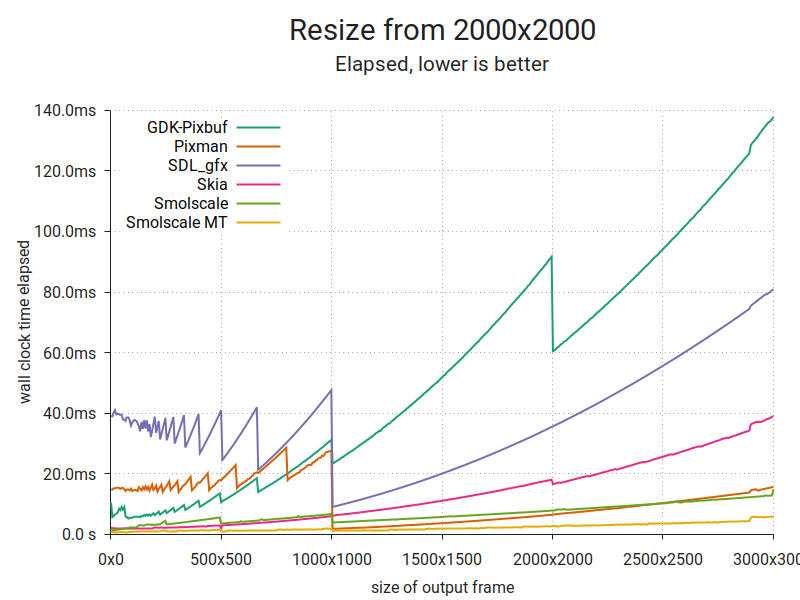
This plot consists of 500 samples per implementation, each of which is the fastest out of 50 runs. The input image is 2000×2000 RGBA pixels at 8 bits per channel. I chose additional parameters (channel ordering, premultiplication) to get the best performance out of each implementation. The image is scaled to a range of sizes (x axis) and the lowest time taken to produce a single output image at each size is plotted (y axis). A line is drawn through the resulting points.
Here's one more:
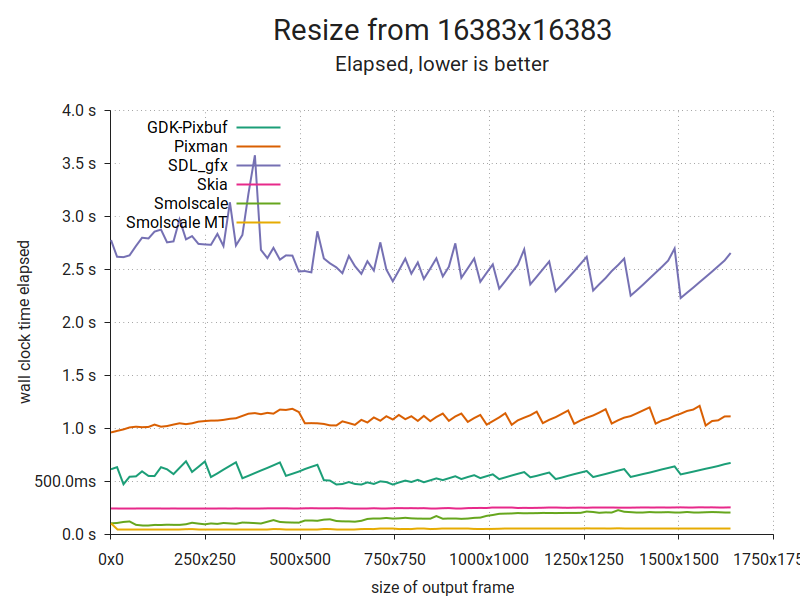
It's the same thing, but with a huge input and smaller outputs. As you can see, there are substantial differences. It's hard to tell from the plot, but Smolscale MT averages about 50ms per frame. More on that below. But first, a look at another important metric.
Output quality
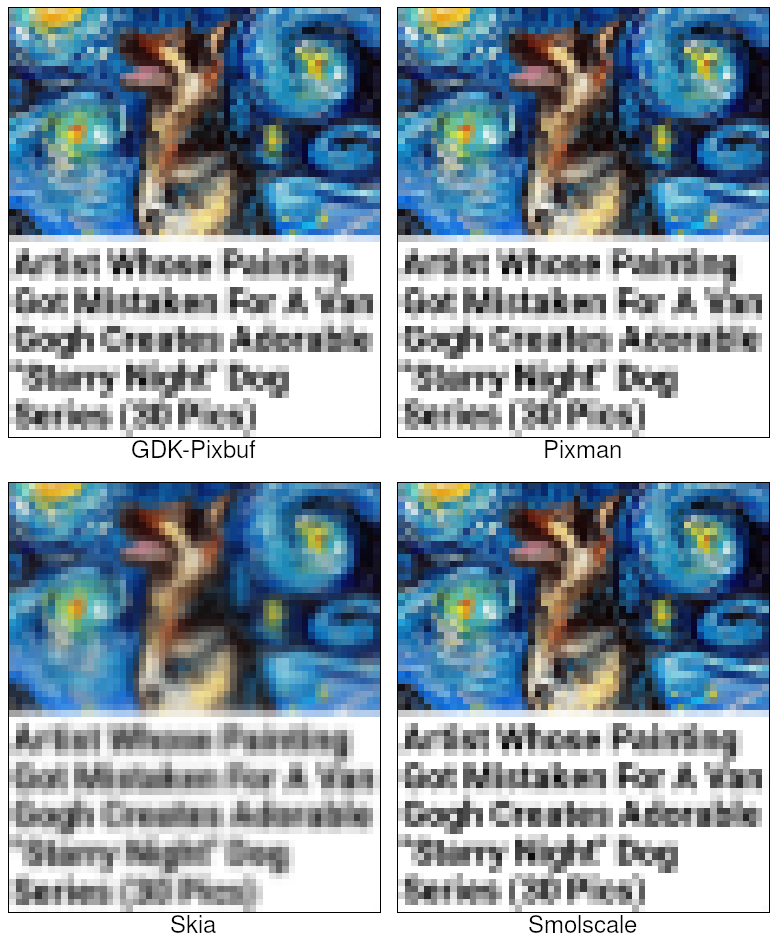
Input image. It's fair to say that one of these is not like the others.
Discussion
GDK-Pixbuf
GDK-Pixbuf is the traditional GNOME image library. Despite its various warts, it's served the project well for close to two decades. You can read more about it in Federico's braindump from last year.
For the test, I used the gdk-pixbuf 2.38.1 packages in openSUSE Tumbleweed. With the scaling algorithm set to GDK_INTERP_BILINEAR, it provides decent quality at all sizes. I don't think that's strictly in line with how bilinear interpolation is supposed to work, but hey, I'm not complaining.
It is, however, rather slow. In fact, at scaling factors of 0.5 and above, it's the slowest in this test. That's likely because it only supports unassociated alpha, which forces it to do extra work to prevent colors from bleeding disproportionately from pixels of varying transparency. To be fair, the alpha channel when loaded from a typical image file is usually unassociated, and if I'd added the overhead of premultiplying it to the other implementations, it would've bridged some or most of the performance difference.
I suspect it's also the origin of the only correctness issue I could find; color values from completely transparent pixels will be replaced with black in the output. This makes sense because any value multiplied by a weight of zero, will be zero. It's mostly an issue if you plan to change the transparency later, as you might do in the realm of very serious image processing. And you won't be using GDK-Pixbuf in such a context, since GEGL exists (and is quite a bit less Spartan than its web pages suggest).
Pixman
Pixman is the raster image manipulation library used in X.Org and Cairo, and therefore indirectly by the entire GNOME desktop. It supports a broad range of pixel formats, transforms, composition and filters. It's otherwise quite minimal, and works with premultiplied alpha only.
I used the pixman 0.36.0 packages in openSUSE Tumbleweed. Pixman subscribes to a stricter definition of bilerp, so I went with that for scaling factors 0.5 and above, and the box filter for smaller factors. Output quality is impeccable, but it has trouble with scaling factors lower than 1/16384, and when scaling huge images it will sometimes leave a column of uniformly miscolored pixels at one extreme of the image. I'm chalking that up to limited precision.
Anyhow, the corner cases are more than made up for by Pixman's absolutely brutal bilerp (proper) performance. Thanks to its hand-optimized SIMD code, it's the fastest single-threaded implementation in the 0.5x-1.0x range. However, the box filter does not appear to be likewise optimized, resulting in one of the worst performances at smaller scaling factors.
SDL_gfx
The Simple Directmedia Layer is a cross-platform hardware abstraction layer originating in the late 90s as a vehicle for games development. While Loki famously used it to port a bunch of games to Linux, it's also been a boon to more recent independent games development (cf. titles like Teleglitch, Proteus, Dwarf Fortress). SDL_gfx is one of its helper libraries. It has a dead simple API and is packaged for pretty much everything. And it's games stuff, so y'know, maybe it's fast?
I tested libSDL_gfx 2.0.26 and libSDL2_gfx 1.0.4 from Tumbleweed. They perform the same: Not great. Below a scaling factor of 0.5x I had to use a combination of zoomSurface() and shrinkSurface() to get good quality. That implies two separate passes over the image data, which explains the poor performance at low output sizes. However, zoomSurface() alone is also disappointingly slow.
I omitted SDL from the sample output above to save some space, but quality-wise it appears to be on par with GDK-Pixbuf and Pixman. There were no corner cases that I could find, but zoomSurface() seems to be unable to work with surfaces bigger than 16383 pixels in either dimension; it returns a NULL surface if you go above that.
It's also worth noting that SDL's documentation and pixel format enums do not specify whether the alpha channel is supposed to be premultiplied or unassociated. The alpha blending formulas seem to imply unassociated, but zoomSurface() and shrinkSurface() displayed color bleeding with unassociated-alpha input in my tests.
Skia
Skia is an influential image library written in C++; Mozilla Firefox, Android and Google Chrome all use it. It's built around a canvas, and supports drawing shapes and text with structured or raster output. It also supports operations directly on raster data — making it a close analogue to Cairo and Pixman combined.
It's not available as a separate package for my otherwise excellent distro, so I built it from Git tag chrome/m76 (~May 2019). It's very straightforward, but you need to build it with Clang (as per the instructions) to get the best possible performance. So that's what I did.
I tested SkPixmap.scalePixels(), which takes a quality setting in lieu of the filter type. That's perfect for our purposes; between kLow_SkFilterQuality, kMedium_SkFilterQuality and kHigh_SkFilterQuality, medium is the one we want. The documentation describes it as roughly "bilerp plus mip-maps". The other settings are either too coarse (nearest-neighbor or bilerp only) or too slow (bicubic). The API supports both premultiplied and unassociated alpha. I used the former.
So, about the apparent quality… In all honesty — it's poor, especially when the output is slightly smaller than 1/2ⁿ relative to the input, i.e. ½*insize-1, ¼*insize-1, etc. I'm not the first to make this observation. Apart from that, there seems to be a precision issue when working with images (input or output) bigger than 16383 pixels in either dimension. E.g. the color #54555657 becomes #54545454, #60616263 becomes #60606060 and so on.
At least it's not slow. Performance is fairly respectable across the board, and it's one of the fastest solutions below 0.5x.
Smolscale
Smolscale is a smol piece of C code that does image scaling, channel reordering and (un)premultiplication. It's this post's mystery contestant, and you've never heard of it before because up until now it's been living exclusively on my local hard drive.
I wrote it specifically to meet the requirements I laid out before: Fast, middling quality, no artifacts, handles input/output sizes up to 65535×65535. Smolscale MT is the same implementation, just driven from multiple threads using its row-batch interface.
As I mentioned above, when running in 8 threads it's able to process a 16383×16383-pixel image to a much smaller image in roughly 50ms. Since it samples every single pixel, that corresponds to about 5.3 gigapixels per second, or ~21 gigabytes per second of input data. At that point it's close to maxing out my old DDR3-1600 memory (its theoretical transfer rate is 12.8GB/s, times two for dual channel ~= 26GB/s).
I'm going to write about it in detail at some point, but I'll save that for another post. In the meantime, I put up a Github dump.
Bonus content!
I found a 2012-issue Raspberry Pi gathering dust in a drawer. Why not run the benchmarks on that too?
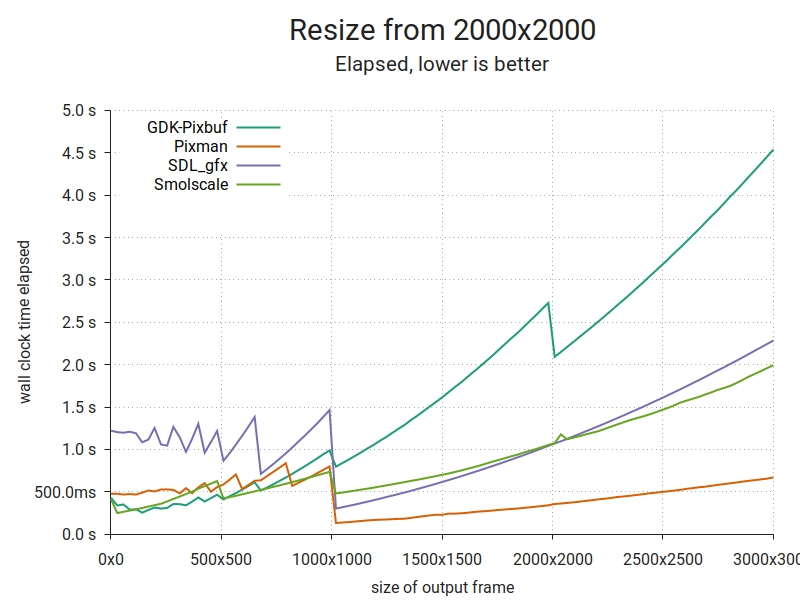
I dropped Skia from this run due to build issues that looked like they'd be fairly time consuming to overcome. Smolscale suffers because it's written for 64-bit registers and multiple cores, and this is an ARMv6 platform with 32-bit registers and a single core. Pixman is still brutally efficient; it has macro templates for either register size. Sweet!

Dongeng di Kampus Seberang
“Assalamu’alaikum, dengan Rifki PTIK dari UNS?”, begitulah chat yang datang kepada saya ketika bulan ramadan, balasan dari saya cuma singkat “Ya, ini dengan siapa?”, dia pun menjelaskan nama dan maksud dia menghubungi saya, sempat terkejut ketika dia menyebutkan kalau dia mendapatkan rekomendasi dari temannya untuk mendatangkan say a di acara yang akan digelar di kampusnya. Saya agak ragu untuk meng-iyakan tawaran tersebut. Karena acara akan diadakan dua atau tiga minggu setelah lebaran. Saya ragu karena lebaran saya tidak cukup satu minggu selesai begitu saja, saudara banyak dan masih banyak hal lain yang membuat saya terhenti di kota kelahiran saya, Jakarta. Dengan berbagai keputusan, saya pun menjawab tawaran tersebut dengan “Oke, saya bersedia”. Saya diundang untuk menjadi narasumber terkait dengan diskusi bareng seputar Linux, dan Open Source, dengan keterbatasan ilmu yang saya miliki di bidang tersebut. Dan karena saya masih muda juga, kapan lagi saya dapat kesempatan seperti itu.
Mendongeng
H-1 acara, saya balik ke Solo. sampai di kost, kostan saya sudah bersih berkat Ibu kost yang baik hati (Terima Kasih Bu!). Tidur sebentar dan bersiap pergi. Acara diadakan di UMS (Universitas Muhammadiyyah Surakarta), tepat di belakang gedung Siti Walidah. Ternyata saya sudah ditunggu oleh peserta yang hadir. Acara pun berlangsung dengan khidmat, karena merupakan kampus Islam, jadi diawali dengan salam dan pembacaan Alquran. Saya pun maju dan mulai berdongeng, hal yang menjadikan saya kaget adalah ternyata banyak sekali orang – orang yang pakai Open Source di Solo Raya.

Pembacaan Alquran

openSUSE.Asia Summit
Panitia memberikan saya waktu berdongeng 30 menit. ya waktu yang sangat lama untuk membicarakan OpenSource. dengan ajakan “Masa anak UMS pakai software bajakan, emang Islam ngajarin kita buat dosa?” Saya berani berkata seperti itu ya karena mereka semua mayoritas Islam, setelah perkenalan tentang Open Source lebih jauh, saya mengenalkan mereka dengan distro favorit saya,openSUSE. Distro yang menjadi perantara saya menjadi orang yang “halal” seperti sekarang. Ajakan yang dimulai dengan “Open Source bisa membahagiakan tapi tidak membuat sengsara” Hal yang membuat pemakai Open Source tertarik adalah tantangan, jika pandai maka akan beruntung, jika bosan maka ya gak betah, seperti perasaan manusia ke manusia lain pada umumnya. Tak lupa saya mengajak mereka untuk mengikuti acara yang akan diselenggarakan oleh openSUSE, yakni openSUSE.Asia Summit 2019 pada tanggal 5-6 Oktober di Bali, Indonesia. Suatu hal yang membanggakan bagi Indonesia karena diberikan kesempatan kedua kalinya untuk mengadakan acara Open Source yang bergengsi di Indonesia.
Para pembaca jangan lupa datang ya!.
Acara yang dadakan tapi tetap menarik. Kalian keren FOSTI UMS!.

Me in Action

Next Summit

三大雲平台工具容器升級小記 with openSUSE Leap 15 container
- azure 以及 aws 工具又有版本升級
- 加上 aws 指令補齊以及修正 vim 針對中文顯示問題
- docker run -v ~/.aws:/root/.aws -v ~/.azure:/root/.azure -v ~/.config/gcloud:/root/.config/gcloud -it sakana/ansible_opensuse15 /bin/bash
- # pip install awscli --upgrade
- # zypper refresh
- # zypper update -y azure-cli
- 在 linux 內的處理方式跟 Mac 不一樣, 要用 source 的方式不是使用 complete
- 9b870 為剛剛修改好的 container ID
- 我這邊建立一個 container image 然後 tag name 為 20190707

 Member
OpenMandriva | Review from an openSUSE User

Removing rsvg-view
I am preparing the 2.46.0 librsvg release. This will no longer have the rsvg-view-3 program.
History of rsvg-view
Rsvg-view started
out
as a 71-line C program to aid development of librsvg. It would just
render an SVG file to a pixbuf, stick that pixbuf in a GtkImage
widget, and show a window with that.
Over time, it slowly acquired most of the command-line options that
rsvg-convert supports. And I suppose, as a way of testing the
Cairo-ification of librsvg, it also got the ability to print SVG files
to a GtkPrintContext. At last count, it was a 784-line C program
that is not really the best code in the world.
What makes rsvg-view awkward?
Rsvg-view requires GTK. But GTK requires librsvg, indirectly, through gdk-pixbuf! There is not a hard circular dependency because GTK goes, "gdk-pixbuf, load me this SVG file" without knowing how it will be loaded. In turn, gdk-pixbuf initializes the SVG loader provided by librsvg, and that loader reads/renders the SVG file.
Ideally librsvg would only depend on gdk-pixbuf, so it would be able to provide the SVG loader.
The rsvg-view source code still has a few calls to GTK functions which are now deprecated. The program emits GTK warnings during normal use.
Rsvg-view is... not a very good SVG viewer. It doesn't even start up
with the window scaled properly to the SVG's dimensions! If used for
quick testing during development, it cannot even aid in viewing the
transparent background regions which the SVG does not cover. It just
sticks a lousy custom widget inside a GtkScrolledWindow, and does
not have the conventional niceties to view images like zooming with
the scroll wheel.
EOG is a much better SVG viewer than rsvg-view, and people actually invest effort in making it pleasant to use.
Removal of rsvg-view
So, the next version of librsvg will not provide the rsvg-view-3
binary. Please update your packages accordingly. Distros may be able to
move the compilation of librsvg to a more sensible place in the
platform stack, now that it doesn't depend on GTK being available.
What can you use instead? Any other image viewer. EOG works fine; there are dozens of other good viewers, too.

Πως να εγκαταστήσετε το viber-unofficial στο openSUSE

Η εγκατάσταση του Viber στο openSUSE έχει αναφερθεί και στο παρελθόν και είναι προβληματική.
Μια πολύ καλή λύση για την εγκατάστασή του είναι το appimage ή το snap. Τα πακέτα Snaps είναι εφαρμογές που είναι συσκευασμένες με όλες τις εξαρτήσεις τους για να τρέχουν σε όλες τις δημοφιλέστερες διανομές Linux από μια ενιαία έκδοση. Ενημερώνονται αυτόματα.
Πριν προχωρήσετε να διαβάζετε και να εφαρμόζετε τις οδηγίες, το πακέτο προσφέρεται από μη επίσημη πηγή, οπότε είστε υπεύθυνοι για την εγκατάστασή του.
1. Ενεργοποίηση snapd
Το Snap μπορεί να εγκατασταθεί από τη γραμμή εντολών στο openSUSE Leap 15 και Tumbleweed.
Πρέπει πρώτα να προσθέσετε το εύχρηστο αποθετήριο από το τερματικό. Οι άλλοι 15 χρήστες, για παράδειγμα, μπορούν να το κάνουν με την ακόλουθη εντολή:
sudo zypper addrepo --refresh https://download.opensuse.org/repositories/system:/snappy/openSUSE_Leap_15.1 snappy
Για openSUSE Tumbleweed (μια γραμμή)
sudo zypper addrepo --refresh https://download.opensuse.org/repositories/system:/snappy/openSUSE_Tumbleweed/ snappy
Με το αποθετήριο, εισαγάγετε το κλειδί GPG:
Τέλος, αναβαθμίστε την προσωρινή μνήμη του πακέτου για να συμπεριλάβετε το νέο αποθετήριο snappy:
Το Snap μπορεί τώρα να εγκατασταθεί με τα εξής:
Στη συνέχεια, χρειάζεται είτε να κάνετε επανεκκίνηση, αποσύνδεση/σύνδεση ή source /etc/profile για να προσθέσετε /snap/bin στο PATH. Επιπλέον, ενεργοποιήστε και ξεκινήστε τις υπηρεσίες snapd και snapd.apparmor με τις ακόλουθες εντολές:
sudo systemctl start snapd
Οι χρήστες Tumbleweed πρέπει επίσης να εκτελέσουν τα εξής:
sudo systemctl start snapd.apparmor
2. Εγκατάσταση viber-unofficial
Για να εγκαταστήσετε το viber-unofficial, απλά χρησιμοποιήστε την ακόλουθη εντολή:
Πηγή:
https://snapcraft.io/install/viber-unofficial/opensuse
三大雲平台工具升級 + awscli 指令補齊小記
Bzip2 1.0.7 is released
Bzip2 1.0.7 has been released by Mark Wielaard. We have a slight change of plans since my last post:
-
The 1.0.x series is in strict maintenance mode and will not change build systems. This is targeted towards embedded use, as in projects which already embed the bzip2-1.0.6 sources and undoubtedly patch the build system. Right now this series, and the tagged 1.0.7 release, live in the sourceware repository for bzip2.
-
The 1.1.x series has Meson and CMake build systems, and a couple of extra changes to modernize the C code but which were not fit for the 1.0.7 release. This is targeted towards operating system distributions. This lives in the master branch of the gitlab repository for bzip2.
Distros and embedded users should start using bzip2-1.0.7 immediately. The patches they already have for the bzip2's traditional build system should still apply. The release includes bug fixes and security fixes that have accumulated over the years, including the new CVE-2019-12900.
Once 1.1.0 is released, distributions should be able to remove their patches to the build system and just start using Meson or CMake. You may want to monitor the 1.1.0 milestone — help is appreciated fixing the issues there so we can make the first release with the new build systems!
Blathering | Raspberry Pi to Monitor Air Quality with an Arduino based Thermostat