
 Member
 Futureboy
Snapshot Control | More openSUSE Tumbleweed Awesomeness

Εγκατάσταση του Unity 3D στο openSUSE (ισχύει και σε άλλες διανομές)

Το Unity 3D είναι ίσως η δημοφιλέστερη μηχανή κατασκευής παιχνιδιών. Για "προσωπική χρήση" και ειδικότερα για το ξεκίνημά σας παρέχεται δωρεάν, αρκεί τα ετήσια κέρδη να μην υπερβαίνουν τα $100 χιλ. Το παραπάνω έχει μια λογική διότι η εταιρία επιτρέπει τον κάθε χρήστη να χρησιμοποιήσει την πλατφόρμα της, να δημιουργήσει ένα παιχνίδι με βάση το πρόγραμμα Unity 3D και εάν αυτό είναι είναι επιτυχημένο, τότε προτρέπει στην αγορά της άδειας χρήσης. Εάν ο δημιουργός έχει έσοδα 100.000$, τότε δεν θα έχει πρόβλημα να πληρώνει 125$ το μήνα (ήτοι 1500$ το χρόνο).
Στην αρχική σελίδα, επιλέγοντας Personal, θα σας βγάλει στην ιστοσελίδα των λήψεων. Εδώ μπορεί να βρείτε εκδόσεις μόνο για windows και macosx. Οπότε καλύτερα επισκεφθείτε το forum και από εκεί κατεβάστε το Unity Hub για Linux.
Το Unity Hub είναι μια αυτόνομη εφαρμογή που συγκεντρώνει όλα τα απαραίτητα για να δημιουργήσετε το δικό σας παιχνίδι. Πάμε να δούμε πως γίνεται η εγκατάσταση.
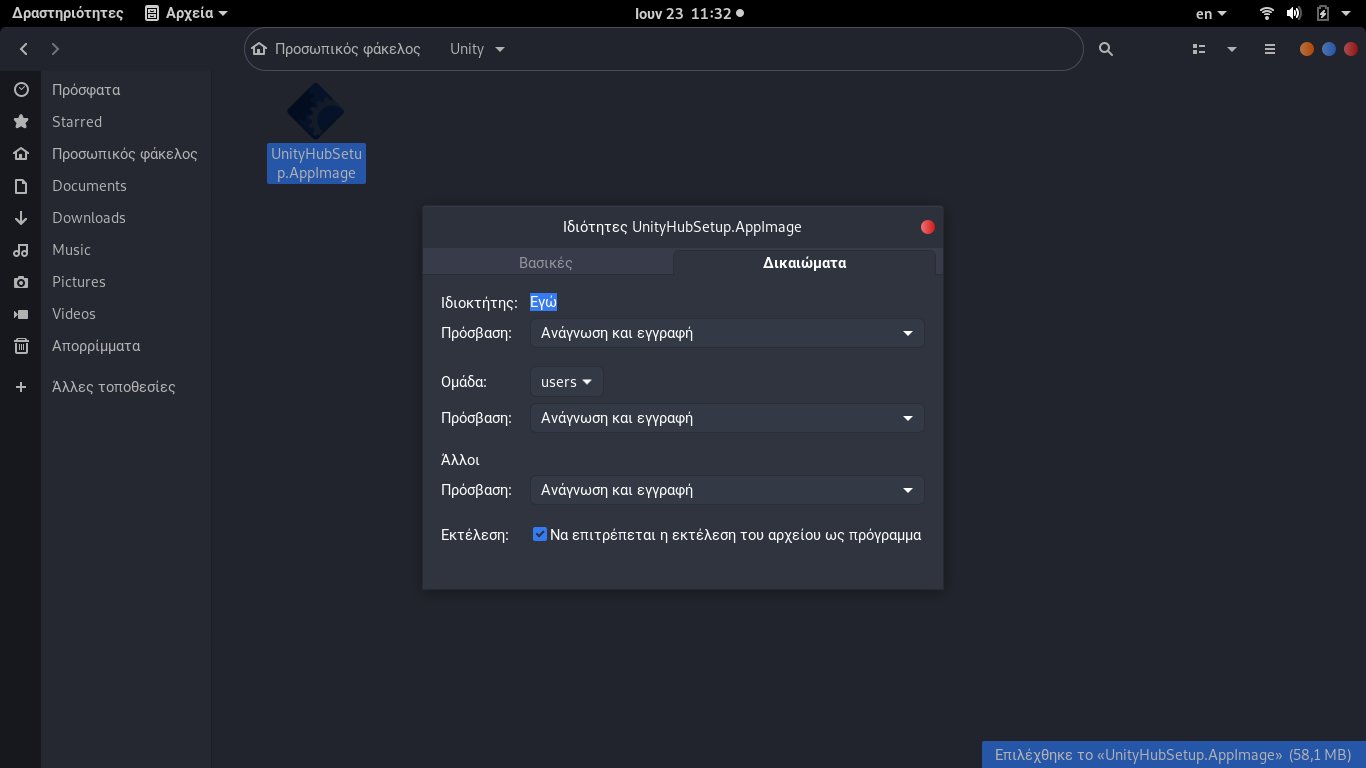
1. Αφού κατεβάσατε το Unity Hub για Linux, πρέπει να το κάνετε εκτελέσιμο. Πατήστε δεξί πλήκτρο>Ιδιότητες και στην καρτέλα δικαιώματα, επιλέξτε το Να επιτρέπεται η εκτέλεση του αρχείου ως πρόγραμμα.
2. Διπλό κλικ πάνω στο αρχείο. Θα ερωτηθείτε εάν συμφωνείτε με την άδεια χρήσης:
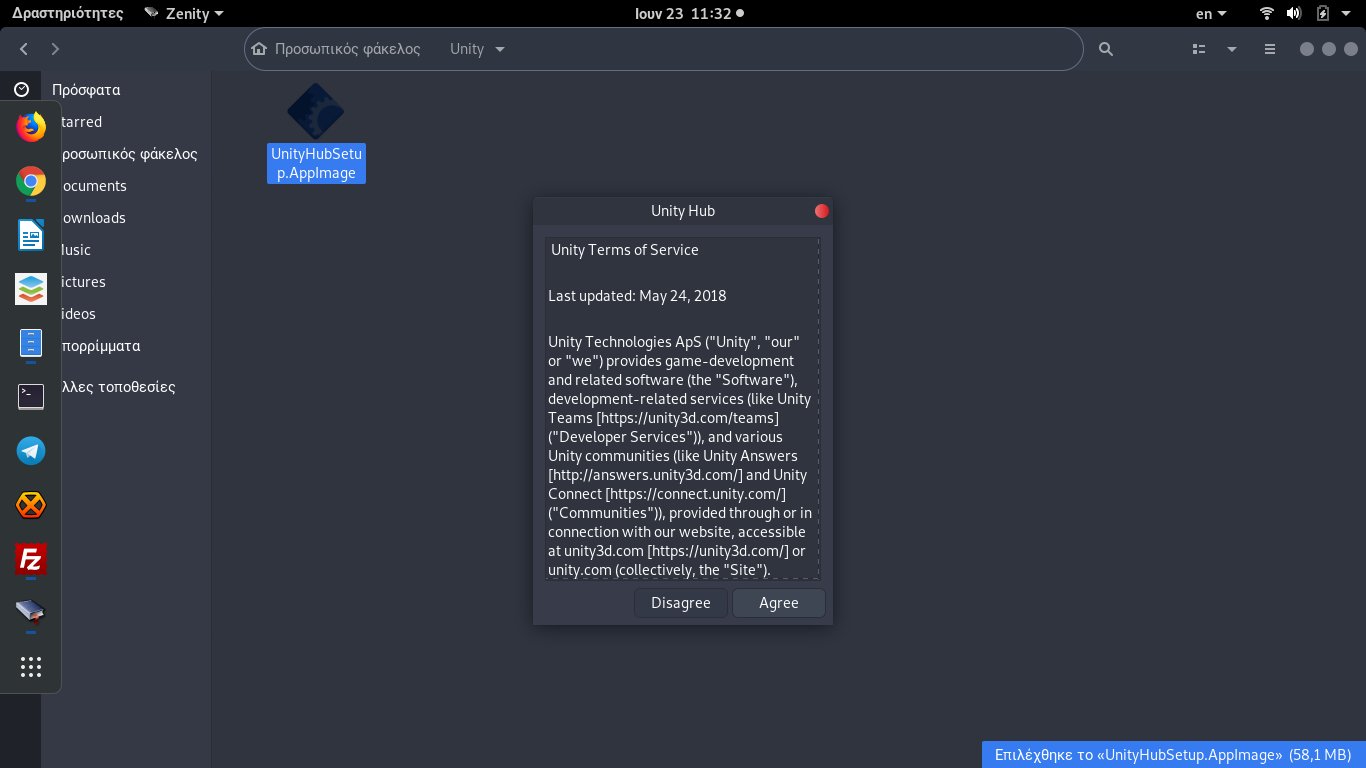
Ενώ στη συνέχεια θα ερωτηθείτε εάν θέλετε να προστεθεί στο μενού.

Η αλήθεια είναι ότι όταν το εγκατέστησα δεν μου το πρόσθεσε. Κάθε φορά το άνοιγα με διπλό κλικ στο αρχείο. Εναλλακτικά μπορείτε να το εισάγετε με το menulibre ή με τερματικό:
Δημιουργήστε ένα αρχείο unity3d.desktop στο /usr/share/applications (ή ~/.local/share/applications ή κατευθείαν στο ~/Desktop) με τον παρακάτω κώδικα:
Encoding=UTF-8
Name=Unity 3D
Exec=/path/to/unity/executable
Icon=/path/to/unity/icon
Type=Application
Categories=Development;
Θα αλλάξετε μόνο τα:
Exec=/path/to/unity/executable (εκεί που βρίσκεται το appimage)
Icon=/path/to/unity/icon (εκεί που βρίσκεται το εικονίδιο της εφαρμογής)
3. Μόλις ανοίξει, θα σας ζητήσει άδεια χρήσης. Προφανώς έχετε την προσωπική χρήση, οπότε απλά δεν σας ενδιαφέρει για τώρα.
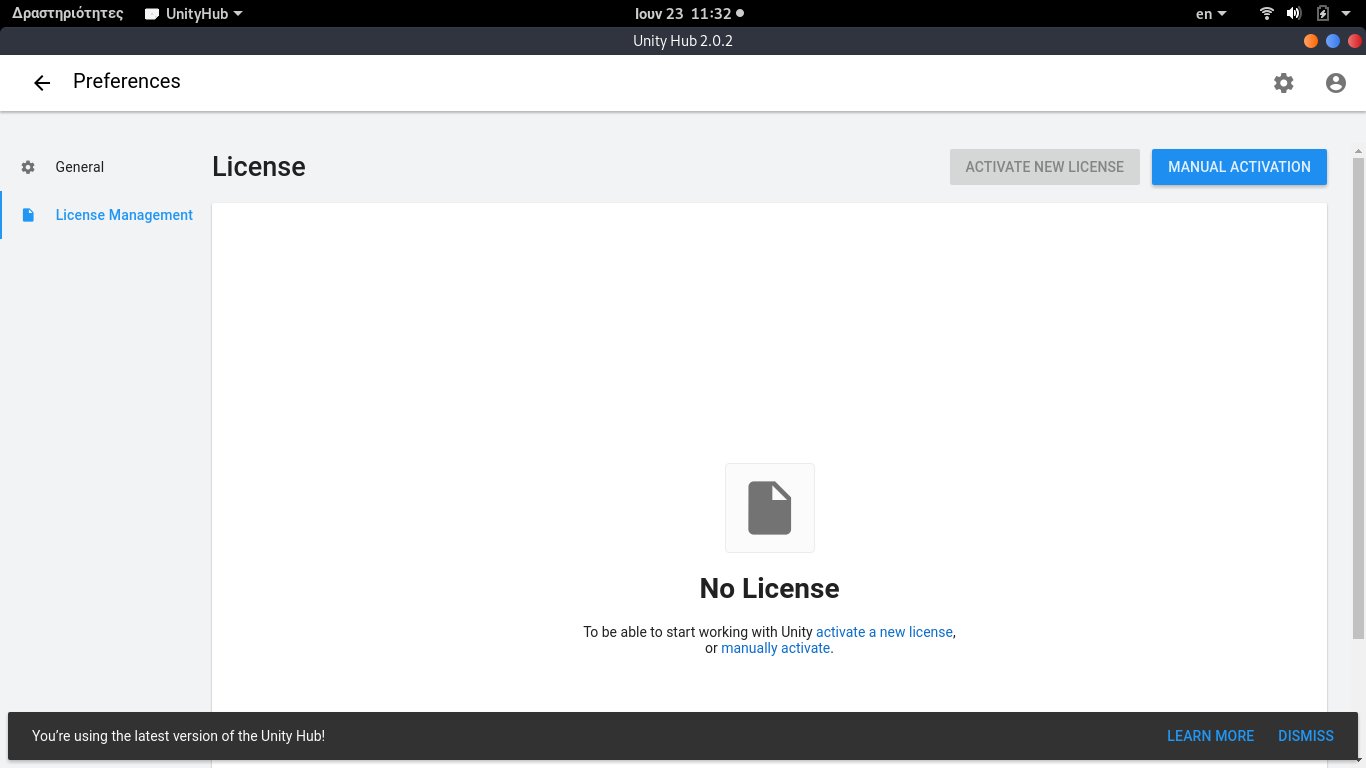
Πατήστε επάνω δεξιά για να εισέλθετε (εάν έχετε λογαριασμό) ή να δημιουργήσετε νέο λογαριασμό.
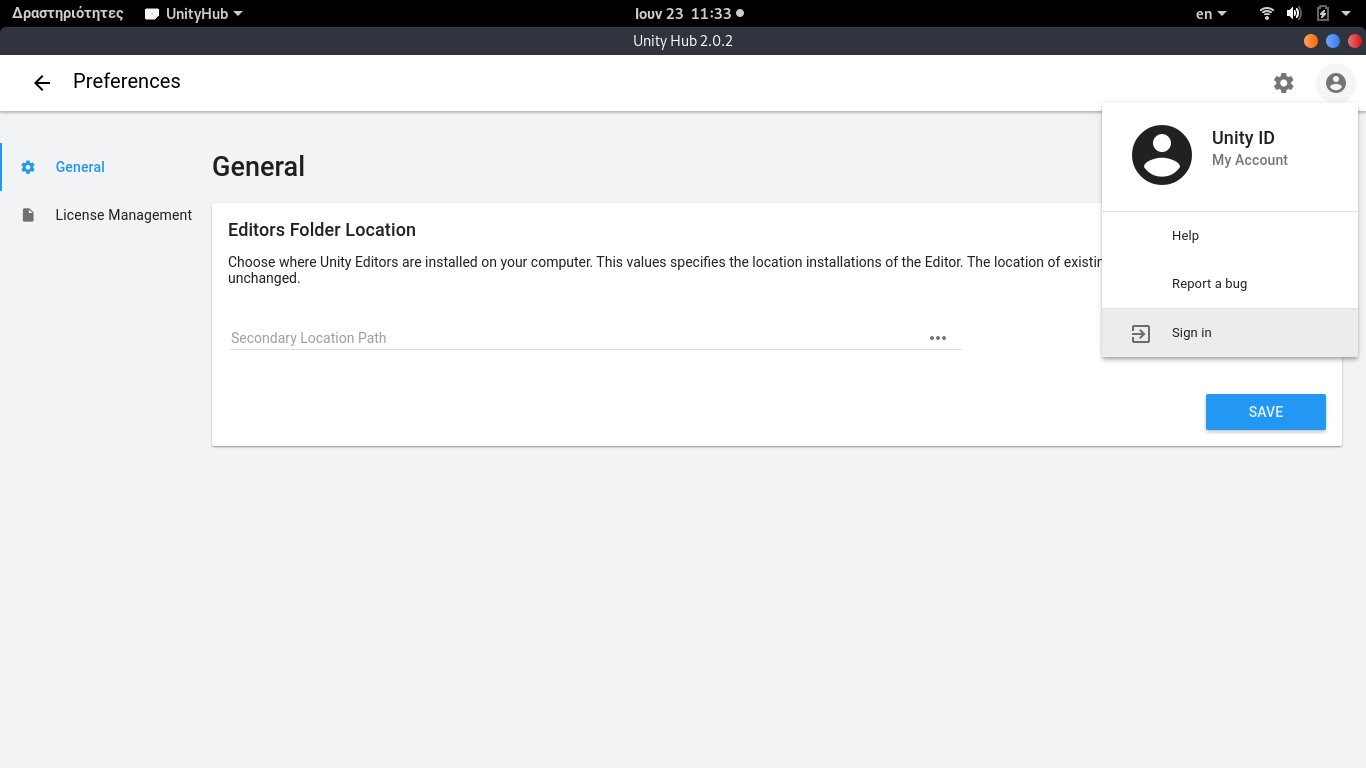
Εάν δεν έχετε, πατήστε Create one. Αλλιώς εισάγετε τα όνομα χρήστη και συνθηματικό.
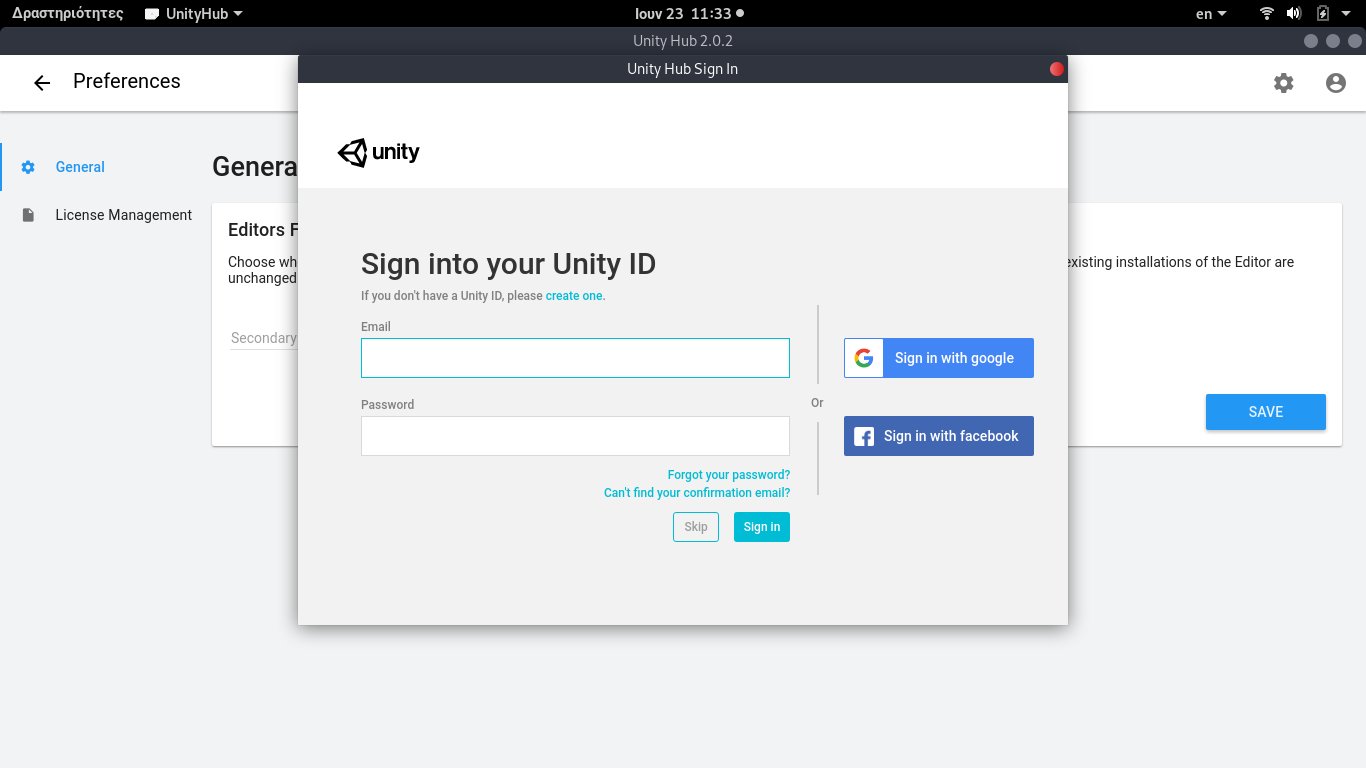
Αφού εισέλθετε θα δείτε τα στοιχεία σας επάνω δεξιά.

4. Μετακινούμαστε στην οθόνη των Projects.

Εδώ θεωρητικά πατάμε το Add και ξεκινάμε νέο έργο για κατασκευή παιχνιδιού. Όμως δεν είναι ακόμα εγκατεστημένο το Unity 3D. Οπότε πρέπει να πατήσουμε στο Installs.
5. Στο Installs, πατάμε το Add.

Τώρα θα μας ρωτήσει ποια έκδοση Unity θέλουμε να εγκαταστήσουμε.
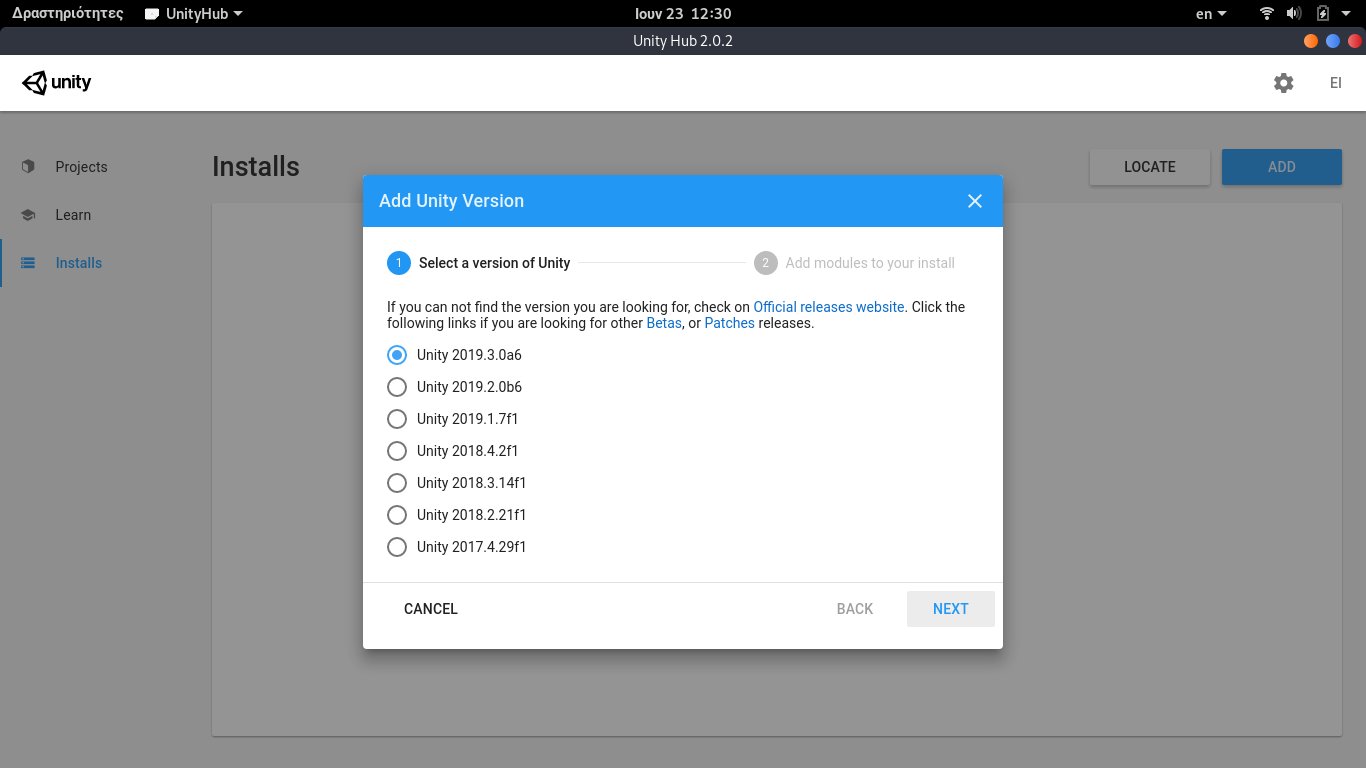
Αφού επιλέξουμε την έκδοση, θα πρέπει να επιλέξουμε και κάποια πρόσθετα. Ανάλογα για ποια πλατφόρμα θέλετε να έχετε διαθέσιμο το παιχνίδι, εγκαθιστάτε τα ανάλογα πρόσθετα.
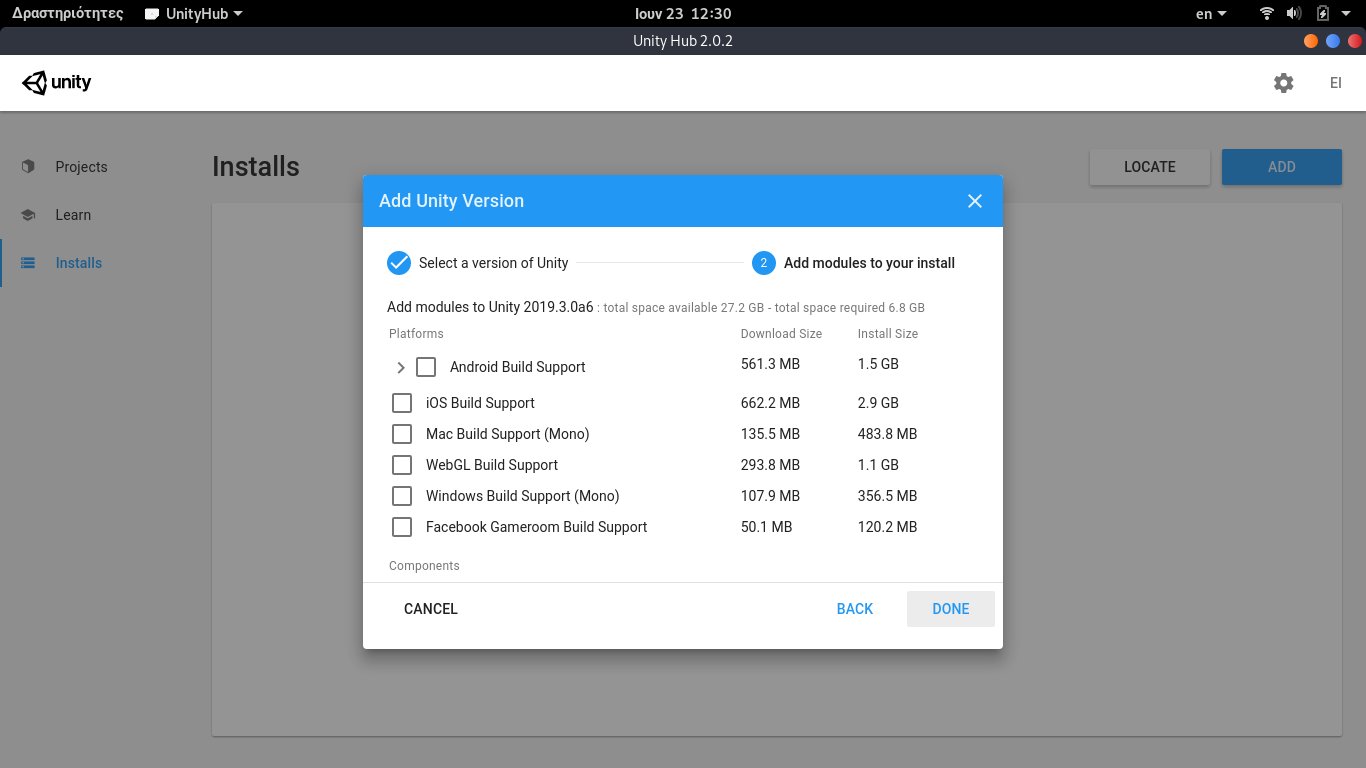
Όταν τελειώστε, πρέπει να περιμένετε, ανάλογα με την ταχύτητα του δικτύου σας.
Παρόμοια διαδικασία ακολουθείται και στις άλλες διανομές.
Εσείς έχετε φτιάξει κάποιο παιχνίδι; Αν ναι, αφήστε σχόλιο να το δοκιμάσουμε.
Les nouveaux Node.js LTS, débogueur GNU et libvirt débarquent dans les instantanés Tumbleweed
 Les trois instantanés openSUSE Tumbleweed publiés cette semaine ont mis à jour certains paquets clés pour les utilisateurs de cette version en publication continue.
Un de ces paquets clés était une mise à jour du débogueur GNU, gdb 8.3, publié dans l'instantané 20190607. Le débogueur a activé les tests ada sur les plate-formes ppc64le et riscv64. Les versions multitarget pour riscv64 ont également été activées. L'instantané a également ajouté les tests unitaires pour Logical Volume Manager (LVM) sur disque modulaire (MD) avec la mise à jour de libstorage-ng 4.1.127. Plusieurs correctifs et corrections de bogues ont été appliqués avec la mise à jour de libvirt 5.4.0, ce qui a également permis d'améliorer les liens statiques inutiles, qui entraînait à la fois l'encombrement du disque et de la mémoire. Libvirt a également introduit le support du bit md-clear CPUID. Le package python-libvirt-python 5.4.0 a ajouté la nouvelle interface de programmation (API) et des constantes dans libvirt 5.4.0. L’éditeur de texte vim 8.1.1467 présentait de multiples correctifs, mais l’instantané Tumbleweed a introduit de nouveaux bogues et affiche actuellement une cote de 86, selon le commentateur d’instantané.
Les deux instantanés précédents ont enregistré une note exceptionnelle exceptionnelle de 98 selon le relecteur d’instantané (http://review.tumbleweed.boombatower.com/).
L'instantané 20190606 n'a mis à jour que deux paquets. Le paquet nodejs10 a mis en place une nouvelle version amont à support à long terme (LTS) avec nodejs10 10.16.0 et une mise à jour des sources d'openssl et libuv en version 1.28.0. L'autre mise à jour importante du paquet dans l'instantané était xfdesktop en 4.12.5; ce package pour Xfce 4 a corrigé la taille des icônes dans les paramètres, réinitialisé l'ordre des icônes du bureau et corrigé une [fuite de timer](https://bugzilla.xfce.org /show_bug.cgi?id=13887).
L'instantané 20190605 comportait trois packages mis à jour. Le noyau Linux 5.1.7 avait quelques corrections concernant Btrfs telles que la correction de l'état interne avec un périphérique de stockage situé entre fsync et l'écriture différée des plages adjacentes. La mise à jour du noyau a également supprimé les dépendances avec les éléments internes du pilote arch_timer pour l'architecture arm et ajouté la prise en charge d'Ice Lake au sein de la gestion d'alimentation [x86] d'Intel. Les fuseaux horaires ont été mis à jour avec le package libical 3.0.5 et le package libinput 1.13.2 a apporté des modifications à la prise en charge des pavés tactiles Wacom et Apple Bluetooth.
Le responsable des publications, Dominique Leuenberger, a rédigé un compte rendu des deux semaines précédentes et a déclaré qu'openssl 1.1.1c, Texlive 2019, KDE Plasma 5.16, Qt 5.13, LLVM 8, swig 4.0 et cmake 3.14 progressaient tous dans la file d'attente et seraient bientôt disponibles dans les prochains instantanés de Tumbleweed.
Tags: opensuse
KDE Plasma 5.16 on openSUSE Tumbleweed | Pretty Great

Preparing the bzip2-1.0.7 release
ATTENTION ALL DISTRIBUTIONS: this is for you. THE SONAME MAY CHANGE!
I am preparing a bzip2-1.0.7 release. You can see the release notes, which should be of interest:
-
Many historical patches from various distributions are integrated now.
-
We have a new fix for the just-published CVE-2019-12900, courtesy of Albert Astals Cid.
-
Bzip2 has moved to Meson for its preferred build system, courtesy of Dylan Baker. For special situations, a CMake build system is also provided, courtesy of Micah Snyder.
What's with the soname?
From bzip2-1.0.1 (from the year 2000), until bzip2-1.0.6 (from 2010),
release tarballs came with a special
Makefile-libbz2_so to generate a shared library
instead of a static one.
This never used libtool or anything; it specified linker flags by hand. Various distributions either patched this special makefile, or replaced it by another one, or outright replaced the complete build system for a different one.
Some things to note:
-
This hand-written
Makefile-libbz2_soused a link line like$(CC) -shared -Wl,-soname -Wl,libbz2.so.1.0 -o libbz2.so.1.0.6. This means, make the DT_SONAME field inside the ELF file belibbz2.so.1.0(note the two digits in1.0), and make the filename of the shared library belibbz2.so.1.0.6. -
Fedora patched the soname in a patch called "saneso" to just be
libbz2.so.1. -
Stanislav Brabec, from openSUSE, replaced the hand-written makefiles with autotools, which meant using libtool. It has this interesting note:
Incompatible changes:
soname change. Libtool has no support for two parts soname suffix (e. g. libbz2.so.1.0). It must be a single number (e. g. libbz2.so.1). That is why soname must change. But I see not a big problem with it. Several distributions already use the new number instead of the non-standard number from Makefile-libbz2_so.
(In fact, if I do objdump -x /usr/lib64/*.so | grep SONAME, I see
that most libraries have single-digit sonames.)
In my experience, both Fedora and openSUSE are very strict, and correct, about obscure things like library sonames.
With the switch to Meson, bzip2 no longer uses libtool. It will have
a single-digit soname — this is not in the meson.build yet, but
expect it to be there within the next couple of days.
I don't know what distros which decided to preserve the 1.0 soname
will need to do; maybe they will need to patch meson.build on their
own.
Fortunately, the API/ABI are still exactly the same. You can preserve the old soname which your distro was using and linking libbz2 will probably keep working as usual.
(This is a C-only release as usual. The Rust branch is still experimental.)
openSUSE Leap 15.1 | Upgrade and Fresh Install Successes


The openSUSE Leap 15.1 update experience
On the 22nd of May, openSUSE released (1) Leap 15.1. A couple of days later I took the plunge to update my laptop and desktop from openSUSE Leap 15.0. In this blog, I will detail my update experience.
Updating my laptop
My laptop is a ASUS VivoBook X402NA-FA112T. This is a laptop with an Intel Pentium N4200 processor, 4 GB of RAM and a 128 GB SSD. The upgrade to Leap 15.1 went flawless.

I have used the SUSE studio image writer to burn the Leap 15.1 ISO to a USB thumb drive. This is an excellent program that does just one thing and does it right. After plugging in this USB drive, I checked the UEFI menu to make sure that I would boot from the USB drive instead of the SSD harddrive.

To start the upgrade, just select the right option from the USB boot menu.

Then accept the license agreement, which states that this is free and open source software! You own it outright, but you have to share the source code if you want to distribute or change it.

The installer kicks off and finds my previous installation of openSUSE Leap 15.0.

The next thing to do is to Disable the additional repositories. The default setting is for these repositories to be Removed. I don’t want to re-enter these additional repositories from scratch. So I simply disable them. After installation, I open YaST and then Software Repositories. And I change the name of the URL from Leap 15 to Leap 15.1. For example:
https://download.opensuse.org/repositories/mozilla/openSUSE_Leap_15.0/becomes
https://download.opensuse.org/repositories/mozilla/openSUSE_Leap_15.1/After that, I set the repository to Enabled and Auto-refresh.
Most of these repositories were available from the get go. The only exception were 2 gaming repositories which took 2 more days to become available.


The ‘update settings’ page stated that there were package conflicts that couldn’t be resolved automatically. So I needed to go in and make these decisions manually. The amazing thing is, that even with all additional package repositories disabled, the installer still goes out of its way to find an updated package from various additional package repositories and proposes to install it. Its these kind of little things that make a big difference!

After I went through the list with all the proposed changes, I got a nice summary of everything that would happen. This is the default YaST Software Manager installation overview. But its a nice touch to present the user with such a summary.

Once I clicked on Accept, I was returned to the ‘update settings’ page. After clicking install, there is no way back.

I restarted my laptop and Leap 15.1 was successfully installed! Great job openSUSE!

Updating my desktop
My desktop is a HP Pavilion Power 580-146nd. This is a midsize PC with an AMD Ryzen 5 1400 CPU, an AMD Radeon RX 580 GPU, 16 GB of RAM, a 128 GB M.2 SSD and a 1 TB 7200rpm HDD.
I used the same USB thumbstick. After selecting ‘Update’ from the boot menu, the whole screen went black. And then nothing happened. Since I have installed openSUSE many times before, I quickly realized that this must be a graphics issue. I used ‘nomodeset’ in the past to get around that issue. This causes the installer to go back to the most basic graphics settings but it also means I could finish the update.
It used to be a lot easier to edit the boot options. However, this is now hidden. This post on Stack Exchange (2) gives a great explanation how to enable nomodeset, both as a one-time option and as a permanent option.
For the permanent enablement of nomodeset I know an easier way: in YaST look for the module ‘Boot Loader’ and in the Kernel Parameters tab, you can edit the boot command. This was the route that I took to make nomodeset a permanent boot setting.

With nomodeset enabled, I was able to complete the installation. I set the BIOS options to a fixed resolution of 1280 x 1024, which was enough screen real-estate to complete the update.
The black screen issue was also present during regular boot. The permanent nomodeset was a way to work around this. This enabled me to successfully launch into the KDE Plasma 5 desktop environment.
It looks like I am not the only one with this issue. I found other forum posts that describe similar problems. Some describe this problem in Leap 42.3 or Leap 15.0 (3, 4). Some describe this problem in Tumbleweed (5, 6).
I tried to do some troubleshooting by following this article SDB Configuring Graphics Cards (7). When entering the command:
sudo lspci -nnk | grep -A3 VGAI found that the system detects the AMD GPU and also notes that the kernel driver in use is the amdgpu driver. What I tried so far to resolve the issue:
- Force reinstall all AMD graphic driver packages
- Remove all AMD/ATI graphic driver packages except for amdgpu
- Edit the xorg.conf and 50-device.conf files to force-enable the amdgpu driver
All of the above actions didn’t solve my problem. The next thing that I wanted to try is if this issue was also present in openSUSE Tumbleweed. So I downloaded the latest ISO image and used imagewriter to write it to the USB thumbstick. Unfortunately I encountered the same issue in Tumbleweed.
Next I tried to reinstall openSUSE Leap 15.0. That installation continued without the black screen issue. Because of time constraints, I decided that I would continue to use openSUSE Leap 15.0 for the time being. I will try to troubleshoot this issue by installing Leap 15.1 as a dual-boot option at a later date.
Conclusion
Overall, I really like the openSUSE update experience. Both on my laptop and desktop, the installer found my previous install and I think its great that the installer automatically fetches updated packages from additional package repositories. It also presents the user with an excellent installation overview.
The downside of the update experience is that it might not be very intuitive for new Linux users. I feel that new users might find it difficult to select the right package option manually.
Due to a GPU driver issue I didn’t keep openSUSE Leap 15.1 on my desktop PC and reverted back to Leap 15.0. This driver issue is present both in openSUSE Leap 15.1 and in openSUSE Tumbleweed (of 27 May 2019). I found that multiple people have encountered similar issues. I will try to resolve this driver issue in the future. That is a subject for a future blog post.
Published on: 18 june 2019

Permission denied for hugepages in QEMU without libvirt
So, say you’re running qemu, and decided to use hugepages, nice isn’t it? helps with performace and stuff, however a wild wall appears!
QEMU: qemu-system-aarch64: can't open backing store /dev/hugepages/ for guest RAM: Permission denied
This basically means that you’re using the amazing -mem-path /dev/hugepages, and that QEMU running as an unprivileged user can’t write there… This is how it looked for me:
sudo -u _openqa-worker qemu-system-aarch64 -device virtio-gpu-pci -m 4094 -machine virt,gic-version=host -cpu host \
  -mem-prealloc -mem-path /dev/hugepages -serial mon:stdio  -enable-kvm -no-shutdown -vnc :102,share=force-shared \
  -cdrom openSUSE-Tumbleweed-DVD-aarch64-Snapshot20190607-Media.iso \
  -pflash flash0.img -pflash flash1.img -drive if=none,file=opensuse-Tumbleweed-aarch64-20190607-gnome-x11@aarch64.qcow2,id=hd0 \
  -device virtio-blk-device,drive=hd0
The machine tries to start, but utimately I get that dreadful message.
You can simply do a chmod to the directory, use an udev rule, and get away with it, it’s quick and does the job but also
there are few options to solve this using libvirt, however if you’re not using hugeadm
to manage those pools and let the operating system take care of it, likely the operating system will take care of this for you,
so you can look to /usr/lib/systemd/system/dev-hugepages.mount, since trying to add an udev rule failed for a colleague of mine,
I decided to use the systemd approach, ending up with the following:
[Unit]
Description=Systemd service to fix hugepages + qemu ram problems.
After=dev-hugepages.mount

[Service]
Type=simple
ExecStart=/usr/bin/chmod o+w /dev/hugepages/

[Install]
WantedBy=multi-user.target

Linux Stable Tree Mirror at Github
As everyone seems to like to put kernel trees up on github for random projects (based on the crazy notifications I get all the time), I figured it was time to put up a semi-official mirror of all of the stable kernel releases on github.com
It can be found at: https://github.com/gregkh/linux and I will try to keep it up to date with the real source of all kernel stable releases at https://git.kernel.org/pub/scm/linux/kernel/git/stable/linux.git/

openSUSE Leap 15.1 ofrece la experiencia completa de Linux en Raspberry Pi

openSUSE ofrece además dos versiones: Leap sigue el modelo de versión fija y Tumbleweed sigue el modelo de versión móvil. En este artículo, les contaré sobre la última versión estable de openSUSE Leap 15.1 basada en SUSE Linux Enterprise 15 Service Pack 1.

Comenzando con el entorno de escritorio, Leap 15.1 nos permite elegir múltiples entornos de escritorio como KDE, GNOME y Xfce. Las opciones específicas disponibles con Leap 15.1 son KDE Plasma 15.2 y GNOME 3.26.
La distro también se envía con una pila de gráficos completamente nueva. Sin embargo, la nueva versión aún funciona con el kernel de Linux 4.12 pero contiene el muy necesario backporting de 4.19. También obtiene un mejor soporte para las CPUs AMD Vega y otro hardware.
Para mejorar la experiencia en 4K (HiDPI), Leap 15.1 ahora los detectará y escalará el escritorio para brindar una experiencia visual nítida. Para los audiófilos, hay mejoras como el audio HD de alta definición y otras actualizaciones como los controladores de audio USB con puerto trasero.
openSUSE Leap 15.1 para ARM64, es el primer sistema operativo multipropósito que te permite disfrutar de una experiencia de escritorio Linux estándar completa en Raspberry Pi. Así que, ¿qué significa? esto significa que la imagen ISO estándar de Leap se puede instalar directamente en la Pi; no se necesita ninguna imagen personalizada. El instalador Leap detecta el Pi, aplica las configuraciones predefinidas y continúa con la instalación.
Los desarrolladores han aconsejado a los usuarios de openSUSE Leap 15.0 que se actualicen a Leap 15.1, ya que el ciclo de soporte de la versión 15.0 expirará en los próximos 6 meses. Para aquellos que no lo saben, las versiones menores de Leap 15 reciben 18 meses de soporte.
Para aquellos que estén interesados en realizar una instalación limpia, los archivos ISO y torrent se pueden encontrar aquí. Pruébalo y comparte tus experiencias. ¡Diviertete mucho!